Page 304 of 720
3044-4. Refueling
HILUX_OM_OM0K322E_(EE)
Opening the fuel tank cap
●Close all the doors and windows, and turn the engine switch to the
“LOCK” position (vehicles without smart entry & start system) or off
(vehicles with smart entry & start system).
● Confirm the type of fuel.
■Fuel types
P. 692
■ Fuel tank opening for unleaded gasoline (gasoline engine)
To help prevent incorrect fueling, your vehicle has a fuel tank opening that
only accommodates the special nozzle on unleaded fuel pumps.
Perform the following steps to open the fuel tank cap:
Before refueling the vehicle
Page 307 of 720
3074-4. Refueling
4
Driving
HILUX_OM_OM0K322E_(EE)
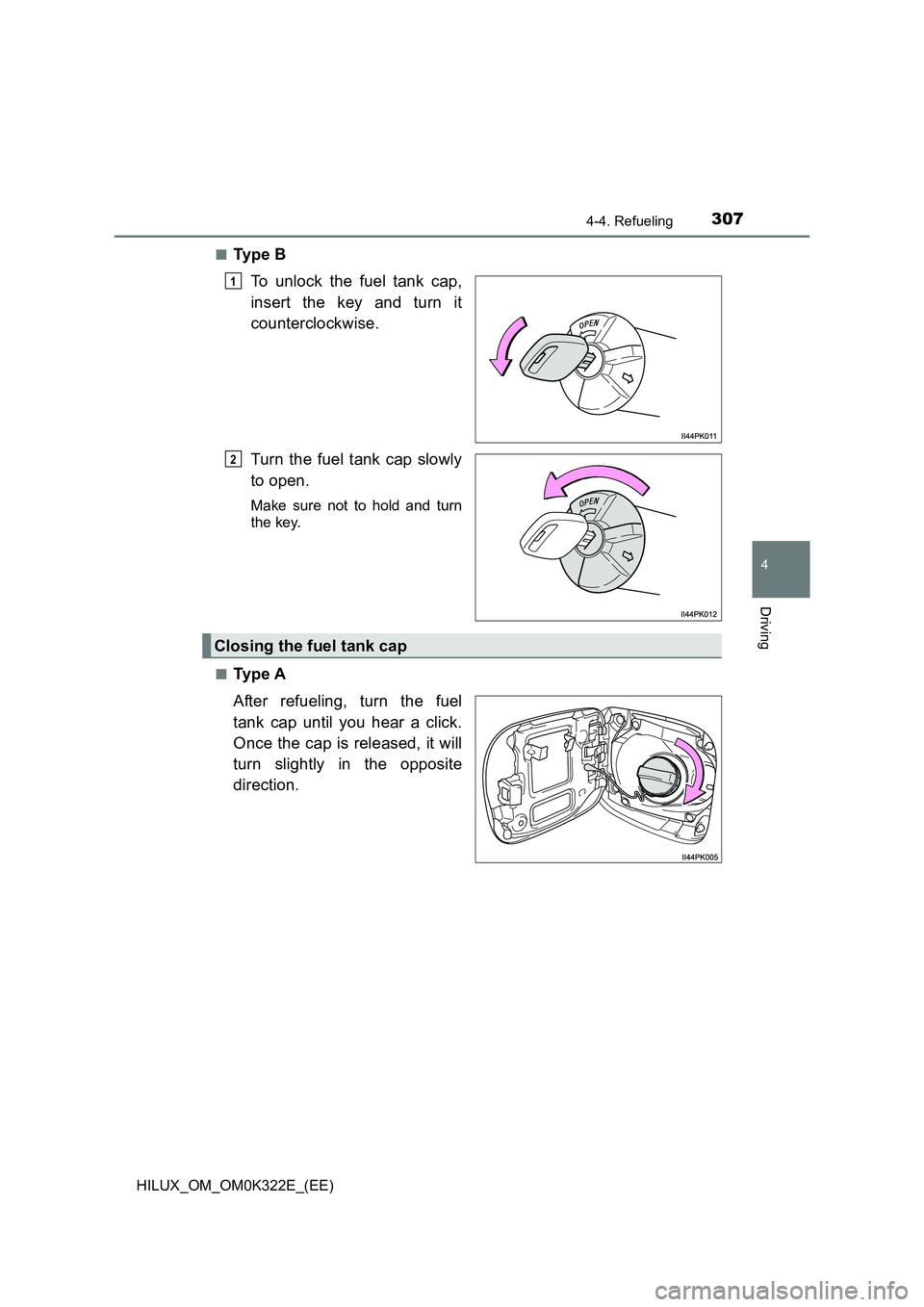
■Ty p e B
To unlock the fuel tank cap,
insert the key and turn it
counterclockwise.
Turn the fuel tank cap slowly
to open.
Make sure not to hold and turn
the key.
■Ty p e A
After refueling, turn the fuel
tank cap until you hear a click.
Once the cap is released, it will
turn slightly in the opposite
direction.
1
2
Closing the fuel tank cap
Page 308 of 720
3084-4. Refueling
HILUX_OM_OM0K322E_(EE)
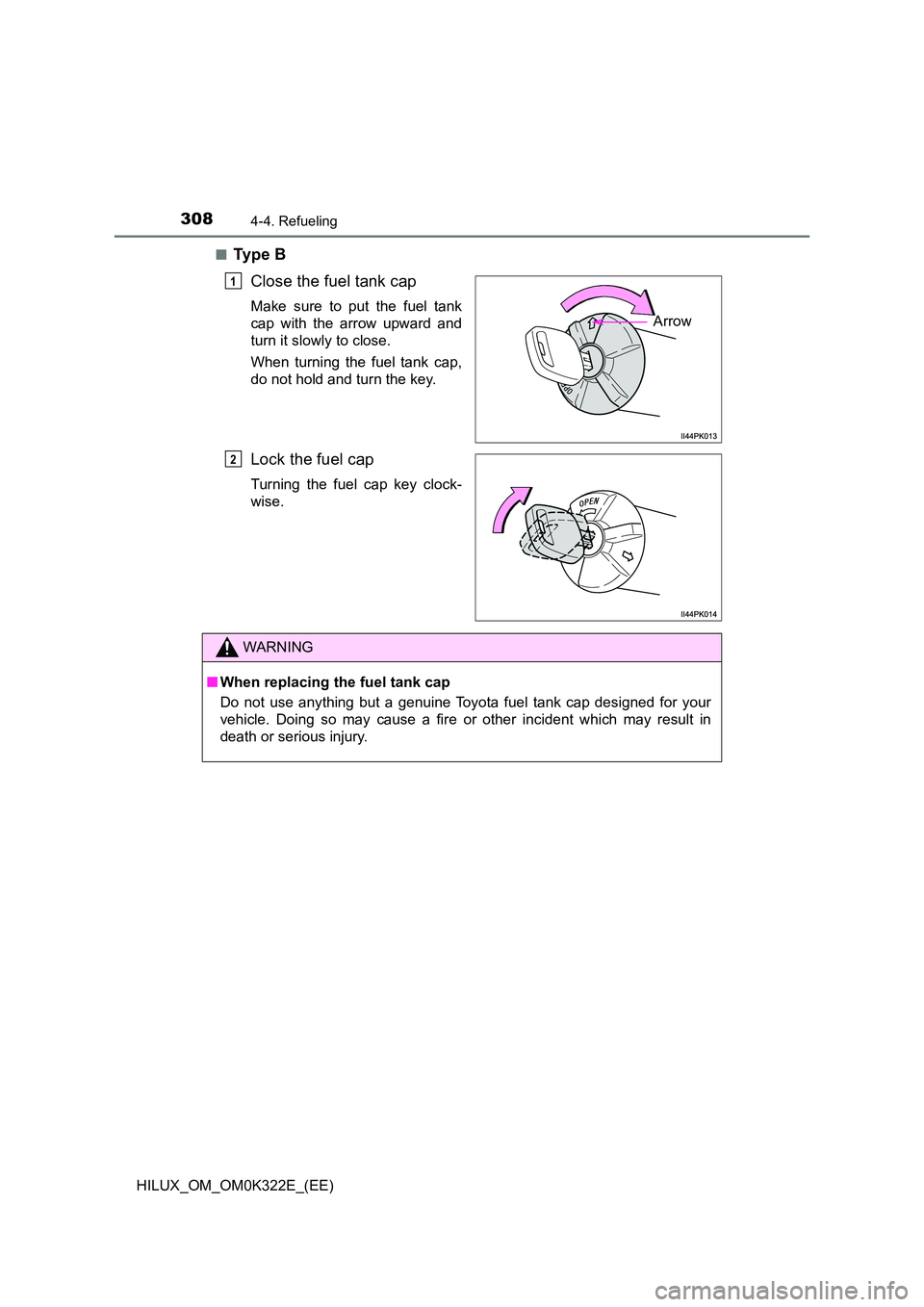
■Ty p e B
Close the fuel tank cap
Make sure to put the fuel tank
cap with the arrow upward and
turn it slowly to close.
When turning the fuel tank cap,
do not hold and turn the key.
Lock the fuel cap
Turning the fuel cap key clock-
wise.
Arrow
1
2
WARNING
■ When replacing the fuel tank cap
Do not use anything but a genuine Toyota fuel tank cap designed for your
vehicle. Doing so may cause a fire or other incident which may result in
death or serious injury.
Page 325 of 720
3254-5. Using the driving support systems
4
Driving
HILUX_OM_OM0K322E_(EE)
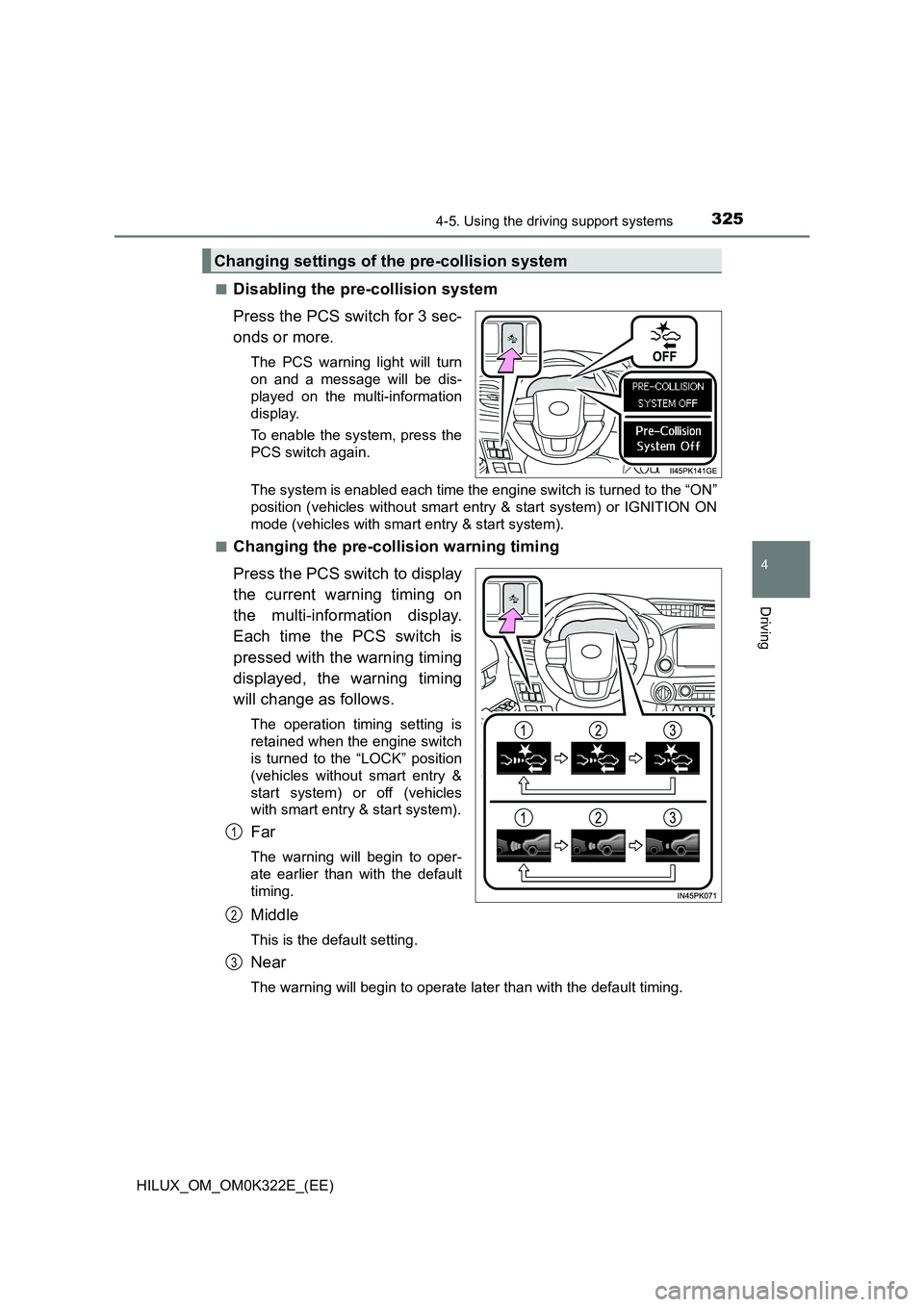
■Disabling the pre-collision system
Press the PCS switch for 3 sec-
onds or more.
The PCS warning light will turn
on and a message will be dis-
played on the multi-information
display.
To enable the system, press the
PCS switch again.
The system is enabled each time the engine switch is turned to the “ON”
position (vehicles without smart entry & start system) or IGNITION ON
mode (vehicles with smart entry & start system).
■Changing the pre-collision warning timing
Press the PCS switch to display
the current warning timing on
the multi-information display.
Each time the PCS switch is
pressed with the warning timing
displayed, the warning timing
will change as follows.
The operation timing setting is
retained when the engine switch
is turned to the “LOCK” position
(vehicles without smart entry &
start system) or off (vehicles
with smart entry & start system).
Far
The warning will begin to oper-
ate earlier than with the default
timing.
Middle
This is the default setting.
Near
The warning will begin to operate later than with the default timing.
Changing settings of the pre-collision system
1
2
3
Page 331 of 720
3314-5. Using the driving support systems
4
Driving
HILUX_OM_OM0K322E_(EE)
• When driving in inclement weather such as heavy rain, fog, snow or a
sandstorm
• When the vehicle is hit by water, snow, dust, etc. from a vehicle ahead
• When driving through steam or smoke
• When driving in a place where the surrounding brightness changes sud-
denly, such as at the entrance or exit of a tunnel
• When a very bright light, such as the sun or the headlights of oncoming
traffic, shines directly into the camera sensor
• When the surrounding area is dim, such as at dawn or dusk, or while at
night or in a tunnel
• After the engine has started the vehicle has not been driven for a certain
amount of time
• While making a left/right turn and for a few seconds after making a left/
right turn
• While driving on a curve and for a few seconds after driving on a curve
• If your vehicle is skidding
• If the wheels are misaligned
• If a wiper blade is blocking the camera sensor
• The vehicle is wobbling.
• The vehicle is being driven at extremely high speeds.
• When driving on a hill
• If the radar sensor or camera sensor is misaligned
● In some situations such as the following, sufficient braking force may not be
obtained, preventing the system from performing properly:
• If the braking functions cannot operate to their full extent, such as when
the brake parts are extremely cold, extremely hot, or wet
• If the vehicle is not properly maintained (brakes or tires are excessively
worn, improper tire inflation pressure, etc.)
• When the vehicle is being driven on a gravel road or other slippery sur-
face
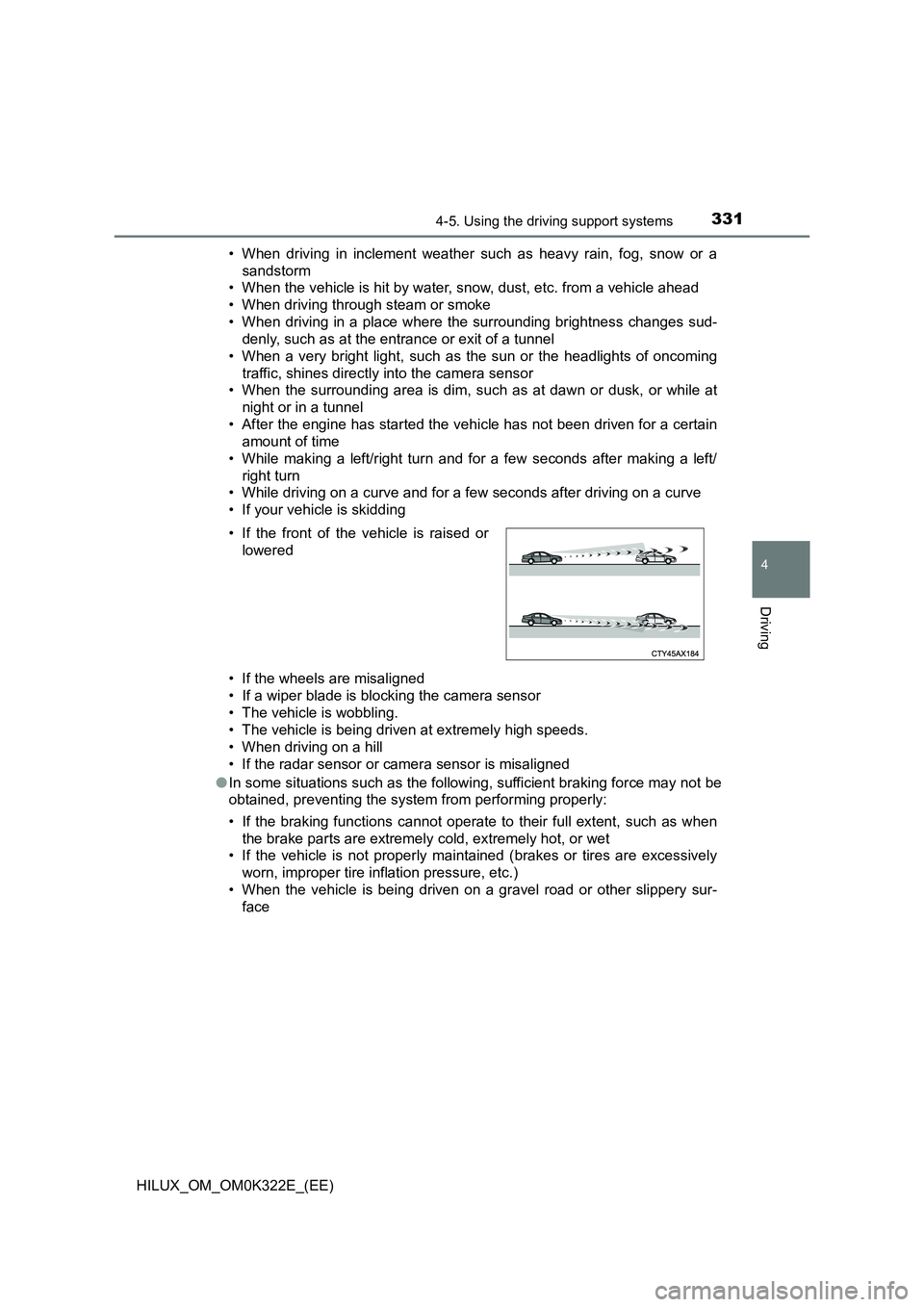
• If the front of the vehicle is raised or
lowered
Page 341 of 720

3414-5. Using the driving support systems
4
Driving
HILUX_OM_OM0K322E_(EE)
■ Warning message
If the following warning message is displayed on the multi-information dis-
play, follow the appropriate troubleshooting procedure.
Warning messageDetails/Actions
“LDA MALFUNCTION
VISIT YOUR DEALER”/
“LDA malfunction
Visit your dealer”
The system may not be operating
properly.
Have the vehicle inspected at any
authorized Toyota retailer or Toyota
authorized repairer, or any reliable
repairer.
“FRONT CAMERA
VISION BLOCKED
CLEAN AND DEMIST
WINDSHIELD”/
“Front Camera
Vision Blocked
Clean and Demist
Windshield”
Dirt, rain, condensation, ice, snow,
etc., are present on the windshield in
front of the camera sensor.
Turn the LDA system off, remove
any dirt, rain, condensation, ice,
snow, etc., from the windshield, and
then turn the LDA system back on.
“FRONT CAMERA
U N AVA I L A B L E ” /
“Front Camera
Unavailable”
The operation conditions of the cam-
era sensor (temperature, etc.) are not
met.
When the operation conditions of
the camera sensor (temperature,
etc.) are met, the LDA system will
become available. Turn the LDA
system off, wait for a little while,
and then turn the LDA system back
on.
Page 347 of 720

3474-5. Using the driving support systems
4
Driving
HILUX_OM_OM0K322E_(EE)
● The sign is only visible to the camera sensor for a short amount of time.
● The driving scene (turning, lane change, etc.) is judged incorrectly.
● Even if it is a sign not appropriate for the currently traveled lane, such a sign
exists directly after a freeway branches, or in an adjacent lane just before
merging.
● Stickers are attached to the rear of the preceding vehicle.
● A sign resembling a system compatible sign is recognized.
● The vehicle is driven in a country with a different direction of traffic.
● Side road speed signs may be detected and displayed (if positioned in sight
of the camera sensor) while the vehicle is traveling on the main road.
● Roundabout exit road speed signs may be detected and displayed (if posi-
tioned in sight of the camera sensor) while traveling on a roundabout.
● The speed information displayed on the meter and that displayed on the
Navigation system (if equipped) may be different due to the Multimedia sys-
tem using map data.
■ When driving vehicle in country with different speed unit
Since RSA recognizes signs based on the set unit of the meter, it is neces-
sary to change the set unit of the meter. Adjust the set unit of the meter to the
speed unit of signs in the current location. ( P. 696)
■ Turning the system on/off
Use the meter control switches to select while the vehicle is stopped and
press , and select and press .
■ Speed limit sign display
If the engine switch was last turned to the “LOCK” position (vehicles without
smart entry & start system) or off (vehicles with smart entry & start system)
while a speed limit sign was displayed on the multi-information display, the
same sign displays again when the engine switch is turned to the “ON” posi-
tion (vehicles without smart entry & start system) or IGNITION ON mode
(vehicles with smart entry & start system).
■ Customization
Setting (e.g. speeding warning threshold) can be changed.
(Customizable feature: P. 695)
Page 373 of 720
373
4
4-5. Using the driving support systems
Driving
HILUX_OM_OM0K322E_(EE)
Rear differential lock system
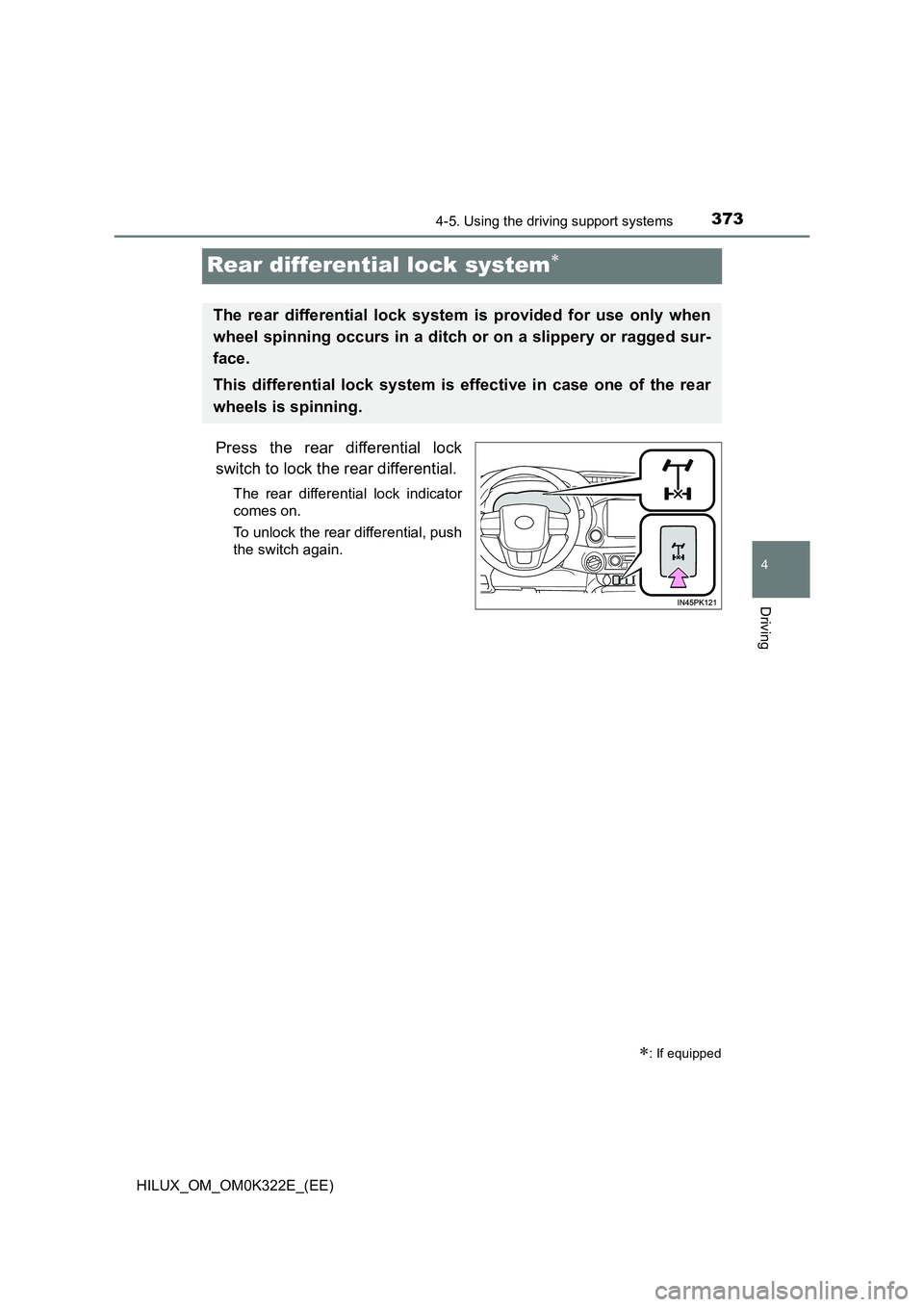
Press the rear differential lock
switch to lock the rear differential.
The rear differential lock indicator
comes on.
To unlock the rear differential, push
the switch again.
: If equipped
The rear differential lock system is provided for use only when
wheel spinning occurs in a ditch or on a slippery or ragged sur-
face.
This differential lock system is effective in case one of the rear
wheels is spinning.