Page 325 of 732
3254-5. Using the driving support systems
4
Driving
HIGHLANDER_U (OM0E017U)■
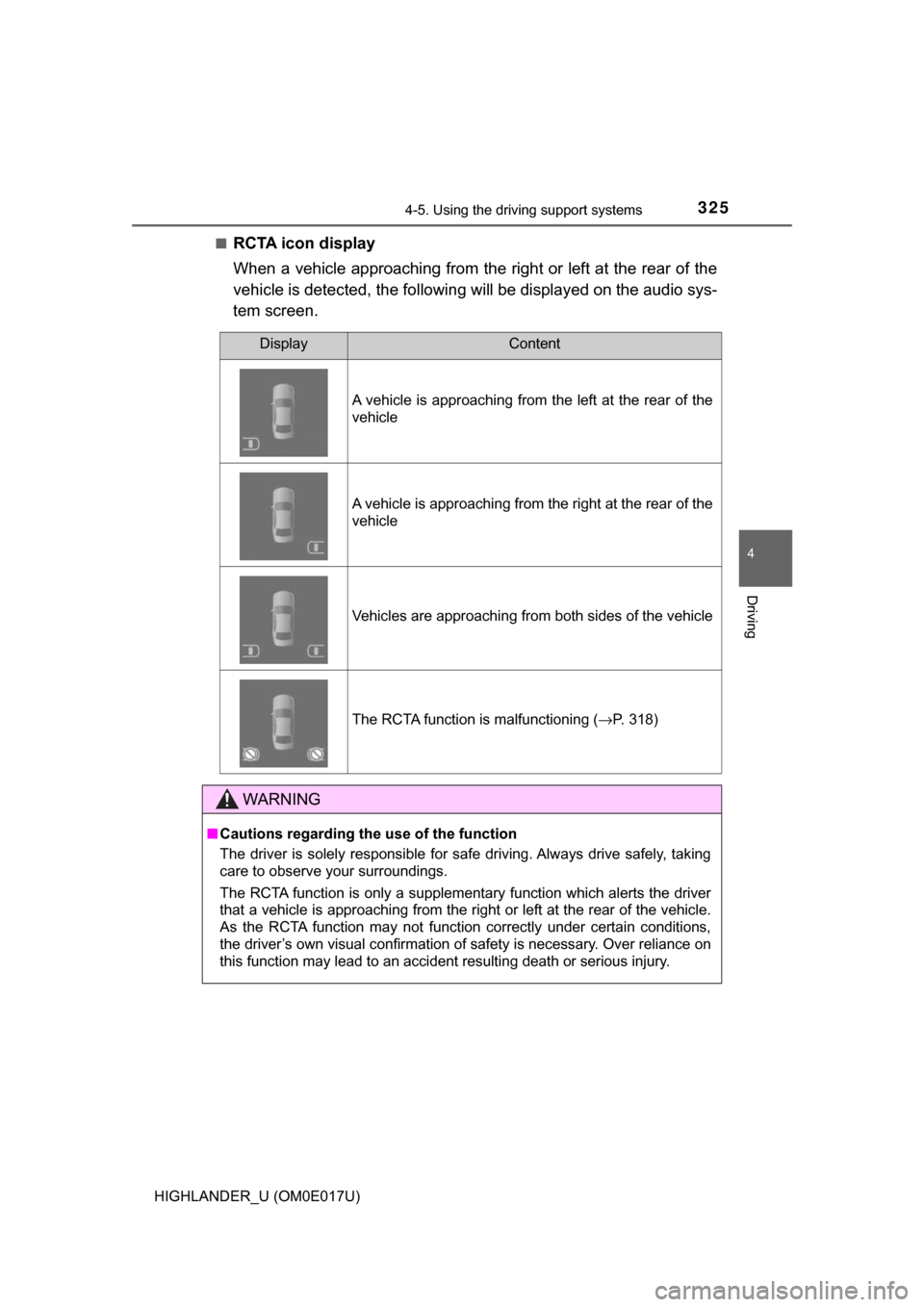
RCTA icon display
When a vehicle approaching from the right or left at the rear of the
vehicle is detected, the following
will be displayed on the audio sys-
tem screen.
DisplayContent
A vehicle is approaching from the left at the rear of the
vehicle
A vehicle is approaching from the right at the rear of the
vehicle
Vehicles are approaching from both sides of the vehicle
The RCTA function is malfunctioning ( →P. 318)
WARNING
■Cautions regarding the use of the function
The driver is solely responsible for safe driving. Always drive safely, taking
care to observe your surroundings.
The RCTA function is only a supplementary function which alerts the driver
that a vehicle is approaching from the right or left at the rear of the vehicle.
As the RCTA function may not function correctly under certain conditions,
the driver’s own visual confirmation of safety is necessary. Over reliance on
this function may lead to an accident resulting death or serious injury.
Page 333 of 732
3334-5. Using the driving support systems
4
Driving
HIGHLANDER_U (OM0E017U)
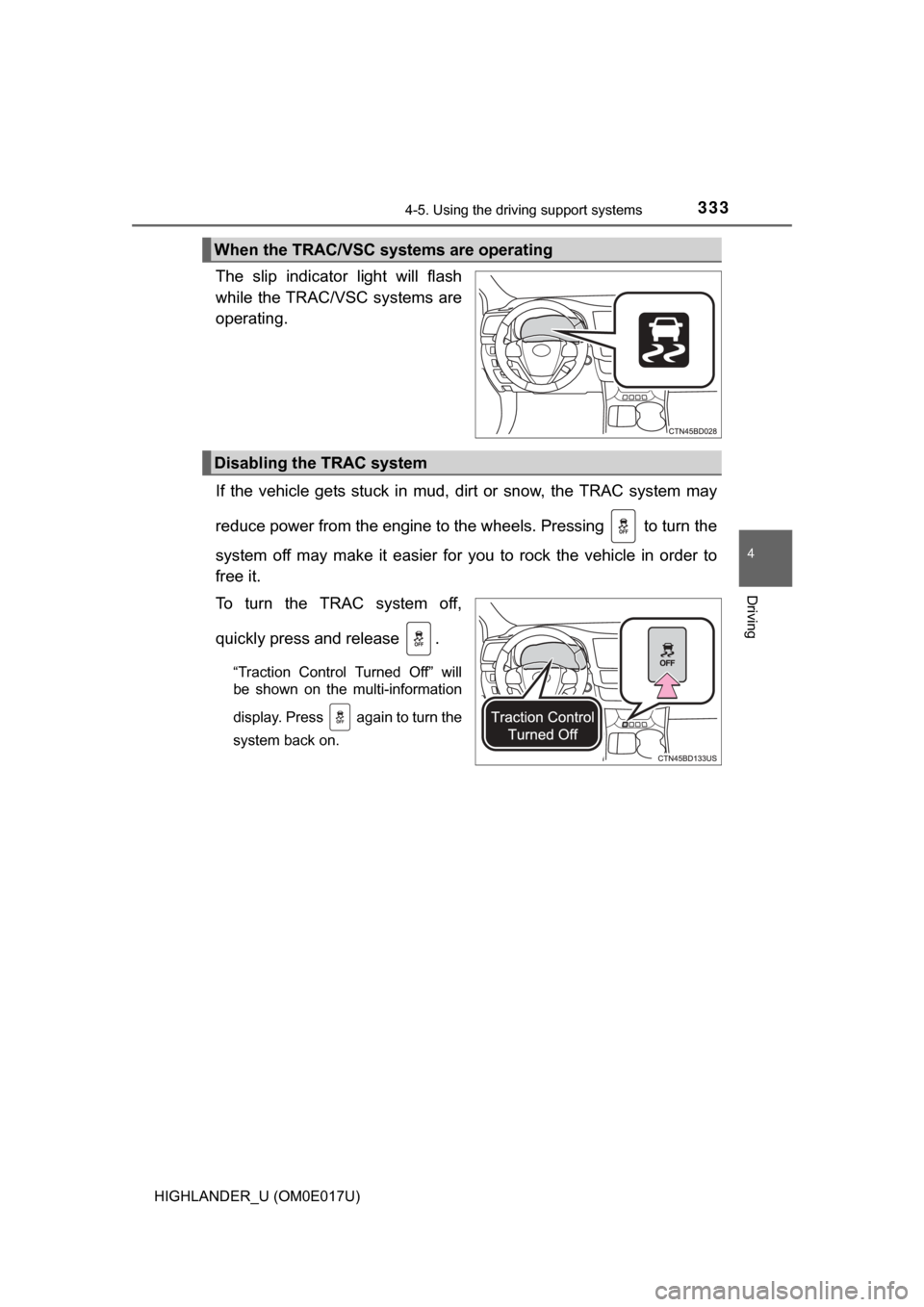
The slip indicator light will flash
while the TRAC/VSC systems are
operating.
If the vehicle gets stuck in mud, dirt or snow, the TRAC system may
reduce power from the engine to the wheels. Pressing to turn the
system off may make it easier for you to rock the vehicle in order to
free it.
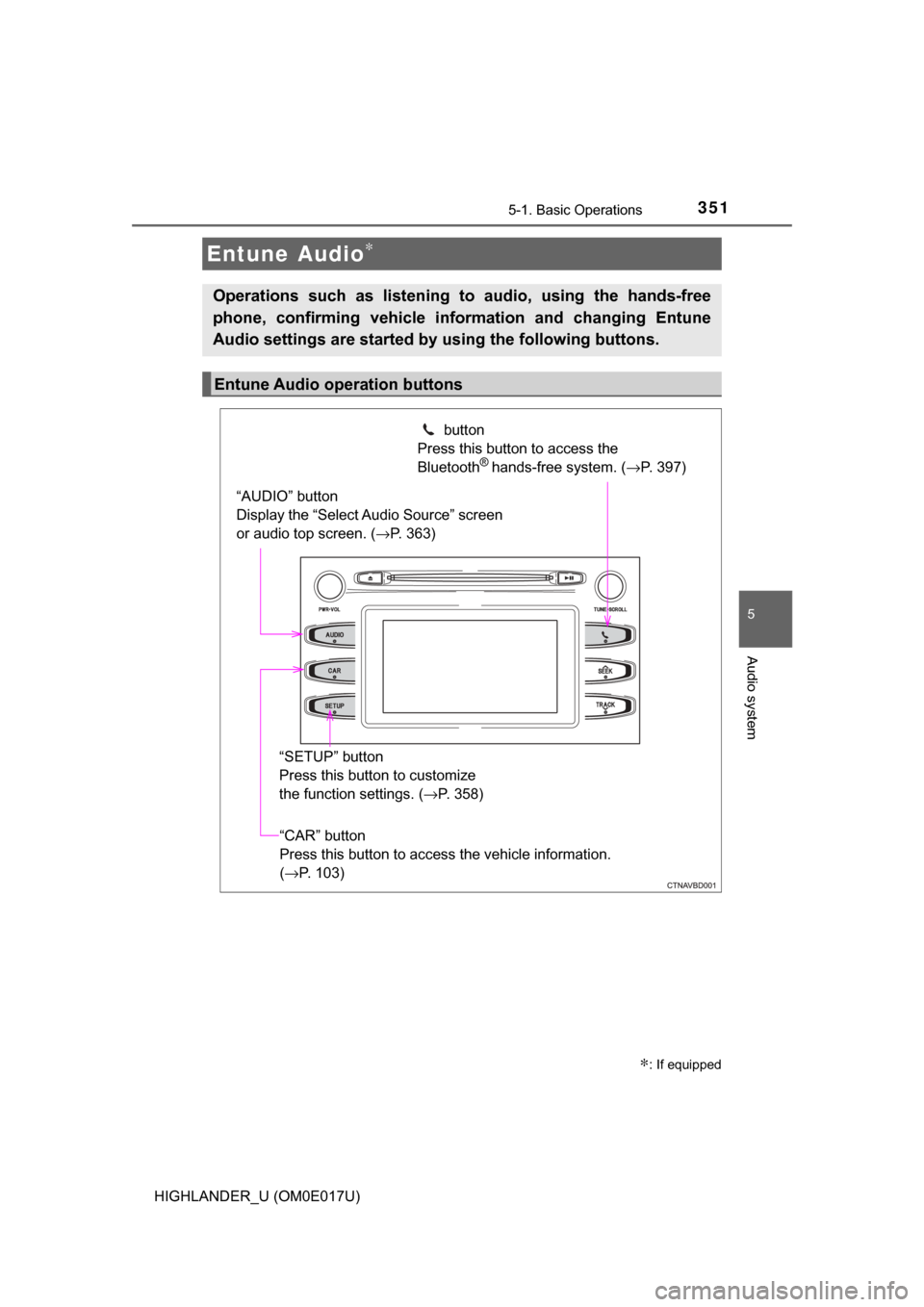
To turn the TRAC system off,
quickly press and release .
“Traction Control Turned Off” will
be shown on the multi-information
display. Press again to turn the
system back on.
When the TRAC/VSC systems are operating
Disabling the TRAC system
Page 334 of 732
3344-5. Using the driving support systems
HIGHLANDER_U (OM0E017U)
■Turning off both TRAC and VSC systems
To turn the TRAC and VSC systems off, press and hold for more than 3
seconds while the vehicle is stopped.
The VSC OFF indicator light will come on and “Traction Control Turned Off”
will be shown on the multi-information display.
*
Press again to turn the systems back on.
*: Pre-collision brake assist and pre-collision braking will also be disabled.
(→ P. 274)
■ When the message is displayed on th e multi-information display show-
ing that TRAC has been disabled even if switch has not been
pressed
TRAC cannot be operated. Contact your Toyota dealer.
■ Operating conditions of hill-start assist control
When the following four conditions are met, the hill-start assist control will
operate:
● The shift lever is in a position other than P or N (when starting off forward/
backward on an upward incline).
● The vehicle is stopped.
● The accelerator pedal is not depressed.
● The parking brake is not engaged.
■ Automatic system cancelation of hill-start assist control
The hill-start assist control will turn off in any of the following situations:
● The shift lever is moved to P or N.
● The accelerator pedal is depressed.
● The parking brake is engaged.
● Approximately 2 seconds elapse after the brake pedal is released.
■ Sounds and vibrations caused by the ABS, brake assist, VSC, TRAC and
hill-start assist control systems
●A sound may be heard from the engine compartment when the brake pedal
is depressed repeatedly, when the engine is started or just after the vehicle
begins to move. This sound does not indicate that a malfunction has
occurred in any of these systems.
● Any of the following conditions may occur when the above systems are
operating. None of these indicates that a malfunction has occurred.
• Vibrations may be felt through the vehicle body and steering.
• A motor sound may be heard also after the vehicle comes to a stop.
• The brake pedal may pulsate slightly after the ABS is activated.
• The brake pedal may move down slightly after the ABS is activated.
Page 337 of 732
3374-5. Using the driving support systems
4
Driving
HIGHLANDER_U (OM0E017U)■
Activating the downhill assist control system
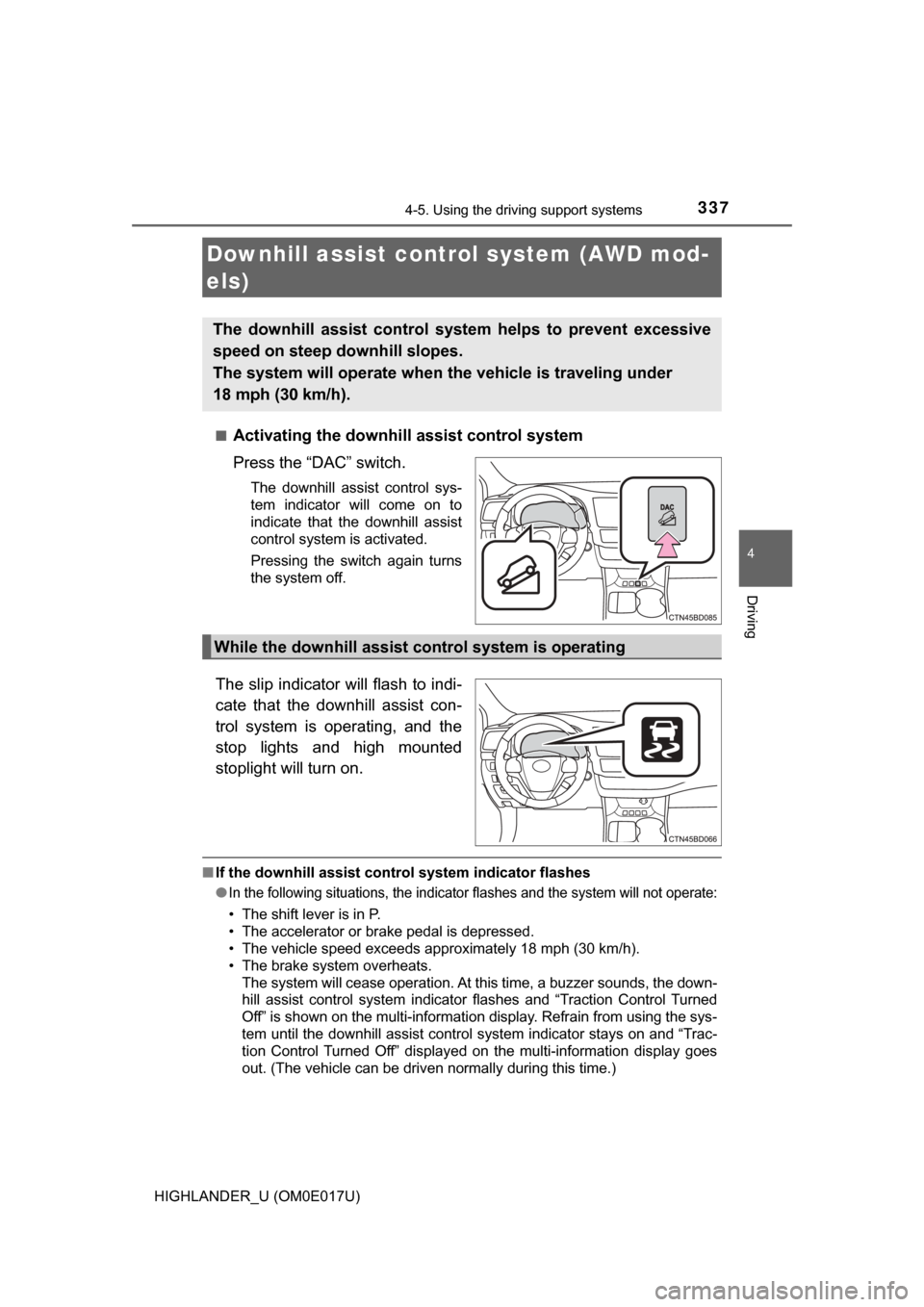
Press the “DAC” switch.
The downhill assist control sys-
tem indicator will come on to
indicate that the downhill assist
control system is activated.
Pressing the switch again turns
the system off.
The slip indicator will flash to indi-
cate that the downhill assist con-
trol system is operating, and the
stop lights and high mounted
stoplight will turn on.
■
If the downhill assist control system indicator flashes
●
In the following situations , the indicator flashes and the system will not operate:
• The shift lever is in P.
• The accelerator or brake pedal is depressed.
• The vehicle speed exceeds approximately 18 mph (30 km/h).
• The brake system overheats.
The system will cease operation. At this time, a buzzer sounds, the down-
hill assist control system indicator flashes and “Traction Control Turned
Off” is shown on the multi-information display. Refrain from using the sys-
tem until the downhill assist control system indicator stays on and “Trac-
tion Control Turned Off” displayed on the multi-information display goes
out. (The vehicle can be driven normally during this time.)
Downhill assist cont rol system (AWD mod-
els)
The downhill assist control system helps to prevent excessive
speed on steep downhill slopes.
The system will operate when th e vehicle is traveling under
18 mph (30 km/h).
While the downhill assist control system is operating
Page 348 of 732
348
HIGHLANDER_U (OM0E017U)5-1. Basic Operations
Audio system types ........... 350
Entune Audio .................... 351
Steering wheel audio switches .......................... 354
AUX Port/USB Port ........... 355
Basic audio operations ....................... 356
5-2. Setup Setup menu....................... 358
General settings ................ 359
Audio settings ................... 360
Display settings ................. 361
Voice settings.................... 362
5-3. Using Entune Audio Selecting the audio source ............................. 363
List screen operation......... 364
Optimal use of Entune Audio............................... 366
5-4. Using the radio Radio operation................. 367
5-5. Playing an audio CD and MP3/WMA/AAC discs
CD player operation .......... 369
5Audio system
Page 349 of 732

349
5Audio system
HIGHLANDER_U (OM0E017U)5-6. Using an external device
Listening to an iPod .......... 375
Listening to a USB memory device................ 379
Using the AUX port ........... 383
5-7. Connecting Bluetooth
®
Preparations to use wireless
communication ................ 384
Registering a Bluetooth
®
audio player for the
first time .......................... 388
Registering a Bluetooth
®
phone for the
first time .......................... 389
Registering a Bluetooth
®
device.............................. 390
Connecting a Bluetooth
®
device.............................. 392
Displaying a Bluetooth
®
device details .................. 394
Detailed Bluetooth
®
system settings ............... 395
5-8. Bluetooth
® Audio
Listening to Bluetooth®
Audio ............................... 396 5-9. Bluetooth
® phone
Using a Bluetooth®
Phone ............................. 397
Making a call ..................... 399
Receiving a call ................. 402
Speaking on the phone .............................. 403
Bluetooth
® phone
message function ............ 406
Using the steering wheel switches ................ 410
Bluetooth
® phone
settings ........................... 411
Contact/Call History Settings ........................... 412
What to do if... (Troubleshooting) ............ 421
5-10. Bluetooth
®
Bluetooth®......................... 425
5-11. Using the voice command system
Voice command system ............................ 429
Page 351 of 732
3515-1. Basic Operations
5
Audio system
HIGHLANDER_U (OM0E017U)
Entune Audio∗
∗: If equipped
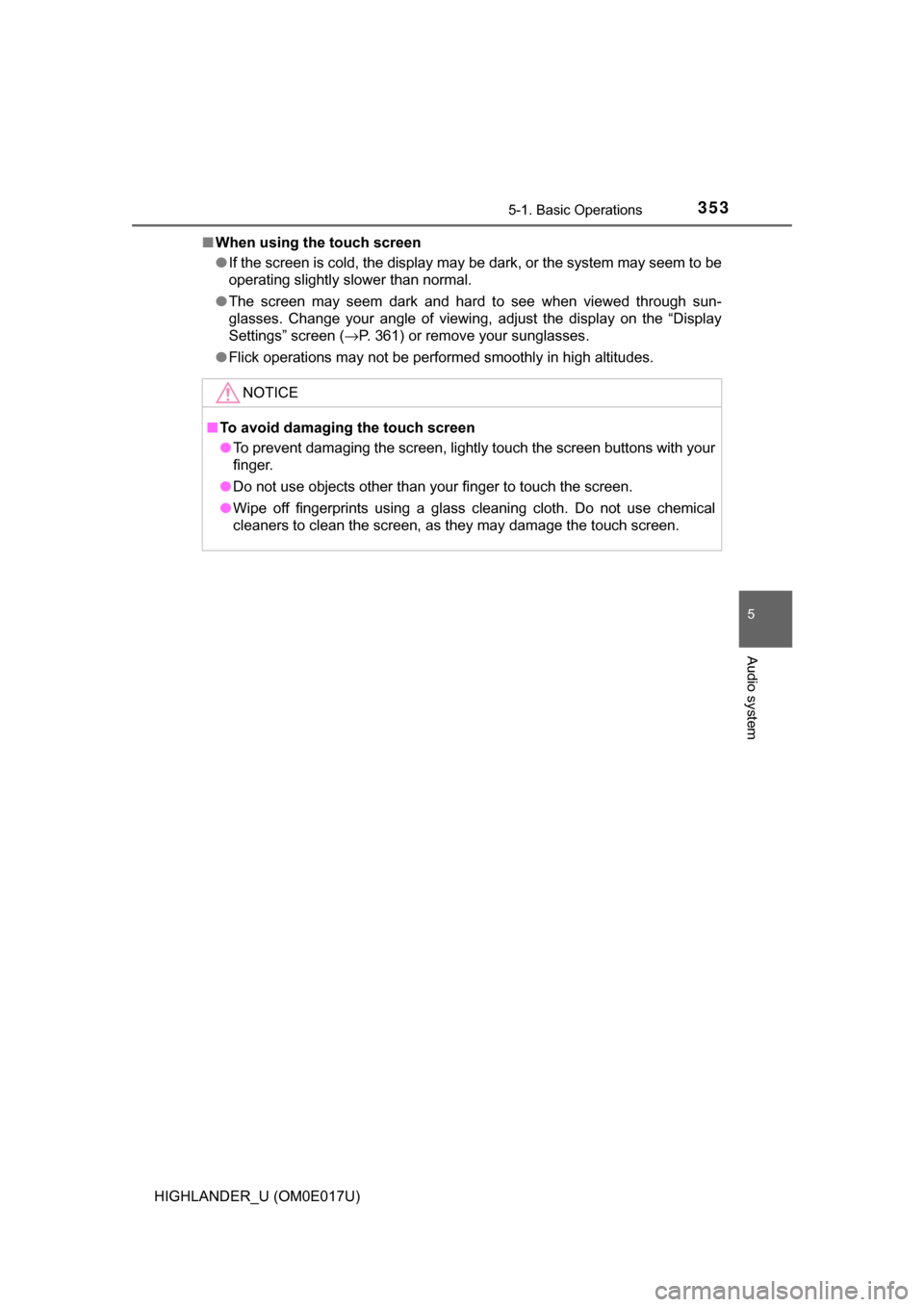
Operations such as listening to audio, using the hands-free
phone, confirming vehicle information and changing Entune
Audio settings are started by using the following buttons.
Entune Audio operation buttons
“AUDIO” button
Display the “Select Audio Source” screen
or audio top screen. (→P. 363) button
Press this button to access the
Bluetooth
® hands-free system. ( →P. 397)
“CAR” button
Press this button to access the vehicle information.
(→P. 103)
“SETUP” button
Press this button to customize
the function settings. (
→P. 358)
Page 353 of 732
3535-1. Basic Operations
5
Audio system
HIGHLANDER_U (OM0E017U)■
When using the touch screen
●If the screen is cold, the display may be dark, or the system may seem to be
operating slightly slower than normal.
● The screen may seem dark and hard to see when viewed through sun-
glasses. Change your angle of viewing, adjust the display on the “Display
Settings” screen ( →P. 361) or remove your sunglasses.
● Flick operations may not be performed smoothly in high altitudes.
NOTICE
■To avoid damaging the touch screen
● To prevent damaging the screen, lightly touch the screen buttons with your
finger.
● Do not use objects other than your finger to touch the screen.
● Wipe off fingerprints using a glass cleaning cloth. Do not use chemical
cleaners to clean the screen, as they may damage the touch screen.