Page 91 of 732

912. Instrument cluster
2
Instrument cluster
HIGHLANDER_U (OM0E017U)
*6: In order to confirm operation, the BSM outside rear view mirror indicators
illuminate in the following situations:
Vehicles without a smart key system
• When the BSM function is enabled on of the multi-information dis-
play, the engine switch is turned to the “ON” position.
• When the engine switch is the “ON” position, the BSM function is
enabled on of the multi-information display.
Vehicles with a smart key system
• When the BSM function is enabled on of the multi-information dis-
play, the engine switch is turned to IGNITION ON mode.
• When the engine switch is in IGNITION ON mode, the BSM function is
enabled on of the multi-information display.
If the system is functioning correctly, the BSM outside rear view mirror indi-
cators will turn off after a few seconds.
If the BSM outside rear view mirror indicators do not illuminate or do not
turn off, there may be a malfunction in the system.
If this occurs, have the vehicle inspected by your Toyota dealer.
*7: This light illuminates on the outside rear view mirrors.
*8: This light illuminates on the center panel.
*9: The light does not turn on when the system is disabled.
WARNING
■ If a safety system warning light does not come on
Should a safety system light such as the ABS and SRS warning lights not
come on when you start the engine, this could mean that these systems are
not available to help protect you in an accident, which could result in death
or serious injury. Have the vehicle inspected by your Toyota dealer immedi-
ately if this occurs.
Page 92 of 732
922. Instrument cluster
HIGHLANDER_U (OM0E017U)
Tachometer
Displays the engine speed in revolutions per minute.
Multi-information display
Presents the driver with a variety of driving-related data.
Speedometer
Fuel gauge
Trip meter reset knob
Switches the trip information.
Outside temperature
Odometer/trip meter/Stop & Start system operation time display*
Shift position and shift range
Displays the selected shift position or selected shift range. (→P. 227)
Meter panel lights control button
Engine coolant temperature gauge
Displays the engine coolant temperature.
*: If equipped
Gauge and meters
The displayed content may differ depending on the type of
meter.
1
2
3
4
5
6
7
8
9
10
Page 93 of 732

932. Instrument cluster
2
Instrument cluster
HIGHLANDER_U (OM0E017U)
Switches between the trip meter
“A” and “B” displays. When the trip
meter is displayed, pressing and
holding the knob will reset the trip
meter.
The brightness of the meter panel lights can be adjusted.
Pressing the button will adjust the
brightness of the meter panel
lights.
The brightness level of the meters
when the surroundings are bright
(day mode) and dark (night mode)
can be adjusted individually. How-
ever, when in day mode, adjusting
the brightness level will also
change the brightness level of
night mode.
■ The meters and display illuminate when
Vehicles without a smart key system
The engine switch is in the “ON” position.
Vehicles with a smart key system
The engine switch is in IGNITION ON mode.
■ Outside temperature display
In the following situations, the correct outside temperature may not be \
dis-
played, or the display may take longer than normal to change.
●When stopped, or driving at low speeds (less than 12 mph [20 km/h])
● When the outside temperature has changed suddenly (at the entrance/exit
of a garage, tunnel, etc.)
■ Stop & Start system operation ti me (current) (if equipped)
This display will be displayed when the engine is stopped due to the opera-
tion of the Stop & Start system.
Changing the trip meter display
Instrument panel light control
Page 94 of 732
942. Instrument cluster
HIGHLANDER_U (OM0E017U)
NOTICE
■To prevent damage to the engine and its components
● Do not let the indicator needle of the tachometer enter the red zone, which
indicates the maximum engine speed.
● The engine may be overheating if the engine coolant temperature gauge is
in the red zone (H). In this case, immediately stop the vehicle in a safe
place, and check the engine after it has cooled completely. (→ P. 644)
Page 97 of 732

972. Instrument cluster
2
Instrument cluster
HIGHLANDER_U (OM0E017U)
●Current fuel consumption*1
Displays the current rate of fuel consumption
● Average fuel economy (after reset
*2/after start/after refuel)*1
Displays the average fuel economy since the function was reset,
the engine was started, and the v ehicle was refueled, respectively
Use the displayed average fuel economy as a reference.
●Average vehicle speed (after reset*2/after start)*1
Displays the average vehicle speed since the function was reset
and the engine was started, respectively
● Elapsed time (after reset
*2/after start)*1
Displays the elapsed time since the function was reset and the
engine was started, respectively
● Distance (driving range/after start/after reset
*2)*1
Displays the estimated maximum distance that can be driven with
the quantity of fuel remaining and the distance driven after the
engine was started, respectively.
• This distance is computed based on your average fuel consumption. As a result, the actual distance that can be driven may differ from that dis-
played.
• When only a small amount of fuel is added to the tank, the display may
not be updated.
When refueling, turn the engine switch off. If the vehicle is refueled with-
out turning the engine switch off, the display may not be updated.
● Eco Driving Indicator
→P. 1 0 2
● AWD control (if equipped)
Displays the torque distribution between the front and rear axles of
the AWD control system
● Display off
A blank screen is displayed
*1: Can be registered to Drive information 1 through 3. ( →P. 99)
*2: Resetting procedures:
• Select a function to be reset using the meter control switches and then press and hold to reset.
• If there is more than one function that can be reset, check boxes will be displayed next to those functions.
Drive information
Page 98 of 732

982. Instrument cluster
HIGHLANDER_U (OM0E017U)■
Stop & Start system operation time
(current)/status notification
Displays the current amount of time the engine has been stopped
due to the operation of the Stop & Start system. Also shows the sta-
tus of the Stop & Start system with a pop-up display. ( →P. 303)
■Stop & Start system operation time (after start/after reset)
Displays the accumulated total of the following:
• Stop & Start system operation time since engine start
• Stop & Start system operation time since display was reset
■
Stop & Start system settings
Press the center button of the mete r control switches to display the
Stop & Start system settings screen.
On this screen, the following operations can be performed:
● Stop & Start
The length of time the Stop & Start system will operate when the “A/C”
switch of the air conditioning system is on can be set to 2 different lev-
els. This setting can also be changed on .
●Reset
Select to reset the Stop & Start system operation time display.
To reset, move the cursor to “Reset”, and then press and hold the center
button.
Stop & Start system information (if equipped)
Page 101 of 732
1012. Instrument cluster
2
Instrument cluster
HIGHLANDER_U (OM0E017U)
■Settings can be changed
Customizable features: →P. 681
■ Pop-up display
In some situations, such as when a switch operation is performed, a pop-up
display, will be temporarily displayed on the multi-information display.
The pop-up display function can be set on/off.
■ Setting display automatic cancelation
In the following situations, setting display in which the settings can b\
e
changed through the meter control switch will automatically be turned off.
●When a warning message appears while the setting display is displayed
● When the vehicle begins to move while the setting display is displayed
■ Liquid crystal display
Small spots or light spots may appear on the display. This phenomenon is
characteristic of liquid crystal displays, and there is no problem continuing to
use the display.
WARNING
■The information display at low temperatures
Allow the interior of the vehicle to warm up before using the liquid crystal
information display. At extremely low temperatures, the display monitor may
respond slowly, and display changes may be delayed.
For example, there is a lag between the driver’s shifting and the new gear
number appearing on the display. This l ag could cause the driver to down-
shift again, causing rapid and excessive engine braking and possibly an
accident resulting in death or injury.
■ Cautions during setting up the display
As the engine needs to be running during setting up the display, ensure that
the vehicle is parked in a place with adequate ventilation. In a closed area
such as a garage, exhaust gases including harmful carbon monoxide (CO)
may collect and enter the vehicle. This may lead to death or a serious
health hazard.
NOTICE
■During setting up the display
To prevent battery discharge, ensure that the engine is running while setting
up the display features.
Page 104 of 732
1042. Instrument cluster
HIGHLANDER_U (OM0E017U)
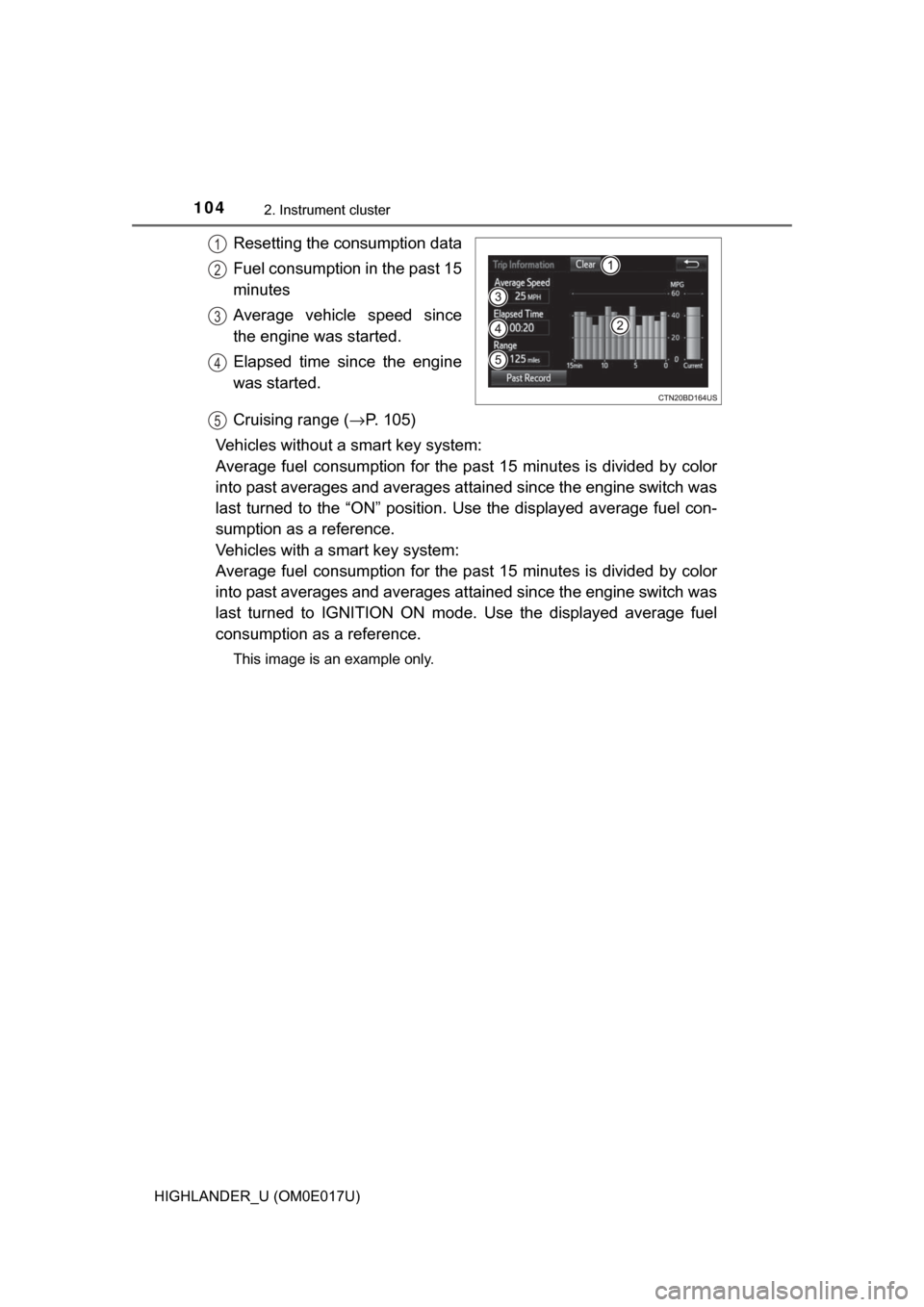
Resetting the consumption data
Fuel consumption in the past 15
minutes
Average vehicle speed since
the engine was started.
Elapsed time since the engine
was started.
Cruising range (→P. 105)
Vehicles without a smart key system:
Average fuel consumption for the past 15 minutes is divided by color
into past averages and averages at tained since the engine switch was
last turned to the “ON” position. Use the displayed average fuel con-
sumption as a reference.
Vehicles with a smart key system:
Average fuel consumption for the past 15 minutes is divided by color
into past averages and averages at tained since the engine switch was
last turned to IGNITION ON mode. Use the displayed average fuel
consumption as a reference.
This image is an example only.
1
2
3
4
5