2017 SUBARU FORESTER led
[x] Cancel search: ledPage 376 of 634
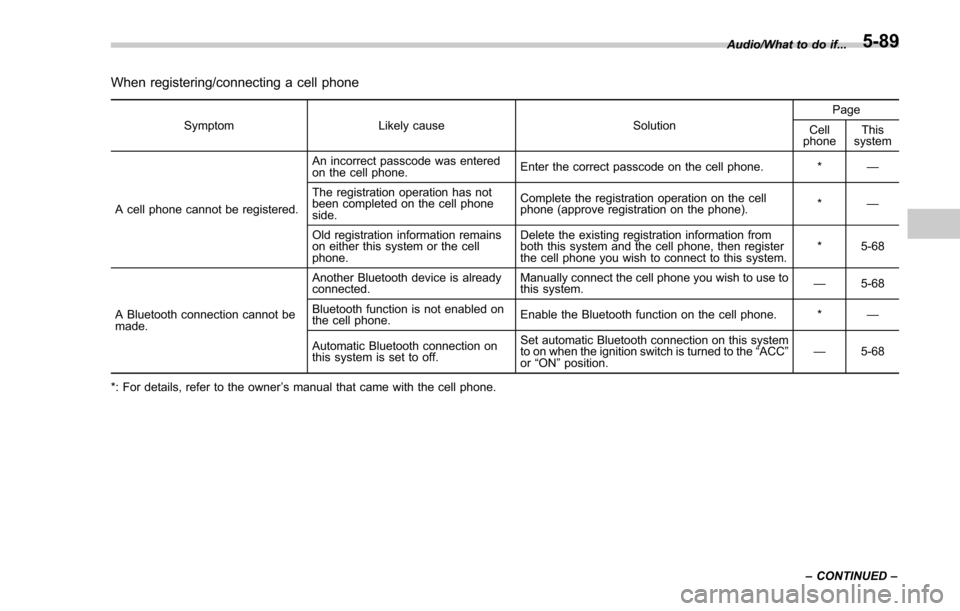
When registering/connecting a cell phone
SymptomLikely cause SolutionPage
Cell
phone This
system
A cell phone cannot be registered. An incorrect passcode was entered
on the cell phone.
Enter the correct passcode on the cell phone. *
—
The registration operation has not
been completed on the cell phone
side. Complete the registration operation on the cell
phone (approve registration on the phone).
*
—
Old registration information remains
on either this system or the cell
phone. Delete the existing registration information from
both this system and the cell phone, then register
the cell phone you wish to connect to this system.
*5-68
A Bluetooth connection cannot be
made. Another Bluetooth device is already
connected.
Manually connect the cell phone you wish to use to
this system.
—
5-68
Bluetooth function is not enabled on
the cell phone. Enable the Bluetooth function on the cell phone. *
—
Automatic Bluetooth connection on
this system is set to off. Set automatic Bluetooth connection on this system
to on when the ignition switch is turned to the
“ACC ”
or “ON ”position. —
5-68
*: For details, refer to the owner ’s manual that came with the cell phone. Audio/What to do if...
–CONTINUED –
5-89
Page 378 of 634
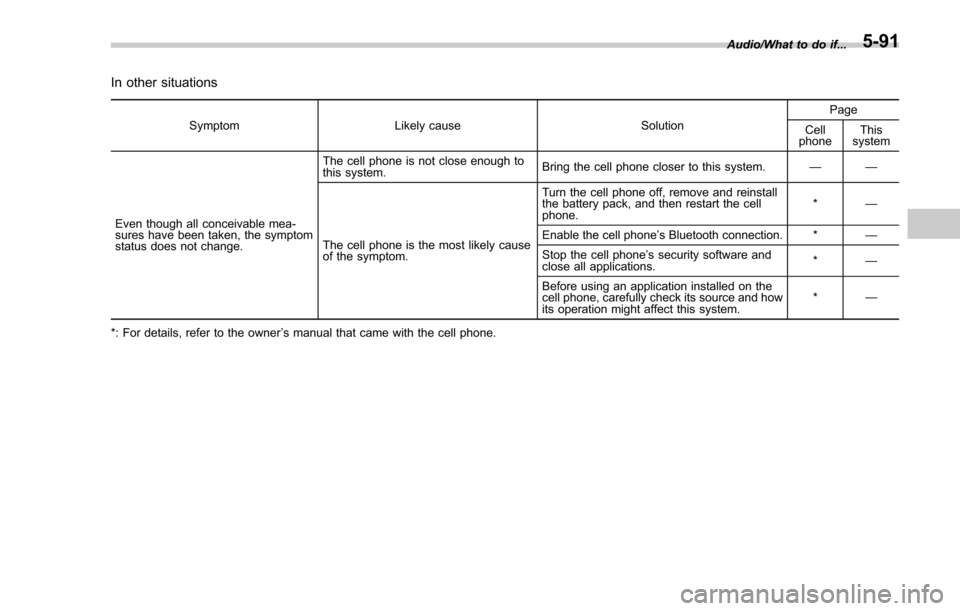
In other situations
SymptomLikely cause SolutionPage
Cell
phone This
system
Even though all conceivable mea-
sures have been taken, the symptom
status does not change. The cell phone is not close enough to
this system.
Bring the cell phone closer to this system.
——
The cell phone is the most likely cause
of the symptom. Turn the cell phone off, remove and reinstall
the battery pack, and then restart the cell
phone.
*
—
Enable the cell phone ’s Bluetooth connection. * —
Stop the cell phone ’s security software and
close all applications. *
—
Before using an application installed on the
cell phone, carefully check its source and how
its operation might affect this system. *
—
*: For details, refer to the owner ’s manual that came with the cell phone. Audio/What to do if...
5-91
Page 379 of 634
Audio/Appendix
Appendix
&Certification
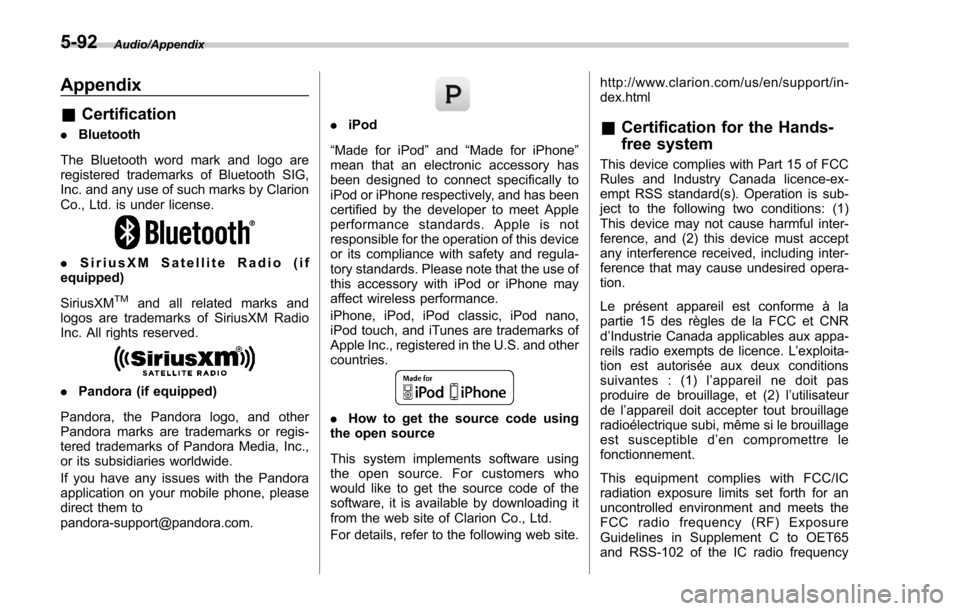
. Bluetooth
The Bluetooth word mark and logo are
registered trademarks of Bluetooth SIG,
Inc. and any use of such marks by Clarion
Co., Ltd. is under license.
. SiriusXM Satellite Radio (if
equipped)
SiriusXM
TMand all related marks and
logos are trademarks of SiriusXM Radio
Inc. All rights reserved.
. Pandora (if equipped)
Pandora, the Pandora logo, and other
Pandora marks are trademarks or regis-
tered trademarks of Pandora Media, Inc.,
or its subsidiaries worldwide.
If you have any issues with the Pandora
application on your mobile phone, please
direct them to
[email protected].
. iPod
“Made for iPod ”and “Made for iPhone”
mean that an electronic accessory has
been designed to connect specifically to
iPod or iPhone respectively, and has been
certified by the developer to meet Apple
performance standards. Apple is not
responsible for the operation of this device
or its compliance with safety and regula-
tory standards. Please note that the use of
this accessory with iPod or iPhone may
affect wireless performance.
iPhone, iPod, iPod classic, iPod nano,
iPod touch, and iTunes are trademarks of
Apple Inc., registered in the U.S. and other
countries.
. How to get the source code using
the open source
This system implements software using
the open source. For customers who
would like to get the source code of the
software, it is available by downloading it
from the web site of Clarion Co., Ltd.
For details, refer to the following web site. http://www.clarion.com/us/en/support/in-
dex.html
&
Certification for the Hands-
free system
This device complies with Part 15 of FCC
Rules and Industry Canada licence-ex-
empt RSS standard(s). Operation is sub-
ject to the following two conditions: (1)
This device may not cause harmful inter-
ference, and (2) this device must accept
any interference received, including inter-
ference that may cause undesired opera-
tion.
Le présent appareil est conforme à la
partie 15 des règles de la FCC et CNR
d’Industrie Canada applicables aux appa-
reils radio exempts de licence. L ’exploita-
tion est autorisée aux deux conditions
suivantes : (1) l ’appareil ne doit pas
produire de brouillage, et (2) l ’utilisateur
de l ’appareil doit accepter tout brouillage
radioélectrique subi, même si le brouillage
est susceptible d ’en compromettre le
fonctionnement.
This equipment complies with FCC/IC
radiation exposure limits set forth for an
uncontrolled environment and meets the
FCC radio frequency (RF) Exposure
Guidelines in Supplement C to OET65
and RSS-102 of the IC radio frequency
5-92
Page 388 of 634
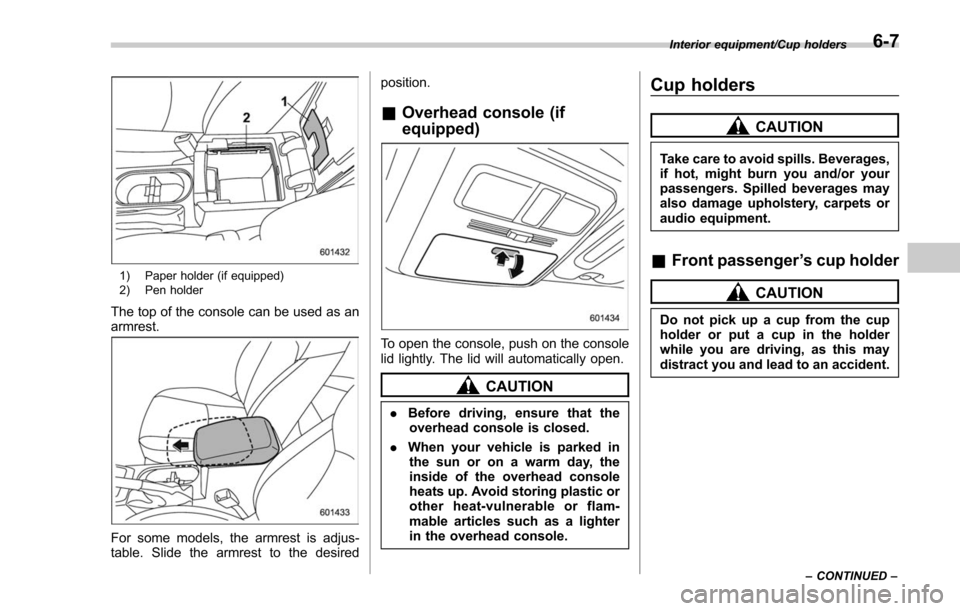
1) Paper holder (if equipped)
2) Pen holder
The top of the console can be used as an
armrest.
For some models, the armrest is adjus-
table. Slide the armrest to the desiredposition.
&
Overhead console (if
equipped)
To open the console, push on the console
lid lightly. The lid will automatically open.
CAUTION
. Before driving, ensure that the
overhead console is closed.
. When your vehicle is parked in
the sun or on a warm day, the
inside of the overhead console
heats up. Avoid storing plastic or
other heat-vulnerable or flam-
mable articles such as a lighter
in the overhead console.
Cup holders
CAUTION
Take care to avoid spills. Beverages,
if hot, might burn you and/or your
passengers. Spilled beverages may
also damage upholstery, carpets or
audio equipment.
& Front passenger ’s cup holder
CAUTION
Do not pick up a cup from the cup
holder or put a cup in the holder
while you are driving, as this may
distract you and lead to an accident.
Interior equipment/Cup holders
–CONTINUED –6-7
Page 389 of 634
Interior equipment/Cup holders
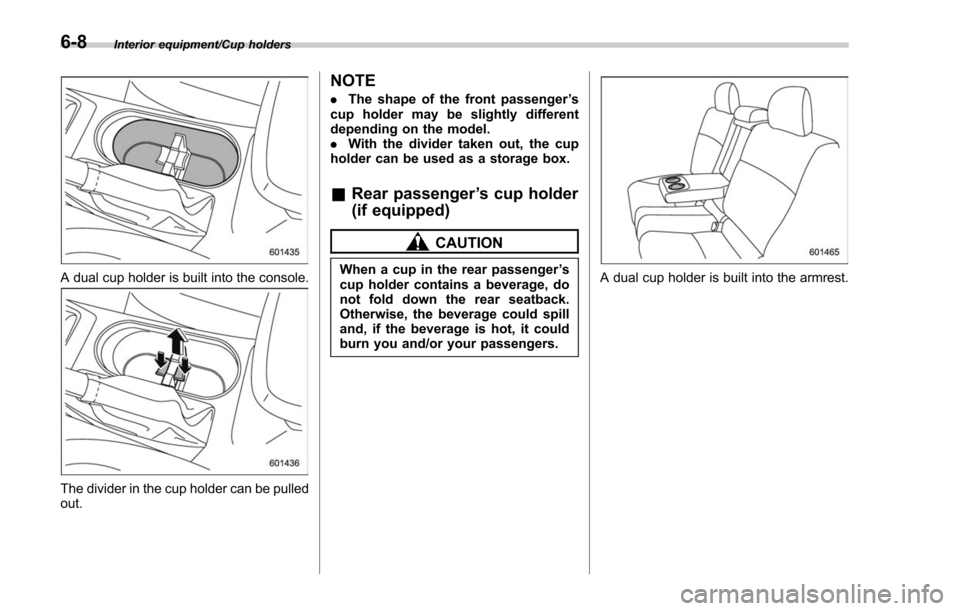
A dual cup holder is built into the console.
The divider in the cup holder can be pulled
out.
NOTE
.The shape of the front passenger ’s
cup holder may be slightly different
depending on the model.
. With the divider taken out, the cup
holder can be used as a storage box.
& Rear passenger ’s cup holder
(if equipped)
CAUTION
When a cup in the rear passenger ’s
cup holder contains a beverage, do
not fold down the rear seatback.
Otherwise, the beverage could spill
and, if the beverage is hot, it could
burn you and/or your passengers.A dual cup holder is built into the armrest.
6-8
Page 393 of 634
Interior equipment/Floor mat
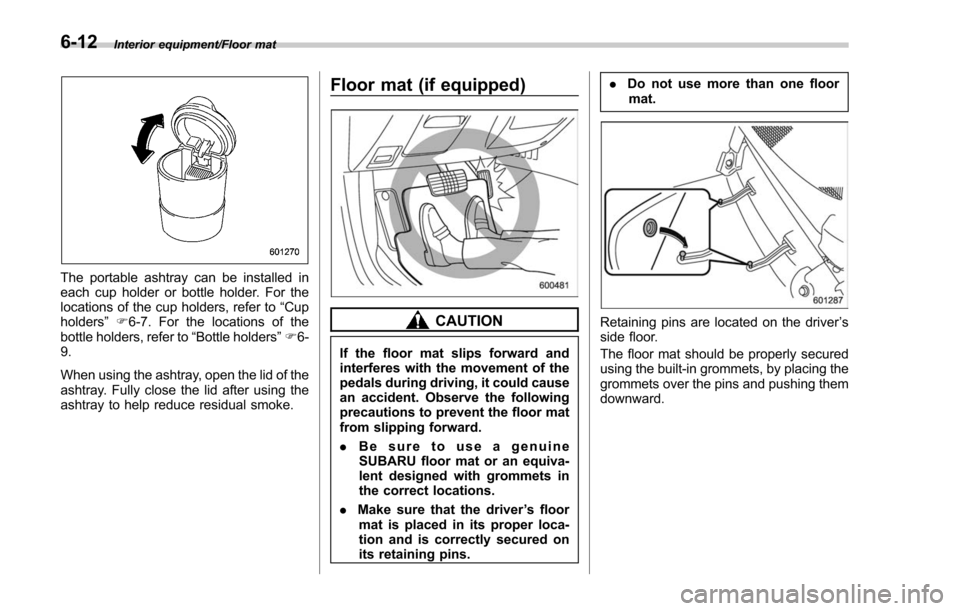
The portable ashtray can be installed in
each cup holder or bottle holder. For the
locations of the cup holders, refer to“Cup
holders ”F 6-7. For the locations of the
bottle holders, refer to “Bottle holders”F 6-
9.
When using the ashtray, open the lid of the
ashtray. Fully close the lid after using the
ashtray to help reduce residual smoke.
Floor mat (if equipped)
CAUTION
If the floor mat slips forward and
interferes with the movement of the
pedals during driving, it could cause
an accident. Observe the following
precautions to prevent the floor mat
from slipping forward.
. Be sure to use a genuine
SUBARU floor mat or an equiva-
lent designed with grommets in
the correct locations.
. Make sure that the driver ’s floor
mat is placed in its proper loca-
tion and is correctly secured on
its retaining pins. .
Do not use more than one floor
mat.
Retaining pins are located on the driver ’s
side floor.
The floor mat should be properly secured
using the built-in grommets, by placing the
grommets over the pins and pushing them
downward.
6-12
Page 400 of 634
is displayed.
1. Set the ignition switch to“ON”.
2. Set the shift lever/select lever to “R”.
NOTE
. For models with the genuine
SUBARU navigation or audio system,
while the navigation system is acti-
vated, the image of the rear view
camera will not be displayed. However,
the image of the rear view camera has
priority over other screen displays.
. The image of the rear view camera
has priority over other screen displays.
. The image of the rear view camera is
horizontally reversed as is the case
with the vehicle rearview mirror or the
side view mirror.
. It may be difficult to see the image of
the rear view camera in the following
cases. This is not a malfunction of the
camera.
–The vehicle is used for towing or
a trailer hitch is installed.
– The vehicle is in a dark place (at
night, in a tunnel, etc.).
– The vehicle is in an extremely hot
or cold place.
– An object (such as raindrops,
snow, dirt, etc.) that disturbs the
view of the rear view camera sticks to the lens of the camera.
–
Strong light shined directly on
the camera lens (occasionally, there
are vertical lines on the screen).& Viewing range on the screen
CAUTION
The range that can be viewed with
the rear view camera is limited.
Always be sure to check with your
eyes when moving backward and
proceed slowly.
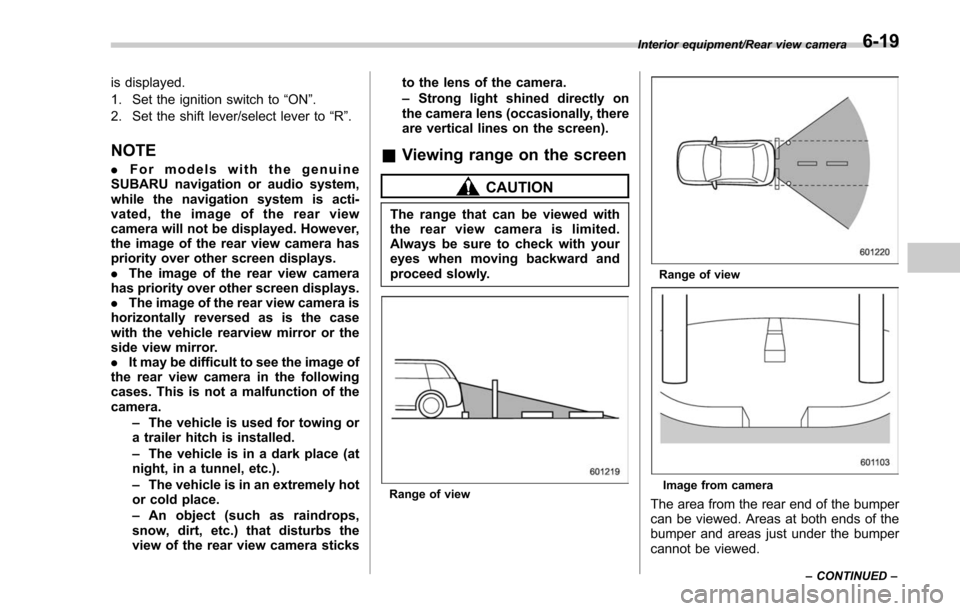
Range of view
Range of view
Image from camera
The area from the rear end of the bumper
can be viewed. Areas at both ends of the
bumper and areas just under the bumper
cannot be viewed.
Interior equipment/Rear view camera
–CONTINUED –6-19
Page 407 of 634

Starting and operating/Fuel
problem is fuel related before returning
your vehicle to an authorized dealer for
service.
!MMT
Some gasoline contains an octane-en-
hancing additive called MMT (Methylcy-
clopentadienyl Manganese Tricarbonyl). If
you use such fuels, your emission control
system performance may deteriorate and
the CHECK ENGINE warning light/Mal-
function indicator light may turn on. If this
happens, return to your authorized
SUBARU Dealer for service. If it is
determined that the condition is caused
by the type of fuel used, repairs may not
be covered by your warranty.
! Gasoline for cleaner air
Your use of gasoline with detergent
additives will help prevent deposits from
forming in your engine and fuel system.
This helps keep your engine in tune and
your emission control system working
properly, and is a way of doing your part
for cleaner air. If you continuously use a
high quality fuel with the proper detergent
and other additives, you should never
need to add any fuel system cleaning
agents to your fuel tank.
Many gasolines are now blended with
materials called oxygenates. Use of these
fuels can also help keep the air cleaner. Oxygenated blend fuels, such as MTBE
(Methyl Tertiary Butyl ether) or ethanol
(ethyl or grain alcohol) may be used in
your vehicle, but should contain no more
than 15% MTBE or 10% ethanol for the
proper operation of your SUBARU.
Do not use any gasoline that contains
more than 10% ethanol, including from
any pump labeled E15, E30, E50 or E85
(which are only some examples of fuel
containing more than 10% ethanol).
In addition, some gasoline suppliers are
now producing reformulated gasolines,
which are designed to reduce vehicle
emissions. SUBARU approves the use of
reformulated gasoline.
If you are not sure what the fuel contains,
you should ask your service station
operators if their gasolines contain deter-
gents and oxygenates and if they have
been reformulated to reduce vehicle emis-
sions.
As additional guidance, only use fuels
suited for your vehicle as explained in the
following description.
.
Fuel should be unleaded and have an
octane rating no lower than that specified
in this manual.
. Methanol (methyl or wood alcohol) is
sometimes mixed with unleaded gasoline. Methanol can be used in your vehicle
ONLY
if it does not exceed 5% of the fuel
mixture ANDif it is accompanied by
sufficient quantities of the proper cosol-
vents and corrosion inhibitors required to
prevent damage to the fuel system. Do not
use fuel containing methanol EXCEPT
under these conditions.
. If undesirable driveability problems are
experienced and you suspect they may be
fuel related, try a different brand of gaso-
line before seeking service at your
SUBARU dealer.
. Fuel system damage or driveability
problems which result from the use of
improper fuel are not covered under the
SUBARU Limited Warranty.
CAUTION
Do not let fuel spill on the exterior
surfaces of the vehicle. Because
fuel may damage the paint, be sure
to wipe off any spilled fuel quickly.
Paint damage caused by spilled fuel
is not covered under the SUBARU
Limited Warranty.
7-4