2017 SUBARU CROSSTREK Door lock
[x] Cancel search: Door lockPage 149 of 572

This meter displays the two trip meters
when the ignition switch is in the“ON”
position.
The trip meter shows the distance that the
vehicle has been driven since you last set
it to zero.
If you press the trip knob when the ignition
switch is in the“LOCK”/“OFF”or“ACC”
position, the odometer/trip meter will light
up. It is possible to switch between the A
trip meter and B trip meter indications
while the odometer/trip meter is lit up. If
you do not press the trip knob within 10
seconds of illumination of the odometer/
trip meter, the odometer/trip meter will turn
off.
Also, if you open and close the driver’s
door within 10 seconds of illumination of
the odometer/trip meter, the odometer/trip
meter will turn off.
The display can be switched as shown in
the following sequence by pressing the
trip knob.
*: They cannot be displayed when the
ignition switch is in the“ON”position.
To set the trip meter to zero, select the A
trip or B trip meter by pressing the knob
and keep the knob pressed for more than
2 seconds.
CAUTION
To ensure safety, do not attempt to
change the function of the indicator
during driving, as an accident could
result.
NOTE
If the connection between the combina-
tion meter and battery is broken for any
reason such as vehicle maintenance or
fuse replacement, the data recorded on
the trip meter will be lost.
&Tachometer
The tachometer shows the engine speed
in thousands of revolutions per minute.
CAUTION
Do not operate the engine with the
pointer of the tachometer in the red
zone. In this range, fuel injection will
be cut by the engine control module
to protect the engine from overrev-
ving. The engine will resume run-
ning normally after the engine speed
is reduced below the red zone.
NOTE
To protect the engine/transmission
while the select lever is in the“P”or
“N”position (for CVT models) or the
shift lever is in the neutral position (for
MT models), the engine is controlled so
that the engine speed may not become
too high even if the accelerator pedal is
pressed hard.
Instruments and controls/Meters and gauges
–CONTINUED–3-11
Page 150 of 572

Instruments and controls/Meters and gauges
&Fuel gauge
Fuel gauge (type A)
1) Trip knob
Fuel gauge (type B)
1) Trip knob (U.S.-spec. models)
2) Trip knob (except U.S.-spec. models)
The fuel gauge is displayed when the
ignition is in the“ON”position, and it
shows the approximate amount of fuel
remaining in the tank.
The gauge indication may change slightly
during braking, turning or acceleration due
to fuel level movement in the tank.
If you press the trip knob while the ignition
switch is in the“LOCK”/“OFF”or“ACC”
position, the fuel gauge will light up and
indicate the amount of fuel remaining in
the tank. If, while the fuel gauge is
indicating the amount of fuel remaining in
the tank, you (a) do not press the trip knob
for 10 seconds or (b) open and close the
driver’s door, the fuel gauge indication will
turn off.
NOTE
You will see the“”sign in the fuel
gauge. This indicates that the fuel filler
door (lid) is located on the right side of
the vehicle.
&ECO gauge (if equipped)
1) U.S.-spec. models
2) Except U.S.-spec. models
The ECO gauge shows the difference
between the current rate of fuel consump-
tion and the average rate of fuel consump-
tion since the trip meter was last reset.
If the needle of the gauge moves towards
the right side, this indicates better fuel
efficiency.
NOTE
.The ECO gauge shows only an
approximate indication of fuel effi-
ciency.
.After resetting the trip meter, the
average rate of fuel consumption is not
shown until driving 0.6 mile (1 km).
3-12
Page 161 of 572

WARNING
When the Hill start assist warning
light illuminates, have the vehicle
inspected at an authorized SUBARU
dealer.
!Hill start assist OFF indicator light
While the Hill start assist system is
deactivated, the Hill start assist OFF
indicator light illuminates continuously to
inform the driver that the Hill start assist
system is not operational.
&Door open warning
light
The warning light illuminates if any door
(including the rear gate) is not fully closed.
This function is effective even if the
ignition switch is in the“LOCK”/“OFF”or
“ACC”position, or the key is removed from
the ignition switch.
Always make sure this light is not illumi-
nated before you start to drive.
&All-Wheel Drive warn-
ing light (CVT models)
This light blinks if the vehicle is driven with
tires of differing diameters fitted on the
wheels or with an excessively low airpressure in any of the tires.
WARNING
If the AWD warning light flashes,
promptly park in a safe location then
check whether all four tires are the
same diameter and whether any of
the tires has a puncture or has lost
air pressure for some other reason.
Continuing to drive with the AWD
warning light flashing can lead to
powertrain damage.
&Power steering warn-
ing light
This warning light illuminates when the
ignition switch is turned to the“ON”
position and turns off after the engine
has started. This indicates that the warn-
ing system is working properly.
While the engine is running, this warning
light illuminates when a malfunction has
been detected in the electric power steer-
ing system.
CAUTION
When the power steering warning
light is illuminated, there may be
more resistance when the steeringwheel is operated. Drive carefully to
the nearest SUBARU dealer and
have the vehicle inspected immedi-
ately.
NOTE
If the steering wheel is operated in the
following ways, the power steering
control system may temporarily limit
the power assist in order to prevent the
system components, such as the con-
trol computer and drive motor, from
overheating.
.The steering wheel is operated fre-
quently and turned sharply while the
vehicle is maneuvered at extremely low
speeds, such as while frequently turn-
ing the steering wheel during parallel
parking.
.The steering wheel remains in the
fully turned position for a long period
of time.
At this time, there will be more resis-
tance when steering. However this is
not a malfunction. Normal steering
force will be restored after the steering
wheel is not operated for a while and
the power steering control system has
an opportunity to cool down. However,
if the power steering is operated in a
non-standard way which causes power
Instruments and controls/Warning and indicator lights
–CONTINUED–3-23
Page 165 of 572

Inside warning
chimeOutside warning
chimeAccess key
warning indica-
tor on meterOperation indica-
tor on push-but-
ton ignition switchStatus Action
Ding,
ding ...
(intermittent)—— —The driver’s door is opened while
the push-button ignition switch is
“ACC”and the select lever is in the
“P”position.Switch the push-button ignition
switch to“OFF”, or close the driver’s
door.
*When exiting the vehicle, be sure to
switch the push-button ignition
switch to“OFF”.
The push-button ignition switch is
switched to“OFF”while the driver’s
door is open.Close the driver’s door.
DingShort beep
(2 seconds)——Lockout warning:
An attempt is made to lock all doors
while the access key is left inside
the vehicle.Take out the access key from the
vehicle, and lock the doors.
*The doors cannot be locked while
the access key is inside the vehicle.
*A chirp sound will be heard, and all
doors will be unlocked.
—Short beep
(2 seconds)——Access key lock-in warning:
The door lock sensor is touched
while the push-button ignition switch
is“OFF”and the access key is
inside the vehicle.Take out the access key from the
vehicle, and lock the doors.
*If the access key is inside the
vehicle, the doors cannot be locked.
—Beep, beep,
beep, beep,
beep
(5 times)——Door ajar warning:
The door lock sensor is touched
while the ignition switch is in the
“OFF”position and one of the doors
including the rear gate is opened.Close the doors securely and lock
them.
*If one of the doors including the rear
gate is opened, the doors cannot be
locked.
DingLong beep (60
seconds max.)——Power warning:
The door lock sensor is touched
while you are carrying the access
key, the push-button ignition switch
is in a position other than“OFF”and
the select lever is in the“P”position.Return the access key inside the
vehicle, or switch the push-button
ignition switch to“OFF”.
*If the push-button ignition switch is
not switched to“OFF”, the doors
cannot be locked. Instruments and controls/Warning and indicator lights
–CONTINUED–
3-27
Page 167 of 572
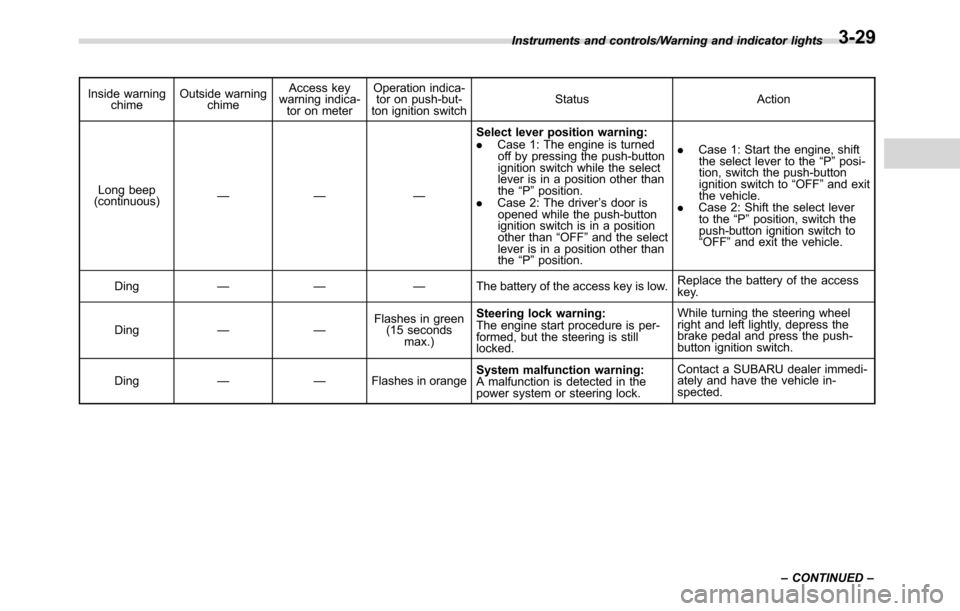
Inside warning
chimeOutside warning
chimeAccess key
warning indica-
tor on meterOperation indica-
tor on push-but-
ton ignition switchStatus Action
Long beep
(continuous)—— —Select lever position warning:
.Case 1: The engine is turned
off by pressing the push-button
ignition switch while the select
lever is in a position other than
the“P”position.
.Case 2: The driver’s door is
opened while the push-button
ignition switch is in a position
other than“OFF”and the select
lever is in a position other than
the“P”position..Case 1: Start the engine, shift
the select lever to the“P”posi-
tion, switch the push-button
ignition switch to“OFF”and exit
the vehicle.
.Case 2: Shift the select lever
to the“P”position, switch the
push-button ignition switch to
“OFF”and exit the vehicle.
Ding—— —The battery of the access key is low.Replace the battery of the access
key.
Ding——Flashes in green
(15 seconds
max.)Steering lock warning:
The engine start procedure is per-
formed, but the steering is still
locked.While turning the steering wheel
right and left lightly, depress the
brake pedal and press the push-
button ignition switch.
Ding——Flashes in orangeSystem malfunction warning:
A malfunction is detected in the
power system or steering lock.Contact a SUBARU dealer immedi-
ately and have the vehicle in-
spected. Instruments and controls/Warning and indicator lights
–CONTINUED–
3-29
Page 168 of 572

Instruments and controls/Warning and indicator lights
&Security indicator light
This indicator light shows the status of the
alarm system. It also indicates operation
of the immobilizer system.
!Alarm system
It blinks to show the driver the operational
status of the alarm system. For detailed
information, refer to“Alarm system”F2-
26.
!Immobilizer system
The security indicator light starts blinking
in the following conditions.
For models with“keyless access with
push-button start system”:
.Immediately after the push-button igni-
tion switch is turned to the“OFF”position.
.Immediately after the driver’s door is
opened or closed when all of the following
conditions are met.
–The push-button ignition switch is in
the“ON”or“ACC”position.
–The access key is outside the
vehicle.
–The engine is not running.
In the event that the push-button ignition
switch is pressed to turn it on or to start
the engine carrying an unauthorized key
(for example, the key is unregistered or
the ID code does not match), the power isnot switched to“ON”and the security
indicator light continues blinking.
For models without“keyless access
with push-button start system”:
.Approximately 60 seconds after the
ignition switch is turned from the“ON”
position to the“ACC”or“LOCK”position.
.Immediately after the key is pulled out.
If the indicator light does not blink in the
above conditions, it may indicate that
immobilizer system may be malfunction-
ing. Contact your nearest SUBARU dealer
immediately.
In the event that an unauthorized key (for
example, an unauthorized duplicate) is
used to start the engine, the security
indicator light illuminates. For details
about the immobilizer system, refer to
“Immobilizer”F2-3.
NOTE
.The security indicator light remains
off in the following conditions. This is
normal and does not indicate a mal-
function.
–while the engine is running
–for approximately 60 seconds
after the ignition switch is turned
from the“ON”position to the
“ACC”or“LOCK”/“OFF”position
.Even if the security indicator lightblinks irregularly or its fuse blows (the
light does not blink if its fuse is blown),
the immobilizer system will function
normally.
&Select lever/gear position in-
dicator (CVT models)
Type A
1) Upshift indicator
2) Downshift indicator
3) Select lever/gear position indicator
3-30
Page 177 of 572

&Basic operation
By operating“”or“”of the control
switch, the screens and selection items
can be switched. When the“
/SET”
switch is pulled toward you, the item can
be selected and set.
If there are some useful messages, such
as vehicle information, warning informa-
tion, etc., they will interrupt the current
screen, and appear on the display accom-
panied by a beep. If such a screen is
displayed, take proper action according to
the message shown on the screen.
The warning screen will return to the
original screen after a few seconds. While
the“
”information reminder is shown on
the display, it may be possible to display
the warning screen again. To recall the
message marked with“
”on the display,
pull the“/SET”switch on the steering
wheel toward you.
&Welcome screen and Good-
bye screen
When the driver’s door is opened and
closed after unlocking the door, the
welcome screen will appear on the multi
information display for approximately 20
seconds.
When the ignition switch is turned to the“LOCK”/“OFF”position, the multi informa-
tion display gradually turns off (Good-bye
screen).
NOTE
.The basic screen will be shown
when the ignition switch is turned to
the“ON”position while the welcome
screen is displayed.
.Once the welcome screen appears,
it takes a certain period of time to
display it again.
.If the ignition switch is operated
after unlocking the driver’s door, the
welcome screen will not appear even
when the driver’s door is opened and
closed.
.The welcome screen will disappear
when you lock the driver’s door by
using the remote keyless entry system
(all models) or the keyless access
function (if equipped) while the wel-
come screen is displayed.
.If any of the doors (including the
rear gate) is opened while the welcome
screen is displayed, the door ajar
warning will appear.
.The welcome screen can be set to
on or off. For details, refer to“Welcome
Good-bye Screen”F3-41.
&Warning screen
Example of warning
If there is a warning message or a
maintenance notification, it will appear for
approximately 3 seconds. Take the appro-
priate actions based on the messages
indicated.
&Basic screens
By operating the“”or“”switch on the
steering wheel, you can change the
screen that is always displayed.
Instruments and controls/Multi information display (models with type B combination meter)
–CONTINUED–3-39
Page 182 of 572

Instruments and controls/Multi function display
&Welcome screen
When the door is unlocked and the
driver’s door is opened, the welcome
screen will appear for a short time.
NOTE
.The welcome screen will disappear
when the ignition switch is turned to
the“ON”position while the welcome
screen is displayed.
.If any of the doors (including the
rear gate) is opened while the welcome
screen is displayed, the door ajar
warning will appear.
.The welcome screen can be set to
on or off. For details, refer to“Bypass
screen setting”F3-71.
.For a certain period of time after the
welcome screen has once appeared, it
may not appear again even when thedriver’s door is opened again. This
does not indicate a malfunction.
&Date screen
If you have set the date and time in the
selection screen, after the welcome
screen is displayed, the current date will
be displayed for a certain period of time. If
“On/Off setting”is set to“On”in the
“Maintenance settings”, the date screen
will be displayed after the self-check
screen.
!Birthday/anniversary screen
Example of notification on an anniversary
If you have set a birthday or anniversary,
after the date screen is displayed, the
notification (reminder) will be displayed for
a certain period of time from 7 days priorto the set date.
NOTE
.Displaying the birthday/anniversary
screen can be set to on or off. Refer to
“Bypass screen setting”F3-71.
.Up to five items can be set for
birthdays and anniversaries respec-
tively. Refer to“Selection screen”F3-
53.
&Ending screen
If“Eco Summary”is set to“On”in the
“Bypass screen setting”, the“Fuel con-
sumption results screen”will be displayed
before the screen turns off when the
ignition switch is turned to the“LOCK”/
“OFF”position.
3-44