2017 RENAULT ALASKAN lock
[x] Cancel search: lockPage 155 of 340
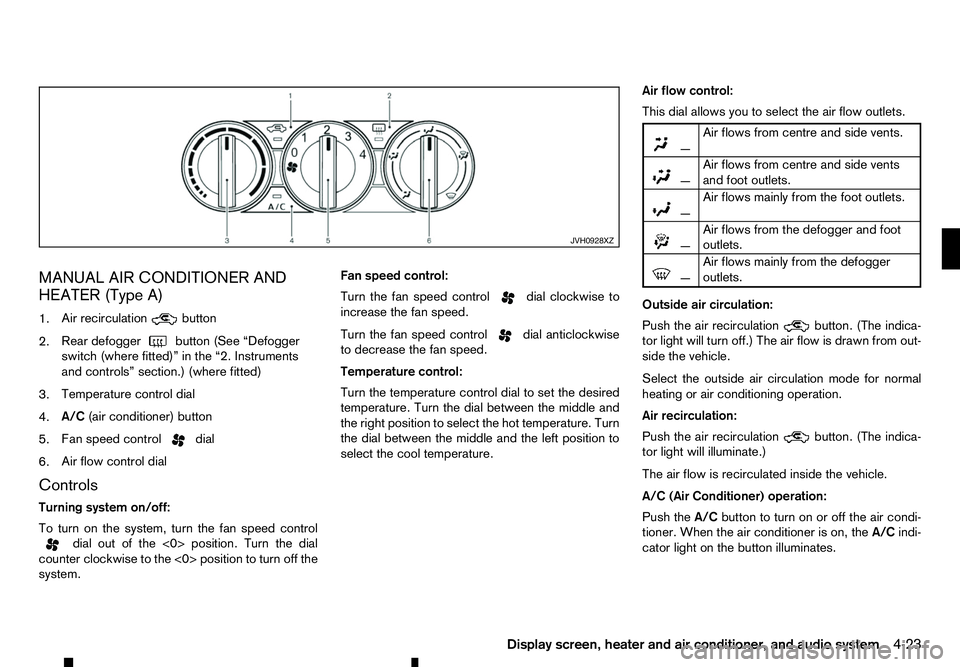
MANUAL AIR CONDITIONER AND
HEATER (Type A)
1. Air recirculation button
2. Rear defogger
button (See “Defogger
switch (where fitted)” in the “2. Instruments
and controls” section.) (where fitted)
3. Temperature control dial
4. A/C
(air conditioner) button
5. Fan speed control dial
6. Air flow control dial
Controls
Turning system on/off:
To turn on the system, turn the fan speed control dial out of the <0> position. Turn the dial
counter clockwise to the <0> position to turn off the
system. Fan speed control:
Turn the fan speed control dial clockwise to
increase the fan speed.
Turn the fan speed control dial anticlockwise
to decrease the fan speed.
Temperature control:
Turn the temperature control dial to set the desired
temperature. Turn the dial between the middle and
the right position to select the hot temperature. Turn
the dial between the middle and the left position to
select the cool temperature. Air flow control:
This dial allows you to select the air flow outlets.
m —
Air
flows from centre and side vents.
m
—
Air
flows from centre and side vents
and foot outlets.
m —
Air
flows mainly from the foot outlets.
m
—
Air
flows from the defogger and foot
outlets.
m —
Air
flows mainly from the defogger
outlets.
Outside air circulation:
Push the air recirculation button. (The indica-
tor light will turn off.) The air flow is drawn from out-
side the vehicle.
Select the outside air circulation mode for normal
heating or air conditioning operation.
Air recirculation:
Push the air recirculation button. (The indica-
tor light will illuminate.)
The air flow is recirculated inside the vehicle.
A/C (Air Conditioner) operation:
Push the A/Cbutton to turn on or off the air condi-
tioner. When the air conditioner is on, the A/Cindi-
cator light on the button illuminates. JVH0928XZ
Display screen, heater and air conditioner, and audio system
4-23
Page 158 of 340

MANUAL AIR CONDITIONER AND
HEATER (Type B)
1. A/C
button/Fan speed control dial
2. Air flow control buttons
3. Temperature control dial
4. Front defogger button
5. Rear defogger
button (See “Defogger
switch (where fitted)” in the “2. Instruments
and controls” section.) (where fitted)
6. Air recirculation button
Controls
Turning system on/off:
To turn on the system, turn the fan speed control dial out of the
anticlockwise to the
system. Fan speed control:
Turn the fan speed control dial clockwise to
increase the fan speed.
Turn the fan speed control dial anticlockwise
to decrease the fan speed.
Ventilation:
This mode directs outside air from the side and
centre vents.
1. Push the air recirculation button. (The indi-
cator light will turn off.)
2. Push the button. (The indicator light will
turn on.)
3. Turn the fan speed control dial to the de-
sired position.
4. Turn the temperature control dial to the desired position. Temperature control:
Turn the temperature control dial to set the desired
temperature. Turn the dial between the middle and
the right position to select the hot temperature. Turn
the dial between the middle and the left position to
select the cool temperature.
Air flow control:
Push one of the air flow control buttons to select the
air flow outlets.
m
—
Air
flows mainly from centre and side
vents.
m —
Air
flows mainly from centre and side
vents and foot outlets.
m —
Air
flows mainly from the foot outlet
and partly from the defogger.
m —
Air
flows mainly from the defogger and
foot outlets.
Outside air circulation:
Push the air recirculation button. (The indica-
tor light will turn off.) The air flow is drawn from out-
side the vehicle.
Select the outside air circulation mode for normal
heating or air conditioning operation.
Air recirculation:
Push the air recirculation button on. (The indi-
cator light will illuminate.)
The air will recirculate inside the vehicle. JVH0888XZ
4-26 Display screen, heater and air conditioner, and audio system
Page 167 of 340
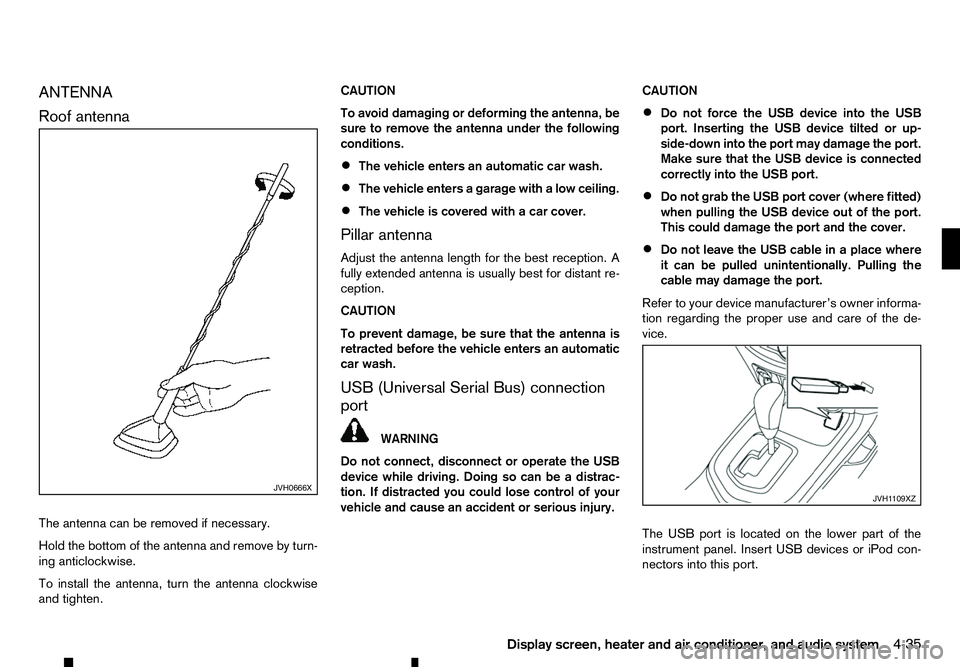
ANTENNA
Roof
antenna
The antenna can be removed if necessary.
Hold the bottom of the antenna and remove by turn-
ing anticlockwise.
To install the antenna, turn the antenna clockwise
and tighten. CAUTION
To avoid damaging or deforming the antenna, be
sure to remove the antenna under the following
conditions.
• The vehicle enters an automatic car wash.
• The vehicle enters
agarage with alow ceiling.
• The vehicle is covered with
acar cover.
Pillar antenna
Adjust the antenna length for the best reception. A
fully extended antenna is usually best for distant re-
ception.
CAUTION
To prevent damage, be sure that the antenna is
retracted before the vehicle enters an automatic
car wash.
USB (Universal Serial Bus) connection
port WARNING
Do not connect, disconnect or operate the USB
device while driving. Doing so can be adistrac-
tion. If distracted you could lose control of your
vehicle and cause an accident or serious injury. CAUTION
• Do not force the USB device into the USB
port. Inserting the USB device tilted or up-
side-down into the port may damage the port.
Make sure that the USB device is connected
correctly into the USB port.
• Do not grab the USB port cover (where fitted)
when pulling the USB device out of the port.
This could damage the port and the cover.
• Do not leave the USB cable in
aplace where
it can be pulled unintentionally. Pulling the
cable may damage the port.
Refer to your device manufacturer’s owner informa-
tion regarding the proper use and care of the de-
vice.
The USB port is located on the lower part of the
instrument panel. Insert USB devices or iPod con-
nectors into this port. JVH0666X
JVH1 109XZ
Display screen, heater and air conditioner, and audio system 4-35
Page 170 of 340

AUDIO MAIN OPERATION
The audio unit operates when the ignition switch is
in ACC or ON position.
m Power
ON/OFF button
Press the button to switch on the audio unit. If
the audio unit was switched off using the ignition
switch, it can also be switched on with the ignition
switch. The source that was playing immediately
before the unit was switched off will resume playing
and the volume will be set to the previous volume
level.
The audio unit can be switched off by pressing ,
or by turning the ignition switch to the “OFF” or
LOCK position. Volume (VOL) level control
Turn the
adjust the volume level.
The audio unit is equipped with aspeed control vol-
ume function, this means that the audio system au-
tomatically adjusts the volume level in relation to
vehicle speed. For details, see “[Speed Volume]
menu” later in this section.
RADIO OPERATION
When the (power ON/OFF) button is pressed,
the audio unit will switch on with the last received
radio station, if the audio unit was previously
switched off in radio mode. The radio is able to receive multiple kinds of audio
transmissions:
–FM
–D
AB (Digital Audio Broadcasting) indicated as
DR (where fitted)
–AM
Radio band select buttons
Press the
transmission source as follows:
FM1 →FM2 →DR1 →DR2 →AM →FM1
When
come on at the last received radio station. If audio is
already playing using one of the other input sources
(iPod, Bluetooth, CD, USB, AUX-in) pressing the
mode and the last received radio station will be se-
lected.
Setting preset stations
Auto populating the [FM List]: When the
1.5 seconds the six stations with the strongest sig-
nals are stored in the preset (1 to 6) buttons of the
band. During the search, anotification message
[Updating FM List] appears in the display and the
sound is muted until the operation is complete. Once
completed, the radio reverts to the previously se-
lected radio station. Manual tuning
When adjusting the broadcasting station frequency
manually access the [FM List] and turn the
Page 171 of 340
![RENAULT ALASKAN 2017 Owners Manual Preset station buttons
➀➁➂➃➄➅
Pressing apreset button for less than 2seconds will
select the stored radio station.
Pressing apreset button for more than 2seconds
while in the [FM list] or](/manual-img/7/58394/w960_58394-170.png "RENAULT ALASKAN 2017 Owners Manual Preset station buttons
➀➁➂➃➄➅
Pressing apreset button for less than 2seconds will
select the stored radio station.
Pressing apreset button for more than 2seconds
while in the [FM list] or")
Preset station buttons
➀➁➂➃➄➅
Pressing apreset button for less than 2seconds will
select the stored radio station.
Pressing apreset button for more than 2seconds
while in the [FM list] or radio main screen will cause
the station currently being received to be stored
against that preset button.
• Twelve stations (if available) can be stored in the
FM bands. (Six each for FM1 and FM2)
• Twelve stations (if available) can be stored in the
DR bands. (Six each for DR1 and DR2) (where
fitted)
• Six stations (if available) can be set for the AM
band.
If the battery is disconnected, or if the fuse blows,
the radio memory will be erased. In that case, reset
the desired stations after battery connection or fuse
replacement.
DAB and Radio Data System (RDS)
operation (where fitted)
The RDS is asystem through which encoded digital
information is transmitted by FM radio stations in
addition to the normal FM radio broadcasting. The
RDS provides information services such as station
name, traffic information, or news.
DAB (Digital Audio Broadcast) NOTE
• When in DR mode operation is similar to FM
mode but may slightly differ.
• In some countries or regions, some of these
services may not be available.
Alternative Frequency (AF) mode:
The AF mode operates in the FM (radio) mode.
• The AF mode operates in the FM (radio), AUX or
CD mode (if FM was previously selected in the
radio mode).
• The AF function compares signal strengths and
selects the station with the optimum reception
conditions for the currently tuned-in station.
DAB and RDS functions
Programme Service (PS) function (station name
display function):
–F M:
When an RDS station is tuned in with seek or
manual tuning, the RDS data is received and the
PS name is displayed.
–D R:
When astation is tuned in with seek or manual
tuning, the data is received and the PS name is
displayed.
TA Traffic announcement
This function operates in FM/DR (Radio) mode. This
function will still operate in the background if any
media source is selected (CD, USB or MEDIA
mode). •
Pressing the
The TA indicator is displayed while TA mode is
on.
• When
switched off and the TA indicator will disappear
from the display.
Traffic announcement interrupt function:
When atraffic announcement is received, the an-
nouncement is tuned in and the display shows a
notification message with the radio station name e.g.
[TA: Radio 1].
Once the traffic announcement has finished, the unit
returns to the source that was active before the traf-
fic announcement started.
If
the traffic announcement interrupt mode is can-
celled. The TA mode returns to the standby mode
and the audio unit returns to the previous source.
SETUP BUTTON
To configure [Audio], [Clock], [Radio], and [Lan-
guage] settings, perform the following procedure:
1. Press the
4-39
Page 172 of 340
![RENAULT ALASKAN 2017 Owners Manual 2. Turn the
<MENU> dial clockwise or anticlock-
wise, the display will appear in the following or-
der:
[Audio] ⇔[Clock] ⇔[Radio] ⇔[Language]
After the desired levels have been set, press either](/manual-img/7/58394/w960_58394-171.png "RENAULT ALASKAN 2017 Owners Manual 2. Turn the
<MENU> dial clockwise or anticlock-
wise, the display will appear in the following or-
der:
[Audio] ⇔[Clock] ⇔[Radio] ⇔[Language]
After the desired levels have been set, press either")
2. Turn the
Page 173 of 340
![RENAULT ALASKAN 2017 Owners Manual [Set Time]:
Select [Set Time] then adjust the clock as follows:
1. The hour display will start flashing. Turn the <MENU> dial to adjust the hour.
2. Press the <ENTER>button. The minute display
will st](/manual-img/7/58394/w960_58394-172.png "RENAULT ALASKAN 2017 Owners Manual [Set Time]:
Select [Set Time] then adjust the clock as follows:
1. The hour display will start flashing. Turn the <MENU> dial to adjust the hour.
2. Press the <ENTER>button. The minute display
will st")
[Set Time]:
Select [Set Time] then adjust the clock as follows:
1. The hour display will start flashing. Turn the
Page 175 of 340

When the
➄
button is pressed repeatedly,
further information about the track can be displayed
along with the track title as follows:
CD:
Track time →Artist name →Album title →Track
time
CD with MP3/WMA:
Track time →Artist name →Album title →Folder
name →Track time
The track name is always displayed.
Track details:
Al ong press on the ➄
button will turn the
display into adetailed overview and after afew sec-
onds it returns to the main display, or press ➄
briefly.
Quick search:
When aMP3 CD with recorded music information
tags (ID3–text tags) is being played from list view
mode, aquick search can be performed to find a
track from the list.
Push the
➅button then turn the