Page 122 of 340

WARNING
• Fuel is extremely flammable and highly explo-
sive under certain conditions. You could be
burned or seriously injured if it is misused or
mishandled. Always stop the engine and do
not smoke or allow open flames or sparks
near the vehicle when refuelling.
• Fuel may be under pressure. Turn the cap a
half of
aturn, and wait for any “hissing” sound
to stop to prevent fuel from spraying out and
possibly causing personal injury. Then remove
the cap.
• Use only an original equipment type fuel filler
cap as
areplacement. It has abuilt-in safety
valve needed for proper operation of the fuel
system and emission control system. An in-
correct cap can result in aserious malfunc-
tion and possible injury. OPENING FUEL FILLER LID
Fuel filler lid opener switch
To open the fuel filler lid, push the fuel filler lid opener
switch located on the lower side of the instrument
panel.
To lock the fuel filler lid, close the lid until it securely
locks. FUEL FILLER CAP
Type A
The fuel filler cap is
aratcheting type. Turn the cap
anticlockwise ➀to remove. Tighten the cap clock-
wise ➁until ratchet clicks, more than twice, after
refuelling.
Put the fuel filler cap on the cap holder j
Aw hile
refuelling.
CAUTION
If fuel is spilled on the vehicle body, flush it away
with water to avoid paint damage. NIC2736 JVP021 1XZ
FUEL FILLER LID AND CAP
3-18
Pre-driving checks and adjustments
Page 123 of 340
Type B
To open the fuel filler cap, turn the key anticlockwise
➀ .
Turn the fuel filler cap anticlockwise ➁after the
cap is unlocked. The fuel filler cap is
ascrew-on ratcheting type.
After refuelling, tighten the cap clockwise until more
than 2ratcheting clicks are heard. The fuel filler cap
locks automatically when it is tightened.
The AdBlue® filler lid➀is located on the right
hand side of the vehicle.
OPENING AdBlue® FILLER LID
To open the AdBlue® filler lid, push the AdBlue®
filler lid slightly and release.
To close the AdBlue® filler lid, close the lid until it
securely locks in place. JVP0370XZ NDI1684
NDI1646
AdBlue® FILLER LID AND CAP
Pre-driving checks and adjustments 3-19
Page 124 of 340

LOCKING AdBlue® FILLER LID
The AdBlue® filler lid is locked and unlocked using
the Keyless Entry System, see “Remote Control Key
system (where fitted)” earlier in this section for addi-
tional details.
AdBlue® FILLER CAP
The AdBlue® filler cap is anon-ratcheting type. Turn
the cap anticlockwise ➀to remove. Tighten the
cap clockwise ➁until tight.
CAUTION
If AdBlue® is spilled on the vehicle body, flush it
away with water to avoid paint damage. WARNING
• While driving, never allow anyone to ride in
the cargo area. Abrupt braking or stopping
could lead to personal injury or death.
• Do not drive the vehicle with the tailgate down.
• Properly secure all cargo with ropes or straps
to help prevent it from sliding or shifting. In a
sudden stop or collision, unsecured cargo
could cause personal injury.
TAILGATE
Locking or unlocking tailgate
(where fitted)
To lock the tailgate, insert the key to the tailgate key
cylinder and turn the key clockwise ➀.
To unlock the tailgate, turn the key anticlockwise ➁ . For Remote Control Key equipped models, see
“Mechanical key” earlier in this section for removing
the mechanical key.
Opening the tailgate
To open the tailgate, pull the tailgate handle ➀and
lower the tailgate. The support wires will hold the
gate open.
• The weight of the cargo load must be evenly dis-
tributed over both the front and the rear axles.
• All cargo should be securely fastened with ropes
or straps to prevent it from shifting or sliding
within the vehicle. WARNING
• Do not drive the vehicle with the tailgate down.
• While driving, never allow anyone to ride in
the cargo area. Abrupt braking or stopping
could lead to personal injury or death. NDI1647
SP A2696Z NP A1529
CARGO BED (where fitted)
3-20 Pre-driving checks and adjustments
Page 125 of 340
Closing the tailgate
When closing the tailgate, make sure that the latches
or levers are securely locked.
TIE DOWN HOOKS (where fitted)
For your convenience, four tie down hooks are
placed on the inside of the cargo bed. These may be
used to help secure cargo loaded into the cargo
bed.
• The weight of the cargo load must be evenly dis-
tributed over both the front and rear axles.
• All cargo should be securely fastened with ropes
or straps to prevent it from shifting or sliding
within the vehicle.
C-CHANNEL SYSTEM (where fitted) WARNING
• Properly install and tighten the tie-down cleats
into the C-Channel system. Also, do not at-
tach any rope or straps directly to the chan- nel. Failure to properly install the tie-down
cleats or attaching ropes or straps directly to
the channel can cause the cargo to become
unsecured. In
asudden stop or collision, un-
secured cargo could cause personal injury.
• Properly secure all cargo with ropes or straps
to help prevent it from sliding or shifting. In a
sudden stop or collision, unsecured cargo
could cause personal injury.
• Do not place cargo higher than the seatbacks.
In
as udden stop or collision, unsecured cargo
could cause personal injury.
• Overloading not only can shorten the life of
your vehicle and the tyre, but can also cause
unsafe vehicle handling and longer braking
distances. This may cause
apremature tyre
failure which could result in aserious acci-
dent and personal injury. Failures caused by
overloading are not covered by the vehicle’s
warranty.
• Do not install accessories over the gap be-
tween the front and rear side channels. Doing
so could affect the rear structure in certain
rear impacts, which could result in serious
injury.
The C-Channel system allows you to move tie-down
clamps in the bed to the best location to secure a
load.
The tie-down cleats must be installed so the clamp
is properly seated in the notches in the rail. If the tie- down cleat is not seated in the notches, it will not be
properly tightened. The bolt in the centre of the cleat
must be securely tightened.
Check the tightness of the tie-down cleat periodi-
cally during
atrip to make sure the centre bolt has
not become loose.
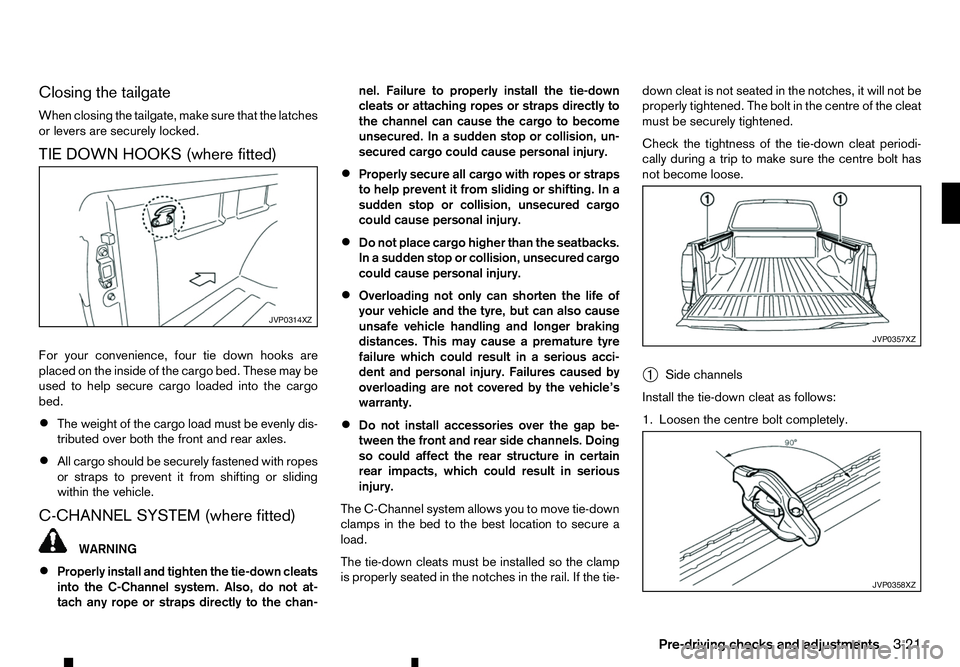
➀ Side channels
Install the tie-down cleat as follows:
1. Loosen the centre bolt completely. JVP0314XZ
JVP0357XZ
JVP0358XZ
Pre-driving checks and adjustments
3-21
Page 126 of 340
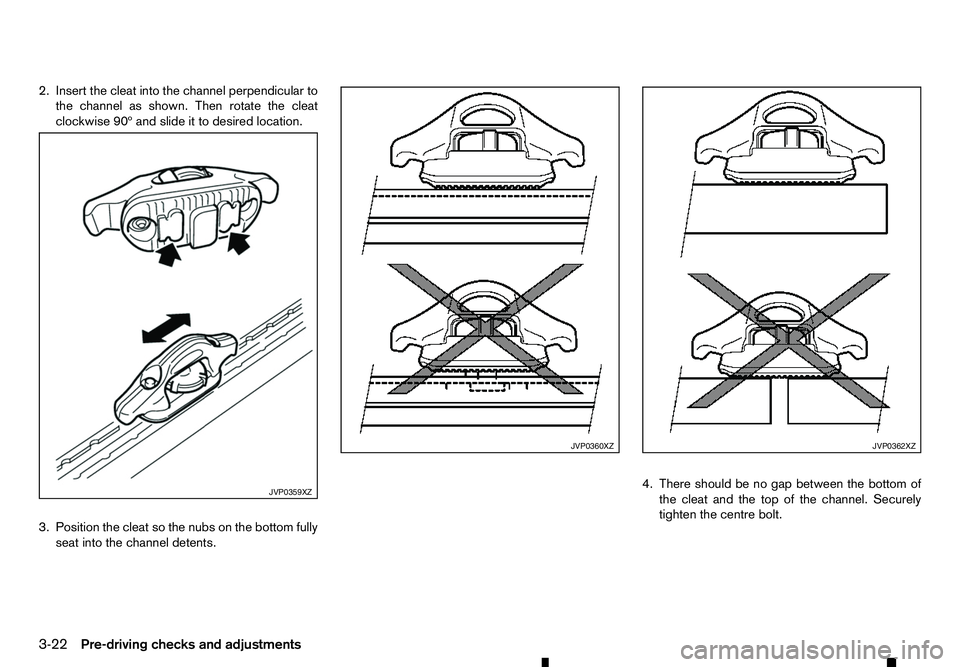
2. Insert the cleat into the channel perpendicular to
the channel as shown. Then rotate the cleat
clockwise 90º and slide it to desired location.
3. Position the cleat so the nubs on the bottom fully seat into the channel detents. 4. There should be no gap between the bottom of
the cleat and the top of the channel. Securely
tighten the centre bolt. JVP0359XZ JVP0360XZ JVP0362XZ
3-22 Pre-driving checks and adjustments
Page 127 of 340
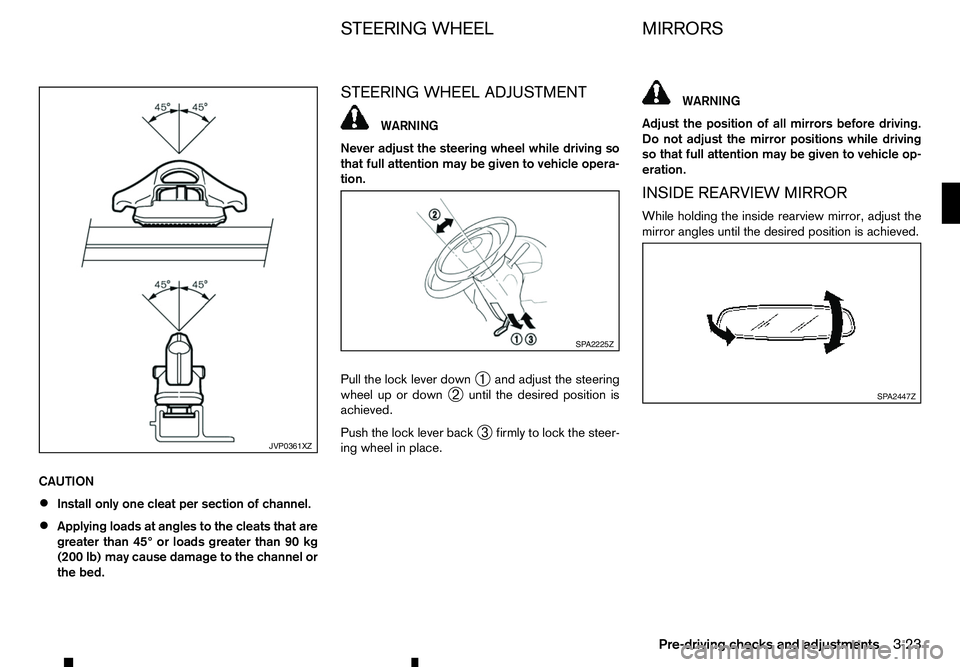
CAUTION
•
Install only one cleat per section of channel.
• Applying loads at angles to the cleats that are
greater than 45° or loads greater than 90 kg
(200 lb) may cause damage to the channel or
the bed. STEERING WHEEL ADJUSTMENT WARNING
Never adjust the steering wheel while driving so
that full attention may be given to vehicle opera-
tion.
Pull the lock lever down ➀and adjust the steering
wheel up or down ➁until the desired position is
achieved.
Push the lock lever back ➂firmly to lock the steer-
ing wheel in place. WARNING
Adjust the position of all mirrors before driving.
Do not adjust the mirror positions while driving
so that full attention may be given to vehicle op-
eration.
INSIDE REARVIEW MIRROR
While holding the inside rearview mirror, adjust the
mirror angles until the desired position is achieved. JVP0361XZ SP A2225Z
SP A2447Z
STEERING WHEEL
MIRRORS
Pre-driving checks and adjustments 3-23
Page 136 of 340

HOW TO USE BACK BUTTON
Push the button to return to the previous
screen. Vehicle information can be checked and various set-
tings can be adjusted on the display.
NOTE
Designs and items displayed on the screen may
vary depending on the models and specifications.
HOW TO USE INFO BUTTON
Push the button to display the following
menu items on the display screen.
Available items:
• [Traffic Messages]
• [Eco Score]
[Traffic Messages] (where fitted)
Traffic Messages can be displayed on the display
screen when available. Refer to the separate Navi-
gation System Owner’s Manual for details.
[Eco Score] (where fitted)
The [Eco Score] feature analyses driving behaviour
and provides an overall score. Refer to the separate
Navigation System Owner’s Manual for details. HOW TO USE BUTTON
Designs and items displayed on the screen may
vary depending on the models and specifications.
Push the button to view and adjust the
following setting items.
Available items:
•
[Audio]
• [System]
–[
Display]
–[ Clock]
–[ Language]
–[ Camera Settings]
–[ Temperature Unit]
–[ Touch Click]
–[ Beep Tones]
–[ Factory Settings] JVH0647XZ
Example
VEHICLE INFORMATION AND SETTINGS (models with navigation system)
4-4 Display screen, heater and air conditioner, and audio system
Page 137 of 340
![RENAULT ALASKAN 2017 Owners Manual –[
Software Licenses]
• [Navigation]
• [Telephone
&Bluetooth]
• [Traffic Messages]
• [Radio]
[Audio] settings
Audio settings can be adjusted from the audio setup
screen.
This item is availab](/manual-img/7/58394/w960_58394-136.png "RENAULT ALASKAN 2017 Owners Manual –[
Software Licenses]
• [Navigation]
• [Telephone
&Bluetooth]
• [Traffic Messages]
• [Radio]
[Audio] settings
Audio settings can be adjusted from the audio setup
screen.
This item is availab")
–[
Software Licenses]
• [Navigation]
• [Telephone
&Bluetooth]
• [Traffic Messages]
• [Radio]
[Audio] settings
Audio settings can be adjusted from the audio setup
screen.
This item is available only when the audio system is
turned on.
1. Push the button.
2. Touch the [Audio] key.
3. Select the item you wish to adjust.
[Bass]/[Treble]/[Balance]/[Fade]:
Touch the adjustment bar next to the corresponding
keys on the display to adjust the tone quality and
speaker balance.
The levels of these features can also be adjusted
with the /Scroll dial.
[Speed Sensitive Vol.]:
Speed sensitive volume function increases the vol-
ume of the audio system as the speed of the vehicle
increases. Choose the desired effect level from 0
(OFF) to 5. The higher the setting, the more the vol-
ume increases in relation to vehicle speed. [AUX Level]:
This feature controls the volume level of incoming
sound when an auxiliary device is connected to the
system. Select the level from [Quiet], [Medium], and
[Loud].
[System settings]
Various system settings can be adjusted from the
system settings.
1. Push the button.
2. Select the [System] key.
3. Select the item you wish to adjust.
[Display]:
Select the corresponding keys to adjust the set-
tings.
• [Brightness]:
Adjusts the brightness of the display.
• [Display Mode]:
Adjusts to fit the level of lighting in the vehicle.
Touch the [Display Mode] key to cycle through
options of the mode ([Day], [Night] and [Auto]).
• [Scroll Direction]:
Adjusts the direction of the menu scroll. Choose
either the up arrow or down arrow. [Clock]:
Select the corresponding keys to adjust the set-
tings.
• [Time Format]:
The time format setting can be selected from 12
hour and 24 hour formats.
• [Date Format]:
The day, month and year display can be selected
from five formats.
• [Clock Mode]:
Select the clock mode from [Manual], [Time
Zone] and [Auto].
When [Manual] is selected, you can set the clock
mode manually with the [Set Clock Manually]
key.
Select [Auto] to automatically maintain the time
using GPS.
• [Set Clock Manually]:
Mode (AM/PM) (where fitted), Hours, Minutes,
Day, Month and Year can be set manually if
“Manual” is selected in the Clock Mode setting.
• [Daylight Savings Time]:
Turns the daylight savings time ON or OFF.
• [Time Zone]:
Select the applicable time zone from the list.
Display screen, heater and air conditioner, and audio system 4-5