2017 RENAULT ALASKAN lights
[x] Cancel search: lightsPage 91 of 340
To cancel the flashing, move the lever to the oppo-
site direction.
See “Settings” earlier in this section to enable/dis-
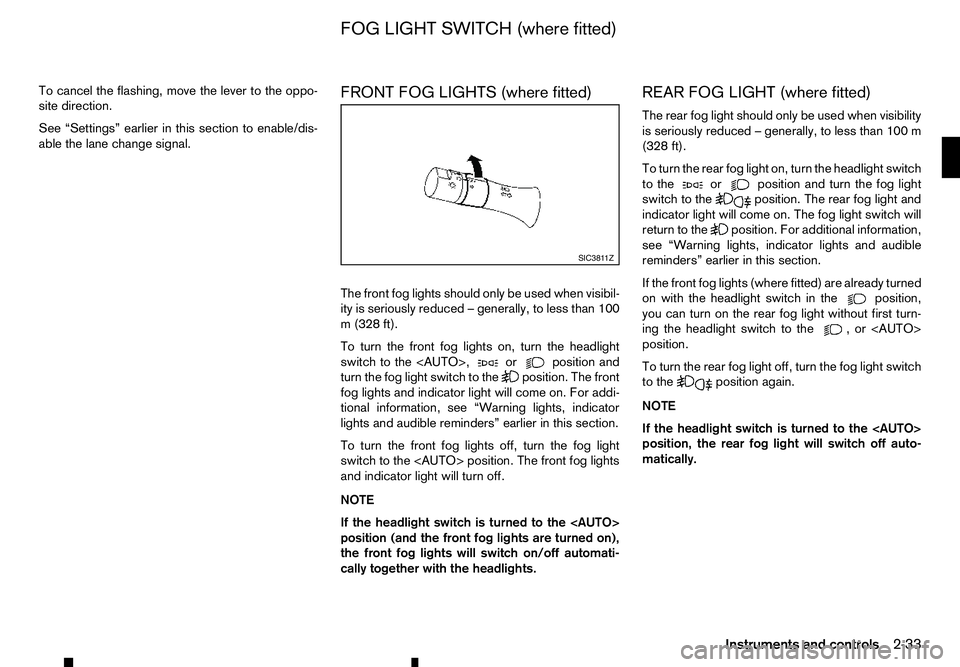
able the lane change signal. FRONT FOG LIGHTS (where fitted)
The front fog lights should only be used when visibil-
ity is seriously reduced
–generally, to less than 100
m( 328 ft).
To turn the front fog lights on, turn the headlight
switch to the
turn the fog light switch to the position. The front
fog lights and indicator light will come on. For addi-
tional information, see “Warning lights, indicator
lights and audible reminders” earlier in this section.
To turn the front fog lights off, turn the fog light
switch to the
and indicator light will turn off.
NOTE
If the headlight switch is turned to the
position (and the front fog lights are turned on),
the front fog lights will switch on/off automati-
cally together with the headlights. REAR FOG LIGHT (where fitted)
The rear fog light should only be used when visibility
is seriously reduced
–generally, to less than 100 m
(328 ft).
To turn the rear fog light on, turn the headlight switch
to the or position and turn the fog light
switch to the position. The rear fog light and
indicator light will come on. The fog light switch will
return to the position. For additional information,
see “Warning lights, indicator lights and audible
reminders” earlier in this section.
If the front fog lights (where fitted) are already turned
on with the headlight switch in the position,
you can turn on the rear fog light without first turn-
ing the headlight switch to the ,o r<
AUTO>
position.
To turn the rear fog light off, turn the fog light switch
to the position again.
NOTE
If the headlight switch is turned to the
position, the rear fog light will switch off auto-
matically. SIC381 1Z
FOG LIGHT SWITCH (where fitted)
Instruments and controls2-33
Page 92 of 340
WARNING
In freezing temperatures, the washer fluid may
freeze on the windscreen and obscure your vi-
sion. Warm the windscreen with the defogger be-
fore you wash the windscreen.
CAUTION
• Do not operate the washer continuously for
longer than 30 seconds.
• Do not operate the washer if the window
washer fluid reservoir is empty.
• If the wiper operation is interrupted by snow
or ice, the wiper may stop moving to protect
its motor. If this occurs, turn the wiper switch
to the OFF position and remove the snow or
ice on and around the wiper arms. In approxi-
mately
1minute, turn the switch on again to
operate the wiper.
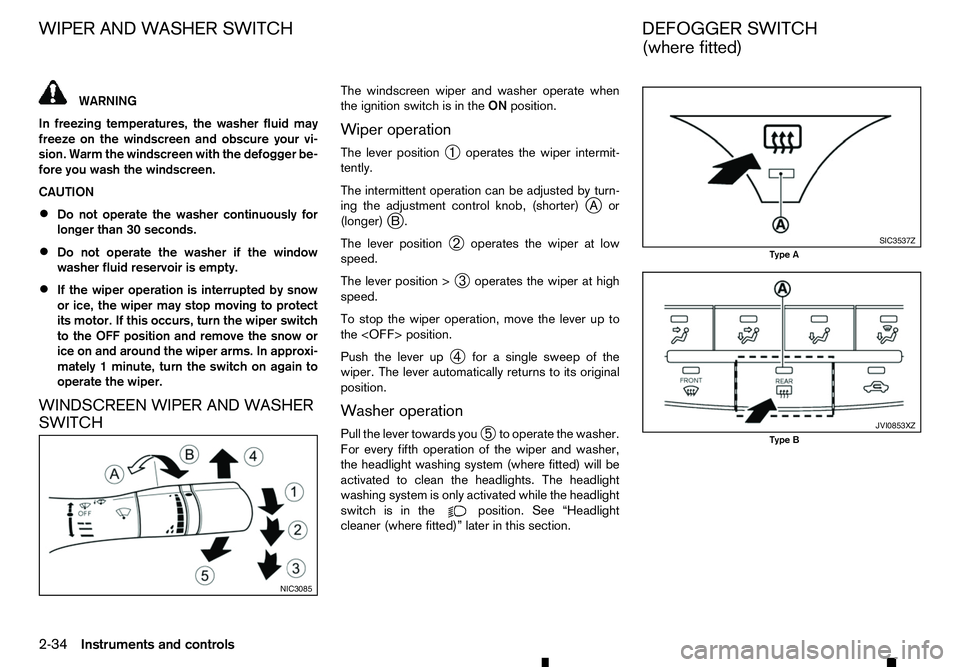
WINDSCREEN WIPER AND WASHER
SWITCH The windscreen wiper and washer operate when
the ignition switch is in the
ONposition.
Wiper operation
The lever position ➀operates the wiper intermit-
tently.
The intermittent operation can be adjusted by turn-
ing the adjustment control knob, (shorter) j
Aor
(longer) j
B.
The lever position ➁operates the wiper at low
speed.
The lever position > ➂operates the wiper at high
speed.
To stop the wiper operation, move the lever up to
the
Push the lever up ➃for
asingle sweep of the
wiper. The lever automatically returns to its original
position.
Washer operation
Pull the lever towards you ➄to operate the washer.
For every fifth operation of the wiper and washer,
the headlight washing system (where fitted) will be
activated to clean the headlights. The headlight
washing system is only activated while the headlight
switch is in the position. See “Headlight
cleaner (where fitted)” later in this section. NIC3085 SIC3537Z
Type A
JVI0853XZ
Type B
WIPER AND WASHER SWITCH
DEFOGGER SWITCH
(where fitted)
2-34 Instruments and controls
Page 93 of 340

The rear window defogger switch operates when
the ignition switch is in the ONposition.
The defogger is used to reduce the moisture, fog or
frost on the rear window and outside rearview mir-
ror (where fitted) surfaces to improve the rear view.
When the defogger switch is pushed, the indicator
light j
Ai lluminates and the rear window defogger operates for approximately 15 minutes. After the
preset time has passed, the defogger will turn off
automatically.
To turn the rear window defogger off manually, push
the defogger switch again.
CAUTION
• When operating the defogger continuously,
be sure to start the engine. Otherwise, it may
cause the battery to discharge.
• When cleaning the inner side of the window,
be careful not to scratch or damage the elec-
trical conductors on the surface of the win-
dow. To clean the headlights, pull the windscreen washer
switch towards you while the headlight switch is in
the position and the ignition switch is in the ON
position.
NOTE
The headlight cleaner will automatically operate
every fifth operation of the wiper and washer
switch.
HEADLIGHT CLEANER SWITCH
(where fitted)
The headlight cleaner operates when the headlight
and turn signal switch is in the position and the
ignition switch is in the ON position.
To operate the headlight cleaner push the headlight
cleaner switch located on the driver’s side, lower
left side of the instrument panel.
CAUTION
• Do not operate the cleaner continuously for
more than 15 seconds. NIC3102
Type C-LHD JVI1022XZ
Type C-RHD SIC2255Z
Headlight cleaner switch (where fitted)
HEADLIGHT CLEANER
(where fitted)
Instruments and controls 2-35
Page 97 of 340

•
This power outlet is not designed for use with
ac igarette lighter unit.
• Do not use accessories that exceed
acom-
bined power draw of 12 volt, 120W (10A)
• Do not use double adapters or more than one
electrical accessory.
• Use this power outlet with the engine running
to avoid discharging the vehicle battery.
• Avoid using when the air conditioner, head-
lights or rear window defogger is on (where
fitted).
• Push the plug in as far as it will go. If good
contact is not made, the plug may overheat or the internal temperature fuse may blow.
• Before inserting or disconnecting
aplug, be
sure that the electrical accessory being used
is turned OFF.
• When not in use, be sure to close the cap. Do
not allow water or any liquid to contact the
outlet. WARNING
• The storage compartments should not be
used while driving so that the full attention
may be given to vehicle operation.
• Keep the storage lids closed while driving to
help prevent injury in an accident or
asudden
stop.
GLOVE BOX
To open the glove box, pull the handle ➀.
To close, push the lid in until the lock latches. CONSOLE BOX
To open the console box lid, push up the knob
j
Aa nd pull up the lid.
To close, push the lid down until the lock latches. JVI1 102XZ JVI1026XZ
STORAGE
Instruments and controls
2-39
Page 101 of 340

If the sunroof does not operate properly after per-
forming the procedure above, have your vehicle
checked by an approved dealer or qualified work-
shop. CAUTION
• Turn off the lights when you leave the vehicle.
• Do not use the lights for extended periods of
time with the engine stopped. This could re-
sult in
adischarged battery.
INTERIOR LIGHT SWITCH
(where fitted)
➀ The interior light can be turned ON regardless
of door position. The light will go off after a
period of time unless the ignition switch is
placed in the ON position when any door is
opened.
➁ The interior lights can be set to operate when
the doors are opened. To turn off the interior
lights when
adoor open, push the switch, the
interior lights will not illuminate, regardless of
door position. The lights will go off when the
ignition switch is placed in the ON position, or
the driver’s door is closed and locked. The lights will also go off after
aperiod of time
when the doors are open.
CONSOLE LIGHT (where fitted)
The console light will turn on whenever the clear-
ance lights or headlights are illuminated.
MAP LIGHTS
Push the button to turn the map lights on. To turn
them off, push the button again. JVI1037XZ JVI1038XZ
JVI1039XZ
INTERIOR LIGHTS
Instruments and controls2-43
Page 102 of 340

MAP LIGHT CONTROL SWITCH
(where fitted)
The map lights control switch has three positions:
ON ➀,O
FF
➁ and centre.
ON position
When the switch is in the ON position ➀,t
he map
lights will illuminate.
OFF position
When the switch is in the OFF position ➁,t
he map
lights will not illuminate, regardless of any other con-
dition.
Centre position
When the switch is in the centre position, the map
lights will illuminate under the following conditions:
• the key is removed from the ignition switch
–r emain on for aperiod of time. •
doors are unlocked by pushing the
UNLOCK button (model with remote key-
less entry system) with the ignition switch in the
LOCK position
–r emain on for aperiod of time.
• any door is opened
–r
emain on while the door is opened. When
the door is closed, the lights go off.
ROOM LIGHT (where fitted)
The room light has athree-position switch.
When the switch is in the ON position ➁,t
he room
light illuminates.
When the switch is in the
➀,
the room light illuminates when adoor is opened. The interior light timer will keep the room light on for
ap
eriod of time when:
• The key is removed from the ignition switch with
all doors closed (models without Remote Con-
trol Key).
• The ignition switch is placed in the OFF position
with all doors closed (models with Remote Con-
trol Key).
• The driver’s door is unlocked without the key in
the ignition switch (models without Remote Con-
trol Key).
• The driver’s door is unlocked when the ignition
switch is in the LOCK position (models with Re-
mote Control Key).
• The doors are unlocked with the UNLOCK button (model with remote keyless entry system).
• The last door is closed without the key in the
ignition switch (models without Remote Control
Key).
The interior light timer will be cancelled when:
• The driver’s door is locked.
• The ignition switch is placed in the ON position.
When the switch is in the OFF position ➂,t
he
room light does not illuminate, regardless of any
condition. SIC4573Z
SIC2489Z
2-44 Instruments and controls
Page 103 of 340

REAR PERSONAL LIGHT (where fitted)
To turn the rear personal lights on, push the switch.
To turn them off, push the switch again.
VANITY MIRROR LIGHTS
(where fitted)
To access the vanity mirror, pull the sun visor down
and flip open the mirror cover. The vanity mirror light illuminates when the vanity
mirror cover is opened. When the cover is closed,
the light will turn off.
BATTERY SAVER SYSTEM
The lights will turn off after aperiod of time when the
lights remain illuminated to prevent the battery from
becoming discharged. SIC3250Z
SIC3869Z
Instruments and controls
2-45
Page 128 of 340

Manual anti-glare type
Pull the adjusting lever ➀when the glare from the
headlights of the vehicle behind you obstructs your
vision at night.
Push the adjusting lever ➁during the day for the
best rearward visibility. Automatic anti-glare type
The inside rearview mirror is designed so that it
automatically changes reflection according to the
intensity of the headlights of the vehicle following
you.
The anti-glare system will be automatically turned on
when you push the ignition switch to the
ONposi-
tion.
When the system is turned on, the indicator light
j Bw ill illuminate and excessive glare from the head-
lights of the vehicle behind you will be reduced.
Push the switch
jAf or3s econds to make the
inside rearview mirror operate normally and the indi-
cator light will turn off. Push the switch again
for 3s
econds to turn the system on.
Do not hang any objects on the mirror or apply
glass cleaner. Doing so will reduce the sensitivity
of the sensor j
C, resulting in improper opera-
tion. Automatic anti-glare type with Reversing
Camera (where fitted)
For further details about the reversing camera
j
A, see “Reversing Camera (where fitted)” in the
“4. Display screen, heater and air conditioner, and
audio system” section.
The inside rearview mirror is designed so that it
automatically changes reflection according to the
intensity of the headlights of the vehicle following
you.
The anti-glare system will be automatically turned on
when you push the ignition switch to the ONposi-
tion.
When the system is turned on, the indicator light j Bw ill illuminate and excessive glare from the head-
lights of the vehicle behind you will be reduced.
Push the button
jCt oturn the system on or
off SP A2143Z
SP A2162Z
NP A1097
3-24 Pre-driving checks and adjustments