2017 PEUGEOT 5008 light
[x] Cancel search: lightPage 178 of 404
176
In case of towing
Driving with a trailer places greater
demands on the towing vehicle and
requires extra care from the driver.
Distribution of loads
F Distribute the load in the trailer so that the heaviest items are as close as possible to
the axle and the nose weight approaches
the maximum permitted without exceeding
it.
Air density decreases with altitude, thus
reducing engine performance. The maximum
towed load must be reduced by 10% for every
1,000
metres of altitude.
Please respect the maximum towable
weights.
Side wind
F Take into account the increased sensitivity to wind.
Cooling
Towing a trailer on a slope increases the
temperature of the coolant.
As the fan is electrically controlled, its cooling
capacity is not dependent on the engine speed.
F
T
o lower the engine speed, reduce your
speed.
The maximum towable load on an incline
depends on the gradient and the exterior
temperature.
In all cases, keep a check on the coolant
temperature.
F
I
f this warning lamp and the
STOP warning lamp come on,
stop the vehicle and switch off
the engine as soon as possible.
New vehicle
Do not pull a trailer before having driven at
least 600
miles (1,000 kilometres).
Braking
Towing a trailer increases the braking distance.
To avoid overheating of the brakes, the use of
engine braking is recommended.
Ty r e s
F Check the tyre pressures of the towing vehicle and of the trailer, observing the
recommended pressures.
Lighting
F Check the electrical lighting and signalling on the trailer and the headlamp beam height
of your vehicle.
For more information on Adjusting the
headlamp beam height , refer to the
corresponding section.
The rear parking sensors will be
deactivated automatically to avoid the
audible signal if a genuine PEUGEOT
towbar is used.
Driving
Page 181 of 404
179
Starting / Switching off
the engine with Keyless
Entry and Starting
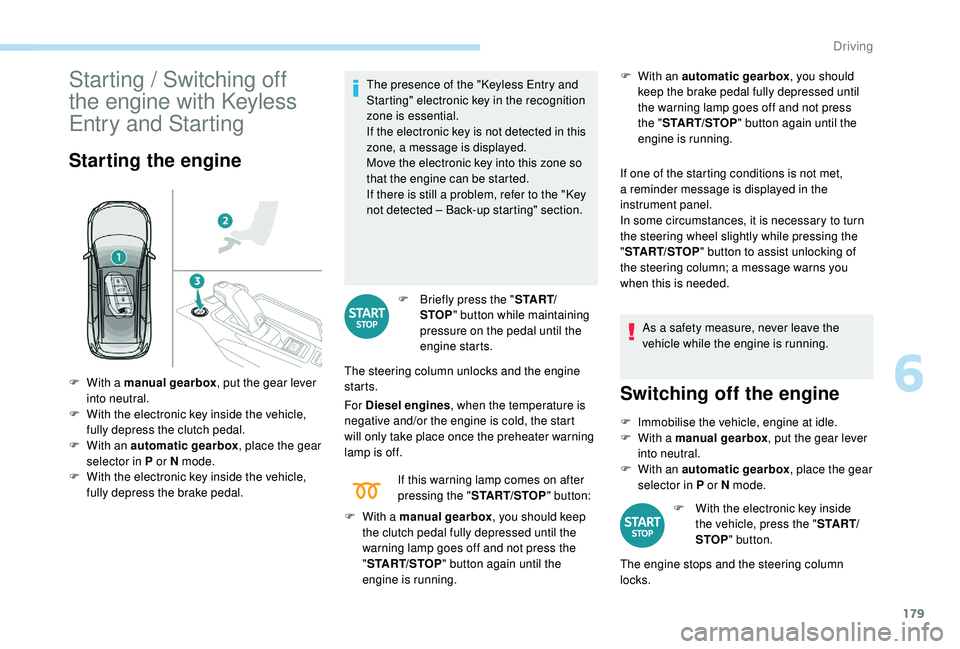
Starting the engine
The presence of the " Keyless Entry and
Starting" electronic key in the recognition
zone is essential.
If the electronic key is not detected in this
zone, a message is displayed.
Move the electronic key into this zone so
that the engine can be started.
If there is still a problem, refer to the "Key
not detected – Back-up starting" section.
F
B
riefly press the " S TA R T/
STOP " button while maintaining
pressure on the pedal until the
engine starts.
The steering column unlocks and the engine
starts.
For Diesel engines , when the temperature is
negative and/or the engine is cold, the start
will only take place once the preheater warning
lamp is off. F
W ith an automatic gearbox
, you should
keep the brake pedal fully depressed until
the warning lamp goes off and not press
the " START/STOP " button again until the
engine is running.
If one of the starting conditions is not met,
a reminder message is displayed in the
instrument panel.
In some circumstances, it is necessary to turn
the steering wheel slightly while pressing the
" START/STOP " button to assist unlocking of
the steering column; a message warns you
when this is needed.
As a safety measure, never leave the
vehicle while the engine is running.
F
W
ith a manual gearbox , put the gear lever
into neutral.
F
W
ith the electronic key inside the vehicle,
fully depress the clutch pedal.
F
W
ith an automatic gearbox , place the gear
selector in P or N mode.
F
W
ith the electronic key inside the vehicle,
fully depress the brake pedal. If this warning lamp comes on after
pressing the "
START/STOP " button:
F
W
ith a manual gearbox , you should keep
the clutch pedal fully depressed until the
warning lamp goes off and not press the
" START/STOP " button again until the
engine is running.
Switching off the engine
F Immobilise the vehicle, engine at idle.
F W ith a manual gearbox , put the gear lever
into neutral.
F
W
ith an automatic gearbox , place the gear
selector in P or N mode.
F
W
ith the electronic key inside
the vehicle, press the " S TA R T/
STOP " button.
The engine stops and the steering column
locks.
6
Driving
Page 182 of 404
180
If the vehicle is not immobilised, the
engine will not stop.
Never leave your vehicle with the
electronic key still inside.
Switching off the engine leads to a loss of
braking assistance.
Switching the ignition on
(without starting)
F Press the "START/STOP" button, the instrument panel
comes on but the engine does
not start.
F
P
ress this button again to switch off the
ignition and allow the vehicle to be locked.
With the ignition on, the system
automatically goes into energy economy
mode to maintain an adequate state of
charge in the battery.
Key not detected
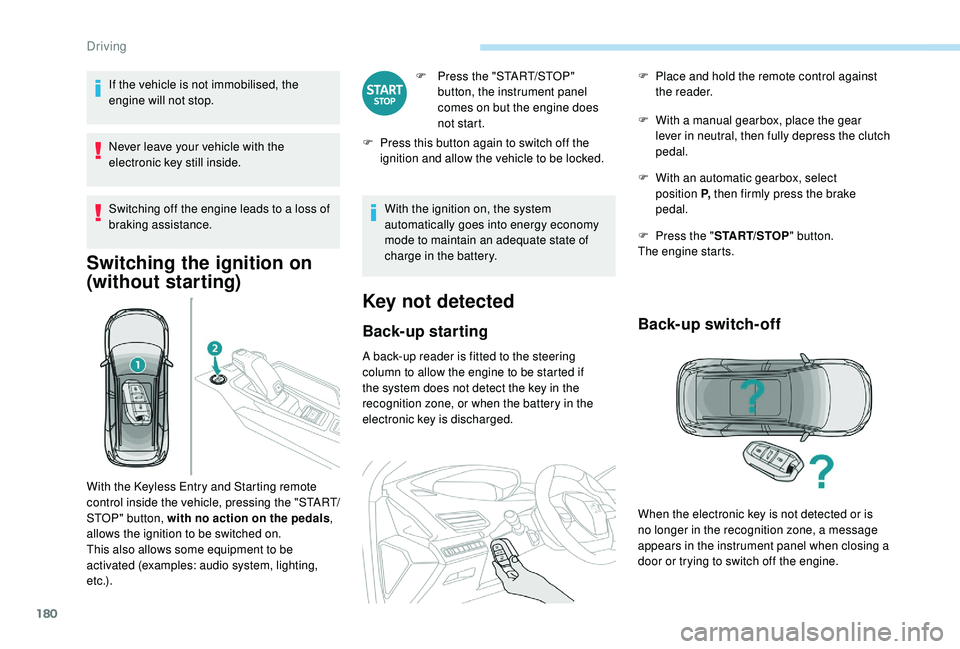
Back-up starting
A back-up reader is fitted to the steering
column to allow the engine to be started if
the system does not detect the key in the
recognition zone, or when the battery in the
electronic key is discharged. F
W
ith a manual gearbox, place the gear
lever in neutral, then fully depress the clutch
pedal.
F
W
ith an automatic gearbox, select
position P, then firmly press the brake
pedal.
F
P
ress the "
START/STOP " button.
The engine starts.
Back-up switch-off
With the Keyless Entry and Starting remote
control inside the vehicle, pressing the "START/
STOP" button, with no action on the pedals ,
allows the ignition to be switched on.
This also allows some equipment to be
activated (examples: audio system, lighting,
e t c .) . F
P
lace and hold the remote control against
the reader.
When the electronic key is not detected or is
no longer in the recognition zone, a message
appears in the instrument panel when closing a
door or trying to switch off the engine.
Driving
Page 191 of 404

189
From neutral N:
F P ress the brake pedal firmly.
F
S
tart the engine.
F
M
aintaining pressure on the brake pedal,
push rear ward to select the automatic
D mode, or for ward, while pressing the
Unlock button to engage reverse R .
Then, from P or N :
F
R
elease the brake pedal.
F
A
ccelerate progressively to automatically
release the electric parking brake.
F
W
ith the parking brake released, the vehicle
then moves off.
In severe wintry conditions (temperature
below -23°C), it is recommended that the
engine be allowed to run for a few minutes
before moving off, to ensure the correct
operation and durability of the engine and
gearbox.Stopping the vehicle
Whatever the state of the gearbox when the
ignition is switched off, P mode is engaged
automatically, with the exception of N , in which
case P mode will be engaged after a delay of
5
seconds (allowing the change to free-wheel).
Check that P mode has been engaged and
that the electric parking brake was applied
automatically; if not, apply it manually.
Operating faults
Malfunction of the gearbox
This is signalled by the illumination
of this warning lamp, accompanied
by the display of a message and an
audible signal, when the ignition is
switched on.
The gearbox switches to back-up mode: drive
mode D is locked in third gear, the steering-
mounted control paddles are inoperative,
Malfunction of the selector
The corresponding indicator lamps
for the selector panel and the
electric parking brake control lever
must be on, as well as the ones in
the instrument panel. mode M is no longer available. You may feel a
pronounced jolt when engaging reverse. This
does not present any risk for the gearbox.
Do not drive faster than 60
mph (100 km/h),
keeping to the speed limit.
Go to a PEUGEOT dealer or a qualified
workshop.
In the event of a minor fault
In the event of a serious fault
Stop as soon as it is safe to do so, away
from the traffic, and call a PEUGEOT
dealer or a qualified workshop.
When the ignition is switched off, the
gearbox goes into P mode automatically. You are alerted by the illumination of
this warning lamp. You are alerted by the warning lamp
lighting up, accompanied by the
display of a message and an audible
signal.
In certain cases, the selector lamps may not
come on, but the state of the gearbox is still
displayed in the instrument panel.
Drive cautiously and go to a PEUGEOT or a
qualified workshop.
6
Driving
Page 193 of 404
191
SPORT
Dynamic pack
This pack influences:
- t he acoustic ambience of the engine,
-
t
he level of power assistance for the
steering,
-
acceleration,
-
h
andling gear transitions with the automatic
gearbox,
-
t
he display on the instrument panel of
information about the dynamic parameters
of the vehicle ("PERSONAL" mode).
Activation / Deactivation
F Press this button; the button indicator lamp lights up to
confirm activation of the
function.
The Dynamic pack is also managed
by the i-Cockpit Amplify function.
For more information on the i-Cockpit Amplify
function, refer to the corresponding section.
If the indicator lamp flashes, activation is
not available (example: if Park Assist is
selected).
If the indicator lamp continues flashing for
a long time, contact a PEUGEOT dealer or
a qualified workshop.
Displays
To show this information on the instrument
panel, select the "PERSONAL" mode and then
the type of information required.This telemetry information (power
output, turbocharger pressure, torque,
longitudinal and lateral acceleration, etc.)
is given as a guide only.
Gear shift indicator
(Depending on engine.)
System which reduces fuel consumption by
recommending the most appropriate gear.
Operation
Depending on the driving situation and your
vehicle's equipment, the system may advise
you to skip one (or more) gear(s). You can
follow this instruction without engaging the
intermediate gears.
Gear shift recommendations are for information
only. In fact, the road layout, the traffic density
and safety remain the deciding factors when
choosing the best gear. The driver therefore
remains responsible for deciding whether or not
to follow the indications issued by the system.
This function cannot be deactivated.
With an automatic gearbox, the system is
only active in manual mode.
The information is displayed in the instrument
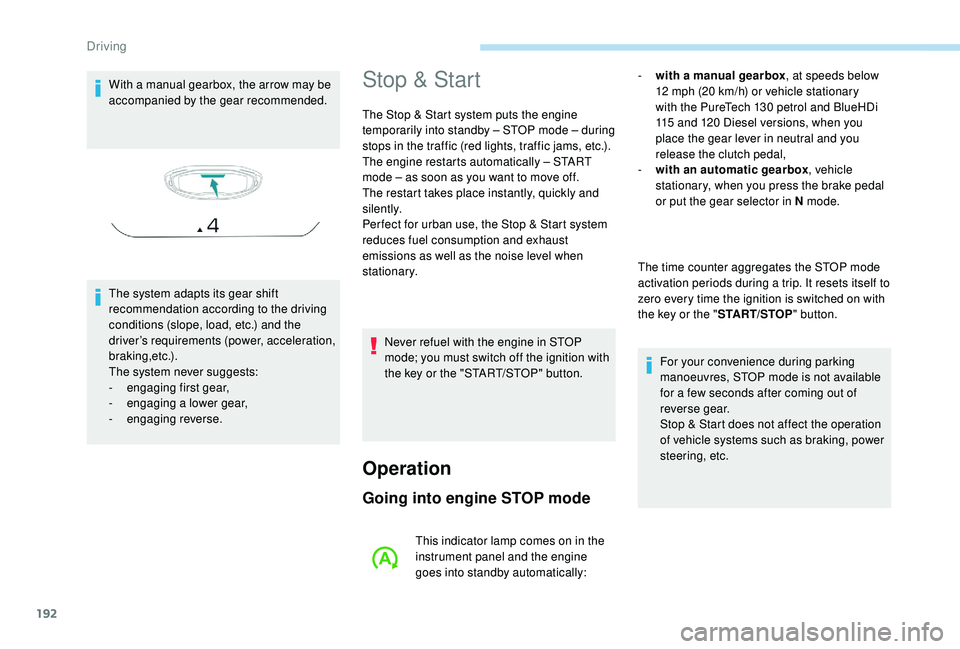
panel in the form of an arrow.
6
Driving
Page 194 of 404
192
With a manual gearbox, the arrow may be
accompanied by the gear recommended.
The system adapts its gear shift
recommendation according to the driving
conditions (slope, load, etc.) and the
driver’s requirements (power, acceleration,
b r a k i n g ,e t c .) .
The system never suggests:
-
e
ngaging first gear,
-
enga
ging a lower gear,
-
enga
ging reverse.Stop & Start
The Stop & Start system puts the engine
temporarily into standby – STOP mode – during
stops in the traffic (red lights, traffic jams, etc.).
The engine restarts automatically – START
mode – as soon as you want to move off.
The restart takes place instantly, quickly and
silently.
Per fect for urban use, the Stop & Start system
reduces fuel consumption and exhaust
emissions as well as the noise level when
stationary.
Operation
Going into engine STOP mode
- with a manual gearbox , at speeds below
12 mph (20 km/h) or vehicle stationary
with the PureTech 130
petrol and BlueHDi
115
and 120 Diesel versions, when you
place the gear lever in neutral and you
release the clutch pedal,
-
w
ith an automatic gearbox , vehicle
stationary, when you press the brake pedal
or put the gear selector in N mode.
The time counter aggregates the STOP mode
activation periods during a trip. It resets itself to
zero every time the ignition is switched on with
the key or the " START/STOP" button.
For your convenience during parking
manoeuvres, STOP mode is not available
for a few seconds after coming out of
reverse gear.
Stop & Start does not affect the operation
of vehicle systems such as braking, power
steering, etc.
Never refuel with the engine in STOP
mode; you must switch off the ignition with
the key or the "START/STOP" button.
This indicator lamp comes on in the
instrument panel and the engine
goes into standby automatically:
Driving
Page 200 of 404
198
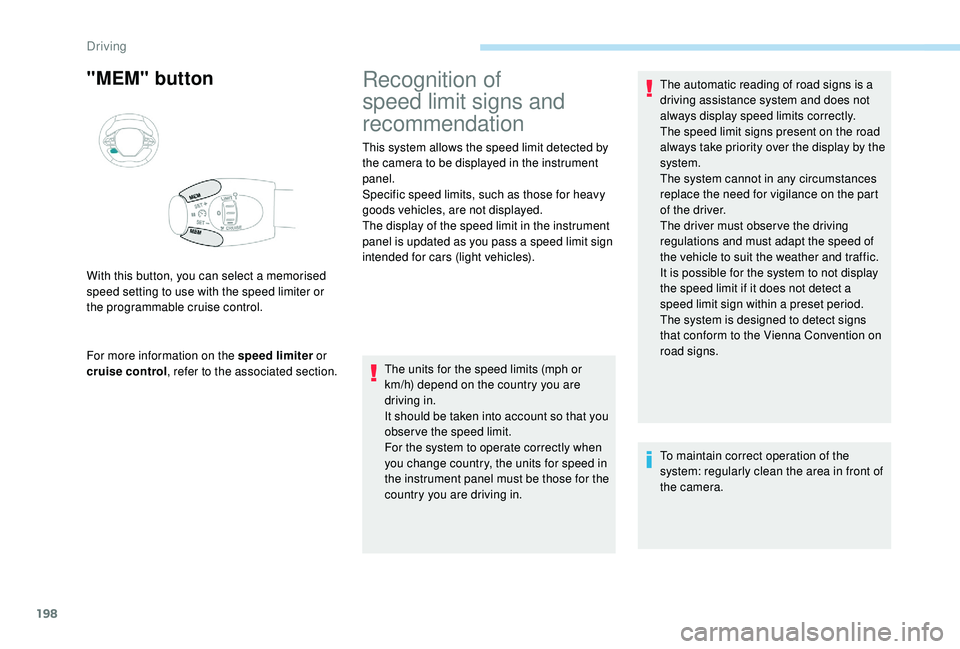
"MEM" button
For more information on the speed limiter or
cruise control , refer to the associated section.
With this button, you can select a memorised
speed setting to use with the speed limiter or
the programmable cruise control.
Recognition of
speed limit signs and
recommendation
This system allows the speed limit detected by
the camera to be displayed in the instrument
panel.
Specific speed limits, such as those for heavy
goods vehicles, are not displayed.
The display of the speed limit in the instrument
panel is updated as you pass a speed limit sign
intended for cars (light vehicles).
The units for the speed limits (mph or
km/h) depend on the country you are
driving in.
It should be taken into account so that you
obser ve the speed limit.
For the system to operate correctly when
you change country, the units for speed in
the instrument panel must be those for the
country you are driving in. The automatic reading of road signs is a
driving assistance system and does not
always display speed limits correctly.
The speed limit signs present on the road
always take priority over the display by the
system.
The system cannot in any circumstances
replace the need for vigilance on the part
of the driver.
The driver must observe the driving
regulations and must adapt the speed of
the vehicle to suit the weather and traffic.
It is possible for the system to not display
the speed limit if it does not detect a
speed limit sign within a preset period.
The system is designed to detect signs
that conform to the Vienna Convention on
road signs.
To maintain correct operation of the
system: regularly clean the area in front of
the camera.
Driving
Page 202 of 404
200
Operating limits
The legislation on speed limits is specific to
each country.
The system does not take account of reduced
speed limits in the following cases:
-
p
oor weather (rain, snow),
-
a
tmospheric pollution,
-
t
railer, caravan,
-
d
riving with a space-saver type spare wheel
or snow chains fitted,
-
p
uncture repair using the temporary repair
kit,
-
y
oung drivers, etc.
The following situations may inter fere with the
operation of the system or prevent it working:
-
p
oor visibility (inadequate street lighting,
falling snow, rain, fog),
-
w
indscreen area located in front of the
camera dirty, misted, frost-covered, snow-
covered, damaged or covered by a sticker,
-
f
ault with the camera,
-
o
bsolete or incorrect mapping,
-
h
idden road signs (other vehicles,
vegetation, snow),
-
s
peed limit signs that do not conform to the
standard, are damaged or distorted.
Memorising the speed
setting
This memorise function is in addition to the
display of Recognition of speed limit signs .
For more information on the Speed
limiter, Cruise control , or Dynamic
cruise control with Stop function , refer
to the corresponding sections.
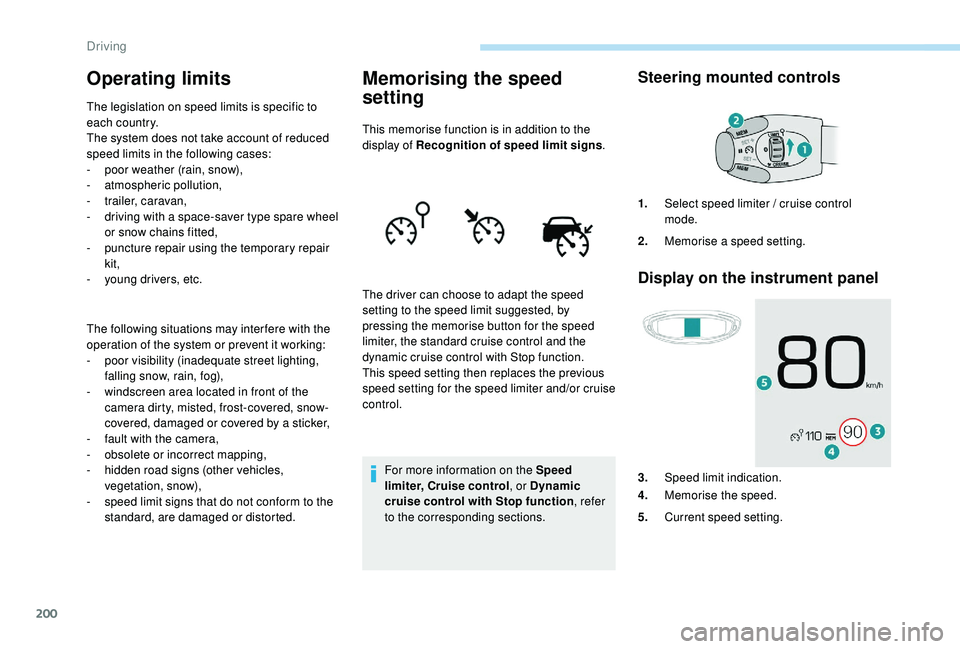
Steering mounted controls
Display on the instrument panel
The driver can choose to adapt the speed
setting to the speed limit suggested, by
pressing the memorise button for the speed
limiter, the standard cruise control and the
dynamic cruise control with Stop function.
This speed setting then replaces the previous
speed setting for the speed limiter and/or cruise
control. 1.
Select speed limiter / cruise control
mode.
2. Memorise a speed setting.
3. Speed limit indication.
4. Memorise the speed.
5. Current speed setting.
Driving