Page 249 of 368
247
4008_EN_CHAP10B_MITSU6_ED01-2016
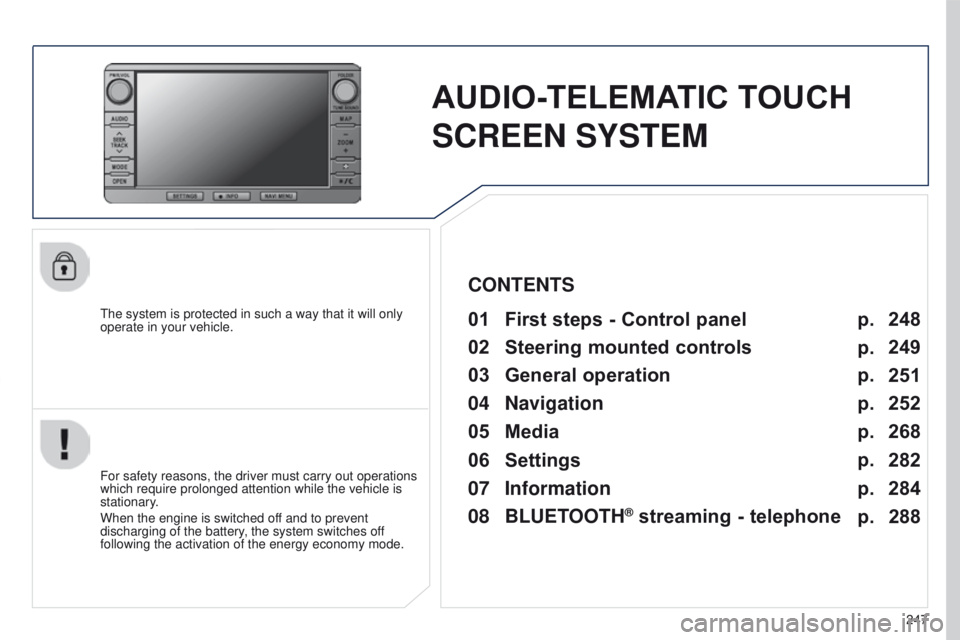
AUDIO-TELEMATIC TOUCH
SCREEN SYSTEM
the system is protected in such a way that it will only
operate in your vehicle.01 First steps - Control panel
For safety reasons, the driver must carry out operations
which require prolonged attention while the vehicle is
stationary.
When the engine is switched off and to prevent
discharging of the battery, the system switches off
following the activation of the energy economy mode.
CONTENTS
03
General
operation
04
Navigation
05
Media
06
Settings
07
Information p.
p.
p.
p.
p.
p.
p. 248
249
251
252
268
282
284
02
Steering
mounted controls p.
288
08
BLUETOOTH
® streaming - telephone
Page 250 of 368

01
248
4008_EN_CHAP10B_MITSU6_ED01-2016
PWR/VOL:
-
audio system on/of
f.
-
volume adjustment for the audio and
telephone functions.
Short press: change the audio source.
Long press: CD / MP3 /
u SB, SD, for fast
forward or rewind.
Long press: RADIO, automatic frequency
search down/up. FOLDER: allows selection of a folder or a
manual search for a radio station.
OPEN: Allows the screen panel to be opened or closed to insert
or remove a CD or SD cards. ZOOM: zoom the map in or out.
Allows the colour map screen the be switched
between day and night mode according to the
state of the vehicle's lighting.
Move a finger over the screen to operate
the system.
u
se the buttons offered on the screen. For safety reasons, the driver
must only carry out operations
which require prolonged
attention with the vehicle
stationary. Insert the SD card containing
the navigation mapping data into
the left-hand slot.
Insert the SD card containing
the audio data into the right-
hand slot.
FIRST STEPS
Page 257 of 368
255
4008_EN_CHAP10B_MITSU6_ED01-2016
Level 1Level 2 Level 3 Comments
g
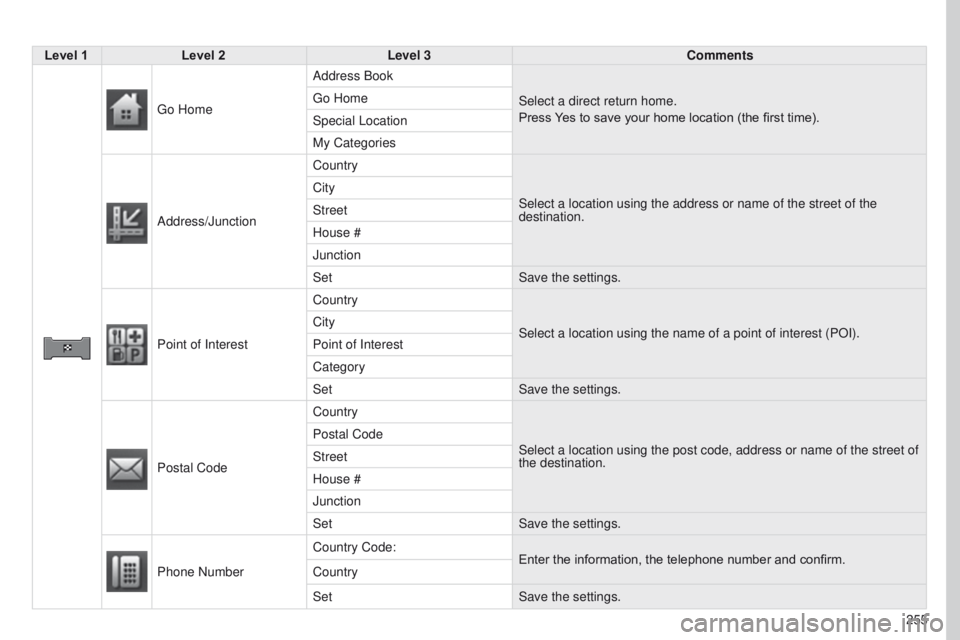
o Home Address Book
Select a direct return home.
Press Yes to save your home location (the first time).
g
o Home
Special Location
My Categories
Address/Junction Country
Select a location using the address or name of the street of the
destination.
City
Street
House #
Junction
Set
Save the settings.
Point of Interest Country
Select a location using the name of a point of interest (POI).
City
Point of Interest
Category
Set
Save the settings.
Postal Code Country
Select a location using the post code, address or name of the street of \
the destination.
Postal Code
Street
House #
Junction
Set
Save the settings.
Phone Number Country Code:
Enter the information, the telephone number and confirm.
Country
Set Save the settings.
Page 274 of 368
05
272
4008_EN_CHAP10B_MITSU6_ED01-2016
What is RDS?
t
he Radio Data System (RDS) function on the FM waveband permits:
-
automatic retuning to alternative frequencies carrying the same
station while travelling through different regions (if the transmitters
of this station cover the area through which you are travelling),
-
temporary tuning to traffic information announcements,
-
display of the name of the station, etc...
Most FM stations use RDS.
t
hese stations transmit non-audible data in addition to their
programmes.
t
he data transmitted in this way allows you access to various
functions, mainly displaying of the name of the station, temporary
tuning to traffic information announcements or automatic retuning
to alternative frequencies.
RDS allows you to continue listening to the same station
automatically by means of alternative frequencies. However,
alternative frequencies may not be provided throughout the country.
Radio stations do not cover the whole country, which explains the
loss of reception of the station during a journey.
RDS, AF, TP, PTY
RDS alternative frequencies
Your radio automatically checks and selects the best frequency for
the radio station to which it is tuned (if the station broadcasts on
several transmitters or frequencies).
t
he frequency of a radio station covers approximately 30 miles
(50
km).
t
he change from one frequency to another explains the
loss of reception during a journey.
If the station to which you are listening does not have several
frequencies in the region in which you are currently located, you can
deactivate automatic alternative frequencies. Traffic information function
The Traf
fi c Programme (TP) function permits automatic and
temporary switching to an FM station broadcasting traffic information.
t
he radio station or the source that you are listening to at this point
is placed on hold.
Once the traffic information has ended, the system switches back to
the radio station or the source that you were listening to initially.
Programme types
Some stations offer the option of listening to a themed type of
programme as a priority, selected from the list available below:
N e WS, AFFAIRS, INFOS, SPOR
t,
e D u CA
te
, DRAMA, C u L
tu
R e ,
SCI e NC e , VARI e D, POP M, ROCK M, e ASY M, LI g H t
M,
CLASSICS, O
t H e R M, W e At H e R, FINANC e , CHILDR e N,
SOCIAL, RELIGION, PHONE IN, TRAVEL, LEISURE, JAZZ,
CO
u N t RY, NAt ION M, OLDI e S, FOLK M, DOC u M e N t.
RADIO
Page 287 of 368
285
4008_EN_CHAP10B_MITSU6_ED01-2016
Level 1Level 2 Level 3 Comments
Calendar Make a note on the calendar of special days, birthdays, ...
Use the arrows to find a date and press directly on the day required to
enter the event.
u
ser SD Check the capacity of the SD card and the free space.
Voice Control Help Make a telephone call
Verify the use of voice commands.
Busy tone
Manage the directory
Pairing
g
PS Information Country View
g PS information:
-
the satellite position chart with the direction and movement of the
vehicle,
-
the name of the current location,
-
the longitude and latitude of the current location,
-
the status of location measurement (2D = 3 satellites or less,
3D = 4 satellites or more),
-
the number of satellites visible.
Page 289 of 368
287
4008_EN_CHAP10B_MITSU6_ED01-2016
Level 1Level 2 Level 3 Comments
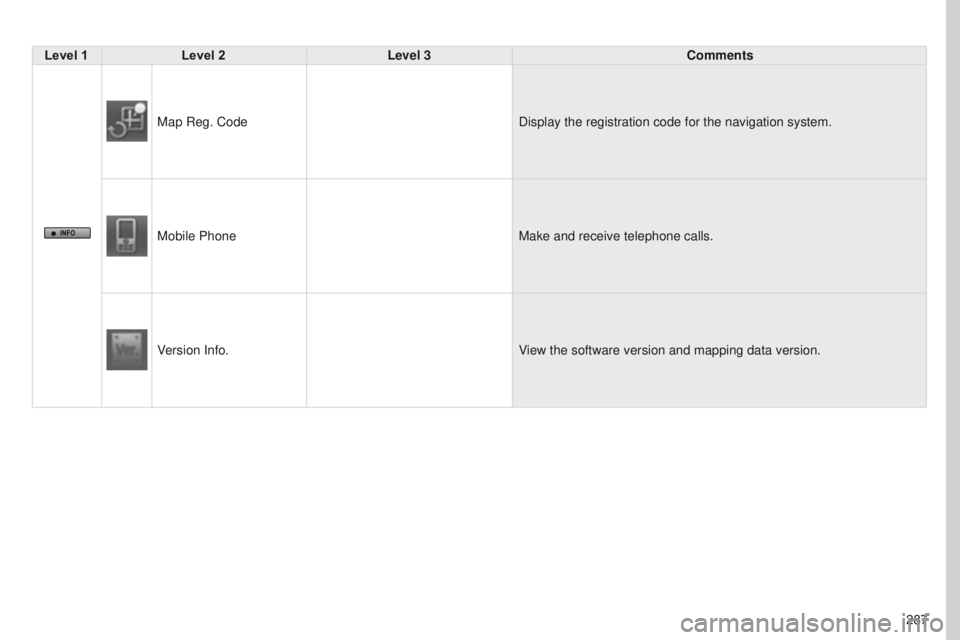
Map Reg. Code Display the registration code for the navigation system.
Mobile Phone Make and receive telephone calls.
Version Info. View the software version and mapping data version.
Page 290 of 368
08
288
4008_EN_CHAP10B_MITSU6_ED01-2016
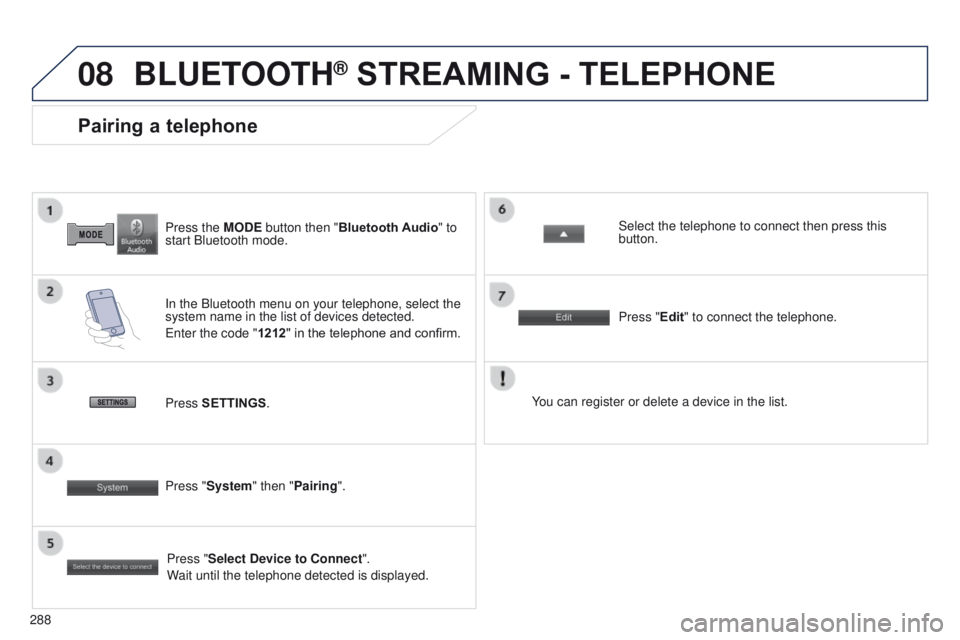
Press the MODE button then "Bluetooth Audio" to
start Bluetooth mode.
Pairing a telephone
In the Bluetooth menu on your telephone, select the
system name in the list of devices detected.
e
nter the code "1212 " in the telephone and confirm. Select the telephone to connect then press this
button.
Press "Select Device to Connect".
Wait until the telephone detected is displayed.
Press SETTINGS
. Press "Edit" to connect the telephone.
Press "System " then "Pairing". You can register or delete a device in the list.
BLUETOOTH® STREAMING - TELEPHONE
Page 291 of 368
289
4008_en_Chap10c_Mitsu5_ed01-2016
AUDIO-CD TOUCH SCREEN
S
ystem
the system is protected in such a way that it will only
operate in your vehicle.
01 First steps - Control panel
For safety reasons, the driver must carry out operations
which require prolonged attention while the vehicle is
stationary.
When the engine is switched off and to prevent
discharging of the battery, the system switches off
following the activation of the energy economy mode.
Contents
03
General
operation
02
Steering
mounted controls
04
Radio
05
Music
06
Bluetooth® telephone p.
p. p.
p.
p.
p. 290
291
293
300
305
310