2017 NISSAN QUEST ABS
[x] Cancel search: ABSPage 19 of 520
0-10Illustrated table of contents
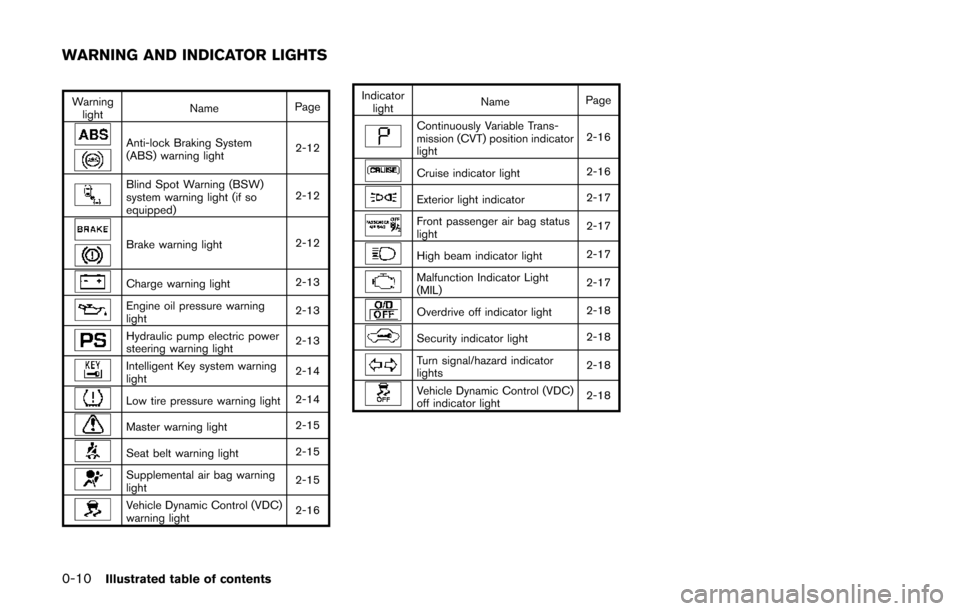
Warninglight Name
Page
Anti-lock Braking System
(ABS) warning light 2-12
Blind Spot Warning (BSW)
system warning light (if so
equipped)2-12
Brake warning light
2-12
Charge warning light2-13
Engine oil pressure warning
light2-13
Hydraulic pump electric power
steering warning light
2-13
Intelligent Key system warning
light2-14
Low tire pressure warning light
2-14
Master warning light2-15
Seat belt warning light2-15
Supplemental air bag warning
light2-15
Vehicle Dynamic Control (VDC)
warning light
2-16Indicator
light Name
Page
Continuously Variable Trans-
mission (CVT) position indicator
light 2-16
Cruise indicator light
2-16
Exterior light indicator2-17
Front passenger air bag status
light2-17
High beam indicator light
2-17
Malfunction Indicator Light
(MIL)2-17
Overdrive off indicator light
2-18
Security indicator light2-18
Turn signal/hazard indicator
lights2-18
Vehicle Dynamic Control (VDC)
off indicator light2-18
WARNING AND INDICATOR LIGHTS
Page 33 of 520
1-14Safety — Seats, seat belts and supplemental restraint system
SSS1036
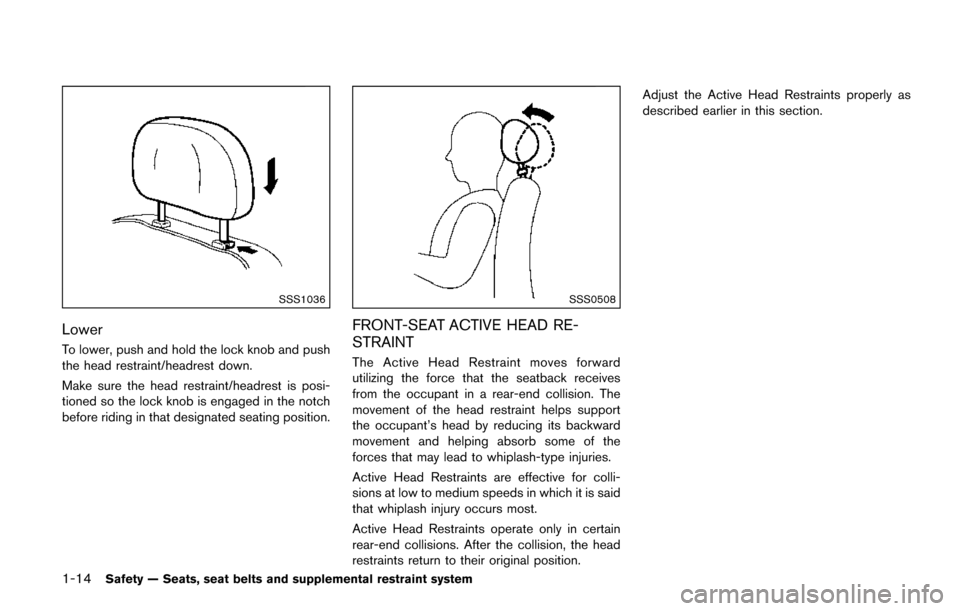
Lower
To lower, push and hold the lock knob and push
the head restraint/headrest down.
Make sure the head restraint/headrest is posi-
tioned so the lock knob is engaged in the notch
before riding in that designated seating position.
SSS0508
FRONT-SEAT ACTIVE HEAD RE-
STRAINT
The Active Head Restraint moves forward
utilizing the force that the seatback receives
from the occupant in a rear-end collision. The
movement of the head restraint helps support
the occupant’s head by reducing its backward
movement and helping absorb some of the
forces that may lead to whiplash-type injuries.
Active Head Restraints are effective for colli-
sions at low to medium speeds in which it is said
that whiplash injury occurs most.
Active Head Restraints operate only in certain
rear-end collisions. After the collision, the head
restraints return to their original position.Adjust the Active Head Restraints properly as
described earlier in this section.
Page 98 of 520
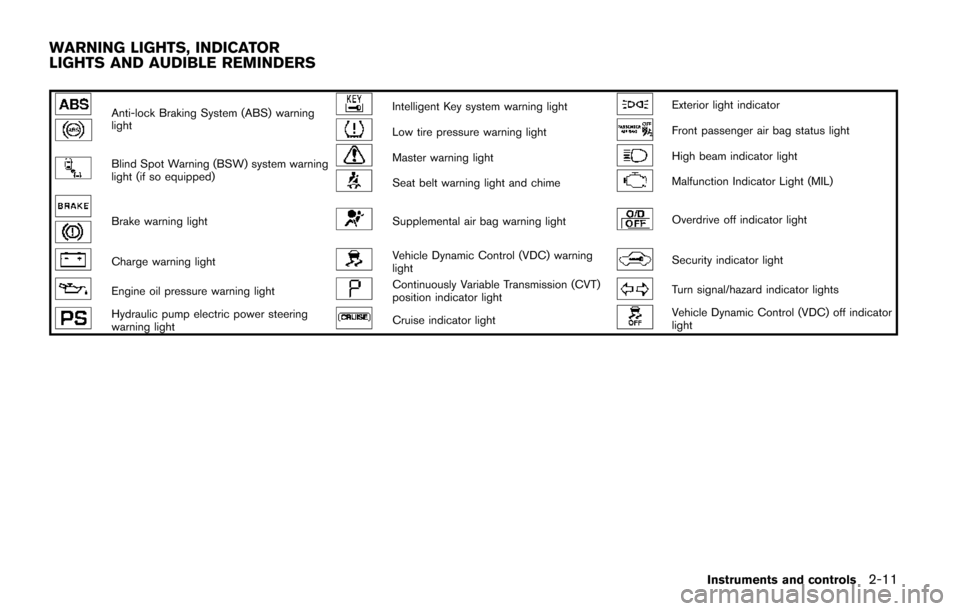
Anti-lock Braking System (ABS) warning
lightIntelligent Key system warning lightExterior light indicator
Low tire pressure warning lightFront passenger air bag status light
Blind Spot Warning (BSW) system warning
light (if so equipped)Master warning lightHigh beam indicator light
Seat belt warning light and chimeMalfunction Indicator Light (MIL)
Brake warning lightSupplemental air bag warning lightOverdrive off indicator light
Charge warning lightVehicle Dynamic Control (VDC) warning
lightSecurity indicator light
Engine oil pressure warning lightContinuously Variable Transmission (CVT)
position indicator lightTurn signal/hazard indicator lights
Hydraulic pump electric power steering
warning lightCruise indicator lightVehicle Dynamic Control (VDC) off indicator
light
Instruments and controls2-11
WARNING LIGHTS, INDICATOR
LIGHTS AND AUDIBLE REMINDERS
Page 99 of 520
2-12Instruments and controls
CHECKING LIGHTS
With all doors closed, apply the parking brake,
fasten the seat belts and place the ignition
switch in the ON position without starting the
engine. The following lights (if so equipped) will
come on:
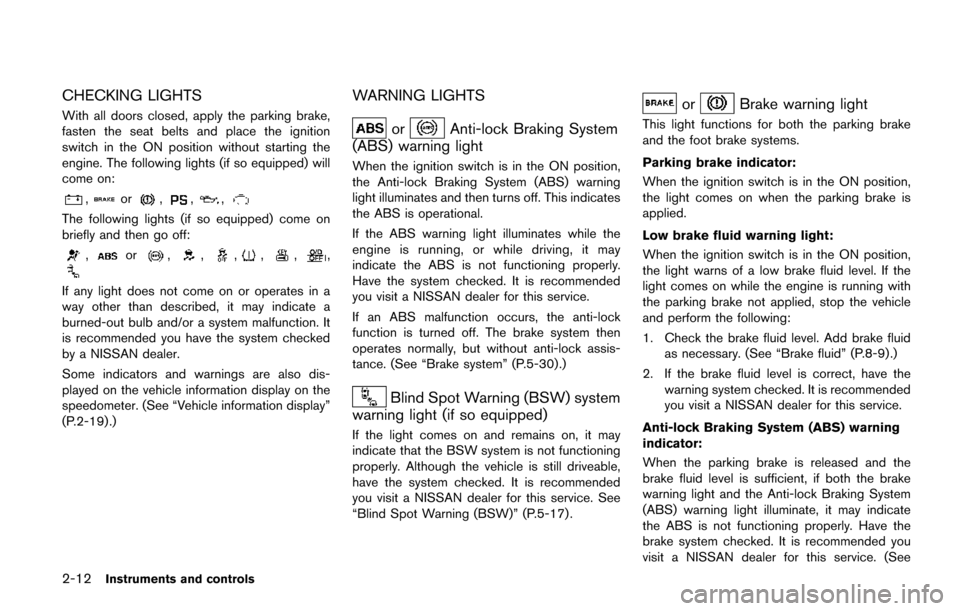
,or,,,
The following lights (if so equipped) come on
briefly and then go off:
,or,,,,,,
If any light does not come on or operates in a
way other than described, it may indicate a
burned-out bulb and/or a system malfunction. It
is recommended you have the system checked
by a NISSAN dealer.
Some indicators and warnings are also dis-
played on the vehicle information display on the
speedometer. (See “Vehicle information display”
(P.2-19) .)
WARNING LIGHTS
orAnti-lock Braking System
(ABS) warning light
When the ignition switch is in the ON position,
the Anti-lock Braking System (ABS) warning
light illuminates and then turns off. This indicates
the ABS is operational.
If the ABS warning light illuminates while the
engine is running, or while driving, it may
indicate the ABS is not functioning properly.
Have the system checked. It is recommended
you visit a NISSAN dealer for this service.
If an ABS malfunction occurs, the anti-lock
function is turned off. The brake system then
operates normally, but without anti-lock assis-
tance. (See “Brake system” (P.5-30).)
Blind Spot Warning (BSW) system
warning light (if so equipped)
If the light comes on and remains on, it may
indicate that the BSW system is not functioning
properly. Although the vehicle is still driveable,
have the system checked. It is recommended
you visit a NISSAN dealer for this service. See
“Blind Spot Warning (BSW)” (P.5-17) .
orBrake warning light
This light functions for both the parking brake
and the foot brake systems.
Parking brake indicator:
When the ignition switch is in the ON position,
the light comes on when the parking brake is
applied.
Low brake fluid warning light:
When the ignition switch is in the ON position,
the light warns of a low brake fluid level. If the
light comes on while the engine is running with
the parking brake not applied, stop the vehicle
and perform the following:
1. Check the brake fluid level. Add brake fluid
as necessary. (See “Brake fluid” (P.8-9) .)
2. If the brake fluid level is correct, have the warning system checked. It is recommended
you visit a NISSAN dealer for this service.
Anti-lock Braking System (ABS) warning
indicator:
When the parking brake is released and the
brake fluid level is sufficient, if both the brake
warning light and the Anti-lock Braking System
(ABS) warning light illuminate, it may indicate
the ABS is not functioning properly. Have the
brake system checked. It is recommended you
visit a NISSAN dealer for this service. (See
Page 100 of 520
“Anti-lock Braking System (ABS) warning light”
(P.2-12) .)
WARNING
.Your brake system may not be
working properly if the warning light
is on. Driving could be dangerous. If
you judge it to be safe, drive care-
fully to the nearest service station
for repairs. Otherwise, have your
vehicle towed because driving it
could be dangerous.
. Pressing the brake pedal with the
engine stopped and/or low brake
fluid level may increase your stop-
ping distance and braking will re-
quire greater pedal effort as well as
pedal travel.
. If the brake fluid level is below the
minimum or MIN mark on the brake
fluid reservoir, do not drive until the
brake system has been checked. It
is recommended you visit a NISSAN
dealer for this service.
Charge warning light
If the light comes on while the engine is running,
it may indicate the charging system is not
functioning properly. Turn the engine off and
check the alternator belt. If the belt is loose,
broken, missing or if the light remains on, have
your vehicle serviced immediately. It is recom-
mended you visit a NISSAN dealer for this
service.
CAUTION
Do not continue driving if the alternator
belt is loose, broken or missing.
Engine oil pressure warning light
This light warns of low engine oil pressure. If the
light flickers or comes on during normal driving,
pull off the road in a safe area, stop the engine
immediately and call a NISSAN dealer or other
authorized repair shop.
The engine oil pressure warning light is
not designed to indicate a low oil level.
Use the dipstick to check the oil level. (See
“Engine oil” (P.8-5).)
CAUTION
Running the engine with the engine oil
pressure warning light on could cause
serious damage to the engine almost
immediately. Such damage is not cov-
ered by warranty. Turn off the engine as
soon as it is safe to do so.
Hydraulic pump electric power
steering warning light
When the ignition switch is in the ON position,
the hydraulic pump electric power steering
warning light illuminates. After starting the
engine, the hydraulic pump electric power
steering warning light turns off. This indicates
that the electric power steering is operational.
If the hydraulic pump electric power steering
warning light illuminates while the engine is
running, it may indicate the hydraulic pump
electric power steering is not functioning prop-
erly and may need servicing. It is recommended
you have the hydraulic pump electric power
steering checked by a NISSAN dealer. (See
“Hydraulic pump electric power steering” (P.5-
30) .)
Instruments and controls2-13
Page 246 of 520
button will illuminate.
The air recirculation mode cannot be activated
when the air conditioner is in the front defrosting
mode.
Outside air circulation:
.Models with Advanced Climate Control
System:
Push the air recirculation “
” button twice
to draw outside air into the passenger
compartment. The indicator light on the air
recirculation “
” button will turn off.
. Models without Advanced Climate Control
System:
Push the outside air circulation “
” button
to draw outside air into the passenger
compartment. The indicator light on the
outside air circulation “
” button will turn
on.
Automatic air intake control:
. Models with Advanced Climate Control
System:
Push the “
AUTO” auto-recirculation”
button to switch to the automatic air intake
control mode. The indicator light on the
“
AUTO” auto-recirculation button will
illuminate. In this mode, the sensor detects
odors and gas to automatically switch
between the air recirculation mode and the outside air circulation mode. (See “Ad-
vanced climate control system” (P.4-57) for
details.)
. Models without Advanced Climate Control
System:
To switch to the automatic control mode,
push the air recirculation “
” button to
recirculate interior air inside the vehicle. The
indicator light on the air recirculation “
”
button for about 2 seconds. The indicator
lights (both air recirculation “
” and
outside air circulation “” buttons) will
flash twice, and then the intake air will be
controlled automatically.
The following conditions need to be met for the
automatic air intake control mode to function
properly.
. The air flow control is not in the front
defroster mode (the indicator light on the
front defroster “
FRONT” button is
turned off).
. The outside temperature is approximately
328F(0 8C) or above.
SAA3670
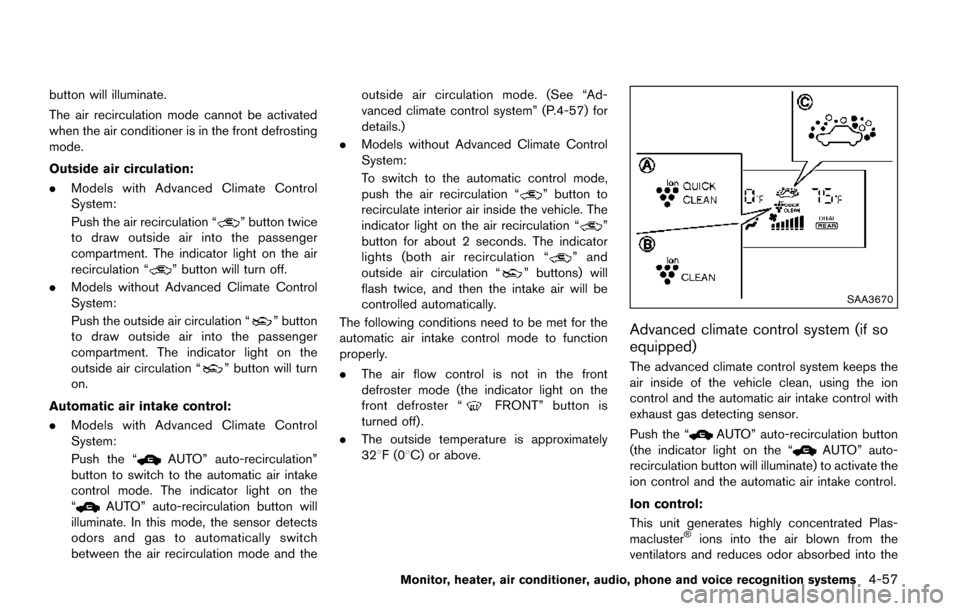
Advanced climate control system (if so
equipped)
The advanced climate control system keeps the
air inside of the vehicle clean, using the ion
control and the automatic air intake control with
exhaust gas detecting sensor.
Push the “
AUTO” auto-recirculation button
(the indicator light on the “AUTO” auto-
recirculation button will illuminate) to activate the
ion control and the automatic air intake control.
Ion control:
This unit generates highly concentrated Plas-
macluster
Šions into the air blown from the
ventilators and reduces odor absorbed into the
Monitor, heater, air conditioner, audio, phone and voice recognition systems4-57
Page 370 of 520
5 Starting and driving
Precautions when starting and driving ................................ 5-2Exhaust gas (carbon monoxide) ...................................... 5-2
Three-way catalyst .............................................................. 5-3
Tire Pressure Monitoring System (TPMS) .................... 5-3
Avoiding collision and rollover ......................................... 5-6
Off-road recovery ................................................................ 5-7
Rapid air pressure loss ...................................................... 5-7
Drinking alcohol/drugs and driving ................................. 5-8
Push-button ignition switch .................................................... 5-8 Operating range for engine start function .................... 5-9
Push-button ignition switch operation ........................... 5-9
Push-button ignition switch positions ......................... 5-10
Emergency engine shut off ............................................ 5-10
Intelligent Key battery discharge .................................. 5-11
Before starting the engine ................................................... 5-11
Starting the engine ................................................................ 5-12
Driving the vehicle ................................................................. 5-13 Continuously Variable Transmission (CVT) ................ 5-13
Parking brake ........................................................................\
.. 5-16
Blind Spot Warning (BSW) (if so equipped) ................. 5-17
BSW system operation .................................................. 5-19
How to enable/disable the BSW system .................. 5-19
BSW system limitations ................................................. 5-20
BSW driving situations ................................................... 5-21
System temporarily unavailable ..................................... 5-24 System malfunction ....................................................... 5-24
System maintenance ..................................................... 5-25
Cruise control ........................................................................\
. 5-25
Precautions on cruise control ..................................... 5-25
Cruise control operations ............................................ 5-26
Break-in schedule ................................................................. 5-27
Fuel efficient driving tips ..................................................... 5-27
Increasing fuel economy ...................................................... 5-28
Parking/parking on hills ........................................................ 5-29
Hydraulic pump electric power steering ......................... 5-30
Brake system ........................................................................\
.. 5-30 Braking precautions ...................................................... 5-30
Parking brake break-in .................................................. 5-31
Anti-lock Braking System (ABS) ............................... 5-31
Vehicle Dynamic Control (VDC) system ......................... 5-32
Cold weather driving ............................................................ 5-34
Freeing a frozen door lock ........................................... 5-34
Anti-freeze ........................................................................\
5-34
Battery ........................................................................\
....... 5-34
Draining of coolant water ............................................. 5-34
Tire equipment ................................................................ 5-34
Special winter equipment ............................................ 5-34
Driving on snow or ice ................................................. 5-35
Engine block heater (if so equipped) ....................... 5-35
Page 400 of 520
ing or downshifting. Abrupt braking
or accelerating could cause the
wheels to skid and result in an
accident.
. If the engine is not running or is
turned off while driving, the power
assist for the brakes will not work.
Braking will be harder.
Wet brakes
When the vehicle is washed or driven through
water, the brakes may get wet. As a result, your
braking distance will be longer and the vehicle
may pull to one side during braking.
To dry brakes, drive the vehicle at a safe speed
while lightly tapping the brake pedal to heat-up
the brakes. Do this until the brakes return to
normal. Avoid driving the vehicle at high speeds
until the brakes function correctly.
PARKING BRAKE BREAK-IN
Break in the parking brake shoes whenever the
stopping effect of the parking brake is weakened
or whenever the parking brake shoes and/or
drums/rotors are replaced, in order to assure the
best braking performance.
This procedure is described in the vehicle
service manual. It is recommended you visit a
NISSAN dealer for this service.
ANTI-LOCK BRAKING SYSTEM (ABS)
WARNING
.The Anti-lock Braking System (ABS)
is a sophisticated device, but it
cannot prevent accidents resulting
from careless or dangerous driving
techniques. It can help maintain
vehicle control during braking on
slippery surfaces. Remember that
stopping distances on slippery sur-
faces will be longer than on normal
surfaces even with ABS. Stopping
distances may also be longer on
rough, gravel or snow covered
roads, or if you are using tire chains.
Always maintain a safe distance
from the vehicle in front of you.
Ultimately, the driver is responsible
for safety.
. Tire type and condition may also
affect braking effectiveness.
— When replacing tires, install the
specified size of tires on all four
wheels.
— When installing a spare tire, make sure that it is the proper
size and type as specified on the Tire and Loading Information
label. See
“Tire and Loading
Information label” (P.10-10) .
— For detailed information, see “Wheels and tires” (P.8-27) .
The Anti-lock Braking System (ABS) controls
the brakes so the wheels do not lock during hard
braking or when braking on slippery surfaces.
The system detects the rotation speed at each
wheel and varies the brake fluid pressure to
prevent each wheel from locking and sliding. By
preventing each wheel from locking, the system
helps the driver maintain steering control and
helps to minimize swerving and spinning on
slippery surfaces.
Using the system
Depress the brake pedal and hold it down.
Depress the brake pedal with firm steady
pressure, but do not pump the brakes. The
ABS will operate to prevent the wheels from
locking up. Steer the vehicle to avoid obstacles.
WARNING
Do not pump the brake pedal. Doing so
may result in increased stopping dis-
tances.
Starting and driving5-31