2017 NISSAN QUEST brake
[x] Cancel search: brakePage 228 of 520
SAA1898
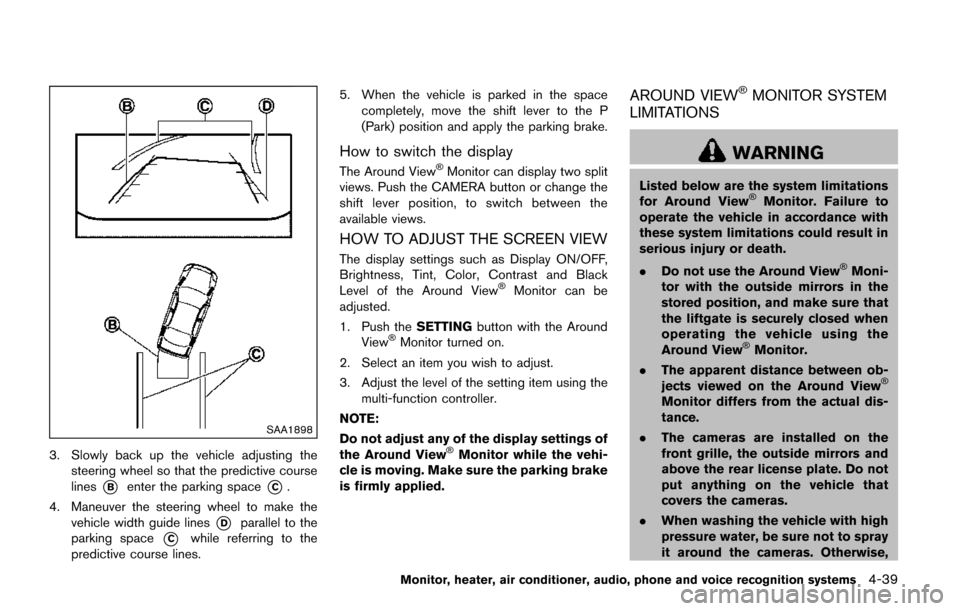
3. Slowly back up the vehicle adjusting thesteering wheel so that the predictive course
lines
*Benter the parking space*C.
4. Maneuver the steering wheel to make the vehicle width guide lines
*Dparallel to the
parking space
*Cwhile referring to the
predictive course lines. 5. When the vehicle is parked in the space
completely, move the shift lever to the P
(Park) position and apply the parking brake.
How to switch the display
The Around ViewŠMonitor can display two split
views. Push the CAMERA button or change the
shift lever position, to switch between the
available views.
HOW TO ADJUST THE SCREEN VIEW
The display settings such as Display ON/OFF,
Brightness, Tint, Color, Contrast and Black
Level of the Around View
ŠMonitor can be
adjusted.
1. Push the SETTINGbutton with the Around
View
ŠMonitor turned on.
2. Select an item you wish to adjust.
3. Adjust the level of the setting item using the multi-function controller.
NOTE:
Do not adjust any of the display settings of
the Around View
ŠMonitor while the vehi-
cle is moving. Make sure the parking brake
is firmly applied.
AROUND VIEWŠMONITOR SYSTEM
LIMITATIONS
WARNING
Listed below are the system limitations
for Around ViewŠMonitor. Failure to
operate the vehicle in accordance with
these system limitations could result in
serious injury or death.
. Do not use the Around View
ŠMoni-
tor with the outside mirrors in the
stored position, and make sure that
the liftgate is securely closed when
operating the vehicle using the
Around View
ŠMonitor.
. The apparent distance between ob-
jects viewed on the Around View
Š
Monitor differs from the actual dis-
tance.
. The cameras are installed on the
front grille, the outside mirrors and
above the rear license plate. Do not
put anything on the vehicle that
covers the cameras.
. When washing the vehicle with high
pressure water, be sure not to spray
it around the cameras. Otherwise,
Monitor, heater, air conditioner, audio, phone and voice recognition systems4-39
Page 280 of 520
When theorbutton is pushed for less
than 1.5 seconds while the CD is being played,
the next track or the beginning of the current
track on the CD will be played.
REPEAT (RPT) , RANDOM (RDM):
When the RPT button is pushed while the CD is
played, the play pattern can be changed as
follows:
(CD)
(CD with compressed audio files)
CD EJECT:
When the CD EJECT button is pushed with the
CD loaded, the CD will be ejected.
When this button is pushed while the CD is
being played, the CD will be ejected.
If the CD comes out and is not removed, it
will be pulled back into the slot to protect
it.
DVD (Digital Versatile Disc) PLAYER
OPERATION (if so equipped)
Precautions
Start the engine when using the DVD entertain-
ment system.
Movies will not be shown on the front display
while the vehicle is in any drive position to
reduce driver distraction. Audio is available
when a movie is played. To view movies in the
front display, stop the vehicle in a safe location,
move the shift lever to the P (Park) position and
apply the parking brake.
WARNING
. The driver must not attempt to
operate the DVD system or wear
the headphones while the vehicle is
in motion so that full attention may
be given to vehicle operation.
. Do not attempt to modify the system
to display a movie on the front
screen while the vehicle is being
driven. Doing so may distract the
driver and may cause a collision and
serious personal injury or death.
CAUTION
.Only operate the DVD while the
vehicle engine is running. Operating
the DVD for extended periods of
time with the engine OFF can dis-
charge the vehicle battery.
. Do not allow the system to get wet.
Excessive moisture such as spilled
liquids may cause the system to
malfunction.
. While playing VIDEO-CD media, this
DVD player does not guarantee
complete functionality of all VI-
DEO-CD formats.
Display settings
To adjust the front display mode, push the
SETTING button while the DVD is being played.
To adjust the display ON/OFF, brightness, tint,
color and contrast, select the “Display Adjust-
ment” key and then select each key.
Then you can adjust each item using the multi-
function controller. After changes have been
made push the BACK button to save the setting.
Monitor, heater, air conditioner, audio, phone and voice recognition systems4-91
Page 299 of 520
4-110Monitor, heater, air conditioner, audio, phone and voice recognition systems
SAA3602
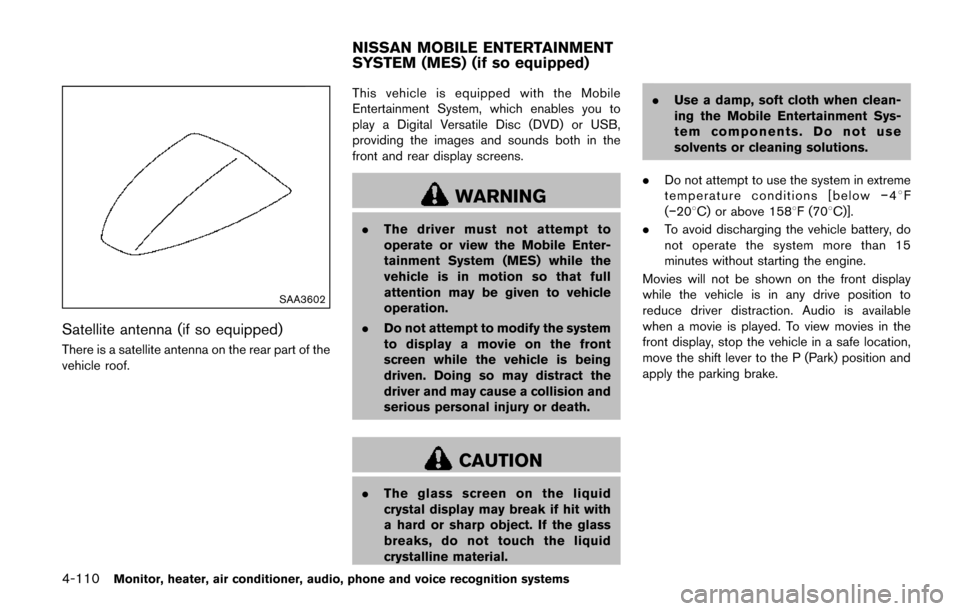
Satellite antenna (if so equipped)
There is a satellite antenna on the rear part of the
vehicle roof.This vehicle is equipped with the Mobile
Entertainment System, which enables you to
play a Digital Versatile Disc (DVD) or USB,
providing the images and sounds both in the
front and rear display screens.
WARNING
.
The driver must not attempt to
operate or view the Mobile Enter-
tainment System (MES) while the
vehicle is in motion so that full
attention may be given to vehicle
operation.
. Do not attempt to modify the system
to display a movie on the front
screen while the vehicle is being
driven. Doing so may distract the
driver and may cause a collision and
serious personal injury or death.
CAUTION
.The glass screen on the liquid
crystal display may break if hit with
a hard or sharp object. If the glass
breaks, do not touch the liquid
crystalline material. .
Use a damp, soft cloth when clean-
ing the Mobile Entertainment Sys-
tem components. Do not use
solvents or cleaning solutions.
. Do not attempt to use the system in extreme
temperature conditions [below í48F
(í208C) or above 1588F (708C)].
. To avoid discharging the vehicle battery, do
not operate the system more than 15
minutes without starting the engine.
Movies will not be shown on the front display
while the vehicle is in any drive position to
reduce driver distraction. Audio is available
when a movie is played. To view movies in the
front display, stop the vehicle in a safe location,
move the shift lever to the P (Park) position and
apply the parking brake.
NISSAN MOBILE ENTERTAINMENT
SYSTEM (MES) (if so equipped)
Page 300 of 520
SAA3607
DIGITAL VERSATILE DISC (DVD) SYS-
TEM COMPONENTS
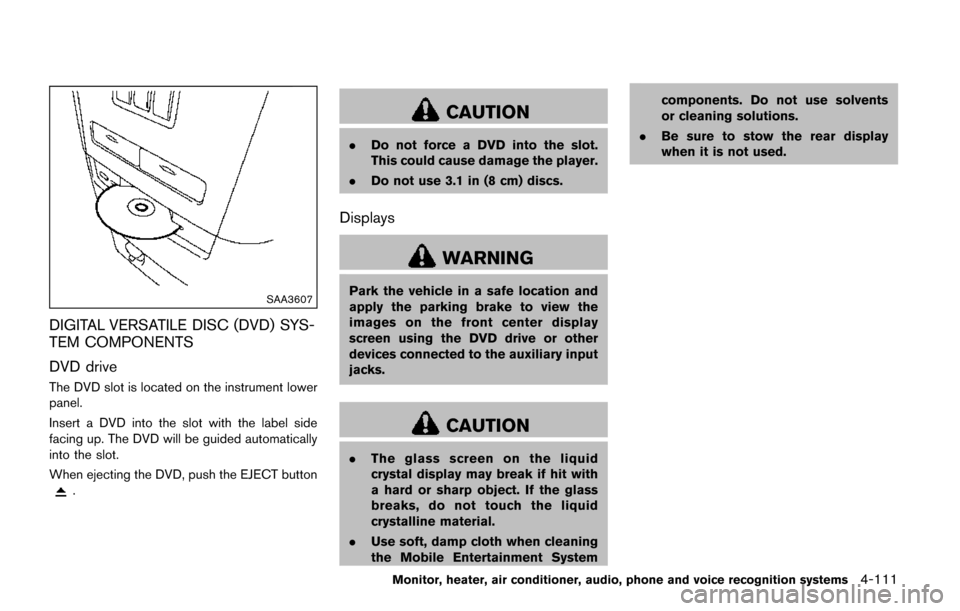
DVD drive
The DVD slot is located on the instrument lower
panel.
Insert a DVD into the slot with the label side
facing up. The DVD will be guided automatically
into the slot.
When ejecting the DVD, push the EJECT button
.
CAUTION
.Do not force a DVD into the slot.
This could cause damage the player.
. Do not use 3.1 in (8 cm) discs.
Displays
WARNING
Park the vehicle in a safe location and
apply the parking brake to view the
images on the front center display
screen using the DVD drive or other
devices connected to the auxiliary input
jacks.
CAUTION
.The glass screen on the liquid
crystal display may break if hit with
a hard or sharp object. If the glass
breaks, do not touch the liquid
crystalline material.
. Use soft, damp cloth when cleaning
the Mobile Entertainment System components. Do not use solvents
or cleaning solutions.
. Be sure to stow the rear display
when it is not used.
Monitor, heater, air conditioner, audio, phone and voice recognition systems4-111
Page 332 of 520
Training procedure
1. Position the vehicle in a reasonably quietoutdoor location.
2. Sit in the driver’s seat with the engine running, the parking brake on, and the
transmission in Park.
3. Press and hold the
button for more than
5 seconds.
4. The system announces: “Press the PHONE SEND (
) button for the hands-free
phone system to enter the speaker adapta-
tion mode or press the PHONE END (
)
button to select a different language.”
5. Press the
button.
For information on selecting a different
language, see “Choosing a language” (P.4-
137) .
6. If the connected phone is already in use, the system will prompt you to overwrite. Follow
the instructions provided by the system.
7. When preparation is complete and you are ready to begin, press the
button.
8. The SA mode will be explained. Follow the instructions provided by the system.
9. When training is finished, the system will tell you an adequate number of phrases have
been recorded. 10. The system will announce that speaker
adaptation has been completed and the
system is ready.
The SA mode will stop if:
. The
button is pressed for more than 5
seconds in SA mode.
. The vehicle is driven during SA mode.
. The ignition switch is turned to the OFF or
LOCK position.
Training phrases
During the SA mode, the system instructs you to
say the following phrases.
(The system will prompt you for each phrase.)
.phonebook transfer entry
. dial 3 0 4 2 9
. delete call back number
. Incoming
. Transfer entry
. 8 pause 9 3 2 pause 7
. delete all entries
. call 7 2409
. phonebook delete entry
. next entry
. dial star 2 1 7 0
. yes .
no
. select
. Missed
. dial 8 5 6 9 2
. Bluetooth on
. Outgoing
. call 3 1 9 0 2
. 9 7 pause pause 3 0 8
. cancel
. call back number
. call star 2 0 9 5
. delete phone
. dial 8 3 0 5 1
. Record Name
. 4 3 pause 2 9 pause 0
. delete redial number
. phonebook list names
. call 8 0 5 4 1
. correction
. connect phone
. dial 7 4 0 1 8
. previous entry
. delete
. dial 9 7 2 6 6
. call 7 6 3 0 1
Monitor, heater, air conditioner, audio, phone and voice recognition systems4-143
Page 370 of 520
5 Starting and driving
Precautions when starting and driving ................................ 5-2Exhaust gas (carbon monoxide) ...................................... 5-2
Three-way catalyst .............................................................. 5-3
Tire Pressure Monitoring System (TPMS) .................... 5-3
Avoiding collision and rollover ......................................... 5-6
Off-road recovery ................................................................ 5-7
Rapid air pressure loss ...................................................... 5-7
Drinking alcohol/drugs and driving ................................. 5-8
Push-button ignition switch .................................................... 5-8 Operating range for engine start function .................... 5-9
Push-button ignition switch operation ........................... 5-9
Push-button ignition switch positions ......................... 5-10
Emergency engine shut off ............................................ 5-10
Intelligent Key battery discharge .................................. 5-11
Before starting the engine ................................................... 5-11
Starting the engine ................................................................ 5-12
Driving the vehicle ................................................................. 5-13 Continuously Variable Transmission (CVT) ................ 5-13
Parking brake ........................................................................\
.. 5-16
Blind Spot Warning (BSW) (if so equipped) ................. 5-17
BSW system operation .................................................. 5-19
How to enable/disable the BSW system .................. 5-19
BSW system limitations ................................................. 5-20
BSW driving situations ................................................... 5-21
System temporarily unavailable ..................................... 5-24 System malfunction ....................................................... 5-24
System maintenance ..................................................... 5-25
Cruise control ........................................................................\
. 5-25
Precautions on cruise control ..................................... 5-25
Cruise control operations ............................................ 5-26
Break-in schedule ................................................................. 5-27
Fuel efficient driving tips ..................................................... 5-27
Increasing fuel economy ...................................................... 5-28
Parking/parking on hills ........................................................ 5-29
Hydraulic pump electric power steering ......................... 5-30
Brake system ........................................................................\
.. 5-30 Braking precautions ...................................................... 5-30
Parking brake break-in .................................................. 5-31
Anti-lock Braking System (ABS) ............................... 5-31
Vehicle Dynamic Control (VDC) system ......................... 5-32
Cold weather driving ............................................................ 5-34
Freeing a frozen door lock ........................................... 5-34
Anti-freeze ........................................................................\
5-34
Battery ........................................................................\
....... 5-34
Draining of coolant water ............................................. 5-34
Tire equipment ................................................................ 5-34
Special winter equipment ............................................ 5-34
Driving on snow or ice ................................................. 5-35
Engine block heater (if so equipped) ....................... 5-35
Page 375 of 520
5-6Starting and driving
tions: (1) this device may not cause inter-
ference, and (2) this device must accept
any interference, including interference
that may cause undesired operation of
the device.
TPMS with Easy Fill Tire Alert
When adding air to an under-inflated tire, the
TPMS with Easy Fill Tire Alert provides visual
and audible signals outside the vehicle to help
you inflate the tires to the recommended COLD
tire pressure.
Vehicle set-up:
1. Park the vehicle in a safe and level place.
2. Apply the parking brake and place the shiftlever in the P (Park) position.
3. Place the ignition switch in the ON position. Do not start the engine.
Operation:
1. Add air to the tire.
2. Within a few seconds, the hazard indicators will start flashing.
3. When the designated pressure is reached, the horn beeps once and the hazard
indicators stop flashing.
4. Perform the above steps for each tire.
.If the tire is over-inflated to more than approximately 4 psi (30 kPa) , the horn
beeps and the hazard indicators flash 3
times. To correct the pressure, push the
core of the valve stem on the tire briefly to
release pressure. When the pressure
reaches the designated pressure, the
horn beeps once.
.If the hazard indicator does not flash
within approximately 15 seconds after
starting to inflate the tire, it indicates that
the TPMS with Easy Fill Tire Alert is not
operating.
.The TPMS will not activate the Easy FillTire Alert under the following conditions:
— If there is interference from an external device or transmitter
— The air pressure from the inflation device is not sufficient to inflate the tire
— There is a malfunction in the TPMS system
— There is a malfunction in the horn or hazard indicators
— The identification code of the tire pres- sure sensor is not registered to the
system
— The battery of the tire pressure sensor is low
.If the TPMS with Easy Fill Tire Alert doesnot operate due to TPMS interference,
move the vehicle about 1 m (3 ft)
backward or forward and try again.
If the TPMS with Easy Fill Tire Alert is not
working, use a tire pressure gauge.
AVOIDING COLLISION AND ROLL-
OVER
WARNING
Failure to operate this vehicle in a safe
and prudent manner may result in loss
of control or an accident.
Be alert and drive defensively at all times. Obey
all traffic regulations. Avoid excessive speed,
high speed cornering, or sudden steering
maneuvers, because these driving practices
could cause you to lose control of your vehicle.
As with any vehicle, a loss of control could
result in a collision with other vehicles or
objects, or cause the vehicle to rollover,
particularly if the loss of control causes the
vehicle to slide sideways. Be attentive at all
times, and avoid driving when tired. Never drive
when under the influence of alcohol or drugs
(including prescription or over-the-counter
drugs which may cause drowsiness) . Always
Page 376 of 520
wear your seat belt as outlined in the “Seat
belts” (P.1-15) of this manual, and also instruct
your passengers to do so.
Seat belts help reduce the risk of injury in
collisions and rollovers.In a rollover crash, an
unbelted or improperly belted person is
significantly more likely to be injured or
killed than a person properly wearing a
seat belt.
OFF-ROAD RECOVERY
If the right side or left side wheels leave the road
surface, maintain control of the vehicle by
following the procedure below. Please note that
this procedure is only a general guide. The
vehicle must be driven as appropriate based on
the conditions of the vehicle, road and traffic.
1. Remain calm and do not overreact.
2. Do not apply the brakes.
3. Maintain a firm grip on the steering wheel
with both hands and try to hold a straight
course.
4. When appropriate, slowly release the accel- erator pedal to gradually slow the vehicle.
5. If there is nothing in the way, steer the vehicle to follow the road while the vehicle
speed is reduced. Do not attempt to drive
the vehicle back onto the road surface until
vehicle speed is reduced. 6. When it is safe to do so, gradually turn the
steering wheel until both tires return to the
road surface. When all tires are on the road
surface, steer the vehicle to stay in the
appropriate driving lane.
.If you decide that it is not safe to returnthe vehicle to the road surface based on
vehicle, road or traffic conditions, gradu-
ally slow the vehicle to a stop in a safe
place off the road.
RAPID AIR PRESSURE LOSS
Rapid air pressure loss or a “blow-out” can
occur if the tire is punctured or is damaged due
to hitting a curb or pothole. Rapid air pressure
loss can also be caused by driving on under-
inflated tires.
Rapid air pressure loss can affect the handling
and stability of the vehicle, especially at highway
speeds.
Help prevent rapid air pressure loss by main-
taining the correct air pressure and visually
inspect the tires for wear and damage. See
“Wheels and tires” (P.8-27).
If a tire rapidly loses air pressure or “blows-out”
while driving maintain control of the vehicle by
following the procedure below. Please note that
this procedure is only a general guide. The
vehicle must be driven as appropriate based on
the conditions of the vehicle, road and traffic.
WARNING
The following actions can increase the
chance of losing control of the vehicle if
there is a sudden loss of tire air
pressure. Losing control of the vehicle
may cause a collision and result in
personal injury.
. The vehicle generally moves or pulls
in the direction of the flat tire.
. Do not rapidly apply the brakes.
. Do not rapidly release the accelera-
tor pedal.
. Do not rapidly turn the steering
wheel.
1. Remain calm and do not overreact.
2. Maintain a firm grip on the steering wheel with both hands and try to hold a straight
course.
3. When appropriate, slowly release the accel- erator pedal to gradually slow the vehicle.
4. Gradually steer the vehicle to a safe location off the road and away from traffic if possible.
5. Lightly apply the brake pedal to gradually stop the vehicle.
Starting and driving5-7