Page 385 of 520
5-16Starting and driving
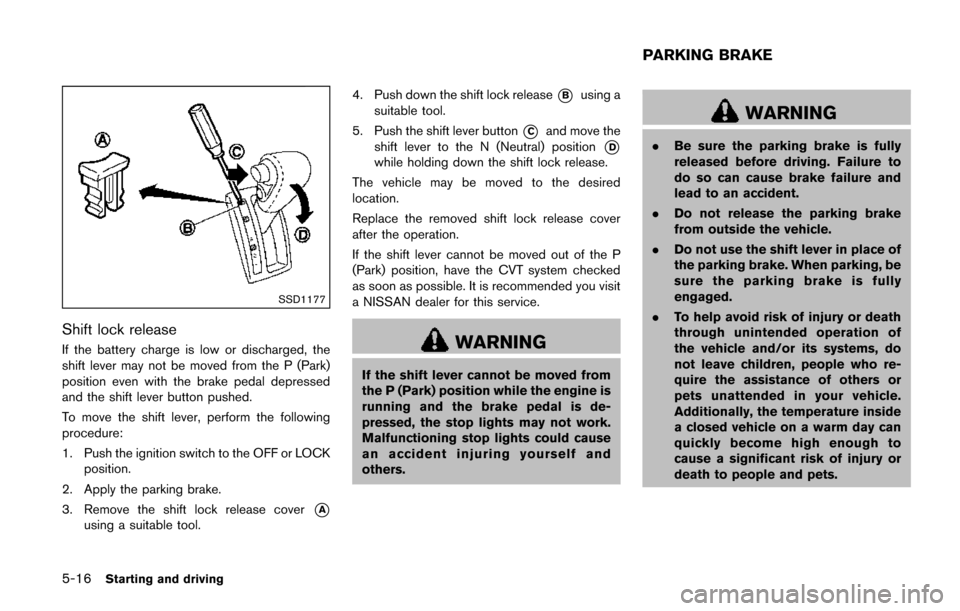
SSD1177
Shift lock release
If the battery charge is low or discharged, the
shift lever may not be moved from the P (Park)
position even with the brake pedal depressed
and the shift lever button pushed.
To move the shift lever, perform the following
procedure:
1. Push the ignition switch to the OFF or LOCKposition.
2. Apply the parking brake.
3. Remove the shift lock release cover
*A
using a suitable tool. 4. Push down the shift lock release
*Busing a
suitable tool.
5. Push the shift lever button
*Cand move the
shift lever to the N (Neutral) position
*D
while holding down the shift lock release.
The vehicle may be moved to the desired
location.
Replace the removed shift lock release cover
after the operation.
If the shift lever cannot be moved out of the P
(Park) position, have the CVT system checked
as soon as possible. It is recommended you visit
a NISSAN dealer for this service.
WARNING
If the shift lever cannot be moved from
the P (Park) position while the engine is
running and the brake pedal is de-
pressed, the stop lights may not work.
Malfunctioning stop lights could cause
an accident injuring yourself and
others.
WARNING
. Be sure the parking brake is fully
released before driving. Failure to
do so can cause brake failure and
lead to an accident.
. Do not release the parking brake
from outside the vehicle.
. Do not use the shift lever in place of
the parking brake. When parking, be
sure the parking brake is fully
engaged.
. To help avoid risk of injury or death
through unintended operation of
the vehicle and/or its systems, do
not leave children, people who re-
quire the assistance of others or
pets unattended in your vehicle.
Additionally, the temperature inside
a closed vehicle on a warm day can
quickly become high enough to
cause a significant risk of injury or
death to people and pets.
PARKING BRAKE
Page 386 of 520
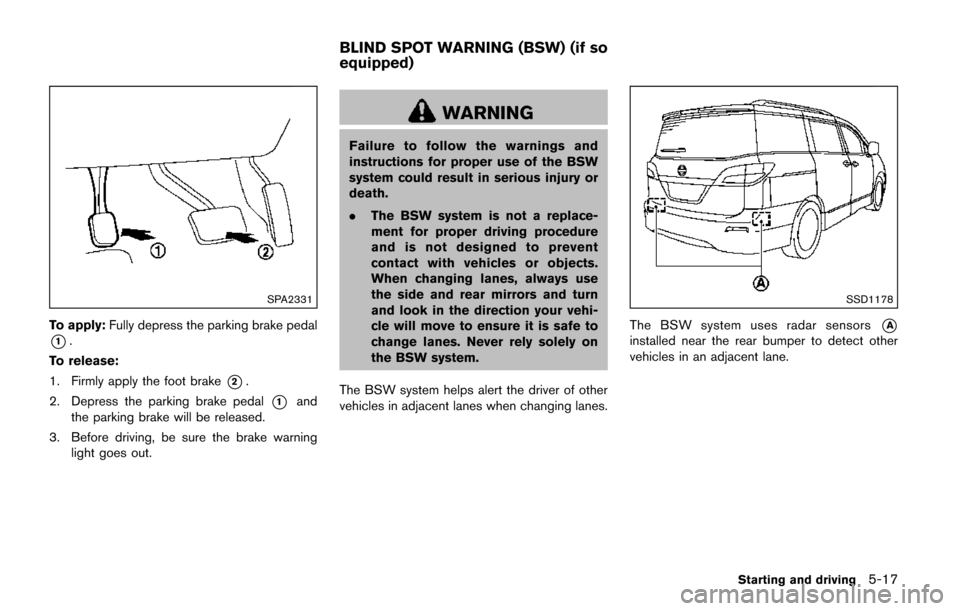
SPA2331
To apply:Fully depress the parking brake pedal
*1.
To release:
1. Firmly apply the foot brake
*2.
2. Depress the parking brake pedal
*1and
the parking brake will be released.
3. Before driving, be sure the brake warning light goes out.
WARNING
Failure to follow the warnings and
instructions for proper use of the BSW
system could result in serious injury or
death.
.The BSW system is not a replace-
ment for proper driving procedure
and is not designed to prevent
contact with vehicles or objects.
When changing lanes, always use
the side and rear mirrors and turn
and look in the direction your vehi-
cle will move to ensure it is safe to
change lanes. Never rely solely on
the BSW system.
The BSW system helps alert the driver of other
vehicles in adjacent lanes when changing lanes.
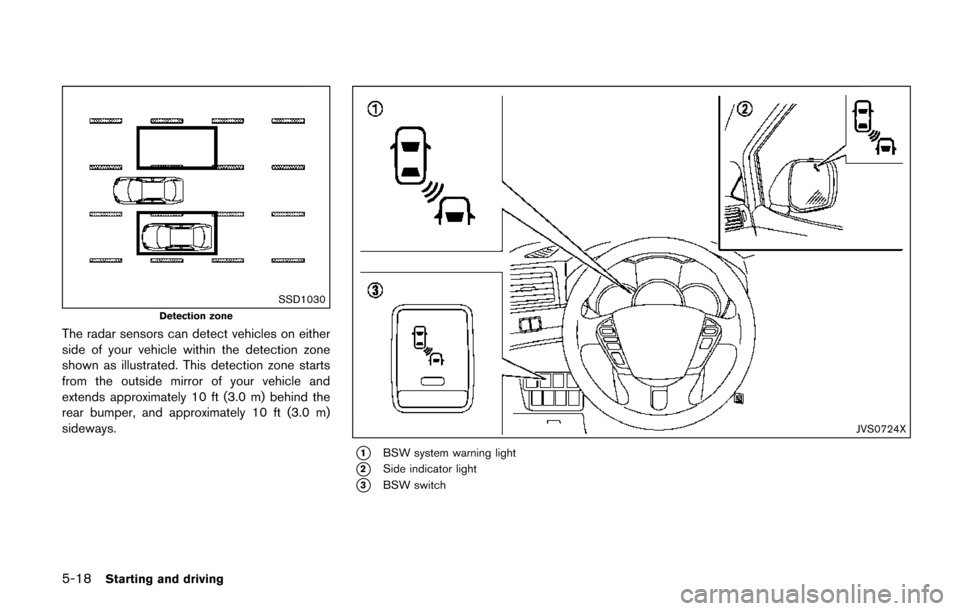
SSD1178
The BSW system uses radar sensors*A
installed near the rear bumper to detect other
vehicles in an adjacent lane.
Starting and driving5-17
BLIND SPOT WARNING (BSW) (if so
equipped)
Page 387 of 520
5-18Starting and driving
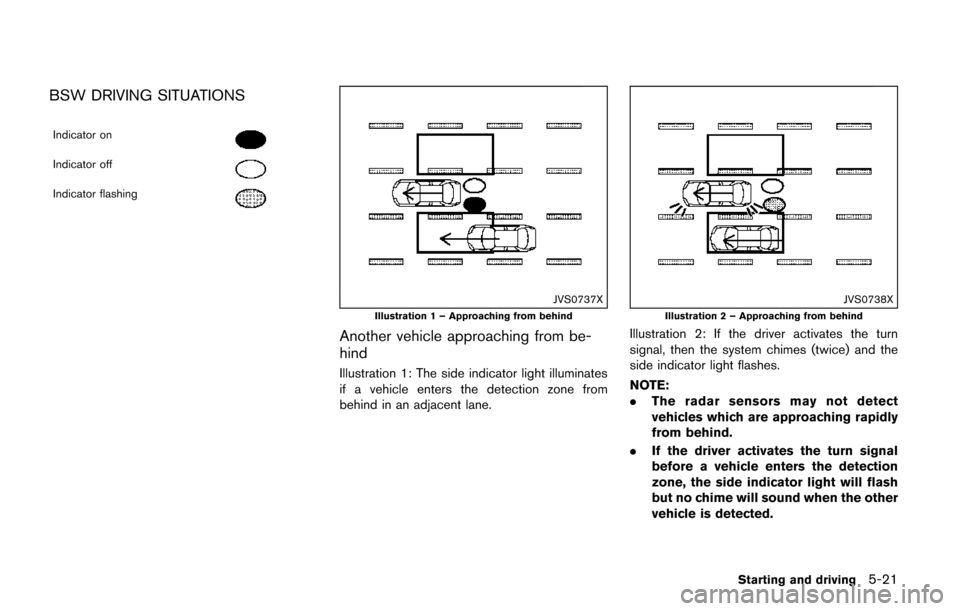
SSD1030
Detection zone
The radar sensors can detect vehicles on either
side of your vehicle within the detection zone
shown as illustrated. This detection zone starts
from the outside mirror of your vehicle and
extends approximately 10 ft (3.0 m) behind the
rear bumper, and approximately 10 ft (3.0 m)
sideways.
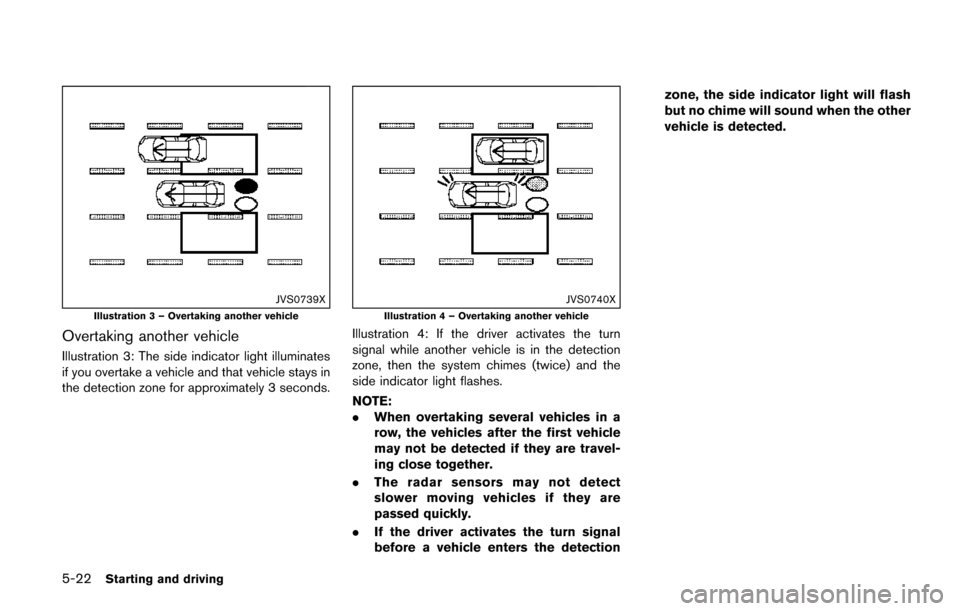
JVS0724X
*1BSW system warning light
*2Side indicator light
*3BSW switch
Page 388 of 520
BSW SYSTEM OPERATION
The BSW system operates above approximately
20 MPH (32 km/h) .
If the radar sensors detect a vehicle in the
detection zone, the side indicator light illumi-
nates.
If the turn signal is then activated, the system
chimes (twice) and the side indicator light
flashes. The side indicator light continues to
flash until the detected vehicle leaves the
detection zone.
NOTE:
.The side indicator light illuminates for
a few seconds when the ignition switch
is placed in the ON position.
. The brightness of the side indicator
light is adjusted automatically depend-
ing on the brightness of the ambient
light.
. If a vehicle comes into the detection
zone after the driver activates the turn
signal, then only the side indicator light
flashes and no chime sounds. For
additional information, refer to “BSW
driving situations” (P.5-21) .
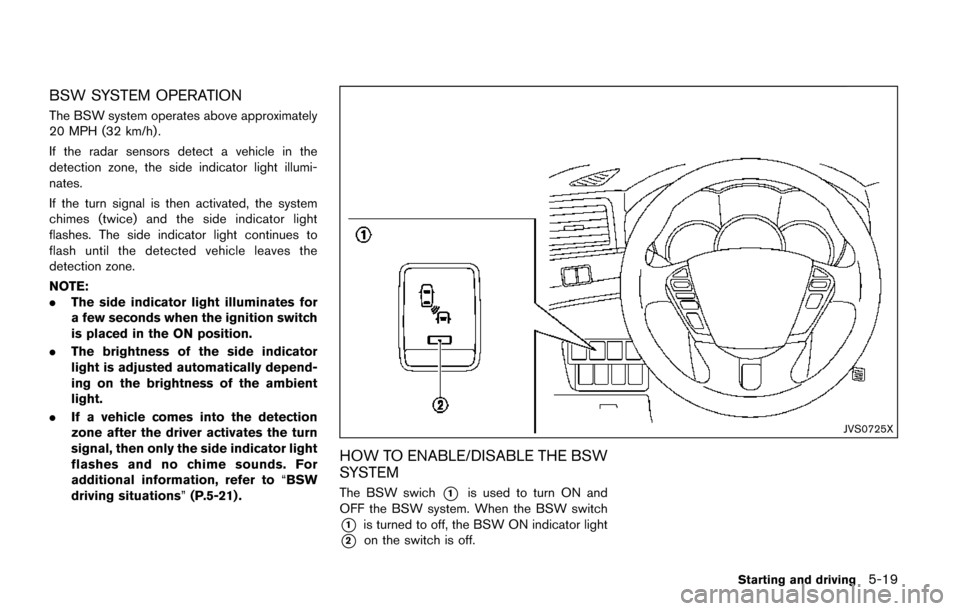
JVS0725X
HOW TO ENABLE/DISABLE THE BSW
SYSTEM
The BSW swich*1is used to turn ON and
OFF the BSW system. When the BSW switch
*1is turned to off, the BSW ON indicator light
*2on the switch is off.
Starting and driving5-19
Page 390 of 520
BSW DRIVING SITUATIONS
Indicator on
Indicator off
Indicator flashing
JVS0737X
Illustration 1 – Approaching from behind
Another vehicle approaching from be-
hind
Illustration 1: The side indicator light illuminates
if a vehicle enters the detection zone from
behind in an adjacent lane.
JVS0738X
Illustration 2 – Approaching from behind
Illustration 2: If the driver activates the turn
signal, then the system chimes (twice) and the
side indicator light flashes.
NOTE:
.The radar sensors may not detect
vehicles which are approaching rapidly
from behind.
. If the driver activates the turn signal
before a vehicle enters the detection
zone, the side indicator light will flash
but no chime will sound when the other
vehicle is detected.
Starting and driving5-21
Page 391 of 520
5-22Starting and driving
JVS0739X
Illustration 3 – Overtaking another vehicle
Overtaking another vehicle
Illustration 3: The side indicator light illuminates
if you overtake a vehicle and that vehicle stays in
the detection zone for approximately 3 seconds.
JVS0740X
Illustration 4 – Overtaking another vehicle
Illustration 4: If the driver activates the turn
signal while another vehicle is in the detection
zone, then the system chimes (twice) and the
side indicator light flashes.
NOTE:
.When overtaking several vehicles in a
row, the vehicles after the first vehicle
may not be detected if they are travel-
ing close together.
. The radar sensors may not detect
slower moving vehicles if they are
passed quickly.
. If the driver activates the turn signal
before a vehicle enters the detection zone, the side indicator light will flash
but no chime will sound when the other
vehicle is detected.
Page 392 of 520
JVS0741X
Illustration 5 – Entering from the side
Entering from the side
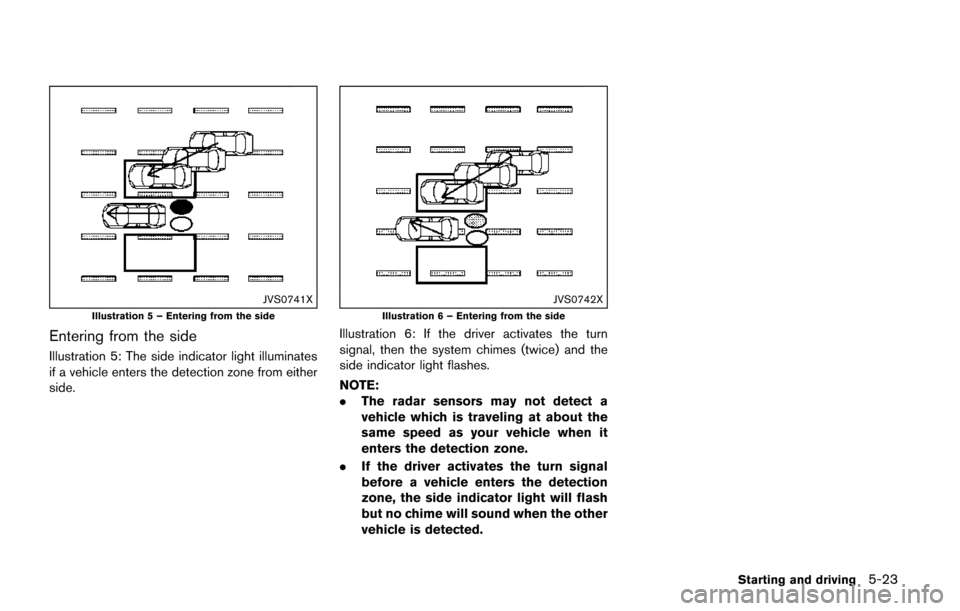
Illustration 5: The side indicator light illuminates
if a vehicle enters the detection zone from either
side.
JVS0742X
Illustration 6 – Entering from the side
Illustration 6: If the driver activates the turn
signal, then the system chimes (twice) and the
side indicator light flashes.
NOTE:
.The radar sensors may not detect a
vehicle which is traveling at about the
same speed as your vehicle when it
enters the detection zone.
. If the driver activates the turn signal
before a vehicle enters the detection
zone, the side indicator light will flash
but no chime will sound when the other
vehicle is detected.
Starting and driving5-23
Page 393 of 520
5-24Starting and driving
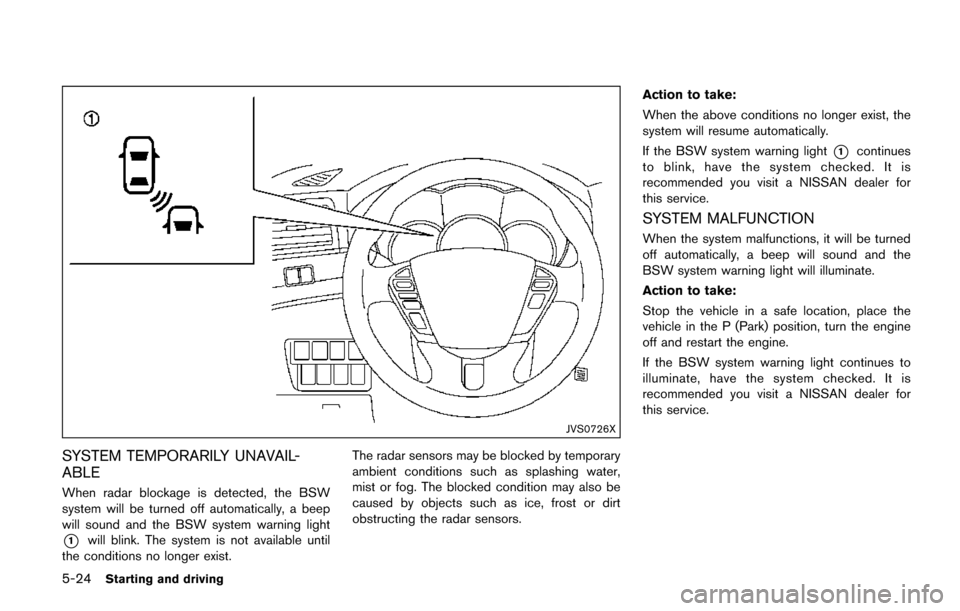
JVS0726X
SYSTEM TEMPORARILY UNAVAIL-
ABLE
When radar blockage is detected, the BSW
system will be turned off automatically, a beep
will sound and the BSW system warning light
*1will blink. The system is not available until
the conditions no longer exist. The radar sensors may be blocked by temporary
ambient conditions such as splashing water,
mist or fog. The blocked condition may also be
caused by objects such as ice, frost or dirt
obstructing the radar sensors.Action to take:
When the above conditions no longer exist, the
system will resume automatically.
If the BSW system warning light
*1continues
to blink, have the system checked. It is
recommended you visit a NISSAN dealer for
this service.
SYSTEM MALFUNCTION
When the system malfunctions, it will be turned
off automatically, a beep will sound and the
BSW system warning light will illuminate.
Action to take:
Stop the vehicle in a safe location, place the
vehicle in the P (Park) position, turn the engine
off and restart the engine.
If the BSW system warning light continues to
illuminate, have the system checked. It is
recommended you visit a NISSAN dealer for
this service.