2017 NISSAN QUEST display
[x] Cancel search: displayPage 267 of 520
4-78Monitor, heater, air conditioner, audio, phone and voice recognition systems
Audio main operation
The audio system operates when the ignition
switch is placed in the ON or ACC position.
Head unit:
The auto loudness circuit enhances the low and
high frequency ranges automatically in both
radio reception and CD playback.
Power button / VOL (volume) control
knob:
Push the Power button/VOL (volume) control
knob to turn on and off the audio system.
Turn the Power button/VOL (volume) control
knob to adjust the volume.
Audio settings:
The settings screen will appear when pushing
the ENTER/SETTING button.
The following items are available in the settings
screen.
. Bluetooth
It is possible to set the Bluetooth
Šsettings.
For details of the BluetoothŠsettings, see
“BluetoothŠaudio player operation” (P.4-
84) .
. Bass, Treble, Balance and Fade
Controls the sound of the audio system.
Balance adjusts the sound between the left
and right speakers. Fade adjusts the sound between the front and rear speakers.
Select the “Bass”, “Treble”, “Balance” or
“Fade” using the TUNE·SCROLL control
knob and then push the ENTER/SETTING
button. Turn the TUNE·SCROLL control
knob to adjust the Bass, Treble, balance
and Fade of the screen to the preferred
level.
. Brightness and Contrast
Adjust the brightness and contrast of the
screen.
Select the “Brightness” or “Contrast” using
the TUNE·SCROLL control knob and then
push the ENTER/SETTING button. Turn the
TUNE·SCROLL control knob to adjust the
brightness and contrast of the screen to the
preferred level.
. Clock Adjust
Adjust the clock according to the following
procedure.
1) Select “Clock Adjust” using the TU-
NE·SCROLL control knob and then
push the ENTER/SETTING button.
2) Adjust the hour with the TUNE·SCROLL control knob and then push the ENTER/
SETTING button.
3) Adjust the minute with the TUNE·SC- ROLL control knob and then push the
ENTER/SETTING button. 24 hour clock is not available.
. On-Screen Clock
When this item is turned on, a clock is
always displayed in the upper right corner of
the screen.
Select the “On-Screen Clock” using the
TUNE·SCROLL control knob and then push
the ENTER/SETTING button. You can tog-
gle between ON and OFF using the
TUNE·SCROLL control knob.
. RDS Display (if so equipped)
RDS (radio data system) information can be
shown on the display. Select “RDS Display”
using the TUNE·SCROLL control knob and
then push the ENTER/SETTING button. You
can toggle between ON and OFF using the
TUNE·SCROLL control knob.
. Speed Sensitive Vol.
To change the Speed Sensitive Volume
(Speed Sensitive Vol.) level from off (0) to
5, turn the TUNE·SCROLL control knob.
. AUX Vol.
Controls the volume level of incoming sound
when an auxiliary device is connected to the
system. Choose a setting between +1 and
+3 or choose 0 to disable the feature
entirely.
Page 268 of 520
.Language Select
The language settings can be changed.
Select “Language Select” using the TU-
NE·SCROLL control knob and then push the
ENTER/SETTING button. Use the TU-
NE·SCROLL control knob knob to select
the preferred language.
DISP button:
Display of the screen can be canceled by
pushing the DISP button. You can still listen to
music that is being played back even while the
screen display is turned off. If you want to
display the screen again, either push the DISP
button once more or push the FM·AM, CD,
MEDIA or iPod MENU button.
MEDIA button:
Pushing the MEDIA button will switch the audio
source as follows:
CD ?USB/iPod
Š?Bluetooth ?AUX ?CD
FM-AM-SAT radio operation
radio (FM·AM) band select:
Pushing the FM·AM button will change the band
as follows:
AM ?FM1 ?FM2 ?AM
radio (SAT) band select:
Pushing the XM band select button will change
the band as follows:
XM1 ?XM2 ?XM3 ?XM1
When the XM band select button is pushed
while the ignition switch is in the ACC or ON
position, the radio will come on at the channel
last played.
The last channel played will also come on when
the power button is pushed to ON.
The satellite radio is not available in Alaska,
Hawaii and Guam.
If another audio source is playing when the radio
band select button is turned to ON, the audio
source will automatically be turned off and the
last radio channel played will come on.
When the stereo broadcast signal is weak, the
radio will automatically change from stereo to
monaural reception. TUNE (Tuning):
.
For AM and FM radio
Turn the radio TUNE·SCROLL control knob
for manual tuning.
. For SiriusXM Satellite Radio
Turn the radio TUNE·SCROLL control knob
to seek channels from all of the categories
when any category is not selected.
SEEK tuning/CAT (category):
. For AM and FM radio
Push the SEEK button
orto tune
from low to high or high to low frequencies
and to stop at the next broadcasting station.
. For SiriusXM Satellite Radio
Push the SEEK button
orto tune to
the first channel of the next or previous
category.
SCAN tuning:
Push the SCAN tuning button to tune from low
to high frequencies and stop at each broad-
casting station for 5 seconds. Pushing the
button again during this 5 seconds period will
stop SCAN tuning and the radio will remain
tuned to that station.
If the SCAN tuning button is not pushed within 5
seconds, SCAN tuning moves to the next
Monitor, heater, air conditioner, audio, phone and voice recognition systems4-79
Page 269 of 520
4-80Monitor, heater, air conditioner, audio, phone and voice recognition systems
station.
toStation memory operations:
12 stations can be set for the FM band (6 each
for FM1 and FM2) and 6 stations can be set for
the AM band.
1. Choose the radio band using the FM·AM button.
2. Tune to the desired station using the SEEK·TRACK, SCAN button or the TU-
NE·SCROLL control knob.
3. Push and hold the desired station preset button
tountill beep sounds.
4. The station indicator will then come on and the sound will resume. Memorizing is now
complete.
5. Other buttons can be set in the same manner.
If the battery cable is disconnected, or if the fuse
opens, the station memory will be erased. In that
case, reset the desired stations.
CD player operation
Place the ignition switch in the ON or ACC
position. Insert the Compact Disc (CD) into the
slot with the label side facing up. The CD will be
guided automatically into the slot and start
playing.
After loading the CD, the number of tracks on
the CD and the play time will appear on the
display.
If the radio is already operating, it will auto-
matically turn off and the CD will play.
If the system has been turned off while the CD
was playing, pushing the Power/VOL dial will
start the CD.
PLAY:
With a CD loaded, press the Media button until
the CD mode is displayed on the screen.
SEEK/CAT:
When the
orbutton is pushed for more
than 1.5 seconds while the CD is being played,
the CD will play while fast forwarding or
rewinding. When the button is released, the
CD will return to normal play speed.
When the
orbutton is pushed for less
than 1.5 seconds while the CD is being played,
the next track or the beginning of the current track on the CD will be played.
REPEAT (RPT):
When the RPT button is pushed while the CD is
played, the play pattern can be changed as
follows:
(CD)
(Normal) œ1 Track Repeat
(CD with compressed audio files)
(Normal) ?1 Folder Repeat ?1 Track Repeat
? (Normal)
RANDOM (RDM):
When the RDM button is pushed while a CD is
being played, the play pattern can be changed
as follows:
(CD)
(Normal) œ1 Disc Random
(CD with compressed audio files)
(Normal) ?1 Disc Random ?1 Folder
Random ?(Normal)
CD eject:
When the CD eject button is pushed with the
CD loaded, the CD will be ejected.
When this button is pushed while the CD is
being played, the CD will be ejected.
Page 271 of 520
4-82Monitor, heater, air conditioner, audio, phone and voice recognition systems
device inserted, push the MEDIA button repeat-
edly until the center display changes to the USB
memory mode.
Next/Previous Track and Fast
Forward/Rewind:
When the FF or REW button is pushed for more
than 1.5 seconds while a USB memory is being
played, the USB memory will play while for-
warding or rewinding. When the button is
released, the USB memory will return to normal
play speed.
When the FF or REW button is pushed for less
than 1.5 seconds while the USB memory is
being played, the next track or the beginning of
the current track on the USB memory will be
played.
Folder selection:
To change to another folder in the USB memory,
choose a folder displayed on the screen using
the TUNE·SCROLL knob.
REPEAT (RPT):
When the RPT button is pushed while the USB
memory is played, the play pattern can be
change as follows.
To change the play mode, push the RPT button
repeatedly and the mode will change as follows. (Normal)
?1 Folder Repeat ?1 Track Repeat
? (Normal)
RANDOM (RDM):
When the RDM button is pushed while a USB
memory is being played, the play pattern can be
changed as follows.
To change the play mode, push the RDM button
repeatedly, and the mode will change as follows.
(Normal) ?All Random ?1 Folder Random ?
(Normal)
BACK button:
When the BACK button is pushed, it returns to
the previous display.
iPodŠplayer operation
WARNING
Do not connect, disconnect or operate
the USB device while driving. Doing so
can be a distraction. If distracted you
could lose control of your vehicle and
cause an accident or serious injury.
CAUTION
. Do not force the USB device into the
USB port. Inserting the USB device
tilted or up-side-down into the port
may damage the port. Make sure
that the USB device is connected
correctly into the USB port.
. Do not grab the USB port cover (if
so equipped) when pulling the USB
device out of the port. This could
damage the port and the cover.
. Do not leave the USB cable in a
place where it can be pulled unin-
tentionally. Pulling the cable may
damage the port.
Refer to your device manufacturer’s owner
information regarding the proper use and care
of the device.
Page 272 of 520
JVH1032X
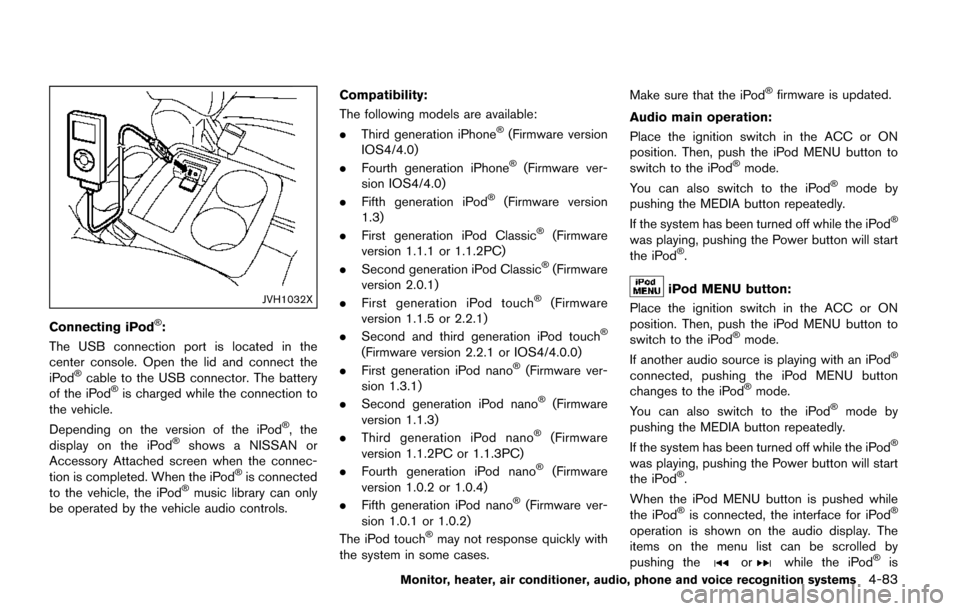
Connecting iPodŠ:
The USB connection port is located in the
center console. Open the lid and connect the
iPod
Šcable to the USB connector. The battery
of the iPodŠis charged while the connection to
the vehicle.
Depending on the version of the iPod
Š, the
display on the iPodŠshows a NISSAN or
Accessory Attached screen when the connec-
tion is completed. When the iPod
Šis connected
to the vehicle, the iPodŠmusic library can only
be operated by the vehicle audio controls. Compatibility:
The following models are available:
.
Third generation iPhone
Š(Firmware version
IOS4/4.0)
. Fourth generation iPhone
Š(Firmware ver-
sion IOS4/4.0)
. Fifth generation iPod
Š(Firmware version
1.3)
. First generation iPod Classic
Š(Firmware
version 1.1.1 or 1.1.2PC)
. Second generation iPod Classic
Š(Firmware
version 2.0.1)
. First generation iPod touch
Š(Firmware
version 1.1.5 or 2.2.1)
. Second and third generation iPod touch
Š
(Firmware version 2.2.1 or IOS4/4.0.0)
. First generation iPod nanoŠ(Firmware ver-
sion 1.3.1)
. Second generation iPod nano
Š(Firmware
version 1.1.3)
. Third generation iPod nano
Š(Firmware
version 1.1.2PC or 1.1.3PC)
. Fourth generation iPod nano
Š(Firmware
version 1.0.2 or 1.0.4)
. Fifth generation iPod nano
Š(Firmware ver-
sion 1.0.1 or 1.0.2)
The iPod touch
Šmay not response quickly with
the system in some cases. Make sure that the iPod
Šfirmware is updated.
Audio main operation:
Place the ignition switch in the ACC or ON
position. Then, push the iPod MENU button to
switch to the iPod
Šmode.
You can also switch to the iPodŠmode by
pushing the MEDIA button repeatedly.
If the system has been turned off while the iPod
Š
was playing, pushing the Power button will start
the iPodŠ.
iPod MENU button:
Place the ignition switch in the ACC or ON
position. Then, push the iPod MENU button to
switch to the iPod
Šmode.
If another audio source is playing with an iPodŠ
connected, pushing the iPod MENU button
changes to the iPodŠmode.
You can also switch to the iPodŠmode by
pushing the MEDIA button repeatedly.
If the system has been turned off while the iPod
Š
was playing, pushing the Power button will start
the iPodŠ.
When the iPod MENU button is pushed while
the iPod
Šis connected, the interface for iPodŠ
operation is shown on the audio display. The
items on the menu list can be scrolled by
pushing the
orwhile the iPodŠis
Monitor, heater, air conditioner, audio, phone and voice recognition systems4-83
Page 273 of 520
4-84Monitor, heater, air conditioner, audio, phone and voice recognition systems
operational. To select an item, push ENTER.
Items in the iPodŠmenu appear on the display in
the following order.
. Now Playing
. Playlists
. Artists
. Albums
. Songs
. Podcasts
. Genres
. Composers
. Audiobooks
. Shuffle Songs
For more information about each item, see the
iPod
ŠOwner’s Manual.
Next/Previous Track and Fast
Forward/Rewind:
When the FF or REW button is pushed for more
than 1.5 seconds while the iPod
Šis playing, the
iPodŠwill play while fast forwarding or rewind-
ing. When the button is released, the iPodŠwill
return to the normal play speed.
When the FF or REW button is pushed for less
than 1.5 seconds while the iPod
Šis playing, the
next track or the beginning of the current track
on the iPod
Šwill be played. Push the buttons
several times to skip through the tracks. The multi-function controller can also be used to
select tracks when the iPod
Šis playing.
REPEAT (RPT):
When the RPT play button is pushed while a
track is being played, the play pattern can be
changed as follows:
(Repeat Off) ?1 Track Repeat? All Repeat?
(Repeat Off)
Random (RDM):
When the RDM play button is pushed while a
track is being played, the play pattern can be
changed as follows:
(Shuffle Off) ?Track Shuffle ?(Shuffle Off)
BACK button:
When the BACK button is pushed, it returns to
the previous display.
BluetoothŠaudio player operation
If you have a compatible BluetoothŠaudio
device that is capable of playing audio files,
the device can be connected to the vehicle’s
audio system so that the audio files on the
device play through the vehicle’s speakers.
Regulatory information:
Bluetooth
Štrademark:
BluetoothŠis a trademark owned
by Bluetooth SIG, Inc. and li-
censed to Visteon Corporation.
Connecting BluetoothŠdevice:
To connect your BluetoothŠdevice to the
vehicle, follow the procedure below:
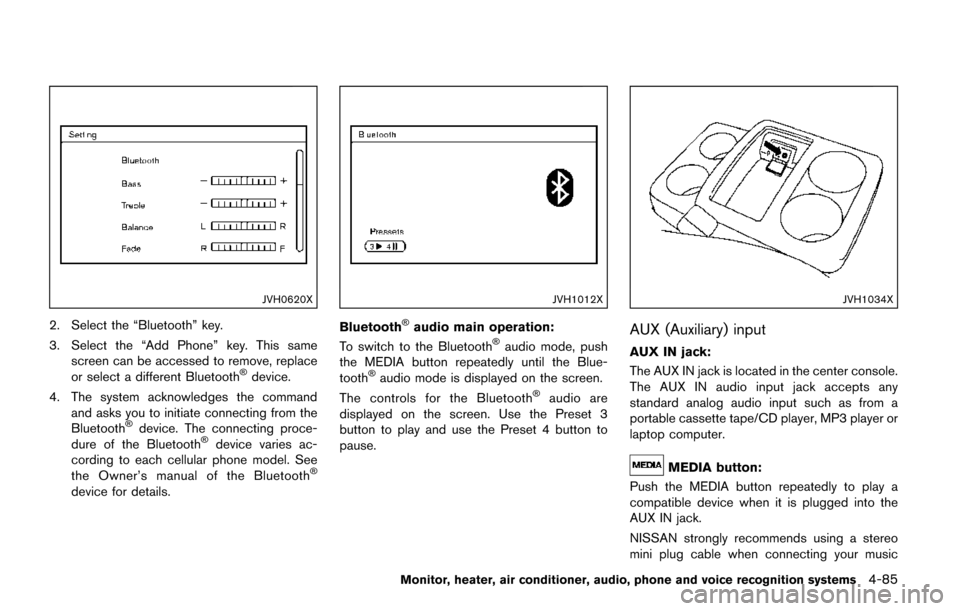
1. Push the ENTER/SETTING button.
Page 274 of 520
JVH0620X
2. Select the “Bluetooth” key.
3. Select the “Add Phone” key. This samescreen can be accessed to remove, replace
or select a different Bluetooth
Šdevice.
4. The system acknowledges the command and asks you to initiate connecting from the
Bluetooth
Šdevice. The connecting proce-
dure of the BluetoothŠdevice varies ac-
cording to each cellular phone model. See
the Owner’s manual of the Bluetooth
Š
device for details.
JVH1012X
BluetoothŠaudio main operation:
To switch to the BluetoothŠaudio mode, push
the MEDIA button repeatedly until the Blue-
tooth
Šaudio mode is displayed on the screen.
The controls for the BluetoothŠaudio are
displayed on the screen. Use the Preset 3
button to play and use the Preset 4 button to
pause.
JVH1034X
AUX (Auxiliary) input
AUX IN jack:
The AUX IN jack is located in the center console.
The AUX IN audio input jack accepts any
standard analog audio input such as from a
portable cassette tape/CD player, MP3 player or
laptop computer.
MEDIA button:
Push the MEDIA button repeatedly to play a
compatible device when it is plugged into the
AUX IN jack.
NISSAN strongly recommends using a stereo
mini plug cable when connecting your music
Monitor, heater, air conditioner, audio, phone and voice recognition systems4-85
Page 277 of 520
4-88Monitor, heater, air conditioner, audio, phone and voice recognition systems
Turn the VOL control knob to adjust the volume.
Adjusting tone quality and speaker bal-
ance:
To adjust Bass, Treble, Balance and Fade, push
the Audio control knob. When the display shows
the setting you want to change (Bass, Treble,
Balance and Fade) , rotate the Audio control
knob to set the desired setting. For the other
setting methods, see “How to use SETTING
button” (P.4-15).
This vehicle has some sound effect functions as
follows:
.Speed Sensitive Vol.
For more details, see “Vehicle information and
settings (models with center multi-function
control panel)” (P.4-10) .
Switching the display:
Pushing the DISC·AUX button will switch the
displays as follows:
iPod
Š/USB ?CD/DVD ?BluetoothŠAudio (if
so equipped) ?AUX ?iPodŠ/USB
FM-AM-SAT radio operation
When the radio band select button is pushed
while the ignition switch is in the ACC or ON
position, the radio will come on at the channel
last played.
The last channel played will also come on when
the ON·OFF button is pushed to ON.
If another audio source is playing when the radio
band select button is turned on, the audio
source will automatically be turned off and the
last radio channel played will come on.
When the stereo broadcast signal is weak, the
radio will automatically change from stereo to
monaural reception.
radio (FM/AM) band select:
Pushing the radio band select button will
change the band as follows:
AM ?FM1 ?FM2 ?AM
radio (SAT) band select:
Pushing the radio band select button will
change the band as follows:
XM1 ?XM2 ?XM3 ?XM1
The satellite radio is not available in Alaska,
Hawaii and Guam. TUNE (Tuning):
.
For AM and FM radio
Turn the radio TUNE knob for manual tuning.
. For SiriusXM Satellite Radio
Turn the radio TUNE knob to seek channels
from all of the categories when any category
is not selected.
or/SEEK tuning/CATE-
GORY (CAT):
. For AM and FM radio
Push the SEEK button
orto tune
from low to high or high to low frequencies
and to stop at the next broadcasting station.
. For SiriusXM Satellite Radio
Push the SEEK button
orto tune
to the first channel of the next or previous
category.
During satellite radio reception, the following
notices will be displayed under certain condi-
tions.
. NO SIGNAL (No signal is received while the
SAT tuner is connected.)
. OFF AIR (Broadcasting signed off)
. CHECK ANTENNA (Antenna connection
error)
. LOADING (When the initial setting is
performed)