2017 NISSAN QASHQAI change
[x] Cancel search: changePage 348 of 508

Vehicle-to-vehicle distance control mode
operation
The vehicle-to-vehicle distance control mode is
designed to maintain a selected distance and
reduce the speed to match the slower vehicle
ahead. The system will decelerate the vehicle as
necessary and if the vehicle ahead comes to a
stop, the vehicle decelerates to a standstill.
However, the ICC system can only apply up to
approximately 40% of the vehicle’s total braking
power. This system should only be used when
traffic conditions allow vehicle speeds to remain
fairly constant or when vehicle speeds change
gradually. If a vehicle moves into the traveling
lane ahead or if a vehicle traveling ahead rapidly
decelerates, the distance between vehicles may
become closer because the ICC system cannot
decelerate the vehicle quickly enough. If this
occurs, the ICC system will sound a warning
chime and blink the system display to notify the
driver to take necessary action.
The system will cancel and a warning chime will
sound if the speed is below approximately 15
MPH (24 km/h) and a vehicle is not detected
ahead. The system will also disengage when the
vehicle goes above the maximum set speed.
See “Approach warning” (P.5-69).The following items are controlled in the vehicle-
to-vehicle distance control mode:
.When there are no vehicles traveling ahead,
the vehicle-to-vehicle distance control mode
maintains the speed set by the driver. The
set speed range is the following speed.
— 20 and 90 MPH (32 and 144 km/h)
.When there is a vehicle traveling ahead, the
vehicle-to-vehicle distance control mode
adjusts the speed to maintain the distance,
selected by driver, from the vehicle ahead.
The adjusting speed range is up to the set
speed. If the vehicle ahead comes to a stop,
the vehicle decelerates to a standstill within
the limitations of the system. The system will
cancel once it judges a standstill with a
warning chime.
.When the vehicle traveling ahead has
moved out from its lane of travel, the
vehicle-to-vehicle distance control mode
accelerates and maintains vehicle speed
up to the set speed.
The ICC system does not control vehicle speed
or warn you when you approach stationary and
slow moving vehicles. You must pay attention to
vehicle operation to maintain proper distance
from vehicles ahead when approaching toll
gates or traffic congestion.
SSD0254
When driving on the freeway at a set speed and
approaching a slower traveling vehicle ahead,
the ICC system will adjust the speed to maintain
the distance, selected by the driver, from the
vehicle ahead. If the vehicle ahead changes
lanes or exits the freeway, the ICC system will
accelerate and maintain the speed up to the set
speed. Pay attention to the driving operation to
maintain control of the vehicle as it accelerates
to the set speed.
The vehicle may not maintain the set speed on
winding or hilly roads. If this occurs, you will
have to manually control the vehicle speed.
Normally when controlling the distance to a
vehicle ahead, this system automatically accel-
Starting and driving5-63
Page 349 of 508

5-64Starting and driving
erates or decelerates your vehicle according to
the speed of the vehicle ahead. Depress the
accelerator to properly accelerate your vehicle
when acceleration is required for a lane change.
Depress the brake pedal when deceleration is
required to maintain a safe distance to the
vehicle ahead due to its sudden braking or if a
vehicle cuts in. Always stay alert when using the
ICC system.
JVS0957X
Vehicle-to-vehicle distance control mode
switches
The system is operated by a CRUISE ON/OFF
switch and four control switches, all mounted on
the steering wheel.
1. RES/+ switch:
Resumes set speed or increases speed
incrementally.
2. CANCEL switch:
Deactivates the system without erasing the
set speed.
3. SET/- switch:
Sets desired cruise speed, reduces speedincrementally.
4. CRUISE ON/OFF switch:
Master switch to activate the system
5. DISTANCE switch:
Changes the vehicle’s following distance:
.Long.Middle.Short
Page 353 of 508

5-68Starting and driving
JVS1073X
When passing another vehicle,the set
speed indicator
*Bwill flash when the vehicle
speed exceeds the set speed. The vehicle
detect indicator will turn off when the area
ahead of the vehicle is open. When the pedal is
released, the vehicle will return to the previously
set speed.
Even though your vehicle speed is set in the ICC
system, you can depress the accelerator pedal
when it is necessary to accelerate your vehicle
rapidly.
How to change the set vehicle speed
To cancel the preset speed,use any of these
methods:
.Push the CANCEL switch. The set vehicle
speed indicator will go out.
.Tap the brake pedal. The set vehicle speed
indicator will go out.
.Turn the CRUISE ON/OFF switch off. The
ICC indicators will go out.
To reset at a faster cruising speed,use one
of the following methods:
.Depress the accelerator pedal. When the
vehicle attains the desired speed, push and
release the SET/- switch.
.Push and hold the RES/+ switch. The set
vehicle speed will increase by approximately
5 MPH (5 km/h) .
.Push, then quickly release the RES/+
switch. Each time you do this, the set speed
will increase by approximately 1 MPH (1
km/h) .
To reset at a slower cruising speed,use one
of the following methods:
.Lightly tap the brake pedal. When the
vehicle attains the desired speed, push the
SET/- switch and release it.
.Push and hold the SET/- switch. The set
vehicle speed will decrease by approxi-mately 5 MPH (5 km/h) .
.Push, then quickly release the SET/- switch.
Each time you do this, the set speed will
decrease by approximately 1 MPH (1 km/h) .
To resume the preset speed,push and
release the RES/+ switch. The vehicle will
resume the last set cruising speed when the
vehicle speed is over 20 MPH (32 km/h) .
Page 354 of 508
JVS0965X
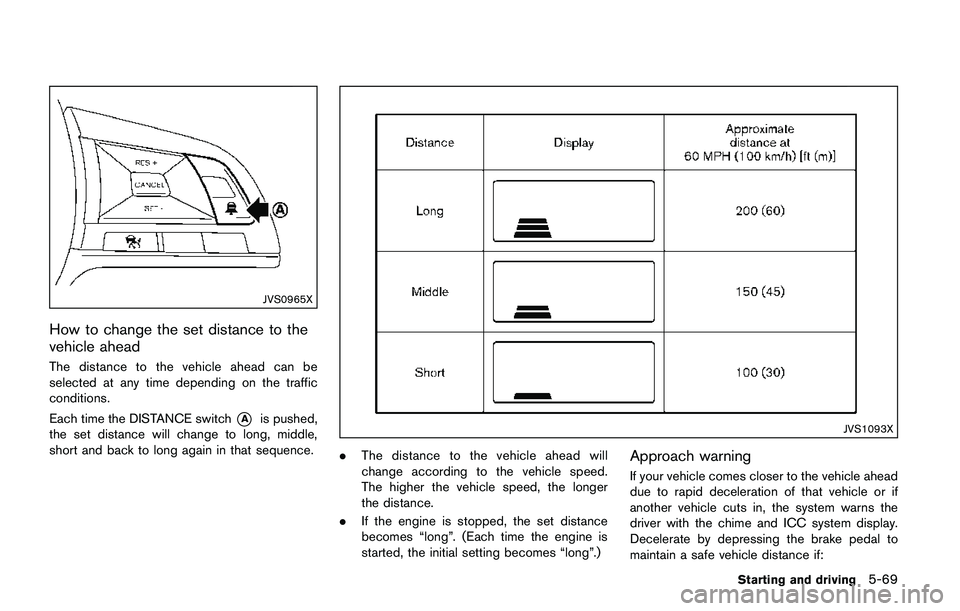
How to change the set distance to the
vehicle ahead
The distance to the vehicle ahead can be
selected at any time depending on the traffic
conditions.
Each time the DISTANCE switch
*Ais pushed,
the set distance will change to long, middle,
short and back to long again in that sequence.JVS1093X
.The distance to the vehicle ahead will
change according to the vehicle speed.
The higher the vehicle speed, the longer
the distance.
.If the engine is stopped, the set distance
becomes “long”. (Each time the engine is
started, the initial setting becomes “long”.)Approach warning
If your vehicle comes closer to the vehicle ahead
due to rapid deceleration of that vehicle or if
another vehicle cuts in, the system warns the
driver with the chime and ICC system display.
Decelerate by depressing the brake pedal to
maintain a safe vehicle distance if:
Starting and driving5-69
Page 360 of 508

dealer for this service.
JVS1041X
System maintenance
The sensor for the ICC system*Ais located on
the front of the vehicle.
To keep the ICC system operating properly, be
sure to observe the following:
.Always keep the sensor area clean.
.Do not strike or damage the areas around
the sensor.
.Do not cover or attach stickers or similar
objects near the sensor area. This could
cause failure or malfunction.
.Do not attach metallic objects near the
sensor area (brush guard, etc.) . This could
cause failure or malfunction..Do not alter, remove or paint the front
bumper. Before customizing or restoring
the front bumper, it is recommended that
you visit a NISSAN dealer.
Radio frequency statement
For USA
FCC : OAYSRR3B
This device complies with part 15 of the
FCC Rules. Operation is subject to the
following two conditions:
(1) This device may not cause harmful
interference, and (2) this device must
accept any interference received, including
interference that may cause undesired
operation.
FCC Warning
Changes or modifications not expressly
approved by the party responsible for
compliance could void the user’s authority
to operate the equipment
For Canada
Applicable law: Canada 310
This device complies with Industry Canada
licence-exempt RSS standard(s) . Opera-
tion is subject to the following two condi-
tions: (1) this device may not cause
interference, and (2) this device must
accept any interference, including interfer-
Starting and driving5-75
Page 363 of 508

5-78Starting and driving
system completely off.
When the ignition switch is placed in the OFF
position, the system is also automatically turned
off.
To use the ICC system again, quickly push and
release the CRUISE ON/OFF switch (vehicle-
to-vehicle distance control mode) or push and
hold it (conventional cruise control mode) again
to turn it on.
CAUTION
To avoid accidentally engaging cruise
control, make sure to turn the CRUISE
ON/OFF switch off when not using the
ICC system.JVS1077X
To set cruising speed,accelerate your vehicle
to the desired speed, push the SET/- switch
*B
and release it. (The color of the cruise indicator
changes to green and set vehicle speed
indicator comes on.) Take your foot off the
accelerator pedal. Your vehicle will maintain the
set speed.
.To pass another vehicle,depress the
accelerator pedal. When you release the
pedal, the vehicle will return to the previously
set speed.
.The vehicle may not maintain the set speed
when going up or down steep hills. If this
happens, manually maintain vehicle speed.To cancel the preset speed,use any of the
following methods:
1. Push the CANCEL switch. The vehicle
speed indicator will turn off.
2. Tap the brake pedal. The vehicle speed
indicator will turn off.
3. Turn the CRUISE ON/OFF switch off. Both
the cruise indicator and set vehicle speed
indicator will turn off.
To reset at a faster cruising speed,use one
of the following three methods:
1. Depress the accelerator pedal. When the
vehicle attains the desired speed, push and
release the SET/- switch.
2. Push and hold the RES/+ switch. When the
vehicle attains the desired speed, release
the switch.
3. Push, then quickly release the RES/+
switch. Each time you do this, the set speed
will increase by about 1 MPH (1.6 km/h) .
To reset at a slower cruising speed,use one
of the following three methods:
1. Lightly tap the brake pedal. When the
vehicle attains the desired speed, push the
SET/- switch and release it.
2. Push and hold the SET/- switch. Release
the switch when the vehicle slows down to
Page 364 of 508

the desired speed.
3. Push, then quickly release the SET/- switch.
Each time you do this, the set speed will
decrease by about 1 MPH (1.6 km/h) .
To resume the preset speed,push and
release the RES/+ switch. The vehicle will
resume the last set cruising speed when the
vehicle speed is over 25 MPH (40 km/h) .
System temporarily unavailable
A chime sounds under the following conditions
and the control is automatically canceled.
.When the vehicle slows down more than 8
MPH (13 km/h) below the set speed
.When the shift lever is not in the D (Drive) or
manual shift mode
.When the parking brake is applied.
.When the VDC (including the traction
control system) operates
.When a wheel slips
JVS1003X
Warning
When the system is not operating properly, the
chime sounds and the color of the cruise
indicator will change to yellow.
Action to take:
If the color of the cruise indicator changes to
yellow, park the vehicle in a safe place. Turn the
engine off, restart the engine, resume driving
and then perform the setting again.
If it is not possible to set or the indicator
stays on, it may indicate that the system is
malfunctioning. Although the vehicle is
still driveable under normal conditions,
have the vehicle checked. It is recom-mended that you visit a NISSAN dealer
for this service.
Starting and driving5-79
Page 371 of 508

5-86Starting and driving
.Do not attach metallic objects near the
sensor area (brush guard, etc.) . This could
cause failure or malfunction.
.Do not alter, remove or paint the front of the
vehicle near the sensor area. Before custo-
mizing or restoring the sensor area, it is
recommended that you visit a NISSAN
dealer.
Radio frequency statement
For USA
FCC : OAYSRR3B
This device complies with part 15 of the
FCC Rules. Operation is subject to the
following two conditions:
(1) This device may not cause harmful
interference, and (2) this device must
accept any interference received, including
interference that may cause undesired
operation.
FCC Warning
Changes or modifications not expressly
approved by the party responsible for
compliance could void the user’s authority
to operate the equipment
For Canada
Applicable law: Canada 310
This device complies with Industry Canadalicence-exempt RSS standard(s) . Opera-
tion is subject to the following two condi-
tions: (1) this device may not cause
interference, and (2) this device must
accept any interference, including interfer-
ence that may cause undesired operation
of the device.
Frequency bands: 24.05 – 24.25GHz
Output power: less than 20 milliwatts*: if so equipped
WARNING
Failure to follow the warnings and
instructions for proper use of the FEB
with pedestrian detection system could
result in serious injury or death.
.The FEB with pedestrian detection
system is a supplemental aid to the
driver. It is not a replacement for the
driver’s attention to traffic condi-
tions or responsibility to drive
safely. It cannot prevent accidents
due to carelessness or dangerous
driving techniques.
.The FEB with pedestrian detection
system does not function in all
driving, traffic, weather and road
conditions.
The FEB with pedestrian detection system can
assist the driver when there is a risk of a forward
collision with the vehicle ahead in the traveling
lane or with a pedestrian.
FORWARD EMERGENCY BRAKING
(FEB) WITH PEDESTRIAN
DETECTION SYSTEM*