Page 388 of 555
SYSTEM TEMPORARILY
UNAVAILABLE
When radar blockage is detected, the system will
be deactivated automatically. The “Side Radar
Obstruction” warning message will appear and
the BSW/RCTA indicator (white) will blink
�Ain
the vehicle information display.
The system is not available until the conditions no
longer exist.
The radar sensors may be blocked by temporary
ambient conditions such as splashing water, mist
or fog. The blocked condition may also be caused
by objects such as ice, frost or dirt obstructing
the radar sensors.
NOTE:
If the BSW system stops working, the RCTA
system (if so equipped) will also stop work-
ing.
Action to take:
When the above conditions no longer exist, the
system will resume automatically.
LSD2763
Starting and driving5-27
Page 389 of 555
Malfunction
If the BSW system malfunctions, it will turn off
automatically. The system malfunction warning
message with the BSW/RCTA indicator (orange)
will appear in the vehicle information display.
NOTE:
If the BSW system stops working, the RCTA
system (if so equipped) will also stop work-
ing.
Action to take:
Stop the vehicle in a safe location, place the
vehicle in the P (Park) position, turn the engine off
and restart the engine. If the message continues
to appear, have the system checked. It is recom-
mended that you visit a NISSAN dealer for this
service.
SYSTEM MAINTENANCE
The two radar sensors�1for the BSW and
RCTA systems are located near the rear bumper.
Always keep the area near the radar sensors
clean.
The radar sensors may be blocked by temporary
ambient conditions such as splashing water, mist
or fog.
The blocked condition may also be caused by
objects such as ice, frost or dirt obstructing the
radar sensors.
Check for and remove objects obstructing the
area around the radar sensors. Do not attach stickers (including transparent ma-
terial) , install accessories or apply additional
paint near the radar sensors.
Do not strike or damage the area around the
radar sensors. It is recommended that you con-
sult a NISSAN dealer if the area around the radar
sensors is damaged due to a collision.
Radio frequency statement
For USA
FCC ID: OAYSRR2B or OAYSRR3B
This device complies with part 15 of the FCC
Rules.
Operation is subject to the following two condi-
tions:
1. This device may not cause harmful interfer- ence, and
2. This device must accept any interference received, including interference that may
cause undesired operation.
FCC Warning
Changes or modifications not expressly ap-
proved by the party responsible for compliance
could void the user’s authority to operate the
equipment.
LSD2707
5-28Starting and driving
Page 397 of 555
SYSTEM TEMPORARILY
UNAVAILABLE
When radar blockage is detected, the system will
be deactivated automatically. The “Side Radar
Obstruction” warning message will appear and
the BSW/RCTA indicator (white) will blink
�Ain
the vehicle information display.
The systems are not available until the conditions
no longer exist.
The radar sensors may be blocked by temporary
ambient conditions such as splashing water, mist
or fog.
The blocked condition may also be caused by
objects such as ice, frost or dirt obstructing the
radar sensors.
NOTE:
If the BSW system stops working, the RCTA
system will also stop working.
Action to take
When the above conditions no longer exist, the
system will resume automatically.
LSD2763
5-36Starting and driving
Page 398 of 555
Malfunction
When the RCTA system malfunctions, it will turn
off automatically. The system malfunction warn-
ing message with the BSW/RCTA indicator (or-
ange) will appear in the vehicle information dis-
play.
NOTE:
If the BSW system stops working, the RCTA
system (if so equipped) will also stop work-
ing.
Action to take
Stop the vehicle in a safe location, place the
vehicle in the P (Park) position, turn the engine off
and restart the engine. If the message continues
to appear, have the system checked. It is recom-
mended that you visit a NISSAN dealer for this
service.
SYSTEM MAINTENANCE
The two radar sensors�1for the BSW and
RCTA systems are located near the rear bumper.
Always keep the area near the radar sensors
clean.
The radar sensors may be blocked by temporary
ambient conditions such as splashing water, mist
or fog.
The blocked condition may also be caused by
objects such as ice, frost or dirt obstructing the
radar sensors.
Check for and remove objects obstructing the
area around the radar sensors. Do not attach stickers (including transparent ma-
terial) , install accessories or apply additional
paint near the radar sensors.
Do not strike or damage the area around the
radar sensors. It is recommended that you con-
sult a NISSAN dealer if the area around the radar
sensors is damaged due to a collision.
Radio frequency statement
For USA
FCC ID: OAYSRR2B or OAYSRR3B
This device complies with part 15 of the FCC
Rules.
Operation is subject to the following two condi-
tions:
1. This device may not cause harmful interfer- ence, and
2. This device must accept any interference received, including interference that may
cause undesired operation.
FCC Warning
Changes or modifications not expressly ap-
proved by the party responsible for compliance
could void the user’s authority to operate the
equipment.
LSD2707
Starting and driving5-37
Page 413 of 555
Action to take
When the conditions listed above are no longer
present, turn the system off using the ICC
CRUISE ON/OFF switch. Turn the ICC system
back on to use the system.
Condition B
When the radar sensor area of the front bumper
is covered with dirt or is obstructed, the ICC
system will automatically be canceled. If the sen-
sor area is covered with ice, a transparent or
translucent vinyl bag, etc., the ICC system may
not detect vehicles ahead. In these instances, the
ICC system may not cancel and may not be able
to maintain the selected following distance from
the vehicle ahead. Be sure to check and clean the
sensor area.
The system warning light (orange) will illuminate
and the “Unavailable: Front Radar Obstruction”
warning message will appear in the vehicle infor-
mation display.
When driving on roads with limited road struc-
tures or buildings (for example, or long bridges,
deserts, snow fields, driving next to long walls) ,
the system may illuminate the system warning
light (orange) and display the “Unavailable: Front
Radar Obstruction” message.Action to take
If the warning light (orange) comes on, park the
vehicle in a safe location and turn the engine off.
Check to see if the radar sensor window is
blocked. If the radar sensor window is blocked,
remove the blocking material. Restart the engine.
If the warning light continues to illuminate, have
the ICC system checked. It is recommended that
you visit a NISSAN dealer for this service.
Condition C
When the ICC system is not operating properly, a
chime sounds and the system warning light (or-
ange) will come on.Action to take
If the warning light comes on, park the vehicle in a
safe place. Turn the engine off, restart the engine,
resume driving and set the ICC system again.
If it is not possible to set the system or the
indicator stays on, it may indicate that the
system is malfunctioning. Although the ve-
hicle is still drivable under normal condi-
tions, have the vehicle checked. It is recom-
mended that you visit a NISSAN dealer for
this service.
LSD2411LSD2395
5-52Starting and driving
Page 424 of 555
●If a warning message continues to be
displayed after the above operations,
have your vehicle checked as soon as
possible. It is recommended that you
visit a NISSAN dealer for this service.
4WD shift switch
The 4WD system is used to select the 2WD,
AUTO or LOCK mode depending on the driving
conditions.
Turn the 4WD mode switch, located on the cen-
ter console, to select 2WD, AUTO, or LOCK.
● 2WD – Turn the 4WD mode switch to the
2WD position. The 2WD indicator light in
the vehicle information display illuminates.
● AUTO – Turn the 4WD mode switch to the
neutral (AUTO) position. The 4WD AUTO
indicator light in the vehicle information dis-
play illuminates. ●
LOCK – To engage the LOCK mode, turn
the 4WD mode switch to the LOCK posi-
tion. The switch will return to the AUTO
position automatically and the 4WD LOCK
indicator light in the vehicle information dis-
play illuminates. To disengage the LOCK
mode, turn the switch to the LOCK position
again. The switch will return to the AUTO
position automatically, and the 4WD LOCK
indicator light turns into the AUTO indicator
light. The LOCK mode will automatically be
canceled when the ignition switch is turned
to the OFF position.
LSD2496
Starting and driving5-63
Page 425 of 555
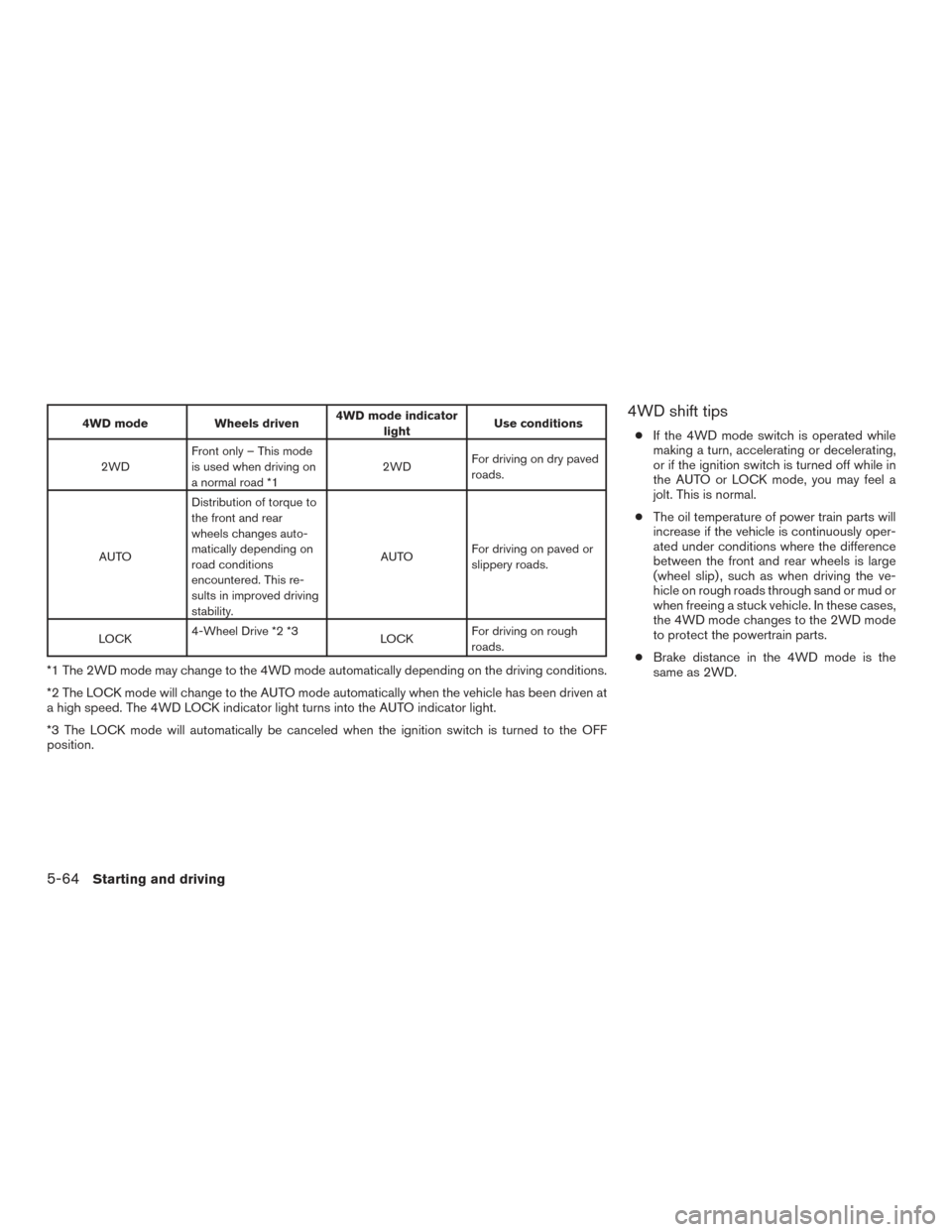
4WD modeWheels driven4WD mode indicator
light Use conditions
2WD Front only – This mode
is used when driving on
a normal road *1 2WD
For driving on dry paved
roads.
AUTO Distribution of torque to
the front and rear
wheels changes auto-
matically depending on
road conditions
encountered. This re-
sults in improved driving
stability. AUTO
For driving on paved or
slippery roads.
LOCK 4-Wheel Drive *2 *3
LOCKFor driving on rough
roads.
*1 The 2WD mode may change to the 4WD mode automatically depending on the driving conditions.
*2 The LOCK mode will change to the AUTO mode automatically when the vehicle has been driven at
a high speed. The 4WD LOCK indicator light turns into the AUTO indicator light.
*3 The LOCK mode will automatically be canceled when the ignition switch is turned to the OFF
position.
4WD shift tips
●
If the 4WD mode switch is operated while
making a turn, accelerating or decelerating,
or if the ignition switch is turned off while in
the AUTO or LOCK mode, you may feel a
jolt. This is normal.
● The oil temperature of power train parts will
increase if the vehicle is continuously oper-
ated under conditions where the difference
between the front and rear wheels is large
(wheel slip) , such as when driving the ve-
hicle on rough roads through sand or mud or
when freeing a stuck vehicle. In these cases,
the 4WD mode changes to the 2WD mode
to protect the powertrain parts.
● Brake distance in the 4WD mode is the
same as 2WD.
5-64Starting and driving
Page 426 of 555
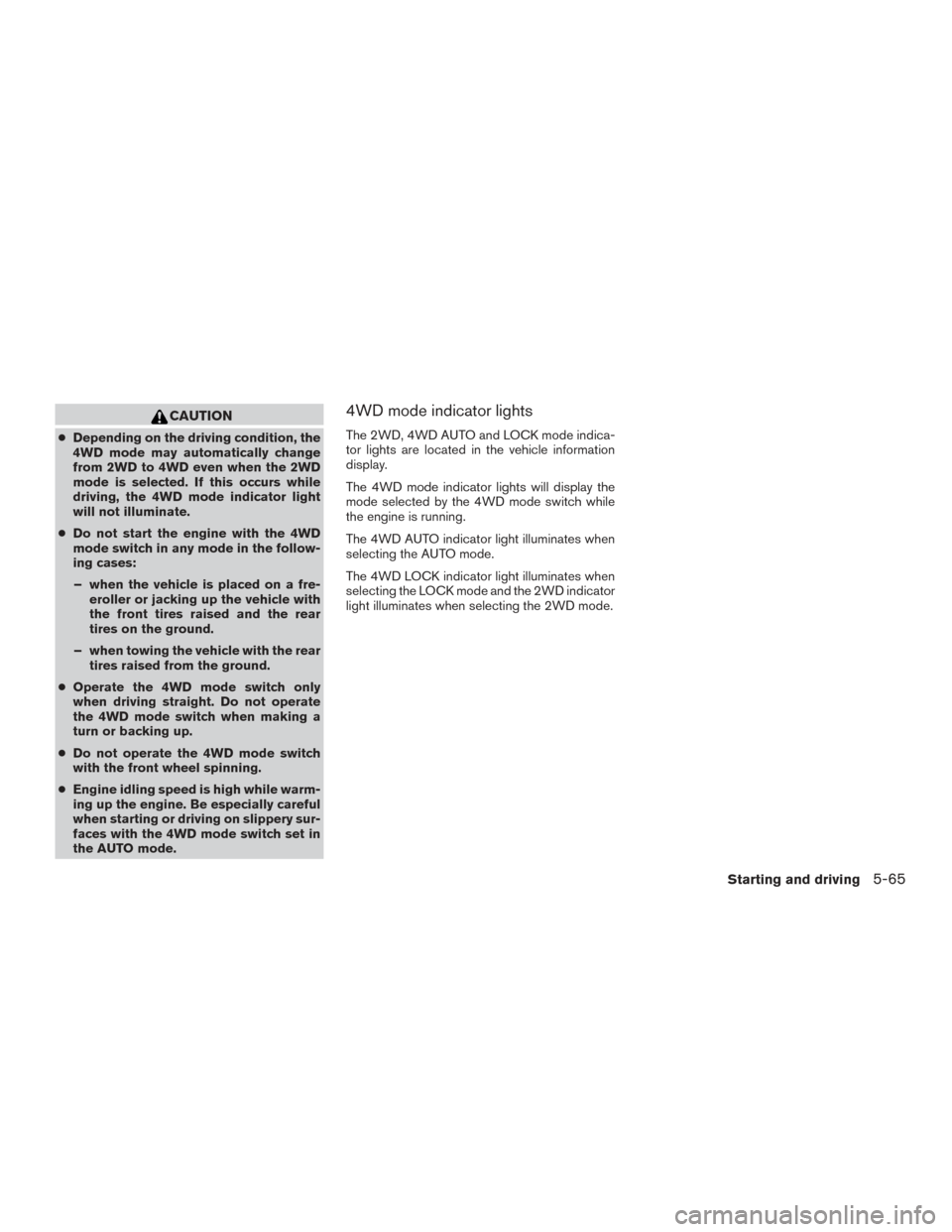
CAUTION
●Depending on the driving condition, the
4WD mode may automatically change
from 2WD to 4WD even when the 2WD
mode is selected. If this occurs while
driving, the 4WD mode indicator light
will not illuminate.
● Do not start the engine with the 4WD
mode switch in any mode in the follow-
ing cases:
– when the vehicle is placed on a fre- eroller or jacking up the vehicle with
the front tires raised and the rear
tires on the ground.
– when towing the vehicle with the rear tires raised from the ground.
● Operate the 4WD mode switch only
when driving straight. Do not operate
the 4WD mode switch when making a
turn or backing up.
● Do not operate the 4WD mode switch
with the front wheel spinning.
● Engine idling speed is high while warm-
ing up the engine. Be especially careful
when starting or driving on slippery sur-
faces with the 4WD mode switch set in
the AUTO mode.
4WD mode indicator lights
The 2WD, 4WD AUTO and LOCK mode indica-
tor lights are located in the vehicle information
display.
The 4WD mode indicator lights will display the
mode selected by the 4WD mode switch while
the engine is running.
The 4WD AUTO indicator light illuminates when
selecting the AUTO mode.
The 4WD LOCK indicator light illuminates when
selecting the LOCK mode and the 2WD indicator
light illuminates when selecting the 2WD mode.
Starting and driving5-65