2017 NISSAN JUKE cruise control
[x] Cancel search: cruise controlPage 16 of 416

JVC0725X
1. Outside mirror remote control switch (P.3-22)
2. Headlight, fog light and turn signal switch— Headlight (P.2-40)
— Turn signal light (P.2-43)
— Fog light* (P.2-44)
3. Paddle shifter* (P.5-16) 4. Steering wheel
— Electric power steering (P.5-34)
— Horn (P.2-44)
— Driver’s supplemental air bag (P.1-38)
5. Wiper and washer switch (P.2-36) 6. Shift lever
— Continuously Variable Transmission (CVT)
(P.5-14)
— Manual Transmission (MT) (P.5-19)
7. Fuse box cover (P.8-19)
8. Vehicle Dynamic Control (VDC) OFF switch (P.5-37)
9. All-Wheel Drive (AWD) switch* (P.5-29)
10. Tilting steering wheel lever (P.3-20)
11. Steering-wheel-mounted controls (left side)
— Audio control (P.4-73)
— Siri
ŠEyes Free (P.4-76)
— BluetoothŠHands-Free Phone System con-
trol (P.4-80, P.4-89)
— NISSAN Voice Recognition System (with
navigation system)* (P.4-96)
12. Steering-wheel-mounted controls (right side) — Cruise control switches (P.5-26)
13. Heated seat switch* (P.2-45)
*: if so equipped
Illustrated table of contents0-7
COCKPIT
Page 21 of 416

0-12Illustrated table of contents
Warninglight Name
Page
All-Wheel Drive (AWD) warning
light (yellow) (AWD model) 2-16
Anti-lock Braking System
(ABS) warning light2-16
Brake warning light
2-16
Charge warning light2-17
Door open warning light2-17
Electric power steering warning
light2-17
Engine oil pressure warning
light2-17
High temperature warning light
(if so equipped)
2-18
Intelligent Key system warning
light2-18
Low fuel warning light
2-18
Low tire pressure warning light2-18
Low washer fluid warning light
(if so equipped)2-20
P position selecting warning
light2-20Warning
light Name
Page
Seat belt warning light 2-20
Supplemental air bag warning
light2-20
Vehicle Dynamic Control (VDC)
warning light2-21Indicator
light Name
Page
All-Wheel Drive (AWD) indica-
tor light (green) (AWD model) 2-21
All-Wheel Drive (AWD) -V indi-
cator light (green) (AWD model)
2-21
Continuously Variable Trans-
mission (CVT) indicator light (if
so equipped)2-21
Cruise indicator light
2-21
Engine start operation indicator
light2-21
Exterior light indicator
2-22
Front fog light indicator light (if
so equipped)2-22
Front passenger air bag status
light2-22
High beam indicator light
2-22
Malfunction Indicator Light
(MIL)2-22
Security indicator light
2-23
Turn signal/hazard indicator
lights2-23
Vehicle Dynamic Control (VDC)
off indicator light
2-23
WARNING AND INDICATOR LIGHTS
Page 82 of 416

JVC0725X
1. Outside mirror remote control switch
2. Headlight, fog light and turn signal switch— Headlight
— Turn signal light
— Fog light*
3. Paddle shifter* 4. Steering wheel
— Electric power steering
— Horn
— Driver’s supplemental air bag
5. Wiper and washer switch 6. Shift lever
— Continuously Variable Transmission (CVT)
— Manual Transmission (MT)
7. Fuse box cover
8. Vehicle Dynamic Control (VDC) OFF switch
9. All-Wheel Drive (AWD) switch*
10. Tilting steering wheel lever
11. Steering-wheel-mounted controls (left side) — Audio control
— Siri
ŠEyes Free
— BluetoothŠHands-Free Phone System con-
trol
— NISSAN Voice Recognition System (with
navigation system)*
12. Steering-wheel-mounted controls (right side) — Cruise control switches
13. Heated seat switch*
*: if so equipped
Instruments and controls2-3
COCKPIT
Page 94 of 416

All-Wheel Drive (AWD) warning light (AWD
model) (if so equipped)Low fuel warning lightEngine start operation indicator light
Anti-lock Braking System (ABS) warning
lightLow tire pressure warning lightExterior light indicator
Low washer fluid warning light (if so
equipped)Front fog light indicator light (if so equipped)
Brake warning lightP position selecting warning lightFront passenger air bag status light
Seat belt warning lightHigh beam indicator light
Charge warning lightSupplemental air bag warning lightMalfunction Indicator Light (MIL)
Door open warning lightVehicle Dynamic Control (VDC) warning lightSecurity indicator light
Electric power steering warning lightAll-Wheel Drive (AWD) indicator light (AWD
model) (if so equipped)Turn signal/hazard indicator lights
Engine oil pressure warning lightAll-Wheel Drive (AWD) -V indicator light
(AWD model) (if so equipped)Vehicle Dynamic Control (VDC) off indicator
light
High temperature warning light (if so
equipped)Continuously Variable Transmission (CVT)
indicator light (if so equipped)
Intelligent Key system warning lightCruise indicator light
Instruments and controls2-15
WARNING LIGHTS, INDICATOR
LIGHTS AND AUDIBLE REMINDERS
Page 100 of 416

Vehicle Dynamic Control (VDC)
warning light
When the ignition switch is in the “ON” position,
the Vehicle Dynamic Control (VDC) warning
light illuminates and then turns off.
The light will blink when the Vehicle Dynamic
Control (VDC) system or the traction control
system is operating, thus alerting the driver that
the vehicle is nearing its traction limits. The road
surface may be slippery.
If the VDC warning light illuminates while the
VDC system is on, this light alerts the driver to
the fact that the VDC system’s fail-safe mode is
operating, for example the VDC system may not
be functioning properly. Have the system
checked. It is recommended you visit a NISSAN
dealer for this service. If a malfunction occurs in
the system, the VDC system function will be
canceled but the vehicle is still driveable. For
additional information, see “Vehicle Dynamic
Control (VDC) system” (P.5-37) of this manual.
INDICATOR LIGHTS
All-Wheel Drive (AWD) indicator
light (AWD model)
When the ignition switch is in the “ON” position,
the All-Wheel Drive (AWD) indicator light
illuminates and then turns off.
When selecting AWD mode while the engine is
running, the AWD indicator light illuminates.
(See “All-Wheel Drive (AWD)” (P.5-29) .)
All-Wheel Drive (AWD-V) indicator
light (AWD model)
When selecting AWD-V mode while the engine
is running, the AWD-V indicator light illuminates.
(See “All-Wheel Drive (AWD)” (P.5-29) .)
Continuously Variable Transmis-
sion (CVT) indicator light (if so equipped)
When the ignition switch is in the “ON” position,
the Continuously Variable Transmission (CVT)
indicator light illuminates and then turns off.
Cruise indicator light
Cruise main switch indicator:
This light illuminates when the cruise control
main switch is pushed. The light turns off when
the main switch is pushed again. When the
cruise indicator light illuminates, the cruise
control system is operational.
Cruise malfunction:
If the cruise indicator light blinks while the
engine is running, it may indicate the cruise
control system is not functioning properly. Have
the system checked. It is recommended you visit
a NISSAN dealer for this service.
See “Cruise control” (P.5-26).
Engine start operation indicator
light
This light appears when the shift lever is in the P
(Park) position (Continuously Variable Transmis-
sion (CVT) models) or N (Neutral) position
(Manual Transmission (MT) models) . This light
means that the engine will start by pushing the
ignition switch with the brake pedal (CVT
models) or clutch pedal (MT models) depressed.
You can start the engine directly in any position.
Instruments and controls2-21
Page 262 of 416

5 Starting and driving
Precautions when starting and driving ................................ 5-2Exhaust gas (carbon monoxide) ...................................... 5-2
Three-way catalyst .............................................................. 5-3
Tire Pressure Monitoring System (TPMS) .................... 5-3
Avoiding collision and rollover ......................................... 5-6
Off-road recovery ................................................................ 5-6
Rapid air pressure loss ...................................................... 5-6
Drinking alcohol/drugs and driving ................................. 5-7
Driving safety precautions ................................................. 5-7
Push-button ignition switch .................................................... 5-9
Operating range for engine start function ................. 5-10
Push-button ignition switch operation ........................ 5-10
Push-button ignition switch positions ......................... 5-11
Emergency engine shut off ............................................ 5-11
Intelligent Key battery discharge .................................. 5-12
Before starting the engine ................................................... 5-12
Starting the engine ................................................................ 5-13
Driving the vehicle ................................................................. 5-14 Continuously Variable Transmission (CVT) ................ 5-14
Manual Transmission (MT) ............................................. 5-19
Integrated control system (if so equipped) ..................... 5-21 Drive mode ........................................................................\
. 5-22
Parking brake ........................................................................\
.. 5-25
Cruise control ........................................................................\
. 5-26 Precautions on cruise control ....................................... 5-26 Cruise control operations ............................................ 5-26
Break-in schedule ................................................................. 5-27
Fuel Efficient Driving Tips ................................................... 5-28
Increasing fuel economy ...................................................... 5-29
All-Wheel Drive (AWD) (if so equipped) ........................ 5-29 All-Wheel Drive (AWD) mode
switch operations ........................................................... 5-29
AWD warning light ........................................................ 5-31
Parking/parking on hills ........................................................ 5-33
Electric power steering ........................................................ 5-34
Brake system ........................................................................\
.. 5-35 Braking precautions ...................................................... 5-35
Brake assist ........................................................................\
.... 5-36
Brake assist ..................................................................... 5-36
Anti-lock Braking System (ABS) ............................... 5-36
Vehicle Dynamic Control (VDC) system ......................... 5-37
Cold weather driving ............................................................ 5-39 Freeing a frozen door lock ........................................... 5-39
Anti-freeze ........................................................................\
5-39
Battery ........................................................................\
....... 5-39
Draining of coolant water ............................................. 5-39
Tire equipment ................................................................ 5-39
Special winter equipment ............................................ 5-39
Driving on snow or ice ................................................. 5-39
Engine block heater (if so equipped) ....................... 5-40
Page 287 of 416
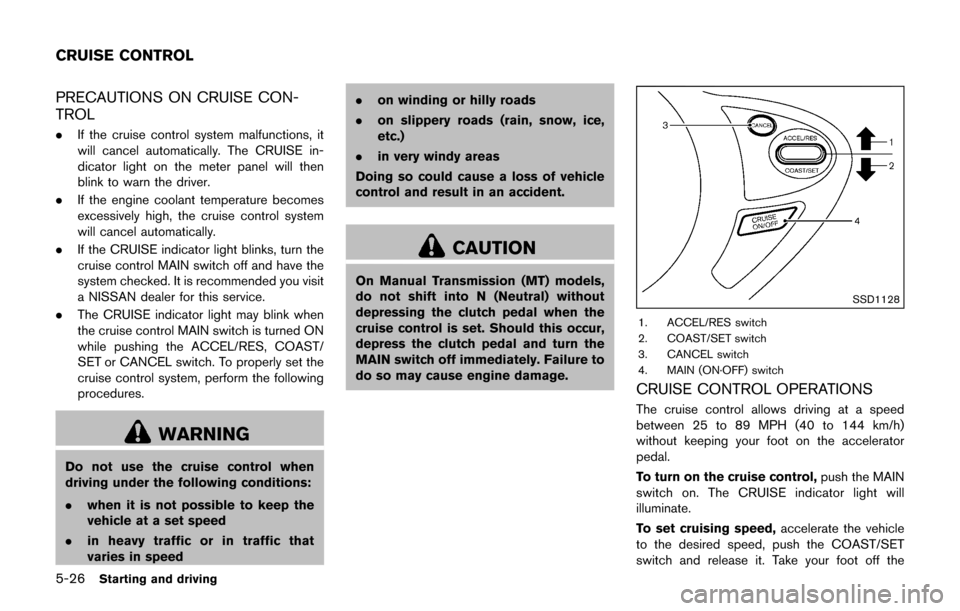
5-26Starting and driving
PRECAUTIONS ON CRUISE CON-
TROL
.If the cruise control system malfunctions, it
will cancel automatically. The CRUISE in-
dicator light on the meter panel will then
blink to warn the driver.
. If the engine coolant temperature becomes
excessively high, the cruise control system
will cancel automatically.
. If the CRUISE indicator light blinks, turn the
cruise control MAIN switch off and have the
system checked. It is recommended you visit
a NISSAN dealer for this service.
. The CRUISE indicator light may blink when
the cruise control MAIN switch is turned ON
while pushing the ACCEL/RES, COAST/
SET or CANCEL switch. To properly set the
cruise control system, perform the following
procedures.
WARNING
Do not use the cruise control when
driving under the following conditions:
.when it is not possible to keep the
vehicle at a set speed
. in heavy traffic or in traffic that
varies in speed .
on winding or hilly roads
. on slippery roads (rain, snow, ice,
etc.)
. in very windy areas
Doing so could cause a loss of vehicle
control and result in an accident.
CAUTION
On Manual Transmission (MT) models,
do not shift into N (Neutral) without
depressing the clutch pedal when the
cruise control is set. Should this occur,
depress the clutch pedal and turn the
MAIN switch off immediately. Failure to
do so may cause engine damage.
SSD1128
1. ACCEL/RES switch
2. COAST/SET switch
3. CANCEL switch
4. MAIN (ON·OFF) switch
CRUISE CONTROL OPERATIONS
The cruise control allows driving at a speed
between 25 to 89 MPH (40 to 144 km/h)
without keeping your foot on the accelerator
pedal.
To turn on the cruise control, push the MAIN
switch on. The CRUISE indicator light will
illuminate.
To set cruising speed, accelerate the vehicle
to the desired speed, push the COAST/SET
switch and release it. Take your foot off the
CRUISE CONTROL
Page 288 of 416

accelerator pedal. Your vehicle will maintain the
set speed.
.To pass another vehicle, depress the
accelerator pedal. When you release the
pedal, the vehicle will return to the previously
set speed.
. The vehicle may not maintain the set speed
on winding or hilly roads. If this happens,
drive without the cruise control.
To cancel the preset speed, use one of the
following methods:
a) Push the CANCEL switch.
b) Tap the brake pedal.
c) Turn the MAIN switch off. The CRUISE indicator light will turn off.
.If you depress the brake pedal while pushing
the ACCEL/RES or COAST/SET switch and
reset at the cruising speed, the cruise
control will disengage. Turn the MAIN switch
off once and then turn it on again.
. The cruise control will automatically cancel if
the vehicle slows more than 8 MPH (13
km/h) below the set speed.
. If you move the shift lever to the N (Neutral)
position (Continuously Variable Transmis-
sion models) or depressing the clutch pedal
(Manual Transmission models) , the cruise
control will be canceled. To reset at a faster cruising speed,
use one
of the following methods:
. Depress the accelerator pedal. When the
vehicle attains the desired speed, push and
release the COAST/SET switch.
. Push and hold the ACCEL/RES switch.
When the vehicle attains the desired speed,
release the switch.
. Push, then quickly release the ACCEL/RES
switch. Each time you do this, the set speed
will increase by about 1 MPH (1.6 km/h) .
To reset at a slower cruising speed, use one
of the following methods:
. Lightly tap the brake pedal. When the
vehicle attains the desired speed, push the
COAST/SET switch and release it.
. Push and hold the COAST/SET switch.
Release the switch when the vehicle slows
down to the desired speed.
. Push, then quickly release the COAST/SET
switch. Each time you do this, the set speed
will decrease by about 1 MPH (1.6 km/h) .
To resume the preset speed, push and
release the ACCEL/RES switch. The vehicle
will resume the last set cruising speed when the
vehicle speed is over 25 MPH (40 km/h) .
CAUTION
During the first 1,200 miles (2,000 km) ,
follow these recommendations to ob-
tain maximum engine performance and
ensure the future reliability and econo-
my of your new vehicle. Failure to
follow these recommendations may
result in shortened engine life and
reduced engine performance.
. Avoid driving for long periods at constant
speed, either fast or slow. Do not run the
engine over 4,000 rpm.
. Do not accelerate at full throttle in any gear.
. Avoid quick starts.
. Avoid hard braking as much as possible.
Starting and driving5-27
BREAK-IN SCHEDULE