2017 NISSAN JUKE ECO mode
[x] Cancel search: ECO modePage 161 of 416

CD/USB memory care and cleaning .......................... 4-73
Steering wheel switch for audio control .................... 4-73
Antenna ........................................................................\
....... 4-75
NissanConnect
SMApp smartphone integration ............. 4-75
Registering with NissanConnectSMApp .................... 4-75
Connect phone ................................................................. 4-76
Application download ...................................................... 4-76
Siri
ŠEyes Free ....................................................................... 4-76
General Information ......................................................... 4-76
Requirements .................................................................... 4-77
Siri
ŠEyes Free Activation .............................................. 4-77
Operating SiriŠEyes Free ............................................. 4-77
Changing SiriŠEyes Free Settings (models without
navigation system) ........................................................... 4-78
Troubleshooting guide ..................................................... 4-79
Car phone or CB radio ........................................................ 4-80
Bluetooth
ŠHands-Free Phone System (models without
navigation system) ................................................................. 4-80
Regulatory information .................................................... 4-81
Using the system .............................................................. 4-82
Bluetooth
ŠHands-Free Phone System (models with
navigation system) ................................................................. 4-89
Regulatory information .................................................... 4-91 Voice command .............................................................. 4-91
Connecting procedure .................................................. 4-92
Vehicle phonebook ........................................................ 4-92
Making a call ................................................................... 4-92
Receiving a call .............................................................. 4-92
During a call .................................................................... 4-93
Ending a call ................................................................... 4-93
Text messaging ............................................................... 4-93
Bluetooth
Šsettings ....................................................... 4-94
Phone settings ................................................................ 4-96
NISSAN Voice Recognition System (models with
navigation system) ................................................................ 4-96 Using the system ........................................................... 4-97
System features .............................................................. 4-98
Bluetooth
ŠHands-Free Phone System
voice commands ............................................................ 4-98
Navigation system voice commands ......................... 4-99
Audio system voice commands ............................... 4-100
Information voice commands ................................... 4-100
My APPS voice commands ...................................... 4-100
Help voice commands ............................................... 4-100
Troubleshooting guide ............................................... 4-100
Page 162 of 416

WARNING
.Do not disassemble or modify this
system. If you do, it may result in
accidents, fire, or electric shock.
. Do not use this system if you notice
any abnormality, such as a frozen
screen or lack of sound. Continued
use of the system may result in
accident, fire or electric shock.
. In case you notice any foreign
object in the system hardware, spill
liquid on it, or notice smoke or smell
coming from it, stop using the
system immediately. It is recom-
mended you visit a NISSAN dealer
for servicing. Ignoring such condi-
tions may lead to accidents, fire, or
electric shock.
Do not attempt to operate the system in
extreme temperature conditions [below
í 48F( í208 C) and above 1588 F (708C)].
Operating this system under these condi-
tions may result in system malfunctions.
JVH0733X
1. MAP button*
2. Display screen
3.
button (P.4-89)
4.button (P.4-5)
5.(brightness control) button (P.4-8)
6. BACK button (P.4-5) 7. ON·OFF button/VOL (volume) control knob
(P.4-8)
8. CAMERA button (P.4-8)
9. NAV button**For information regarding the Navigation sys-
tem control buttons, refer to the separate
Navigation System Owner’s Manual.
Heater, air conditioner, audio and phone systems4-3
SAFETY NOTE CONTROL BUTTONS AND
FUNCTIONS (models with
navigation system)
Page 164 of 416

.123/ABC:
Changes the keyboard between numbers
and alphabets.
. Space:
Inserts a space.
. Delete:
Deletes the last inputted character with one
touch. Touch and hold the “Delete” key to
delete all of the characters.
. OK:
Completes the character input.
Touch screen maintenance
If you clean the display screen, use a dry, soft
cloth. If additional cleaning is necessary, use a
small amount of neutral detergent with a soft
cloth. Never spray the screen with water or
detergent. Dampen the cloth first and then wipe
the screen.
HOW TO USE THE BACK BUTTON
Push the BACK button to return to the previous
screen.
JVH0735X
HOW TO USE THE APPS·I BUTTON
For information about the “SiriusXM Travel Link”,
and “SiriusXM Traffic” features, see the separate
Navigation System Owner’s Manual.
For information about the “My Apps” key, see
“NissanConnect
SMApp smartphone integration”
(P.4-75) .
For information about the “Voice Commands”
key, see “NISSAN Voice Recognition System
(models with navigation system)” (P.4-96).
JVH1249X
To select and/or adjust several functions,
features and modes that are available for your
vehicle:
1. Push the
button.
2. Touch the “Settings” key.
3. Touch the desired item.
Heater, air conditioner, audio and phone systems4-5
Page 187 of 416
4-28Heater, air conditioner, audio and phone systems
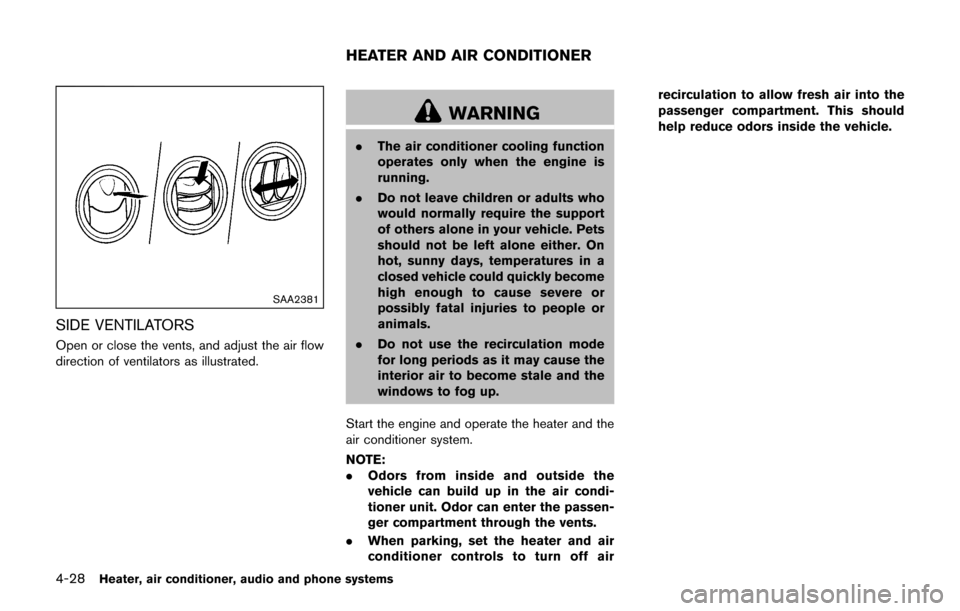
SAA2381
SIDE VENTILATORS
Open or close the vents, and adjust the air flow
direction of ventilators as illustrated.
WARNING
.The air conditioner cooling function
operates only when the engine is
running.
. Do not leave children or adults who
would normally require the support
of others alone in your vehicle. Pets
should not be left alone either. On
hot, sunny days, temperatures in a
closed vehicle could quickly become
high enough to cause severe or
possibly fatal injuries to people or
animals.
. Do not use the recirculation mode
for long periods as it may cause the
interior air to become stale and the
windows to fog up.
Start the engine and operate the heater and the
air conditioner system.
NOTE:
. Odors from inside and outside the
vehicle can build up in the air condi-
tioner unit. Odor can enter the passen-
ger compartment through the vents.
. When parking, set the heater and air
conditioner controls to turn off air recirculation to allow fresh air into the
passenger compartment. This should
help reduce odors inside the vehicle.
HEATER AND AIR CONDITIONER
Page 192 of 416

.To remove moisture or fog on the frontwindow quickly, set the temperature to
the high temperature and the fan speed
to their maximum level.
.After the windshield is cleared, push the
front defrosterbutton again. (The
indicator light will turn off.)
.When the front defrosterbutton is
pushed, the air conditioner will automa-
tically turn on to defog the windshield.
The outside air circulation mode will be
selected to improve the defogging per-
formance.
.When theposition is selected, the
air recirculation mode cannot be turned
on to prevent the windows from being
fogged up.
Manual operation
The manual mode can be used to control the
heater and air conditioner to your desired
settings.
To turn off the heater and air conditioner, push
the OFF button.
If the Drive Mode is indicated on the screen,
push the CLIMATE button to change to the
Climate Control Mode, then push the OFF
button. Fan speed control:
Turn the fan speed control
dial to adjust the
fan speed.
Air flow control:
Push the air flow control buttons to change the
air flow mode:
— Air flows from the center and side ventilators.
— Air flows from the center and sideventilators and foot outlets.
— Air flows mainly from the foot outlets.
— Air flows from the defroster outlets andfoot outlets.
Temperature control:
Turn the temperature control dial to set the
preferred temperature.
The temperature range is between 608F (188C)
and 908F (328C) .
Air intake control:
.Push the air intake button to change the air
circulation mode. When the indicator light
on “
” side illuminates, the flowing air is
recirculated inside the vehicle.
When the
orposition is selected,
the air recirculation mode cannot be turned
on to prevent the windows from being
fogged up. .
Push the air intake button to change the air
circulation mode. When the indicator light
on “
” side illuminates, the flowing air is
drawn from outside the vehicle.
. Push and hold the air intake button for more
than 1.5 seconds to set the automatic
control between the outside air circulation
and air recirculation modes.
When the “
”or“” position is
selected, the air recirculation mode does
not activate.
When setting the automatic control mode,
the indicator lights “
” and “” will
blink twice indicating that the system is in
the automatic control mode.
Heater, air conditioner, audio and phone systems4-33
Page 193 of 416

4-34Heater, air conditioner, audio and phone systems
JVH1245X
Air conditioner mode screen
SAA3379Drive mode screen
Displaying Climate control
When in Climate Control Mode, the selected
temperature and airflow, and automatic mode or
manual mode are indicated on the display.
When in Drive Mode, the same items as above
are indicated, but on the bottom of the display.
To switch to Climate Control Mode, push the
CLIMATE control mode select button.
Setting climate ECO
When in Drive Mode, CLIMATE ECO can be
switched on or off. When CLIMATE ECO is
switched on, the climate control system oper-
ates to enhance fuel economy.
See “Setting the climate ECO mode” (P.5-24).
SAA2368
SAA3441
Page 196 of 416

Satellite radio reception (if so equipped):
When the satellite radio is used for the first time
or the battery has been replaced, the satellite
radio may not work properly. This is not a
malfunction. Wait more than 10 minutes with the
satellite radio ON and the vehicle away from any
metal or large buildings for the satellite radio to
receive all of the necessary data.
The satellite radio mode requires an active
SiriusXM Satellite Radio subscription. The sa-
tellite radio is not available in Alaska, Hawaii and
Guam.
Satellite radio performance may be affected if
cargo carried on the roof blocks the satellite
radio signal.
If possible, do not put cargo near the satellite
antenna.
A buildup of ice on the satellite radio antenna
can affect satellite radio performance. Remove
the ice to restore satellite radio reception.
SAA0480
Compact Disc (CD) player
.Do not force a compact disc into the CD
insert slot. This could damage the CD
and/or CD player.
. During cold weather or rainy days, the
player may malfunction due to the
humidity. If this occurs, remove the CD and dehumidify or ventilate the player
completely.
. The player may skip while driving on
rough roads.
. The CD player sometimes cannot func-
tion when the passenger compartment
temperature is extremely high. De-
crease the temperature before use.
. Only use high quality 4.7 in (12 cm)
round discs that have the “COMPACT
disc DIGITAL AUDIO” logo on the disc
or packaging.
. Do not expose the CD to direct sun-
light.
. CDs that are of poor quality, dirty,
scratched, covered with fingerprints,
or that have pin holes may not work
properly.
. The following CDs may not work prop-
erly:
—Copy control compact discs (CCCD)
— Recordable compact discs (CD-R)
— Rewritable compact discs (CD-RW)
. Do not use the following CDs as they
may cause the CD player to malfunc-
tion.
—3.1 in (8 cm) discs
Heater, air conditioner, audio and phone systems4-37
Page 198 of 416

Notes for iPodŠuse:
iPodŠis a trademark of Apple Inc., registered in
the U.S. and other countries.
. Improperly plugging in the iPod
Šmay cause
a checkmark to be displayed on and off
(flickering) . Always make sure that the iPod
Š
is connected properly.
. An iPod nanoŠ(1st Generation) may remain
in fast forward or rewind mode if it is
connected during a seek operation. In this
case, please manually reset the iPod
Š.
. An iPod nanoŠ(2nd Generation) will con-
tinue to fast-forward or rewind if it is
disconnected during a seek operation.
. An incorrect song title may appear when the
Play Mode is changed while using an iPod
nano
Š(2nd Generation)
. Audiobooks may not play in the same order
as they appear on an iPod
Š.
. Large video files cause slow responses in an
iPod
Š. The vehicle center display may
momentarily black out, but will soon recover.
. If an iPod
Šautomatically selects large video
files while in the shuffle mode, the vehicle
center display may momentarily black out,
but will soon recover.
Compressed Audio Files (MP3/WMA)
Explanation of terms:
. MP3 — MP3 is short for Moving Pictures
Experts Group Audio Layer 3. MP3 is the
most well known compressed digital audio
file format. This format allows for near “CD
quality” sound, but at a fraction of the size of
normal audio files. MP3 conversion of an
audio track can reduce the file size by
approximately a 10:1 ratio (Sampling: 44.1
kHz, Bit rate: 128 kbps) with virtually no
perceptible loss in quality. The compression
reduces certain parts of sound that seem
inaudible to most people.
. WMA — Windows Media Audio (WMA) is a
compressed audio format created by Micro-
soft as an alternative to MP3. The WMA
codec offers greater file compression than
the MP3 codec, enabling storage of more
digital audio tracks in the same amount of
space when compared to MP3s at the same
level of quality.
. Bit rate — Bit rate denotes the number of
bits per second used by a digital music file.
The size and quality of a compressed digital
audio file is determined by the bit rate used
when encoding the file.
. Sampling frequency — Sampling frequency
is the rate at which the samples of a signal are converted from analog to digital (A/D
conversion) per second.
. Multisession — Multisession is one of the
methods for writing data to media. Writing
data once to the media is called a single
session, and writing more than once is
called a multisession.
. ID3/WMA Tag — The ID3/WMA tag is the
part of the encoded MP3 or WMA file that
contains information about the digital music
file such as song title, artist, album title,
encoding bit rate, track time duration, etc.
ID3 tag information is displayed on the
Album/Artist/Track title line on the display.
* Windows
Šand Windows MediaŠare regis-
tered trademarks or trademarks of Microsoft
Corporation in the United States of America
and/or other countries.
Heater, air conditioner, audio and phone systems4-39