2017 NISSAN JUKE warning
[x] Cancel search: warningPage 185 of 416
4-26Heater, air conditioner, audio and phone systems
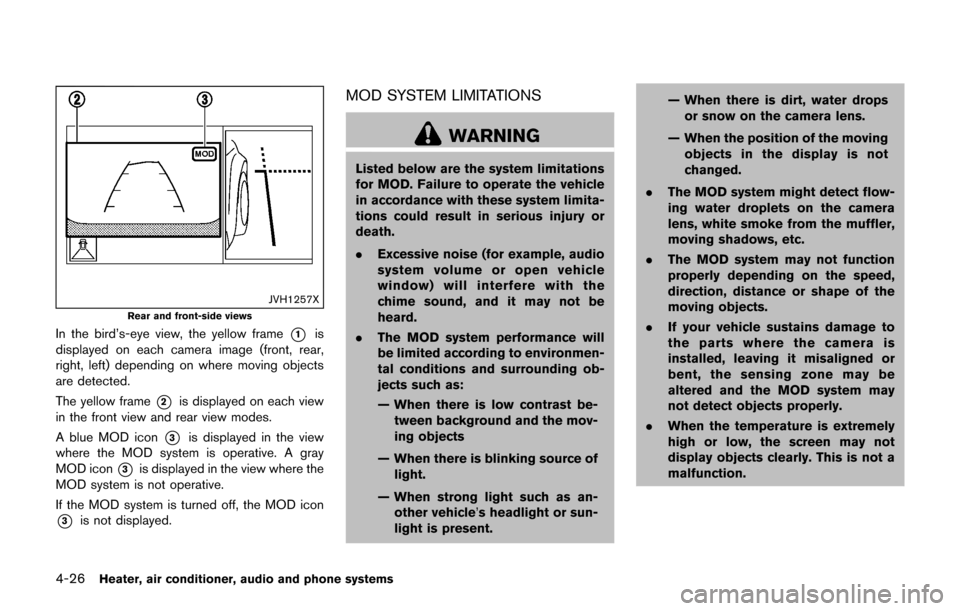
JVH1257X
Rear and front-side views
In the bird’s-eye view, the yellow frame*1is
displayed on each camera image (front, rear,
right, left) depending on where moving objects
are detected.
The yellow frame
*2is displayed on each view
in the front view and rear view modes.
A blue MOD icon
*3is displayed in the view
where the MOD system is operative. A gray
MOD icon
*3is displayed in the view where the
MOD system is not operative.
If the MOD system is turned off, the MOD icon
*3is not displayed.
MOD SYSTEM LIMITATIONS
WARNING
Listed below are the system limitations
for MOD. Failure to operate the vehicle
in accordance with these system limita-
tions could result in serious injury or
death.
. Excessive noise (for example, audio
system volume or open vehicle
window) will interfere with the
chime sound, and it may not be
heard.
. The MOD system performance will
be limited according to environmen-
tal conditions and surrounding ob-
jects such as:
— When there is low contrast be-
tween background and the mov-
ing objects
— When there is blinking source of light.
— When strong light such as an- other vehicle’s headlight or sun-
light is present. — When there is dirt, water drops
or snow on the camera lens.
— When the position of the moving objects in the display is not
changed.
. The MOD system might detect flow-
ing water droplets on the camera
lens, white smoke from the muffler,
moving shadows, etc.
. The MOD system may not function
properly depending on the speed,
direction, distance or shape of the
moving objects.
. If your vehicle sustains damage to
the parts where the camera is
installed, leaving it misaligned or
bent, the sensing zone may be
altered and the MOD system may
not detect objects properly.
. When the temperature is extremely
high or low, the screen may not
display objects clearly. This is not a
malfunction.
Page 187 of 416
4-28Heater, air conditioner, audio and phone systems
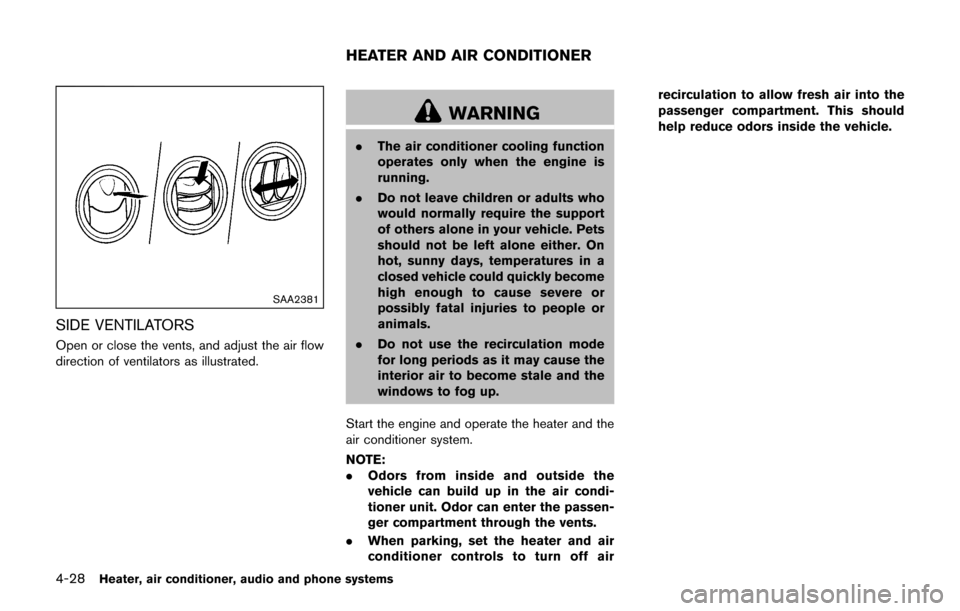
SAA2381
SIDE VENTILATORS
Open or close the vents, and adjust the air flow
direction of ventilators as illustrated.
WARNING
.The air conditioner cooling function
operates only when the engine is
running.
. Do not leave children or adults who
would normally require the support
of others alone in your vehicle. Pets
should not be left alone either. On
hot, sunny days, temperatures in a
closed vehicle could quickly become
high enough to cause severe or
possibly fatal injuries to people or
animals.
. Do not use the recirculation mode
for long periods as it may cause the
interior air to become stale and the
windows to fog up.
Start the engine and operate the heater and the
air conditioner system.
NOTE:
. Odors from inside and outside the
vehicle can build up in the air condi-
tioner unit. Odor can enter the passen-
ger compartment through the vents.
. When parking, set the heater and air
conditioner controls to turn off air recirculation to allow fresh air into the
passenger compartment. This should
help reduce odors inside the vehicle.
HEATER AND AIR CONDITIONER
Page 194 of 416
OPERATING TIPS (for automatic air
conditioner)
.When the engine coolant temperature and
outside air temperature are low, the air flow
from the foot outlets may not operate. This is
not a malfunction. After the coolant tem-
perature warms up, air will flow normally
from the foot outlets.
. The automatic air conditioner is equipped
with sensors as illustrated. The sensors
*A
and*Bon the instrument panel help
maintain a constant temperature. Do not
put anything on or around these sensors.
IN-CABIN MICROFILTER
The air conditioning system is equipped with an
in-cabin microfilter which collects dirt, pollen,
dust, etc. To make sure the air conditioner heats,
defogs, and ventilates efficiently, replace the
filter in accordance with the specified main-
tenance intervals listed in the “9. Maintenance
and schedules” section. It is recommended to
see a NISSAN dealer to replace the filter.
The filter should be replaced if the air flow
decreases significantly or if windows fog
up easily when operating the heater or air
conditioning system.
SERVICING AIR CONDITIONER
The air conditioner system in your vehicle is
charged with a refrigerant designed with the
environment in mind. This refrigerant will not
harm the earth’s ozone layer. Special char-
ging equipment and lubricant are required when
servicing your vehicle air conditioner. Using
improper refrigerants or lubricants will cause
severe damage to your air conditioner system.
(See “Capacities and recommended fluids/
lubricants” (P.10-2) for air conditioner system
refrigerant and lubricant recommendations.)
Your NISSAN dealer will be able to service your
environmentally friendly air conditioner system.
WARNING
The system contains refrigerant under
high pressure. To avoid personal injury,
any air conditioner service should be
done only by an experienced technician
with the proper equipment.
AUDIO OPERATION PRECAUTIONS
Radio
Place the ignition switch in the ACC or ON
position and push the FM·AM button to turn on
the radio. If you listen to the radio with the
engine not running, the ignition switch should be
placed in the ACC position.
Radio reception is affected by station signal
strength, distance from radio transmitter, build-
ings, bridges, mountains and other external
influences. Intermittent changes in reception
quality normally are caused by these external
influences.
Using a cellular phone in or near the
vehicle may influence radio reception
quality.
Radio reception:
Your vehicle radio system is equipped with
state-of-the-art electronic circuits to enhance
radio reception. These circuits are designed to
extend reception range, and to enhance the
quality of that reception.
However there are some general characteristics
of both FM and AM radio signals that can affect
radio reception quality in a moving vehicle, even
when the finest equipment is used. These
characteristics are completely normal in a given
reception area, and do not indicate any mal-
Heater, air conditioner, audio and phone systems4-35
AUDIO SYSTEM
Page 197 of 416
4-38Heater, air conditioner, audio and phone systems
—CDs that are not round
— CDs with a paper label
— CDs that are warped, scratched, or
have abnormal edges
. This audio system can only play pre-
recorded CDs. It has no capabilities to
record or burn CDs.
. If the CD cannot be played, error
messages as the following examples
will be displayed.
Check Disc:
—Confirm that the CD is inserted
correctly (the label side is facing
up, etc.) .
— Confirm that the CD is not bent or
warped and it is free of scratches.
Push Eject:
This is an error due to the temperature
inside the player is too high. Remove
the CD by pushing the EJECT button,
and after a short time reinsert the CD.
The CD can be played when the tem-
perature of the player returns to nor-
mal.
Unplayable Track:
The file is unplayable in this audio
system (only MP3 or WMA CD) .USB (Universal Serial Bus) Connection
Port
WARNING
Do not connect, disconnect or operate
the USB device while driving. Doing so
can be a distraction. If distracted you
could lose control of your vehicle and
cause an accident or serious injury.
CAUTION
. Do not force the USB device into the
USB port. Inserting the USB device
tilted or up-side-down into the port
may damage the port. Make sure
that the USB device is connected
correctly into the USB port.
. Do not grab the USB port cover (if
so equipped) when pulling the USB
device out of the port. This could
damage the port and the cover.
. Do not leave the USB cable in a
place where it can be pulled unin-
tentionally. Pulling the cable may
damage the port. The vehicle is not equipped with a USB device.
USB devices should be purchased separately
as necessary.
This system cannot be used to format USB
devices. To format a USB device, use a personal
computer.
In some states/area, the USB device for the
front seats plays only sound without images for
regulatory reasons, even when the vehicle is
parked.
This system supports various USB memory
devices, USB hard drives and iPod
Šplayers.
Some USB devices may not be supported by
this system.
. Partitioned USB devices may not be played
correctly.
. Some characters used in other languages
(Chinese, Japanese, etc.) are not displayed
properly on display. Using English language
characters with a USB device is recom-
mended.
General notes for USB use:
Refer to your device manufacturer’s owner
information regarding the proper use and care
of the device.
Page 207 of 416
4-48Heater, air conditioner, audio and phone systems
REPEAT (RPT):
When the RPT button is pushed while the CD is
played, the play pattern can be changed as
follows:
(CD)
(Normal) ⇔1 Track Repeat
(CD with compressed audio files)
(Normal) ?1 Folder Repeat ?1 Track Repeat
? (Normal)
RANDOM (RDM):
When the RDM button is pushed while a CD is
being played, the play pattern can be changed
as follows:
(CD)
(Normal) ⇔1 Disc Random
(CD with compressed audio files)
(Normal) ?1 Disc Random ?1 Folder
Random ?(Normal)
CD eject:
When the
button is pushed with the CD
loaded, the CD will be ejected.
If the CD comes out and is not removed, it
will be pulled back into the slot to protect
it.
USB (Universal Serial Bus) connection
port
WARNING
Do not connect, disconnect or operate
the USB device while driving. Doing so
can be a distraction. If distracted you
could lose control of your vehicle and
cause an accident or serious injury.
CAUTION
. Do not force the USB device into the
USB port. Inserting a USB device
tilted or upside-down into the port
may damage the port. Make sure
that the USB device is connected
correctly to the USB port. .
Do not grab the USB port cover (if
so equipped) when pulling a USB
device out of the port. This could
damage the port and the cover.
. Do not leave a USB cable in a place
where it can be pulled unintention-
ally. Pulling the cable may damage
the port.
Refer to your device manufacturer’s owner
information regarding the proper use and care
of the device.
Page 208 of 416

SAA3444
USB main operation:
The USB connection port is located on the
lower part of the instrument panel. Connect a
USB memory device into the connector. When
the audio system operates, the system will
switch to the USB memory device mode
automatically.
If the system has been turned off while the USB
memory device was playing, pushing the Power
button will start the USB memory device.
MEDIA button:
To change to the USB mode, push the
button with a USB connected until the USB
mode is selected.
Next/Previous File and Fast
Forward/Rewind:
When the
orbutton is pushed and hold
while a USB memory is being played, the USB
memory will play while forwarding or rewinding.
When the button is released, the USB memory
will return to normal play speed.
When the
orbutton is pushed while
the USB memory is being played, the next track
or the beginning of the current track on the USB
memory will be played. Push the
button
again to select the previous track.
Folder selection:
To change to another folder in the USB memory,
choose a folder displayed on the screen using
the TUNE·SCROLL knob.
REPEAT (RPT):
When the RPT button is pushed while the USB
memory is played, the play pattern can be
change as follows.
To change the play mode, push the RPT button
repeatedly and the mode will change as follows.
(Normal) ?1 Folder Repeat ?1 Track Repeat
? (Normal)
RANDOM (RDM):
When the RDM button is pushed while a USB
memory is being played, the play pattern can be
changed as follows.
To change the play mode, push the RDM button
repeatedly, and the mode will change as follows.
(Normal) ?All Random ?1 Folder Random ?
(Normal)
BACK button:
When the BACK button is pushed, it returns to
the previous display.
iPodŠplayer operation
WARNING
Do not connect, disconnect or operate
the USB device while driving. Doing so
can be a distraction. If distracted you
could lose control of your vehicle and
cause an accident or serious injury.
Heater, air conditioner, audio and phone systems4-49
Page 216 of 416
If the CD comes out and is not removed, it
will be pulled back into the slot to protect
it.
USB (Universal Serial Bus) connection
port
WARNING
Do not connect, disconnect or operate
the USB device while driving. Doing so
can be a distraction. If distracted you
could lose control of your vehicle and
cause an accident or serious injury.
CAUTION
.Do not force the USB device into the
USB port. Inserting a USB device
tilted or upside-down into the port
may damage the port. Make sure
that the USB device is connected
correctly to the USB port.
. Do not grab the USB port cover (if
so equipped) when pulling a USB
device out of the port. This could
damage the port and the cover. .
Do not leave a USB cable in a place
where it can be pulled unintention-
ally. Pulling the cable may damage
the port.
Refer to your device manufacturer’s owner
information regarding the proper use and care
of the device.
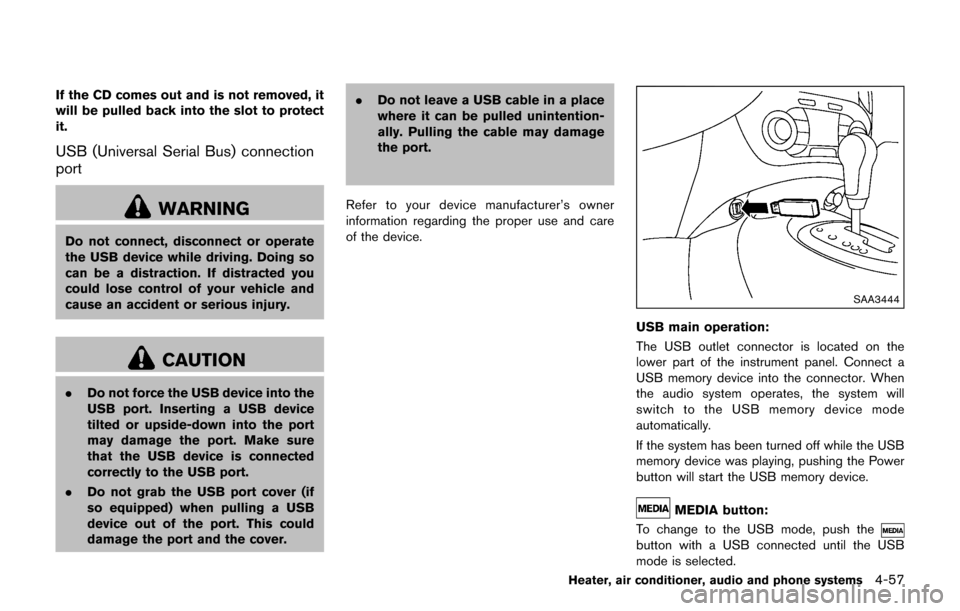
SAA3444
USB main operation:
The USB outlet connector is located on the
lower part of the instrument panel. Connect a
USB memory device into the connector. When
the audio system operates, the system will
switch to the USB memory device mode
automatically.
If the system has been turned off while the USB
memory device was playing, pushing the Power
button will start the USB memory device.
MEDIA button:
To change to the USB mode, push the
button with a USB connected until the USB
mode is selected.
Heater, air conditioner, audio and phone systems4-57
Page 217 of 416
4-58Heater, air conditioner, audio and phone systems
Next/Previous File and Fast
Forward/Rewind:
When the
orbutton is pushed and held
while a USB memory is being played, the USB
memory will play while forwarding or rewinding.
When the button is released, the USB memory
will return to normal play speed.
When the
orbutton is pushed while
the USB memory is being played, the next track
or the beginning of the current track on the USB
memory will be played. Push the
button
again to select the previous track.
Folder selection:
To change to another folder in the USB memory,
choose a folder displayed on the screen using
the TUNE·SCROLL knob.
REPEAT (RPT):
When the RPT button is pushed while the USB
memory is played, the play pattern can be
change as follows.
To change the play mode, push the RPT button
repeatedly and the mode will change as follows.
(Normal) ?1 Folder Repeat ?1 Track Repeat
? (Normal)
RANDOM (RDM):
When the RDM button is pushed while a USB
memory is being played, the play pattern can be
changed as follows.
To change the play mode, push the RDM button
repeatedly, and the mode will change as follows.
(Normal) ?All Random ?1 Folder Random ?
(Normal)
BACK button:
When the BACK button is pushed, it returns to
the previous display.
iPodŠplayer operation
WARNING
Do not connect, disconnect or operate
the USB device while driving. Doing so
can be a distraction. If distracted you
could lose control of your vehicle and
cause an accident or serious injury.
CAUTION
. Do not force the USB device into the
USB port. Inserting the USB device
tilted or up-side-down into the port
may damage the port. Make sure
that the USB device is connected
correctly into the USB port.
. Do not grab the USB port cover (if
so equipped) when pulling the USB
device out of the port. This could
damage the port and the cover.
. Do not leave the USB cable in a
place where it can be pulled unin-
tentionally. Pulling the cable may
damage the port.
Refer to your device manufacturer’s owner
information regarding the proper use and care
of the device.
Connecting iPod
Š:
The USB port is located on the lower part of the
instrument panel. Connect the iPod
Šcable to
the USB connector. See “USB (Universal Serial
Bus) connection port” (P.4-57) . When the audio
system operates, the system will switch to the
iPod
Šmode automatically. The battery of the
iPodŠis charged while the cable is connected to