2017 NISSAN JUKE warning
[x] Cancel search: warningPage 226 of 416
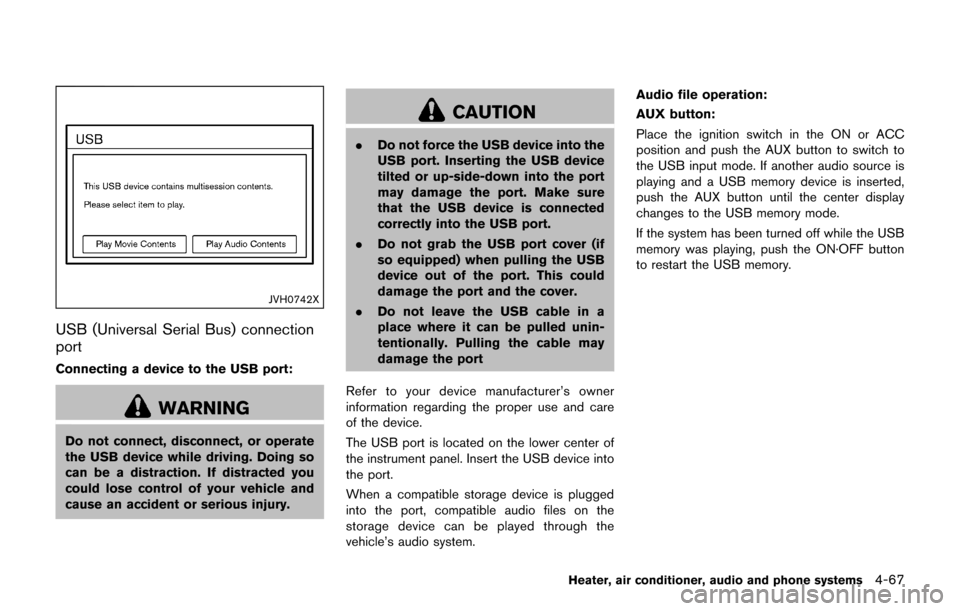
JVH0742X
USB (Universal Serial Bus) connection
port
Connecting a device to the USB port:
WARNING
Do not connect, disconnect, or operate
the USB device while driving. Doing so
can be a distraction. If distracted you
could lose control of your vehicle and
cause an accident or serious injury.
CAUTION
.Do not force the USB device into the
USB port. Inserting the USB device
tilted or up-side-down into the port
may damage the port. Make sure
that the USB device is connected
correctly into the USB port.
. Do not grab the USB port cover (if
so equipped) when pulling the USB
device out of the port. This could
damage the port and the cover.
. Do not leave the USB cable in a
place where it can be pulled unin-
tentionally. Pulling the cable may
damage the port
Refer to your device manufacturer’s owner
information regarding the proper use and care
of the device.
The USB port is located on the lower center of
the instrument panel. Insert the USB device into
the port.
When a compatible storage device is plugged
into the port, compatible audio files on the
storage device can be played through the
vehicle’s audio system. Audio file operation:
AUX button:
Place the ignition switch in the ON or ACC
position and push the AUX button to switch to
the USB input mode. If another audio source is
playing and a USB memory device is inserted,
push the AUX button until the center display
changes to the USB memory mode.
If the system has been turned off while the USB
memory was playing, push the ON·OFF button
to restart the USB memory.
Heater, air conditioner, audio and phone systems4-67
Page 227 of 416

4-68Heater, air conditioner, audio and phone systems
JVH0743X
Play information:
Information about the audio files being played is
shown on the display screen of the vehicle’s
audio system. Touch “Browse” to display the list
of categories that can be used to narrow the
search. Touch the name of a song on the screen
to begin playing that song.
Seek button:
Push the
button while an audio file on the
USB device is playing to return to the beginning
of the current track. Push the
button several
times to skip backward several tracks.
Push the
button while an audio file on the
USB device is playing to advance one track. Push the
button several times to skip
forward several tracks. If the last track in a folder
on the USB device is skipped, the first track of
the next folder is played.
Random and repeat play mode:
While files on a USB device are playing, the play
pattern can be altered so that songs are
repeated or played randomly.
. Random:
Touch the “Random” key to apply a random
play pattern to the USB device. To cancel
Random mode, touch the “Random” key
again.
. Repeat:
Touch the “Repeat” key to apply a repeat
play pattern to the USB device. To cancel
Repeat mode, touch the “Repeat” key again.
SAA3445
iPodŠplayer operation (if so equipped)
Connecting iPodŠ:
WARNING
Do not connect, disconnect or operate
the USB device while driving. Doing so
can be a distraction. If distracted you
could lose control of your vehicle and
cause an accident or serious injury.
Page 239 of 416
4-80Heater, air conditioner, audio and phone systems
When installing a car phone or a CB radio in
your vehicle, be sure to observe the following
precautions, otherwise the new equipment may
adversely affect the electronic control modules
and electronic control system harness.
WARNING
.A cellular phone should not be used
for any purpose while driving so full
attention may be given to vehicle
operation. Some jurisdictions prohi-
bit the use of cellular phones while
driving.
. If you must make a call while your
vehicle is in motion, the hands-free
cellular phone operational mode (if
so equipped) is highly recom-
mended. Exercise extreme caution
at all times so full attention may be
given to vehicle operation.
. If a conversation in a moving vehicle
requires you to take notes, pull off
the road to a safe location and stop
your vehicle before doing so.
CAUTION
.Keep the antenna as far away as
possible from the electronic control
modules.
. Keep the antenna wire more than 8
in (20 cm) away from the electronic
control system harness. Do not
route the antenna wire next to any
harness.
. Adjust the antenna standing-wave
ratio as recommended by the man-
ufacturer.
. Connect the ground wire from the
CB radio chassis to the body.
. For details, it is recommended you
visit a NISSAN dealer.
WARNING
.Use a phone after stopping your
vehicle in a safe location. If you
have to use a phone while driving,
exercise extreme caution at all
times so full attention may be given
to vehicle operation.
. If you are unable to devote full
attention to vehicle operation while
talking on the phone, pull off the
road to a safe location and stop
your vehicle.
CAUTION
To avoid draining the vehicle battery,
use a phone after starting the engine.
Your vehicle is equipped with the Bluetooth
Š
Hands-Free Phone System. If you have a
compatible BluetoothŠenabled cellular phone,
you can set up the wireless connection between
your cellular phone and the in-vehicle phone
module. With Bluetooth
Šwireless technology,
you can make or receive a hands-free telephone
call with your cellular phone in the vehicle.
CAR PHONE OR CB RADIO Bluetooth
ŠHANDS-FREE PHONE
SYSTEM (models without
navigation system)
Page 245 of 416

4-86Heater, air conditioner, audio and phone systems
ber”, then speak the digits. Up to 24
digits can be entered. Available special
characters are “star”, “pound”, “plus” and
“pause”. When finished, say “Dial” to
initiate the call. Say “Correction” at any
time in the process to correct a mis-
spoken or misinterpreted number or
character.
.RedialSpeak this command to dial the number
of the last outgoing call. The system will
display “Redialing (name/number)”. The
name of the phonebook entry will be
displayed if it available, otherwise the
number being redialed will be displayed.
.Call Back
Speak this command to dial the number
of the last incoming call. The system will
display “Calling back (name/number)” .
The name of the phonebook entry will be
displayed if it available, otherwise the
number being called back will be dis-
played.
Receiving a call
When a call is received by the phone connected
to the vehicle’s BluetoothŠHands-Free Phone
System, the call information is displayed on
either the vehicle information display or both the
vehicle information display and the control panel
display.
Push the
button to accept the call. Push thebutton to reject the call.
During a call
While a call is active, push thebutton to
access additional options. Speak one of the
following commands:
. Send
Speak this command followed by the digits
to enter digits during the phone call.
. Mute On or Mute Off
Speak the command to mute or unmute the
system.
. Transfer Call
Speak this command to transfer the call to
the handset. To transfer the call back from
the handset to the Bluetooth
ŠHands-Free
Phone System, push thebutton and
confirm when prompted.
If supported by the phone, the Bluetooth
Š
Hands-Free Phone System allows for call wait-
ing functionality. If a call is received while
another call is already active, a message will
be displayed on the screen. Push the
button to hold the active call and switch to the
second call. Push thebutton to reject the
second call. While the second call is active, pushing the
button will allow the same commands that
available during any call as well as two additional
commands:
.
Switch Call
Speak this command to hold the second call
and switch back to the original call.
. End Other Call
Speak this command to stay with the
second call and end the original call.
Push the
button to accept the call. Push thebutton to reject the call.
Ending a call
To end an active call, push thebutton.
Text messaging
WARNING
. Laws in some jurisdictions may
restrict the use of some of the
applications and features, such as
social networking and texting.
. Laws in some jurisdictions may
restrict the use of “Text-to-Speech”.
Check local regulations before
using this feature.
Page 248 of 416
.Text MessageSelect to turn on or off the vehicle’s text
messaging feature.
.New Text SoundSelect to adjust the volume of the sound
that plays when a new text is received by
a phone connected to the Bluetooth
Š
Hands-Free Phone System. The setting
all the way to the left indicates that the
new text sound will be muted.
.Show Incoming TextSelect “Driver Only” to have incoming
text messages displayed only in the
vehicle information display. Select “Both”
to have incoming text messages dis-
played in both the vehicle information
display and the center display screen.
Select “None” to have no display of
incoming text messages.
.Edit Custom MessagesSelect to set a custom message that will
be available with the standard options
when sending a text message. To set a
custom message, send a text message to
your own phone number while the phone
is connected to the system. Three
custom messages can be set. Custom
messages can only be set while the
vehicle is stationary.
.Auto ReplySelect to turn on or off the Auto Reply
function. When enabled, the vehicle will
automatically send a predefined text message to the sender when a text
message is received while driving.
.Auto Reply Message
Select to choose the message that is
sent when the Auto Reply function is
enabled. Choose from “I’m Driving” or
one of the three custom messages
stored in the system.
.Vehicle Signature On/OffSelect to choose whether or not the
vehicle signature is added to outgoing
text messages from the vehicle. This
message cannot be changed or custo-
mized.
WARNING
. Use a phone after stopping your
vehicle in a safe location. If you
have to use a phone while driving,
exercise extreme caution at all
times so full attention may be given
to vehicle operation.
. If you are unable to devote full
attention to vehicle operation while
talking on the phone, pull off the
road to a safe location and stop
your vehicle.
CAUTION
To avoid discharging the vehicle bat-
tery, use a phone after starting the
engine.
Heater, air conditioner, audio and phone systems4-89
BluetoothŠHANDS-FREE PHONE
SYSTEM (models with navigation
system)
Page 252 of 416
DURING A CALL
While a call is active, the following options are
available on the screen:
.“Handset”
Select this option to switch control of the
phone call over to the handset.
. “Mute Mic.”
Select this option to mute the microphone.
Select again to unmute the microphone.
. Red phone (
) icon
Select to end the phone call.
ENDING A CALL
To end a phone call, select the red phone ()
icon on the screen or push thebutton on
the steering wheel.
TEXT MESSAGING
WARNING
. Laws in some jurisdictions may
restrict the use of some of the
applications and features, such as
social networking and texting.
. Laws in some jurisdictions may
restrict the use of “Text-to-Speech”.
Check local regulations before
using this feature. .
Use the text messaging feature after
stopping your vehicle in a safe
location. If you have to use the
feature while driving, exercise ex-
treme caution at all times so full
attention may be given to vehicle
operation.
. If you are unable to devote full
attention to vehicle operation while
using the text messaging feature,
pull off the road to a safe location
and stop your vehicle.
NOTE:
Many phones may require special permis-
sion to enable text messaging. Check the
phone’s screen during Bluetooth
Špairing.
For some phones, you may need to enable
“Notifications” in the phone’s Bluetooth
Š
menu for text messages to appear on the
vehicle audio system. See the phone’ s
Owner’s Manual for details. Text message
integration requires that the phone sup-
port MAP (Message Access Profile) for
both receiving and sending text messages.
Some phones may not support all text
messaging features. Refer to www.nissa-
nusa.com/bluetooth or www.nissan.ca/
bluetooth for compatibility information, as well as your device’s Owner’s Manual.
The system allows for the sending and receiving
of text messages through the vehicle interface.
Sending a text message
1. Push thebutton on the steering wheel.
2. Say “Phone” after the tone.
3. Say “Send Text” after the tone.
4. The system will provide a list of available commands in order to determine the reci-
pient of the text message. Choose from the
following:
.To (a name).Enter Number.Missed Calls.Incoming Calls.Outgoing Calls
For more information about these options,
see “Voice command” (P.4-91) .
5. Once a recipient is chosen, the system prompts for which message to send. Nine
predefined messages are available as well
as three custom messages. To choose one
of the predefined messages, speak one of
the following after the tone:
.“Driving, can’t text”.“Call me”
Heater, air conditioner, audio and phone systems4-93
Page 262 of 416

5 Starting and driving
Precautions when starting and driving ................................ 5-2Exhaust gas (carbon monoxide) ...................................... 5-2
Three-way catalyst .............................................................. 5-3
Tire Pressure Monitoring System (TPMS) .................... 5-3
Avoiding collision and rollover ......................................... 5-6
Off-road recovery ................................................................ 5-6
Rapid air pressure loss ...................................................... 5-6
Drinking alcohol/drugs and driving ................................. 5-7
Driving safety precautions ................................................. 5-7
Push-button ignition switch .................................................... 5-9
Operating range for engine start function ................. 5-10
Push-button ignition switch operation ........................ 5-10
Push-button ignition switch positions ......................... 5-11
Emergency engine shut off ............................................ 5-11
Intelligent Key battery discharge .................................. 5-12
Before starting the engine ................................................... 5-12
Starting the engine ................................................................ 5-13
Driving the vehicle ................................................................. 5-14 Continuously Variable Transmission (CVT) ................ 5-14
Manual Transmission (MT) ............................................. 5-19
Integrated control system (if so equipped) ..................... 5-21 Drive mode ........................................................................\
. 5-22
Parking brake ........................................................................\
.. 5-25
Cruise control ........................................................................\
. 5-26 Precautions on cruise control ....................................... 5-26 Cruise control operations ............................................ 5-26
Break-in schedule ................................................................. 5-27
Fuel Efficient Driving Tips ................................................... 5-28
Increasing fuel economy ...................................................... 5-29
All-Wheel Drive (AWD) (if so equipped) ........................ 5-29 All-Wheel Drive (AWD) mode
switch operations ........................................................... 5-29
AWD warning light ........................................................ 5-31
Parking/parking on hills ........................................................ 5-33
Electric power steering ........................................................ 5-34
Brake system ........................................................................\
.. 5-35 Braking precautions ...................................................... 5-35
Brake assist ........................................................................\
.... 5-36
Brake assist ..................................................................... 5-36
Anti-lock Braking System (ABS) ............................... 5-36
Vehicle Dynamic Control (VDC) system ......................... 5-37
Cold weather driving ............................................................ 5-39 Freeing a frozen door lock ........................................... 5-39
Anti-freeze ........................................................................\
5-39
Battery ........................................................................\
....... 5-39
Draining of coolant water ............................................. 5-39
Tire equipment ................................................................ 5-39
Special winter equipment ............................................ 5-39
Driving on snow or ice ................................................. 5-39
Engine block heater (if so equipped) ....................... 5-40
Page 263 of 416
5-2Starting and driving
WARNING
.Do not leave children or adults who
would normally require the support
of others alone in your vehicle. Pets
should not be left alone either. They
could accidentally injure themselves
or others through inadvertent op-
eration of the vehicle. Also, on hot,
sunny days, temperatures in a
closed vehicle could quickly become
high enough to cause severe or
possibly fatal injuries to people or
animals.
. Properly secure all cargo with ropes
or straps to help prevent it from
sliding or shifting. Do not place
cargo higher than the seatbacks. In
a sudden stop or collision, unse-
cured cargo could cause personal
injury.
EXHAUST GAS (carbon monoxide)
WARNING
.Do not breathe exhaust gases; they
contain colorless and odorless car-
bon monoxide. Carbon monoxide is
dangerous. It can cause uncon-
sciousness or death.
. If you suspect that exhaust fumes
are entering the vehicle, drive with
all windows fully open, and have the
vehicle inspected immediately.
. Do not run the engine in closed
spaces such as a garage.
. Do not park the vehicle with the
engine running for any extended
length of time.
. Keep the liftgate closed while driv-
ing, otherwise exhaust gases could
be drawn into the passenger com-
partment. If you must drive with the
liftgate open, follow these precau-
tions:
1. Open all the windows.
2. Set the
air recirculation to off
and the fan control to high to circulate the air.
. If electrical wiring or other cable
connections must pass to a trailer
through the seal on the liftgate or
the body, follow the manufacturer’s
recommendation to prevent carbon
monoxide entry into the vehicle.
. If a special body, camper or other
equipment is added for recreational
or other usage, follow the manufac-
turer’s recommendation to prevent
carbon monoxide entry into the
vehicle. (Some recreational vehicle
appliances such as stoves, refrig-
erators, heaters, etc. may also gen-
erate carbon monoxide.)
. The exhaust system and body
should be inspected by a qualified
mechanic whenever:
— The vehicle is raised for service.
— You suspect that exhaust fumes
are entering into the passenger
compartment.
— You notice a change in the sound of the exhaust system.
— You have had an accident invol- ving damage to the exhaust
PRECAUTIONS WHEN STARTING
AND DRIVING