2017 MITSUBISHI OUTLANDER tire
[x] Cancel search: tirePage 228 of 521

Parking sensors (Front/Rear) (if so equipped)
Features and controls 5-147
5
N00533001233
Your tire pressure monitoring system oper- ates on a radio frequency subject to Federal Communications Commission (FCC) Rules(For vehicles sold in
U.S.A.) and Industry
Canada Rules (For vehicles sold in Canada). This device complies with part 15 of FCCRules and Industry Ca
nada licence-exempt
RSS standard(s). Operation is subject to the following two con- ditions. This device may not
cause harmful inter-
ference. This device must ac
cept any interference
received, including interference that may cause undesired operation.
N00589800039
Parking sensors will al
ert the driver with an
intermittent or contin
uous buzzer sound when
the vehicle approaches
an object and the sen-
sor detects that object
during parking. The
system incorporates 8 ultrasonic sensors (A)
General information
CAUTION Changes or modifica
tions not expressly
approved by the manufacturer for compli- ance could void the user’s authority to oper-ate the equipment.
Parking sensors (Front/Rear)
(if so equipped)
WA R N I N G Before using the parkin
g sensors, read this
entire section to fully understand the limi- tations of this system. Failure to followinstructions could result in an accident.
The parking sensors ar
e parking aid only.
It is not a substitute for your visual confir-mation.The system is not designed to detect chil- dren, pedestrians, bicycles and pets. The area within which the system can detect isvery limited, and objects outside the detection area, such as under the bumper or around either co
rner of the bumper,
cannot be detected. The sensors of the sys- tem may not be able to detect certain objects. Never rely solely on
the parking sensors to
clear the area in fron
t and to the rear of
your vehicle. Always
check visually in
front and to the rear
of your vehicle for
persons, animals, ob
structions or other
vehicles. Failure to do so can result in damage to your vehicle, seriou
s injury or death.
CAUTIONThe parking sensors
may not operate prop-
erly in a certain situation. Some examplesare:• The sensors or surroundings have beenwiped by hand.• The stickers or ac
cessories have been
attached to the sensors or surroundings.• The sensors or surroundings are coveredwith ice, snow, or mud.WA R N I N G
BK0239700US.book 147 ページ 2016年6月16日 木曜日 午前10時58分
Page 229 of 521

Parking sensors (Front/Rear) (if so equipped) 5-148 Features and controls
5
“Normal mode” and “Tow
ing hitch mode” for
a vehicle equipped with a towing hitch can beselected.
The detection areas are within approximately 24 inches (60 cm) (A) from the front and cor-ner sensors and 49 inches (125 cm) (B) from the back sensors.
• When the ambient temp
erature has rapidly
changed.• When the sensor is frozen.• When the system detects ultrasonic noise,such as the noise from motorcycle engines, brakes, radios, pouring rain, splashing water or tire chains.• When the sensor is extremely hot or cold(after the vehicle has
been parked for a long
period of time under
a blazing sun or in
cold weather).• When the vehicle is driven on a rough roadincluding a bumpy, gravel, hilly, or grassy surface.• When the vehicle is too close to an object.• Immediately after the engine switch is turned on.
The parking sensors may not properly detect certain objects including;• A thin object such as a wire net or rope.• An object that absorbs ultrasonic sound waves, such as snow.• An object with sharp angles.• An object with a sm
ooth surface, such as
glass.• A low height object such as a curb. If the bumper has experienced an impact, the sensor area may have
damage and the park-
ing sensors may not f
unction properly. Have
the vehicle inspected at an authorized Mit- subishi Motors dealer or a repair facility of your choice.CAUTION
Detection areas
WA R N I N G The detection areas described below are for reference only. The actual detectionareas may vary depend
ing on the shape,
size and position of
the object being
detected. Certain objects may not bedetected, even if the object is within the detection area described below. Also false alerts may sound de
pending on the sur-
rounding environment.
Normal mode
BK0239700US.book 148 ページ 2016年6月16日 木曜日 午前10時58分
Page 235 of 521
Multi Around Monitor (if so equipped)
5
N00587200042
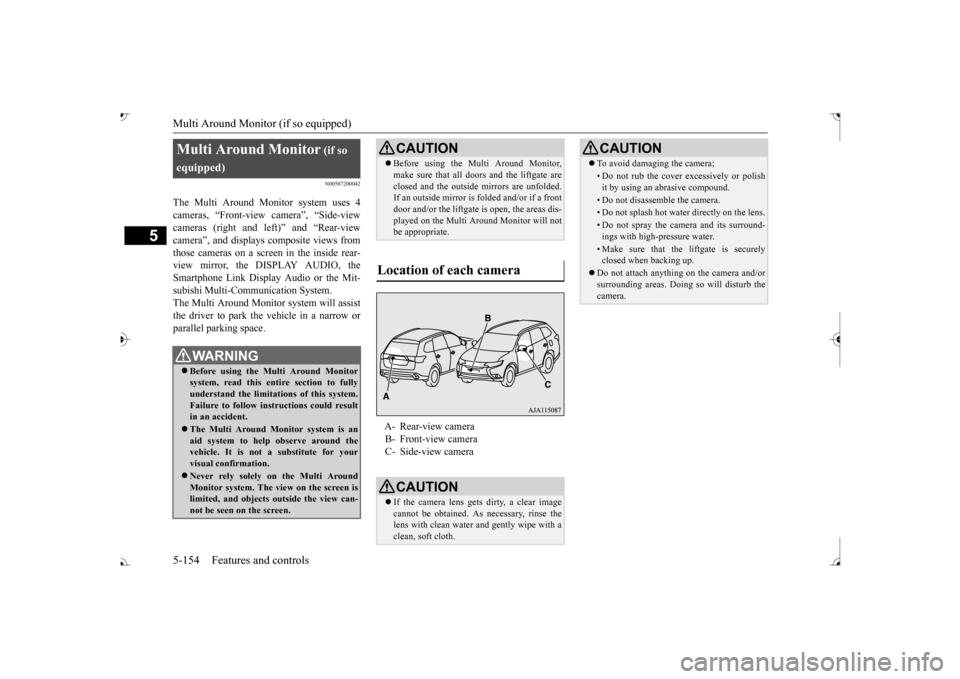
The Multi Around Monitor system uses 4 cameras, “Front-view camera”, “Side-viewcameras (right and le
ft)” and “Rear-view
camera”, and displays
composite views from
those cameras on a screen in the inside rear-view mirror, the DISPLAY AUDIO, the Smartphone Link Display Audio or the Mit- subishi Multi-Comm
unication System.
The Multi Around Monitor
system wi
ll assist
the driver to park the vehicle in a narrow orparallel parking space. Multi Around Monitor
(if so
equipped) Before using the Multi Around Monitor system, read this entire section to fully understand the limitations of this system. Failure to follow instructions could resultin an accident. The Multi Around Monitor system is an aid system to help observe around the vehicle. It is not a substitute for your visual confirmation. Never rely solely on the Multi Around Monitor system. The view on the screen islimited, and objects
outside the view can-
not be seen on the screen.
CAUTION Before using the Multi Around Monitor, make sure that all doors and the liftgate areclosed and the outside mirrors are unfolded.If an outside mirror is folded and/or if a front door and/or the liftgate
is open, the areas dis-
played on the Multi Around Monitor will notbe appropriate.
Location of each camera
A- Rear-view camera B- Front-view camera C- Side-view cameraCAUTION If the camera lens gets
dirty, a clear image
cannot be obtained. As necessary, rinse the lens with clean water and gently wipe with aclean, soft cloth.
To avoid damaging the camera;• Do not rub the cover excessively or polish it by using an abrasive compound.• Do not disassemble the camera.• Do not splash hot wate
r directly on the lens.
• Do not spray the camera and its surround- ings with high-pressure water.• Make sure that the liftgate is securelyclosed when backing up.
Do not attach anythi
ng on the camera and/or
surrounding areas. Doing
so will disturb the
camera.CAUTION
BK0239700US.book 154 ページ 2016年6月16日 木曜日 午前10時58分
Page 259 of 521
Multi Information display - Type 1 5-178 Features and controls
5
Refer to “Changing the time until “REST REMINDER” is displayed” on page 5-182.Refer to “Changing the turn signal sound” on page 5-182. Refer to “Changing the momentary fuelconsumption display” on page 5-182. Refer to “Tire ID set change” on page 5-146.Refer to “Returning to the factory set- tings” on page 5-183.
N00557001240
You can change the mode condition for theaverage fuel consumption and average speed display to “Auto reset”
or “Manual reset.”
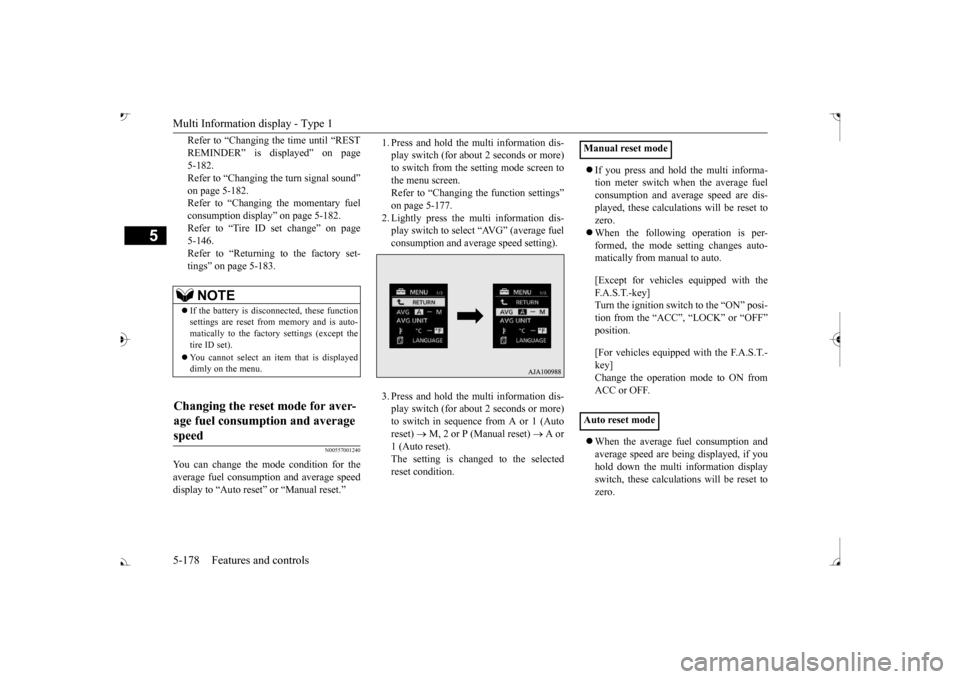
1. Press and hold the mu
lti information dis-
play switch (for about 2 seconds or more)to switch from the setting mode screen to the menu screen. Refer to “Changing th
e function settings”
on page 5-177. 2. Lightly press the multi information dis- play switch to select “AVG” (average fuelconsumption and average speed setting). 3. Press and hold the mu
lti information dis-
play switch (for about 2 seconds or more)to switch in sequence from A or 1 (Auto reset)
M, 2 or P (Manual reset)
A or
1 (Auto reset).The setting is changed to the selected reset condition.
If you press and hold the multi informa- tion meter switch when the average fuelconsumption and average speed are dis- played, these calculati
ons will be reset to
zero. When the following operation is per- formed, the mode setting changes auto- matically from manual to auto. [Except for vehicles
equipped with the
F. A . S . T. - k e y ] Turn the ignition switch to the “ON” posi-tion from the “ACC”, “LOCK” or “OFF” position. [For vehicles equipped
with the F.A.S.T.-
key]Change the operation mode to ON from ACC or OFF. When the average fuel consumption and average speed are being displayed, if youhold down the multi in
formation display
switch, these calculations will be reset to zero.
NOTE
If the battery is disc
onnected, these function
settings are reset from
memory and is auto-
matically to the factory settings (except thetire ID set). You cannot select an it
em that is displayed
dimly on the menu.
Changing the reset mode for aver- age fuel consumption and average speed
Manual reset mode Auto reset mode
BK0239700US.book 178 ページ 2016年6月16日 木曜日 午前10時58分
Page 264 of 521
Multi Information display - Type 2
Features and controls 5-183
5
N00557601217
Many of the function set
tings can be returned
to their factory settings. 1. Press and hold the mu
lti information dis-
play switch (for about 2 seconds or more)to switch from the setting mode screen to the menu screen. Refer to “Changing th
e function settings”
on page 5-177. 2. Lightly press the multi information dis- play switch to select “RESET” (return to the factory settings). 3. Press and hold the mu
lti information dis-
play switch (for about 5 seconds or more), the buzzer sounds and all of the function settings are returned to the factory set-tings.
N00555001291
The multi information display displays theodometer, trip odometer, service reminder, fuel remaining, outside
temperature, selector
lever position, averag
e fuel consumption,
driving range, etc. It is also possible to change elements such as the units used on the multi information dis- play.
Returning to the
factory settings
NOTE
The factory settings are as follows. • Average fuel consumption and average speed reset mode: A (Auto reset) • Fuel consumption di
splay unit: mpg (US)
or (L/100 km) • Temperature unit: °F (Fahrenheit) or {°C (Celsius)} • Display language: ENGLISH • Cooperative language
setting: A (language
cooperation: enabled)
• Operation sounds: ON (Operation sound on) • “REST REMINDER” display: OFF • Turn signal sound: Turn signal sound 1• Momentary fuel consumption with the green bar graph: ON
The tire ID set cannot be returned to the fac- tory settings.
Multi Information display - Type 2
NOTE
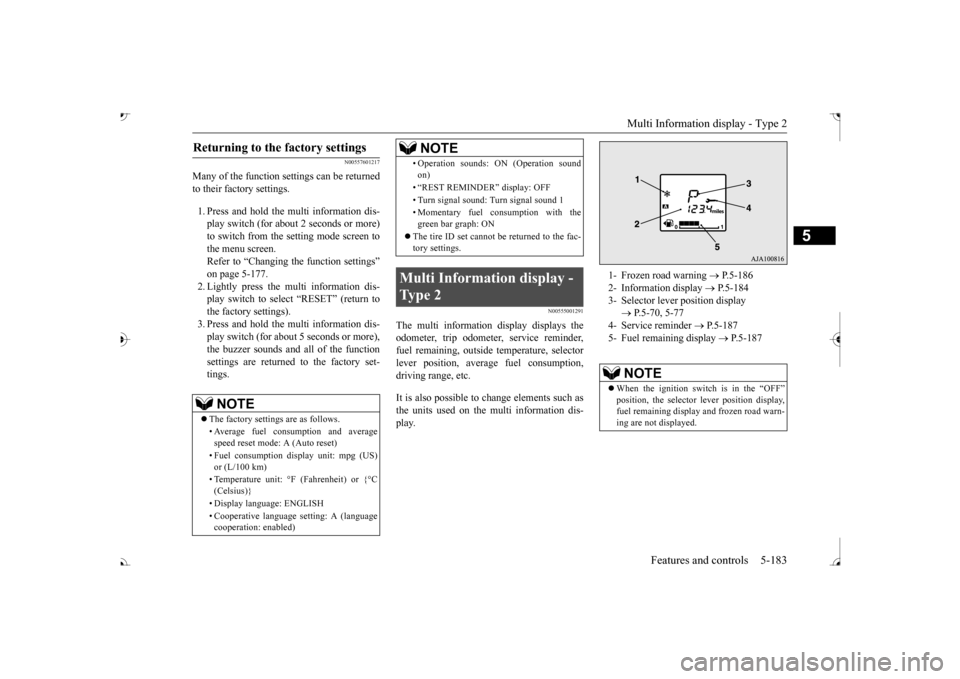
1- Frozen road warning
P.5-186
2- Information display
P.5-184
3- Selector lever position display
P.5-70, 5-77
4- Service reminder
P.5-187
5- Fuel remaining display
P.5-187
NOTE
When the ignition switch is in the “OFF”
lever position display,
fuel remaining display and frozen road warn-ing are not displayed.
BK0239700US.book 183 ページ 2016年6月16日 木曜日 午前10時58分
Page 265 of 521
Multi Information display - Type 2 5-184 Features and controls
5
N00574801067
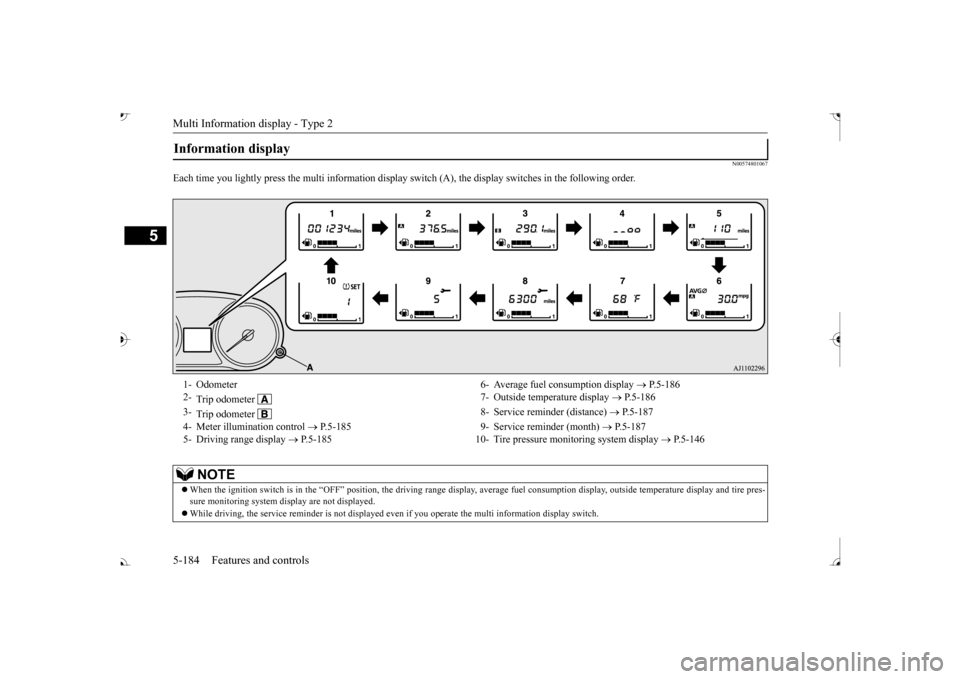
Each time you lightly press th
e multi information display switch (A), th
e display switches in
the following order.
Information display 1- Odometer 6- Average fuel
consumption display
P.5-186
2-
Trip odometer
7- Outside temperature display
P.5-186
3-
Trip odometer
8- Service reminder (distance)
P.5-187
4- Meter illumination control
P.5-185 9- Service reminder (month)
P.5-187
5- Driving range display
P.5-185 10- Tire pressure monitoring system display
P.5-146
NOTE
When the ignition switch is in the “OFF” position, the driving ra
nge display, average fuel consum
ption display, outside tempera
ture display and tire pres-
sure monitoring system di
splay are not displayed.
While driving, the service reminder is
not displayed even if you operate th
e multi information display switch.
BK0239700US.book 184 ページ 2016年6月16日 木曜日 午前10時58分
Page 273 of 521

Indicator light, warning light, and information screen display list (multi information display - Type 1)
5
N00557901092
When there is information to be announced,
such as light reminder, the
tone sounds and the screen sw
itches to the displays show
n below. Refer to
the appropriate page and ta
ke the necessary measures.
When the cause of the warning display is elimin
ated, the warning displa
y goes out automatically.
Refer to Warning disp
lay list on page 5-193.
Refer to Navigation informat
ion display on page 5-209.
Refer to Other interrupt displays on page 5-210. 15- Seat belt remi
nder/warning light
P.4-23
16- Tire pressure monitoring system warn-
ing light
P.5-143
17- Brake auto hold indicator (if so
equipped)
P.5-93
18- Brake warning light (red)
P.5-216
19- Information screen display list
P.5-192
Information screen display list
NOTE
In the following cases, a warning may be
displayed on the information screen and th
e buzzer may sound for a
few seconds, at tim
es.
This is caused by the system picking up in
terference such as strong el
ectromagnetic waves
or noise, and is not a functional pro
blem.
• An extremely strong electrom
agnetic wave is received from a s
ource such as an illegal radio se
t, a spark from a wire, or a rad
ar station.
• Abnormal voltage or a static
electricity disc
harge is generated by the operation of
your vehicle’s electr
onics (including afte
r-market parts).
If the warning display has oc
curred a number of times, take your
vehicle to an author
ized Mitsubishi Motors
dealer or a repair
facility of your choice and
have the system checked.
BK0239700US.book 192 ページ 2016年6月16日 木曜日 午前10時58分
Page 277 of 521
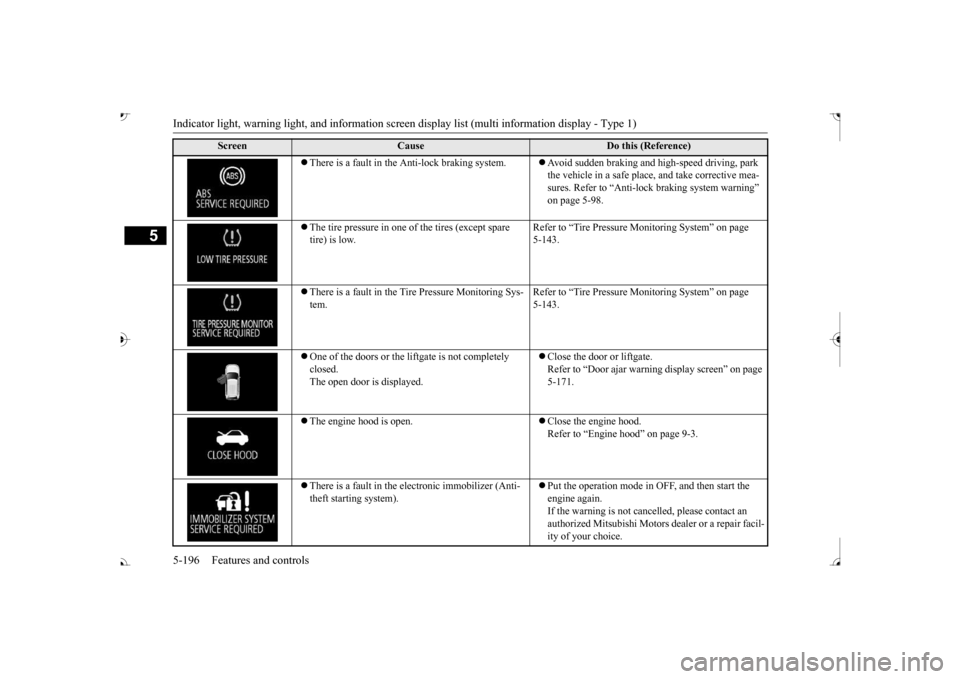
Indicator light, warning light, and information screen display list (multi information display - Type 1)
5
There is a fault in the Anti-lock braking system.
Avoid sudden braking and high-speed driving, park the vehicle in a safe place, and take corrective mea-sures. Refer to “Anti-lock
braking system warning”
on page 5-98.
The tire pressure in one of the tires (except spare tire) is low.
Refer to “Tire Pressure Monitoring System” on page 5-143.
There is a fault in the Tire Pressure Monitoring Sys- tem.
Refer to “Tire Pressure Monitoring System” on page 5-143.
One of the doors or the liftgate is not completely closed. The open door is displayed.
Close the door or liftgate. Refer to “Door ajar warnin
g display screen” on page
5-171.
The engine hood is open.
Close the engine hood. Refer to “Engine hood” on page 9-3.
There is a fault in the electronic immobilizer (Anti- theft starting system).
Put the operation mode in OFF, and then start the engine again.If the warning is not cancel
led, please contact an
authorized Mitsubishi Motors dealer or a repair facil- ity of your choice.
Screen
Cause
Do this (Reference)
BK0239700US.book 196 ページ 2016年6月16日 木曜日 午前10時58分