2017 MITSUBISHI OUTLANDER tire
[x] Cancel search: tirePage 188 of 521
Adaptive Cruise Control System (ACC) (if so equipped)
Features and controls 5-107
5
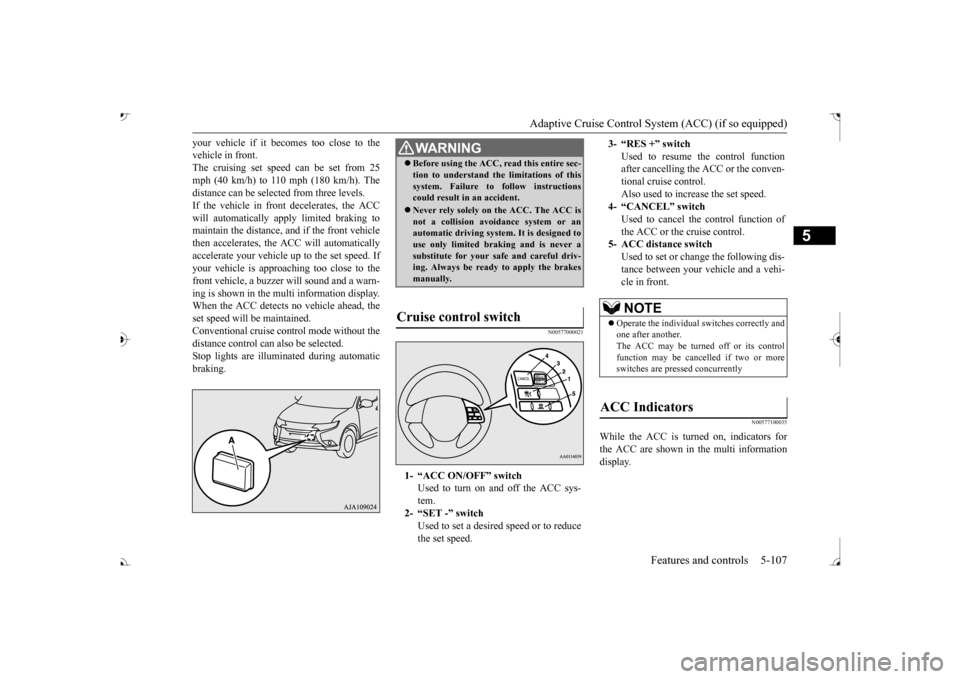
your vehicle if it becomes too close to the vehicle in front.The cruising set speed can be set from 25 mph (40 km/h) to 110 mph (180 km/h). The distance can be select
ed from three levels.
If the vehicle in front decelerates, the ACC will automatically apply limited braking to maintain the distance, a
nd if the front vehicle
then accelerates, the ACC will automatically accelerate your vehicle up to the set speed. If your vehicle is approa
ching too close to the
front vehicle, a buzzer will sound and a warn- ing is shown in the multi information display.When the ACC detects no vehicle ahead, the set speed will be maintained. Conventional cruise cont
rol mode without the
distance control can
also be selected.
Stop lights are illuminated during automatic braking.
N00577000021
N00577100035
While the ACC is turned on, indicators for the ACC are shown in the multi information display.
WA R N I N G Before using the ACC, read this entire sec- tion to understand th
e limitations of this
system. Failure to follow instructionscould result in an accident. Never rely solely on the ACC. The ACC is not a collision avoidance system or an automatic driving system. It is designed to use only limited brak
ing and is never a
substitute for your safe and careful driv- ing. Always be ready to apply the brakes manually.
Cruise control switch
1- “ACC ON/OFF” switch
Used to turn on and off the ACC sys-tem.
2- “SET -” switch
Used to set a desired speed or to reducethe set speed.
3- “RES +” switch
Used to resume the control function after cancelling the ACC or the conven-tional cruise control. Also used to increase the set speed.
4- “CANCEL” switch
Used to cancel the control function of the ACC or the cruise control.
5- ACC distance switch
Used to set or change the following dis- tance between your
vehicle and a vehi-
cle in front.NOTE
Operate the individual
switches correctly and
one after another. The ACC may be turned off or its control function may be canc
elled if two or more
switches are pressed concurrently
ACC Indicators
BK0239700US.book 107 ページ 2016年6月16日 木曜日 午前10時58分
Page 193 of 521

Adaptive Cruise Control System (ACC) (if so equipped) 5-112 Features and controls
5
N00581500027
There are two ways to increase the set speed. The set speed will increase by 1 mph (1 km/h) every time you push up the “RES +” switch while the ACC is activated. If youhold the switch pushed up, the set speed increases in 5 mph (5 km/h) increments.
• When the height of a vehicle in front is extremely low or the road clearance ofthe vehicle is extremely high.• When driving on a r
oad with alternating
up and down surfaces.• When driving on a curve.• When driving on a bumpy or rough road.• When driving in a tunnel.• When driving in construction zones.• When the rear of your vehicle is weighed down with the weight of passengers and luggage• For up to two minutes after starting driv-ing.• When driving in curved sections of roadincluding their entrance/outlet or run-ning beside a closed lane in a traffic work or similar zone.• When the surface of th
e sensor is covered
with dirt, snow, ice, etc.• When a front vehicle or an oncomingvehicle is splashing wa
ter, snow or dirt.
WA R N I N G
• When driving on
a winding road.
Never use the ACC in the following situa- tions:• In heavy traffic.• On winding roads.• On slippery roads, such as icy, snow-cov-ered or dirt roads.• In adverse weather conditions, such asrain, snow or sand storms, etc.• On steep downslopes.• When the inclination of a road fre-quently changes.• When the approach alarm frequentlysounds.• When your vehicle is towed or is towinganother vehicle.• When your vehicle is on a chassis dyna-mometer or free rollers.• When tire inflation pressures are notadequate.• When the temporary sp
are tire is being
used.• When the radar sensor and/or its sur-rounding area are damaged or deformed.WA R N I N G
CAUTION To maintain proper performance of the ACC:• Always clean the surface of the radar sen- sor.• Avoid impacting the radar sensor or its sur-rounding area.• Do not put a sticker on the radar sensor orits surrounding area.• Do not paint the radar sensor.• Do not install a grill guard.• Do not modify the radar sensor or its sur- rounding area.• Always use tires of the same size, sametype, and same brand, and which have no significant wear differences.• Do not modify the vehicle’s suspension.
To increase the set speed
By using the “RES +” switch:
BK0239700US.book 112 ページ 2016年6月16日 木曜日 午前10時58分
Page 199 of 521
Forward Collision Mitigation System (FCM) (if so equipped) 5-118 Features and controls
5
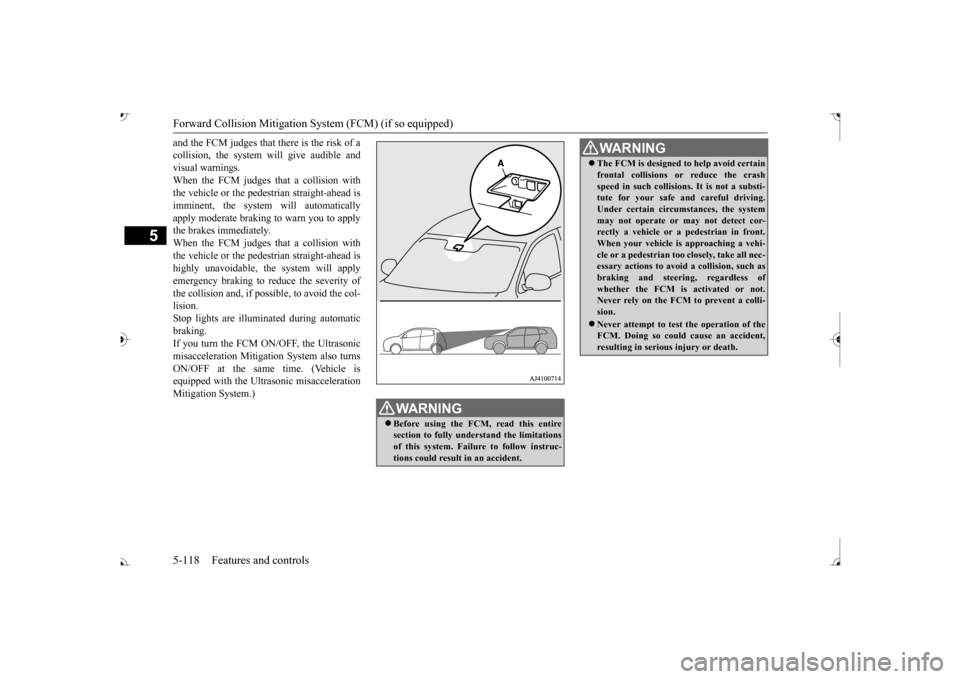
and the FCM judges that there is the risk of a collision, the system
will give audible and
visual warnings. When the FCM judges that a collision with the vehicle or the pedest
rian straight-ahead is
imminent, the system will automatically apply moderate braking to warn you to apply the brakes immediately. When the FCM judges that a collision with the vehicle or the pedest
rian straight-ahead is
highly unavoidable, th
e system will apply
emergency braking to reduce the severity of the collision and, if possible, to avoid the col-lision. Stop lights are illuminated during automatic braking.If you turn the FCM ON/OFF, the Ultrasonic misacceleration Mitigation System also turns ON/OFF at the same time. (Vehicle isequipped with the Ultr
asonic misacceleration
Mitigation System.)
WA R N I N G Before using the FCM, read this entire section to fully understand the limitationsof this system. Failure to follow instruc- tions could result
in an accident.
The FCM is designed
to help avoid certain
frontal collisions or reduce the crashspeed in such collisions. It is not a substi-tute for your safe and careful driving. Under certain circumstances, the system may not operate or may not detect cor-rectly a vehicle or a
pedestrian in front.
When your vehicle is
approaching a vehi-
cle or a pedestri
an too closely, take all nec-
essary actions to avoid
a collision, such as
braking and
steering, regardless of
whether the FCM is
activated or not.
Never rely on the FCM to prevent a colli- sion. Never attempt to test the operation of the FCM. Doing so could cause an accident, resulting in seriou
s injury or death.
WA R N I N G
BK0239700US.book 118 ページ 2016年6月16日 木曜日 午前10時58分
Page 202 of 521

Forward Collision Mitigation System (FCM) (if so equipped)
Features and controls 5-121
5
• When driving on a curve.• When there is a road
side object (B) that
reflects the radar sensor signal, such as a road sign.• When approaching a gate, a railroad crossing, an underpa
ss, a narrow bridge,
manhole lid or
a speed bump.
• When driving unde
r an overpass or
pedestrian bridge.• When driving in
a narrow tunnel.
• When driving in a parking structure.• When approaching a slope where the incline changes
significantly.
• When trying to stop your vehicle very close to a vehicle or
an object in front.
• When passing a vehicle, a pedestrian or an object closely.WA R N I N G
• When a vehicle in the next lane becomespositioned directly in
front of your vehi-
cle due to winding road conditions.• When passing through an area that objects may contact the vehicle, such as thick grass, tree br
anches, or a banner.
• When there are patterns on the road that may be mistaken for
a vehicle or a pedes-
trian.• When a vehicle cuts in
to your path in the
detecting range of the sensor.• When an oncoming vehicle is positionedstraight ahead of your vehicle on a curved road.• When the FCM detects a long object car-ried on your vehicle, such as skies or a roof carrier.• When driving through fog, steam, smokeor dust.
The FCM should be tuned off if any of fol- lowing situations occur:• When using an automatic car wash.• When the tires are not properly inflated. • When the emergency spare tire is used.WA R N I N G
• When your vehicle is
towed or
your vehi-
cle tows another vehicle.• When your vehicle is
carried on a truck.
• When your vehicle is on a chassis dyna- mometer or free rollers.• If the windshield on or surrounding thesensor is cracke
d or scratched.
NOTE
When depressing the brake pedal while auto- matic braking is applie
d, the brake pedal will
feel firm. This is normal. Depress the brake pedal harder to apply
greater braking force.
During the automatic braking, operating sounds may be heard. This is normal. WA R N I N G
BK0239700US.book 121 ページ 2016年6月16日 木曜日 午前10時58分
Page 206 of 521

Forward Collision Mitigation System (FCM) (if so equipped)
Features and controls 5-125
5
N00593400036
The sensor (A) is located inside the wind- shield as shown in the illustration. The sensor is shared in the following sys-tems: FCM Lane Departure Warning (LDW) Automatic high beam system
NOTE
If the sensor or its surrounding area becomes extremely high temperature when parkingthe vehicle under a blazing sun, the “FCMSERVICE REQUIRED” message may appear. After the temperature of the sensor or its sur-rounding area has been in range, if the mes- sage remains even afte
r restarting the engine,
please contact an au
thorized Mitsubishi
Motors dealer.
Handling of the sensor
CAUTION To maintain proper performance of the FCM, LDW and Automatic high beam system;• Always keep clea
n the windshield.
If the inside of the windshield where the sensor is installed be
comes dirty or fogged,
contact an authorized Mitsubishi Motors dealer.• Do not apply an impact or load on the sen-sor or its surrounding area.
• Do not put anything including a sticker or film on the windshield in front of or sur-rounding the area of the sensor.• Do not attempt to deta
ch or disassemble the
sensor.• If the windshield is misted, remove the mistfrom the windshield by using the defogger switch.• Maintain the wiper blades in good condi-tion. Refer to “Wiper blades” on page 9-44.When replacing the wi
per blades, use only
Mitsubishi Motors Genui
ne parts or equiva-
lent.• Do not dirty or da
mage the sensor.
• Do not spray glass cleaner on the sensor. Also, do not spill liqui
d, such as a bever-
age, to the sensor.• Do not install an electronic device, such asantenna, or a device th
at emits strong elec-
tric waves, near the sensor.• Always use tires of the same size, sametype and same brand,
and which have no
significant wear differences.• Do not modify the vehicle’s suspensions.CAUTION
BK0239700US.book 125 ページ 2016年6月16日 木曜日 午前10時58分
Page 209 of 521
Ultrasonic misacceleration Miti
gation System (if so equipped)
5
On vehicles equipped with the Fo
rward Collision Mitigation System (FCM), when th
e FCM system is turned on/off, the Ultrasonic m
isaccelera-
tion Mitigation System is also turned on/off simultaneously.
Situation
Operation display
Buzzer
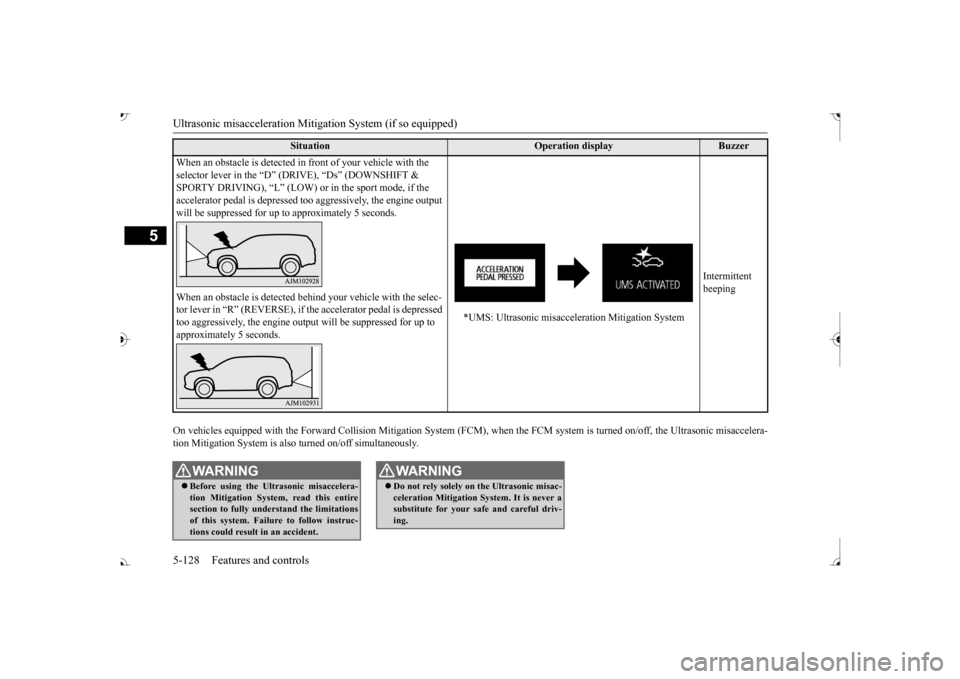
When an obstacle is detected in
front of your vehicle with the
selector lever in the “D” (D
RIVE), “Ds” (DOWNSHIFT &
SPORTY DRIVING), “L” (LOW) or
in the sport mode, if the
accelerator pedal is depressed t
oo aggressively, the engine output
will be suppressed for up to
approximately 5 seconds.
*UMS: Ultrasonic misacceleration Mitigation System
Intermittent beeping
When an obstacle is de
tected behind your vehicle with the selec-
tor lever in “R” (REVERSE), if the accelerator pedal is depressed too aggressively, the engine out
put will be suppressed for up to
approximately 5 seconds.
WA R N I N G Before using the Ultrasonic misaccelera- tion Mitigation System, read this entire section to fully understand the limitations of this system. Failure to follow instruc-tions could result in an accident.
Do not rely solely on the Ultrasonic misac- celeration Mitigation Sy
stem. It is never a
substitute for your safe and careful driv- ing.WA R N I N G
BK0239700US.book 128 ページ 2016年6月16日 木曜日 午前10時58分
Page 211 of 521

Ultrasonic misacceleration Miti
gation System (if so equipped)
5
• When a vehicle ahea
d or behind is a
truck loaded with fr
eight that protrudes
rearward from the cargo bed.• If the height of an object is low. • If the ground clearance of an object is extremely high.• When an object is covered by snow.• When the shape of an object is rounded, such as a pole.• When ultrasonic waves are absorbed byan object, such as snow or a spongy material.• When an obstacle
is a chain fence.
• When an object is moving.• If an aftermarket el
ectrical device, such
as a radio antenna, is
installed near the
sensor
The Ultrasonic misacc
eleration Mitigation
System operation may be cancelled when the system recognizes evasive actions by the driver to avoid a co
llision or
when the
obstacle moves out of
the detection range
of the sensor. In certain situations,
though there is little
or no risk of a col
lision, the Ultrasonic
misacceleration Mitigation System mayactivate. Examples include:• When a vehicle ahea
d or an oncoming
vehicle is splashing wa
ter, snow or dirt.
• When a bump or step
is ahead of the
vehicle.WA R N I N G
• When a parking gate or crossing gate isnot fully opened.• When the vehicle is in smoke, fog or steam.• When attempting to park the vehiclevery close to another
vehicle or
an object.
• When the vehicle is exiting from parallel parking.• When the system detects ultrasonicnoise, such as the noise from motorcycle engines, brakes, radios, pouring rain,splashing water, tire chains or a ultra- sonic wave from a sonar sensor on another vehicle.• If an aftermarket el
ectrical device, such
as a radio antenna, is
installed near the
sensor.• When the vehicle is
on a gravel road.
• When the vehicle is in a tall grass area.The Ultrasonic misacc
eleration Mitigation
System should be tuned off if any of fol- lowing situations occur:• When attempting to get out of a roadgroove or a mud.• When using an automatic car wash.• When the vehicle is entering or exiting a car elevator.• When your vehicle is on a chassis dyna-mometer or free rollers.• When your vehicle is
towed or
your vehi-
cle tows another vehicle.• When your vehicle is
carried on a truck.
WA R N I N G
• When driving on a circuit.• When the tires are not properly inflated.• When the ultrasonic sensor and its sur- rounding area is damaged or deformed.CAUTION To maintain proper perf
ormance of the Ultra-
sonic misaccelerati
on Mitigation System,
follow the instructions below.• Do not hit or apply load to the sensors.• Wipe the sensors and surrounding areas ifan object, such as dirt, adheres.• Do not cover the sensors.• Do not modify the suspension of your vehi- cle.
If the bumper has experienced an impact, the sensor area may have
been damaged and the
Ultrasonic misacceleration Mitigation Sys-tem may not function
properly. Have the
vehicle inspected at an
authorized Mitsubishi
Motors dealer or a repair facility of yourchoice.WA R N I N G
BK0239700US.book 130 ページ 2016年6月16日 木曜日 午前10時58分
Page 213 of 521

Blind Spot Warning (BSW) (with Lane Change Assist) (if so equipped)
5
When a vehicle in the next lane is traveling at same speed or faster in the detection areas,the Blind Spot Warning light in the corre- sponding outside rearview
mirror will illumi-
nate. If the turn signal lever is operated to theside where the Blind Spot Warning light is illuminated, the Blind
Spot Warning light will
blink and the system will beep three times toalert the driver. Depending on the speed of your vehicle, the Blind Spot Warning system will detect up to approximately 230 feet (70 m) from your vehicle.
N00592300038
The BSW uses 2 sensors (A) located inside the rear bumper. The detection areas are
shown as illustrated.
WA R N I N GBefore using the BSW, read this entire sec- tion to fully understand the limitations ofthis system. Failure to follow instructions could result in an accident.
Never rely solely on the BSW system when changing lanes. BSW is an aid only. It isnot a substitute for your safe and carefuldriving. Always check
visually behind and
all around your vehicl
e for other vehicles.
The performance of the BSW may varydepending on driving, traffic and/or road conditions.
Detection areas
WA R N I N G
WA R N I N G In certain situations, the BSW may not detect a vehicle in the detection areas or the detection may be delayed. Some ofthese include;• When a small motorcycle or a bicycle isbehind your vehicle.• When a vehicle is
traveling alongside of
your vehicle at nearly
the same speed for
prolonged periods of time.
BK0239700US.book 132 ページ 2016年6月16日 木曜日 午前10時58分