2017 MITSUBISHI OUTLANDER ESP
[x] Cancel search: ESPPage 231 of 521

Parking sensors (Front/Rear) (if so equipped) 5-150 Features and controls
5
When a sensor detects an object; The system will alarm the driver by inter- mittent beeps.As the vehicle moves
closer to the object,
the alarm will switch to shorter beeps and then to a continuous beep.When the vehicle is too close to an object, the alarm may no longer sound or it may return to intermittent beeps from a contin- uous beep. Also, in the multi-information display, an indicator corresponding to the sensor detecting the objec
t will be blinking.
Front and corner sensor Back sensor (When the “normal mode” is selected) mode
Page 237 of 521
Multi Around Monitor (if so equipped)
5
N00587400028
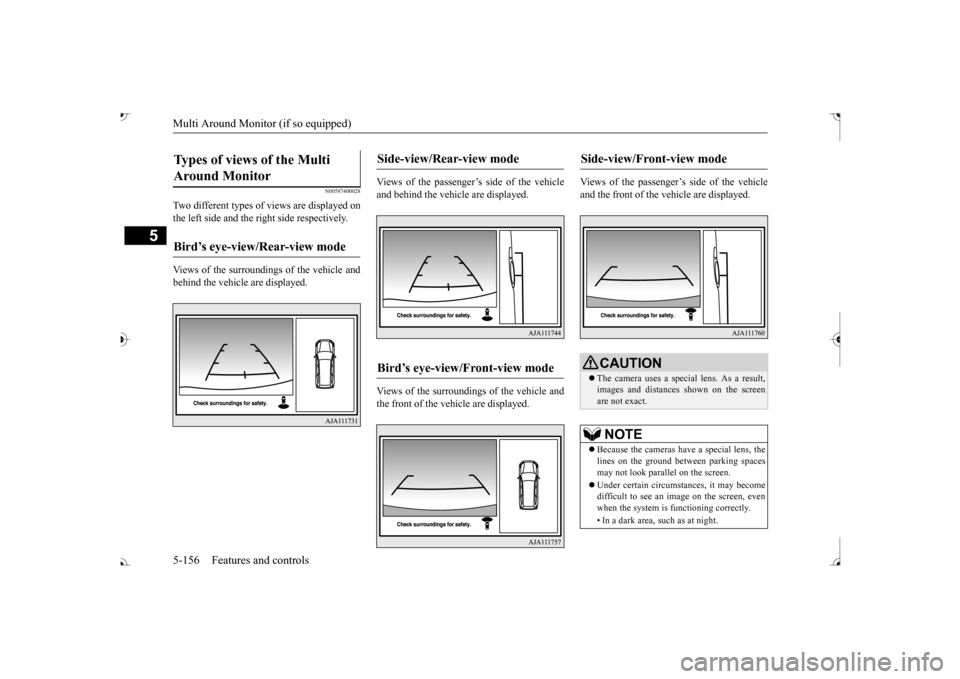
Two different types of views are displayed on the left side and the ri
ght side respectively.
Views of the surroundings of the vehicle and behind the vehicle are displayed.
Views of the passenger’s side of the vehicle and behind the vehicle are displayed. Views of the surroundings of the vehicle and the front of the vehicle are displayed.
Views of the passenger’s side of the vehicle and the front of the vehicle are displayed.
Types of views of the Multi Around Monitor
Bird’s eye-view/Rear-view mode
Side-view/Rear-view mode
Bird’s eye-view/Front-view mode
Side-view/Front-view mode
CAUTION The camera uses a special lens. As a result, images and distances shown on the screen are not exact.NOTE
Because the cameras have a special lens, the lines on the ground between parking spaces may not look parallel on the screen. Under certain circumst
ances, it may become
difficult to see an image on the screen, even when the system is functioning correctly. • In a dark area, such as at night.
BK0239700US.book 156 ページ 2016年6月16日 木曜日 午前10時58分
Page 255 of 521
Multi Information display - Type 1 5-174 Features and controls
5
When the display is reset, the time until the next periodic inspection
is displayed and the
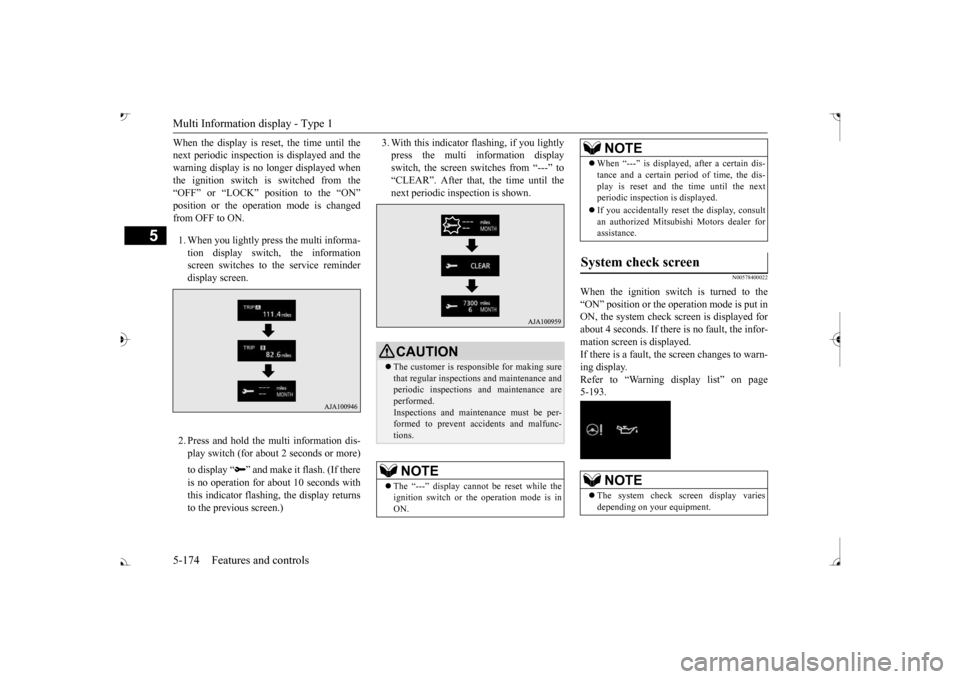
warning display is no longer displayed when the ignition switch is switched from the “OFF” or “LOCK” position to the “ON” from OFF to ON. 1. When you lightly press the multi informa- tion display switch, the informationscreen switches to the service reminder display screen. 2. Press and hold the multi information dis- play switch (for about 2 seconds or more) to display “ ” and make it flash. (If there is no operation for
about 10 seconds with
this indicator flashing, the display returns to the previous screen.)
3. With this indicator
flashing, if you lightly
press the multi information displayswitch, the screen switches from “---” to “CLEAR”. After that, the time until the next periodic inspection is shown.
N00578400022
When the ignition switch is turned to the “ON” position or the ope
ration mode is put in
ON, the system check sc
reen is displayed for
about 4 seconds. If there is no fault, the infor- mation screen is displayed. If there is a fault, the screen changes to warn-ing display. Refer to “Warning di
splay list” on page
5-193.
CAUTION The customer is responsible for making sure that regular inspections and maintenance and periodic inspections
and maintenance are
performed.Inspections and mainte
nance must be per-
formed to prevent accidents and malfunc- tions.NOTE
The “---” display cannot
be reset while the
ignition switch or the operation mode is inON.
When “---” is displayed, after a certain dis- tance and a certain pe
riod of time, the dis-
play is reset and th
e time until the next
periodic inspection is displayed. If you accidentally reset
the display, consult
an authorized Mitsubishi Motors dealer for assistance.
System check screen
NOTE
The system check screen display varies depending on your equipment.NOTE
BK0239700US.book 174 ページ 2016年6月16日 木曜日 午前10時58分
Page 256 of 521

Multi Information display - Type 1
Features and controls 5-175
5
N00575201026
Shows the approximate driving range (how many more miles or
kilometers you can
drive). When this driving range falls below30 miles (50 km),
“---” is displayed.
Refuel as soon as possible.
N00575301027
This displays the average fuel consumption from the last reset to the present.There are 2 types of mode settings of manual reset and automatic reset. Refer to “Changing the reset mode for aver-age fuel consumption and average speed” on page 5-178. For information on how to change the aver- age fuel consumption di
splay setting, refer to
“Changing the function settings” on page5-177.
N00578500023
This displays the average speed from the lastreset to the present.There are 2 types of mode setting of manual reset and automatic reset. Refer to “Changing the
reset mode for aver-
age fuel consumption
and average speed” on
page 5-178. For the method for changing the averagespeed display setting, refer to “Changing the function settings
” on page 5-177.
Driving range display
NOTE
The driving range is determined based on the fuel consumption da
ta. This may vary
depending on the drivi
ng conditions and hab-
its. Treat the distance displayed as just a rough guideline. When you refuel, the driving range display is updated. However, if you only add a small amount offuel, the correct value
will not be displayed.
Fill to a full tank whenever possible. When your vehicle is stopped on an extremely steep hill, the driving range value may, change. This is due to the movement offuel in the tank and does not indicate any breakdown. The display setting ca
n be changed to the
preferred units (miles or km). Refer to “Changing the
function settings” on
page 5-177.
Average fuel consumption dis- play
NOTE
The average fuel cons
umption display can be
reset separately in both auto reset mode and manual reset mode. “---” is displayed when the average fuel con- sumption cannot be measured. The initial (default) setting is “Auto reset mode”. Average fuel consumption may vary depend- ing on the driving conditions (road condi- tions, how you drive, etc.) The actual fuelconsumption may differ from the fuel con- sumption displayed, so
treat the fuel con-
sumption displayed as
just a rough guideline.
Disconnecting the batter
y cable wi
ll erase
from memory the manual reset mode or autoreset mode setting for the average fuel con-sumption display. The display setting ca
n be changed to the
preferred units {mpg (US), mpg (UK), L/100km or km/L}. Refer to “Changing the function settings” onpage 5-177.
Average speed display
NOTE
The average speed display can be reset sepa- rately in both auto reset mode and manual reset mode. “---” is displayed when the average speed cannot be measured. The initial (default) setting is “Auto reset mode”.NOTE
BK0239700US.book 175 ページ 2016年6月16日 木曜日 午前10時58分
Page 266 of 521
Multi Information display - Type 2
Features and controls 5-185
5
N00574901039
The odometer indicates the total distance the vehicle has traveled.
N00575001037
The trip odometer indicates the distance trav-eled between two points. To return the display to 0, hold down the multi information display switch for about 2 seconds or more. Only the currently dis- played value wi
ll be reset.
Example If trip odometer is displayed, only tripodometer will be reset.
Both trip odometers and can count up to 9999.9 m
iles/kilometers.
When a trip odometer goes past 9999.9miles/kilometers, it returns to 0.0 miles/ kilometers. When disconnecting th
e battery terminal,
the memories of trip odometer displays
and are cleared, and their displays
return to “0.0 miles/kilometers”.
N00578900030
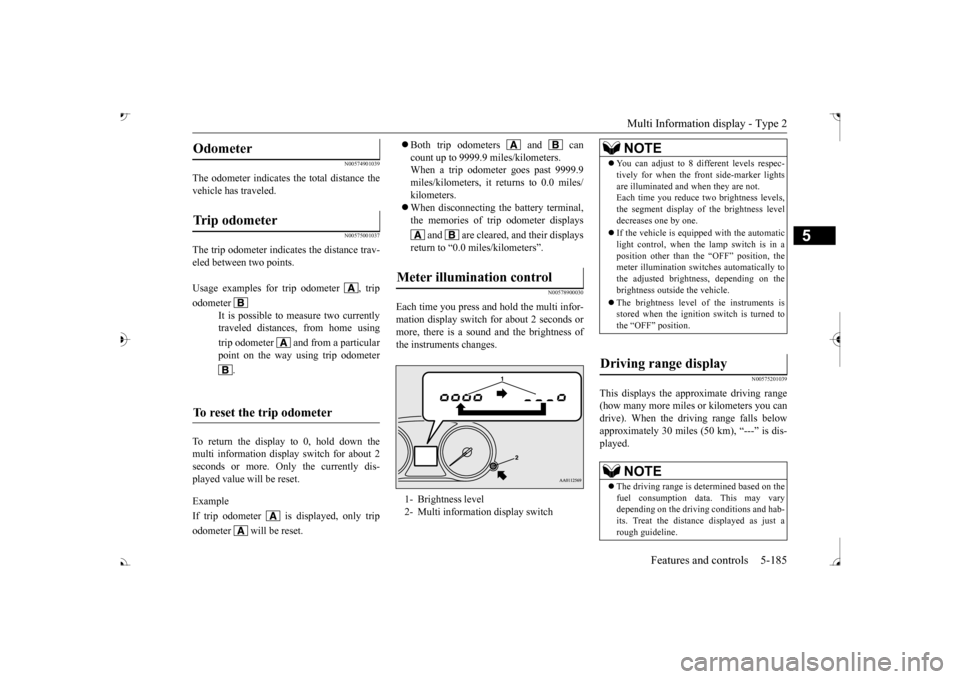
Each time you press a
nd hold the multi infor-
mation display switch for about 2 seconds ormore, there is a sound and the brightness of the instruments changes.
N00575201039
This displays the approximate driving range (how many more miles or
kilometers you can
drive). When the driving range falls below approximately 30 miles (
50 km), “---” is dis-
played.
Odometer Trip odometer Usage examples for trip odometer , trip odometer
It is possible to
measure two currently
traveled distances, from home using trip odometer and from a particular point on the way using trip odometer
.
To reset the trip odometer
Meter illumination control 1- Brightness level 2- Multi information display switch
NOTE
You can adjust to 8 di
fferent levels respec-
tively for when the front side-marker lightsare illuminated and when they are not.Each time you reduce tw
o brightness levels,
the segment display of
the brightness level
decreases one by one. If the vehicle is equi
pped with the automatic
light control, when the lamp switch is in aposition other than the
“OFF” position, the
meter illumination switches automatically to the adjusted bright
ness, depending on the
brightness outsi
de the vehicle.
The brightness level of the instruments is stored when the ignition switch is turned to the “OFF” position.
Driving range display
NOTE
The driving range is determined based on the fuel consumption data. This may vary depending on the drivi
ng conditions and hab-
its. Treat the distance displayed as just arough guideline.
BK0239700US.book 185 ページ 2016年6月16日 木曜日 午前10時58分
Page 269 of 521
Multi Information display - Type 2 5-188 Features and controls
5
1. Shows the time until the next periodic inspection. 2. This informs you that a periodic inspec- tion is due. Contact
an authorized Mit-
subishi Motors dealer or a repair facilityof your choice to have the system checked. 3. After your vehicle is inspected at anauthorized Mitsubishi Motors dealer, it displays the time until the next periodic inspection.
The “---” display can be reset while the igni- tion switch is in the “OFF” position.
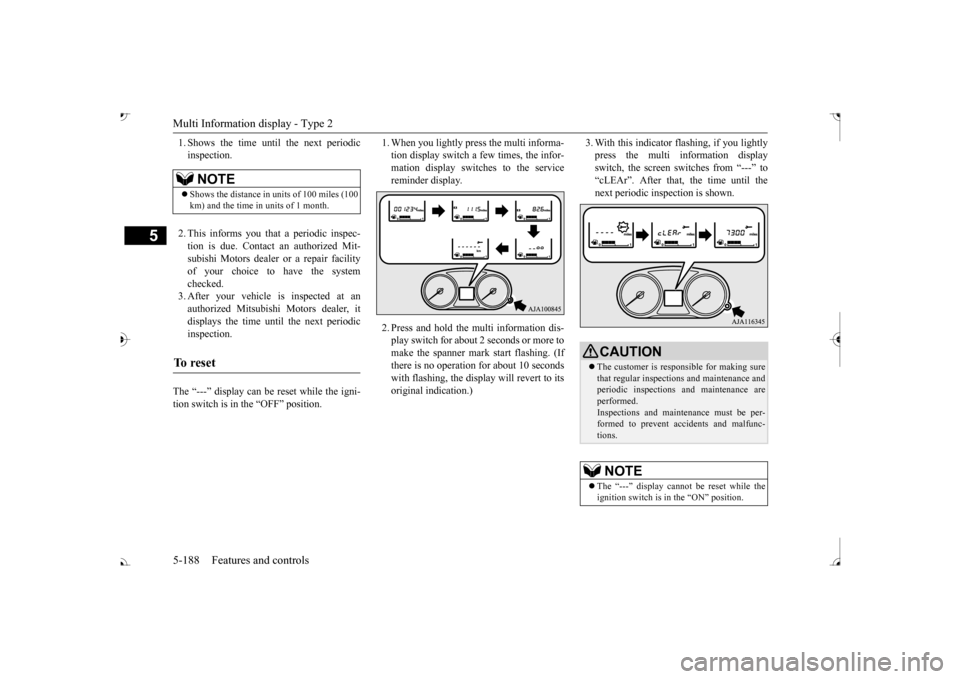
1. When you lightly press the multi informa- tion display switch a few times, the infor-mation display switches to the service reminder display. 2. Press and hold the mu
lti information dis-
play switch for about 2 seconds or more tomake the spanner mark start flashing. (If there is no operation for about 10 seconds with flashing, the display will revert to itsoriginal indication.)
3. With this indicator flashing, if you lightly press the multi information displayswitch, the screen sw
itches from “---” to
“cLEAr”. After that, the time until the next periodic inspection is shown.
NOTE
Shows the distance in units of 100 miles (100 km) and the time in units of 1 month.
To r e s e t
CAUTION The customer is responsible for making sure that regular inspections
and maintenance and
periodic inspections
and maintenance are
performed.Inspections and mainte
nance must be per-
formed to prevent accidents and malfunc- tions.NOTE
The “---” display cannot
be reset while the
ignition switch is in the “ON” position.
BK0239700US.book 188 ページ 2016年6月16日 木曜日 午前10時58分
Page 327 of 521

Bluetooth® 2.0 interface 5-246 Features and controls
5
1. Stop your vehicle in a safe area, put the selector lever in the “P” (PARK) positionand apply the parking brake. 2. Press the SPEECH button (except for vehicles with Mitsubishi Multi-Commu-nication System) or
PICK-UP button (for
vehicles with Mitsubishi Multi-Commu- nication System).3. Say “Voice training.”
say “This operation
must be performed in
a quiet environment
while the vehicle is stopped. See the owner’s manual for th
e list of required
training phrases. Press and release theSPEECH button when you are ready to begin. Press the HANG-UP button to can- cel at any time.” speaker enrollment process.
5. The voice guide will prompt for phrase 1. Repeat the correspondi
ng phrase listed in
table “Enrollment commands” on page 5-263.The system will register your voice and then move on to the registration of the next command. Continue the process untilall phrases have been registered. 6. When all enrollment commands have been read out, the voice guide will say “Speaker enrollment is complete.” Thesystem will then end the speaker enroll- ment process and return to the main menu.
N00564901078
You can turn a voice model registered with the speaker enrollment function on and off whenever you want.You can also retrain the system. Use the following procedure to perform these actions. 1. Press the SPEECH button (except for vehicles with Mitsubishi Multi-Commu- nication System) or
PICK-UP button (for
vehicles with Mitsubishi Multi-Commu-nication System). 2. Say “Voice training.”ment process once already, the voice guide will say eith
er “Enrollment is
enabled. Would you like to disable orretrain?” or “Enrol
lment is disabled.
Would you like to enable or retrain?”
NOTE
Speaker enrollment is not possible unless the vehicle is parked. Make sure you park the vehicle in a safe area before attempting speaker enrollment.
NOTE
If you do not start the speaker enrollment process within 3 minut
es after pressing the
SPEECH button, the speaker enrollmentfunction will time out. The voice guide will say “Speaker enroll- ment has timed out.” The system will thenbeep and the voice reco
gnition mode will be
deactivated. NOTE
To repeat the most re
cent voice training com-
mand, press and release the SPEECH button. If you press the HANG-UP button anytime during the process, the
system will beep and
stop the speaker enrollment process.
NOTE
Completing the speaker enrollment process will turn on the voice model automatically. The commands “Help”
and “Cancel” will not
work in this mode.
Enabling and disabling the voice model and retraining
BK0239700US.book 246 ページ 2016年6月16日 木曜日 午前10時58分
Page 331 of 521

Bluetooth® 2.0 interface 5-250 Features and controls
5
7. The voice guide will say “Pairing Com- plete. Would you like to import the con-tacts from your mobi
le device now?”
say “Please wait while the contacts areimported. This may ta
ke several minutes.”
Answer “No” to end the pairing process.
If your device requires a specific pairing code, you need to set the pairing code. Follow the procedures below. 1. Press the SPEECH button (except for vehicles with Mitsubishi Multi-Commu- nication System) or
PICK-UP button (for
vehicles with Mitsubishi Multi-Commu-nication System). 2. Say “Setup.” 3. Say “Pairing Options.”4. Say “Set Code.” 5. The voice guide will say “Do you want the pairing code to be random or fixed?” digit pairing code.”
Say a 4-digit number.
7. The voice guide will
say “Pairing code set
to
Step 6.8. The voice guide will say “Do you want to pair a device now?” Answer “Yes,” the system will proc
eed to Step 3 in the pair-
ing process. Refer to
the “Pairing proce-
dure- Type 2.”
N00565101080
If multiple paired Bluetooth
® devices are
available in the vehicle, the cellular phone ormusic player most recent
ly connected is auto-
matically connected
to the Bluetooth
® 2.0
interface.You can connect to the
other paired cellular
phone or music player by following setting change procedures.
N00582200034
1. Press the SPEECH button (except for vehicles with Mitsubishi Multi-Commu- nication System) or PICK-UP button (forvehicles with Mitsubishi Multi-Commu- nication System). 2. Say “Setup.”3. Say “Select phone.”
4. After the voice guide says “Please say,”device tags of
corresponding cellular
phones will be read out in order, starting with the cellular phone that has been mostrecently connected. Say the number of the cellular phone that you want to connect to.When the confirmation function is on, the system will ask you again whether the phone that you want to connect to is cor- rect. Answer “Yes” to
continue and con-
nect to the cellular phone.Answer “No,” and the voice guide will say “Please say.” Say the number of the phone that you want to connect to. 5. The selected phone w
ill be connected to
the Bluetooth
® 2.0 interface. The voice
guide will say “
main menu.
If your device requires
a specific pairing
code
Selecting a device
To select a cellular phone
NOTE
You can connect to a phone at any time by pressing the SPEECH button and saying thenumber, even before all of the paired num- bers and device tags of corresponding cellu- lar phones are read out by the system.
BK0239700US.book 250 ページ 2016年6月16日 木曜日 午前10時58分