2017 MITSUBISHI OUTLANDER audio
[x] Cancel search: audioPage 336 of 521

Bluetooth® 2.0 interface
Features and controls 5-255
5
You can redial the last
number called, based
on the history of dialed calls in the paired cel-lular phone. Use the following procedure to redial. 1. Press the SPEECH button (except for vehicles with Mitsubishi Multi-Commu- nication System) or PICK-UP button (forvehicles with Mitsubishi Multi-Commu- nication System). 2. Say “Redial.”
N00565700018
During a call, press the SPEECH button toenter voice recognitio
n mode, then say
“
a call you need to sim-
ulate the pressing of a phone button as a
response to an automated system, press the SPEECH button and speak “1 2 3 4 poundsend” and the 1234# will be sent via your cel- lular phone.
N00565801045
If an incoming phone call is received whilethe ignition switch or
the operation mode is in
ON or ACC, the audio sy
stem will be auto-
matically turned on and switched to the incoming call, even when the audio systemwas originally off. The voice guide a
nnouncement for the
incoming call will be output from the frontpassenger’s seat speaker. If the CD player or radio was playing when the incoming call was received, the audio sys-tem will mute the sound from the CD player or radio and output onl
y the incoming call.
To receive the call, press the PICK-UP buttonon the steering wheel control switch. When the call is over, the audio system will return to its previous state.
N00565900010
At any time during a ca
ll, you can mute the
vehicle microphone.
Pressing the SPEECH button and then saying “Mute” during a call will turn ON the mutefunction and mute the microphone. Saying “Mute off” in the same way will turn off the mute function and cancel the mute onthe microphone.
N00566600014
The Bluetooth
® 2.0 interface can switch
between hands-free m
ode (hands-free calls)
and private mode (calls
using cellular phone).
If you press the SPEECH button and say“Transfer call” duri
ng a hands-free call, you
can stop the hands-free m
ode and talk in pri-
vate mode. To return to hands-free mode, press the SPEECH button again and say “Transfer call.”The Bluetooth
® 2.0 interface has 2 types of
unique phonebooks that are different from thephonebook stored in the cellular phone. They are the vehicle phonebook and the mobile phonebook.
NOTE
When the confirmation function is on, the system will check if
the name and location of
the receiver are correct. If the name is cor-rect, answer “Yes.”
or location to call,
answer “No.” The system will return to Step3.
RedialingSend function
Receiving calls Mute function
Switching between hands-free mode and private mode Phonebook function
BK0239700US.book 255 ページ 2016年6月16日 木曜日 午前10時58分
Page 344 of 521
USB input terminal
Features and controls 5-263
5
off and on, the user is encouraged to try to correct the interference by
one or more of the
following measures: Reorient or relocate
the receiving antenna.
Increase the sepa
ration between the
equipment and receiver. Connect the equipment into an outlet on a circuit different from that to which the receiver is connected. Consult the dealer or an experienced radio/TV technician for help.
ICES Notice: This Class B digital apparatus complies with Canadian ICES-003.
N00566401136
N00566701142
You can connect your USB memory device or iPod
* to play music files stored in the USB
memory device or iPod.This section explains how to connect and remove a USB memory device or iPod. See the following sect
ion for details on how
to play music files. Refer to “Listen to an iPod” on page 7-32. Refer to “Listen to Audio Files on a USBDevice” on page 7-34. Refer to “To play iPod/USB memory device tracks via voice ope
ration” on page 7-37.
* : “iPod” is a registered trademark of Apple Inc. in the United Stat
es and other countries.
N00566801156
1. Park your vehicle in a safe place and turn the ignition switch to the “LOCK” posi-tion or put the operation mode in OFF.
Enrollment commands
USB input terminal How to connect a USB memory device
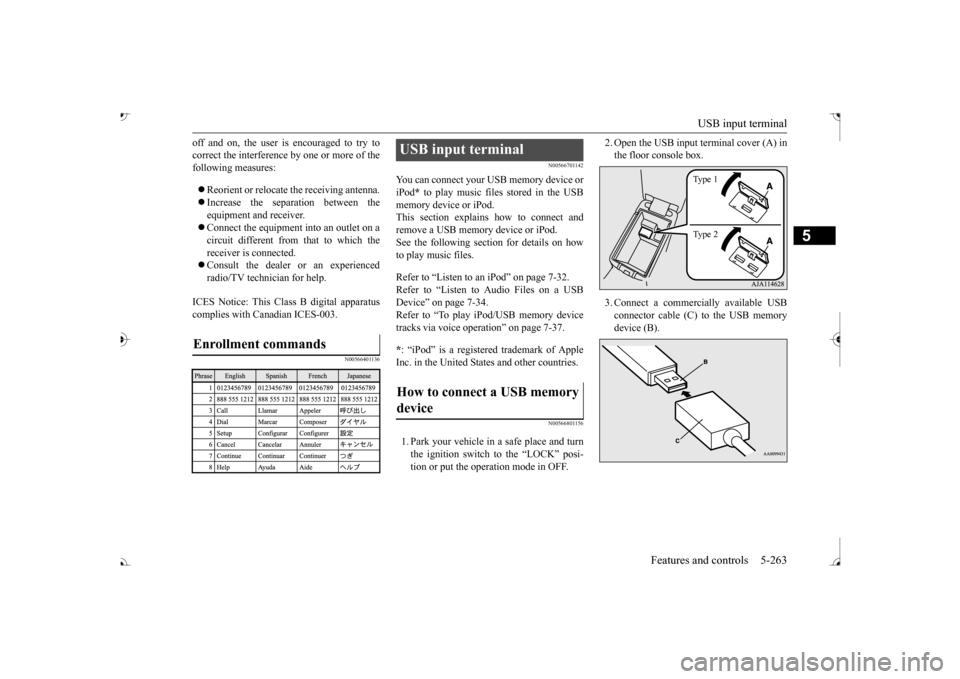
2. Open the USB input
terminal cover (A) in
the floor console box. 3. Connect a commercia
lly available USB
connector cable (C) to the USB memory device (B).
Ty p e 1 Ty p e 2
BK0239700US.book 263 ページ 2016年6月16日 木曜日 午前10時58分
Page 346 of 521
USB input terminal
Features and controls 5-265
5
N00567001083 N00567101130
Devices of the following types can be con- nected. For these connectable
device types, “iPod*,”
“iPod classic*,”
“iPod nano*,” “iPod touch*”
site: [For vehicles sold in U.S.A.] You can access the Mitsubishi Motors NorthAmerica website. [For vehicles sold in
Canada and Mexico]
You can access the Mitsubishi Motors web-site. Please read and agree to the “Warning about Links to the Web Sites of Other Com-
panies”. The websites
mentioned above may
connect you to websites
other than the Mit-
subishi Motors website. http://www.mitsubishi-
motors.com/en/prod-
ucts/index.html * : “iPod,” “iPod classic,” “iPod nano,” “iPod touch,” and “iPhone” marks of Apple Inc. in the United States and other countries.
N00567201056
You can play music files of the followingspecifications that are saved in a USB mem- ory device or other
device supporting mass
storage class. When
you connect your iPod,
playable file specif
ications depend on the
connected iPod.
Types of connectable devices and supported file specifica-tions Device types Model name
Condition
USB memory device
Storage capac- ity of 256 Mbytes or more
Models other than USB memory devices and iPods
Digital audio player support- ing mass stor-age class
NOTE
Depending on the type of the USB memory device or other devi
ce connected, the con-
nected device may not
function properly or
the available functi
ons may be limited.
It is recommended to use an iPod with firm- ware updated to th
e latest version.
You can charge your
iPod by connecting it to
the USB input terminal
when the ignition
switch or the operation mode is in ON or ACC. Do not keep your US
B memory device or
iPod in your vehicle. It is recommended that you back up the files in case of
data damage.
Do not connect to the USB input terminal any device (hard disk
, card reader, memory
reader, etc.) other
than the connectable
devices specified in the previous section. The device and/or data
may be damaged. If
any of these devices
was connected by mis-
take, remove it after turning the ignition switch to the “LOCK” position or putting the operation mode in OFF.
File specifications Item
Condition
File format
MP3, WMA, AAC, WAV
Maximum number of levels (including the root)
Level 8
Number of folders 700 Number of files 65,535
NOTE
BK0239700US.book 265 ページ 2016年6月16日 木曜日 午前10時58分
Page 384 of 521
7
Comfort controlsVents ................................................................................................7-2 Dual-zone automatic climate control air conditioner ......................7-5 Important air conditioning operating tips ..
...........
...........
.........
.....7-13
Air purifier .....................................................................................7-14 AM/FM radio/CD player (if so equipped) .....................................7-14 Handling of Discs ..........................................................................7-18Audio Files (MP3/WMA/AAC) ....................................................7-19 Important Points on Safety for the Customer ................................7-23 Operation Keys ..............................................................................7-24Listen to Radio ...............................................................................7-26 Listen to Satellite Radio (if so equipped) .......................................7-28 Listen to CDs .................................................................................7-30Listen to MP3s ...............................................................................7-31 Listen to an iPod ............................................................................7-32 Listen to Audio Files on a USB Device .........................................7-34To play iPod/USB memory device tr
acks via voice ope
ration ......7-37
Listen to Bluetooth Audio .............................................................7-40 Display Indicator ...........................................................................7-42Audio Quality and Volume Balance Adjustment ...........................7-44 System Settings ..............................................................................7-44 Troubleshooting ..........
...........
...........
...........
...........
.........
.........
.....7-47
Clock (if so equipped) ....................................................................7-49 General information about your radio .....
...........
...........
...........
.....7-50
BK0239700US.book 1 ページ 2016年6月16日 木曜日 午前10時58分
Page 397 of 521

Air purifier 7-14 Comfort controls
7
The air conditioner shoul
d be operated for at
least five minutes each week, even in cold weather. This includes the quick defrostingmode. Operating the
air condition system
weekly maintains lubrication of the compres- sor internal parts to keep the air conditionerin the best operating condition.
N00733801190
The air conditioning system is equipped withan air filter to re
move pollen
and dust.
The air filter’s ability to collect pollen and dirt is reduced as it be
comes dirty, so replace
it periodically. For the
maintenance interval,
refer to the “WARRANTY AND MAINTE- NANCE MANUAL”.
N00734302102
The audio system can only be used when theignition switch or th
e operation mode is in
ON or ACC.
CAUTION The air conditioning system in your vehicle must be charged with the refrigerant HFC-134a and the lubricant SUN-PAG56.Use of any other refrige
rant or lubricant will
cause severe da
mage and may re
quire replac-
ing your vehicle’s entire air conditioningsystem. The release of refrigerant into the atmo- sphere is not recommended.The new refrigerant HFC-134a in your vehi- cle is designed not to harm the earth’s ozone layer. However, it ma
y contribute slightly to
global warming. It is recommended that
the old refrigerant be
saved and recycled for future use.
During a long period of disuse Air purifier
NOTE
Operation in certain conditions such as driv- ing on a dusty road and frequent use of the air conditioner can lead
to reduction of ser-
vice life of the filter. When you feel that theair flow is lower than normal or when the windshield or windows st
art to fog up easily,
replace the air filter.Contact your Mitsubishi
Motors dealer or a
repair facility of your
choice for assistance.
AM/FM radio/CD player
(if
so equipped)
NOTE
To listen to the audio system while the engine is not running, turn the ignitionswitch to the “ACC” ation mode in ACC. If the ignition switch
or the operation mode
is left in ACC, the accessory power willautomatically turn off after a certain period of time and you will no
longer be able to use
the audio system. The accessory powercomes on again if the ignition switch or the engine switch is opera
ted with it in the
“ACC” position. Refer to “ACC power auto-cutout function” on page 5-20 and 5-64. If a cellular phone is used inside the vehicle, it may create noise in
the audio equipment.
This does not mean that anything is wrong with your audio equipment. In such a case,use the cellular phone at a place as far away as possible from the audio equipment. If foreign objects or wa
ter get into the audio
equipment, or if smoke or a strange odor comes from it, immediately turn off theaudio system and have it checked at an authorized Mitsubishi Motors dealer or a repair facility of your
choice. Never try to
repair it yourself. Avoid using the audio sys- tem until it is insp
ected by a qualified per-
son. If the audio system is damaged by foreign objects, water, or fi
re, have the system
checked by a qualified Mitsubishi Motors technician.
BK0239700US.book 14 ページ 2016年6月16日 木曜日 午前10時58分
Page 398 of 521
AM/FM radio/CD player (if so equipped)
Comfort controls 7-15
7
N00715000021
This product supports audio playback from iPod/iPhone devi
ces, however dif-
fering versions mean
that playback cannot
be guaranteed. Please be aware that depending on the iPod/iPhone model or
version, operation
may differ.
N00715200023
If the product becomes dirty, wipe with a soft cloth. If very dirty, use a
soft cloth dipped in
neutral detergent diluted in water, andthen wrung out. Do not use benzene, thin- ners, or other chemic
al wipes. This may
harm the surface.
N00715300112
Product names and other proper names are the trademarks or registered trade-marks of their respective owners.
Furthermore, even if there is no specific denotation of trademarks or registeredtrademarks, these are to be observed in their entirety. “Made for iPod”, “Made for iPhone” mean that an electronic accessory hasbeen designed to connect specifically to iPod or iPhone, respec
tively, and has been
certified by the devel
oper to meet Apple
performance standards. iPhone, iPod, iPod clas
sic, iPod nano, and
iPod touch are trademarks of Apple Inc.,registered in the U.S. and other countries. Apple is not responsib
le for the operation
of this device or its compliance withsafety and regulatory standards.
Important Points on Usage
iPod/iPhone Playback Function
(if
so equipped)How to Clean
Trademarks
NOTE
iPod and iTunes licensi
ng allows individual
users to privately reproduce and play back non- copyrighted
material as we
ll as material
that may be legally
copied and reproduced.
Infringement of copyright is prohibited.
The types of devices
that can be connected
may vary.[For vehicles sold in U.S.A.]For details, access the Mitsubishi Motors North America website. [For vehicles sold in Canada and Mexico]For details, access the Mitsubishi Motors website. Please read and agree to the “Warn- ing about Links to th
e Web Sites of Other
Companies”. The webs
ites mentioned above
may connect you to websites other than the Mitsubishi Motors website.http://www.mitsubishi-motors.com/en/prod- ucts/index.htmlNOTE
BK0239700US.book 15 ページ 2016年6月16日 木曜日 午前10時58分
Page 402 of 521

Audio Files (MP3/WMA/AAC)
Comfort controls 7-19
7
3 inches (8 cm) discs may not be used. Do not insert irregularly-shaped discs (for example, heart-shaped), as these may result in malfunction.
Additionally, discs
that have transparent portions may not beplayed back. Discs that have not
been finalized cannot
be played back. Even if recorded using the correct format on a recorder or computer, application software settings a
nd environments; disc
peculiarities, damage,
or marking; or dirt
or condensation on the lens inside theproduct may render th
e disc unplayable.
Depending on the disc, some functions may not be used, or the disc may not playback. Do not use discs with cracks or warps. If the disc has sticke
rs affixed, remains
from removed stickers
, or affixed adhe-
sive, then do not use the disc. Discs that have decora
tive labels or stick-
ers may not be used.
This product will play
back audio CDs, how-
ever please be aware of the following points regarding CD standards. Ensure that you use discs with on the label surface.
Playback of other than standard CDs is not guaranteed. Even
if the audio can be
played back, the audio quality cannot be guaranteed. When playing back other than standard CDs, the following may occur. • There may be noise during playback. • There may be jumping in the audio.• The disc may not be recognized. • The first track may not be played back. • It may take longer than usual until start of playback of tracks. • Playback may start from within thetrack. • Some parts may not be played back. • Tracks may freeze
during playback.
• Tracks may be displayed erroneously.
N00715600027
This product can play back MP3/WMA/AACformat audio files recorded on CD-ROM, CD-R/RW, and USB devices. There are limitations on the files and media that can be used, therefore read the followingprior to recording MP3/WMA/AAC format audio files on discs or USB devices.
Additionally, ensure y
ou read the user manu-
als for your CD-R/RW drive and the writingsoftware, and ensure these are used correctly. If the MP3/WMA/AAC
format audio files
includes title informati
on or other data, then
this can be displayed.
Nonstandard CDs
Audio Files (MP3/WMA/AAC)
CAUTION CD-ROM and CD-R/R
W media can only
play back MP3 format audio files. Actions such as copyi
ng audio CDs or files
and either distributing th
ese to others for free
or for charge, or uploading files via the Inter- net or other means to se
rvers is an infringe-
ment of the law. Do not append the file extensions “.mp3”,MP3/WMA/AAC format
files. Playing back
discs with these types of files recorded upon them may cause the files to be incorrectlyidentified for playba
ck, which may lead to
loud noise, resulting in
speaker damage or
accident.NOTE
Depending on the condition of the disc recorder or recording software used, correctplayback may not be pos
sible. In these cases,
refer to the user manual for your product or software.
BK0239700US.book 19 ページ 2016年6月16日 木曜日 午前10時58分
Page 403 of 521
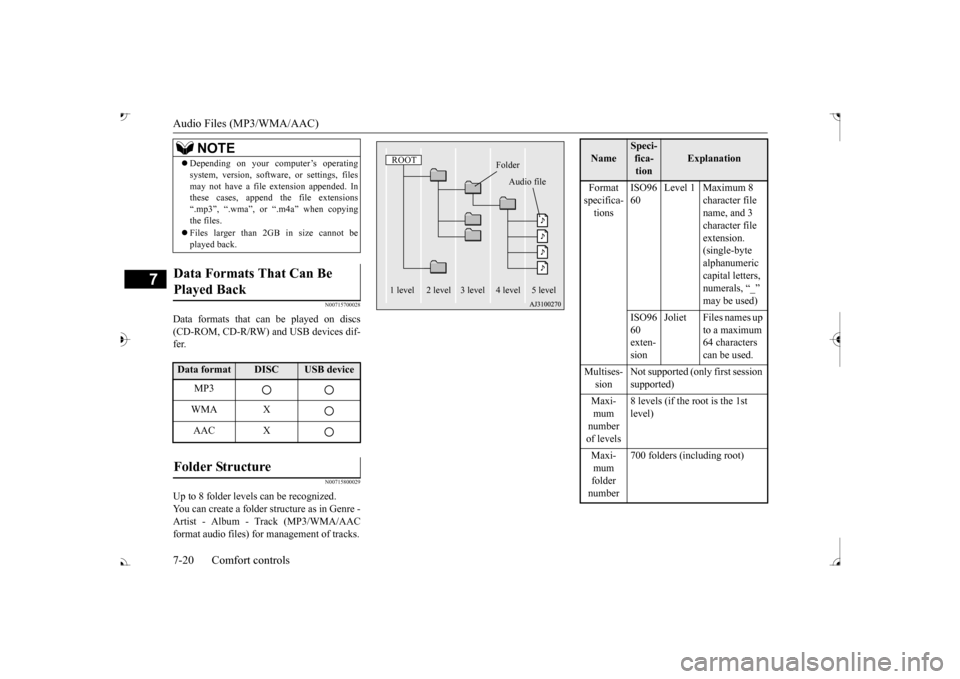
Audio Files (MP3/WMA/AAC) 7-20 Comfort controls
7
N00715700028
Data formats that can
be played on discs
(CD-ROM, CD-R/RW) and USB devices dif- fer.
N00715800029
Up to 8 folder levels can be recognized. You can create a folder structure as in Genre - Artist - Album - Track (MP3/WMA/AACformat audio files) for
management of tracks.
Depending on your computer’s operating system, version, softwa
re, or settings, files
may not have a file
extension appended. In
these cases, append
the file extensions
“.mp3”, “.wma”, or “.m4a” when copying the files. Files larger than 2GB in size cannot be played back.
Data Formats That Can Be Played Back Data format
DISC
USB device
MP3 WMA XAAC X
Folder Structure
NOTE
ROOT
Folder
Audio file
1 level 2 level 3 level 4 level 5 level
Name
Speci- fica- tion
Explanation
Format specifica- tions
ISO96 60
Level 1 Maximum 8
character file name, and 3 character file extension. (single-byte alphanumeric capital letters, numerals, “_”
ISO96 60 exten- sion
Joliet Files names up
to a maximum 64 characters can be used.
Multises- sion
Not supported (only first session supported)
mum number of levels
8 levels (if the root is the 1st level)
mum folder number
700 folders (including root)
BK0239700US.book 20 ページ 2016年6月16日 木曜日 午前10時58分