2017 MERCEDES-BENZ SPRINTER lights
[x] Cancel search: lightsPage 57 of 286

In an emergency braking situation, depress
the brake pedal with full force. ABS prevents
the wheels from locking.
Vehicles without steering wheel buttons: if the
BAS driving safety system is malfunctioning,
the : warning lamp lights up while the
engine is running (
Ypage 191).
BAS operates in emergency braking situations.
If you depress the brake quickly, BAS automat-
ically increases the brake pressure, thereby
reducing the stopping distance.
The brakes will function as usual once you
release the brake pedal. BAS is deactivated.
EBD (electronic brake force distribu-
tion)
GWARNING
If EBD is malfunctioning, the rear wheels can
lock, e.g. under full braking. This increases the
risk of skidding and an accident.
You should therefore adapt your driving style
to the different handling characteristics. Have
the brake system checked at a qualified spe-
cialist workshop.
EBD monitors and controls the brake pressure
to the rear wheels. This enables EBD to improve
handling during braking.
Observe the information on warning and indica-
tor lamps (
Ypage 191).
ESP®(Electronic Stability Program)
Important safety notes
GWARNING
If ESP
®is malfunctioning it will not provide
any vehicle stabilization. There is an increased
risk of skidding or of an accident.
Exercise caution when continuing to drive.
Have ESP
®checked at a qualified specialist
workshop.
!Do not run the vehicle on a roller dynamom-
eter (e.g. for performance tests). If you must
operate the vehicle on a roller dynamometer, please consult a qualified specialist workshop
in advance. You could otherwise damage the
drive train or the brake system.
If you activate or deactivate the all-wheel drive
in a vehicle with this option, ESP
®will be deac-
tivated for the duration of the activation/deac-
tivation process.
If ESP
®is malfunctioning, the hindicator
lamp lights up while the engine is running and
the engine power may be reduced
(
Ypage 190).
iOnly use wheels with the recommended tire
sizes. Only then will ESP®function properly.
4ETS (Electronic Traction System)
!A function or performance test should only
be carried out on a two-axle dynamometer.
Before you operate the vehicle on such a
dynamometer, please consult a qualified
workshop. You could otherwise damage the
drive train or the brake system.
4ETS is only active when all-wheel drive is acti-
vated (
Ypage 145).
4ETS ensures permanent drive for all four
wheels, and together with ESP
®it improves the
vehicle's traction.
If a driven wheel spins due to lack of traction:
RWhen pulling away, make use of the traction
control integrated in ESP®. Depress the
accelerator pedal as far as necessary.
RWhile driving, slowly take your foot off the
accelerator pedal.
In wintry driving conditions, always use winter
tires (M+S tires) and if necessary, snow chains
(
Ypage 246). This is the only way to get the full
benefit from the all-wheel drive system.
Crosswind Assist
Crosswind Assist does not work if ESP®is deac-
tivated or disabled because of a malfunction.
Crosswind Assist does not react:
Rin the event of severe jolts and vibrations, e.g.
as a result of uneven surfaces or potholes.
Rif the vehicle loses traction, e.g. on snow or
ice or when hydroplaning.
Rto large and sudden steering movements by
the driver.
Driving safety systems55
Safety
Z
Page 60 of 286

XRemove theke yfrom th eignition lock.
XPress butto n:.
When th ebutto nis released, indicator
lamp ;in th ebutto nlights up for about
5 seconds.
XLoc kth evehicle.
The tow-away alarm is disarmed .
The tow-away alarm remain sdisarmed until you
loc kth evehicl eagain .
Disar mthetow-away alarm when lockin gyour
vehicl eand :
Rloadin gand/o rtransporting th evehicle, on a
ferry or car transporter, for exampl e
Rparking onamoving surface, as split-level
garage
This will preven tfals ealarms.
Interior motion sensor
Operation
If th earmed interior motion sensor detects
motion in th evehicl einterior, avisual and acous-
ti c alarm is triggered .This can happe nif some-
on ereaches int oth evehicl einterior, for exam-
ple.
Switching on
XClose th eside windows .
XMakesur ethat nothing (suc has mascots or
coat hangers) are hangin gon th erear-view
mirror or on th egrab handles on th ehead-
liner.
This will preven tfals ealarms.
XLoc kth evehicle.
The interior motion sensor is armed after
approximately 40 seconds.
Switching off
XUnloc kvehicle.
The interior motion sensor automatically
switches off .
Deactivating
XRemove theke yfrom th eignition lock.
XPress butto n:.
When th ebutto nis released, indicator
lamp ;of th ebutto nlights up for about
5 seconds.
XLoc kth evehicle.
The interior motion sensor is deactivated.
The interior motion sensor remain sdeactivated
until you loc kth evehicl eagain .
Deactivat eth einterior motion sensor when
lockin gyour vehicle:
Rwit hpeople or animals remaining inside
Rwit hth eside windows remaining open
Rwhen transporting it on aferry or car trans -
porter, for exampl e
This will preven tfals ealarms.
58Theft deterrent locking system
Safety
Page 63 of 286

XTo unlock the driver's or rear door:press
the key release button on the remote control.
The key folds out.
XInsert the key fully into the door lock and turn it to position 2.
The door is unlocked.
XTo lock the vehicle: lock all doors except the
driver's door and, if necessary the rear door,
from inside. To do this, press down the door
locking buttons.
XPress the key release button on the remote
control.
The key folds out.
XInsert the key fully into the driver's door lock
and turn it to position 1.
The driver's door is locked.
Remote control battery
Important safety notes
GWARNING
Batteries contain toxic and corrosive substan- ces. If batteries are swallowed, it can result in
severe health problems. There is a risk of fatalinjury.
Keep batteries out of the reach of children. If
a battery is swallowed, seek medical attention immediately.
HEnvironmental note
Batteries contain dangerous
substances. It is against the
law to dispose of them with
the household rubbish. They
must be collected separatelyand recycled to protect the
environment.
Dispose of batteries in an
environmentally friendly
manner. Take discharged
batteries to a qualified spe-
cialist workshop or a special
collection point for used bat-
teries.
The key batteries contain perchlorate material,
which may require special handling and regard for the environment. Check with your local gov-
ernment’s disposal guidelines. California resi-
dents, see
www.dtsc.ca.gov/
HazardousWaste/Perchlorate/index.cfm .
We recommend that you have batteries
changed at a qualified specialist workshop.
Checking the batteries
XPress the %or& button for longer than
two seconds.
If battery indicator lamp (
Ypage 59 )lights up
briefly, the batteries in the remote control still
have sufficient charge. Otherwise, change the
batteries immediately.
iIf the remote control is checked within the
signal reception range of the vehicle, pressing
the & or% button:
Rlock or
Runlock the vehicle
Changing batteries
You need a CR 2025 2 3 V cell battery, which can
be obtained from any qualified specialist work-
shop.
When changing the batteries, do not press any
of the buttons on the remote control.
XPress release button ;.
The key folds out.
XRemove battery compartment cover :in the
direction of the arrow.
Key61
Opening and closing
Z
Page 66 of 286
XTo lock/unlock the entire vehicle:press
the upper Ãcentral locking button when
the doors are closed.
When the entire vehicle is locked, the indica- tor lamp in the Ãcentral locking button
lights up.
iIf the SmartKey has been removed or is in
position 0in the ignition lock, the indicator
lamp in the Ãcentral locking button
remains lit for 5 seconds.
XTo lock/unlock the sliding doors and rear
doors: press the lower section of the Ä
central locking button when the doors are
closed.
When the sliding doors and rear doors are
locked, the indicator lamp in the upper Ã
central locking button lights up.
Automatic locking
General notes
The vehicle locks automatically as standard
once a speed of 9 mph (15 km/h) has been
reached. Depending on the vehicle's equip-
ment, the doors may be locked automatically
once the ignition is switched on. Information on
the functions of the automatic locking mecha-
nism of your vehicle can be obtained from any
authorized Sprinter Dealer.
If the automatic locking when driving function is
activated, there is a risk of being locked out
when the vehicle is pushed or towed.
For this reason, deactivate the automatic lock-
ing when driving function:
Rbefore pushing the vehicle
Rbefore towing the vehicle
If activated, automatic locking is deactivated
when the vehicle is unlocked or locked using the
central locking button.
Automatic locking is reactivated after the igni-
tion is switched off or a door is opened with the
vehicle stationary.
Activating automatic locking when driv-
ing
XTurn the SmartKey to position 1or 2in the
ignition lock when the doors are closed.
XFor the entire vehicle: press the upperÃ
central locking button until the indicator lamp
in the button flashes four times.
XFor the sliding doors and rear doors only:
press the Älower central locking button
until the indicator lamp in the Ãupper
button flashes four times.
Deactivating automatic locking when
driving
XTurn the SmartKey to position 1or 2in the
ignition lock when the doors are closed.
XFor the entire vehicle: press theÃupper
central locking button until the indicator lamp
in the button flashes twice.
XFor the sliding doors and rear doors only:
press the Älower central locking button
until the indicator lamp in the Ãupper
button flashes twice.
Driver's door and front passenger
door
!
Only open the doors when road and traffic
conditions permit. Make sure that there is
sufficient clearance when opening the doors.
Otherwise, you could damage your vehicle or
other vehicles.
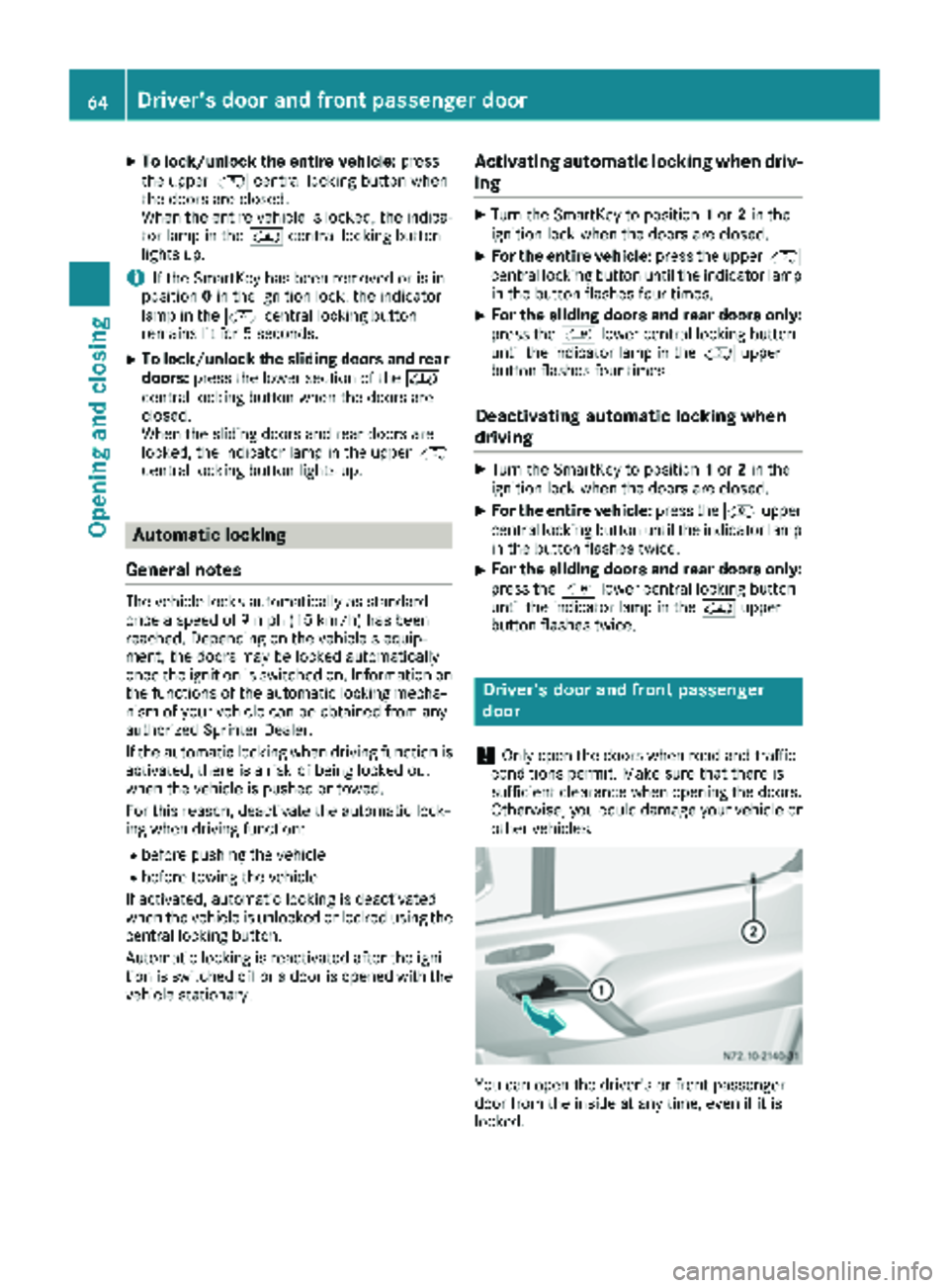
You can open the driver's or front-passenger
door from the inside at any time, even if it is
locked.
64Driver's door and front passenger door
Opening and closing
Page 68 of 286

Electrical closing assist
If your vehicle is equipped with electrical closing
assist, you will require less force to close the
sliding door.
Electrical step
Important safety notes
!
Always observe the ground clearance of the
vehicle and avoid obstacles. On vehicles with a step, ground clearance is further restricted.
Obstacles can damage the vehicle.
If you must drive over obstacles, drive espe-
cially slowly and carefully. If necessary, have
another person direct you.
If you do not use the grab handle and the step,
you could injure yourself when getting in and out
of the vehicle.
In order to reduce risks:
Rdraw the passengers' attention to the electri-
cal step. Wait until the electrical step is fully
extended.
Rdo not jump out of the vehicle.
Ronly use the grab handle and step. Only they
are designed for such a load.
Rkeep grab handles, access steps and entry
sills free from dirt, e.g. mud, clay, snow and
ice.
Operation and obstacle detection
Electrical step
The sliding door of your vehicle can be equipped
with an electrical step.
XWhen getting in and out of the vehicle, use the grab handles and electrical step :.Electrical step
:automatically extends when
the sliding door is opened and retracts when it is
closed.
Electrical step :is equipped with an obstruc-
tion detection device on the front side. If the
step comes into contact with an obstacle while
it is extending, it stops.
After you have removed the obstacle, you must
first close the sliding door and open it once
again so that the step can extend completely.
iIf the electrical step obstructs loading, you
can prevent the step from extending when
opening the sliding door via obstacle detec-
tion. The electrical step can then remain
retracted and a forklift or other lifting equip-
ment can be moved nearer to the cargo com-
partment.
Vehicles without steering-wheel buttons: if
the 1 indicator lamp in the instrument clus-
ter lights up and a warning tone sounds, elec-
trical step :is malfunctioning (
Ypage 199).
Vehicles with steering wheel buttons: if the
Electrical
Stepmessage is shown in the dis-
play and a warning tone sounds, electrical
step :is malfunctioning (
Ypage 189).
If electrical step :is malfunctioning, the step
may only partially extend/retract or may not
extend/retract at all. If a malfunction does
occur, you will have to retract and lock electrical
step :manually before continuing the journey
(
Ypage 66).
Before passengers get out of the vehicle, let
them know that electrical step :might not be
extended.
Emergency release
!
Driving with the step extended may result in
it being damaged.
If the electrical step does not retract auto-
matically, you will have to push it in and lock it
into place manually before continuing your
journey.
66Electrical step
Opening and closing
Page 69 of 286

XPull R-clips;on both rods :on the under-
side of the step out of their respective pins.
XRemove washers =and detach both rods :.
XFold rods:into the housing in the step.
XPush the step into its housing.
iWhen securing the step for the first time,
you must pierce a film with the R-clips.
XInsert R-clips ;into the step as far as they
will go through the holes on both sides of the
housing.
The step is secured in its housing.
Rear doors
Important safety notes
GWARNING
If you open a rear door, you could:
Rendanger other people or road users
Rbe caught by oncoming traffic
This is particularly the case if you open the
rear door more than 90°. There is a risk of an
accident and injury.
Only open the rear doors when traffic condi-
tions permit. Always make sure that the rear
doors are properly locked.
GWARNING
If you open the rear doors 90°, the rear lights are no longer visible. The vehicle will then be
difficult for other road users to see or will not
be seen by them at all, particularly if it is dark
or visibility is poor. There is a risk of an acci-
dent.
You should therefore ensure in this and simi-
lar situations that the vehicle is visible from
the rear in accordance with the relevant
national regulations, by using the warning tri-
angle, for instance.
!Make sure that there is sufficient clearance
when opening the rear doors. You could oth-
erwise damage the vehicle and objects in
close range of the rear doors.
You can lock the rear doors at an angle of 90°,
180° and 270°. Always make sure that the open
rear door is correctly engaged in the detent.
Rear doors67
Opening and closing
Z
Page 82 of 286

Useful information
This Operator's Manual describes all models as
well as standard and optional equipment of your
vehicle that were available at the time of going
to print. Country-specific variations are possi-
ble. Note that your vehicle may not be equipped
with all of the described functions. This also
applies to systems and functions relevant to
safety.
Read the information on qualified specialist
workshops (
Ypage 27).
Exterior lighting
Important safety notes
For reasons of safety, we recommend that you
drive with the lights switched on even during the
daytime. There may be differences in operation
due to legal requirements and voluntary recom-
mendations in some countries.
Bulb failure indicator
The bulb failure indicator is only an aid. You are
responsible for the proper functioning of the
vehicle lighting. Insufficient or non-functioning
vehicle lighting puts the operating safety of the
vehicle at risk.
For this reason, check the condition and func-
tion of your vehicle's lighting system and, if nec-
essary, that of the trailer before each journey.
The bulb failure indicator monitors all of the
exterior lighting lamps, except the perimeter
lamp and the trailer lighting. If a bulb fails, either
the b(
Ypage 34) indicator lamp lights up, or
you will see a corresponding message in the
display (
Ypage 182).
iDepending on the equipment, the bulb fail-
ure indicator can fail for all lamps with the
exception of the turn signal lamps.
Light switch
Operation
1 ÃAutomatic headlamp mode/daytime
running lamps
2$Lights off
3TParking lamps, license plate and
instrument lighting
4LLow-beam/high-beam headlamps
5NFog lamps
6RRear fog lamp
If you hear a warning tone when you leave the
vehicle, the lights may still be switched on.
XTurn the light switch to $orÃ.
or
XIf the rear fog lamp is switched on: press the
light switch in to the stop.
The turn signals, high-beam headlamps and the
high-beam flasher are operated using the com-
bination switch (
Ypage 82).
Low-beam headlamp
XTo switch on: turn the key to position 2in the
ignition lock or start the engine.
XTurn the light switch to position L.
The L indicator lamp in the instrument
cluster lights up.
Daytime running lamps
You can activate/deactivate the daytime run-
ning lamps function using the on-board com-
puter.
This is not possible in countries where daytime
running lamps are a legal requirement.
80Exterior lighting
Lights and windshield wipers
Page 83 of 286

The daytime running lamps function must be
activated using the on-board computer:
Rvehicles with steering wheel buttons
(Ypage 168)
Rvehicles without steering wheel buttons
(Ypage 161)
XTo switch on:turn the light switch to the
$ position.
The low-beam headlamps, parking lamps and
license plate lamp are switched on when the
engine is running. The Lindicator lamp in
the instrument cluster lights up.
iUSA only:
If you turn the light switch to the TorL
position, the parking lamps or low-beam
headlamps switch on. If you turn the light
switch to the Ãposition, the daytime run-
ning lamps remain switched on.
iCanada only:
If you turn the light switch to the Lposi-
tion, the low-beam headlamps are switched
on. If you turn the light switch to the Tor
à position, the daytime running lamps
remain switched on.
Automatic headlamp mode
GWARNING
When the light switch is set to Ã, the low-
beam headlamps may not be switched on
automatically if there is fog, snow or other
causes of poor visibility due to the weather
conditions such as spray. There is a risk of an
accident.
In such situations, turn the light switch to
L.
Automatic headlamp mode is only a driving aid.
You are responsible for the vehicle lighting at all
times.
Depending on ambient light, the rain and light
sensor automatically switches on the parking
lamps, low-beam headlamps and the license
plate lamp. This excludes weather-related
impairments to visibility, such as snow, fog or
spray.
If there is fog, snow or spray, turn the light
switch quickly from ÃtoL. You could
otherwise briefly interrupt operation of the
headlamps.
XTo switch on automatic headlamp mode:
turn the light switch to Ã.
Key in position 1in the ignition lock: the park-
ing lamps switch on or off automatically
depending on the ambient light.
When the engine is running: if you activate the
"daytime running lamps" function using the
on-board computer, the daytime running
lamps are switched on. The parking lamps and
low-beam headlamps also switch on or off
automatically, depending on the ambient
light.
When the low-beam headlamps are switched
on, the Lindicator lamp in the instrument
cluster lights up.
Fog lamps/rear fog lamp
GWARNING
If you suspect that driving conditions will be
foggy, turn the light switch to Lbefore you
start your journey. Your vehicle may other-
wise not be visible and you could endanger
yourself and others.
GWARNING
In low ambient lighting or foggy conditions,
only switch from position ÃtoL with
the vehicle at a standstill in a safe location.
Switching from ÃtoL will briefly
switch off the headlamps. Doing so while driv-
ing in low ambient lighting conditions may
result in an accident.
XTurn the ignition key to position 2in the igni-
tion lock or start the engine.
XTurn the light switch to LorT.
iIf your vehicle is only equipped with one rear
fog lamp, you must turn the light switch to
L.
iWhen the light switch is set to Ãyou
cannot switch on the front and rear foglamps.
XTo switch on the front fog lamps: pull the
light switch out to the first locking point.
The green Nindicator lamp on the light
switch lights up.
Exterior lighting81
Lights and windshield wipers
Z