2017 MERCEDES-BENZ S-Class MAYBACH Multimedia
[x] Cancel search: MultimediaPage 138 of 382
Activating/deactivating
XTo activate:press theÁ rockerswitch up
or down .
The indicator lamp abov eth erocke rswitch
lights up.
XTo deactivate: press theÁ rockerswitch
up or down .
The indicator lamp abov eth erocke rswitch
goe sout .
Problems with the "Cooling with air dehumidification" function
ProblemPossible causes/consequences and MSolutions
The indicator lamp in the
Á buttonflashes
three times or remain s
off .Cooling wit hair
dehumidification can
also no longer be activa-
te dusin gth emultimedia
system; see th eDigital
Operator' sManual.Cooling wit hair dehumidification has been deactivated due to amal-
function .
XVisitaqualified specialis tworkshop .
Setting climate control to automatic
Gene ral notes
In automatic mode, th eset temperature is main -
taine dautomatically at aconstan tlevel. The
system automatically regulates th etemperature
of th edispensed air, th eairflow and th eair dis-
tribution .
During automatic controlling, th e"Cooling wit h
air dehumidification "function is activated.
Control ling front climate control auto-
ma tically using the front control panel
XTurn theSmartKey to position 2in th eignition
loc k (Ypage 145).
XSetth edesired temperature usin gth ew
rocke rswitch on th efron tcontrol unit.
XTo activate: press theà rockerswitch up
or down .
The indicator lamp in th eà rockerswitch
lights up.
XTo switch to manua loperation: press the
K rockerswitch up or down .
The indicator lamp in th eà rockerswitch
goe sout . In automatic mode, if you adjust th
eairflow or
air distribution manually, th eindicator lamp on
th eà rockerswitch goe sout .The function
whic hhas no tbeen changed manually, however ,
continues to be controlled automatically. When
th emanually set function switches bac kto auto -
matic mode, th eindicator lamp on th eÃ
rocke rswitch lights up again .
Controlling rear climate control auto-
ma tically using the rear control panel
XTurn theSmartKey to position 2in th eignition
loc k (Ypage 145).
XSetth edesired temperature usin grocke r
switches Hand N(Ypage 133).
XTo activate: press rockerswitch Jup or
down (Ypage 133).
The indicator lamp in rocke rswitch Jlights
up.
XTo deactivate: press rockerswitch Jup or
down (Ypage 133).
The indicator lamp in rocke rswitch Jgoes
out .
If you adjust th eairflow or air distribution man -
ually when in automatic mode, th eAUT Odisplay
in th erear-compartmen tdisplay goe sout .The
136Operating the climate control systems
Climate control
Page 140 of 382
Setting the air distribution
Air distribution settings
¯ Directs air through the defroster vents
P Directs air through the center and side air
vents
O Directs air through the footwell air vents
S Directs air through the center, side and
footwell vents
a Directs air through the defroster and
footwell vents
W Sets the air distribution to automatic
Setting the air distribution in the front
compartment
The air distribution for the left and right sides of
the front and rear compartment can be adjusted
using the multimedia system (see the Digital
Operator's Manual).
Setting the air distribution in the rear
compartment using the rear control
panel
XTurn the SmartKey to position 2in the ignition
lock (Ypage 145).
XPress rocker switch IorM up or down
repeatedly (Ypage 133) until the desired air
distribution symbol is shown in the display.
iYou can also set the air distribution in the
rear compartment using the multimedia sys-
tem (see the Digital Operator's Manual).
Setting the airflow
General notes
You can select different airflow settings for the
driver's and front-passenger sides as well as for
the rear compartment (only vehicles with rear
compartment climate control).
Observe the notes on controlling the rear-com-
partment climate control using the front control
panel (
Ypage 134).
Setting the front-compartment airflow
using the front control panel
XTurn the SmartKey to position 2in the ignition
lock (Ypage 145).
XTo increase or reduce: press theK
rocker switch up or down.
iYou can also set the front-compartment air-
flow using the multimedia system (see the
Digital Operator's Manual).
Setting the rear compartment airflow
using the rear control panel
XTurn the SmartKey to position 2in the ignition
lock (Ypage 145).
XTo increase or reduce: press rocker switch
K up or down (Ypage 133).
iYou can also set the front-compartment air-
flow using the multimedia system (see the
Digital Operator's Manual).
Activating or deactivating the syn-
chronization function
Climate control can be set centrally using the
synchronization function. The settings for tem-
perature, air distribution and airflow on the driv-
er's side are adopted for the front-passenger
side and the rear compartment (vehicles with
rear-compartment air conditioning).
XTo activate or deactivate: activate or deac-
tivate the "Synchronization" function via the
multimedia system (see the Digital Operator's
Manual).
Vehicles with rear-compartment air condi-
tioning: the SYNCdisplay appears on the
rear-compartment display.
The synchronization function is deactivated:
Rif the settings for the front-passenger side are
changed
Rin vehicles with rear-compartment air condi-
tioning: the settings for the rear compartment
are changed
138Operating the climate control systems
Climate control
Page 141 of 382
Defrosting thewindshield
General notes
You can use this function to defrost th ewind-
shield or to clear afogge dup windshield or fron t
sid ewindows on th einside.
Switc hof fth e"Windshield defrosting" function
as soo nas th ewindshield is clear again .
Switchingth e"Windshield defrosting"
function on or off
XTur nth eSmartKey to position 2in th eignition
loc k (Ypage 145).
XTo activate :press th e¬ rocker switch on
th efron tcontro lpanel up or down .
The indicator lamp in th e¬ rocker switch
lights up.
The climat econtro lsyste mswitches to th e
followin gfunctions:
Rhig hairflow
Rhig htemperature
Rair distribution to th ewindshield and fron t
sid ewindows
Rair-recirculation mode of f
Rwindshield heatingon
Rcoolin gwit hair dehumidification on
XTo deactivate :press th e¬ rocker switch
up or down .
The indicator lamp in th e¬ rocker switch
goe sout .The previously selecte dsetting sare
restored .Air-recirculation mode remain s
deactivated.
Defrosting th ewindows
Windows fogged up on th einside
XActivat eth e"Coolin gwit hair dehumidifica-
tion "function wit hth eÁ rocker switch .
or
XActivat eth e"Coolin gwit hair dehumidifica-
tion "function via th emultimedia system; see
th eDigital Operator's Manual.
XSwitc hon automatic mode usin gth eÃ
rocker switch .
XIf thewindows continue to fo gup: activat eth e
"Windshield defrosting" function usin gth e
¬ rocker switch .The windshield heatin gis
switched on .
iYou should only selec tthis setting until th e
windshield is clear again .
Windows fogged up on th eoutsid e
XActivat eth ewindshield wipers .
XSwitchon automatic mode usin gth eÃ
rocker switch .
iIf you clean th ewindows regularly, they do
no tfo gup so quickly.
Rea rwindow defroster
General notes
The rea rwindow defroster has ahig hcurren t
draw. You should therefore switch it of fas soo n
as th erea rwindow is clear .Otherwise ,th erea r
window defroster switches of fautomatically
after severa lminutes.
If th ebattery voltage is to olow, th erea rwindow
defroster may switch off.
Activating or deactivating
XTur nth eSmartKey to position 2in th eignition
loc k (Ypage 145).
XPress th e¤ rocker switch up or down .
The indicator lamp in th e¤ rocker switch
lights up or goe sout .
Operating the climate control systems139
Climate control
Page 143 of 382
Front control panel
XTurn theSmartKey to position 0in th eignition
loc kor remove it (Ypage 145).
XTo activate: press the! orÁ rocker
switch up or down .
The indicator lamp in th e! orÁ rocke r
switch lights up.
The blowe rwill run at alow spee dregardless of
th eairflow setting .
If you activat eth eresidual heat function at high
temperatures ,only th eventilation will be acti-
vated. The blowe rrun sat medium speed.
XTo deactivate: press the! orÁ
rocke rswitch up or down .
The indicator lamp in th e! orÁ rocke r
switch goes out .
Rear control panel
XTurn theSmartKey to position 0in th eignition
loc kor remove it (Ypage 145).
The RESTdisplay appear son th erear com-
partmen tdisplay.
XTo activate: press rockerswitch Lup or
down (Ypage 133).
The indicator lamp in rocke rswitch Llights
up.
XTo deactivate: press rockerswitch Lup or
down (Ypage 133).
The indicator lamp in rocke rswitch Lgoes
out .RES Tgoes out on th erear compartmen t
display.
iIf you do no tactivat eth eresidual heat func-
tion ,RES Tgoes out automatically after fiv e
minute son th erear compartmen tdisplay.
Residual heat is deactivated automatically:
Rafter approximately 30 minute sif the residual
heat function is activated in the front or rear
compartment
Rafter approximately 15 minutes if the residual
heat function is activated in the front and rear
compartments
Rwhen the ignition is switched on
Rif the battery voltage drops
Perfume atomizer
Operating the perfume atomizer
GWARNING
If children open the vial, they could drink the
perfume or it could come into contact with
their eyes. There is a risk of injury. Do not
leave children unsupervised in the vehicle.
If the perfume liquid has been drunk, consult
a doctor. If perfume comes into contact with
your eyes or skin, rinse the eyes with clean
water. If you continue to experience difficul-
ties, consult a doctor.
HEnvironmental note
Full vials must not be dis-
posed of with household
waste. They must be collec-
ted separately and recycled
to protect the environment.
Dispose of full vials in an
environmentally responsible
manner and take them to a
harmful substance collec-
tion point.
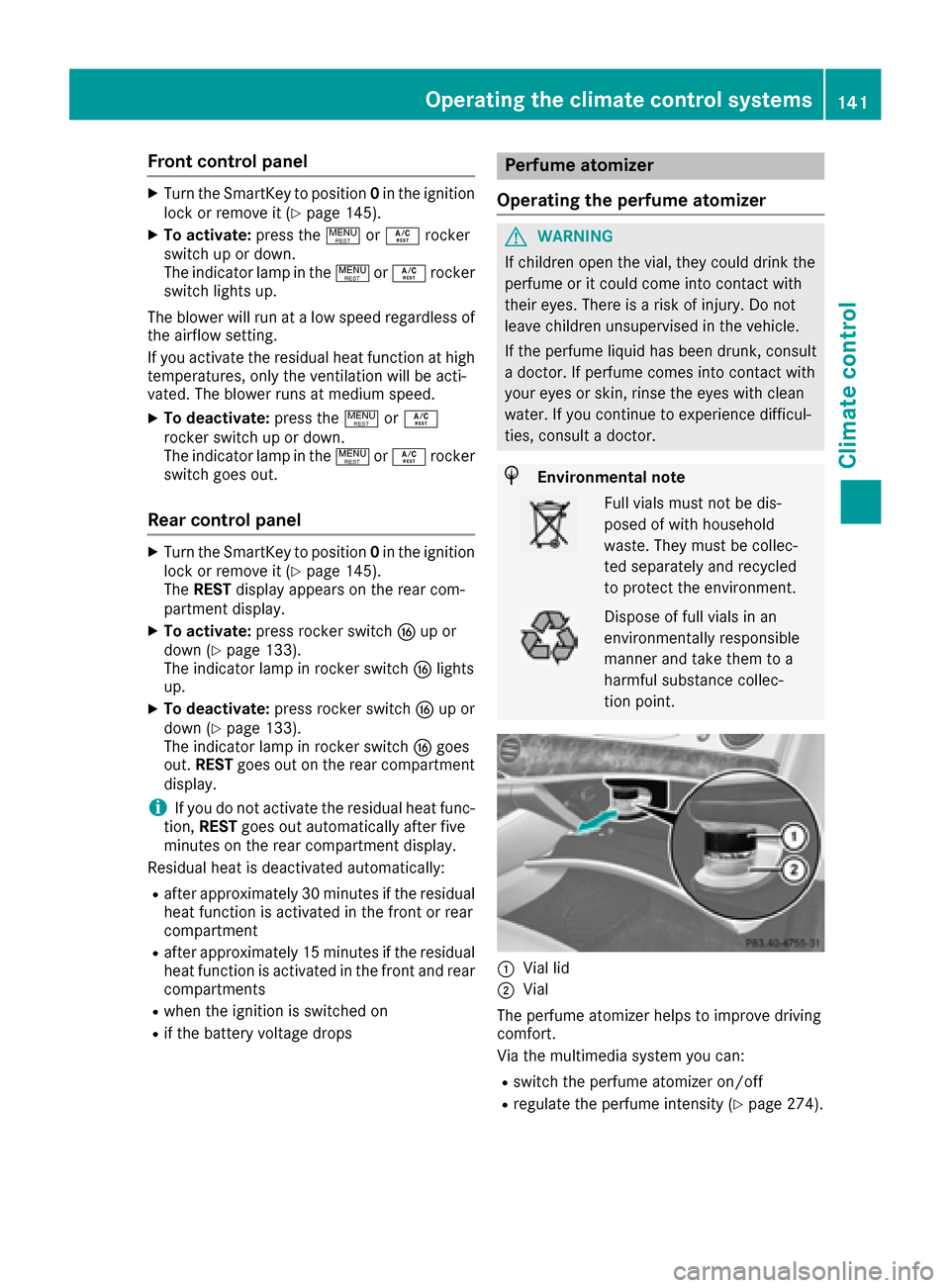
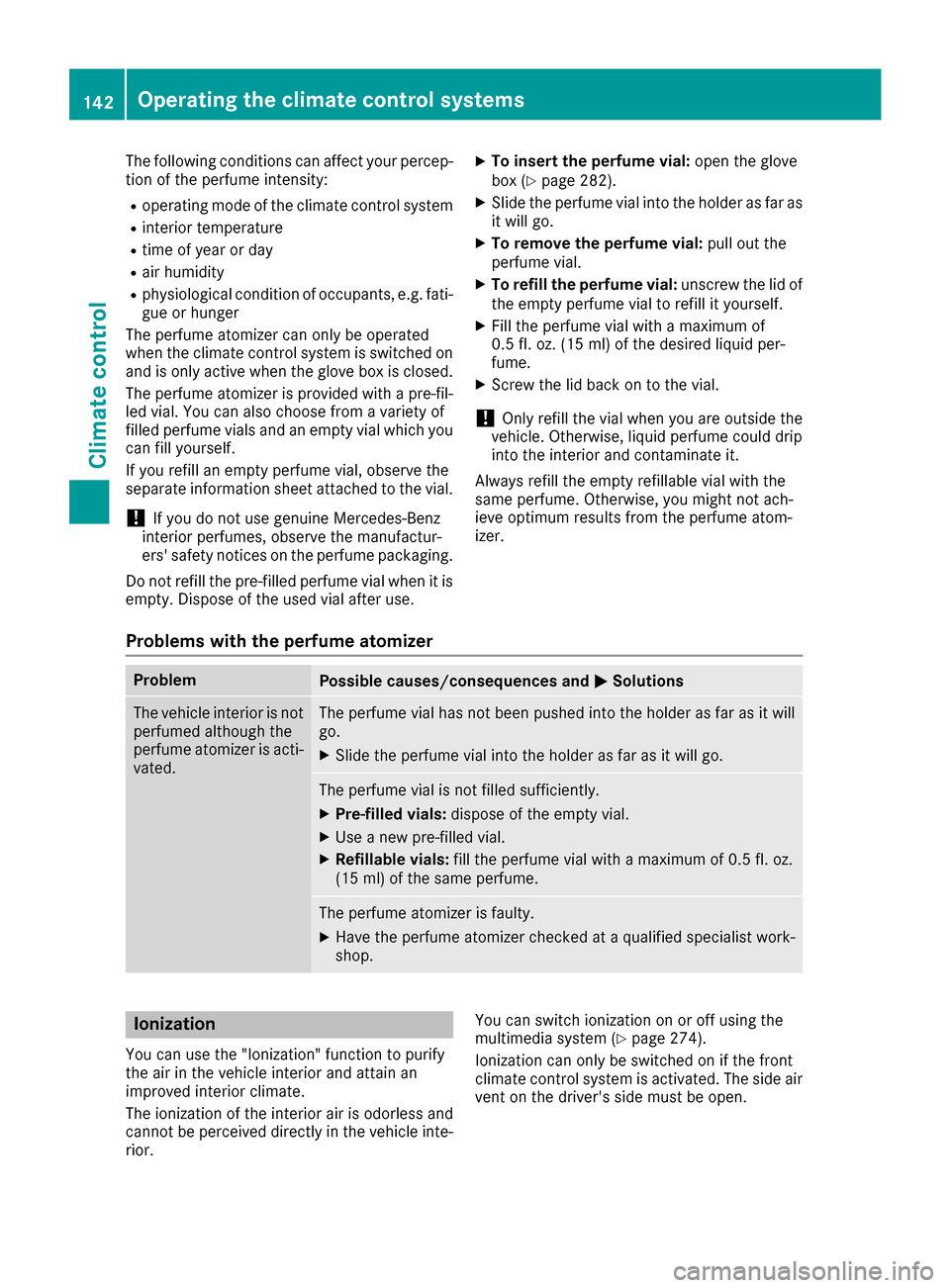
:Vial lid
;Vial
The perfume atomizer helps to improve driving
comfort.
Via the multimedia system you can:
Rswitch the perfume atomizer on/off
Rregulate the perfume intensity (Ypage 274).
Operating the climate control systems141
Climate control
Z
Page 144 of 382
The following conditions can affect your percep-
tion of the perfume intensity:
Roperating mode of the climate control system
Rinterior temperature
Rtime of year or day
Rair humidity
Rphysiological condition of occupants, e.g. fati-
gue or hunger
The perfume atomizer can only be operated
when the climate control system is switched on
and is only active when the glove box is closed.
The perfume atomizer is provided with a pre-fil-
led vial. You can also choose from a variety of
filled perfume vials and an empty vial which you can fill yourself.
If you refill an empty perfume vial, observe the
separate information sheet attached to the vial.
!If you do not use genuine Mercedes-Benz
interior perfumes, observe the manufactur-
ers' safety notices on the perfume packaging.
Do not refill the pre-filled perfume vial when it is
empty. Dispose of the used vial after use.
XTo insert the perfume vial: open the glove
box (Ypage 282).
XSlide the perfume vial into the holder as far as
it will go.
XTo remove the perfume vial: pull out the
perfume vial.
XTo refill the perfume vial: unscrew the lid of
the empty perfume vial to refill it yourself.
XFill the perfume vial with a maximum of
0.5 fl. oz. (15 ml) of the desired liquid per-
fume.
XScrew the lid back on to the vial.
!Only refill the vial when you are outside the
vehicle. Otherwise, liquid perfume could drip
into the interior and contaminate it.
Always refill the empty refillable vial with the
same perfume. Otherwise, you might not ach-
ieve optimum results from the perfume atom-
izer.
Problems with the perfume atomizer
ProblemPossible causes/consequences and MSolutions
The vehicle interior is not
perfumed although the
perfume atomizer is acti-
vated.The perfume vial has not been pushed into the holder as far as it will
go.
XSlide the perfume vial into the holder as far as it will go.
The perfume vial is not filled sufficiently.
XPre-filled vials:dispose of the empty vial.
XUse a new pre-filled vial.
XRefillable vials: fill the perfume vial with a maximum of 0.5 fl. oz.
(15 ml) of the same perfume.
The perfume atomizer is faulty.
XHave the perfume atomizer checked at a qualified specialist work-
shop.
Ionization
You can use the "Ionization" function to purify
the air in the vehicle interior and attain an
improved interior climate.
The ionization of the interior air is odorless and
cannot be perceived directly in the vehicle inte-
rior. You can switch ionization on or off using the
multimedia system (Ypage 274).
Ionization can only be switched on if the front
climate control system is activated. The side air vent on the driver's side must be open.
142Operating the climate control systems
Climate control
Page 192 of 382
Surroundingsmessage appears in the mul-
tifunction display.
iYou will achieve the best results by waiting
for the steering procedure to complete before
pulling away.
If you back up after activation, the steering
wheel is moved to the straight-ahead posi-
tion.
XDrive forwards and back up as prompted by
the PARKTRONIC warning displays, several
times if necessary.
Once you have exited the parking space com-
pletely, the steering wheel is moved to the
straight-ahead position. You hear a tone and the
Park
AssistSwitchedOffmessage appears
in the multifunction display. You will then have
to steer and merge into traffic on your own.
PARKTRONIC is still available. You can take over
the steering before the vehicle has exited the
parking space completely. This is useful if you
recognize that it is already possible to pull out of
the parking space.
Canceling Active Parking Assist
XStop the movement of the multifunction
steering wheel or steer yourself.
Active Parking Assist will be canceled at once.
The Park Assist Canceled
message
appears in the multifunction display.
or
XPress the PARKTRONIC button (Ypage 185).
PARKTRONIC is switched off and Active Park-
ing Assist is immediately canceled. The Park
Assist Canceledmessage appears in the
multifunction display.
Active Parking Assist is canceled automatically
if:
Rthe electric parking brake is engaged
Rtransmission position Pis selected
Rparking using Active Parking Assist is no lon-
ger possible
Ryou are driving faster than 6 mph (10 km/h)
Ra wheel spins, ESP®intervenes or fails. The
÷ warning lamp lights up in the instrument
cluster
A warning tone sounds. The parking symbol dis-
appears and the multifunction display shows the
Park Assist Canceled
message.
When Active Parking Assist is canceled, you
must steer and brake again yourself. If a system malfunction occurs, the vehicle is
braked to a standstill. To drive on, depress the
accelerator again.
Rear view camera
General notes
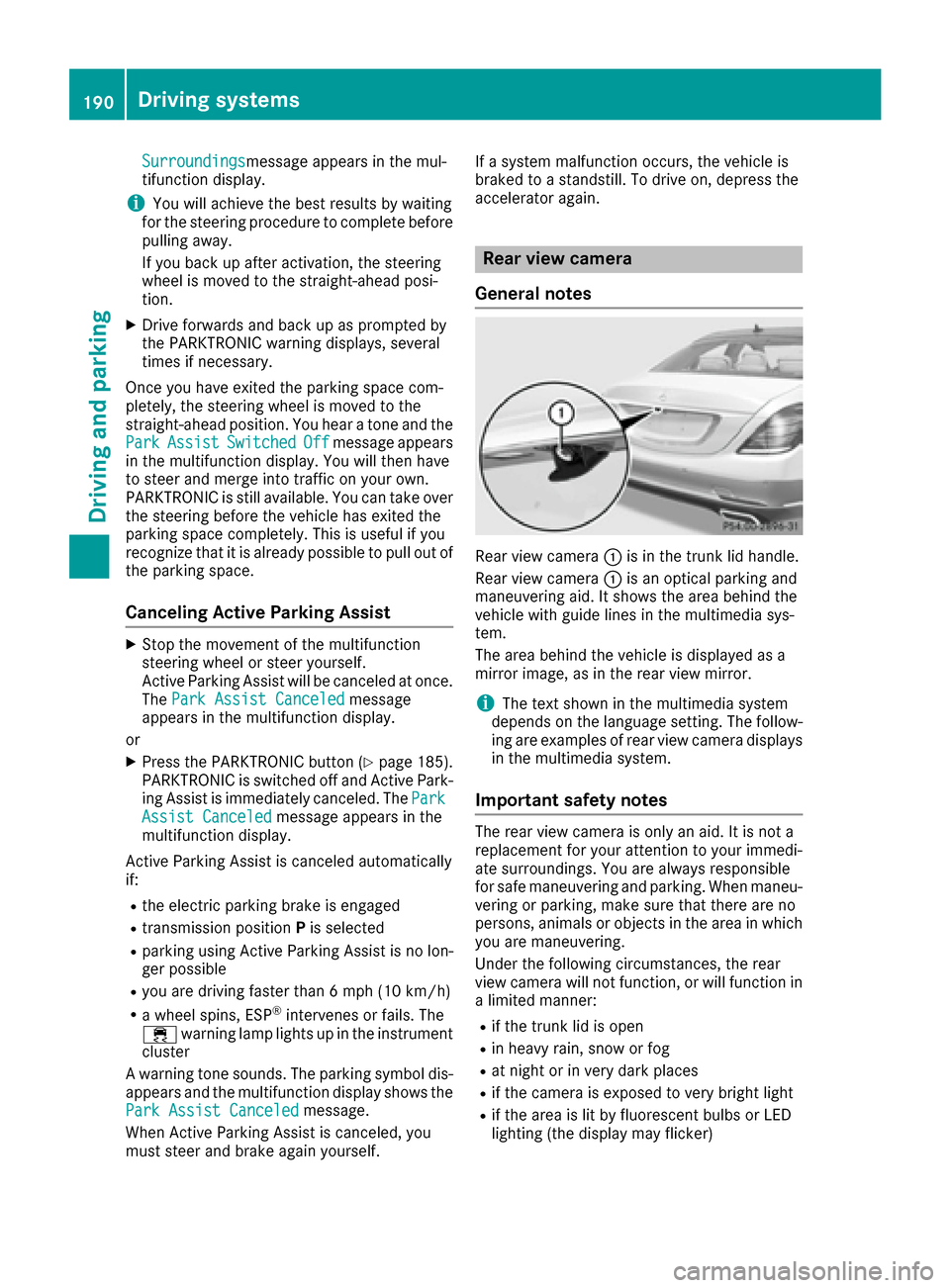
Rear view camera :is in the trunk lid handle.
Rear view camera :is an optical parking and
maneuvering aid. It shows the area behind the
vehicle with guide lines in the multimedia sys-
tem.
The area behind the vehicle is displayed as a
mirror image, as in the rear view mirror.
iThe text shown in the multimedia system
depends on the language setting. The follow- ing are examples of rear view camera displays
in the multimedia system.
Important safety notes
The rear view camera is only an aid. It is not a
replacement for your attention to your immedi-
ate surroundings. You are always responsible
for safe maneuvering and parking. When maneu-
vering or parking, make sure that there are no
persons, animals or objects in the area in whichyou are maneuvering.
Under the following circumstances, the rear
view camera will not function, or will function in
a limited manner:
Rif the trunk lid is open
Rin heavy rain, snow or fog
Rat night or in very dark places
Rif the camera is exposed to very bright light
Rif the area is lit by fluorescent bulbs or LED
lighting (the display may flicker)
190Driving systems
Driving and parking
Page 193 of 382
Rif the camera lens fogs up, e.g. when driving
into a heated garage in winter, causing a rapid
change in temperature
Rif the camera lens is dirty or obstructed
Rif the rear of your vehicle is damaged. In this
event, have the camera position and setting
checked at a qualified specialist workshop
The field of vision and other functions of the rear
view camera may be restricted due to additional
accessories on the rear of the vehicle (e.g.
license plate holder, bicycle rack).
The guide lines on the multimedia system show
the distances to your vehicle. The distances only
apply to road level.
The rear view camera is protected from rain-
drops and dust by means of a flap. When the rear
view camera is activated, this flap opens.
The flap closes again when:
Ryou have finished the maneuvering process
Ryou switch off the engine
Ryou open the trunk
Observe the notes on cleaning (
Ypage 323).
For technical reasons, the flap may remain open
briefly after the rear view camera has been
deactivated.
Activating/deactivating the rear view
camera
XTo activate: make sure that the Activa‐
tion by R gearfunction is selected in the
multimedia system; see Digital Operator's
Manual.
XEngage reverse gear.
The rear view camera flap opens. The multi-
media system shows the area behind the vehi-
cle with guide lines.
The image from the rear view camera is avail-
able throughout the maneuvering process.
XShift the transmission to position P.
or
XDrive forwards a short distance.
Displays in the multimedia system
The rear view camera may show a distorted view
of obstacles, show them incorrectly or not at all.
The rear view camera does not show objects in
the following positions:
Rvery close to the rear bumper
Runder the rear bumper
Rin the area immediately above the handle in
the trunk lid
!Objects not at ground level may appear to
be further away than they actually are, e.g.:
Rthe bumper of a parked vehicle
Rthe drawbar of a trailer
Rthe ball coupling of a trailer tow hitch
Rthe rear section of an HGV
Ra slanted post
Use the guidelines only for orientation.
Approach objects no further than the bottom-
most guideline.
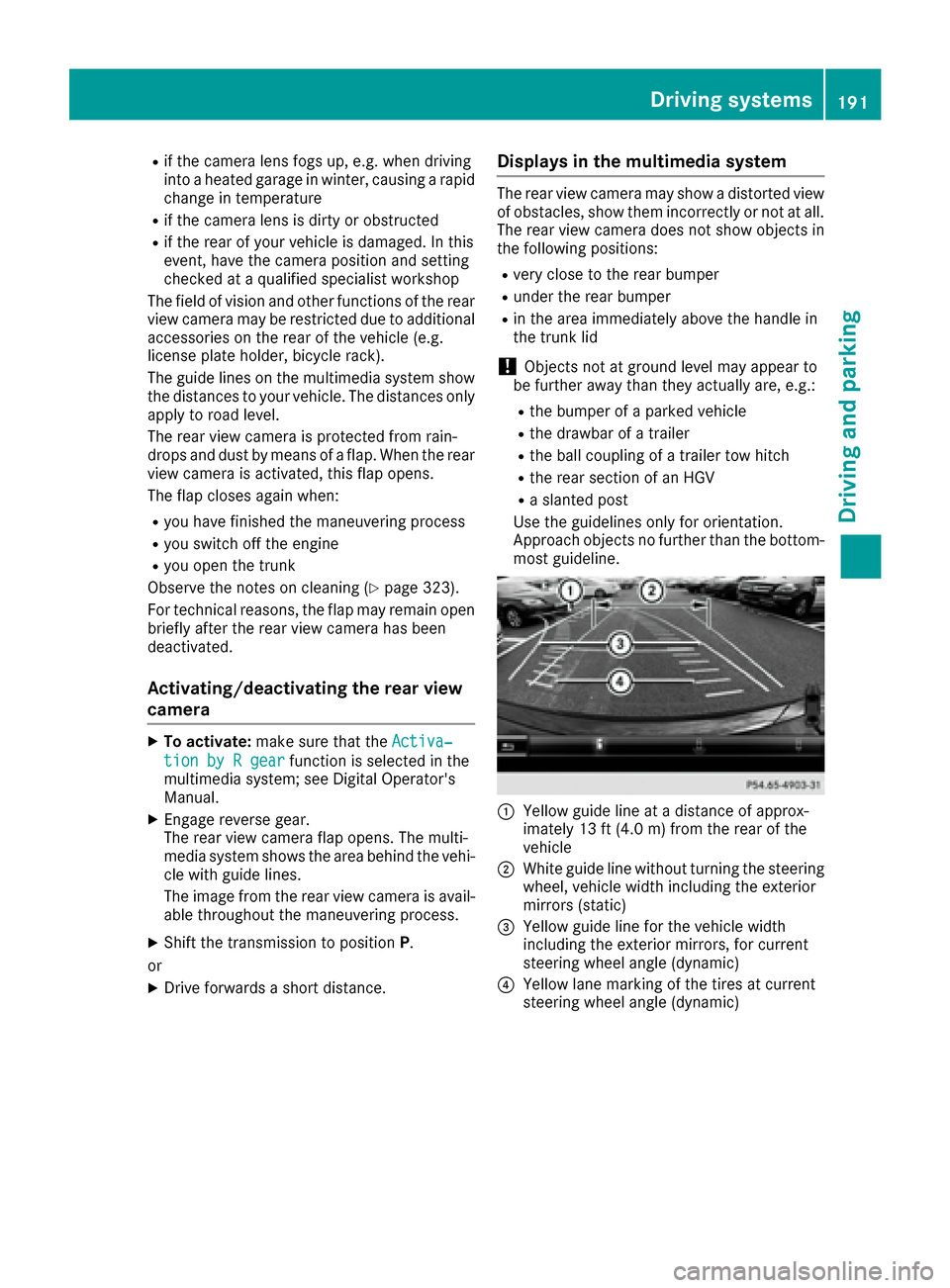
:Yellow guide line at a distance of approx-
imately 13 ft (4.0 m) from the rear of the
vehicle
;White guide line without turning the steering
wheel, vehicle width including the exterior
mirrors (static)
=Yellow guide line for the vehicle width
including the exterior mirrors, for current
steering wheel angle (dynamic)
?Yellow lane marking of the tires at current
steering wheel angle (dynamic)
Driving systems191
Driving and parking
Z
Page 194 of 382
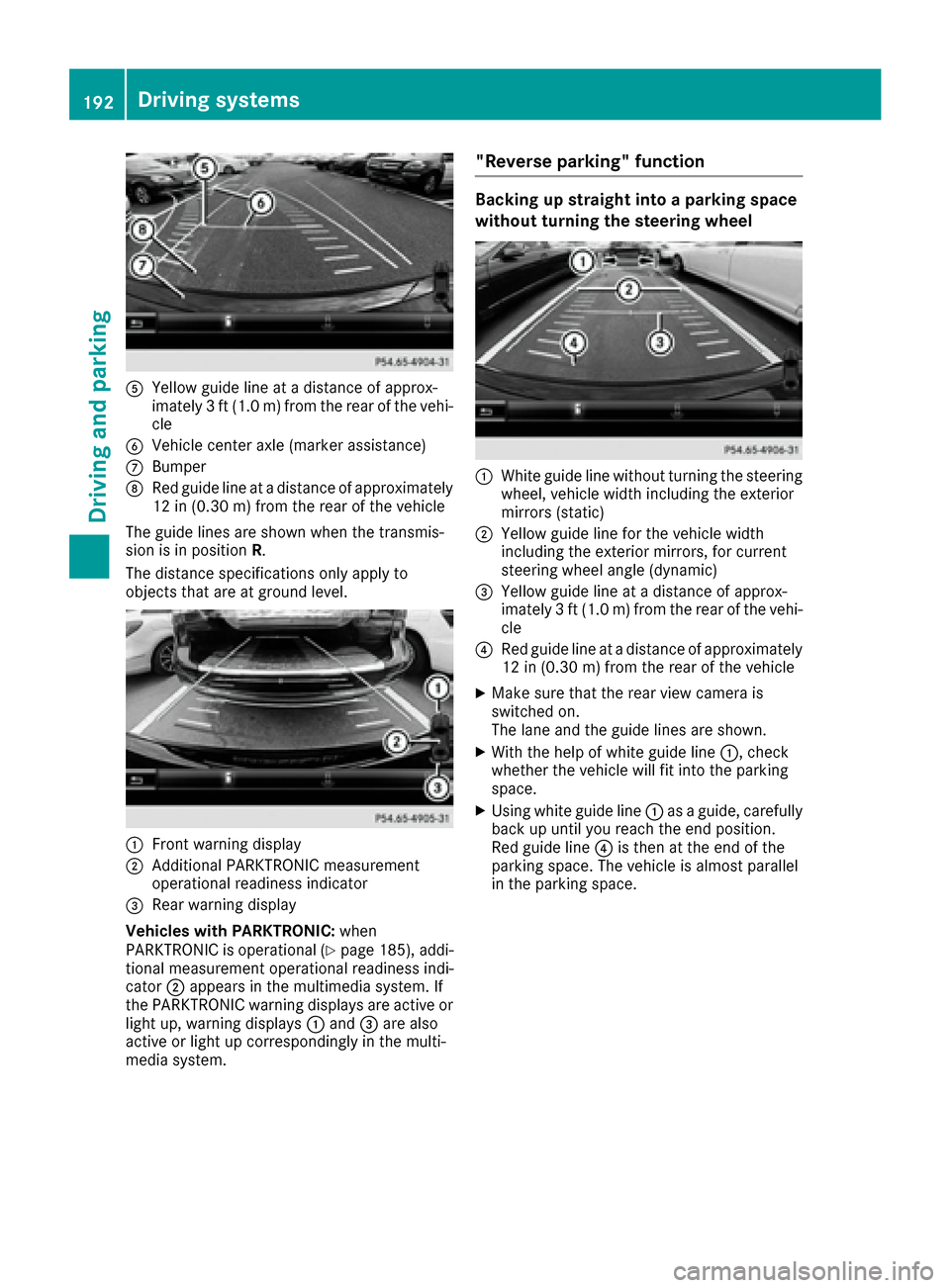
AYellow guide line at a distance of approx-
imately 3 ft (1.0 m) from the rear of the vehi-
cle
BVehicle center axle (marker assistance)
CBumper
DRed guide line at a distance of approximately
12 in (0.30 m) from the rear of the vehicle
The guide lines are shown when the transmis-
sion is in position R.
The distance specifications only apply to
objects that are at ground level.
:Front warning display
;Additional PARKTRONIC measurement
operational readiness indicator
=Rear warning display
Vehicles with PARKTRONIC: when
PARKTRONIC is operational (
Ypage 185), addi-
tional measurement operational readiness indi-
cator ;appears in the multimedia system. If
the PARKTRONIC warning displays are active or
light up, warning displays :and =are also
active or light up correspondingly in the multi-
media system.
"Reverse parking" function
Backing up straight into a parking space
without turning the steering wheel
:White guide line without turning the steering
wheel, vehicle width including the exterior
mirrors (static)
;Yellow guide line for the vehicle width
including the exterior mirrors, for current
steering wheel angle (dynamic)
=Yellow guide line at a distance of approx-
imately 3 ft (1.0 m) from the rear of the vehi-
cle
?Red guide line at a distance of approximately
12 in (0.30 m) from the rear of the vehicle
XMake sure that the rear view camera is
switched on.
The lane and the guide lines are shown.
XWith the help of white guide line :, check
whether the vehicle will fit into the parking
space.
XUsing white guide line :as a guide, carefully
back up until you reach the end position.
Red guide line ?is then at the end of the
parking space. The vehicle is almost parallel
in the parking space.
192Driving systems
Driving and parking