2017 MERCEDES-BENZ S-Class MAYBACH Multimedia
[x] Cancel search: MultimediaPage 115 of 382
limited temperature sensitivity or a limited
ability to react to excessively high tempera-
tures may be affected or they may even suffer
burn-like injuries. There is a risk of injury.
Therefore, do not switch the seat heating on
repeatedly.
For vehicles equipped with the Warmth Comfort
package: the armrest in the door and the center
console can also be heated when you switch on
the seat heating of one of the front seats. You
can set this via the multimedia system; see the
Digital Operator's Manual.
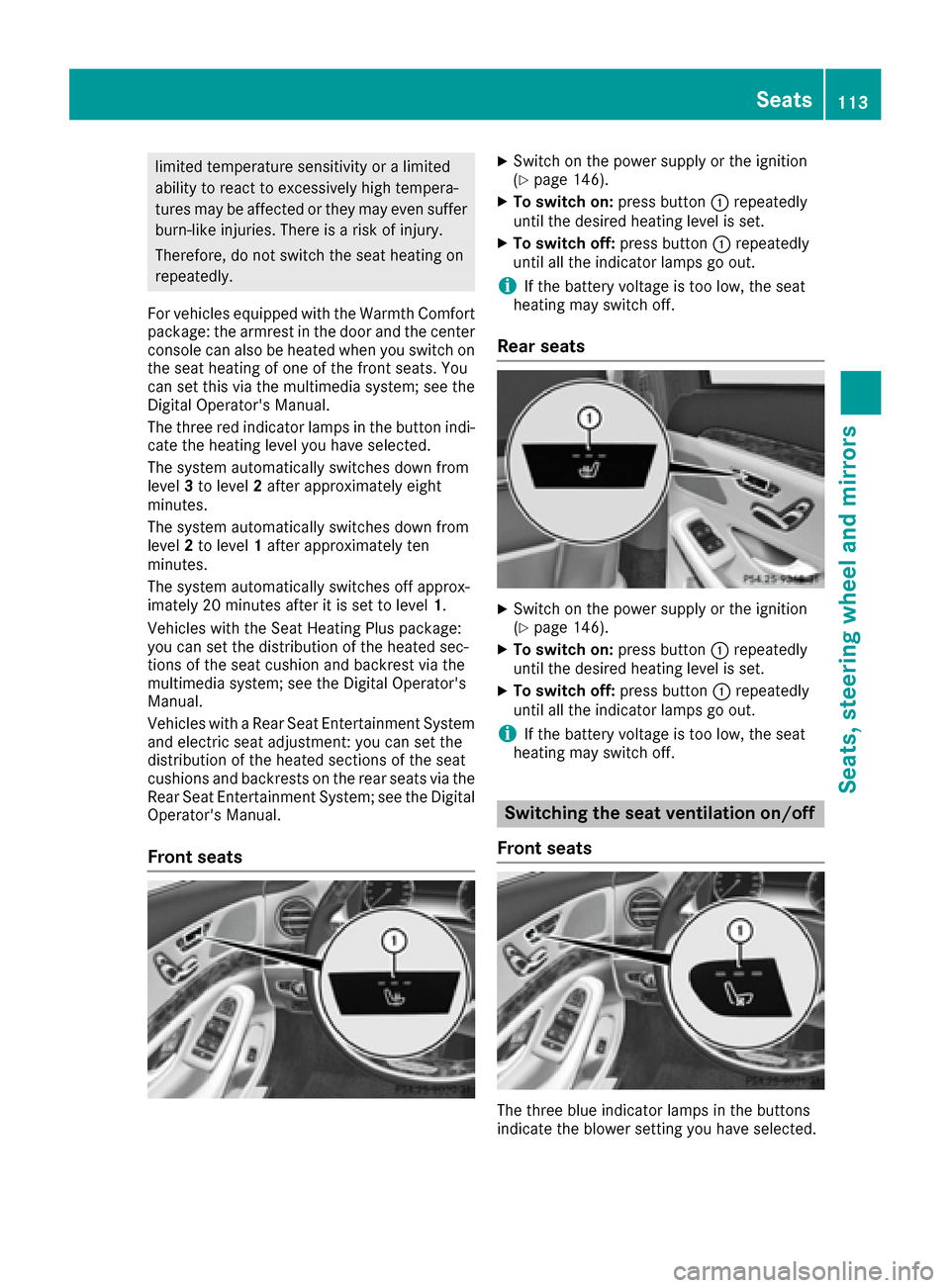
The three red indicator lamps in the button indi-
cate the heating level you have selected.
The system automatically switches down from
level 3to level 2after approximately eight
minutes.
The system automatically switches down from
level 2to level 1after approximately ten
minutes.
The system automatically switches off approx-
imately 20 minutes after it is set to level 1.
Vehicles with the Seat Heating Plus package:
you can set the distribution of the heated sec-
tions of the seat cushion and backrest via the
multimedia system; see the Digital Operator's
Manual.
Vehicles with a Rear Seat Entertainment System
and electric seat adjustment: you can set the
distribution of the heated sections of the seat
cushions and backrests on the rear seats via the
Rear Seat Entertainment System; see the Digital
Operator's Manual.
Front seats
XSwitch on the power supply or the ignition
(Ypage 146).
XTo switch on: press button:repeatedly
until the desired heating level is set.
XTo switch off: press button:repeatedly
until all the indicator lamps go out.
iIf the battery voltage is too low, the seat
heating may switch off.
Rear seats
XSwitch on the power supply or the ignition
(Ypage 146).
XTo switch on: press button:repeatedly
until the desired heating level is set.
XTo switch off: press button:repeatedly
until all the indicator lamps go out.
iIf the battery voltage is too low, the seat
heating may switch off.
Switching the seat ventilation on/off
Front seats
The three blue indicator lamps in the buttons
indicate the blower setting you have selected.
Seats113
Seats, steering wheel and mirrors
Z
Page 118 of 382
Problems with the steering wheel heating
ProblemPossible causes/consequences andMSolutions
The steering wheel heat-
ing has switched off pre-
maturely or cannot be
switched on.The on-board voltage is too low because too many electrical consum-
ers are switched on.
XSwitch off electrical consumers that you do not need, such as the
rear window defroster or interior lighting.
EASY-ENTRY/EXIT feature
Important safety notes
GWARNING
When the EASY-ENTRY/EXIT feature adjusts
the steering wheel and the driver's seat, you
and other vehicle occupants – particularly
children – could become trapped. There is a
risk of injury.
While the EASY-ENTRY/EXIT feature is mak-
ing adjustments, make sure that no one has
any body parts in the sweep of the seat and
the steering wheel.
If there is a risk of becoming trapped by
Rthe steering wheel: move the steering
wheel adjustment lever.
Rthe seat: press the switch for seat adjust-
ment.
The adjustment process is stopped.
You can stop the adjustment process by press-
ing one of the memory function's position but-
tons. This function is only available on vehicles
with memory function.
GWARNING
If children activate the EASY-ENTRY/EXIT fea-
ture, they can become trapped, particularly
when unattended. There is a risk of injury.
When leaving the vehicle, always take the
SmartKey with you and lock the vehicle. Never
leave children unsupervised in the vehicle.
GWARNING
If you drive off while the EASY-ENTRY/EXIT
feature is making adjustments, you could lose
control of the vehicle. There is a risk of an
accident.
Always wait until the adjustment process is
complete before driving off.
The EASY-ENTRY/EXIT feature makes getting in
and out of your vehicle easier.
You can activate and deactivate the EASY-
ENTRY/EXIT feature using the multimedia sys-
tem (see the Digital Operator's Manual).
Position of the steering wheel and the
driver's seat when the EASY-ENTRY/
EXIT feature is active
The steering wheel tilts upwards and the driver's seat moves backwards if you:
Rremove the SmartKey from the ignition lock
Rwith the start/stop button: open the driv-
er's door; the ignition must be switched off
Rwith the SmartKey: open the driver's door;
the SmartKey must be in position 0or 1in the
ignition lock (
Ypage 145)
iThe steering wheel only tilts upwards and
the driver's seat only moves backwards if the
driving position is stored after the seat or
steering column has been adjusted.
The last position of the steering wheel or seat is
stored if:
Rthe ignition is switched off
Rthe setting is stored with the memory function
(Ypage 120).
iThe steering wheel only moves upwards if it
has not already reached the upper stop. The
driver's seat only moves backwards if it is not
already in the rearmost position.
116Steering wheel
Seats, steering wheel and mirrors
Page 119 of 382
Position of the steering wheel and the
driver's seat for driving
The steering wheel and the driver's seat are
moved to the previously set position if:
Rthe driver's door is closed and you insert the
SmartKey into the ignition lock
Ryou close the driver's door when the ignition
is switched on
Ryou press the Start/Stop button once
iThe steering wheel and the driver's seat only
return to the last set position if the driving
position is stored after the seat or steering
column has been adjusted.
The last position of the steering wheel or seat is
stored if:
Rthe ignition is switched off
Rthe setting is stored with the memory function
(Ypage 120).
Crash-responsive EASY-EXIT feature
If the crash-responsive EASY-EXIT feature is trig-
gered in an accident, the steering column will
move upwards when the driver's door is opened
or the SmartKey is removed from the ignition
lock. This makes it easier to exit the vehicle and rescue the occupants.
The crash-responsive EASY-EXIT feature is only
operational if the EASY-EXIT/ENTRY feature is
activated in the multimedia system (see the sep-
arate Operator's Manual).
Mirrors
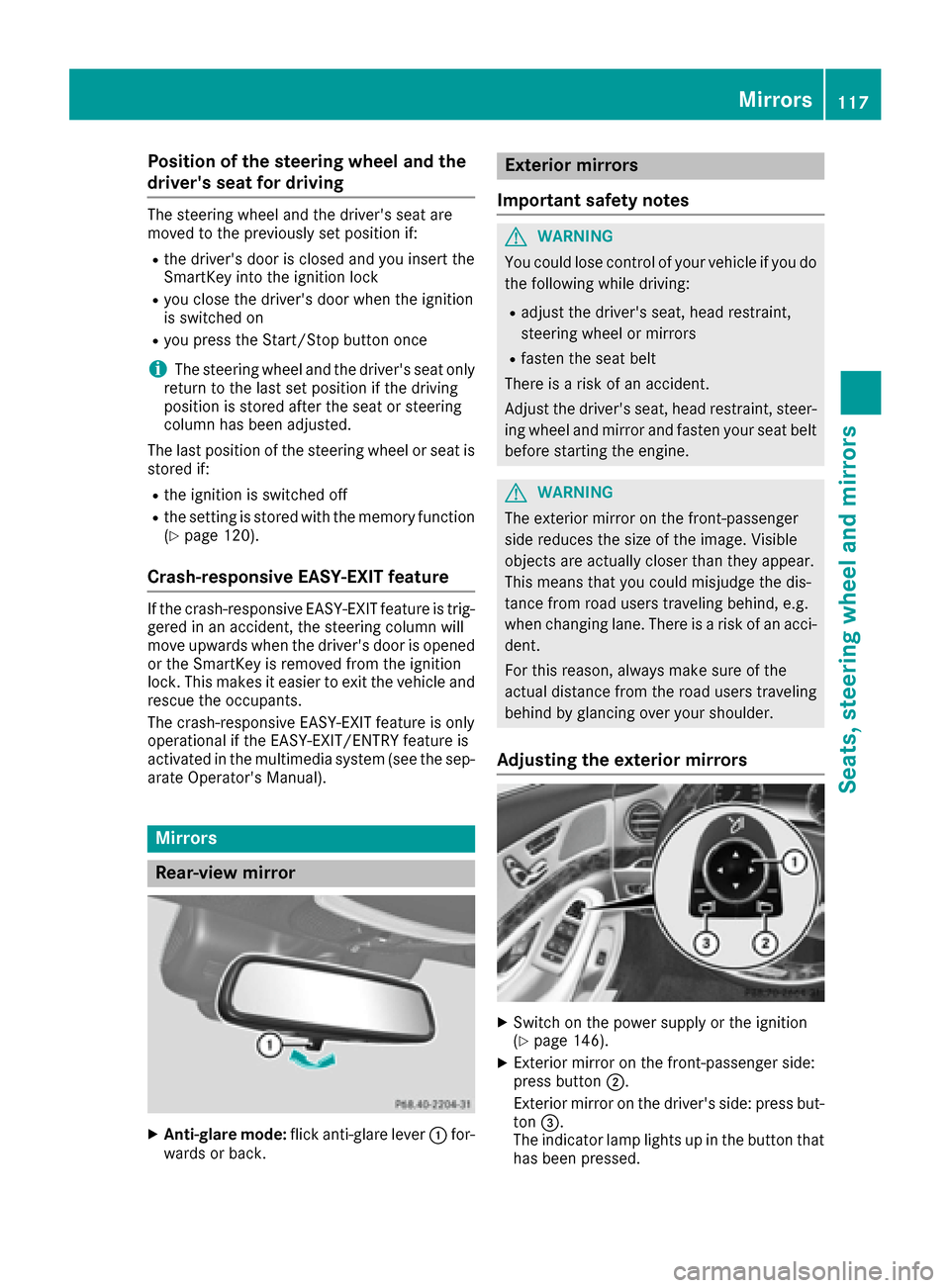
Rear-view mirror
XAnti-glare mode: flick anti-glare lever :for-
wards or back.
Exterior mirrors
Important safety notes
GWARNING
You could lose control of your vehicle if you do the following while driving:
Radjust the driver's seat, head restraint,
steering wheel or mirrors
Rfasten the seat belt
There is a risk of an accident.
Adjust the driver's seat, head restraint, steer-
ing wheel and mirror and fasten your seat belt before starting the engine.
GWARNING
The exterior mirror on the front-passenger
side reduces the size of the image. Visible
objects are actually closer than they appear.
This means that you could misjudge the dis-
tance from road users traveling behind, e.g.
when changing lane. There is a risk of an acci-
dent.
For this reason, always make sure of the
actual distance from the road users traveling
behind by glancing over your shoulder.
Adjusting the exterior mirrors
XSwitch on the power supply or the ignition
(Ypage 146).
XExterior mirror on the front-passenger side:
press button ;.
Exterior mirror on the driver's side: press but-
ton =.
The indicator lamp lights up in the button that
has been pressed.
Mirrors117
Seats, steering wheel and mirrors
Z
Page 120 of 382
The indicator lamp goes out again after some
time. You can adjust the selected exterior
mirror using button:as long as the indicator
lamp is lit.
XPress button :up, down, or to the left or
right until you have adjusted the exterior mir- ror to the correct position. You should have a
good overview of traffic conditions.
The convex exterior mirrors provide a larger field of vision.
After the engine has been started, the exterior
mirrors are automatically heated if the rear win-
dow defroster is switched on and the outside
temperature is low.
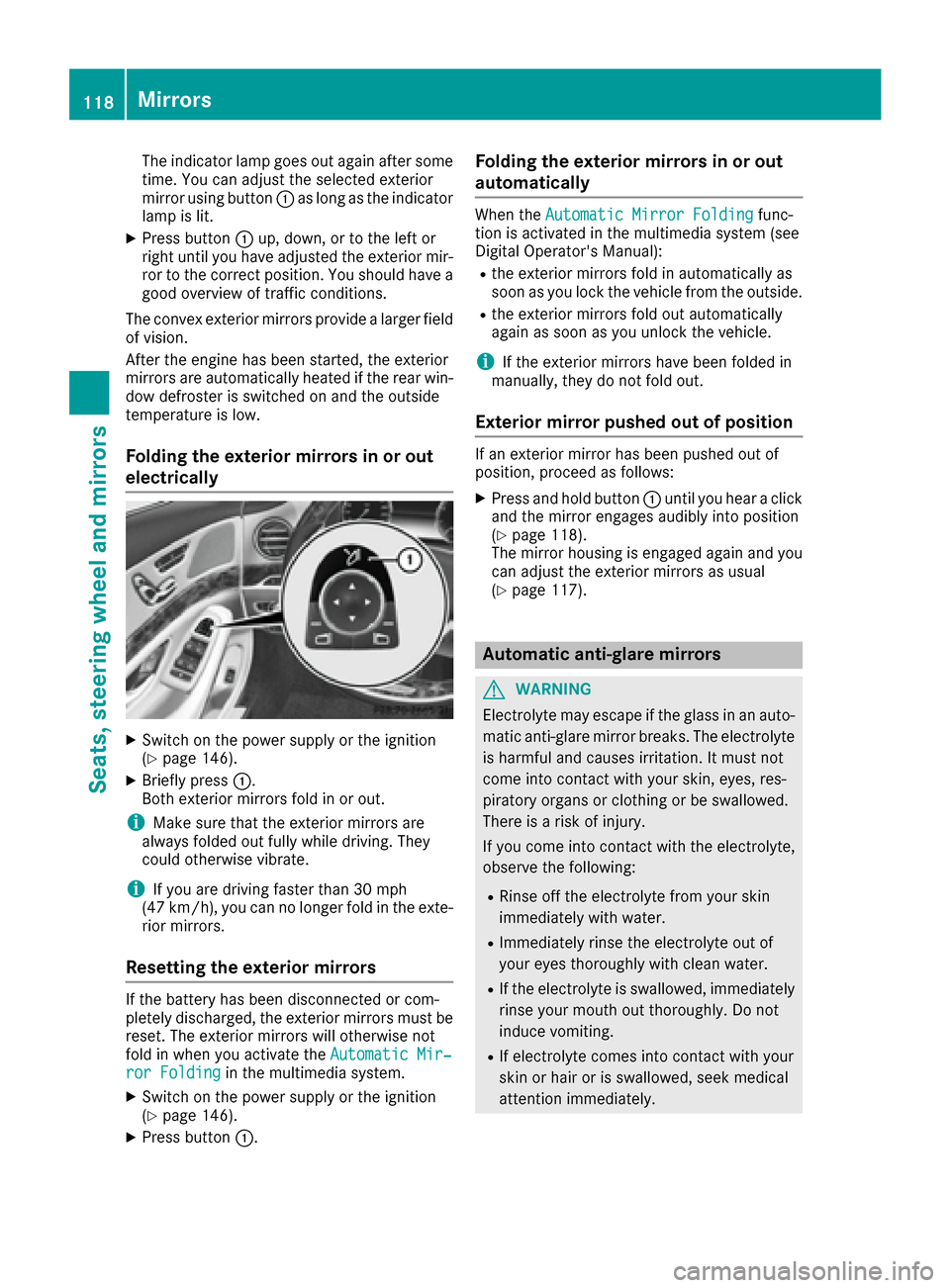
Folding the exterior mirrors in or out
electrically
XSwitch on the power supply or the ignition
(Ypage 146).
XBriefly press :.
Both exterior mirrors fold in or out.
iMake sure that the exterior mirrors are
always folded out fully while driving. They
could otherwise vibrate.
iIf you are driving faster than 30 mph
(47 km/h), you can no longer fold in the exte-
rior mirrors.
Resetting the exterior mirrors
If the battery has been disconnected or com-
pletely discharged, the exterior mirrors must be
reset. The exterior mirrors will otherwise not
fold in when you activate the Automatic Mir‐
ror Foldingin the multimedia system.
XSwitch on the power supply or the ignition
(Ypage 146).
XPress button:.
Folding the exterior mirrors in or out
automatically
When theAutomatic Mirror Foldingfunc-
tion is activated in the multimedia system (see
Digital Operator's Manual):
Rthe exterior mirrors fold in automatically as
soon as you lock the vehicle from the outside.
Rthe exterior mirrors fold out automatically
again as soon as you unlock the vehicle.
iIf the exterior mirrors have been folded in
manually, they do not fold out.
Exterior mirror pushed out of position
If an exterior mirror has been pushed out of
position, proceed as follows:
XPress and hold button :until you hear a click
and the mirror engages audibly into position
(
Ypage 118).
The mirror housing is engaged again and you
can adjust the exterior mirrors as usual
(
Ypage 117).
Automatic anti-glare mirrors
GWARNING
Electrolyte may escape if the glass in an auto-
matic anti-glare mirror breaks. The electrolyte
is harmful and causes irritation. It must not
come into contact with your skin, eyes, res-
piratory organs or clothing or be swallowed.
There is a risk of injury.
If you come into contact with the electrolyte,
observe the following:
RRinse off the electrolyte from your skin
immediately with water.
RImmediately rinse the electrolyte out of
your eyes thoroughly with clean water.
RIf the electrolyte is swallowed, immediately
rinse your mouth out thoroughly. Do not
induce vomiting.
RIf electrolyte comes into contact with your
skin or hair or is swallowed, seek medical
attention immediately.
118Mirrors
Seats, steering wheel and mirrors
Page 130 of 382
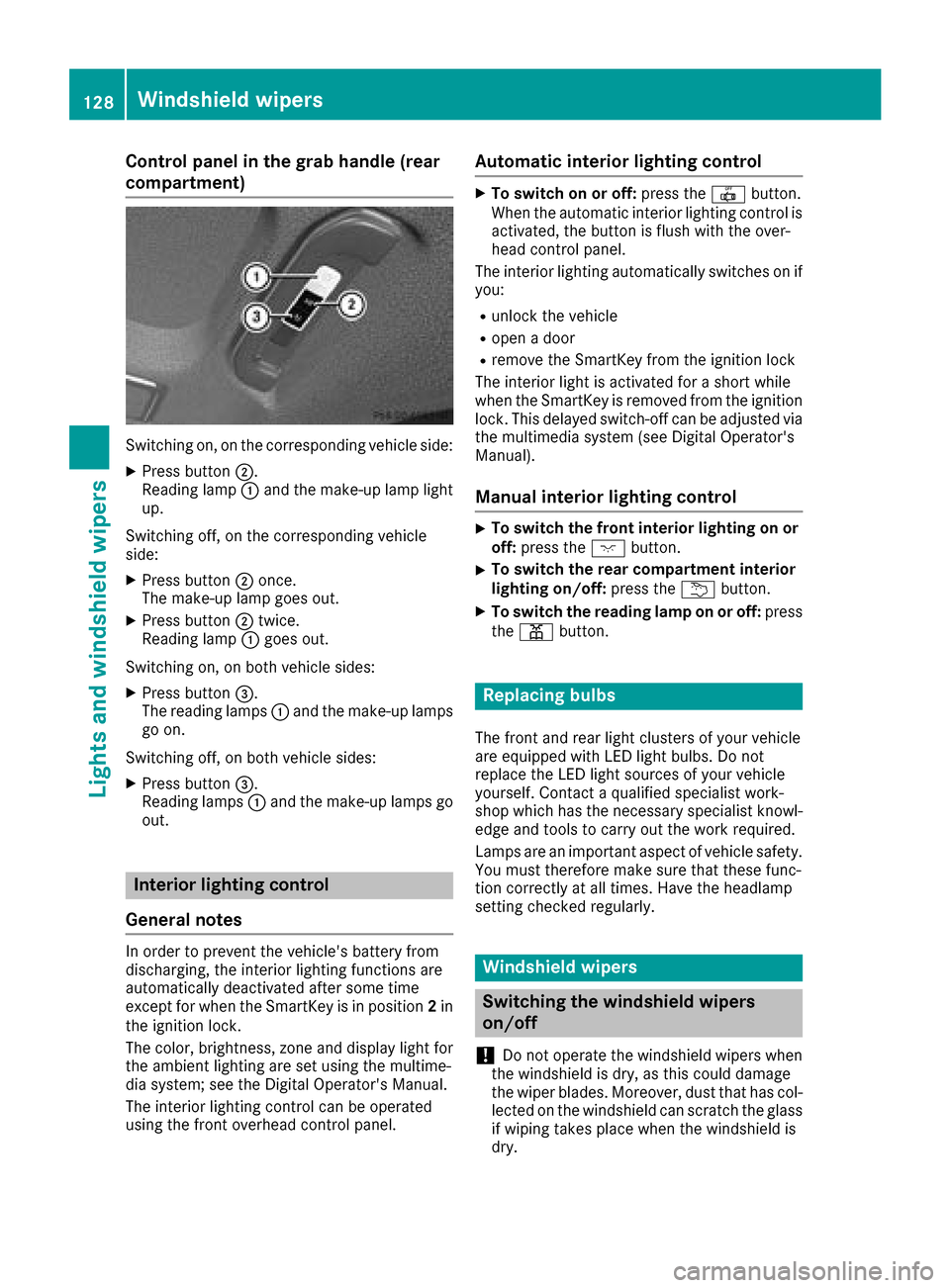
Control panel in the grab handle (rear
compartment)
Switching on, on the corresponding vehicle side:
XPress button;.
Reading lamp :and the make-up lamp light
up.
Switching off, on the corresponding vehicle
side:
XPress button ;once.
The make-up lamp goes out.
XPress button ;twice.
Reading lamp :goes out.
Switching on, on both vehicle sides:
XPress button =.
The reading lamps :and the make-up lamps
go on.
Switching off, on both vehicle sides:
XPress button =.
Reading lamps :and the make-up lamps go
out.
Interior lighting control
General notes
In order to prevent the vehicle's battery from
discharging, the interior lighting functions are
automatically deactivated after some time
except for when the SmartKey is in position 2in
the ignition lock.
The color, brightness, zone and display light for
the ambient lighting are set using the multime-
dia system; see the Digital Operator's Manual.
The interior lighting control can be operated
using the front overhead control panel.
Automatic interior lighting control
XTo switch on or off: press the|button.
When the automatic interior lighting control is
activated, the button is flush with the over-
head control panel.
The interior lighting automatically switches on if
you:
Runlock the vehicle
Ropen a door
Rremove the SmartKey from the ignition lock
The interior light is activated for a short while
when the SmartKey is removed from the ignition
lock. This delayed switch-off can be adjusted via
the multimedia system (see Digital Operator's
Manual).
Manual interior lighting control
XTo switch the front interior lighting on or off: press the cbutton.
XTo switch the rear compartment interior
lighting on/off: press theubutton.
XTo switch the reading lamp on or off: press
the p button.
Replacing bulbs
The front and rear light clusters of your vehicle
are equipped with LED light bulbs. Do not
replace the LED light sources of your vehicle
yourself. Contact a qualified specialist work-
shop which has the necessary specialist knowl-
edge and tools to carry out the work required.
Lamps are an important aspect of vehicle safety.
You must therefore make sure that these func-
tion correctly at all times. Have the headlamp
setting checked regularly.
Windshield wipers
Switching the windshield wipers
on/off
!
Do not operate the windshield wipers when
the windshield is dry, as this could damage
the wiper blades. Moreover, dust that has col-
lected on the windshield can scratch the glass
if wiping takes place when the windshield is
dry.
128Windshield wipers
Lights and windshield wipers
Page 135 of 382
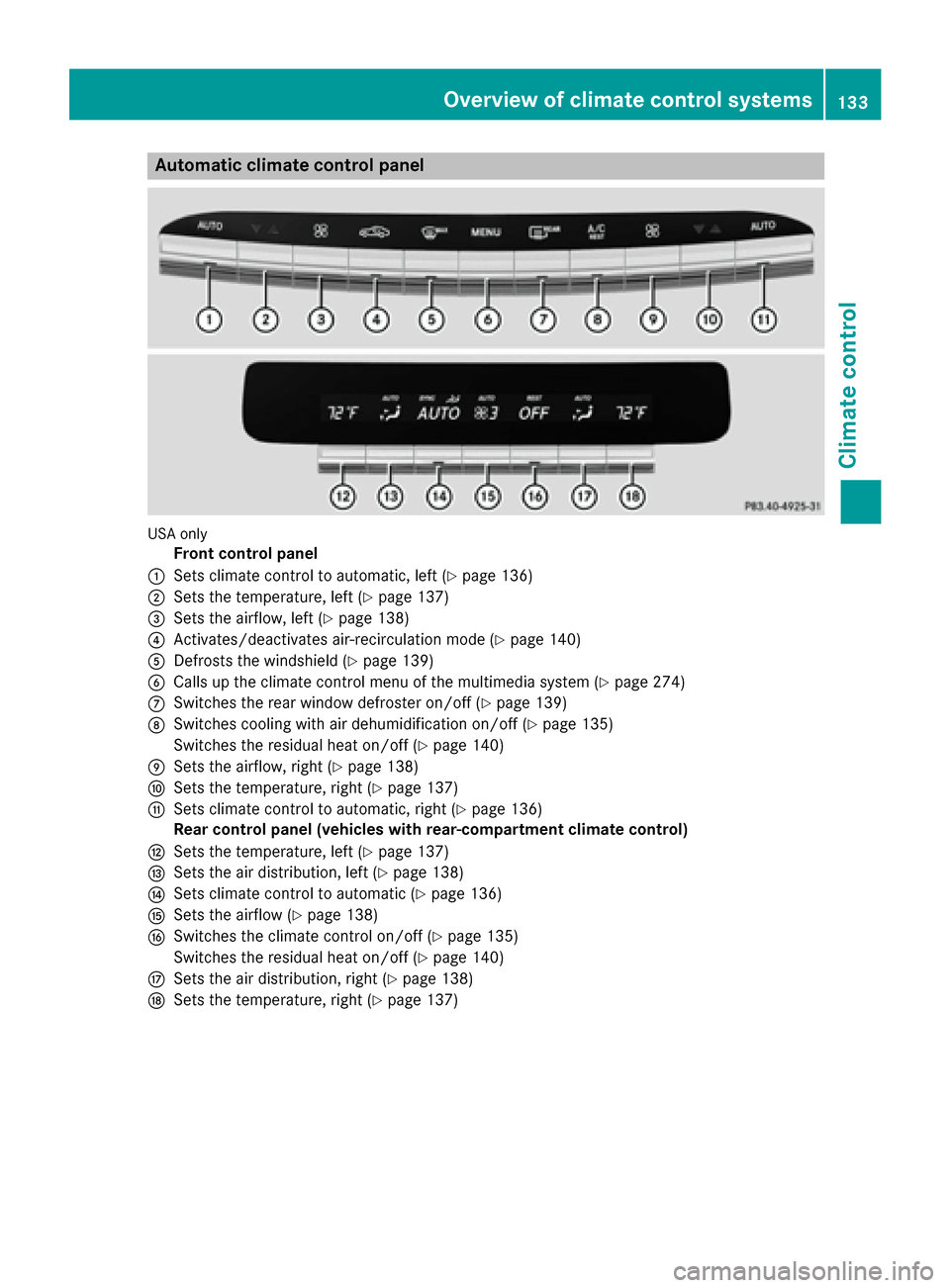
Automa tic climate control panel
USAonly
Front control panel
:Sets climat econtrol to automatic, lef t (Ypage 136)
;Sets thetemperature, lef t (Ypage 137)
=Sets theairflow, lef t (Ypage 138)
?Activates/deactivates air-recirculation mod e (Ypage 140)
ADefroststh ewindshield (Ypage 139)
BCalls up theclimat econtrol men uof th emultimedia system (Ypage 274)
CSwitches therear window defroste ron/off (Ypage 139)
DSwitches coolin gwit hair dehumidification on/off (Ypage 135)
Switches th eresidual heat on/off (
Ypage 140)
ESets theairflow, right (Ypage 138)
FSets thetemperature, right (Ypage 137)
GSets climatecontrol to automatic, right (Ypage 136)
Rea rcontrol panel (vehicles wit hrear-compartmen tclimat econtrol )
HSets thetemperature, lef t (Ypage 137)
ISets theair distribution ,lef t (Ypage 138)
JSets climat econtrol to automatic (Ypage 136)
KSets theairflow (Ypage 138)
LSwitches th eclimat econtrol on/off (Ypage 135)
Switches th eresidual heat on/off (
Ypage 140)
MSets theair distribution ,right (Ypage 138)
NSets th etemperature, right (Ypage 137)
Overview of climate control systems133
Climate control
Page 136 of 382
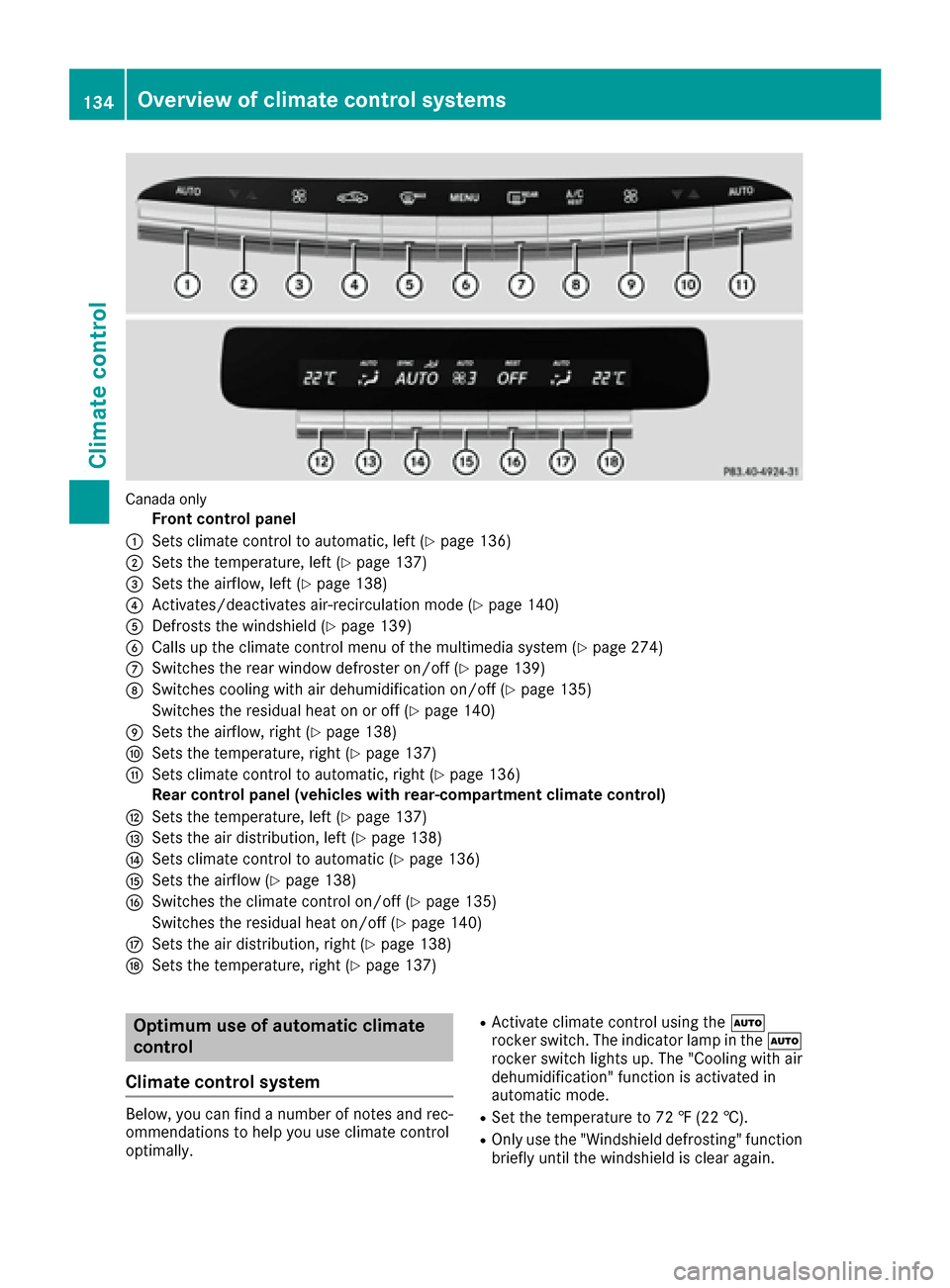
Canada only
Front control panel
:Sets climate control to automatic, left (Ypage 136)
;Sets the temperature, left (Ypage 137)
=Sets the airflow, left (Ypage 138)
?Activates/deactivates air-recirculation mode (Ypage 140)
ADefrosts the windshield (Ypage 139)
BCalls up the climate control menu of the multimedia system (Ypage 274)
CSwitches the rear window defroster on/off (Ypage 139)
DSwitches cooling with air dehumidification on/off (Ypage 135)
Switches the residual heat on or off (
Ypage 140)
ESets the airflow, right (Ypage 138)
FSets the temperature, right (Ypage 137)
GSets climate control to automatic, right (Ypage 136)
Rear control panel (vehicles with rear-compartment climate control)
HSets the temperature, left (Ypage 137)
ISets the air distribution, left (Ypage 138)
JSets climate control to automatic (Ypage 136)
KSets the airflow (Ypage 138)
LSwitches the climate control on/off (Ypage 135)
Switches the residual heat on/off (
Ypage 140)
MSets the air distribution, right (Ypage 138)
NSets the temperature, right (Ypage 137)
Optimum use of automatic climate
control
Climate control system
Below, you can find a number of notes and rec-
ommendations to help you use climate control
optimally.
RActivate climate control using the Ã
rocker switch. The indicator lamp in the Ã
rocker switch lights up. The "Cooling with air
dehumidification" function is activated in
automatic mode.
RSet the temperature to 72 ‡ (22 †).
ROnly use the "Windshield defrosting" function
briefly until the windshield is clear again.
134Overview of climate control systems
Climate control
Page 137 of 382
ROnly use air-recirculation mode briefly, e.g. if
there are unpleasant outside odors or when in
a tunnel. The windows could otherwise fog up,
since no fresh air is drawn into the vehicle in
air-recirculation mode.
RUse the residual heat function if you want to
heat or ventilate the vehicle interior when the
ignition is switched off. The residual heat
function can only be activated or deactivated
with the ignition switched off. The residual
heat function is switched off when the ignitionis switched on.
If you are controlling the rear-compartment cli-
mate control using the front control panel, note
the following:
RThe Y symbol appears in the rear-com-
partment display.
ROperation from the rear control panel is not
possible. After completing the settings for the
rear-compartment climate control using the
front control panel, wait five seconds. You will then be able to control the rear climate con-
trol using the rear control panel.
RAfter selecting the rear compartment set-
tings, the front climate control can be con-
trolled automatically again via the multimedia
system after five seconds.
Alternatively, you can select "Cancel rear
compartment" in the air-conditioning function
bar of the multimedia system.
ECO start/stop function
During automatic engine switch-off, the climate
control system only operates at a reduced capa-
city. If you require the full climate control output,
you can switch off the ECO start/stop function
by pressing the ECO button (
Ypage 150).
Operating the climate control sys-
tems
Activating/deactivating climate con-
trol
General notes
When the climate control is switched off, the air
supply and air circulation are also switched off.
The windows could fog up. Therefore, switch off
climate control only briefly Switch on climate control primarily using the
Ã
rocker switch (
Ypage 136).
Activating/deactivating front climate
control using the front control panel
XTurn the SmartKey to position 2in the ignition
lock (Ypage 145).
XTo switch on: set the airflow to level 1 or
higher using the Krocker switch.
XTo switch off: set the airflow to level 0 using
the K rocker switch.
Activating/deactivating rear-compart-
ment climate control using the rear con-
trol panel
XTurn the SmartKey to position 2in the ignition
lock (Ypage 145).
XTo activate: press rocker switch Lup or
down (Ypage 133).
The indicator lamp in rocker switch Lgoes
out. All settings are displayed in full in the
rear-compartment display.
XTo deactivate: press rocker switch Lup or
down (Ypage 133).
The indicator lamp in rocker switch Llights
up. OFF is displayed in the rear-compartment
display.
Switching cooling with air dehumidi-
fication on/off
General notes
If you deactivate the "Cooling with air-dehumid-
ification" function, the air inside the vehicle will
not be cooled. The air inside the vehicle will also
not be dehumidified. The windows can fog up
more quickly. Therefore, only deactivate the
"Cooling with air-dehumidification" function
briefly.
The "Cooling with air dehumidification" function is only available when the engine is running. The
air inside the vehicle is cooled and dehumidified
according to the temperature selected.
Condensation may drip from the underside of
the vehicle when it is in cooling mode. This is
normal and not a sign that there is a malfunc-
tion.
Operating the climate control systems135
Climate control