2017 MERCEDES-BENZ S-Class MAYBACH engine
[x] Cancel search: enginePage 174 of 382

Continue todrive carefully and beready to
brake, inparticular when warned to dosoby
DI ST RONIC PLU S.
GWARNING
DI ST RONIC PLUS brakes your veh icle with up
to 50 %of the maximum possible deceleration.
If this braking force is insufficient, DISTRONIC
PLUS warns you visually and audibly. There is a risk of an accident.
In such cases, apply the brakes yourself and
try to take evasive action.
!When DISTRONIC PLUS or the HOLD func-
tion is activated, the vehicle brakes automat-
ically in certain situations.
To avoid damage to the vehicle, deactivate
DISTRONIC PLUS and the HOLD function in
the following or similar situations:
Rwhen towing the vehicle
Rin the car wash
DISTRONIC PLUS can neither reduce the risk of
an accident if you fail to adapt your driving style
nor override the laws of physics. DISTRONIC
PLUS cannot take account of road, weather and traffic conditions. DISTRONIC PLUS is only an
aid. You are responsible for maintaining a safe
distance to the vehicle in front, for vehicle
speed, for braking in good time and for staying in
lane.
Do not use DISTRONIC PLUS:
Rin road and traffic conditions which do not
allow you to maintain a constant speed, e.g. in
heavy traffic or on winding roads
Ron slippery road surfaces. Braking or accel-
erating could cause the drive wheels to lose
traction and the vehicle could then skid
Rwhen there is poor visibility, e.g. due to fog,
heavy rain or snow
DISTRONIC PLUS may not detect narrow vehi-
cles driving in front, e.g. motorcycles, or vehi-
cles driving on a different line.
In particular, the detection of obstacles can be
impaired if:
Rthere is dirt on the sensors or anything else
covering the sensors
Rthere is snow or heavy rain
Rthere is interference by other radar sources
Rthere are strong radar reflections, for exam-
ple, in parking garages
If DISTR
ONIC PLUS no longer detects a vehicle
in front, DISTRONIC PLUS may unexpectedly
accelerate the vehicle to the stored speed.
This speed may:
Rbe too high if you are driving in a filter lane or an exit lane
Rbe so high in the right lane that you pass vehi-cles driving on the left (left-hand drive coun-
tries)
Rbe so high in the left lane that you pass vehi-
cles driving on the right (right-hand drive
countries)
If there is a change of drivers, advise the new
driver of the speed stored.
Cruise control lever
:Activates or increases speed
;Activates or reduces speed
=Deactivates DISTRONIC PLUS
?Activates at the current speed/last stored
speed
ASets a specified minimum distance
Activating DISTRONIC PLUS
Activation conditions
To activate DISTRONIC PLUS, the following con-
ditions must be fulfilled:
Rthe engine must be started. It may take up to two minutes after pulling away before
DISTRONIC PLUS is operational.
Rthe electric parking brake must be released.
RESP®must be activated, but not intervening
at present.
RActive Parking Assist must not be activated.
172Driving systems
Driving and parking
Page 176 of 382
gram, the vehicle accelerates more gently. This
setting is recommended in stop-and-start traf-
fic.
Mercedes-AMG vehicles:DISTRONIC PLUS
supports a sporty driving style when you select
the Sor Mdrive program (
Ypage 155). Accel-
eration behind the vehicle in front or to the set
speed is then noticeably more dynamic. When
you select the Cdrive program, the vehicle
accelerates more gently. This setting is recom-
mended in stop-and-start traffic.
Changing lanes
DISTRONIC PLUS aids you when switching to
the overtaking lane, if:
Ryou are driving faster than 45 mph (70 km/h)
Ryou switch on the appropriate turn signal
RDISTRONIC PLUS does not detect a danger of
a collision
If these conditions are fulfilled, your vehicle is
accelerated. Acceleration will be interrupted if
changing lanes takes too long or if the distance
between your vehicle and the vehicle in front
becomes too small.
When you change lanes, DISTRONIC PLUS mon-
itors the left lane (on left-hand-drive vehicles) or the right lane (on right-hand-drive vehicles).
Stopping
GWARNING
When leaving the vehicle, even if it is braked
only by DISTRONIC PLUS, it could roll away if:
Rthere is a malfunction in the system or in
the voltage supply.
RDISTRONIC PLUS has been deactivated
with the cruise control lever, e.g. by a vehi-
cle occupant or from outside the vehicle.
Rthe electrical system in the engine com-
partment, the battery or the fuses have
been tampered with.
Rthe battery is disconnected.
Rthe accelerator pedal has been depressed, e.g. by a vehicle occupant.
There is a risk of an accident.
If you wish to exit the vehicle, always turn off
DISTRONIC PLUS and secure the vehicle
against rolling away. For further information on deactivating
DISTRONIC PLUS (
Ypage 176).
If DISTRONIC PLUS detects that the vehicle in
front has stopped, it will cause your vehicle to
brake and come to a halt.
Once your vehicle is stationary, it remains sta-
tionary and you do not need to depress the
brake.
After a time, the electric parking brake secures
the vehicle and relieves the service brake.
Depending on the specified minimum distance,
your vehicle will come to a standstill at a suffi-
cient distance behind the vehicle in front. The
specified minimum distance is set using the
control on the cruise control lever.
When DISTRONIC PLUS is activated, the trans-
mission is shifted automatically to position Pif:
Rthe driver's seat belt is not fastened and the
driver's door is open.
Rthe engine is switched off, unless it is auto-
matically switched off by the ECO start/stop
function.
The electric parking brake secures the vehicle
automatically if DISTRONIC PLUS is activated
when the vehicle is stationary and:
Ra system malfunction occurs.
Rthe power supply is not sufficient.
If a malfunction occurs, the transmission may
also shift into position Pautomatically.
Setting a speed
XPush the cruise control lever upwards :for a
higher speed or down ;for a lower speed.
XTo adjust the set speed in1 mphincre-
ments (1 km/hincrements): briefly push
the cruise control lever up :or down ;to
the pressure point.
Every time the cruise control lever is pressed
up : or down ;the last speed stored is
increased or reduced.
XTo adjust the set speed in5 mphincre-
ments (10 km/hincrements): briefly push
the cruise control lever up :or down ;
beyond the pressure point.
Every time the cruise control lever is pressed
up : or down ;, the last speed stored is
increased or reduced.
iIf you accelerate to overtake, DISTRONIC
PLUS adjusts the vehicle's speed back to the
174Driving systems
Driving and parking
Page 178 of 382
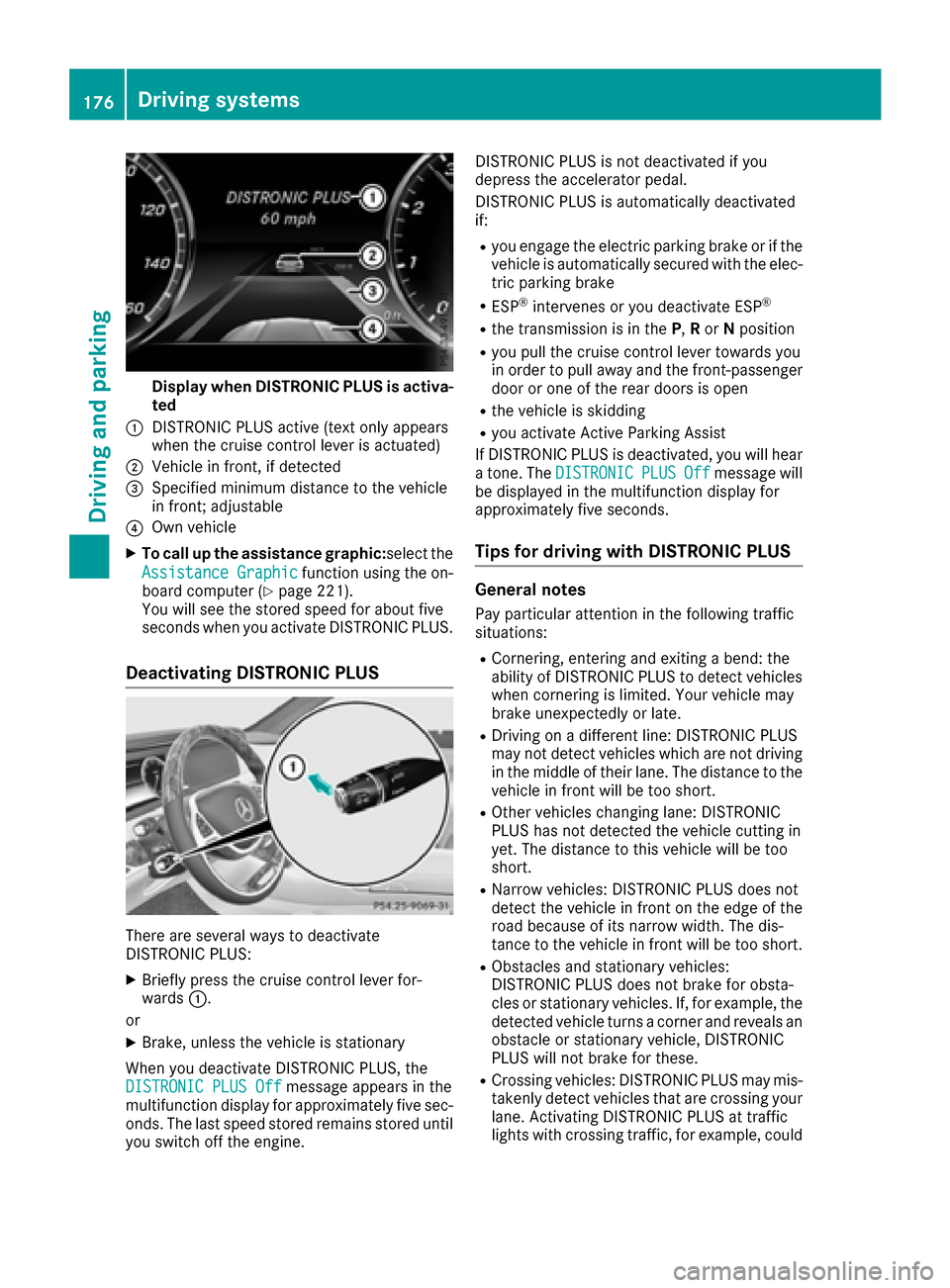
Display when DISTRONIC PLUS is activa-
ted
:DISTRONI CPLU Sactive (tex tonly appear s
when th ecruise control lever is actuated)
;Vehicl ein front, if detecte d
=Specifiedminimum distanc eto th evehicl e
in front; adjustable
?Own vehicl e
XTo call up th eassistanc egraphic:s electth e
Assistanc eGraphi c
function usin gth eon -
boar dcomputer (Ypage 221).
You will see th estore dspeed for about fiv e
seconds when you activat eDISTRONI CPLUS.
Deactivating DISTRONIC PLUS
There are several ways to deactivat e
DISTRONI CPLUS:
XBriefly press th ecruise control lever for -
ward s:.
or
XBrake ,unless th evehicl eis stationary
Whe nyou deactivat eDISTRONI CPLUS, th e
DISTRONIC PLU SOff
message appear sin th e
multifunction display for approximately fiv esec -
onds. The last speed store dremain sstore duntil
you switch off th eengine. DISTRONI
CPLU Sis no tdeactivated if you
depress th eaccelerato rpedal .
DISTRONI CPLU Sis automatically deactivated
if:
Ryou engage th eelectric parking brak eor if th e
vehicl eis automatically secured wit hth eelec -
tric parking brak e
RESP®intervenes or you deactivat eES P®
Rthetransmission is in th eP, Ror Nposition
Ryou pull th ecruise control lever toward syou
in order to pull away and th efront-passenger
door or on eof th erear door sis open
Rth evehicl eis skiddin g
Ryou activat eActive Parking Assis t
If DISTRONI CPLU Sis deactivated, you will hear
a tone .The DISTRONIC
PLUSOffmessage will
be displayed in th emultifunction display for
approximately fiv eseconds.
Tips for driving with DISTRONIC PLUS
Genera lnotes
Pay particular attention in th efollowin gtraffic
situations:
RCornering ,enterin gand exiting abend: th e
abilit yof DISTRONI CPLU Sto detec tvehicles
when cornering is limited. Your vehicl emay
brak eunexpectedly or late.
RDrivin gon adifferen tline: DISTRONI CPLU S
may no tdetec tvehicles whic hare no tdrivin g
in th emiddle of their lane. The distanc eto th e
vehicl ein fron twill be to oshort .
ROther vehicles changing lane: DISTRONI C
PLU Shas no tdetecte dth evehicl ecutting in
yet .The distanc eto this vehicl ewill be to o
short .
RNarrow vehicles: DISTRONI CPLU Sdoes no t
detec tth evehicl ein fron ton th eedge of th e
roa dbecause of it snarrow width. The dis-
tance to th evehicl ein fron twill be to oshort .
RObstacles and stationary vehicles:
DISTRONI CPLU Sdoes no tbrak efor obsta-
cle sor stationary vehicles. If ,for example, th e
detecte dvehicl eturns acorner and reveals an
obstacle or stationary vehicle, DISTRONI C
PLU Swill no tbrak efor these .
RCrossingvehicles: DISTRONI CPLU Smay mis -
takenly detec tvehicles that are crossing your
lane. Activating DISTRONI CPLU Sat tra
ffic
lights wit hcrossing traffic, for example, could
176Driving systems
Driving and parking
Page 182 of 382
The electric parking brake secures the vehicle
automatically if the HOLD function is activated
when the vehicle is stationary and:
Ra system malfunction occurs.
Rthe power supply is not sufficient.
If a malfunction in the electric parking brake
occurs, then the transmission may also be shif-
ted into position Pautomatically.
MAGIC BODY CONTROL
General notes
MAGIC BODY CONTROL consists of Active Body
Control (ABC), ROAD SURFACE SCAN as well as
automatic vehicle stabilization in the event of a
crosswind.
Your vehicle automatically adjusts its ride height
to improve driving safety and reduce fuel con-
sumption. The suspension mode is adjusted
according to your selection (sports or comfort),
the road surface conditions and the vehicle load. A multifunction camera detects bumps in the
road surface before the vehicle drives over
them. This reduces chassis movements.
Important safety notes
GWARNING
When the vehicle is being lowered, people
could become trapped if their limbs are
between the vehicle body and the wheels or
underneath the vehicle. There is a risk of
injury.
Make sure no one is underneath the vehicle or
in the immediate vicinity of the wheel arches
when the vehicle is being lowered.
!The vehicle is lowered when the engine is
switched off. When parking, position your
vehicle so that it does not make contact with
the curb as the vehicle is lowered. Your vehi-
cle could otherwise be damaged.
Crosswind Assist
The crosswind stabilization operates by chang-
ing wheel loads through adjusting the ABC
spring struts. It reduces impairments in handling
when driving in a straight line and assists during
countersteering. Crosswind Assist is active in the speed range
between 50 mph (80 km/h)
and
130 mph (210 km/h) when driving straight
ahead or cornering gently.
Active Body Control ABC
Vehicle level
Mercedes-AMG vehicles: depending on the
vehicle level that has been selected, the vehicle
automatically adjusts its height dependent on
the current speed. The vehicle is lowered by up
to 0.4 in (10 mm) below the normal level as the
speed increases. As the speed is reduced, the
vehicle is raised up to the set vehicle height.
All other models: depending on the vehicle
level that has been set, the vehicle automatically
adjusts its height dependent on the current
speed. The vehicle is lowered by up to 0.6 in
(15 mm) as the speed increases. As the speed is
reduced, the vehicle is raised up to the set vehi-
cle height.
Select the "Normal" setting for normal road con-
ditions and "Raised" for driving with snow chains
or in particularly poor road conditions.
Setting the vehicle level
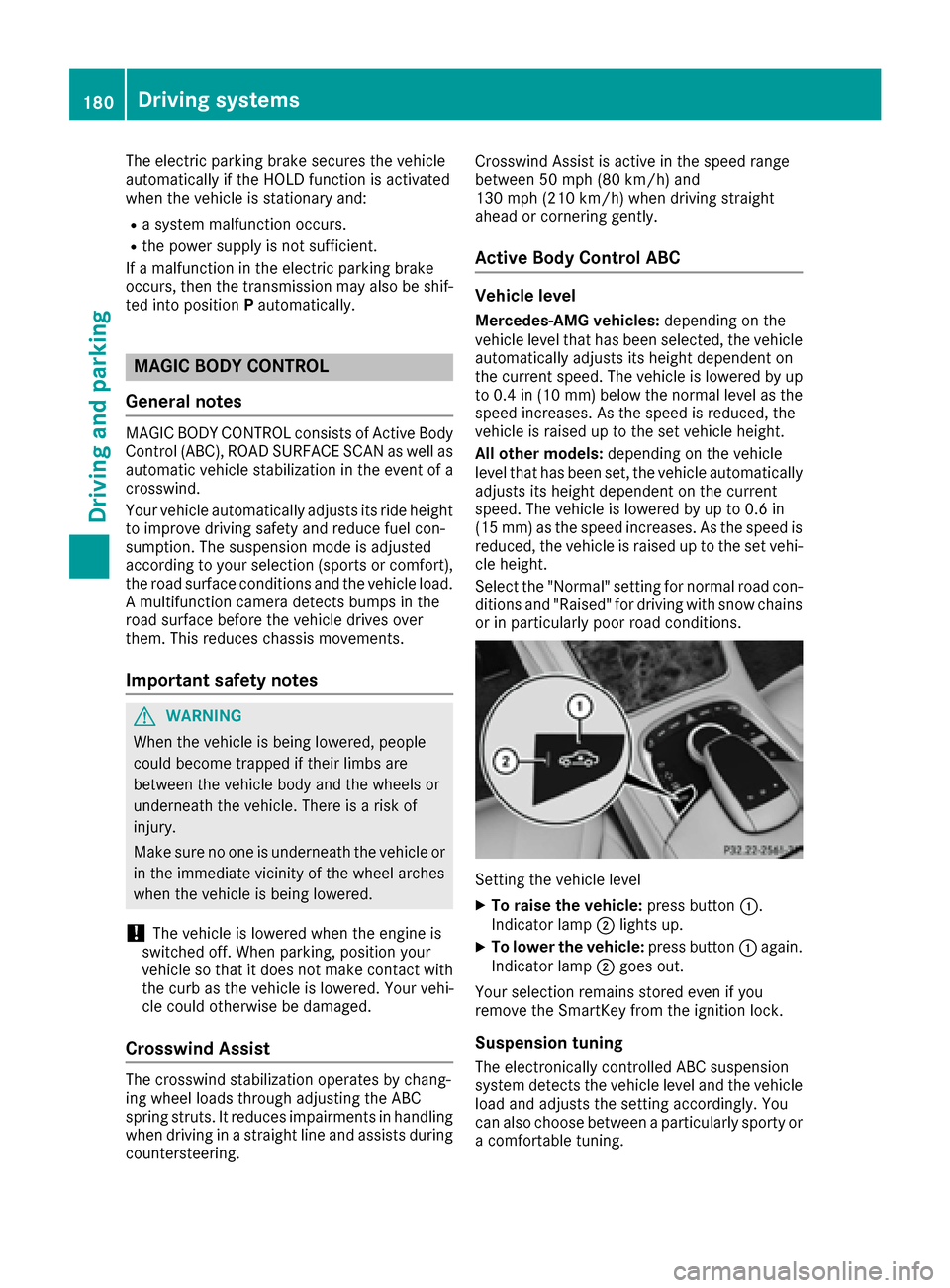
XTo raise the vehicle: press button:.
Indicator lamp ;lights up.
XTo lower the vehicle: press button:again.
Indicator lamp ;goes out.
Your selection remains stored even if you
remove the SmartKey from the ignition lock.
Suspension tuning
The electronically controlled ABC suspension
system detects the vehicle level and the vehicle
load and adjusts the setting accordingly. You
can also choose between a particularly sporty or
a comfortable tuning.
180Driving systems
Driving and parking
Page 184 of 382
Rsections of the route have a very small radius
of curvature
Rif you accelerate hard or brake sharply
AIRMATIC
General notes
AIRMATIC is an air suspension with variable
damping for improved driving comfort. All-round
level control ensures the best possible suspen-
sion and constant ground clearance, even with a
laden vehicle. When you drive fast, the vehicle is
lowered automatically to improve driving safety
and to reduce fuel consumption. There is also
the option to manually adjust the vehicle level.
AIRMATIC consists of level setting, level control
and the Adaptive Damping System ADS PLUS.
Important safety notes
GWARNING
When the vehicle is being lowered, people
could become trapped if their limbs are
between the vehicle body and the wheels or
underneath the vehicle. There is a risk of
injury.
Make sure no one is underneath the vehicle or
in the immediate vicinity of the wheel arches
when the vehicle is being lowered.
Vehicle level
Setting the raised vehicle level
It is possible to choose between the "Normal"
and "Raised" vehicle levels. Select the "Normal"
setting for normal road surfaces and "Raised"
for driving with snow chains or on particularly poor road surfaces. Your selection remains
stored even if you remove the SmartKey from
the ignition lock.
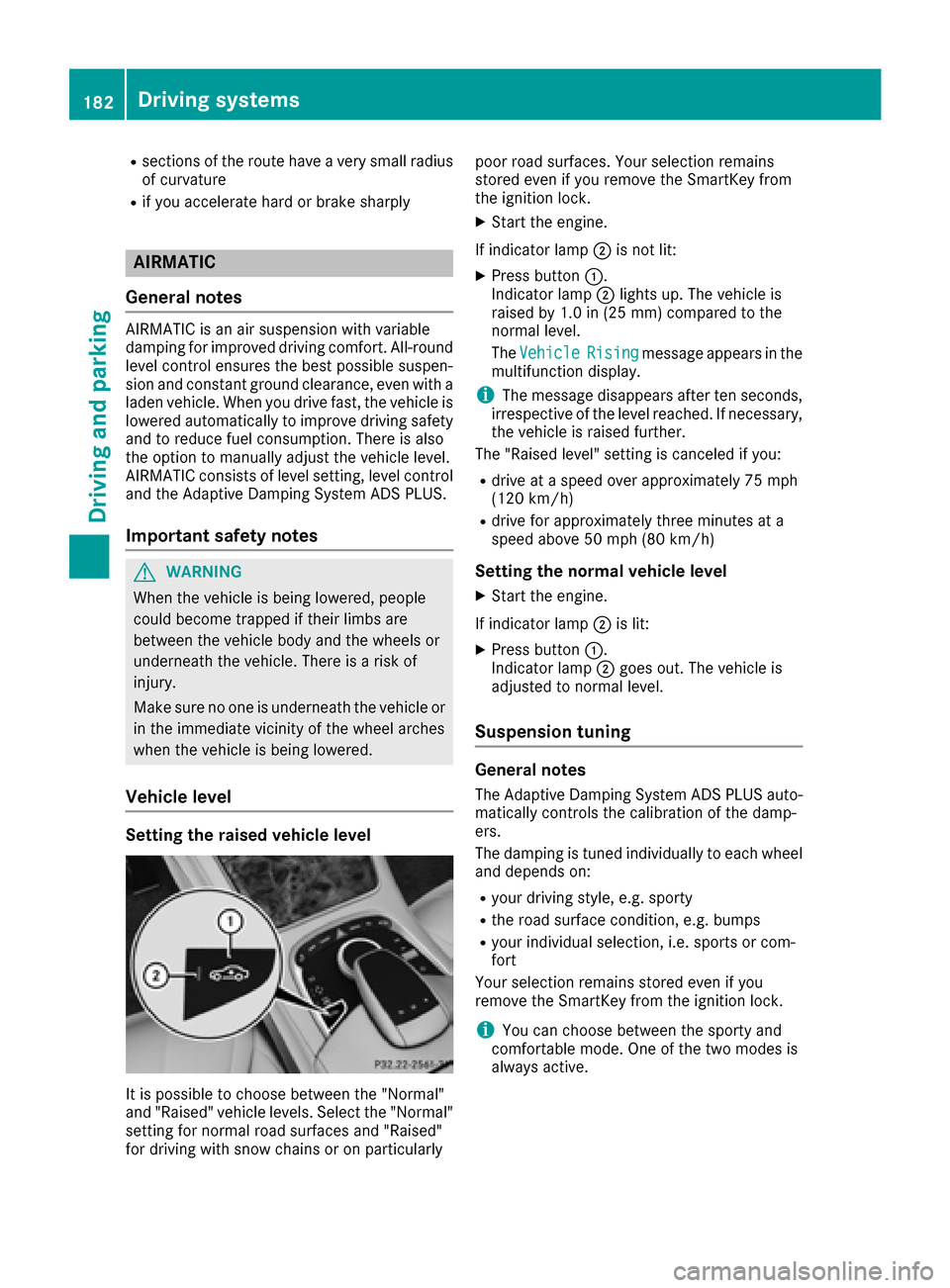
XStart the engine.
If indicator lamp ;is not lit:
XPress button :.
Indicator lamp ;lights up. The vehicle is
raised by 1.0 in (25 mm) compared to the
normal level.
The Vehicle
Risingmessage appears in the
multifunction display.
iThe message disappears after ten seconds,
irrespective of the level reached. If necessary,
the vehicle is raised further.
The "Raised level" setting is canceled if you:
Rdrive at a speed over approximately 75 mph
(120 km/h)
Rdrive for approximately three minutes at a
speed above 50 mph (80 km/h)
Setting the normal vehicle level
XStart the engine.
If indicator lamp ;is lit:
XPress button :.
Indicator lamp ;goes out. The vehicle is
adjusted to normal level.
Suspension tuning
General notes
The Adaptive Damping System ADS PLUS auto-
matically controls the calibration of the damp-
ers.
The damping is tuned individually to each wheel
and depends on:
Ryour driving style, e.g. sporty
Rthe road surface condition, e.g. bumps
Ryour individual selection, i.e. sports or com-
fort
Your selection remains stored even if you
remove the SmartKey from the ignition lock.
iYou can choose between the sporty and
comfortable mode. One of the two modes is
always active.
182Driving systems
Driving and parking
Page 187 of 382

the sensors regularly, taking care not to scratch
or damage them (Ypage 323).
Minimum distance
CenterApprox. 8 in (approx. 20 cm)
CornersApprox. 6 in (approx. 15 cm)
If there is an obstacle within this range, the rel-
evant warning displays light up and a warning
tone sounds. If the distance falls below the min-
imum, the distance may no longer be shown.
Warning displays
:Segments on the left-hand side of the vehi-
cle
;Segments on the right-hand side of the vehi-
cle
=Segments showing operational readiness
The warning displays show the distance
between the sensors and the obstacle. The
warning display for the front area is in the instru-
ment cluster. The warning display for the rear
area is located on the headliner in the rear com- partment.
The warning display for each side of the vehicle
is divided into five yellow and two red segments.
PARKTRONIC is operational if operational read-
iness indicator =lights up.
The selected transmission position and the
direction in which the vehicle is rolling deter-
mine which warning display is active when the
engine is running.
Transmission posi-
tionWarning display
DFront area activated
R, Nor the vehicle is
rolling backwardsRear and front areas
activated
PNo areas activated
One or more segments light up as the vehicle
approaches an obstacle, depending on the vehi-
cle's distance from the obstacle.
From the:
Rsixth segment onwards, you will hear an inter-
mittent warning tone for approximately two
seconds.
Rseventh segment onwards, you will hear a
warning tone for approximately two seconds.
This indicates that you have now reached the minimum distance.
Deactivating/activating PARKTRONIC
:Indicator lamp
;Deactivates/activates PARKTRONIC
If indicator lamp :is on then PARKTRONIC is
deactivated. Active Parking Assist is then also
deactivated.
iPARKTRONIC is activated automatically
when you switch on the ignition.
Driving system s185
Driving an d parking
Z
Page 190 of 382
Active Parking Assist will only detect parking
spaces:
Rparallel or at right angles to the direction of
travel
Rthat are parallel to the direction of travel and
at least 59 in (1.5m) wide
Rthat are parallel to the direction of travel and
at least 39.5 in (1.0 m)longer than your vehi-
cle
Rthat are at right angles to the direction of
travel and at least 39.5 in (1.0 m) wider than
your vehicle
iNote that Active Parking Assist cannot
measure the size of a parking space if it is at
right angles to the direction of travel. You will
need to judge whether your vehicle will fit into
the parking space.
When driving at speeds below 19 mph
(30 km/h), you will see the parking symbol as a
status indicator in the instrument cluster. When
a parking space has been detected, an arrow
towards the right or the left also appears. By
default, Active Parking Assist only displays park-
ing spaces on the front-passenger side. Parking
spaces on the driver's side are displayed as
soon as the turn signal on the driver's side is
activated. When parking on the driver's side,
this must remain switched on until you acknowl-
edge the use of Active Parking Assist by press-
ing the abutton on the multifunction steer-
ing wheel. The system automatically determines
whether the parking space is parallel or at right
angles to the direction of travel.
A parking space is displayed while you are driv-
ing past it, and until you are approximately 50 ft
(15 m) away from it.
Parking
GWARNING
If you leave the vehicle when it is only being
braked by Active Parking Assist it could roll
away if:
Rthere is a malfunction in the system or in
the voltage supply.
Rthe electrical system in the engine com-
partment, the battery or the fuses have
been tampered with.
Rthe battery is disconnected.
Rthe accelerator pedal has been depressed,
e.g. by a vehicle occupant.
There is a risk of an accident.
Before leaving the vehicle, always secure it
against rolling away.
iWhen PARKTRONIC detects obstacles,
Active Parking Assist brakes automatically
during the parking process. You are respon-
sible for braking in good time.
XStop the vehicle when the parking space sym-
bol shows the desired parking space in the
instrument cluster.
XShift the transmission to position R.
The Start
ParkAssist?Yes:OKNo:%
message appears in the multifunction display.
XTo cancel the procedure: press the%
button on the multifunction steering wheel or
pull away.
or
XTo park using Active Parking Assist: press
the a button on the multifunction steering
wheel.
The Park Assist Active Accelerate
and BrakeObserve Surroundingsmes-
sage appears in the multifunction display.
XLet go of the multifunction steering wheel.
XBack up the vehicle, being ready to brake at all
times. When backing up, drive at a speed
below approximately 6 mph (10 km/h). Oth-
erwise Active Parking Assist will be canceled.
Active Parking Assist brakes the vehicle to a
standstill when the vehicle approaches the
rear border of the parking space.
Maneuvering may be required in tight parking
spaces.
The Park
AssistActiveSelect DObserveSurroundingsmessage appears in the multi-
function display.
XShift the transmission to position Dwhile the
vehicle is stationary.
Active Parking Assist immediately steers in
the other direction.
188Driving systems
Driving and parking
Page 191 of 382
ThePark Assist Active Accelerateand BrakeObserve Surroundingsmes-
sage appears in the multifunction display.
iYou will achieve the best results by waiting
for the steering procedure to complete before
pulling away.
XDrive forwards and be ready to brake at all
times.
Active Parking Assist brakes the vehicle to a
standstill when the vehicle approaches the
rear border of the parking space.
The Park
AssistActiveSelect RObserveSurroundingsmessage appears in the multi-
function display.
As soon as the parking procedure is complete,
the Park Assist Switched Off
message
appears and a warning tone sounds. The vehicle
is now parked. The vehicle is kept stationary
without the driver having to depress the brake
pedal. The braking effect is canceled when you
depress the accelerator pedal.
Active Parking Assist no longer supports you
with steering interventions and brake applica-
tions. When Active Parking Assist is finished,
you must steer and brake again yourself.
PARKTRONIC is still available.
Parking tips:
RThe way your vehicle is positioned in the park-
ing space after parking is dependent on vari-
ous factors. These include the position and
shape of the vehicles parked in front and
behind it and the conditions of the location. It
may be the case that Active Parking Assist
guides you too far into a parking space, or not
far enough into it. In some cases, it may also
lead you across or onto the curb. If necessary,
you should cancel the parking procedure with
Active Parking Assist.
RYou can also select preselect transmission
position D. The vehicle redirects and does not
drive as far into the parking space. Should the
transmission change take place too early, the parking procedure will be canceled. A sensi-
ble parking position can no longer be ach-
ieved from this position.
Exiting a parking space
In order that Active Parking Assist can support
you when exiting the parking space:
Rthe border of the parking space must be highenough at the front and the rear. A curb is too
small, for example.
Rthe border of the parking space must not be
too wide. Your vehicle can be maneuvered
into a position at a maximum of 45° to the
starting position in the parking space.
Ra maneuvering distance of at least 3.3 ft
(1.0 m) must be available.
Active Parking Assist can only assist you with
exiting a parking space if you have parked the
vehicle parallel to the direction of travel using
Active Parking Assist.
iIf PARKTRONIC detects obstacles, Active
Parking Assist brakes automatically whilst the
vehicle exits the parking space. You are
responsible for braking in good time.
XStart the engine.
XRelease the electric parking brake.
XSwitch on the turn signal in the direction you
are pulling away.
XShift the transmission to position Dor R.
The Start
ParkAssist?Yes:OKNo:%
message appears in the multifunction display.
XTo cancel the procedure:press the %
button on the multifunction steering wheel or pull away.
or
XTo exit a parking space using Active Park-
ing Assist: press theabutton on the mul-
tifunction steering wheel.
The Park Assist Active Accelerate
and BrakeObserve Surroundingsmes-
sage appears in the multifunction display.
XLet go of the multifunction steering wheel.
XPull away, being ready to brake at all times. Do
not exceed a maximum speed of approx-
imately 6 mph (10 km/h) when exiting a park-
ing space. Otherwise Active Parking Assist
will be canceled.
XShift the transmission to position Dor Ras
required or according to the message while
the vehicle is stationary.
Active Parking Assist immediately steers in
the other direction. The Park Assist
Active Accelerate and BrakeObserve
Driving systems189
Driving and parking
Z