2017 MERCEDES-BENZ S-Class MAYBACH engine
[x] Cancel search: enginePage 223 of 382
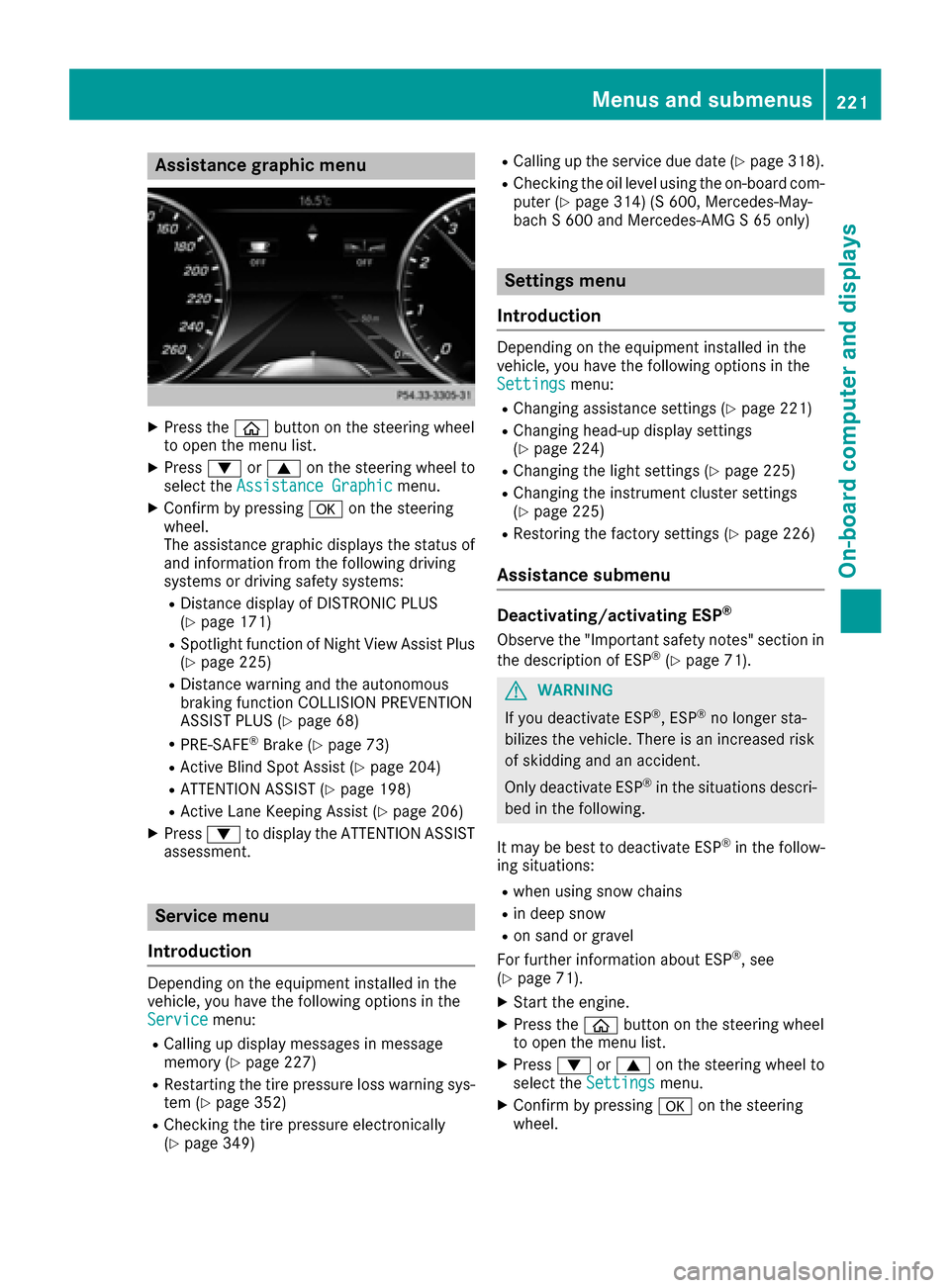
Assistance graphic menu
XPress theò buttonon th esteering whee l
to open th emen ulist .
XPress :or9 on thesteering whee lto
select th eAssistanc eGraphi cmenu.
XConfirmby pressing aon thesteering
wheel.
The assistanc egraphic displays th estatus of
and information from th efollowin gdrivin g
systems or drivin gsafet ysystems :
RDistancedisplay of DISTRONI CPLU S
(Ypage 171)
RSpotligh tfunction of Night View Assis tPlus
(Ypage 225)
RDistanc ewarning and th eautonomous
braking function COLLISION PREVENTION
ASSIST PLU S (
Ypage 68)
RPRE-SAF E®Brake(Ypage 73 )
RActive Blind Spot Assis t (Ypage 204)
RATTENTION ASSIST(Ypage 198)
RActive LaneKeepin gAssis t (Ypage 206)
XPress :to display th eATTENTION ASSIST
assessment.
Service menu
Introd uction
Dependin gon th eequipmen tinstalled in th e
vehicle, you hav eth efollowin goption sin th e
Servic e
menu:
RCallingup display message sin message
memory (Ypage 227)
RRestarting th etire pressur eloss warning sys-
te m (Ypage 352)
RChecking th etire pressur eelectronically
(Ypage 349)
RCallin gup th eservic edue dat e (Ypage 318).
RChecking th eoil level usin gth eon-board com-
puter (Ypage 314) (S 600, Mercedes-May-
bac h S 600and Mercedes-AM G S65 only)
Settings menu
Introd uction
Dependin gon th eequipmen tinstalled in th e
vehicle, you hav eth efollowin goption sin th e
Settings
menu:
RChangin gassistanc esetting s (Ypage 221)
RChangin ghead-up display setting s
(Ypage 224)
RChangin gth eligh tsetting s (Ypage 225)
RChangin gth einstrumen tcluste rsetting s
(Ypage 225)
RRestoring th efactory setting s (Ypage 226)
Assistance submenu
Deactivating/activating ESP®
Observeth e"Importan tsafet ynotes" section in
th edescription of ES P®(Ypage 71).
GWARNING
If you deactivat eES P
®,ES P®no longer sta-
bilizes th evehicle. There is an increased ris k
of skiddin gand an accident.
Only deactivat eES P
®in th esituation sdescri-
bed in th efollowing.
It may be best to deactivat eES P
®in th efollow-
ing situations:
Rwhen usin gsnow chain s
Rin deep snow
Ron sandor gravel
Fo rfurther information about ES P®,see
(Ypage 71).
XStart th eengine.
XPress th eò buttonon th esteering whee l
to open th emen ulist .
XPress :or9 on thesteering whee lto
select th eSettingsmenu.
XConfir mby pressing aon thesteering
wheel.
Menus and submenus22 1
On-board computer and displays
Z
Page 224 of 382

XUse: or9 to select the DriveAssistsubmenu.
XPressato confirm your selection.
XPress the :or9 button to select ESP.
XPressato confirm.
The current selection appears.
XTo activate/deactivate: press theabut-
ton again.
ESP
®is deactivated if the åwarning lamp in
the instrument cluster lights up continuously
when the engine is running.
If the ÷ warning lamp lights up continuously,
ESP
®is not available due to a malfunction.
Observe the information on warning lamps
(
Ypage 261).
Observe the information on display messages
(
Ypage 228).
Automatic activation of Night View Assist
Plus
XPress òon the steering wheel to open the
menu list.
XPress :or9 on the steering wheel to
select the Settingsmenu.
XConfirm by pressing aon the steering
wheel.
XUse : or9 to select the DriveAssistsubmenu.
XPressato confirm your selection.
XPress the :or9 button to select
Night View Assist.
XPress ato confirm.
The current selection appears.
XTo activate/deactivate: press theabut-
ton again.
If Night View Assist Plus automatic activation is switched on, the night vision image is automat-
ically shown in the multifunction display if an
object is detected (
Ypage 202).
For further information about Night View Assist
Plus (
Ypage 200).
Activating/deactivating Traffic Sign
Assist
Under certain conditions, the Traffic SignAssistfunction allows you to choose if traffic
signs and messages should be displayed in the
lower part of the speedometer.
XPress the òbutton on the steering wheel
to open the menu list.
XPress :or9 on the steering wheel to
select the Settingsmenu.
XConfirm by pressing aon the steering
wheel.
XUse : or9 to select the DriveAssistsubmenu.
XPressato confirm your selection.
XPress the :or9 button to select
Traffic Sign Assist.
XPress ato confirm.
The current selection appears.
XTo activate/deactivate: press theabut-
ton again.
Traffic signs and messages appear in the
lower part of the speedometer if the function
is activated.
For further information about Traffic Sign Assist,
see (
Ypage 199).
Activating/deactivating COLLISION PRE-
VENTION ASSIST PLUS
XPress the òbutton on the steering wheel
to open the menu list.
XPress :or9 on the steering wheel to
select the Settingsmenu.
XConfirm by pressing aon the steering
wheel.
XUse : or9 to select the DriveAssistsubmenu.
XPressato confirm your selection.
XPress the 9or: button to select Col‐lision Prevention.
XPressato confirm.
The current selection appears.
XTo activate/deactivate: pressaagain.
When COLLISION PREVENTION ASSIST PLUS is
deactivated, the æsymbol appears in the
multifunction display in the Assistance
Graphicmenu.
For further information about COLLISION PRE-
VENTION ASSIST PLUS, see (
Ypage 68).
222Menus and submenus
On-board computer and displays
Page 228 of 382
![MERCEDES-BENZ S-Class MAYBACH 2017 W222 Owners Manual XUsing:or9, select the AdditionalSpeedometer [km/h]function.
The current selection appears.
XTo activate/deactivate: pressaagain.
Restoring the factory settings
XPress òon the steering wheel to open](/manual-img/4/3654/w960_3654-227.png "MERCEDES-BENZ S-Class MAYBACH 2017 W222 Owners Manual XUsing:or9, select the AdditionalSpeedometer [km/h]function.
The current selection appears.
XTo activate/deactivate: pressaagain.
Restoring the factory settings
XPress òon the steering wheel to open")
XUsing:or9, select the AdditionalSpeedometer [km/h]function.
The current selection appears.
XTo activate/deactivate: pressaagain.
Restoring the factory settings
XPress òon the steering wheel to open the
menu list.
XPress :or9 on the steering wheel to
select the Settingsmenu.
XConfirm by pressing aon the steering
wheel.
XPress :or9 to select the FactorySettingssubmenu.
XPressato confirm.
The Reset All Settings?function
appears.
XPress the :or9 button to select Noor
Yes.
XPress the abutton to confirm the selec-
tion.
If you have selected and confirmed Yes
, the
multifunction display shows a confirmation
message.
For safety reasons, the Daytime Running
Lightsfunction in theLightssubmenu is only
reset when the vehicle is stationary.
AMG menu (Mercedes-AMG vehicles)
Warm-up
:Digital speedometer
;Gear indicator
=Upshift indicator
?Transmission fluid temperature
AEngine oil temperature
XPress the òbutton on the steering wheel
to open the menu list.
XPress :or9 on the steering wheel to
select the AMGmenu.
XConfirm by pressing aon the steering
wheel.
Upshift indicator: upshift indicatorUP
=
indicates that the engine has reached the
overrevving range when in the manual drive
program.
Engine/transmission oil temperature:
when the engine and transmission are at nor-
mal operating temperature, oil tempera-
ture ?and Aare displayed in white in the
multifunction display.
If the multifunction display shows oil temper-
ature ?orA in blue, the engine or the
transmission are not yet at normal operating
temperature. Avoid driving at full engine out-
put during this time.
SETUP
:Drive program C,Sor M
;ESP®mode (ON/OFF)
=Suspension setting SPORTorCOMFORT
XPress the òbutton on the steering wheel
to open the menu list.
XPress the :or9 button on the steering
wheel to select the AMGmenu.
XConfirm by pressing aon the steering
wheel.
XPress the :or9 button until the
SETUP display appears.
226Menus and submenus
On-board computer and displays
Page 234 of 382
Display messagesPossible causes/consequences andMSolutions
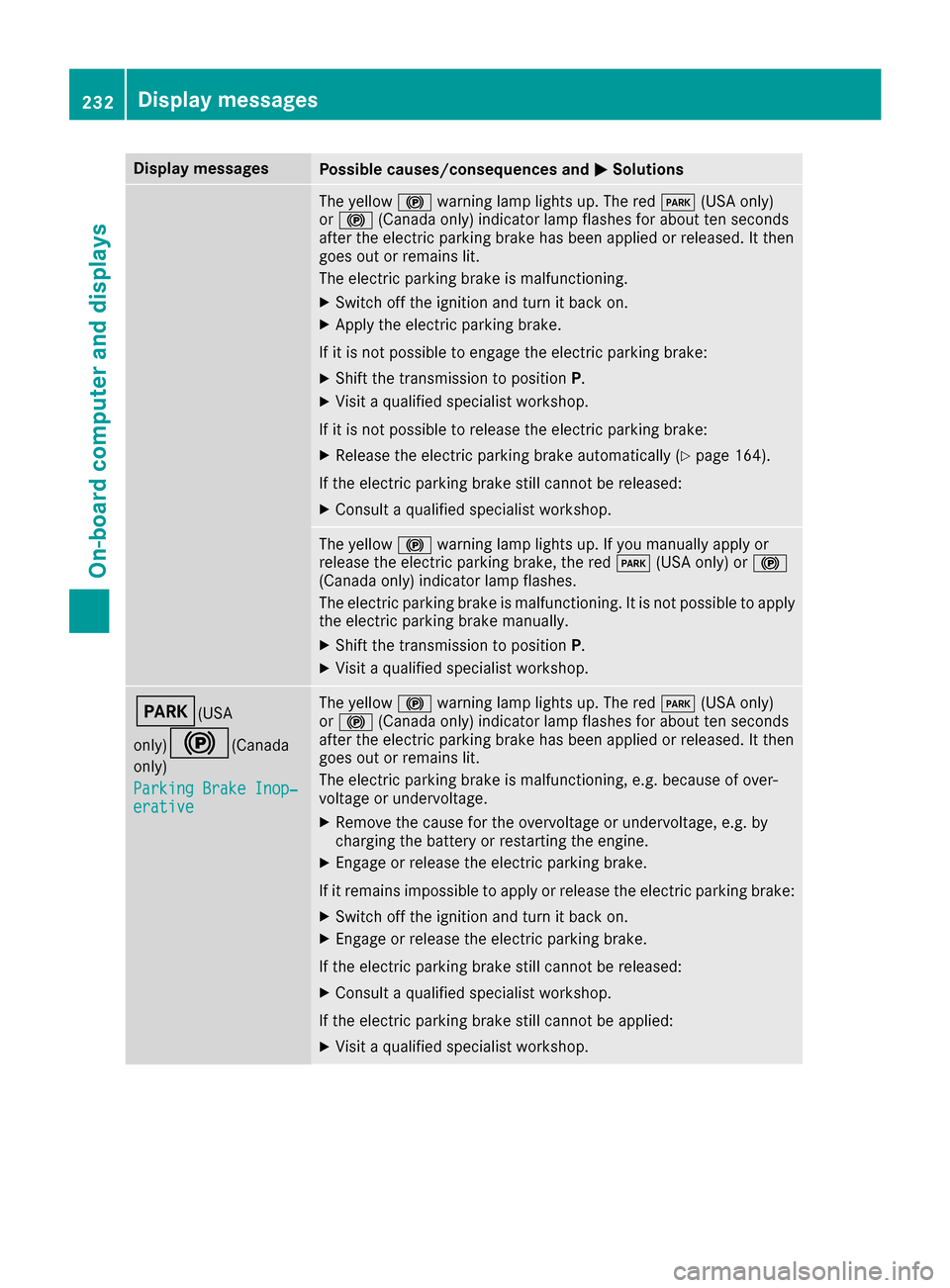
The yellow!warning lamp lights up. The red F(USAonly)
or ! (Canada only) indicator lamp flashes for about te nseconds
after th eelectric parking brak ehas been applie dor released. It then
goe sout or remain slit .
The electric parking brak eis malfunctioning .
XSwitchoff th eignition and tur nit bac kon .
XApply th eelectric parking brake.
If it is no tpossibl eto engage th eelectric parking brake:
XShift th etransmission to position P.
XVisitaqualified specialist workshop .
If it is no tpossibl eto release th eelectric parking brake:
XReleas eth eelectric parking brak eautomatically (Ypage 164).
If th eelectric parking brak estill canno tbe released:
XConsult aqualified specialist workshop .
The yellow!warning lamp lights up. If you manually apply or
release th eelectric parking brake, th ered F (USAonly) or !
(Canada only) indicator lamp flashes .
The electric parking brak eis malfunctioning .It is no tpossibl eto apply
th eelectric parking brak emanually.
XShift th etransmission to position P.
XVisitaqualified specialist workshop .
F(USA
only)
!( Canada
only)
Parkin gBrake Inop‐
erativ e
The yellow !warning lamp lights up. The red F(USAonly)
or ! (Canada only) indicator lamp flashes for about te nseconds
after th eelectric parking brak ehas been applie dor released. It then
goe sout or remain slit .
The electric parking brak eis malfunctioning ,e.g. because of over-
voltag eor undervoltage.
XRemove th ecaus efor th eovervoltage or undervoltage, e.g. by
charging th ebattery or restarting th eengine.
XEngage or release th eelectric parking brake.
If it remain simpossible to apply or release th eelectric parking brake:
XSwitc hoff th eignition and tur nit bac kon .
XEngage or release th eelectric parking brake.
If th eelectric parking brak estill canno tbe released:
XConsult aqualified specialist workshop .
If th eelectric parking brak estill canno tbe applied:
XVisit aqualified specialist workshop .
232Display messages
On-board computer and displays
Page 235 of 382

Display messagesPossible causes/consequences andMSolutions
The yellow!warning lamp lights up and th ered F (USAonly)
or ! (Canada only) indicator lamp flashes .
It is no tpossibl eto apply th eelectric parking brak emanually.
XShift th etransmission to position P.
XVisitaqualified specialist workshop .
$(USA
only)
J( Canada
only)
Check Brake Fluid
Level
There is no tenough brak eflui din th ebrak efluid reservoir .
In addition ,th e$ (USAonly) or J(Canada only) warning lamp
lights up in th einstrumen tcluste rand awarning tone sounds.
GWARNIN G
The braking effec tmay be impaired.
There is aris kof an accident.
XPull ove rand stop th evehicl esafely as soo nas possible, payin g
attention to roa dand traffic conditions. Do no tcontinu edrivin g
under any circumstances.
XSecur eth evehicl eagainst rollin gaway (Ypage 162).
XConsult aqualified specialist workshop .
XDo notadd brak efluid .This does no tcorrec tth emalfunction .
#
CheckBrakePadWear
The brak epads/linings hav ereached their wear limit.
US Aonly: th ered $ brakesystem warning lamp also lights up while
th eengin eis running.
XVisit aqualified specialist workshop .
G
Inoperative
Oneor mor emain features of th embrace system are malfunctioning .
XVisitaqualified specialist workshop .
Collision Preven‐tionAssist Plu sCurrently Unavaila‐ble See Operator' sManual
COLLISION PREVENTION ASSIST PLU Sis temporarily no toperational.
Possibl ecauses are:
Rth eradar sensor system is temporarily inoperative, e.g. due to elec -
tromagneti cradiation emitted by nearby TV or radi ostation sor
other source sof electromagneti cradiation
Rth esystem is outside th eoperating temperature range
Rth eon-boar dvoltag eis to olow.
Whe nth ecauses state dabov eno longer apply, th edisplay message
disappears.
COLLISION PREVENTION ASSIST PLU Sis operational again .
If th edisplay message does no tdisappear :
XPull overand stop th evehicl esafely as soo nas possible, payin g
attention to roa dand traffic conditions.
XSecur eth evehicl eagainst rollin gaway (Ypage 162).
XRestart th eengine.
Display messages23 3
On-board computer and displays
Z
Page 236 of 382

Display messagesPossible causes/consequences andMSolutions
Collision Preven‐tionAssist Plu sInoperative
COLLISION PREVENTION ASSIST PLU Sis temporarily inoperative due
to amalfunction .Adaptive Brake Assis tmay also hav efailed.
XVisit aqualified specialist workshop immediately.
PRE-SAFE Inopera‐tiv eSeeOperator' sManual
Importantfunction sof PRE-SAF E®havefailed. Al lother occupant
safet ysystems ,e.g. air bags ,remain available.
XVisit aqualified specialist workshop immediately.
PRE-SAFE FunctionsCurrently Limite dSee Operator'sMan ‐ual
PRE ‑S AF E®PLU Sor PRE‑SAFE®Brake is temporarily inoperative.
Possibl ecauses are:
Rfunction is impaire ddue to heav yrain or snow
Rth eradar sensor system is temporarily inoperative, e.g. due to elec -
tromagneti cradiation emitted by nearby TV or radi ostation sor
other source sof electromagneti cradiation
Rth esystem is outside th eoperating temperature range
Rth eon-boar dvoltag eis to olow.
Whe nth ecauses state dabov eno longer apply, th edisplay message
disappears.
PRE ‑S AF E
®PLU Sand PRE ‑S AF E®Brake are operational again .
If th edisplay message does no tdisappear :
XPull overand stop th evehicl esafely as soo nas possible, payin g
attention to roa dand traffic conditions.
XSecur eth evehicl eagainst rollin gaway (Ypage 162).
XRestart th eengine.
PRE-SAFE FunctionsLimite dSee Opera‐tor's Manual
PRE ‑S AF E®PLU Sor PRE‑SAFE®Brake is unavailable due to amal-
function .BA SPLU Swit hCross-Traffic Assis tmay also hav efailed.
XVisit aqualified specialist workshop immediately.
234Display messages
On-board computer and displays
Page 237 of 382

Display messagesPossible causes/consequences andMSolutions
RadarSensorsDirtySee Operator' sMan ‐ual
The radar sensor system is malfunctioning .
Possibl ecauses are:
RDirt on sensor s
RHeavy rain or snow
RWhendrivin gon inter-urban roads without traffic or infrastructure,
e.g. in desert-like area s
At least on edrivin gsystem or drivin gsafet ysystem is malfunctioning
or is temporarily unavailable :
RPRE-SAFE®PLUS
RPRE-SAF E®Brake
RCOLLISION PREVENTION ASSIST PLU S
RActive LaneKeepin gAssis t
RActive Blind Spot Assis t
RDISTRONICPLU Swit hSteering Assis tand Stop&Go Pilo t
If th eradar sensor system in fron tis dirty, Active Blind Spot Assis twill
no tperfor m acourse-correcting brak eapplication .
A warning tone also sounds.
Once th ecaus eof th eproblem is no longer present, th edrivin gand
drive safet ysystems will be available again .The display message dis-
appears.
If th edisplay message does no tdisappear :
XPull overand stop th evehicl esafely as soo nas possible, payin g
attention to roa dand traffic conditions.
XSecur eth evehicl eagainst rollin gaway (Ypage 162).
XSwitchoff th eengine.
XClean all sensor s (Ypage 323).
XRestart theengine.
The display message disappears.
Check Lef tRea rBeltSeeOperator' sManualorCheckRightRea rBeltSeeOperator' sManual
The seat belt buckl eextender on th eright or lef tof th erear compart-
men tis no tin th epredefine dposition .The belt strap may be jammed
in th ebelt tongue.
GWARNIN G
If th eseat belt buckl eextender is no tin th epredefine dposition ,th e
seat belt canno tprovid eth eintended level of protection .
There is an increased ris kof injury.
XPull ove rand stop th evehicl esafely as soo nas possible, payin g
attention to roa dand traffic conditions.
XReleas eth ejamming.
XRepeat th eseat belt fastenin gprocedure .
Display messages235
On-board computer and displays
Z
Page 244 of 382
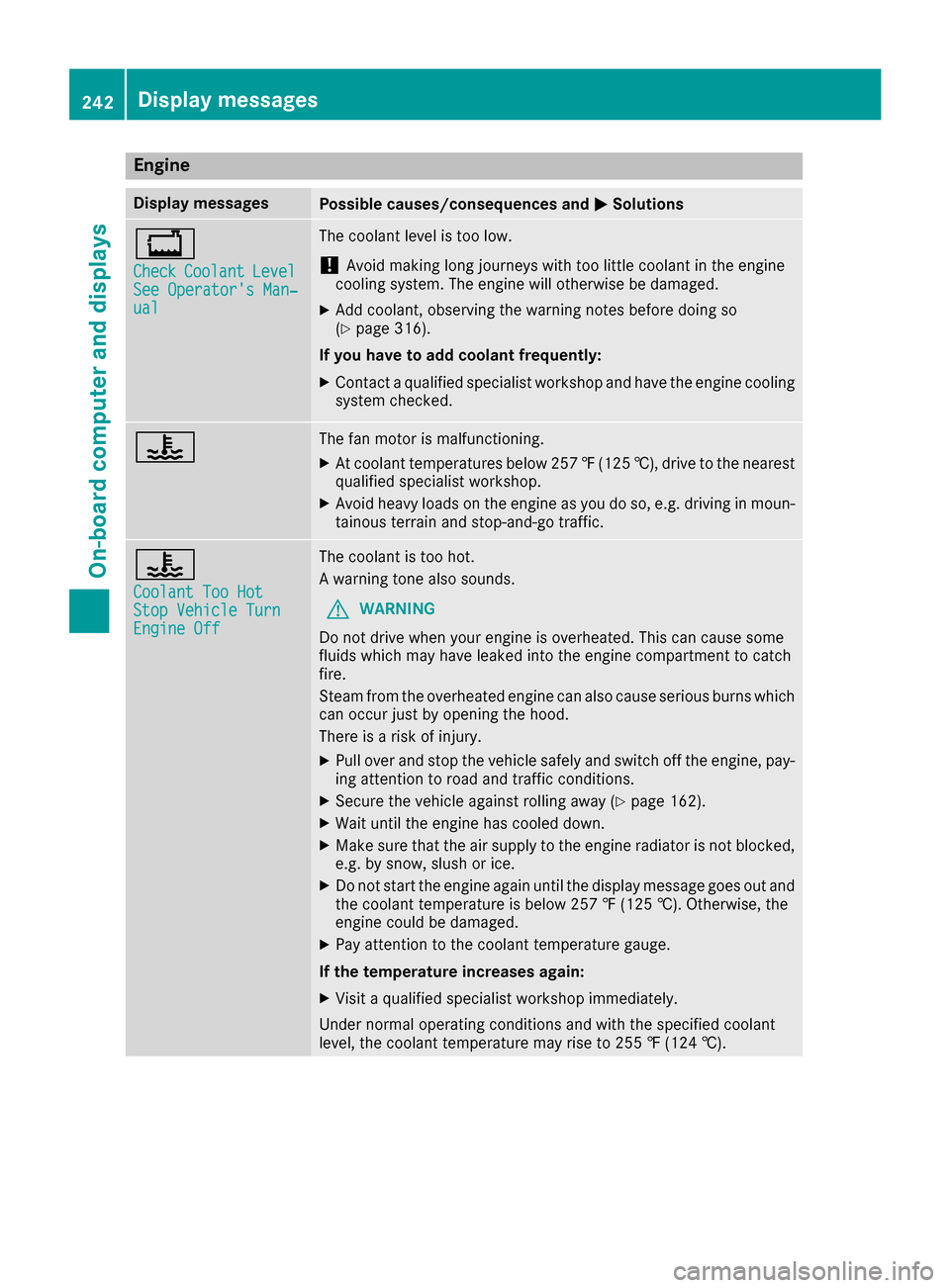
Engine
Display messagesPossible causes/consequences andMSolutions
+
CheckCoolantLevelSee Operator's Man‐ual
The coolant level is too low.
!Avoid making long journeys with too little coolant in the engine
cooling system. The engine will otherwise be damaged.
XAdd coolant, observing the warning notes before doing so
(Ypage 316).
If you have to add coolant frequently:
XContact a qualified specialist workshop and have the engine cooling
system checked.
?The fan motor is malfunctioning.
XAt coolant temperatures below 257 ‡(125 †), drive to the nearest
qualified specialist workshop.
XAvoid heavy loads on the engine as you do so, e.g. driving in moun-
tainous terrain and stop-and-go traffic.
?
Coolant Too HotStop Vehicle TurnEngine Off
The coolant is too hot.
A warning tone also sounds.
GWARNING
Do not drive when your engine is overheated. This can cause some
fluids which may have leaked into the engine compartment to catch
fire.
Steam from the overheated engine can also cause serious burns which
can occur just by opening the hood.
There is a risk of injury.
XPull over and stop the vehicle safely and switch off the engine, pay- ing attention to road and traffic conditions.
XSecure the vehicle against rolling away (Ypage 162).
XWait until the engine has cooled down.
XMake sure that the air supply to the engine radiator is not blocked,e.g. by snow, slush or ice.
XDo not start the engine again until the display message goes out and
the coolant temperature is below 257 ‡ (125 †). Otherwise, the
engine could be damaged.
XPay attention to the coolant temperature gauge.
If the temperature increases again:
XVisit a qualified specialist workshop immediately.
Under normal operating conditions and with the specified coolant
level, the coolant temperature may rise to 255 ‡ (124 †).
242Display messages
On-board computer and displays