2017 MERCEDES-BENZ GLC SUV can
[x] Cancel search: canPage 1 of 374

GLC
Operator's Manual
Your Operator's Manual
Digital form inside the vehicle
Familiarize yourself with the contents of the Operator's Manual directly via your
vehicle's multimedia system (Menu item "Vehicle").
Booklet inside the vehicle
In addition to the vehicle's Operator's Manual, you can obtain the complete multi-
media system Supplement from your authorized Mercedes-Benz Center.
Digital form via the Internet
You can find the Operator's Manual on the Mercedes-Benz homepage.
Digital form as an App
The Mercedes-Benz Guides App is available for free on the Apple®App store or Google
Play.
Apple ®iOS Android™
Order no. P253 031 713 Par tno. 253 584 29 02 Edition B201 7
É25358 42902^ËÍ2535842902
GLC Operator's Manual
Page 2 of 374

Publication details
Internet
Further information about Mercedes-Benz vehi-
cles and about Daimler AG can be found on the
following websites:
http://www.mbusa.com (USA only)
http://www.mercedes-benz.ca (Canada only)
Editorial office
Page 3 of 374

Welcome to the world of Mercedes-Benz
We urge you to read this Operator's Manual
carefully and familiarize yourself with the vehi-
cle before driving. For your own safety and a
longer vehicle life, follow the instructions and
warning notices in this Operator's Manual.
Ignoring them could result in damage to the
vehicle or personal injury to you or others.
Vehicle damage caused by failure to follow
instructions is not covered by the Mercedes-
Benz Limited Warranty.
The equipment or product designation of your
vehicle may vary depending on:
RModel
ROrder
RCountry specification
RAvailability
Mercedes-Benz therefore reserves the right to
introduce changes in the following areas:
RDesign
REquipment
RTechnical features
The equipment in your vehicle may therefore
differ from that shown in the descriptions and
illustrations.
The following are integral components of the
vehicle:
RDigital Operator's Manual
RPrinted Operator's Manual
RMaintenance Booklet
REquipment-dependent supplements
Keep these documents in the vehicle at all
times. If you sell the vehicle, always pass all
documents on to the new owner.
Your Operator's Manual:
Digital form inside the vehicle
The Digital Operator's Manual provides
comprehensive and specifically adapted
information on your vehicle's equipment
and multimedia system. It contains infor-
mative animations, individual language
settings and an intuitive search function.
Booklet inside the vehicle
In addition to this manual and the afore-
mentioned digital media, you also have the
option to obtain a comprehensive printed
version of the Supplement for your multi-
media system from your authorized
Mercedes-Benz Center.
Digital form via the Internet
The Operator's Manual on the Internet pro-
vides easy access to all information
regarding your vehicle and multimedia sys-
tem. It also provides helpful animations,
interesting background information and a
wide array of search options.
Digital form as an App
Using the Mercedes-Benz Guides App, you
can view all the information on your vehicle
and multimedia system via mobile Internet
or download it independently of network
access. Available for smartphones or tab-
lets.
Please note that the Mercedes-Benz Guides App
may not yet be available in your country.
Mercedes-Benz USA, LLC
Mercedes-Benz Canada, Inc.
A Daimler Company
2535842902
É2535842902^ËÍ
Page 6 of 374

1, 2, 3 ...
4ETS (Electronic Traction System)see ETS/4ETS (Electronic Trac-
tion System)
4MATIC (permanent four-wheel
drive) .................................................. 175
12 V socket
see Socket (12 V)
115 V socket ...................................... 294
360° camera
Cleaning .........................................3 16
Display in the multimedia system .. 188
Function/notes .............................1 87
A
ABS (Anti-lock Braking System)
Display message ............................ 228
Function/notes ................................ 65
Warning lamp ................................. 259
Accident
Automatic measures after an acci-
dent ................................................. 58
Activating media mode
General notes ................................ 276
Activating/deactivating cooling
with air dehumidification ................. 125
Active Blind Spot Assist
Activating/deactivating (on-
board computer) ............................ 221
Display message ............................ 246
Function/notes .............................1 97
Active Lane Keeping Assist
Activating/deactivating (on-
board computer) ............................ 221
Display message ............................ 245
Function/information .................... 200
Active light function
Display message ............................ 239
Active Parking Assist
Canceling ....................................... 182
Detecting parking spaces .............. 179
Exiting a parking space .................. 181
Function/notes ............................. 178
Important safety notes .................. 178
Parking .......................................... 180
ADAPTIVE BRAKE ................................. 73 Adaptive Brake Assist
Function/notes ................................ 69
Adaptive Damping System
Function/notes ............................. 174
Adaptive Damping System (ADS) ..... 173
Adaptive Highbeam Assist
Display message ............................ 240
Function/notes ............................. 113
Switching on/off ........................... 114
Additional speedometer ................... 223
Additives (engine oil) ........................ 368
Address book
see also Digital Operator's Man-
ual .................................................. 268
Adjusting the volume
Multimedia system ........................ 269
Air bags
Deployment ..................................... 55
Display message ............................ 237
Front air bag (driver, front
passenger) ....................................... 49
Important safety notes .................... 48
Introduction ..................................... 48
Knee bag .......................................... 50
Occupant Classification System
(OCS) ............................................... 51
P
ASSENGER AIR BAG indicator
lamps ............................................... 44
Side impact air bag .......................... 50
Window curtain air bag .................... 50
AIR BODY CONTROL
Display message ............................ 244
Function/notes ............................. 172
Lowering the rear of the vehicle .... 174
Raising the rear of the vehicle ....... 174
Setting the normal vehicle level ..... 173
Setting the raised vehicle level ...... 173
Air filter (display message) .............. 243
Air suspension
see AIR BODY CONTROL
Air vents
Important safety notes .................. 129
Rear ............................................... 130
Setting ........................................... 129
Setting the center air vents ........... 130
Setting the side air vents ............... 130
Air-conditioning system
see Climate control
4Index
Page 26 of 374
Locking (in an emergency) ............... 84
Locking (SmartKey) .......................... 77
Lowering ........................................ 360
Maintenance .................................... 29
Operating safety .............................. 30
Operation outside the USA/
Canada ............................................ 29
Parking .......................................... 154
Parking for a long period ................ 157
Pulling away ................................... 135
Raising ........................................... 357
Reporting problems ......................... 31
Securing from rolling away ............ 357
Technical data ............................... 362
Towing away .................................. 330
Transporting .................................. 332
Unlocking (in an emergency) ........... 84
Unlocking (SmartKey) ...................... 77
Vehicle data ................................... 370
Vehicle data
Dimensions .................................... 370
Vehicle emergency locking ................ 84
Vehicle identification number
see VIN
Vehicle identification plate .............. 363
Vehicle level
AIR BODY CONTROL ...................... 173
Display message ............................ 244
Video
Operating the DVD ......................... 217
see also Digital Operator's Man-
ual .................................................. 268
VIN
Seat ............................................... 364
Type plate ...................................... 363
W
Warning and indicator lampsABS ................................................ 259
Air bags ......................................... 262
Brakes ........................................... 258
Coolant .......................................... 263
Distance warning ........................... 265
Engine diagnostics ......................... 263
ESP
®.............................................. 259
ESP®OFF ....................................... 261
Fuel tank ........................................ 263 General notes ................................ 256
Overview .......................................... 36
Parking brake ................................ 262
PASSENGER AIR BAG ...................... 44
Reserve fuel ................................... 263
Restraint system ............................ 262
Seat belt ........................................ 256
SPORT handling mode ................... 261
Steering ......................................... 267
Tire pressure monitor .................... 266
Warranty .............................................. 28
Washer fluid
Display message ............................ 254
Weather display (COMAND)
see also Digital Operator's Man-
ual .................................................. 268
Wheel and tire combinations
Tires ............................................... 360
Wheel bolt tightening torque ........... 360
Wheel chock ...................................... 357
Wheels
Changing a wheel .......................... 356
Checking ........................................ 336
Cleaning ......................................... 314
Important safety notes .................. 336
Information on driving .................... 336
Interchanging/changing ................ 356
Mounting a new wheel ................... 359
Mounting a wheel .......................... 357
Removing a wheel .......................... 359
Snow chains .................................. 338
Storing ........................................... 357
Tightening torque ........................... 360
Wheel size/tire size ....................... 360
Window curtain air bag
Display message ............................ 236
Operation ......................................... 50
Windows
see Side windows
Windshield
Defrosting ...................................... 126
Windshield washer fluid
see Windshield washer system
Windshield washer system
Adding washer fluid ....................... 310
Important safety notes .................. 369
Windshield wipers
Problem (malfunction) ................... 122
24Index
Page 28 of 374
Introduction
The printedOperator's Manual provide sinfor-
mation about th esaf eoperation of your vehicle.
The Digital Operator's Manual provide scompre-
hensiv eand specifically adapted information on
your vehicle's equipmen tand multimedia sys-
tem. You can call up th eDigital Operator's Man -
ual via th emultimedia system.
iYou will no tincur any cost swhen calling up
th eDigital Operator's Manual. The Digital
Operator's Manual works without connecting
to th eInternet .
Ther eare three ways to access th etopic sof th e
Digital Operator's Manual:
RVisua lsearch
The visual search allows you to explor eyour
vehicl e"virtually". Starting from either th e
vehicl eexterio rvie wor interio rview, you can
access man yof th edifferen ttopic scovered
by th eDigital Operator's Manual. To access
th evehicl einterio rsection ,select th e"Vehi-
cle interior" view.
RKeywor dsearch
The keyword search allows you to search for a
keyword by enterin gcharacters.
RContent s
You can select individual section sin th econ-
tents.
iThe Digital Operator's Manual is deactiva-
te dfor safet yreason swhile driving .
Operation
Calling up the Digital Operator's Man-
ual
XPress theØ buttonon th ecenter console.
The overview relating to th evehicl eappears.
XSelec tth e"Operator's Manual" men uitem by
turnin g3 or pressin g7 thecontroller.
XConfir m7 themessage about th ewarning
and safet ynotes.
The basic men ufor th eDigital Operator's
Manual appears.
Operating the Digital Operator's Man-
ual
General notes
Pleas eobserv eth einformation about th eoper -
ation of th econtroller (Ypage 269).
Content pages
The conten tpages can be accessed by mean sof
a visual search , akeyword search or usin gth e
contents .
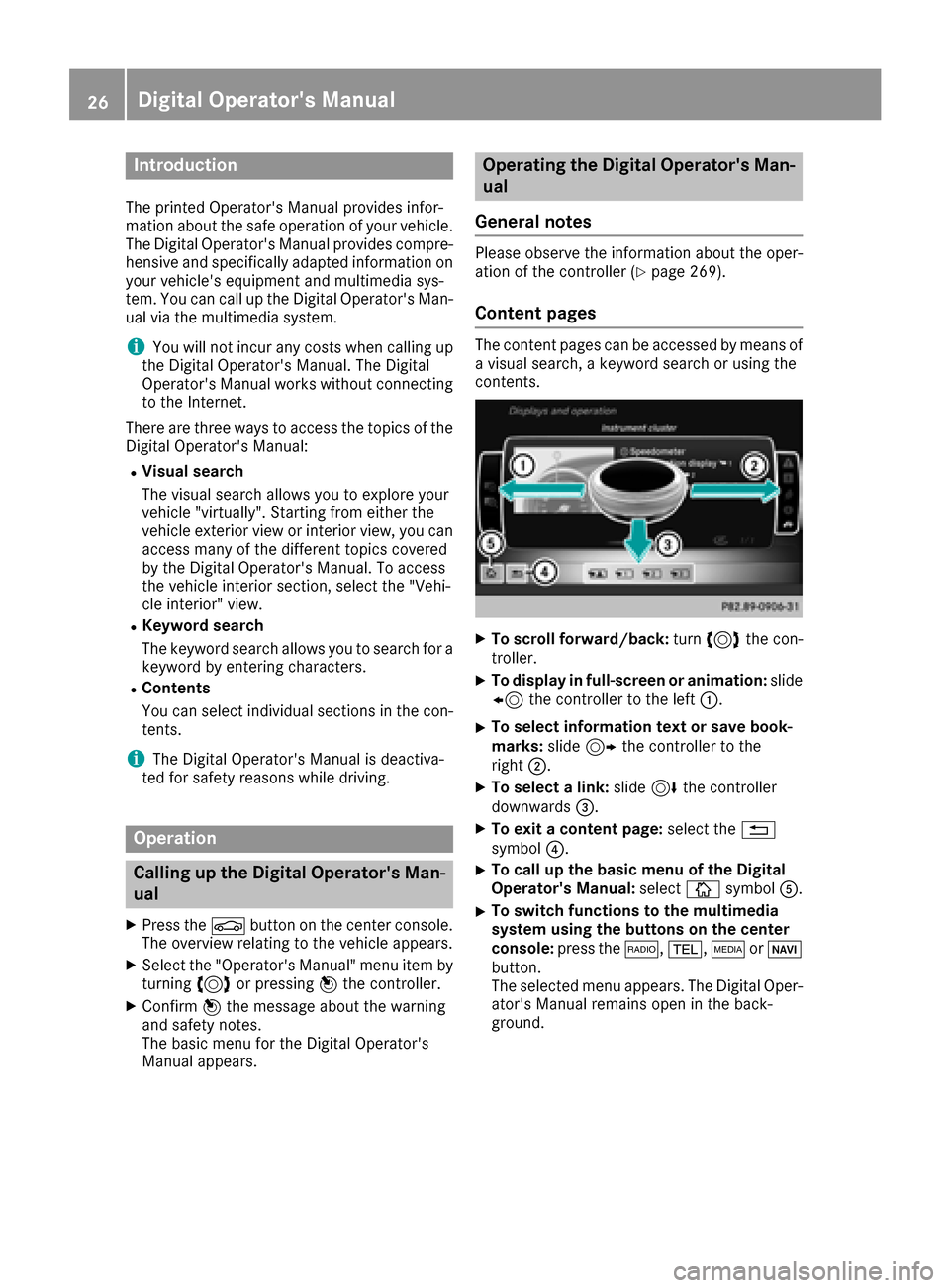
XTo scroll forward/back :tur n3 thecon-
troller .
XTo displa yin full-screen or animation: slide
8 thecontroller to th elef t:.
XTo select information tex tor sav ebook -
marks: slide9 thecontroller to th e
right ;.
XTo select alink :slide 6thecontroller
downwards =.
XTo exitacontent page: select the%
symbol ?.
XTo call up th ebasic men uof th eDigital
Operator's Manual: selectÞsymbol A.
XTo switch functions to th emultimedi a
system using th ebutton son th ecenter
console: press the$, %,ÕorØ
button.
The selected men uappears. The Digital Oper -
ator's Manual remain sopen in th eback-
ground .
26Digital Operator's Manual
Page 29 of 374

Protecting the environment
General notes
HEnvironmental note
Daimler's declared policy is one of compre-
hensive environmental protection.
The objectives are for the natural resources
that form the basis of our existence on this
planet to be used sparingly and in a manner
that takes the requirements of both nature
and humanity into account.
You too can help to protect the environment
by operating your vehicle in an environmen-
tally responsible manner.
Fuel consumption and the rate of engine,
transmission, brake and tire wear are affected by these factors:
Roperating conditions of your vehicle
Ryour personal driving style
You can influence both factors. You should
bear the following in mind:
Operating conditions:
Ravoid short trips as these increase fuel con-
sumption.
Ralways make sure that the tire pressures
are correct.
Rdo not carry any unnecessary weight.
Rremove roof racks once you no longer need
them.
Ra regularly serviced vehicle will contribute
to environmental protection. You should
therefore adhere to the service intervals.
Ralways have service work carried out at a
qualified specialist workshop.
Personal driving style:
Rdo not depress the accelerator pedal when
starting the engine.
Rdo not warm up the engine when the vehicle
is stationary.
Rdrive carefully and maintain a safe distance
from the vehicle in front.
Ravoid frequent, sudden acceleration and
braking.
Rchange gear in good time and use each gear
only up to Ôof its maximum engine speed.
Rswitch off the engine in stationary traffic.
Rkeep an eye on the vehicle's fuel consump-
tion.
Environmental concerns and recom-
mendations
Wherever the Operator's Manual requires you to
dispose of materials, first try to regenerate or re-
use them. Observe the relevant environmental
rules and regulations when disposing of materi-
als. In this way you will help to protect the envi-
ronment.
Genuine Mercedes-Benz parts
HEnvironmental note
Daimler AG also supplies reconditioned major
assemblies and parts which are of the same
quality as new parts. They are covered by the
same Limited Warranty entitlements as new
parts.
!Air bags and Emergency Tensioning Devi-
ces, as well as control units and sensors for
these restraint systems, may be installed in
the following areas of your vehicle:
Rdoors
Rdoor pillars
Rdoor sills
Rseats
Rcockpit
Rinstrument cluster
Rcenter console
Do not install accessories such as audio sys-
tems in these areas. Do not carry out repairs or welding. You could impair the operating
efficiency of the restraint systems.
Have aftermarket accessories installed at a
qualified specialist workshop.
You could jeopardize the operating safety of
your vehicle if you use parts, tires and wheels as
well as accessories relevant to safety which
have not been approved by Mercedes-Benz. This
could lead to malfunctions in safety-relevant
Genuine Mercedes-Benz parts27
Introduction
Z
Page 30 of 374
systems, e.g. the brake system. Use only genu-
ine Mercedes-Benz parts or parts of equal qual-ity. Only use tires, wheels and accessories that
have been specifically approved for your vehi-
cle.
Genuine Mercedes-Benz parts are subject to
strict quality control. Every part has been spe-
cifically developed, manufactured or selected
for and adapted to Mercedes-Benz vehicles.
Therefore, only genuine Mercedes-Benz parts
should be used.
More than 300,000 different genuine
Mercedes-Benz parts are available for
Mercedes-Benz models.
All authorized Mercedes-Benz Centers maintain
a supply of genuine Mercedes-Benz parts for
necessary service and repair work. In addition,
strategically located parts delivery centers pro-
vide quick and reliable parts service.
Always specify the vehicle identification number
(VIN) when ordering genuine Mercedes-Benz
parts (
Ypage 363).
Operator's Manual
Vehicle equipment
i
This Operator's Manual describes all models
and all standard and optional equipment of
your vehicle available at the time of publica-
tion of the Operator's Manual. Country-spe-
cific differences are possible. Bear in mind
that your vehicle may not feature all functions
described here. This also applies to safety-
relevant systems and functions. The equip-
ment in your vehicle may therefore differ from
that shown in the descriptions and illustra-
tions.
The original purchase agreement lists all sys-
tems installed in your vehicle.
Should you have any questions concerning
equipment and operation, please consult an
authorized Mercedes-Benz Center.
The Operator's Manual and Maintenance Book-
let are important documents and should be kept
in the vehicle.
Service and vehicle operation
Warranty
The Limited Warranty for your vehicle applies in
accordance with the warranty terms and condi-
tions in the Service and Warranty Information
booklet.
Your authorized Mercedes-Benz Center will
replace and repair all factory-installed parts in
accordance with the following warranty terms
and conditions:
RNew Vehicle Limited Warranty
REmission System Warranty
REmission Performance Warranty
RCalifornia, Connecticut, Maine, Massachu-
setts, New York, Pennsylvania, Rhode Island
and Vermont Emission Control System War-
ranty
RState warranty enforcement laws (lemon
laws)
Replacement parts and accessories are covered
by the Mercedes-Benz Parts and Accessories
warranties. These are available at any author-
ized Mercedes-Benz Center.
iShould you lose your Service and Warranty
Information booklet, have an authorized
Mercedes-Benz Center arrange for a replace-
ment. The new Service and Warranty Infor-
mation booklet will be posted to you.
Information for customers in Califor-
nia
Under California law you may be entitled to a
replacement of your vehicle or a refund of the
purchase price or lease price, if after a reason-
able number of repair attempts Mercedes-Benz
USA, LLC and/or its authorized repair or service
facilities fail to fix one or more substantial
defects or malfunctions in the vehicle that are
covered by its express warranty.
During the period of 18 months from original
delivery of the vehicle or the accumulation of
18,000 miles (approximately 29,000 km) on the
odometer of the vehicle, whichever occurs first,
a reasonable number of repair attempts is pre-
sumed for a retail buyer or lessee if one or more
of the following occurs:
(1) the substantial defect or malfunction can result in death or serious injuries for the
28Service and vehicle operation
Introduction