2017 MERCEDES-BENZ GLC SUV electrical
[x] Cancel search: electricalPage 13 of 374

Emissions controlService and warranty information .... 28
Engine
Check Engine warning lamp .......... .263
Display message ............................ 240
ECO start/stop function ................ 136
Engine number ............................... 364
Irregular running ............................ 138
Jump-starting ................................. 328
Starting (important safety notes) ... 133
Starting problems .......................... 138
Starting the engine with the
SmartKey ....................................... 134
Starting via smartphone ................ 134
Starting with the Start/Stop but-
ton ................................................. 134
Switching off .................................. 155
Tow-starting (vehicle) ..................... 333
Engine electronics
Problem (malfunction) ................... 138
Engine oil
Adding ...........................................3 08
Additives ........................................ 368
Checking the oil level ..................... 307
Checking the oil level using the
dipstick .......................................... 308
Display message ............................ 242
Filling capacity ............................... 368
General notes ................................ 367
Notes about oil grades ................... 367
Notes on oil level/consumption .... 307
Temperature (on-board computer,
Mercedes-AMG vehicles) ...............2 24
Entering an address
see also Digital Operator's Man-
ual ..................................................2 68
ESP
®(Electronic Stability Pro-
gram)
AMG menu (on-board computer) ... 225
Characteristics ................................. 70
Crosswind Assist .............................7 3
Deactivating/activating (button
in Mercedes-AMG vehicles) .............7 1
Deactivating/activating (notes,
except Mercedes-AMG vehicles) ...... 70
Deactivating/activating (on-
board computer, except
Mercedes-AMG veh icle
s) ............... 220 Display message ............................ 228
Function/notes ................................ 70
General notes .................................. 70
Important safety information ........... 70
Trailer stabilization ........................... 73
Warning lamp ................................. 259
ETS/4ETS (Electronic Traction Sys-
tem) ...................................................... 70
Exhaust
see Exhaust pipe
Exhaust check ................................... 158
Exhaust pipe
Cleaning ......................................... 316
Exterior lighting
Cleaning ......................................... 315
Setting options .............................. 111
see Lights
Exterior mirrors
Adjusting ....................................... 107
Dipping (automatic) ....................... 108
Folding in/out (automatically) ....... 107
Folding in/out (electrically) ........... 107
Out of position (troubleshooting) ... 108
Setting ........................................... 107
Storing settings (memory func-
tion) ............................................... 109
Storing the parking position .......... 108
Eyeglasses compartment ................. 279
F
Favorites
Overview ........................................ 271
Features ............................................. 290
Filler cap
see Refueling
Flat tire
Changing a wheel/mounting the
spare wheel ................................... 356
MOExtended tires .......................... 321
Preparing the vehicle ..................... 321
TIREFIT kit ...................................... 322
Floormats ........................................... 305
Frequencies
Mobile phone ................................. 362
Two-way radio ................................ 362
Front wheel arch
Removing/installing the cover ....... 117
Index11
Page 14 of 374

Front wheel arch coverInstalling/removing ...................... .117
Fuel
Additives ........................................ 366
Consumption statistics .................. 213
Displaying the current consump-
tion ................................................ 213
Displaying the range ......................2 13
Driving tips ....................................1 57
E10 ................................................ 365
Fuel gauge ....................................... 36
Gasoline ......................................... 365
Grade (gasoline) ............................ 365
Important safety notes .................. 365
Low outside temperatures ............. 367
Problem (malfunction) ................... 151
Quality (diesel) ............................... 366
Refueling ........................................ 148
Tank content/reserve fuel ............. 365
Fuel filler flap
Closing ........................................... 150
Fuel filter (display message) ............ 243
Fuel level
Calling up the range (on-board
computer) ...................................... 213
Fuel tank
Capacity ........................................ 365
Problem (malfunction) ................... 151
Fuses
Allocation chart ............................. 334
Before changing ............................. 333
Dashboard fuse box ....................... 334
Fuse box in the cargo compart-
ment .............................................. 334
Fuse box in the engine compart-
ment .............................................. 334
Fuse box in the front-passenger
footwell .......................................... 334
Important safety notes .................. 333
G
G-Meter (on-board computer,
Mercedes-AMG vehicles) .................. 224
Garage door opener
Clearing the memory ..................... 305
General notes ................................ 302
Important safety notes .................. 302 Opening/closing the garage doo
r..3 04
Problems when programming ........3 04
Programming (button in the rear-
view mirror) ................................... 303
Synchronizing the rolling code ....... 303
Gasoline ............................................. 365
Gear indicator (on-board com-
puter, Mercedes-AMG vehicles) ....... 224
Genuine parts ...................................... 27
Glove box ...........................................2 79
Google™ Local Search
see also Digital Operator's Man-
ual ..................................................2 68
H
HANDS-FREE ACCESS.......................... 87
Handwriting recognition
Switching text reader function
on/off ............................................ 271
Touchpad ....................................... 270
Hazard warning lamps ......................113
Head restraints
Adjusting (electrically) ................... 101
Adjusting (manually) ......................1 01
Adjusting (rear) .............................. 101
Adjusting the fore-and-aft posi-
tion manually ................................. 101
General notes ................................ 101
Important safety notes .................. 100
Installing/removing (rear) .............. 102
Head-up display
Adjusting the brightness ................ 222
Displays and operating .................. 211
Function/notes .............................2 11
Important safety notes .................. 211
Selecting displays .......................... 222
Setting the position ....................... 222
Storing settings (memory func-
tion) ............................................... 109
Headlamps
Display message ............................ 239
Fogging up ..................................... 114
see Automatic headlamp mode
Heating
see Climate control
High beam flasher .............................1 12
12Index
Page 21 of 374

Important safety guidelines .............45
Introduction .....................................4 4
Releasin g ......................................... 47
Warning lamp ................................. 256
Warning lamp (function) ................... 47
Seats
Adjusting (AMG Performance
Seat) .............................................. 102
Adjusting (electrically) ................... 100
Adjusting the 4-way lumbar sup-
port ................................................ 102
Adjusting the head restraint .......... 100
Calling up a stored setting (mem-
ory function) .................................. 110
Cleaning the cover ......................... 317
Folding the backrest (rear com-
partment) forwards/back .............. 281
Important safety notes .................... 98
Seat heating .................................. 102
Seat heating problem .................... 104
Seat ventilation .............................. 103
Seat ventilation problem ................ 104
Storing settings (memory func-
tion) ............................................... 109
Securing a load
see Securing cargo
Securing cargo .................................. 284
Selector lever
Cleaning ......................................... 317
see Automatic transmission
Sensors (cleaning instructions) ....... 315
Service menu (on-board com-
puter) .................................................. 219
Service message
see ASSYST PLUS
Service products
Brake fluid ..................................... 368
Coolant (engine) ............................ 368
DEF special additives ..................... 367
Engine oil ....................................... 367
Fuel ................................................ 364
Important safety notes .................. 364
Refrigerant (air-conditioning sys-
tem) ............................................... 369
Washer fluid ................................... 369
Setting the date/time format
see also Digital Operator's Man-
ual .................................................. 268 Setting the language
see also Digital Operator's Man-
ual .................................................. 268
Setting the time
see also Digital Operator's Man-
ual .................................................. 268
Settings
Factory (on-board computer) ......... 223
On-board computer ....................... 220
SE TUP (
on-board computer,
Mercedes-AMG vehicles) .................. 225
Side impact air bag ............................. 50
Side marker lamp (display mes-
sage) ................................................... 239
Side running board
Cleaning ......................................... 315
Side windows
Cleaning ......................................... 314
Convenience closing feature ............ 91
Convenience opening feature .......... 91
Important safety information ........... 90
Opening/closing .............................. 90
Problem (malfunction) ..................... 93
Resetting ......................................... 92
Reversing feature ............................. 90
SIRIUS services
see also Digital Operator's Man-
ual .................................................. 268
Ski and snowboard bag .................... 280
Sliding sunroof
Important safety notes .................... 93
Problem (malfunction) ..................... 96
see Panorama roof with power
tilt/sliding panel
SmartKey
Changing the battery ....................... 80
Changing the programming ............. 79
Checking the battery ....................... 80
Convenience closing feature ............ 92
Convenience opening feature .......... 91
Display message ............................ 255
Door central locking/unlocking ....... 77
Important safety notes .................... 77
KEYLESS-GO start function .............. 79
Loss ................................................. 81
Mechanical key ................................ 79
Overview .......................................... 77
Positions (ignition lock) ................. 132
Index19
Page 22 of 374

Problem (malfunction) ..................... 81
Starting the engine ........................ 134
Smartphone
Starting the engine ........................ 134
SMS
see also Digital Operator's Man-
ual .................................................. 268
Snow chains ...................................... 338
Socket (12 V)
Cargo compartment ....................... 293
Center console .............................. 293
General notes ................................ 293
Rear compartment .........................2 93
Sound
Switching on/off ........................... 269
Special seat belt retractor .................. 59
Specialist workshop ............................ 31
Speed, controlling
see Cruise control
Speedometer
Activating/deactivating the addi-
tional speedometer ........................ 223
Digital ............................................ 213
In the Instrument cluster ................. 36
Segments ...................................... 208
Selecting the display unit ...............2 23
SPORT handling mode
Deactivating/activating
(Mercedes-AMG vehicles) ................ 71
Warning lamp ................................. 261
Standing lamps
Display message ............................ 239
Switching on/off ........................... 112
Start button
Display message ............................ 256
Start/Stop button
Key positions ................................. 133
Starting the engine ........................ 134
Start/stop function
see ECO start/stop function
Starting (engine) ................................ 133
STEER CONTROL .................................. 75
Steering
Display message ............................ 254
Warning lamps ............................... 267
Steering Assist and Stop&Go Pilot .. 169Steering Assist and Stop&Go Pilot
(DISTRONIC PLUS)
Display message ............................ 248
Steering assistant STEER CON-
TROL
see STEER CONTROL
Stee ring w
heel
Adjusting (electrically) ................... 105
Adjusting (manually) ...................... 104
Button overview ............................... 37
Buttons (on-board computer) ......... 209
Cleaning ......................................... 317
EASY ENTRY/EXIT feature ............. 105
Important safety notes .................. 104
Storing settings (memory func-
tion) ............................................... 109
Steering wheel heating
Problem (malfunction) ................... 105
Switching on/off ........................... 105
Steering wheel paddle shifters ........ 145
Stop&Go Pilot and Steering Assist .. 169
Stopwatch (RACETIMER) ................... 225
Stowage areas ................................... 278
Stowage compartments
Armrest (under) ............................. 279
Center console .............................. 279
Cup holders ................................... 290
Door ............................................... 280
Eyeglasses compartment ............... 279
Glove box ....................................... 279
Important safety information ......... 278
Map pockets .................................. 280
Rear ............................................... 280
Stowage net ................................... 280
see Stowage areas
Stowage net ....................................... 280
Summer tires
In winter ........................................ 338
Sun visor ............................................ 291
Suspension settings
AIR BODY CONTROL ...................... 173
Suspension tuning
AMG sports suspension based on
AIR BODY CONTROL ...................... 174
SETUP (on-board computer,
Mercedes-AMG vehicles) ............... 225
20Index
Page 32 of 374

Sports Utility Vehicle
GWARNING
Due to the high center of gravity, the vehicle
may start to skid and roll over in the event of
an abrupt steering maneuver and/or when
the vehicle's speed is not adapted to the road
conditions. There is a risk of an accident.
Always adapt your speed and driving style to
the vehicle's driving characteristics and to the
prevailing road and weather conditions.
Utility vehicles have a significantly higher roll-
over rate than other types of vehicles.
Failure to operate this vehicle safely may result
in an accident, rollover of the vehicle, and severe
or fatal injury.
In a rollover crash, an unbelted person is signif-
icantly more likely to die than a person wearing
a seat belt.
You and all vehicle occupants should always
wear your seat belts.
Operating safety
Important safety notes
GWARNING
If you do not have the prescribed service/
maintenance work or any required repairs
carried out, this can result in malfunctions or system failures. There is a risk of an accident.
Always have the prescribed service/mainte-
nance work as well as any required repairs
carried out at a qualified specialist workshop.
GWARNING
Flammable material such as leaves, grass or
twigs may ignite if they come into contact with
hot parts of the exhaust system. There is a risk of fire.
When driving off road or on unpaved roads,
check the vehicle's underside regularly. In
particular, remove parts of plants or other
flammable materials which have become
trapped. In the case of damage, contact a
qualified specialist workshop.
GWARNING
Modifications to electronic components, their software as well as wiring can impair their
function and/or the function of other net-
worked components. In particular, systems
relevant to safety could also be affected. As a
result, these may no longer function as inten-
ded and/or jeopardize the operating safety of
the vehicle. There is an increased risk of an
accident and injury.
Never tamper with the wiring as well as elec-
tronic components or their software. You
should have all work to electrical and elec-
tronic equipment carried out at a qualified
specialist workshop.
!There is a risk of damage to the vehicle if:
Rthe vehicle becomes stuck, e.g. on a high
curb or an unpaved road
Ryou drive too fast over an obstacle, e.g. a
curb, a speed bump or a pothole in the road
Ra heavy object strikes the underbody or
parts of the chassis
In situations like this, the body, the under-
body, chassis parts, wheels or tires could be
damaged without the damage being visible.
Components damaged in this way can unex-
pectedly fail or, in the case of an accident, no
longer withstand the loads they are designed
to.
If the underbody paneling is damaged, com-
bustible materials such as leaves, grass or
twigs can gather between the underbody and
the underbody paneling. If these materials
come in contact with hot parts of the exhaust system, they can catch fire.
In such situations, have the vehicle checked
and repaired immediately at a qualified spe-
cialist workshop. If on continuing your jour-
ney you notice that driving safety is impaired,
pull over and stop the vehicle immediately,
paying attention to road and traffic condi-
tions. In such cases, consult a qualified spe-
cialist workshop.
Declaration of conformity for wireless
vehicle components
USA: "The wireless devices of this vehicle com-
ply with Part 15 of the FCC Rules. Operation is
30Operating safety
Introduction
Page 44 of 374
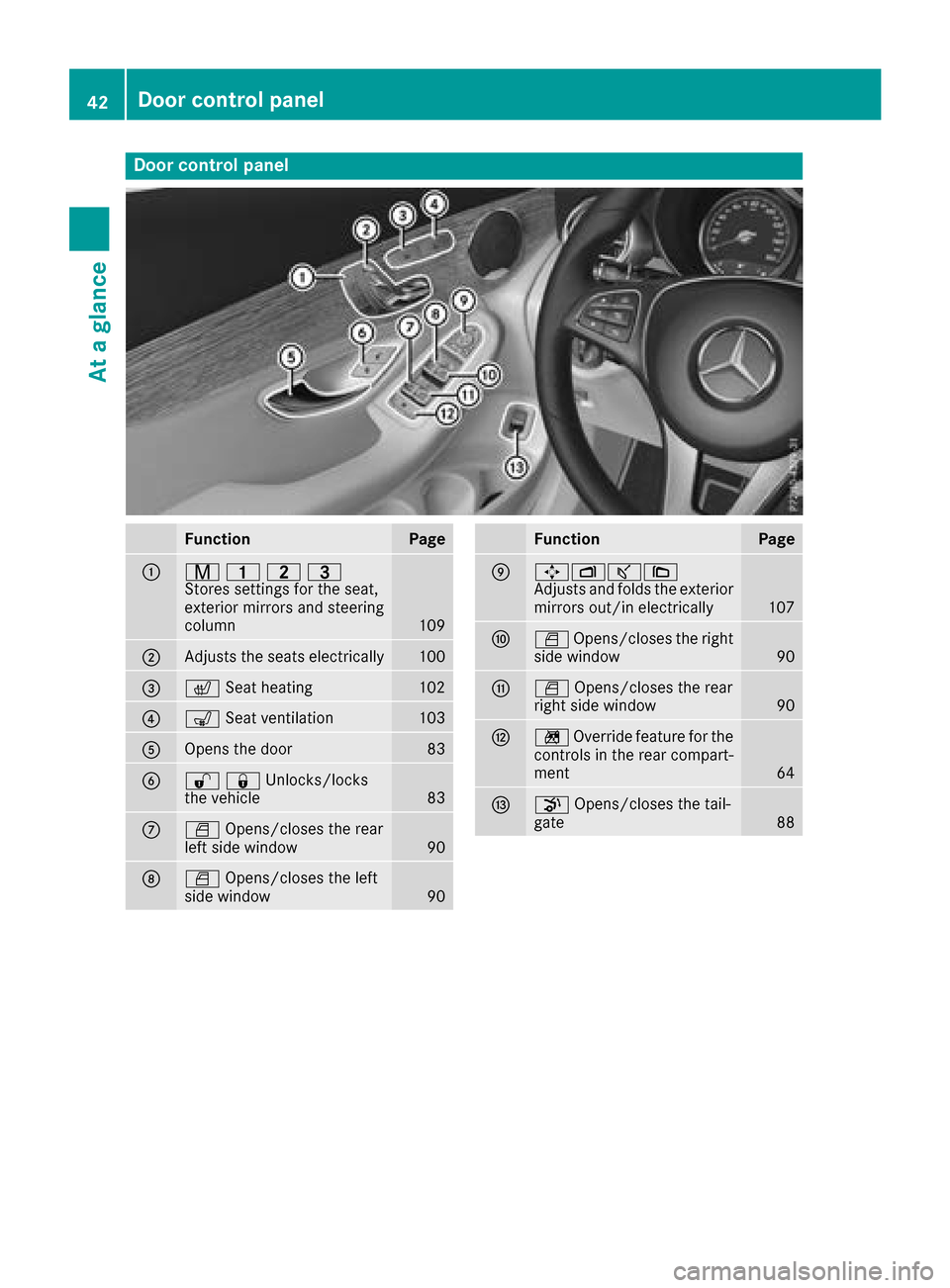
Door controlpanel
FunctionPage
:r 45=
Stores settings for the seat,
exterior mirrors and steering
column
109
;Adjusts the seats electrically100
=c Seat heating102
?sSeat ventilation103
AOpens the door83
B%&Unlocks/locks
the vehicle83
CWOpens/closes the rear
left side window90
DW Opens/closes the left
side window90
FunctionPage
E7Zª\
Adjusts and folds the exterior
mirrors out/in electrically
107
FW Opens/closes the right
side window90
GW Opens/closes the rear
right side window90
Hn Override feature for the
controls in the rear compart-
ment
64
Ip Opens/closes the tail-
gate88
42Door control panel
At a glance
Page 77 of 374

Rdarkness
Ror if:
-pedestrians move quickly, e.g. into the path
of the vehicle
-the camera system no longer recognizes a
pedestrian as a person due to special cloth-
ing or other objects
-a pedestrian is concealed by other objects
-the typical outline of a pedestrian is not
distinguishable from the background
Following damage to the front end of the vehicle,
have the configuration and operation of the
radar sensors checked at a qualified specialist
workshop. This also applies to collisions at slow
speeds where there is no visible damage to the
front of the vehicle.
Following damage to the windshield, have the
configuration and operation of the camera sys-
tem checked at a qualified specialist workshop.
Function
XTo activate/deactivate: activate or deacti-
vate PRE-SAFE®Brake in the on-board com-
puter (Ypage 221).
If the PRE-SAFE®Brake is not activated, the
æ symbol appears in the multifunction dis-
play.
Starting at a speed of around 4 mph (7 km/h),
this function warns you if you are rapidly
approaching a vehicle in front. An intermittent
warning tone will then sound and the ·dis-
tance warning lamp will light up in the instru-
ment cluster.
XBrake immediately to defuse the situation.
or
XTake evasive action provided it is safe to do
so.
PRE-SAFE
®Brake can also brake the vehicle
automatically under the following conditions:
Rthe driver and front passenger have their seat belts fastened
Rthe vehicle speed is between approximately
4 mph (7 km/h) and 124 mph (200 km/ h)
At speeds of up to approximately 44 mph
(70 km/h), PRE-SAFE
®Brake can also detect:
Rstationary objects in the path of your vehicle,
e.g. stopped or parked vehicles
Rpedestrians in the path of your vehicle
iIf there is an increased risk of a collision,
preventive passenger protection measures
(PRE-SAFE
®) are triggered (Ypage 57).
If the risk of collision with the vehicle in front
remains and you do not brake, take evasive
action or accelerate significantly, the vehicle
may perform automatic emergency braking, up
to the point of full brake application. Automatic emergency braking is not performed until imme-
diately prior to an imminent accident.
You ca
n prevent the intervention of the PRE-
SAFE®Brake at any time by:
Rdepressing the accelerator pedal further.
Ractivating kickdown.
Rreleasing the brake pedal
The braking action of PRE-SAFE®Brake is ended
automatically if:
Ryou maneuver to avoid the obstacle.
Rthere is no longer a risk of collision.
Ran obstacle is no longer detected in front of
your vehicle.
STEER CONTROL
General information
STEER CONTROL helps you by transmitting a
noticeable steering force to the steering wheel
in the direction required for vehicle stabilization.
This steering assistance is provided in particular if:
Rboth right wheels or both left wheels are on a
wet or slippery road surface when you brake
Rthe vehicle begins to skid
Important safety notes
iObserve the "Important safety notes" sec-
tion (Ypage 65).
No steering support is provided from STEER
CONTROL, if:
RESP®is deactivated
RESP®is malfunctioning
Rthe steering is malfunctioning
If ESP®is malfunctioning, you will be assisted
further by the electrical power steering.
Driving safety systems75
Safety
Z
Page 79 of 374
SmartKey
Important safety notes
GWARNING
If children are left unsupervised in the vehicle,
they could:
Ropen the doors, thus endangering other
people or road users.
Rget out and disrupt traffic.
Roperate the vehicle's equipment.
Additionally, children could set the vehicle in
motion if, for example, they:
Rrelease the parking brake.
Rshifting the automatic transmission out of
park position P
RStart the engine.
There is a risk of an accident and injury.
When leaving the vehicle, always take the
SmartKey with you and lock the vehicle. Never
leave children or animals unattended in the
vehicle. Always keep the SmartKey out of
reach of children.
GWARNING
If you attach heavy or large objects to the
SmartKey, the SmartKey could be uninten-
tionally turned in the ignition lock. This could
cause the engine to be switched off. There is a risk of an accident.
Do not attach any heavy or large objects to the
SmartKey. Remove any bulky key rings before
inserting the SmartKey into the ignition lock.
!Keep the SmartKey away from strong mag-
netic fields. Otherwise, the remote control
function could be affected.
Strong magnetic fields can occur in the vicin-
ity of powerful electrical installations.
Do not keep the SmartKey:
Rwith electronic devices, e.g. a mobile phone
or another SmartKey.
Rwith metallic objects, e.g. coins or metal foil.
Rinside metallic objects, e.g. a metal case.
This can affect the functionality of the Smart- Key. Vehicles with KEYLESS-GO start function:
do
not keep the SmartKey in the cargo compart-
ment. Otherwise, the SmartKey may not be
detected, e.g. when starting the engine using
the Start/Stop button.
A brief radio connection between the vehicle
and the SmartKey determines whether a valid
SmartKey is in, or in the direct vicinity of, the
vehicle. This occurs, for example:
Rwhen starting the engine
Rwhile driving
Rwhen using HANDS-FREE ACCESS
Rwhen the external door handles are touched
Rduring convenience closing
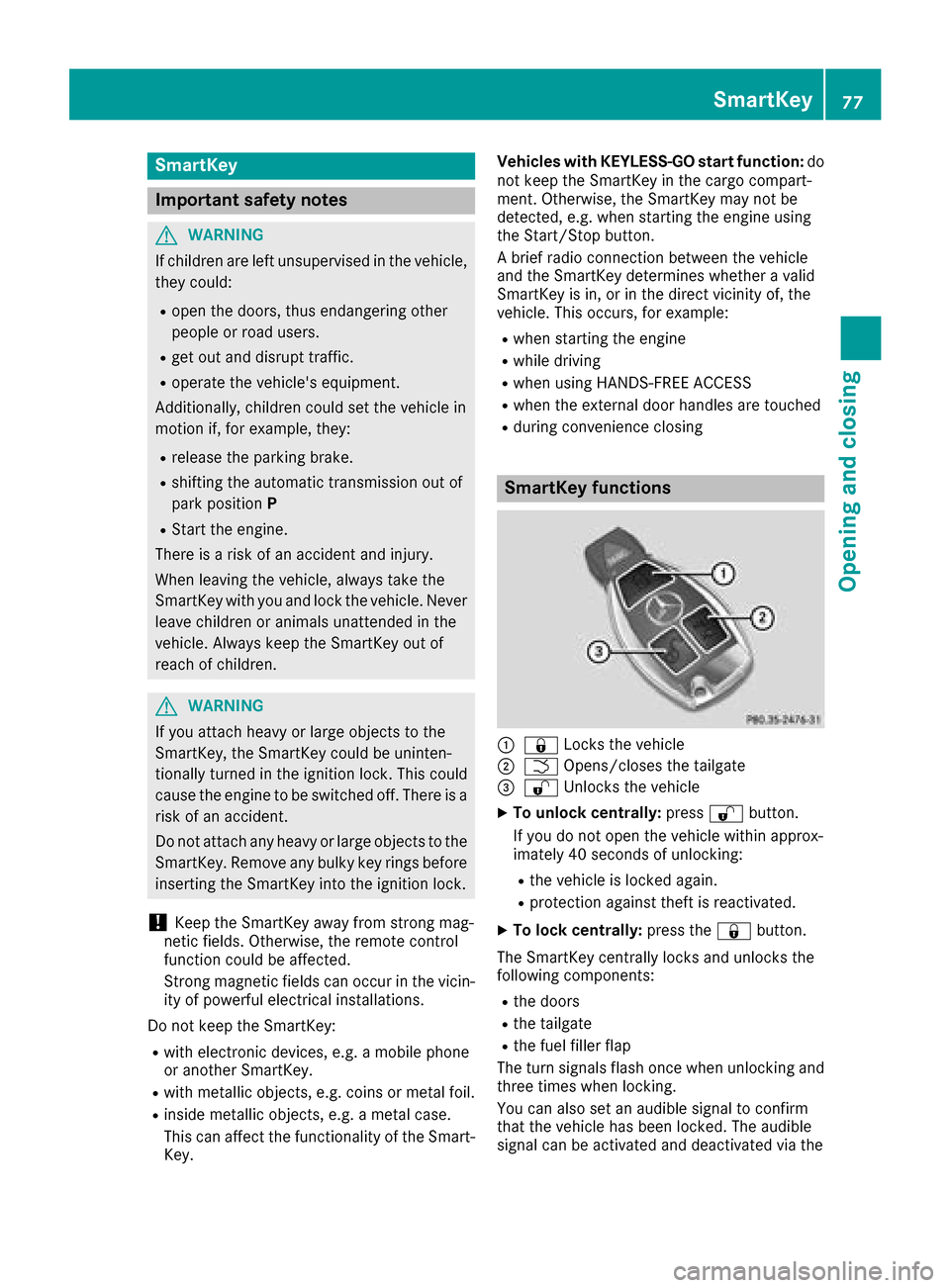
SmartKey functions
:& Locks the vehicle
;FOpens/closes the tailgate
=%Unlocks the vehicle
XTo unlock centrally: press%button.
If you do not open the vehicle within approx-
imately 40 seconds of unlocking:
Rthe vehicle is locked again.
Rprotection against theft is reactivated.
XTo lock centrally: press the&button.
The SmartKey centrally locks and unlocks the
following components:
Rthe doors
Rthe tailgate
Rthe fuel filler flap
The turn signals flash once when unlocking and
three times when locking.
You can also set an audible signal to confirm
that the vehicle has been locked. The audible
signal can be activated and deactivated via the
SmartKey77
Opening and closing
Z