2017 MERCEDES-BENZ GLA SUV wheel
[x] Cancel search: wheelPage 21 of 369
Rear window heating
Problem (fault) ............................... 135
Switching on/off ........................... 135
Rear window wiper
Replacing the wiper blad e.............. 126
Switching on/of f........................... 124
Rear-compartment seat belt sta-
tus indicator ........................................ 46
Rear-view mirror
Anti-dazzle mode (automatic) ........ 113
Dipping (manual) ........................... 112
Reflective safety vest ....................... 315
Refuelling
Fuel gaug e....................................... 34
Important safety notes .................. 163
Notes for Mercedes‑ AMG vehi-
cles ................................................ 354
Refuelling process ......................... 164
see Fuel
Remote control
Auxiliary heating/ventilation .......... 138
Changing the batteries (auxiliary
heating) ......................................... 140
Replacing bulbs
Brake lamp .................................... 123
Dipped-beam headlamp s............... 122
Fitting/removing the cover (front
wheel arch) .................................... 121
Important safety notes .................. 120
Main-beam headlamp s................... 122
Overview of bulb types .................. 121
Rear fog lamp ................................ 123
Turn signals (front) ......................... 122
Turn signals (rear) .......................... 123
Replacing the battery (auxiliary
heating remote control) .................... 140
Rescue card ......................................... 30
Reserve (fuel tank)
see Fuel
Reserve fuel
Display message ............................ 251
Warning lamp ................................. 272
Residual heat (climate control) ........ 137
Restraint system
Display message ............................ 243
Introduction ..................................... 41
Warning lamp ................................. 272 Warning lamp (function) ................... 42
Rev counter ........................................ 217
Reverse gear
Engaging (manual transmission) .... 153
Reverse gear (selector lever) ........... 156
Reversing camera
"Reverse parking" function ............ 202
Cleaning instructions ..................... 311
Coupling up a trailer function ........ 203
Display in the multimedia system .. 201
Function/note s............................. 200
General notes ................................ 200
Switching on/of f........................... 201
Reversing feature
Side windows ................................... 98
Tailgate ............................................ 89
Reversing function
Roller sunblind ............................... 103
Reversing lamps
Display message ............................ 247
Roller sunblind
Panorama sliding sunroo f.............. 103
Roof carrier ........................................ 296
Roof lining and carpets (cleaning
instructions) ...................................... 314
Roof load (maximum) ........................ 358
Route guidance
See also Digital Owner's Manua l... 277 S
Safety Children in the vehicle ..................... 56
see Occupant safety
Safety net
Attaching ....................................... 294
Important safety information ......... 294
Safety system
see Driving safety systems
SD card
Inserting ........................................ 286
Inserting/removing ........................ 286
Removing ....................................... 286
SD memory card
See also Digital Owner's Manua l... 277
Seat
Adjusting (Performance Seat) ........ 110
Correct driver's seat position ........ 106 18
Index
Page 23 of 369
Spare wheel
see Emergency spare wheel
Specialist workshop ............................30
Spectacles compartment ................. 289
Speed limiter
Display message ............................2 55
Important safety notes .................. 178
Selecting ........................................ 179
Speed, controlling
see Cruise control
Speedometer
Activating/deactivating the addi-
tional speedometer ........................ 228
Digital ............................................ 222
In the Instrument cluster ................. 34
Segments ...................................... 217
Selecting a display unit .................. 228
SPORT handling mode
Deactivating/activating
(Mercedes-AMG vehicles) ................ 73
Warning lamp ................................. 270
Start-off assist
Activating ....................................... 188
Important safety notes .................. 187
Start/Stop button
Removing ....................................... 145
Starting the engine ........................ 146
Start/stop function
see ECO start/stop function
Starting (engine) ................................ 145
Starting the engine
see Starting (engine)
STEER CONTROL .................................. 75
Steering
Display message ............................ 262
Steering assistant STEER CON-
TROL
see STEER CONTROL
Steering wheel
Adjusting (manually) ...................... 111
Button overview ............................... 35
Buttons (on-board computer) ......... 218
Cleaning ......................................... 313
Gearshift paddle s........................... 161
Important safety notes .................. 111
Steering wheel gearshift paddles .... 161
Stopwatch (RACETIMER) ................... 232Stowage compartment
Map pockets .................................. 290
Stowage compartments
Armrest (front) ............................... 289
Armrest (under) ............................. 290
Centre console .............................. 289
Centre console (rear) ..................... 290
Cup holde r..................................... 296
Glove compartment ....................... 289
Important safety information ......... 288
Spectacles compartment ............... 289
Under driver's seat/front-
passenger sea t.............................. 290
Stowage net ....................................... 290
Stowage space
Stowage net ................................... 290
Summer opening
see Convenience opening feature
Summer tyres .................................... 336
Sun visor ............................................ 297
Suspension settings
AMG RIDE CONTROL sports sus-
pension .......................................... 189
Switching on media mode
Via the device list .......................... 286 T
Tail lamps see Lights
Tailgate
Display message ............................ 261
Emergency unlocking ................. 94, 97
Important safety notes .................... 89
Limiting the opening angle ............... 93
Obstruction detectio n...................... 89
Opening dimensions ...................... 358
Opening/closing (from outside) .. 90, 95 Opening/closing automatically
from inside ....................................... 92
Opening/closing automatically
from outside .................................... 90
Tank
see Fuel tank
Technical data
Capacities ...................................... 352
Information .................................... 350
Trailer load s................................... 359 20
Index
Page 24 of 369
Tyres/wheels ................................. 347
Vehicle data ................................... 358
Telephone
Accepting a call (multifunction
steering wheel) .............................. 225
Authorising a mobile phone (con-
necting) ......................................... 281
Authorising a mobile phone via
the device manager (connecting) ... 282
Connecting a mobile phone
(device manager) ........................... 282
Connecting a Mobile phone (gen-
eral information) ............................2 80
Display message ............................ 263
Introduction ................................... 225
Menu (on-board computer) ............ 225
Number from the phone book ....... .225
Redialling ....................................... 226
Rejecting/ending a call ................. 225
See also Digital Owner's Manual ... 277
Telephone compartment ................ 290
Telephone module with Bluetooth ®
(SAP profile) Activating and connecting the
module .......................................... .284
Charging a mobile phone .............. .286
Connecting the mobile phone ....... .284
Connecting the module via a USB
cable .............................................. 283
Data modem mode ........................ 285
Installing the module ..................... 283
Introduction ................................... 283
Saving/deleting the PIN for the
SIM card ........................................ 285
Settings ......................................... 285
SIM card mode .............................. 284
Text messages ............................... 285
Transferring the phone book .......... 285
Temperature
Coolant .......................................... 218
Coolant (on-board computer,
Mercedes-AMG vehicles) .............. .231
Engine oil (on-board computer,
Mercedes-AMG vehicles) .............. .231
Outside temperature ..................... .217
Setting (climate control) ................ 133
Transmission oil (on-board com-
puter, Mercedes-AMG vehicles) ..... 231 TEMPOMAT
Function/notes ............................ .176
Text messages
Telephone module with Blue-
tooth ®
(SAP profile) ....................... 285
Through-loading ................................ 291
Timing (RACETIMER) ......................... 232
TIREFIT kit .......................................... 319
Declaration of conformity ................ 28
Important safety notes .................. 319
Storage location ............................ 317
Tyre pressure not reached ............. 321
Tyre pressure reached ................... 321
Tool
see Vehicle tool kit
Top Tether ............................................ 59
Total distance recorder .................... 221
Tow-away protection
Activating ......................................... 76
Deactivating ..................................... 77
Function .......................................... .76
Tow-starting
Emergency engine starting ............ 331
Fitting the towing eye .................... 328
Important safety notes .................. 327
Removing the towing eye ............... 329
Towing
Important safety notes .................. 327
Notes for 4MATIC vehicles ............ 330
Transporting the vehicle ................ 330
Towing a trailer
Axle load, permissibl e.................... 359
ESP ®
(Electronic Stability Pro-
gram) ............................................... 75
Failure check for LEDs ................... 216
General notes ................................ 213
Parking Pilot .................................. 196
Pulling away with a traile r.............. 147
Trailer tow hitch display message .. 262
Towing away
Fitting the towing ey e.................... 328
Removing the towing eye ............... 329
With both axles on the ground ....... 329
With front axle raised ..................... 329
Towing eye ......................................... 317 Index
21
Page 26 of 369
Summer tyres ................................ 336
Tyre size (data
).............................. 347
Tyre tread ...................................... 335
see Flat tyre U
Unlocking Emergency unlocking ....................... 88
From inside the vehicle (central
unlocking button) ............................. 87
Upshift indicator (on-board com-
puter, Mercedes-AMG vehicles) ....... 231
USB devices
Connecting to the Media Inter-
face ............................................... 287 V
Vanity mirror (in sun visor) .............. 298
Vehicle
Correct use ...................................... 30
Data acquisition ............................... 30
Display message ............................ 258
Electronics ..................................... 350
Equipment ....................................... 27
Implied warranty .............................. 30
Individual settings .......................... 228
Leaving parked up ......................... 169
Locking (in an emergency) ............... 88
Locking (key) ................................... 79
Lowering ........................................ 346
Pulling away ................................... 146
Raising ........................................... 344
Registration ..................................... 30
Securing from rolling away ............ 344
Transporting .................................. 330
Unlocking (in an emergency) ........... 88
Unlocking (key) ................................ 79
Vehicle data ................................... 358
Vehicle battery
see Battery (vehicle)
Vehicle data
Boot load (maximum) ..................... 358
Roof load (maximum) ..................... 358
Vehicle data (off-road driving)
Approach/departure angle ............ 359
Maximum gradient climbing abil-
ity .................................................. 359 Vehicle dimensions
........................... 358
Vehicle emergency locking ................ 88
Vehicle identification number
see VIN
Vehicle identification plate .............. 351
Vehicle tool kit .................................. 317
Ventilation
Setting the vents ........................... 141
Video
Operating the DVD ......................... 224
See also Digital Owner's Manua l... 277
VIN
Seat ............................................... 352
Type plate ...................................... 351 W
Warning and indicator lamps ABS ................................................ 267
Active Brake Assist ........................ 275
Brakes ........................................... 266
Distance warning signal ................. 275
ESP ®
.............................................. 269
ESP ®
OFF ....................................... 270
Fuel tank ........................................ 272
LIM (cruise control )........................ 176
LIM (Distance Pilot DISTRONIC ).... 181
LIM (variable limiter) ...................... 178
Overview .......................................... 34
Reserve fuel ................................... 272
Seat belt ........................................ 265
Tyre pressure monitor ................... 276
Warning triangle ................................ 316
Washer fluid
Display message ............................ 263
Weather display (COMAND Online)
See also Digital Owner's Manua l... 277
Wheel and tyre combinations
Tyres .............................................. 347
Wheel bolt tightening torque ........... 346
Wheel chock ...................................... 344
Wheels
Changing a whee l.......................... 342
Changing/replacing ....................... 342
Checking ........................................ 334
Cleaning ......................................... 310
Emergency spare wheel ................. 348
Fitting a new wheel ........................ 345 Index
23
Page 27 of 369
Important safety notes .................. 334
Information on driving .................... 334
Removing a wheel
.......................... 345
Storing ........................................... 343
Tightening torque ........................... 346
Wheel size/tyre size ...................... 347
Wheels and tyres
Changing a whee l.......................... 343
Windowbag
Display message ............................ 243
Operation ......................................... 49
Windows
Cleaning ......................................... 310
see Side windows
Windscreen
Demisting ...................................... 134
Windscreen washer fluid
see Windscreen washer system
Windscreen washer system
Important safety notes .................. 357
Topping up ..................................... 306
Windscreen wipers
Display message ............................ 263
Problem (malfunction) ................... 127
Rear window wipe r........................ 124
Replacing the wiper blades ............ 125
Switching on/of f........................... 124
Winter driving
General notes ................................ 336
Winter operation
Slippery road surfaces ................... 172
Snow chains .................................. 337
Winter tyres
Limiting the speed (on-board com-
puter) ............................................. 229
M+S tyres ...................................... 336
Wiper blades
Cleaning ......................................... 310
Important safety notes .................. 125
Replacing (on the rear window )..... 126
Wooden trim (cleaning instruc-
tions) .................................................. 313
Workshop
see Qualified specialist workshop Z
ZONE function Switching on/of f........................... 134 24
Index
Page 30 of 369
Have accessories retrofitted at a qualified
specialist workshop.
You could jeopardise the operating safety of
your vehicle if you use parts, tyres and wheels as
well as accessories relevant to safety that have not been approved by Mercedes-Benz. This
could lead to malfunctions in safety-relevant
systems, e.g. the brake system. Use only genu-
ine Mercedes-Benz parts or parts of equal qual- ity. Use only tyres, wheels and accessories that
have been specifically approved for your vehi-
cle.
Mercedes-Benz tests genuine parts and conver-
sion parts and accessories that have been spe-
cifically approved for your vehicle for their reli-
ability, safety and suitability. Despite ongoing
market research, Mercedes-Benz is unable to
assess other parts. Mercedes-Benz therefore
accepts no responsibility for the use of such
parts in Mercedes-Benz vehicles, even if they
have been officially approved or independently
approved by a testing centre.
In Germany, certain parts are officially approved for installation or modification only if they com-
ply with legal requirements. This also applies to some other countries. All genuine Mercedes-
Benz parts meet the approval requirements. The
use of non-approved parts may invalidate the
vehicle's general operating permit.
This is the case:
R if they cause a change of the vehicle type from
that for which the vehicle's general operating permit was granted
R if other road users could be endangered
R if the emission or noise levels are adversely
affected
Always specify the vehicle identification number (VIN) (Y page 351) when ordering genuine
Mercedes-Benz parts. Owner's Manual
Vehicle equipment
i This Owner's Manual describes all models
and all standard and optional equipment
available for your vehicle at the time of pub-
lication of the Owner's Manual. Country-spe-
cific differences are possible. Note that your
vehicle may not be fitted with all features
described. This is also the case for systems
and functions relevant to safety. Therefore, the equipment on your vehicle may differ from
that in the descriptions and illustrations.
The original purchase contract documentation
for your vehicle contains a list of all the systems in your vehicle.
Should you have any questions concerning
equipment and operation, please consult a
Mercedes-Benz Service Centre.
The Owner's Manual and Service Booklet are
important documents and should be kept in the
vehicle. Operating safety
Declarations of conformity
Wireless vehicle components The following information applies to all compo-
nents of the vehicle and the information sys-
tems and communication devices integrated
into the vehicle that receive and/or transmit
radio waves:
The components of this vehicle that receive
and/or transmit radio waves are compliant with
the basic requirements and all other relevant
conditions of Directive 1999/5/EC. You can
obtain further information from any Mercedes-
Benz Service Centre.
Electromagnetic compatibility The electromagnetic compatibility of the vehicle
components has been checked and certified
according to the currently valid version of Reg-
ulation ECE-R 10.
Jack Copy and translation of the original declaration
of conformity:
EC declaration of conformity
1. The signatory, as a representative
Manufacturer:
BRANO a.s.
74741 Hradec nad Moravicí, Opav-
ská 1000,
Czech Republic
ID no.: 64-387-5933
VAT ID no.: CZ64-387-5933 Operating safety
27Introduction Z
Page 33 of 369
Qualified specialist workshop
A qualified specialist workshop has the neces-
sary special skills, tools and qualifications to
correctly carry out any necessary work on your
vehicle. This particularly applies to work rele-
vant to safety.
Observe the notes in the Service Booklet.
Always have the following work carried out at a
qualified specialist workshop:
R work relevant to safety
R service and maintenance work
R repair work
R modifications, installations and conversions
R work on electronic components
Mercedes-Benz recommends that you use a
Mercedes-Benz Service Centre. Vehicle registration
Mercedes-Benz may ask its Service Centres to
carry out technical inspections on certain vehi-
cles. The quality or safety of the vehicle is
improved as a result of the inspection.
Mercedes-Benz can only inform you about vehi-
cle checks if it has your registration data.
It is possible that your vehicle has not yet been
registered in your name in the following cases:
R if your vehicle was not purchased at an
authorised specialist dealer
R if your vehicle has not yet been inspected at a
Mercedes-Benz Service Centre
It is advisable to register your vehicle with a
Mercedes-Benz Service Centre.
Inform Mercedes-Benz as soon as possible
about any change in address or vehicle owner-
ship. You can do this at a Mercedes-Benz Ser-
vice Centre, for example. Correct use
If you remove any warning stickers, you or oth-
ers could fail to recognise certain dangers.
Leave warning stickers in position.
Observe the following information when driving
your vehicle:
R the safety notes in this manual
R technical data for the vehicle R
traffic rules and regulations
R laws and safety standards pertaining to motor
vehicles Implied warranty
! Follow the instructions in this manual about
the proper operation of your vehicle as well as
about possible vehicle damage. Damage to
your vehicle that arises from culpable contra- ventions against these instructions are not
covered either by Mercedes-Benz implied
warranty or by the New or Used-Vehicle War- ranty. QR code for rescue card
The QR code is secured in the fuel filler flap and
on the opposite side on the B-pillar. In the event
of an accident, rescue services can use the QR
code to quickly find the appropriate rescue card for your vehicle. The current rescue card con-
tains, in a compact form, the most important
information about your vehicle, e.g. the routing
of the electric cables.
You can find more information under
www.mercedes-benz.de/qr-code. Data stored in the vehicle
Many of the electronic components in your vehi- cle can store data.
These data memories temporarily or perma-
nently store technical information about:
R the vehicle's operating state
R events
R faults
In general, this technical information docu-
ments the state of a component, a module, a
system or the surroundings.
This includes, for example:
R operating conditions of system components.
For example, fluid levels.
R status messages concerning the vehicle and
its individual components, e.g. number of
wheel revolutions/speed, deceleration in
movement, lateral acceleration, accelerator
pedal position. 30
Data stored in the vehicleIntroduction
Page 35 of 369
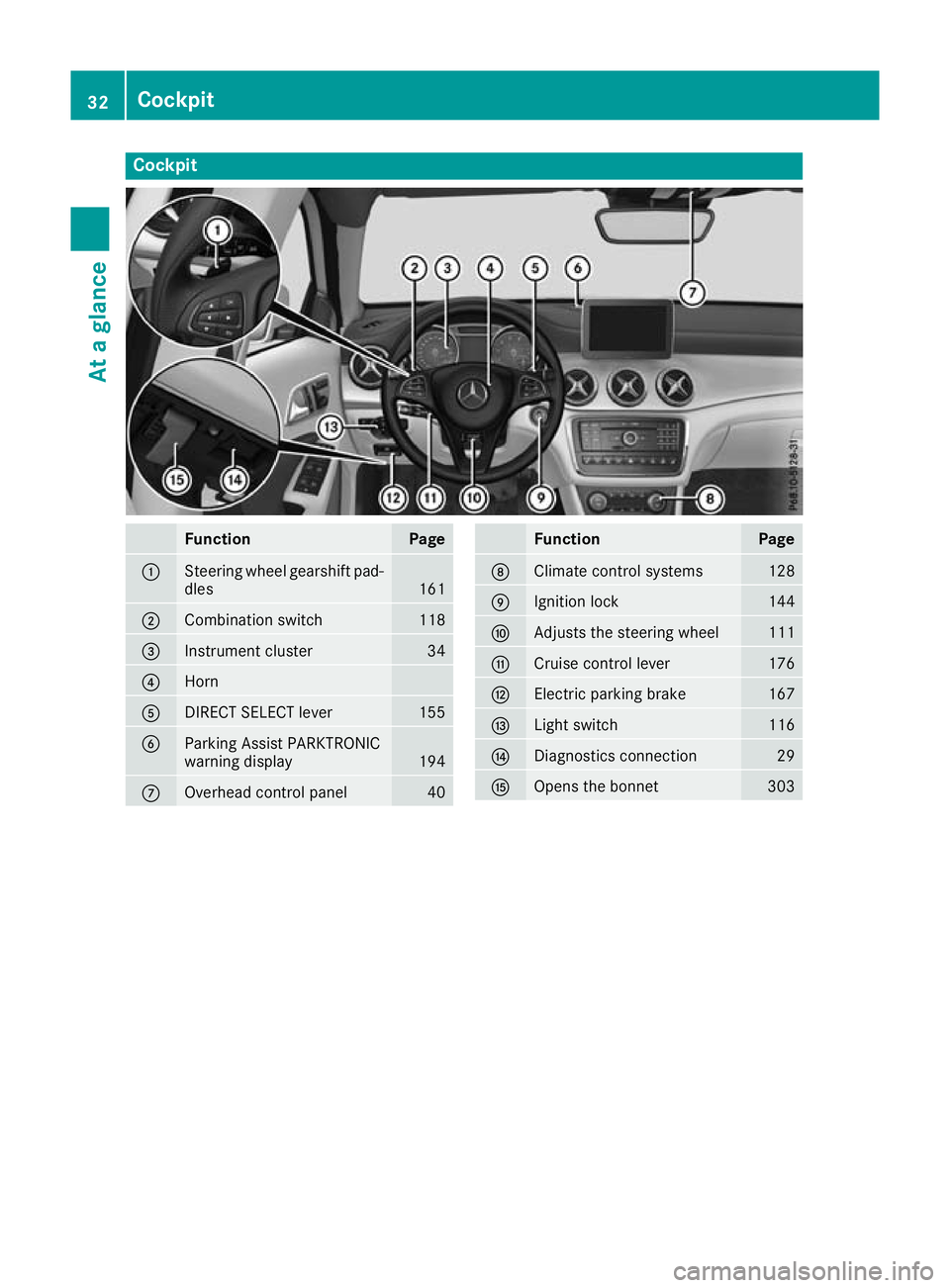
Cockpit
Function Page
:
Steering wheel gearshift pad-
dles 161
;
Combination switch 118
=
Instrument cluster 34
?
Horn
A
DIRECT SELECT lever 155
B
Parking Assist PARKTRONIC
warning display
194
C
Overhead control panel 40 Function Page
D
Climate control systems 128
E
Ignition lock 144
F
Adjusts the steering wheel 111
G
Cruise control lever 176
H
Electric parking brake 167
I
Light switch 116
J
Diagnostics connection 29
K
Opens the bonnet 30332
CockpitAt a glance