2017 MERCEDES-BENZ G-Class warning light
[x] Cancel search: warning lightPage 130 of 286

Familiarize yourself with the characteristics of
your vehicle and the gearshift operation before
driving through difficult terrain.
The following driving systems are specially
adapted to off-roadd riving:
R4ETS (Ypage 59)
ROff-roadABS (Ypage 58)
RTransfer case (Ypage 145)
RDifferentia llocks (Ypage 120)
Observe the following notes:
RStop the vehicle before yo udrive off-roada nd,
if necessary ,shift the transfe rcase to the off-
roadd riving position LOW RANGE
(
Ypage 146).
REngag ethe differential locks if necessary
(Ypage 148).
iABS, 4ETS, ESP®and BAS are deactivated
while the differential locks are engaged.T his
allow sthe front wheels to lock briefly, so that
these can dig into aloose surface .However,
please note that locke dwheels skid and can
no longer steer.
RCheck that items of luggage and loads are
stowed safely and are well secured
(
Ypage 209).
RTo avoid damaging the vehicle, make sure
there is always sufficient ground clearance.
RAlway skeep the engine running and in gear
whe ndriving on adownhil lgradient.
RAlway skeep the engine running and in gear
whe ndriving downani ncline.
RDrive slowlyand evenly, if necessary at a
walking pace.
REnsure that the wheels are in contact with the
ground at al ltimes.
RDrive with extreme care on unfamilia roff-road
routes where visibility is poor. For safety rea-
sons, get ou
tofthe vehicle firs tand survey
the off-roadr oute.
RCheck the depth of water before fording rivers
and streams.
RWatch outfor obstacles.
RAlwayskeep the doors, reard oor, sidewin-
dowsa nd the sliding sunroof closed while the
vehicle is in motion.
RSwitch off cruise control.
RDo not deviate from marke droutes.
RAdap tyou rspeed to the terrain. The rougher,
steeper or more ruts on the terrain, the slower
your speed should be.
RDo not jump with the vehicle. as this will inter-
rup tthe vehicle' spropulsion.
RAvoid hig hengine speeds .Drive at appropri-
ate engine speeds (maximu m3,000 rpm).
RDo not shift the automatic transmission to
position N.
RAlwayscheck the vehicle for damag eafteroff-
roadd riving.
Do not use the HOLD function whe ndriving off-
road, on steep uphil lordownhil lgradients or on
slippery or loose surfaces. The HOLD function
cannot holdt he vehicle on such surfaces.
You can obtain further information aboutr etro-
fitting specia lall-terrain tires from aquali fied
specialist workshop.
Checklist before driving off-road
!If the engine oil warning lamp lights up while
the vehicle is in motion, stop the vehicle in a
saf ep lace as soona spossible. Check the
engine oil level. The engine oil warning lamp
warning mus tnot be ignored.C ontinuing the
journey while the symbol is displaye dcould
lea dtoe ngine damage.
XEngin eoillevel: check the engine oil level
and ad doil if necessary.
Whend riving on steep gradients, the engine
oil level mus tbes ufficiently hig htoensure a
correct oil supply in the vehicle.
XTire-changing too lkit: check that the jack is
working and make sur eyou hav ethe lug
wrench, arobust tow cable and afolding
spade in the vehicle.
XWheels and tires: check the tire treadd epth
and tire pressure.
XCheck for damag eand remove any foreign
objects, e.g. small stones,f rom the wheels/
tires.
XReplace any missing valve caps.
XReplace dente dordamaged wheels .Also
check the spare wheel.
XRims: dentedorbent rims can result in aloss
of tire pressure and damag ethe tire bead.
Befored riving off-road, check the wheels and
replace them if necessary.
128Drivin gtips
Drivin gand parking
Page 132 of 286
for possible damage, especially to the under-
body and the components of the chassis.
!Drive with particularcare when driving over
an obstacle while driving up or downas teep
slope.
The vehiclec ouldotherwise tilt and slide side-
ways or tip over.
Observe the following rules when driving over
tree stumps ,larg estones and other obstacles:
RObserve the safety notes (Ypag e127) and
the generaln otes (Ypage127) on off-road
driving.
RShift the transfer case to the off-road driving
position LOW RANGE (Ypage146).
RAvoid high engine speeds.
RShift the automatic transmission to alow
gear.
RMake sure that you have enoug hground
clearance before driving across an obstacle.
RDrive very slowly.
RTry to drive straight over the center of obsta-
cles: front wheelf irst, then rear wheel.
Travelinguphill
Approach/departure angle
GWARNING
If you drive on asteep incline at an angle or
turn when driving on an incline ,the vehicle
coul dslips ideways, tip and rollover. There is a
risk of an accident.
Always drive on asteep incline in the line of
fall (straight up or down) and do not turn the
vehicle.
Always observe the approach/departure angle
values (
Ypag e283).
RObserve the safety notes (Ypag e127) and
generaln otes (Ypage127) on driving off-
road.
RDo not drive at an angle on slopes, incline sor
gradients, but instead follow the direct line of
fall .Note that the climbing ability of you rvehi-
cle depends on the terrai nconditions.
RBefore driving on extreme uphill and extreme
downhill gradients, set the transfer case to
the off-road driving position LOW RANGE
(
Ypag e146).
REngage the differential locks if necessary
(Ypag e148).
RDrive slowly.
RAccelerate gently and make sure that the
wheels are gripping.
RAvoid high engine speeds, except when driv-
ing on sandy and mudd yroutes with high driv-
ing resistance.
RAvoid high engine speeds –drive at an appro-
priate engine speed( maximum 3,000 rpm).
RWhen driving downani ncline,make use of the
engine'sb raking effect. Observe the engine
speed; do not overrev the engine.
Further information on the maximu mengine
speed: (
Ypag e157).
RShift the automatic transmission to alow gear
appropriate for tackling an uphill gradient or a
long, steep downhill gradient.
Hill start assist wil laid you when pulling away on
ah ill. For further information about hills tart
assist, see (
Ypag e127).
Maximum gradient-climbing capability
Always observe the maximu mgradient climbing
ability values (Ypag e283).
Hilltops
When driving up an uphill gradient, slightly
reduce pressure on the accelerator immediately
before reaching the brow of the hill( do not shift
the transmission into N).Make use of the vehi-
cle's own impetus to travel over the brow.
This style of driving prevents:
Rthe vehiclef rom lifting off the ground on the
brow of ahill
Rloss of traction
Rthe vehiclef rom traveling too quickly down
the other side
Driving downhill
RDrive slowly.
RDo not drive at an angle downs teep inclines.
Steer into the line of fall and drive with the
front wheels aligned straight. Otherwise, the
vehiclec ouldslips ideways, tip and rollover.
RBefore tackling steep downhill gradients, shift
the automatic transmission to alow gear.
By doing so, you wil luse the braking effect of
the engine to reduce the speed. If this is not
130Driving tips
Driving and parking
Page 135 of 286

·distanc ewarning lamp in the instrument
cluster lights up. Brakei mmediately in order to
increase the distance to the vehicle in fronto r
take evasive action provided it is safe to do so.
DISTRONIC PLUS operates in the speed range
between 0mph (0 km/h) and 120 mph
(200 km/h).
Do not use DISTRONIC PLUS while driving on
roads with steep gradients.
As DISTRONIC PLUS transmits radar waves, it
can resemble the radar detectors of the respon-
sible authorities. You can refer to the relevant
chapte rinthe Operator's Manual if questions
are asked about this.
iUSA only: This device has been approved by
the FCC as a"Vehicular Radar System". The
radar sensor is intended for use in an auto-
motiv eradar system only. Removal, tamper-
ing, or alterin gofthe device will void any war-
ranties, and is not permitted by the FCC. Do
not tamper with, alter, or use in any non-
approved way.
An yu nauthorized modification to this device
could void the user's authorit ytooperate the
equipment.
iCanada only: This device complies with
RSS-210 of Industry Canada. Operation is
subjec ttothe following two conditions:
1. This device may not cause interference,
and
2. This device must accept any interference
received, includin ginterferenc ethat may
cause undesired operation of the device.
Removal, tampering, or alterin gofthe device
will void any warranties, and is not permitted. Do not tamper with, alter, or use in any non-
approved way.
An yu nauthorized modification to this device
could void the user's authorit ytooperate the
equipment.
Important safetyn otes
GWARNING
DISTRONIC PLUS does not react to:
Rpeople or animals
Rstationary obstacles on the road, e.g. stop- ped or parked vehicles
Roncoming and crossing traffic
As aresult, DISTRONIC PLUS may neither give
warning snor interveneins uch situations.
There is arisk of an accident.
Always pay careful attention to the traffic sit-
uation and be ready to brake.
GWARNING
DISTRONIC PLUS cannot always clearly iden-
tify other road users and complex traffic sit-
uations.
In such cases, DISTRONIC PLUS may:
Rgive an unnecessary warning and then
brake the vehicle
Rneither give awarning nor intervene
Raccelerateorb rake unexpectedly
There is arisk of an accident.
Continue to drive carefully and be ready to
brake, in particular when warned to do so by
DISTRONIC PLUS.
GWARNING
DISTRONIC PLUS brakes your vehicle with up to 40% of the maximum brakin gforce. If this
brakin gforceisi nsufficient ,DISTRONIC PLUS
warns you visually and audibly. There is arisk
of an accident.
In such cases, apply the brakes yourself and
try to take evasive action.
If you fail to adapt your driving style, DISTRONIC
PLUS can neither reduce the risk of an accident
nor override the laws of physics. DISTRONIC
PLUS cannot take accountofr oad, weather and
traffic conditions. DISTRONIC PLUS is only an
aid. You are responsible for maintaining asafe
distanc etothe vehicle in front, for vehicle
speed, for brakin gingood time and for staying in
lane.
Do not use DISTRONIC PLUS:
Rin road and traffic condition sthat do not allow
you to maintain aconstan tspeed, e.g. in
heavy traffic or on winding roads
Ron slippery road surfaces.B raking or accel-
eratin gcan cause the drive wheels to lose
traction and the vehicle could then skid
Rwhen ther eispoor visibility, e.g. due to fog,
heavy rain or snow
Driving systems133
Driving and parking
Z
Page 139 of 286

obstacle or stationary vehicle, DISTRONIC
PLUS will not brake for these.
RCrossing vehicles: DISTRONIC PLUS may mis-
takenly detect vehicles that are crossingyour
lane. Activating DISTRONIC PLUS at traffic
lights with crossingt raffic,for example, could
cause your vehicle to pull away unintention-
ally.
In such situations, brake if necessary.
DISTRONIC PLUS is then deactivated.
Blind Spot Assist
General notes
Blind Spot Assist monitor sthe areas on either
side of the vehicle that are not visible to the
driver with two lateral, rear-facingr adar sen-
sors. Awarning lamp lights up in the exterior
mirrors and draws your attention to vehicles
detected in the monitored area. If you then
switch on the corresponding turn signal to
change lane, you will also receive an optical and
audiblew arning.
Blind Spot Assist supports you from aspeed of
approximately 20 mph (30 km/h).
Important safety notes
GWARNING
Blind Spot Assist does not react to:
Rvehicles overtaken too closely on the side,
placing them in the blind spot area
Rvehicles which approach with alarge speed
differential and overtak eyour vehicle
As aresult, Blind Spot Assist may not give
warnings in such situations. There is arisk of
an accident.
Always observe the traffic conditions care-
fully, and maintain asafe lateral distance.
Blind Spot Assist is only an aid. It may fail to
detect some vehicles and is no substitute for
attentive driving. Always ensure that there is
sufficient distance to the side for other road
users and obstacles.
iUSA only:
This device has been approved by the FCC as
a" Vehicular RadarS ystem". The radar sensor
is intended for use in an automotive radar system only. Removing, tampering with, or
altering the device will void any warranties,
and is not permitted by the FCC. Do not tam-
per with, alter, or use in any non-approved
way.
Any unauthorized modification to this device
could void the user’s authority to operate the
equipment.
Radar sensors
The radar sensors for Blind Spot Assist are inte-
grated into the rear bumper. Make sure that the
bumpers are free from dirt, ice or slush. The
sensors must not be covered, for example by
cycle racks or overhanging loads. Following a
severe impact or in the event of damage to the
bumpers, have the function of the radar sensors
checked at aqualified specialist workshop.
Blind Spot Assist may no longer work properly.
Monitoring area
In particular, the detection of obstacles can be
impaired if:
Rthere is dirt on the sensors or anything else
coveringt he sensors
Rthere is poor visibility, e.g. due to fog, heavy
rain, snow or spray
Rthere are narrow vehicles, e.g. motorcycles or
bicycles
Rthe road has very wide lanes
Rthe road has narrow lanes
Ryou are not driving in the middle of the lane
Rthere are barriers or other road boundaries
Driving systems137
Driving and parking
Z
Page 140 of 286
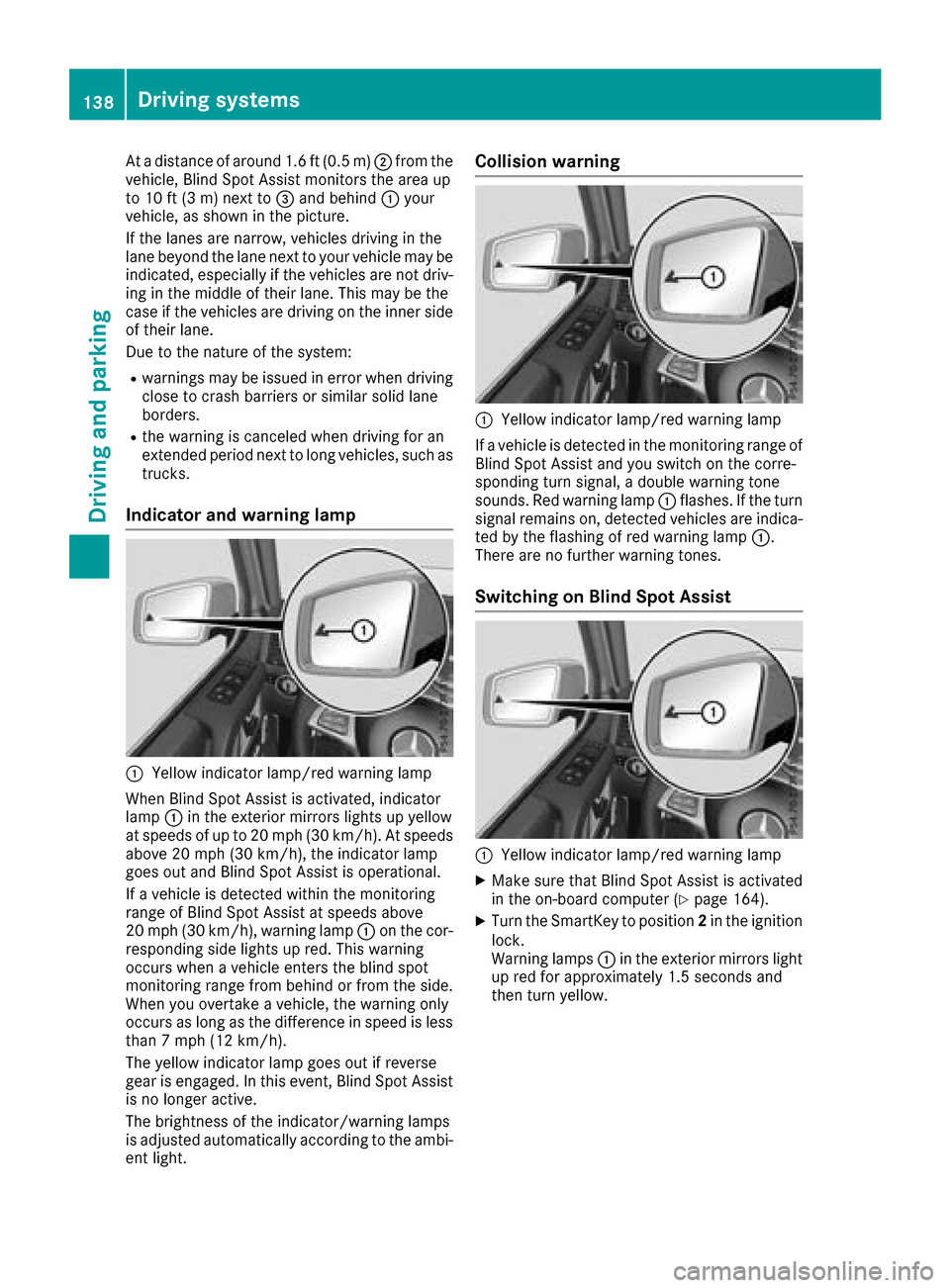
Atad istance of around 1.6 ft (0.5 m); from the
vehicle, Blind Spo tAssist monitors the area up
to 10 ft (3 m)next to =and behind :your
vehicle, as shown in the picture.
If the lanes are narrow,v ehicles driving in the
lane beyond the lane next to your vehicl emay be
indicated,e specially if the vehicles are not driv-
ing in the middl eoftheirlan e. Thi smay be the
cas eift he vehicles are driving on the inne rside
of thei rlan e.
Due to the nature of the system:
Rwarning smaybe issued in error when driving
close to crash barriers or similar solid lane
borders.
Rthe warning is cancele dwhend riving for an
extended perio dnext to long vehicles, such as
trucks.
Indicator and warning lamp
:Yellow indicator lamp/red warning lamp
Whe nBlind Spo tAssist is activated, indicator
lamp :in the exterio rmirrors lights up yellow
at speed sofupto20m ph (30 km/h). At speeds
above 20 mph (30 km/h), the indicator lamp
goe soutand Blind Spo tAssist is operational.
If av ehicl eisd etectedw ithint he monitoring
rang eofB lind Spo tAssist at speed sabove
20 mph (30 km/h), warning lamp :on the cor-
responding side lights up red.T hisw arning
occurs when avehicl eenter sthe blind spot
monitoring rang efrom behind or from the side.
Whe nyou overtake avehicle, the warning only
occurs as long as the difference in speed is less
than7m ph (12 km/h).
The yellow indicator lamp goe soutif reverse
gea rise ngaged .Inthise vent, Blind Spo tAssist
is no longer active.
The brightness of the indicator/warning lamps
is adjusted automaticall yaccording to the ambi-
ent light.
Collisio nwarning
:Yellow indicator lamp/red warning lamp
If av ehicl eisd etectedint he monitoring rang eof
Blind Spo tAssist and yo uswitch on the corre-
sponding turn signal, adouble warning tone
sounds. Re dwarning lamp :flashes. If the turn
signalr emains on, detectedv ehicles are indica-
ted by the flashing of red warning lamp :.
There are no further warning tones.
Switchin gonBlind SpotA ssist
:Yellow indicator lamp/red warning lamp
XMake sure thatB lind SpotAssist is activated
in the on-board compute r(Ypage 164).
XTurn the SmartKey to position 2in the ignition
lock.
Warning lamps :in the exterio rmirrors light
up red for approximately1 .5 seconds and
then turn yellow.
138Driving systems
Driving an dparking
Page 143 of 286

:Approx. 24 in (approx. 60 cm)(corners)
;Approx. 32 in (approx. 80 cm )(corners)
=Approx. 35 in (approx. 90 cm )(center)
?Approx. 40 in (approx. 100 cm )(center)
The sensors must be freef rom dirt, ice or slush.
The ycan otherwise not functio ncorrectly. Clean
the sensors regularly ,taking car enot to scratch
or damage them (
Ypage 234).
Minimu mdistance
CenterApprox. 8in(appr ox. 20 cm)
CornersApprox. 8in(appr ox. 20 cm)
If ther eisano bstacle withint hisrange,t he rel-
evant warning display slight up and awarning
tone sounds. If the distance falls belo wthe min-
imum, the distance maynol ongerbes hown.
Warning displays
Warning display for the front area
:
Segments on the left-hand side of the vehi-
cle
;Segments on the right-hand side of the vehi-
cle
=Segments showing operational readiness
The warning display sshowt he distance
between the sensors and the obstacle .The
warning display for the front area is locate don
the dashboard above the cente rairvents .The
warning display for the rea rareaisl ocate don
the headline rinthe rea rcompartment.
The warning display for each side of the vehicle
is divided into fiv eyello wand two red segments.
PARKTRONICi soperational if yellow segments
showing operational readiness =light up.
The selecte dtransmission positio nand the
direction in which the vehicl eisrolling deter-
mine which warning display is active when the
engine is running.
Transmission posi-
tionWarning display
DFront area activated
R, Nor the vehicl eis
rolling backwardsRear and front areas
activated
PNo area sactivated
One or more segments light up as the vehicle
approaches an obstacle ,depen ding on the vehi-
cle's distance from the obstacle.
From the:
Rsixth segment onwards, yo uwillh ea rani nter-
mittent warning tone for approximatelyt wo
seconds.
Rseventh segment onwards, yo uwillh eara
warning tone for approximatelyt wo seconds.
Driving systems141
Driving andparking
Z
Page 144 of 286

This indicates that you have now reached the
minimum distance.
Deactivating/activating PARKTRONIC
:Indicator lamp
;Deactivating/activatingPARKTRONIC If indicator lamp
:lights up, PARKTRONIC is
deactivated.
iPARKTRONIC is automatically activated
when you turn the SmartKey to position 2in
the ignition lock.
Towing atrailer
PARKTRONIC is deactivated for the rear area
when you establish an electrical connection
between your vehicle and atrailer.
Problems with PARKTRONIC
ProblemPossible causes/consequences and MSolutions
Only the red segmentsin
the PARKTRONIC warn-
ing displaysa re lit. You
also hear awarning tone
for approximately two
seconds.
PARKTRONIC is deacti-
vated after afew sec-
onds, and the indicator
lamp in the PARKTRONIC
button lights up.PARKTRONIC has malfunctioned and has switched off.
XIf problems persist, have PARKTRONIC checked at aqualified spe-
cialist workshop.
Only the red segment sin
the PARKTRONIC warn-
ing displaysa re lit.
PARKTRONIC is deacti-
vated after afew sec-
onds.The PARKTRONIC sensors are dirty or there is interference.
XClean the PARKTRONIC sensors (Ypage 234).
XSwitch the ignition back on.
The problem may be caused by an external source of radio or ultra-
sound waves.
XSee if PARKTRONIC functions in adifferent location.
142Driving systems
Driving and parking
Page 146 of 286
!Objects that are not at ground level appear
further awayt han they actually are, e.g.:
Rthe bumper of aparked vehicle
Rthe drawbarofat railer
Rthe rear end ofatruck
Rap ost sticking up at an angle
Use the guide lines for orientation only. Do
not cross the lower guide line when approach-
ing objects.
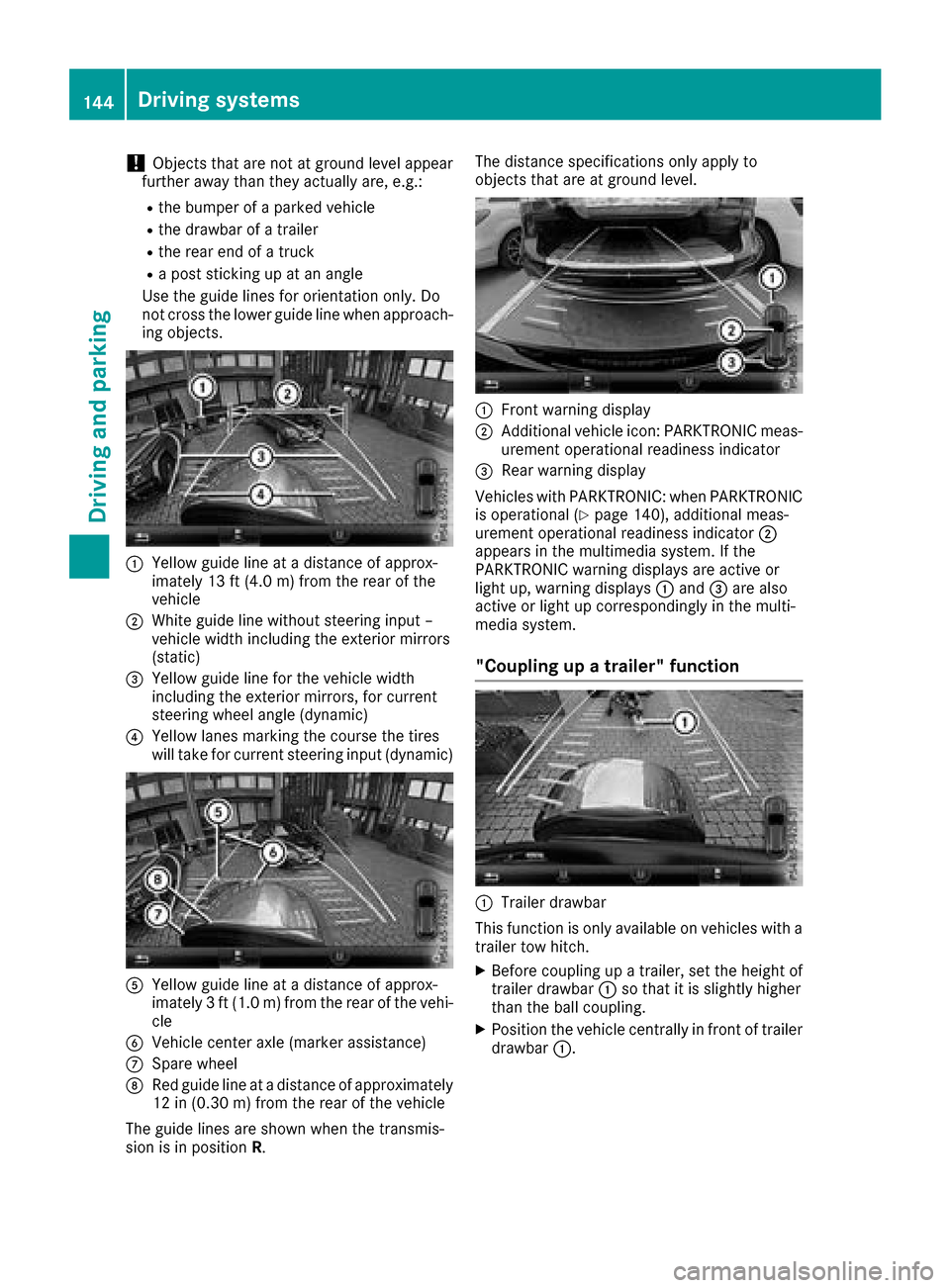
:Yellowg uide line at adistance of approx-
imately 13 ft (4.0 m) from the rear of the
vehicle
;White guide line without steering input –
vehicle width including the exterior mirrors
(static)
=Yellowg uide line for the vehicle width
including the exterior mirrors, for current
steering wheel angle (dynamic)
?Yellowl anes marking the course the tires
will take for current steering input (dynamic)
AYellowg uide line at adistance of approx-
imately 3ft(1.0 m) from the rear of the vehi-
cle
BVehicle center axle (marker assistance)
CSpare wheel
DRed guide line at adistance of approximately
12 in (0.30 m)from the rear of the vehicle
The guide lines are shownw hen the transmis-
sion is in position R. The distance specifications only apply to
objects that are at ground level.
:Front warning display
;Additional vehiclei
con: PARKTRONIC meas-
urement operational readiness indicator
=Rea rwarning display
Vehicles with PARKTRONIC: when PARKTRONIC
is operational (
Ypag e140), additiona lmeas-
urement operational readiness indicator ;
appears in the multimedias ystem. If the
PARKTRONIC warning display sare active or
light up, warning displays :and =are also
active or light up correspondinglyint he multi-
medias ystem.
"Coupling up atrailer" function
:Trailer drawbar
This function is only available on vehicles with a
trailer tow hitch.
XBefore coupling up atrailer, set the height of
trailer drawbar :so that it is slightly higher
than the bal lcoupling.
XPosition the vehiclec entrallyinfront of trailer
drawbar :.
144Driving systems
Driving and parking