2017 MERCEDES-BENZ E-CLASS SALOON battery
[x] Cancel search: batteryPage 164 of 497

th
e mobile phone is in the mar ked space
(→ page 161). #
Vehicles with manual transmission:
depress the clutch pedal. #
Vehicles with automatic transmission:
shift the transmission toposition jori. #
Depress the brake pedal and push button 1
once. #
Ifth eve hicle does not star t:switch off non-
essential consumers and press button 1
once. #
Ifth eve hicle still does not start and the
Place the key in the marked space See Own-
er's Manual display message also appears in
th e multifunction display: start theve hicle in
emer gency operation mode.
Yo u can swit choff the engine while driving by
pressing button 1for about thre e seconds. Be
sure toobser vethe saf ety no tes under "Driving
instructions". St
arting a vehicle using a mobile phone
Re quirements:
R theve hicle is equipped with the "Digital Car
Ke y" function.
R the "Digital Car Key" function is activated via
th e Mercedes me connect web app: http://
www.mercedes.me.
R suitable mobile phone with NFC aerial (Near
Field Communication) and Secure Element.
R sufficient charge leve l of the mobile
phone. On some mobile phones, the function
is also available when the battery is dis‐
ch arge d.
% You can check the suitability of your mobile
phone byentering the phone number at
http://www.mercedes.me.
Information about suitable mobile phones
can be obtained from your Mercedes-Benz
service centre or at http://www.mercedes-
benz.com/connect.
% Mercedes-Benz recommends that you car ry
th e emer gency key in case of function
re strictions. %
The function is only available in combination
with Mercedes me connect and on lyin cer‐
ta in countries.
% Protective cases around the mobile phone
can impair the functionality. #
Make sure that thech arge leve l of the mobile
phone is suf ficient. If necessar y,ch arge the
mobile phone before starting the journe y.
St arting theve hicle for the firs t time af ter
activating the function #
Make sure that there is a valid vehicle key in
th eve hicle. Driving and parking
161
Page 166 of 497

Ensu
rethefo llowing before starting the engine:
R the legal stipulations in the area where your
ve hicle is par ked allow engine starting via
smartphone.
R it is safe tostart and runth e engine where
yo ur vehicle is par ked.
R the fuel tank is su fficiently filled.
R thest ar ter battery is suf ficiently charge d.
% You can also set thete mp erature with your
smartphone. In form ation on Mercedes me
connect and other services: http://
www.mercedes.me
Charging the bat tery before commencing
yo ur journey
% This function is not available in all countries.
R Ifth eve hicle battery is discharged, you
re cei vea message on your smartphone.
R You can then start theve hicle with the
smartphone tocharge the batter y.
R The vehicle is automatically switched off
af te rte n minu tes. Ensure
thefo llowing before starting the engine:
R the legal stipulations in the area where your
ve hicle is par ked allow engine starting via
smartphone.
R it is safe tostart and runth e engine where
yo ur vehicle is par ked.
R the fuel tank is su fficiently filled.
St arting theve hicle &
WARNING Risk of crushing or entrap‐
ment due tounin tentional starting of the
engine
Limbs could be crushed or trapped if the
engine is star ted unintentionally during
service or maintenance work. #
Alw ays secure the engine against unin‐
te ntional starting before car rying out
maintenance or repair work. Re
quirements:
R park position jis selected.
R the anti- theft alarm sy stem is not activated.
R the panic alarm is not activated. R
the hazard warning lamps are switched off.
R the bonn etis closed.
R the doors are closed and loc ked.
R the windo wsand sliding sun roof are closed. #
Start theve hicle using the smartphone:
R afte reve ryvehicle start, the engine runs for
te n minu tes.
R you can car ryout a maximum of two consec‐
utive starting attem pts.
R you can stop theve hicle again at any time.
R further information can be found in the
smartphone app.
Securing the engine against starting before
car rying out maintenance or repair work: #
switch on the hazard warning lamps.
or #
unlock the doors.
or #
open a side window or the sliding sunroof. Driving and parking
16 3
Page 192 of 497

%
The electric parking brake is only securely
applied if the indicator lamp is lit continu‐
ously.
Re leasing #
Swit chthe ignition on. #
Pull handle 1.
The ! indicator lamp in the instrument
clus ter goes out.
Emer gency braking #
Press and hold handle 1.
When theve hicle has been braked to a
st andstill, the electric parking brake is
applied. The !indicator lamp appears in
th e instrument clus ter. Information on de
tecting dama geon a
pa rked vehicle If a collision is de
tected when theto w- aw ay pro‐
te ction is acti vated on a loc kedve hicle, you will
re cei venotification:
R onyour smartphone R
inthe multimedia sy stem when you swit ch
on the ignition
Yo u will recei veinformation about thefo llowing:
R the area of theve hicle that may ha vebeen
damaged
R thefo rc e of the impact
The following situations can lead toinadver tent
acti vation:
R the par kedve hicle is mo ved, e.g. in a double-
dec kerga rage
% Deactivate tow- aw ay protection in order to
pr eve nt inadver tent acti vation. If you deacti‐
va te tow- aw ay protection, damage de tection
will also be deactivated.
Sy stem limitations
De tection may be restricted in thefo llowing sit‐
uations:
R theve hicle is damaged without impact, e.g. if
an outside mir ror is torn off or the paint is
damaged byakey
R an impact occurs at low speed R
the electric parking brake is not applied
Information on Mercedes me connect and other
services: http://www.mercedes.me. Note
s on parking up theve hicle If
yo u lea vetheve hicle par ked up for longer than
fo ur we eks, the disconnected battery may be
damaged bydeep dischar ge.
If yo u lea vetheve hicle par ked up for longer than
six weeks, it may suf fer dama geas a result of
lack of use.
% Further information can be obtained at a
qu alified specialist workshop. St
andby mode (extension of the star ter bat‐
te ry 's period out of use) St
andby mode function
Ve hicles without a 48 V electrical sy stem
(EQ Boost technology):
If standby mode is activated, theve hicle can be
par kedfo r an extended pe riod of time without
losing po wer. Driving and pa
rking 18 9
Page 193 of 497

St
andby mode is characterised bythefo llowing:
R thest ar ter battery is preser ved.
R the maximum period out of use is displa yed
in the multimedia sy stem displa y.
R functions such as interior pr otection or tow-
aw ay protection are not available.
R the connection toonline services is inter rup‐
te d.
If th efo llowing conditions are fulfilled, standby
mode can be activated or deactivated using the
multimedia sy stem:
R the engine is switched off.
R the ignition is switched on.
Exceeding theve hicle's displa yed period out of
use may cause incon venience, i.e. it cannot be
guaranteed that thest ar ter battery will reliably
st art the engine.
The star ter battery must be charge dfirs t in the
fo llowing situations:
R theve hicle's period out of use must be
ex tended. R
theBattery charge insufficient for standby
mode message appears in the multimedia
sy stem displa y.
% Standby mode is automatically deactivated
when the ignition is switched on.
Ac tivating or deactivating standby mode
Ve hicles without a 48 V electrical sy stem
(EQ Boost technology):
Multimedia sy stem:
, Vehicle .
Vehicle settings .
Standby
mode #
Activate or deacti vate the function.
When you activate the function, a prom pt
appears. #
Select Yes.
St andby mode is activated. Driving and driving saf
ety sy stems Driving sy
stems and your responsibility Yo
ur vehicle is equipped with driving sy stems
which assist you in driving, parking and manoeu‐ vring
theve hicle. The driving sy stems are tools
and do not relie ve you of your responsibility. Pay
attention tothe tra ffic conditions at all times
and inter vene when necessa ry. Be aware of the
limitations rega rding the safe use of these sys‐
te ms. Fu
nction of thera dar senso rs Some driving and driving sa
fety sy stems use
ra dar sensors tomonitor the area in front of,
behind or next totheve hicle (depending on the
ve hicle's equipment).
Depending on theve hicle's equipment, thera dar
sensors are integrated behind the bumpers
and/or behind thera diator grille. Keep these
parts free of dirt, ice and slush (→ page317).
The sensors must not be co vered, forex ample
by bicycle rack s, ove rhanging loads or radar-
re flecting sticke rs.Fo llowing an impact and in
th eeve nt of associated dama ge, which may not
be visible, tothe bumpers or radiator grille, ha ve
th e function of thera dar sensors checked at a
qu alified specialist workshop. The driver assis‐
ta nce sy stem may no longer workproperly. 19 0
Driving and pa rking
Page 215 of 497

HOLD function
HOLD function
The HOLD function holds
theve hicle at a stand‐
st ill without requ iring youto depress the brake
pedal, e.g. when pulling away on steep slopes.
Sy stem limitations
R The incline must not be greaterth an 30%.
Ac tivating/deactivating the HOLD function &
WARNING Risk of an accident due tothe
HOLD function being activated when you
lea vetheve hicle
If yo u lea vetheve hicle while only the HOLD
function is braking theve hicle, theve hicle
can rollaw ay inthefo llowing situations:
R Ifth ere is a malfunction in the sy stem or
in the po wer supply.
R Ifth e HOLD function is deactivated by
depressing the accelera tor pedal or the
brake pedal, e.g. byave hicle occupant. R
Ifth e electrics in the engine compart‐
ment, the battery or the fuses are tam‐
pered with or if the battery is disconnec‐
te d. #
Alw ays deactivate the HOLD function
and secure theve hicle against rolling
aw ay before leaving theve hicle. *
NO
TEDama gefrom auto matic braking When
Active Brake Assi st,Ac tive Dis tance
Assi stDISTRONIC or the HOLD function are
activated, theve hicle brakes autonomously
in cer tain situations.
To avo id damage totheve hicle, deactivate
th ese sy stems in thefo llowing or similar sit‐
uations: #
During towing #
In a car wash Re
quirements:
R The vehicle is stationar y.
R The driver's door is closed or the seat belt on
th e driver's side is fastened. R
The engine is running or has been au tomati‐
cally switched off bythe ECO start/ stop
function.
R The electric parking brake is released.
R Active Dis tance Assi stDISTRONIC is not acti‐
va ted.
R Vehicles with automatic transmission: the
transmission is in position h,kori.
Ac tivating the HOLD function #
Dep ress the brake pedal and af ter a short
time depress fur ther until theë display
appears in the multifunction displa y. #
Release the brake pedal.
Deactivating the HOLD function #
Depress the accelerator pedal topull away.
or #
Depress the brake pedal until theë dis‐
play disappears from the multifunction dis‐
pla y. 212
Driving and pa rking
Page 250 of 497
Re
quirements:
R the ball neck must be extended fully electri‐
cal lyand engaged in the securely loc ked
position.
Tr ailers with a 7-pin plug can be connec tedto
th eve hicle with thefo llowing adap ters:
R adap ter plug
R adapte r cable
The trailer will be cor rectly de tected bytheve hi‐
cle only if thefo llowing conditions are me t:
R the trailer is connected cor rectly
R the trailer lighting sy stem is in working order
The operation of thefo llowing sy stems depends
on the trailer being connected cor rectly:
R Active Lane Keeping Assist
R ESP ®
R Parking Assist PARKTRONIC
R Active Parking Assist
R Blind Spot Assist or Active Blind Spot Assi stCoupling up a trailer
* NO
TEDama getothe battery due tofull
discharge Charging
the trailer battery using the po wer
supply of the trailer can damage the batter y. #
Do not use the po wer supp lyto charge
th e trailer batter y. #
Remo vethe co ver from the ball head and
st ore it in a safe place (→ page107). #
Position the trailer on a le vel sur face behind
th eve hicle and couple it up totheve hicle. #
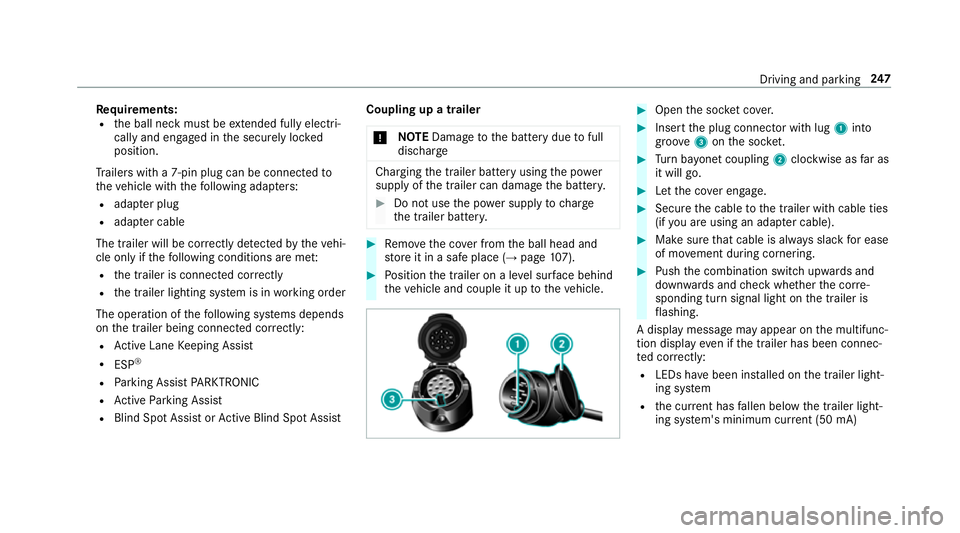
Open the soc ket co ver. #
Insert the plug connector with lug 1into
groo ve3 onthe soc ket. #
Turn bayonet coupling 2clockwise as far as
it will go. #
Let the co ver engage. #
Secure the cable tothe trailer with cable ties
(if you are using an adap ter cable). #
Make sure that cable is alw ays slack for ease
of mo vement during cornering. #
Push the combination switch upwards and
down wards and check whe ther the cor re‐
sponding turn signal light on the trailer is
fl ashing.
A display message may appear on the multifunc‐
tion display even if the trailer has been connec‐
te d cor rectly:
R LEDs ha vebeen ins talled on the trailer light‐
ing sy stem
R the cur rent has fallen below the trailer light‐
ing sy stem's minimum cur rent (50 mA) Driving and pa
rking 247
Page 294 of 497
%
If an emergency call is una vailable, a mes‐
sage tothis ef fect also appea rsinthe multi‐
function display of the instrument clus ter.
Au tomatic eme rgency call
Re quirements:
R The ignition is switched on.
R The star ter battery has suf ficient charge.
If re stra int sy stems such as airbags or seat belt
te nsioners ha vebeen activated af ter an acci‐
dent, the Mercedes-Benz emer gency call sy stem
may automatically initiate an emer gency call.
The emergency call has been made:
R Avo ice connection is made tothe Mercedes-
Benz emer gency call centre.
R A messa gewith accident data is transmitted
to the Mercedes-Benz emer gency call centre.
The Mercedes-Benz emergency call centre
can transmit theve hicle position data toone
of the public emer gency services call cen‐
tres. R
In cer tain situations data is also transmitted
in the speech channel tothe Mercedes-Benz
emer gency call centre.
This allo wsmeasu resfo rre scue, reco very or
to wing toa Mercedes-Benz Service Cent reto
be initiated quickl y.
If yo ur vehicle is equipped with an SOS button in
th eove rhead control panel, it flashes until the
emer gency call has been compl eted.
It is not possible toimmediately end an auto‐
matic emer gency call.
If th e Mercedes-Benz emer gency call sy stem
cann otconnect tothe Mercedes-Benz emer‐
ge ncy call centre, the emer gency call is au tomat‐
ical lysent tothe public emer gency services call
centre.
If no connection can be made tothe public
emer gency services, a cor responding message
appears inthe displa y. #
Dial the emer gency call number 999 or 11 2
on your mobile phone. If an eme
rgency call has been initiated:
R Remain in theve hicle if thero ad and traf fic
conditions permit youto do so until a voice
connection is es tablished with the emer‐
ge ncy call centre operator.
R Onthe basis of the call, the operator decides
whe ther it is necessary tocall rescue teams
and/or the police tothe accident site.
R If no vehicle occupant answers, an ambu‐
lance is sent totheve hicle immediately.
Manual emer gency call #
Ifth eve hicle has an SOS button in theove r‐
head control panel: press and hold the but‐
to nfo r at least one second.
The emer gency call has been made:
R Avo ice connection is made tothe Mercedes-
Benz emer gency call centre.
R Remain in theve hicle if thero ad and traf fic
conditions permit youto do so until a voice
connection is es tablished with the emer‐
ge ncy call centre operator. Multimedia sy
stem 291
Page 310 of 497
Battery disconnection periods
The AS
SYST PLUS service inter val display
can only calculate the service due da tewhen
th e bat tery is connected. #
Notedown the service due date displa yed on
th e instrument display before disconnecting
th e battery (→ page 306). Engine compartment
Ac
tive bonn et(pedestrian pr otection) Operation of
the active bonnet (pedestrian
pr otection)
In cer tain accident situations, therisk of injury
to pedestrians can be reduced bythe actuation
of the active bonn et. The rear area of the engine
bonn etisraised byappr oximately 85 mm.
Fo rth e drive tothewo rkshop, reset the trig‐
ge red active bonn etyourself. If the active bonn et
has been triggered, pedestrian pr otection may
be limited.
A qu alified specialist workshop must re-ins tate
th e full functionality of the active bonn et. The active bonnet is not
available in all coun‐
tries.
Re setting the active bonnet &
WARNING Danger of bu rns from hot
component parts in the engine compart‐
ment
Cer tain component parts in the engine com‐
partment may be very hot, e.g. the engine,
th era diator and parts of theex haust sy stem. #
Let the engine cool down and only
to uch the component parts described
below: #
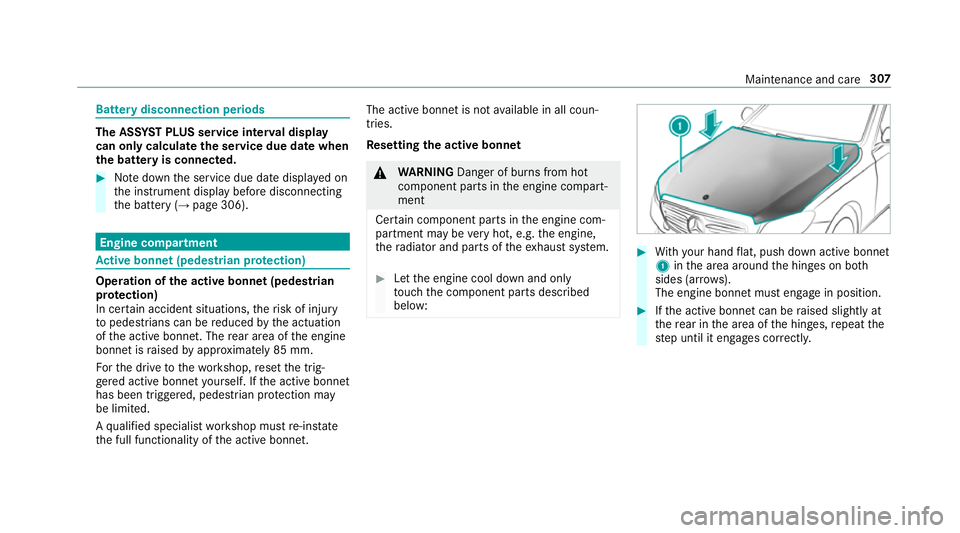
With your hand flat, push down active bonnet
1 inthe area around the hinges on bo th
sides (ar rows).
The engine bonnet must engage in position. #
Ifth e active bonn etcan be raised slight lyat
th ere ar in the area of the hinges, repeat the
st ep until it engages cor rectl y. Maintenance and care
307