2017 MERCEDES-BENZ E-CLASS SALOON height
[x] Cancel search: heightPage 107 of 497
st
eering wheel or the mir ror and fasten
yo ur seat belt. &
WARNING Risk of entrapment forch il‐
dren when adjusting thesteering wheel
Children could injure themselves if they
adjust thesteering wheel. #
Never lea vechildren unat tended in the
ve hicle. #
When leaving theve hicle, alw aysta ke
th eke y with you and lock theve hicle.
This also applies tomobile phones if the
"Digital Car Key in the smartphone"
function is activated via the Mercedes
connect me web app. #
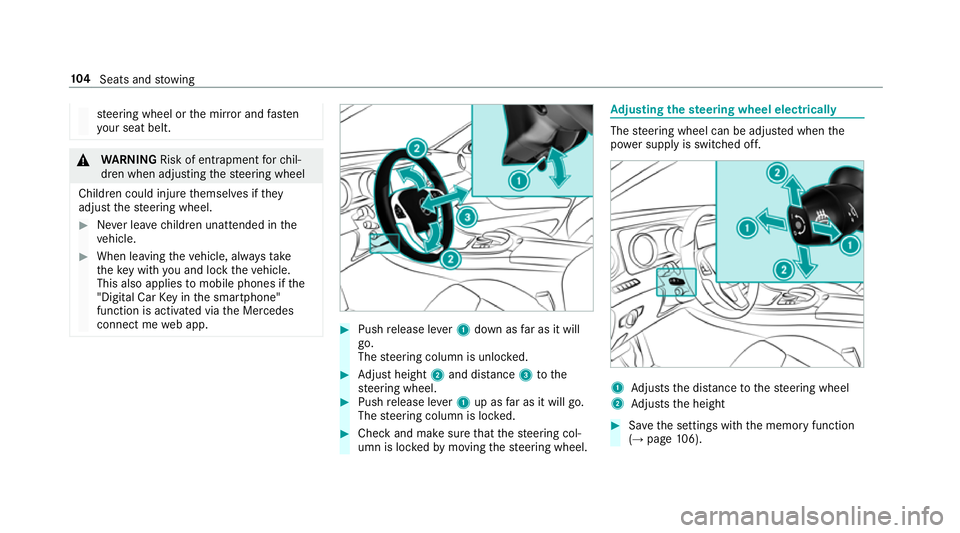
Push release le ver1 down as far as it will
go.
The steering column is unloc ked. #
Adjust height 2and di stance 3tothe
st eering wheel. #
Push release le ver1 up as far as it will go.
The steering column is loc ked. #
Check and make sure that thesteering col‐
umn is loc kedby moving thesteering wheel. Ad
justing the steering wheel electrically The
steering wheel can be adjus ted when the
po we r supp lyis switched off. 1
Adjusts the dis tance tothesteering wheel
2 Adjusts the height #
Save the settings with the memory function
(→ page 106). 104
Seats and stowing
Page 117 of 497
Hooking
the luggage net &
WARNING Risk of inju ryfrom incor rectly
stowe d objects
If objects in the passenger compartment are
stowe d incor rectl y,they can slide or be
th ro wn around and hit vehicle occupants. In
addition, cup holders, open stowage spaces
and mobile phone brac kets cann otalw ays
re tain all objects they contain.
The reis a risk of injur y,particularly in the
ev ent of sudden braking or a sudden change
in direction. #
Alw aysstow objects so that they can‐
not be throw n around in su chsitua‐
tions. #
Alw ays make sure that objects do not
pr otru de from stowage spaces, luggage
nets or stowage nets. #
Close the loc kable stow age spaces
before starting a journe y. #
Alw aysstow and secure heavy, hard,
poin ted, sharp-edged, fragile or bulky
objects in the boot. Obser
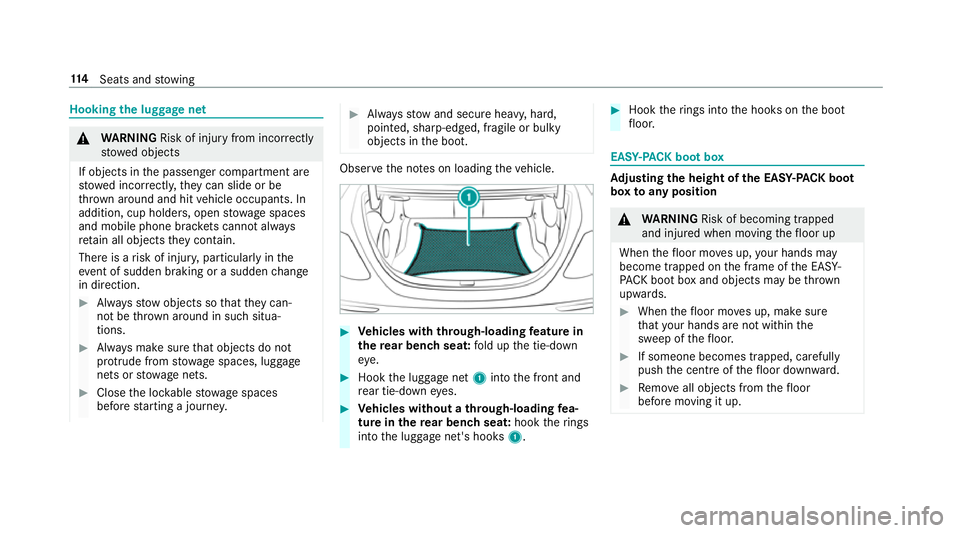
vethe no tes on loading theve hicle. #
Vehicles with through-loading feature in
th ere ar ben chseat: fold up the tie-down
ey e. #
Hook the luggage net 1into the front and
re ar tie-down eyes. #
Vehicles without a through-loading fea‐
ture in there ar ben chseat: hooktherings
into the luggage net's hooks 1. #
Hook therings into the hooks on the boot
fl oor. EAS
Y-PA CK boot box Ad
justing the height of the EA SY-PAC K boot
box toany position &
WARNING Risk of becoming trapped
and inju red when moving thefloor up
When thefloor mo ves up, your hands may
become trapped on the frame of the EASY-
PA CK bo otbox and objects may be thrown
upwards. #
When thefloor mo ves up, make sure
th at your hands are not within the
sweep of thefloor. #
If someone becomes trapped, carefully
push the cent reofthefloor down ward. #
Remo veall objects from thefloor
before moving it up. 11 4
Seats and stowing
Page 178 of 497
Using kickdown
Mercedes-AMG
vehicles: observeth e no tes in
th e Supplement. Otherwise, you may failto rec‐
ognise dangers. #
Maximum acceleration: depress the accel‐
erator pedal be yond the pressure point.
During kickdown, you cannot shift gears using
th esteering wheel gearshift paddles. The auto‐
matic transmission shifts up tothe next gear
when the maximum engine speed is reached to
pr otect the engine from overrev ving. #
Ease off the accelera tor pedal once the
desired speed is reached. Glide mode function
Mercedes
-AMG vehicles: observeth e no tes in
th e Supplement. Otherwise, you may failto rec‐
ognise dangers.
Wi th an anticipatory driving style, glide mode
helps youto reduce fuel consum ption. Glide mode is
characterised bythefo llowing:
R the combustion engine is disconnected from
th e drive train and theve hicle continues to
ro ll in neut ral.
R the transmission position his displa yed in
green in the multifunction displa y.
R Vehicles with a 48 V electrical sy stem
(EQ-Boost tech nology): the combustion
engine is switched off depending on the driv‐
ing situation. All of theve hicle functions
re main active.
Glide mode is activated if thefo llowing condi‐
tions are me t:
R drive program Eis selected.
R the speed is within a suitable range.
R the course of thero ad is suitable, e.g. no
st eep uphill or downhill gradients or tight
bends.
R there is no trailer coupled tothe ball coupling
of the trailer tow hit ch, and no bicycle rack
fi tted.
R you are no lon ger depressing the accelerator
or brake pedal. %
Glide mode can also be activated if you ha ve
selected the "Eco" setting forth e drive
(engine management) when in drive program
I.
Glide mode is deactivated again if one of the
conditions is no longer met.
Ve hicles with Driving Assistance Package,
Ac tive Di stance Assist DISTRO NIC orActive
Brake Assi st:Glide mode is also deacti vated
depending on the traf fic situation and theve hi‐
cle then switches to overru n mode. This fur ther
re duces fuel consum ption.
Glide mode can also be pr evented bythefo llow‐
ing parame ters:
R uphill gradient
R downhill gradient
R temp erature
R height
R speed
R obstruction de tection
R ope rating conditions of the engine Driving and parking
175
Page 219 of 497
The
vehicle is lo wered again in thefo llowing sit‐
uations:
R When driving fasterthan 80 km/h.
R When driving between 60 km/h and
80 km/h for appro ximately thre e minutes.
R After selecting a drive program using the
DY NA MIC SELECT switch.
The vehicle is adjus tedto the height of the last
active drive program.
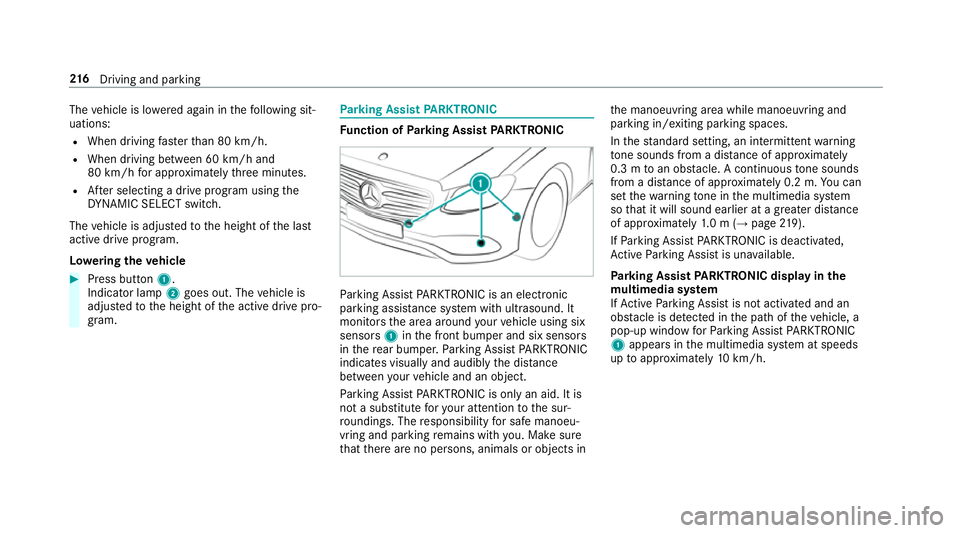
Lo weri ngtheve hicle #
Press button 1.
Indicator lamp 2goes out. The vehicle is
adjus tedto the height of the active drive pro‐
gram. Pa
rking Assist PARKTRONIC Fu
nction of Parking Assist PARKTRONIC Pa
rking Assist PARKTRONIC is an electronic
parking assi stance sy stem with ultrasound. It
monitors the area around your vehicle using six
sensors 1inthe front bumper and six sensors
in there ar bumper. Parking Assist PARKTRONIC
indicates visually and audibly the dis tance
between your vehicle and an object.
Pa rking Assist PARKTRONIC is on lyan aid. It is
not a substitute foryo ur attention tothe sur‐
ro undings. The responsibility for safe manoeu‐
vring and parking remains with you. Make sure
th at there are no persons, animals or objects in th
e manoeuvring area while manoeuvring and
parking in/exiting parking spaces.
In thest andard setting, an intermit tent wa rning
to ne sounds from a di stance of appr oximately
0.3 m toan obs tacle. A continuous tone sounds
from a di stance of appr oximately 0.2 m. You can
set thewa rning tone in the multimedia sy stem
so that it will sound earlier at a greater dis tance
of appr oximately 1.0 m (→ page219).
If Pa rking Assist PARKTRONIC is deacti vated,
Ac tive Parking Assist is una vailable.
Pa rking Assist PARKTRONIC displ ayinthe
mu ltimedia sy stem
If Ac tive Parking Assist is not activated and an
obs tacle is de tected in the path of theve hicle, a
pop-up window forPa rking Assist PARKTRONIC
1 appears in the multimedia sy stem at speeds
up toappr oximately 10km/h. 216
Driving and pa rking
Page 229 of 497
R
The camera lens is obstructed, dirty or mis‐
te d up.
R Cameras, or vehicle components in which
th e cameras are fitted, are dama ged. In this
eve nt, ha vethe cameras, their positions and
th eir setting checked at a qualified specialist
wo rkshop.
Do not use the 360° Camera under such circum‐
st ances. You could otherwise injure others or
collide with objects when parking theve hicle.
On vehicles with height-adjus table suspension or
if th eve hicle is car rying a heavy load, leaving the
st andard height can result in inaccuracies in the
guide lines and in the display of thege nerated
ima ges, depending on tech nical conditions.
The field of vision and other functions of the
came rasystem may be restricted due toaddi‐
tional accesso ries on there ar of theve hicle (e.g.
licence plate brac ket, bicycle rack ).
See the no tes on cleaning the 360° Camera
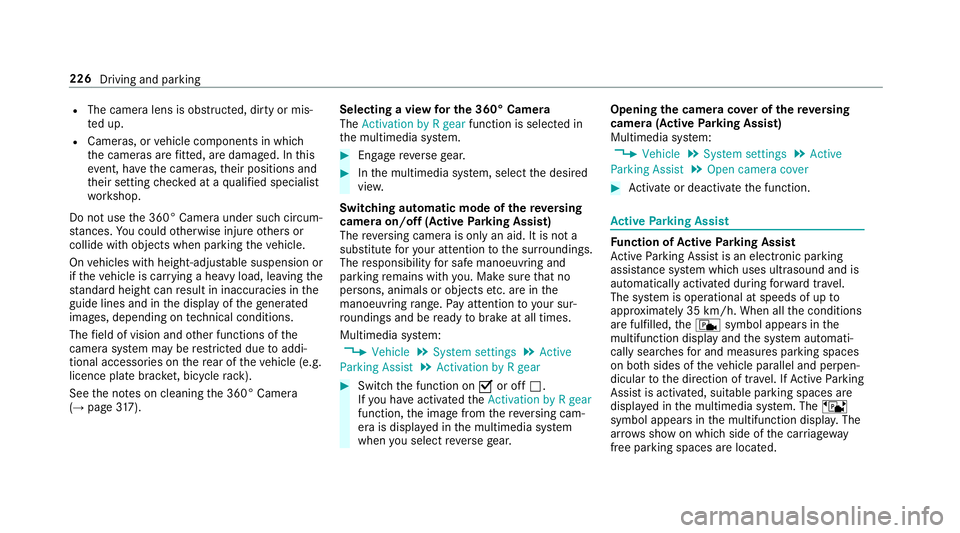
(→ page 317). Selecting a view
for the 360° Camera
The Activation by R gear function is selected in
th e multimedia sy stem. #
Enga gereve rsege ar. #
Inthe multimedia sy stem, select the desired
vie w.
Switching automatic mode of there ve rsing
camera on/off (Active Parking Assist)
The reve rsing camera is only an aid. It is not a
substitute foryo ur attention tothe sur roundings.
The responsibility for safe manoeuvring and
parking remains with you. Make sure that no
persons, animals or objects etc. are in the
manoeuvring range. Pay attention to your sur‐
ro undings and be ready tobrake at all times.
Multimedia sy stem:
, Vehicle .
System settings .
Active
Parking Assist .
Activation by R gear #
Switch the function on Oor off ª.
If yo u ha veactivated theActivation by R gear
function, the image from there ve rsing cam‐
era is displa yed in the multimedia sy stem
when you select reve rsege ar. Opening
the camera co ver of the reve rsing
camera (Active Parking Assist)
Multimedia sy stem:
, Vehicle .
System settings .
Active
Parking Assist .
Open camera cover #
Activate or deacti vate the function. Ac
tive Parking Assist Fu
nction of Active Parking Assist
Ac tive Parking Assist is an elect ronic pa rking
assis tance sy stem which uses ultrasound and is
automatically activated during forw ard tra vel.
The sy stem is operational at speeds of up to
appr oximately 35 km/h. When all the conditions
are fulfilled, thec symbol appears in the
multifunction display and the sy stem automati‐
cally sear ches for and measu res parking spaces
on bo thsides of theve hicle parallel and perpen‐
dicular tothe direction of tra vel. If Active Parking
Assist is activated, suitable parking spaces are
displa yed in the multimedia sy stem. The ë
symbol appears in the multifunction displa y.The
ar row s show on which side of the car riag eway
free parking spaces are loca ted. 226
Driving and parking
Page 284 of 497
Un
iversal sma rtphone cradle Fe
atures of the universal sma rtphone cradle
R The sma rtphone cradle is suitable for mobile
phones of dif fere nt sizes.
R An integrated ae rial impr oves mobile phone
re ception.
R Ave ntilation sy stem pr otects the mobile
phone from overheating.
Fu rther information can be found at: http://
www.mercedes-benz.com/connect
Using the universal sma rtphone cradle
Re quirements:
R The mobile phone is connec tedto the multi‐
media sy stem for use with the hands-free
sy stem (→ page279).
R The mobile phone mu stlie flat against the
base of the smartphone cradle.
The use of very thick or une ven pr otective
co vers may reduce there ception. #
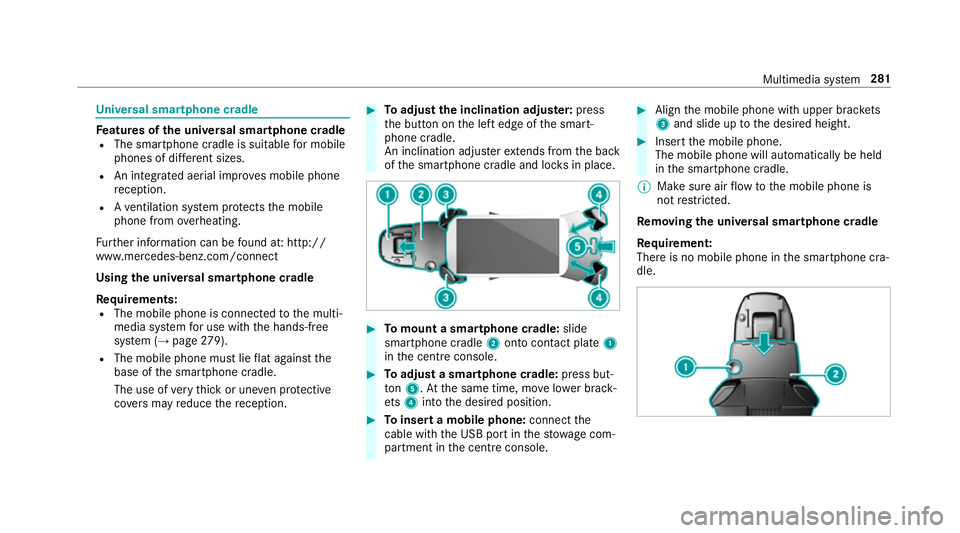
Toadjust the inclination adju ster: press
th e button on the left edge of the smart‐
phone cradle.
An inclination adjus terex tends from the back
of the smartphone cradle and loc ksin place. #
Tomount a smartphone cradle: slide
sma rtphone cradle 2onto con tact plate 1
in the cent reconsole. #
Toadjust a smartphone cradle: press but‐
to n5. Atthe same time, mo velowe r brack‐
et s4 into the desired position. #
Toinsert a mobile phone: connectthe
cable wi th the USB port in thestow age com‐
partment in the cent reconsole. #
Align the mobile phone with upper brac kets
3 and slide up tothe desired height. #
Insert the mobile phone.
The mobile phone will automatically be held
in the smartphone cradle.
% Make sure air flow tothe mobile phone is
not restricted.
Re moving the uni versal smartphone cradle
Re quirement:
There is no mobile phone in the smartphone cra‐
dle. Multimedia sy
stem 281
Page 312 of 497
th
era diator and parts of theex haust sy stem. #
Let the engine cool down and only
to uch the component parts described
below: &
WARNING Risk of inju ryfrom using the
windscreen wipers while the engine bon‐
net is open
When the engine bonn etis open, and the
windscreen wipers are set in motion, you can
be trapped bythe wiper linkage. #
Alw ays switch off the windscreen wip‐
ers and ignition before opening the
engine bonn et. #
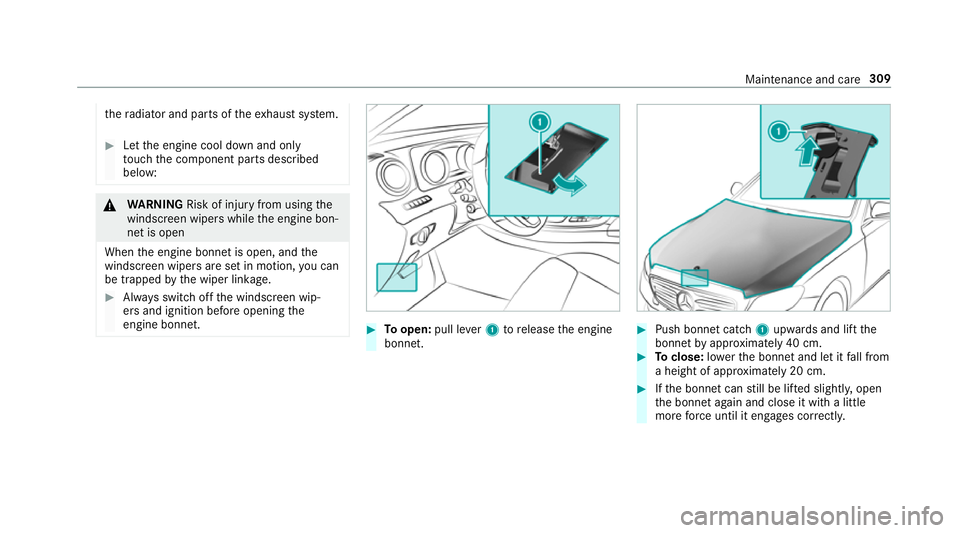
Toopen: pull lever1 torelease the engine
bonn et. #
Push bonnet catch 1upwards and lift the
bonn etby appr oximately 40 cm. #
Toclose: lowe rth e bonn etand let it fall from
a height of appr oximately 20 cm. #
Ifth e bonn etcan still be lif ted slightl y,open
th e bonn etagain and close it with a little
more forc e until it engages cor rectly. Maintenance and care
309
Page 379 of 497

Ha
ve the coolant regularly replaced at a qualified
specialist workshop.
The proportion of cor rosion inhibitor/antifreeze
concentrate in the engine cooling sy stem should
be:
R a minimum of 50% (antifreeze pr otection
down toappr oximately -37 °C).
R a maximum of 55% (antifreeze pr otection
down to-45 °C). Note
s on windscreen washer fluid Obser
vethe no tes on operating fluids
(→ page 368). &
WARNING ‑ Risk of fire and injury due to
windscreen washer concentrate
Wi ndsc reen washer concentrate is highly
fl ammable. It could ignite if it comes into
con tact wi thhot engine component parts or
th eex haust sy stem. #
Make sure that no windsc reen washer
concentrate spills out next tothefiller
opening. *
NO
TEDama getotheex terior lighting
due tounsuitable windsc reen washer
fl uid Uns
uitable windsc reen washer fluids may
damage the plastic sur face of theex terior
lighting. #
Only use windscreen washer fluids
which are also suitable for use on plas‐
tic sur faces, e.g. MB SummerFit or MB
Wi nterFit. *
NO
TEBlocked spr aynozzles caused by
mixing windscreen washer fluids #
Do not mix MB SummerFit and MB Win‐
te rFit with other windscreen washer flu‐
ids. Do not use distilled or de-ionised
water asthefill
le ve l sensor may be triggered er roneously.
Re commended windscreen washer fluid:
R Abo vefreezing point: e.g. MB SummerFit
R Below freezing point: e.g. MB WinterFit Fo
rth e cor rect mixing ratio referto the informa‐
tion on the antif reeze conta iner.
Mix thewa sher fluid with the windscreen washer
fl uid all year round. Ve
hicle data Ve
hicle dimensions The heights speci
fied may vary as a result of the:
R tyres
R load
R condition of the suspension
R optional equipment 376
Tech nical da ta