Page 335 of 676

3354-5. Using the driving support systems
4
Driving
LS600h/LS600hL_EE(OM50G20E)
Sport mode
• SPORT S mode
Assists acceleration response by controlling the hybrid system. Suit-
able for when powerful acceleration is desirable.
When not in SPORT S mode and the driv ing mode select switch is turned to
the right, the “SPORT S” indicator comes on in the multi-information display,
and the Hybrid System Indicator changes to the tachometer. ( P. 115)
• SPORT S+ mode
Helps to ensure steering performance and driving stability by simul-
taneously controlling the steering and suspension in addition to the
hybrid system. Suitable for sporty driving.
When in SPORT S mode and the driving mo de select switch is turned to the
right, the “SPORT S+” indicator comes on in the multi-information display.
■Operation of the air conditioni ng system in Eco drive mode
Eco drive mode controls the heating/cooling operations and fan speed of the air
conditioning system to enhance fuel efficiency ( P. 399). To improve air condition-
ing performance, adjust the fan speed or turn off Eco drive mode.
■Sport mode automatic deactivation
Sport mode is automatically deactivated if the power switch is turned off after driving
in sport mode.
■Driving mode pop-up display
When the driving mode is changed, the selected driving mode will be temporarily
displayed on the side display. ( P. 396)
4
Page 382 of 676

382
LS600h/LS600hL_EE(OM50G20E)
4-6. Driving tips
■Using Eco drive mode
When using Eco drive mode, the torque corresponding to the acceler-
ator pedal depression amount can be generated more smoothly than it
is in normal conditions. In addition, the operation of the air conditioning
system (heating/cooling) will be minimized, improving the fuel econ-
omy. ( P. 334)
■Use of Hybrid System Indicator
The Eco-friendly driving is possible by keeping the indicate of Hybrid
System Indicator within Eco area. ( P. 119)
■When braking the vehicle
Make sure to operate the brakes gently and in good time. A greater
amount of electrical energy can be retained when slowing down.
■Delays
Repeated acceleration and deceleration, as well as long waits at traffic
lights, will lead to bad fuel consumption. Check traffic reports before
leaving and avoid delays as much as possible. When encountering a
delay, gently release the brake peda l to allow the vehicle to move for-
ward slightly while avoiding overuse of the accelerator pedal. Doing so
can help control excessive gasoline consumption.
■Highway driving
Control your speed and keep at a constant speed. Also, before stop-
ping at a toll booth or similar, allow plenty of time to release the acceler-
ator and gently apply the brakes. A greater amount of electrical energy
can be retained when slowing down.
Hybrid vehicle driving tips
For economical and ecological driving, pay attention to the following
points:
Page 383 of 676

3834-6. Driving tips
4
Driving
LS600h/LS600hL_EE(OM50G20E)
■Air conditioning
Use the air conditioning only when necessary. Doing so can help con-
trol excessive gasoline consumption.
In summer: In high temperatures, use the recirculated air mode. Doing
so will help to reduce the burden on the air conditioner and reduce fuel
consumption as well.
In winter: Because the gasoline engine will not automatically cut out
until the gasoline engine and the interior of the vehicle are warm, it will
consume fuel. Also, fuel consumption can be improved by avoiding
overuse of the heater.
■Checking tire inflation pressure
Make sure to check the tire inflation pressure frequently. Improper tire
inflation pressure can cause poor fuel consumption.
Also, as snow tires can cause large amounts of friction, their use on dry
roads can lead to poor fuel consumption. Use a tire that is appropriate
for the season.
■Luggage
Carrying heavy luggage can lead to poor fuel consumption. Avoid car-
rying unnecessary luggage. Installing a large roof rack can also cause
poor fuel consumption.
■Warming up before driving
Since the gasoline engine starts up and cuts out automatically when
cold, warming up the engine is unnecessary. Moreover, frequently driv-
ing short distances will cause the engi ne to repeatedly warm up, which
can lead to poor fuel consumption.
Page 389 of 676

389
5Interior features
LS600h/LS600hL_EE(OM50G20E)
5-1. Remote Touch screen
Remote Touch ............................ 390
12.3-inch display.........................394
5-2. Lexus Climate Concierge
Lexus Climate Concierge..... 398
5-3. Using the air conditioning
system and defogger
Front automatic air
conditioning system ...............399
Rear air conditioning
system ........................................... 418
Rear window and
outside rear view
mirror defoggers .....................425
Windshield wiper de-icer ....... 426
5-4. Using the interior lights
Interior lights list.......................... 427
• Interior lights ..........................428
• Personal lights ....................... 429
5-5. Using the storage
features
List of storage features ............. 431
• Glove box ............................... 433
• Coin holder ............................ 434
• Door pockets......................... 434
• Cup holders ........................... 435
• Console box .......................... 437
• Auxiliary boxes ..................... 439
Trunk features ............................. 442
5-6. Other interior features
Sun visors and vanity
mirrors ......................................... 445
Clock .............................................. 447
Ashtrays .........................................448
Cigarette lighters....................... 449
Power outlets................................ 451
Heated steering wheel ............ 454
Climate control seats/
seat heaters ............................... 456
Armrest............................................461
Retractable table........................ 462
Rear sunshade ............................ 464
Rear door sunshades ............... 468
Coat hooks ................................... 472
Assist grips.................................... 473
Page 393 of 676
3935-1. Remote Touch screen
5
Interior features
LS600h/LS600hL_EE(OM50G20E)
Press the “MENU” button on the Remote Touch to display the “Menu”
screen.
When the split-screen display is selected, the “Menu” screen will be displayed on
the main display. ( P. 396)
*1: If equipped
*2: For details, refer to “NAVIGATION AND MULTIMEDIA SYSTEM OWNER’S
MANUAL”.
“Menu” screen
SwitchFunction
*1Select to display the map screen or the navigation menu
screen.*2
Select to display the radio control screen.*2
Select to display the media control screen.*2
Select to display the hands-free operation screen.*2
Select to display the energy monitor or fuel consumption screen.
( P. 131, 133)
Select to display the “Information” screen.*2
Select to display the air conditioning control screen. (P. 400)
Select to display the “Setup” screen.*2
“Display”Select to adjust the contrast and brightness of the screens, turn
the screen off, etc.*2
Page 394 of 676
3945-1. Remote Touch screen
LS600h/LS600hL_EE(OM50G20E)
■Full screen display
The following functions can be displayed full screen:
•Initial screen
•“Menu” screen ( P. 393)
•Map screen*
•Audio screen*
• Energy monitor or fuel consumption screen ( P. 130)
• Air conditioning control screen ( P. 399)
*: For details, refer to “NAVIGATION AND MULTIMEDIA SYSTEM OWNER’S
MANUAL”.
12.3-inch display
12.3-inch display overview
Page 396 of 676
3965-1. Remote Touch screen
LS600h/LS600hL_EE(OM50G20E)
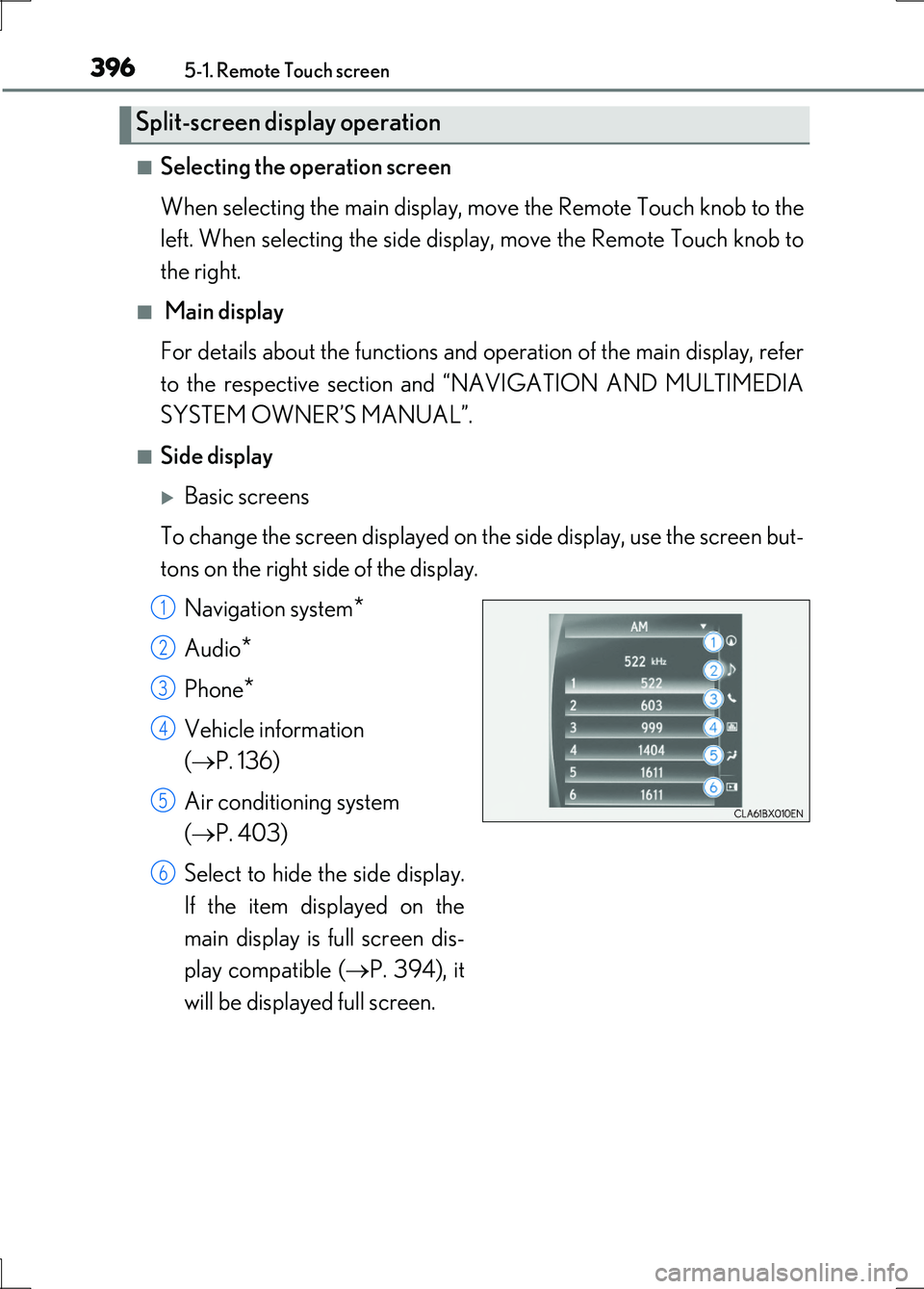
■Selecting the operation screen
When selecting the main display, move the Remote Touch knob to the
left. When selecting the side display, move the Remote Touch knob to
the right.
■ Main display
For details about the functions and operation of the main display, refer
to the respective section and “NAVIGATION AND MULTIMEDIA
SYSTEM OWNER’S MANUAL”.
■Side display
Basic screens
To change the screen displayed on th e side display, use the screen but-
tons on the right side of the display.
Navigation system*
Audio*
Phone*
Vehicle information
( P. 136)
Air conditioning system
( P. 403)
Select to hide the side display.
If the item displayed on the
main display is full screen dis-
play compatible ( P. 394), it
will be displayed full screen.
Split-screen display operation
1
2
3
4
5
6
Page 398 of 676

398
LS600h/LS600hL_EE(OM50G20E)
5-2. Lexus Climate Concierge
Automatic air conditioning system (P. 404, 419)
Set the air conditioning system to automatic mode.
The temperature for the driver’s seat, front passenger’s seat and both rear seats
can be adjusted individually.
Climate control seats/seat heaters ( P. 456, 457)
Select “AUTO” mode on each seat.
Seat heater, off, ventilation or seat cooler is automatically selected according to
the set temperature of the air conditioning system, outside temperature, etc.
Heated steering wheel ( P. 454)
Turned on automatically according to the outside temperature and
cabin temperature.
Operates for a maximum of 30 minutes.
Lexus Climate Concierge
: If equipped
The climate control seats/seat heater on each seat and heated steer-
ing wheel are automatically controlled according to the set tempera-
ture of the air conditioning system, outside temperature, cabin
temperature, etc. Lexus Climate Co ncierge allows a comfortable con-
dition to be maintained wi thout adjusting each system.
1
2
3