2017 KIA CARENS RHD tow
[x] Cancel search: towPage 117 of 723

421
Features of your vehicle
✽✽NOTICE
Do not activate the sensor if there are any chances the vehicle tilts by
the outward influences (for exam-
ple, ferry boat travelling, tower
parking etc.), because it could cause
the siren to sound inadvertently.
Make sure all windows are close whilst the system operates. If not,
the sensor detects the inadvertent
movement inside the vehicle (for
example, blowing a wind or enter-
ing a butterfly) and it makes the
siren sounds.
If boxes are piled high in the vehi- cle, the sensor may not detect the
movement behind the boxes. Also
the boxes may drop and it makes
the siren sounds.
If the sensor is stained with for- eign matter such as cosmetics,
spray type air freshener, or spray
type window cleaner, the sensor
may not operate normally.Theft-alarm stage
Intrusion/tilt sensor off condition
The alarm will be activated if any of
the following occurs whilst the sys-
tem is armed.
A front or rear door is opened with-out using the transmitter (or smart
key).
The tailgate is opened without using the transmitter (or smart key).
The engine bonnet is opened.
The ignition switch is in the ON position. Intrusion/tilt sensor on condition
The alarm will be activated if any of
the following occurs whilst the sys-
tem is armed when the sensor is
activated.
The passenger(s) moves in the
vehicle.
The inclination of the vehicle is changed to the certain degree.
A front or rear door is opened without using the transmitter (or smart key).
The tailgate is opened without using the transmitter (or smart key).
The engine bonnet is opened.
The ignition switch is in the ON position.
The siren will sound and the hazard
warning lights will blink continuously
for approximately 27 seconds and
repeat max. 8 times whilst the sys-
tem is met the alarm activate condi-
tion. To turn off the system, unlock
the doors with the transmitter (or
smart key).
Page 119 of 723
423
Features of your vehicle
Operating door locks from
outside the vehicle
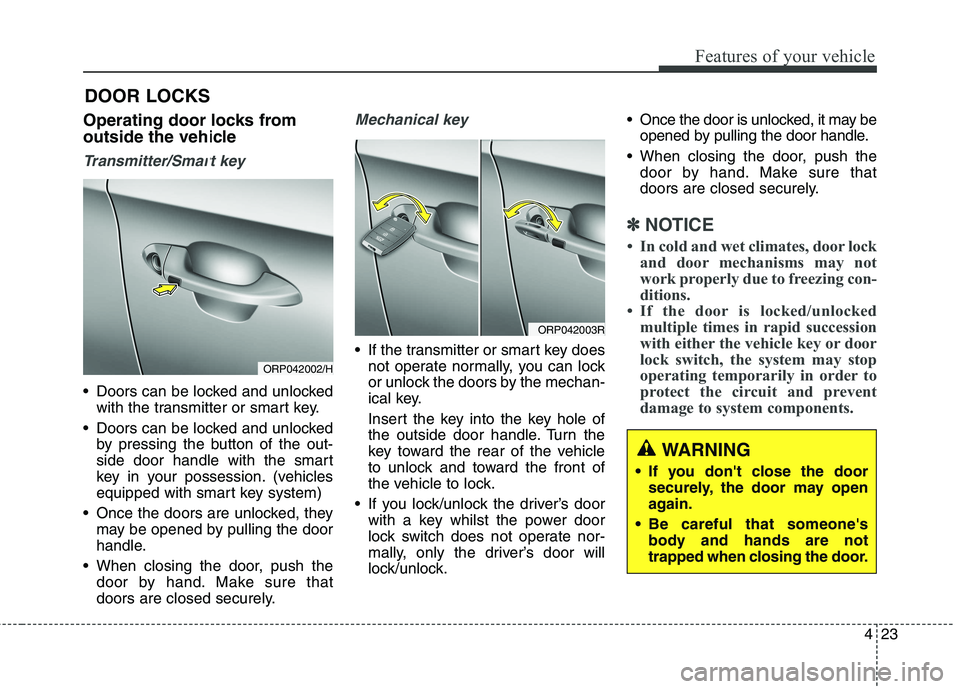
Transmitter/Smart key
Doors can be locked and unlockedwith the transmitter or smart key.
Doors can be locked and unlocked by pressing the button of the out-
side door handle with the smart
key in your possession. (vehicles
equipped with smart key system)
Once the doors are unlocked, they may be opened by pulling the door
handle.
When closing the door, push the door by hand. Make sure that
doors are closed securely.
Mechanical key
If the transmitter or smart key doesnot operate normally, you can lock
or unlock the doors by the mechan-
ical key.
Insert the key into the key hole of
the outside door handle. Turn the
key toward the rear of the vehicle
to unlock and toward the front of
the vehicle to lock.
If you lock/unlock the driver’s door with a key whilst the power door
lock switch does not operate nor-
mally, only the driver’s door will
lock/unlock. Once the door is unlocked, it may be
opened by pulling the door handle.
When closing the door, push the door by hand. Make sure that
doors are closed securely.
✽✽ NOTICE
In cold and wet climates, door lock and door mechanisms may not
work properly due to freezing con-
ditions.
If the door is locked/unlocked multiple times in rapid succession
with either the vehicle key or door
lock switch, the system may stop
operating temporarily in order to
protect the circuit and prevent
damage to system components.
DOOR LOCKS
WARNING
If you don't close the door securely, the door may open
again.
Be careful that someone's body and hands are not
trapped when closing the door.
ORP042002/H
ORP042003R
Page 147 of 723

451
Features of your vehicle
FLEX STEER (if equipped)
The FLEX STEER controls steering
effort as driver's preference or roadcondition.
You can select the desired steering
mode by pressing the steering mode
button.
When the steering mode button is
pressed, the selected steering mode
will appear on the LCD display.
If the steering mode button is
pressed within 4 seconds, the steer-
ing mode will change.If the steering wheel mode button is
not pressed for about 4 seconds, the
LCD display will change to the previ-ous screen.
Normal mode
The normal mode offers medium
steering effort.
Comfort mode
The steering wheel becomes lighter.
The comfort mode is usually used
when driving in downtown or parking
the vehicle.
Also, the comfort mode helps weak
people to drive easily.
Sport mode
The steering wheel becomes heav-
ier. The sport mode is usually used
when driving in highway.
ORP042027
CAUTION
For your safety, if you press the
steering mode button whilstoperating the steering wheel, the LCD display will change. Atthe same time, the steeringeffort will change automatical- ly to the selected mode.
Be careful when changing the steering mode whilst driving.
When the electronic power steering is not working prop-erly, the flex steering wheelwill not work.
Page 148 of 723
Features of your vehicle
52
4
Inside rearview mirror
Adjust the rearview mirror so that the
centre view through the rear window
is seen. Make this adjustment before
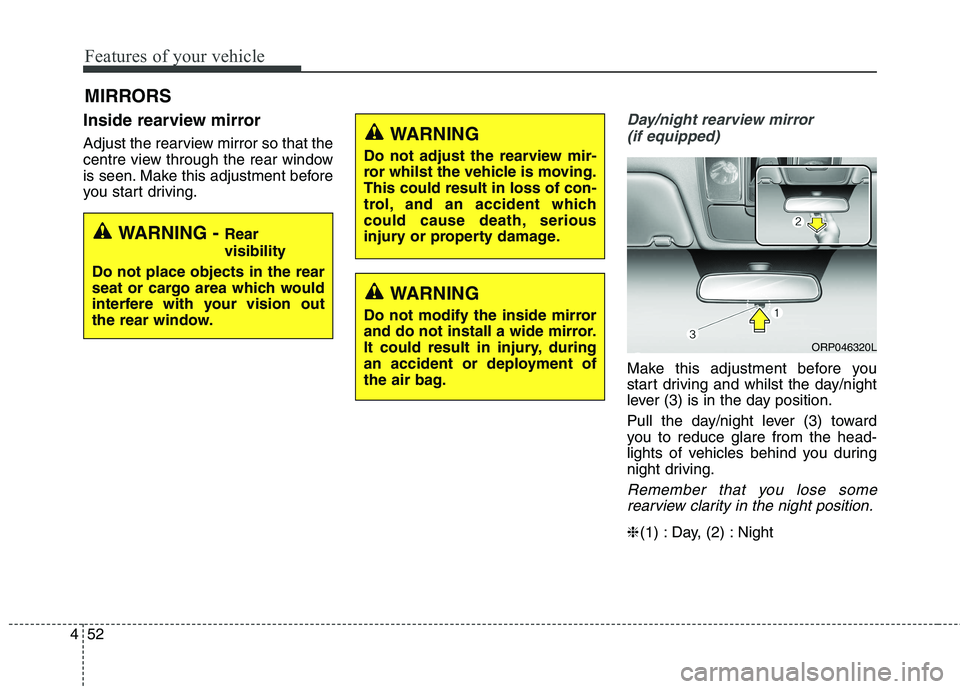
you start driving.Day/night rearview mirror
(if equipped)
Make this adjustment before you
start driving and whilst the day/night
lever (3) is in the day position.
Pull the day/night lever (3) toward
you to reduce glare from the head-
lights of vehicles behind you during
night driving.
Remember that you lose somerearview clarity in the night position.
❈ (1) : Day, (2) : Night
MIRRORS
WARNING -
Rear visibility
Do not place objects in the rear
seat or cargo area which would
interfere with your vision out
the rear window.
WARNING
Do not adjust the rearview mir-
ror whilst the vehicle is moving.This could result in loss of con-
trol, and an accident which
could cause death, serious
injury or property damage.
WARNING
Do not modify the inside mirror
and do not install a wide mirror.
It could result in injury, during
an accident or deployment of
the air bag.
ORP046320L
Page 149 of 723

453
Features of your vehicle
Electric chromic mirror (ECM)(if equipped)
The electric rearview mirror automat- ically controls the glare from the
headlights of the vehicle behind you
in nighttime or low light driving condi-
tions. The sensor mounted in the mir-
ror senses the light level around the
vehicle, and automatically controls
the headlight glare from vehicles
behind you.
When the engine is running, the glare
is automatically controlled by the sen-
sor mounted in the rearview mirror.
Whenever the shift lever is shifted
into R (Reverse), the mirror will auto-
matically go to the brightest setting in
order to improve the drivers view
behind the vehicle. To operate the electric rearview mirror:
The mirror defaults to the ON posi-
tion whenever the ignition switch is
turned on.
Press the ON/OFF button (1) to turn the automatic dimming func-
tion off. The mirror indicator light
(2) will turn off.
Press the ON/OFF button (1) to
turn the automatic dimming func-
tion on. The mirror indicator light
(2) will illuminate.
❈ (2) : Indicator, (3) : Sensor Outside rearview mirror Be sure to adjust mirror angles
before driving.
Your vehicle is equipped with both
left-hand and right-hand outside
rearview mirrors. The mirrors can beadjusted remotely with the remote
switch. The mirror heads can be fold-
ed back to prevent damage during an
automatic car wash or when passing
in a narrow street.
CAUTION
When cleaning the mirror, use a
paper towel or similar materialdampened with glass cleaner. Do not spray glass cleanerdirectly on the mirror as thatmay cause the liquid cleaner to enter the mirror housing.
WARNING - Rearview
mirrors
The outside rearview mirror is convex. Objects seen in the
mirror are closer than they
appear.
Use your interior rearview mirror or direct observation todetermine the actual distance
of following vehicles when
changing lanes.
ORP046321L
Page 151 of 723
455
Features of your vehicle
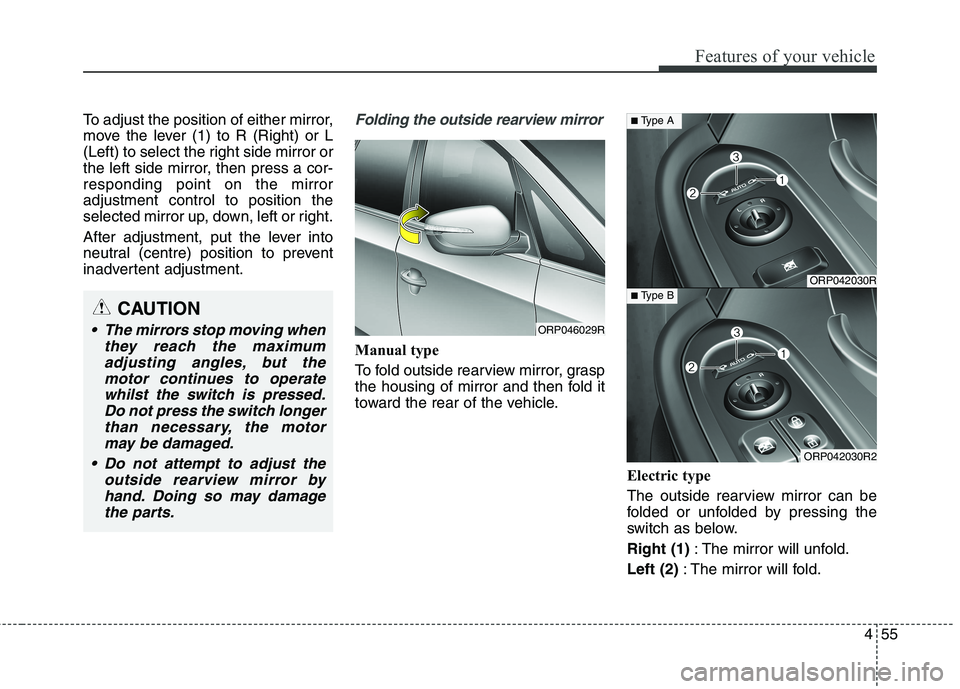
To adjust the position of either mirror,
move the lever (1) to R (Right) or L
(Left) to select the right side mirror or
the left side mirror, then press a cor-responding point on the mirroradjustment control to position the
selected mirror up, down, left or right.
After adjustment, put the lever into
neutral (centre) position to prevent
inadvertent adjustment.Folding the outside rearview mirror
Manual type
To fold outside rearview mirror, grasp
the housing of mirror and then fold it
toward the rear of the vehicle.Electric type
The outside rearview mirror can be
folded or unfolded by pressing the
switch as below. Right (1): The mirror will unfold.
Left (2) : The mirror will fold.
CAUTION
The mirrors stop moving when
they reach the maximumadjusting angles, but themotor continues to operatewhilst the switch is pressed. Do not press the switch longerthan necessary, the motormay be damaged.
Do not attempt to adjust the outside rearview mirror byhand. Doing so may damagethe parts.ORP046029R
ORP042030R
ORP042030R2
■ Type A
■ Type B
Page 157 of 723

461
Features of your vehicle
Engine Coolant TemperatureGauge
This gauge indicates the tempera- ture of the engine coolant when the
ignition switch or Engine Start/Stop
button is ON.
CAUTION
Do not operate the engine with-in the tachometer's RED ZONE.This may cause severe engine damage.
ORP042053/ORP042052
■
Type A
For Europe
Except Europe
■ Type A
ORP042055/ORP042054■
Type B
■ Type B
WARNING
Never remove the radiator cap
when the engine is hot. Theengine coolant is under pressure
and could severely burn. Wait
until the engine is cool before
adding coolant to the reservoir.
CAUTION
If the gauge pointer moves beyond the normal range areatoward the “130 or H” position, itindicates overheating that may damage the engine.
Do not continue driving with anoverheated engine. If your vehi-cle overheats, refer to “If theEngine Overheats” in chapter 7.
Page 178 of 723

Features of your vehicle
82
4
Parking Brake & Brake
Fluid Warning Light
This warning light illuminates:
Once you set the ignition switch or Engine Start/Stop Button to the ON position.
- It illuminates for approximately 3seconds
- It remains on if the parking brake is applied.
When the parking brake is applied.
When the brake fluid level in the reservoir is low.
- If the warning light illuminateswith the parking brake released, it
indicates the brake fluid level in
reservoir is low. If the brake fluid level in the reservoir
is low:
1. Drive carefully to the nearest safe
location and stop your vehicle.
2. With the engine stopped, check the brake fluid level immediately
and add fluid as required (For
more details, refer to “Brake Fluid”
in chapter 8). Then check all brake
components for fluid leaks. If any
leak on the brake system is still
found, the warning light remains
on, or the brakes do not operate
properly, do not drive the vehicle.
In this case, we recommend that
you have the vehicle towed to an
authorised Kia dealer and inspect-ed. Dual-diagonal braking system
Your vehicle is equipped with dual-
diagonal braking systems. This
means you still have braking on two
wheels even if one of the dual sys-
tems should fail. With only one of the dual systems
working, more than normal pedal
travel and greater pedal pressure are
required to stop the vehicle.
Also, the vehicle will not stop in as
short a distance with only a portion
of the brake system working.
If the brakes fail whilst you are driv-
ing, shift to a lower gear for addition-
al engine braking and stop the vehi-
cle as soon as it is safe to do so.