Page 193 of 723

497
Features of your vehicle
This system will activate whenbacking up with the ignition switch ON.
If the vehicle is moving at a speed
over 5 km/h (3 mph), the system
may not be activated correctly.
The sensing distance whilst the rear parking assist system is in
operation is approximately 120 cm(47 in.).
When more than two objects are sensed at the same time, the clos-
est one will be recognized first.
Types of warning sound
When an object is 120 cm to 61 cm(47 in. to 23.6 in.) from the rear
bumper: Buzzer beeps intermittently
When an object is 60 cm to 31 cm (23.6 in. to 12.2 in.) from the rear
bumper: Buzzer beeps more fre-quently
When an object is within 30 cm (11.8 in.) of the rear bumper:
Buzzer sounds continuously.
Type of the warning indicator
(if equipped)
* 1
: It indicates the range of sensed
object by each sensor. (Left,
Centre, Right)
❈ In case the object is between or
close to the sensors, the indicator
could be different. Non-operational conditions of rear parking assist system The rear parking assist system
may not operate properly when:
1. Moisture is frozen to the sensor. (It
will operate normally when the moisture has been cleared.)
2. The sensor is covered with foreign matter, such as snow or water, or
the sensor cover is blocked. (It will
operate normally when the materi-
al is removed or the sensor is no
longer blocked.)
3. Driving on uneven road surfaces (unpaved roads, gravel, bumps,
gradient).
4. Objects generating excessive noise (vehicle horns, loud motor-
cycle engines, or truck air brakes)
are within range of the sensor.
5. Heavy rain or water spray exists.
6. Wireless transmitters or mobile phones are within range of the
sensor.
7. Trailer towing.
Distance from objectWarning indicator
Type AType B
61cm ~ 120 cm
(24 in. ~ 47 in.)
31cm ~ 60 cm
(12.2 in. ~ 23.6 in.)
Less than 30 cm (11.8 in.)
* 1
* 1
* 1
Page 218 of 723
Features of your vehicle
122
4
The high-beam indicator will light
when the headlight high beams are
switched on.
To prevent the battery from being discharged, do not leave the lights
on for a prolonged time whilst the
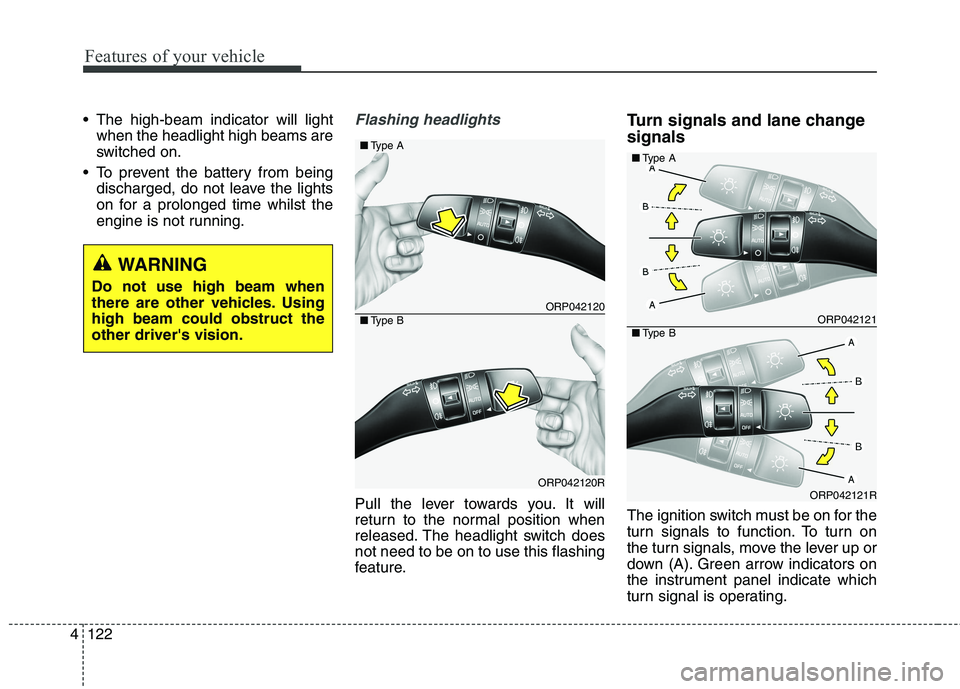
engine is not running.Flashing headlights
Pull the lever towards you. It will
return to the normal position when
released. The headlight switch doesnot need to be on to use this flashing
feature. Turn signals and lane change signals
The ignition switch must be on for the
turn signals to function. To turn on
the turn signals, move the lever up or
down (A). Green arrow indicators on
the instrument panel indicate which
turn signal is operating.
ORP042120
ORP042120R
■
Type A
■Type BORP042121
ORP042121R
■Type A
■Type B
WARNING
Do not use high beam when
there are other vehicles. Usinghigh beam could obstruct theother driver's vision.
Page 227 of 723

4131
Features of your vehicle
When the operation of the passen-
ger’s side wiper blade is limited by
accumulated snow on the cowl top
cover, operating angle of the driver’s
side wiper blade will be reduced to
avoid collision between the wiper
blades. Operating under a reduced
angle, the driver's side blade stop
position will be different.
✽✽NOTICE
If you do not remove the snow
and/or ice before using the wiper
and washer, it may damage the
wiper and washer system.
Windscreen washers (front) In the O (Off) position, pull the lever
gently toward you to spray washer
fluid on the windscreen and to run
the wipers 1-3 cycles. Use this function when the wind-
screen is dirty.
The spray and wiper operation will
continue until you release the lever.
If the washer does not work, check
the washer fluid level. If the fluid level
is not sufficient, you will need to add
appropriate non-abrasive windscreen
washer fluid to the washer reservoir.
The reservoir filler neck is located in
the front of the engine compartment
on the driver side.
CAUTION
To prevent possible damage to
the washer pump, do not oper-ate the washer when the fluid reservoir is empty.
ORP072064R
Reduced angle (Driver’s side Wiper)
Normal angle
(Driver’s side Wiper)
Accumulated SnowCowl Top Cover
ORP046128L
ORP046352L
ORP046352R
■ Type B
■
Type A
■ Type C
Page 238 of 723
Features of your vehicle
142
4
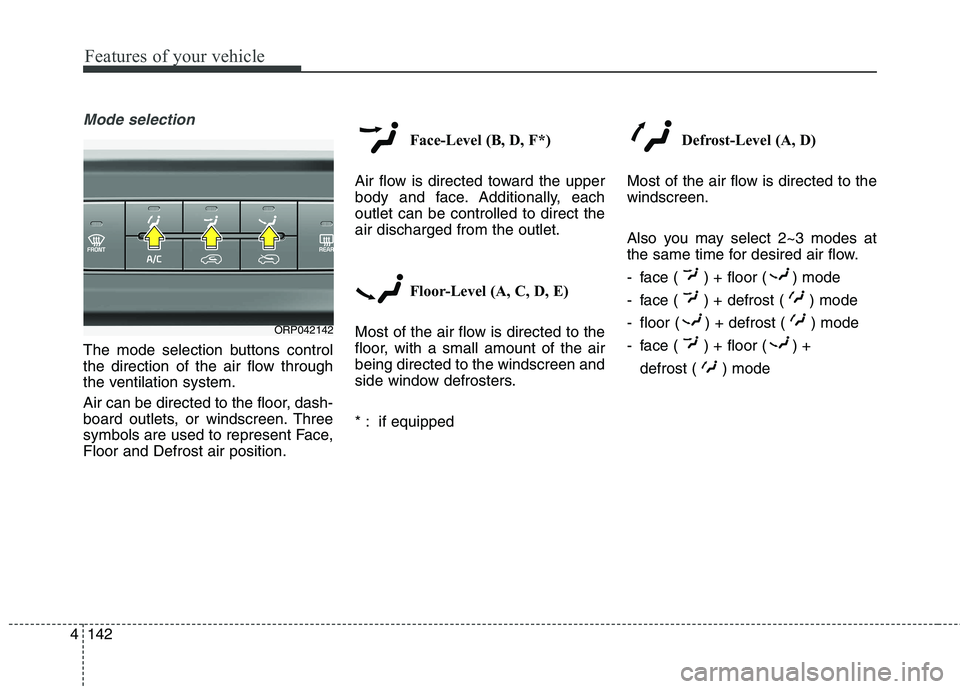
Mode selection
The mode selection buttons control
the direction of the air flow through
the ventilation system.
Air can be directed to the floor, dash-
board outlets, or windscreen. Three
symbols are used to represent Face,Floor and Defrost air position. Face-Level (B, D, F*)
Air flow is directed toward the upper
body and face. Additionally, eachoutlet can be controlled to direct theair discharged from the outlet.
Floor-Level (A, C, D, E)
Most of the air flow is directed to the
floor, with a small amount of the airbeing directed to the windscreen and
side window defrosters.
* : if equipped Defrost-Level (A, D)
Most of the air flow is directed to the windscreen.
Also you may select 2~3 modes at
the same time for desired air flow.
- face ( ) + floor ( ) mode
- face ( ) + defrost ( ) mode
- floor ( ) + defrost ( ) mode
- face ( ) + floor ( ) + defrost ( ) mode
ORP042142
Page 250 of 723
Features of your vehicle
154
4
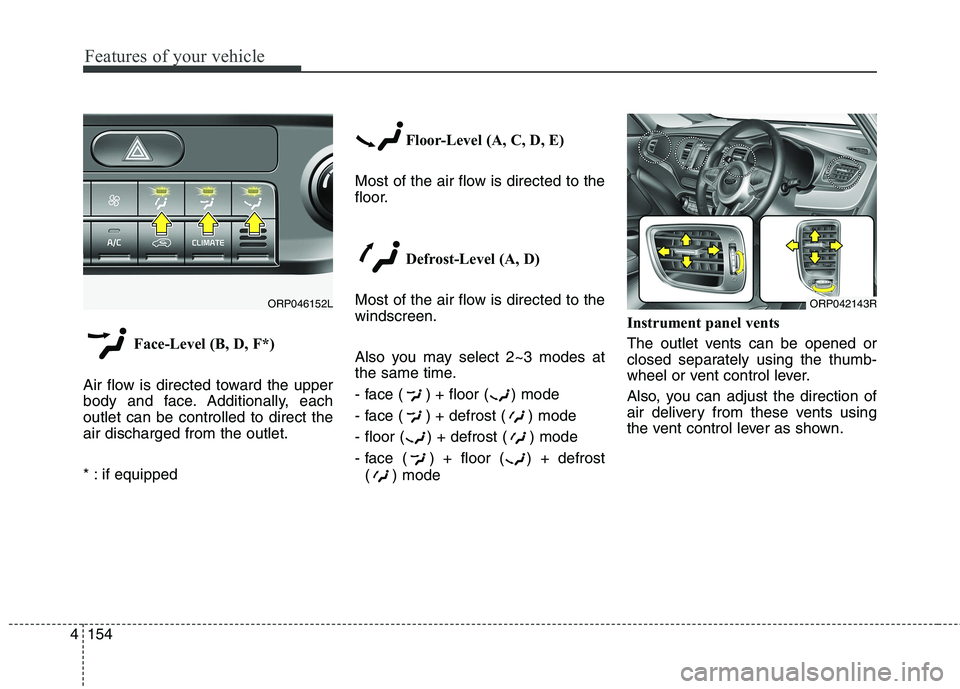
Face-Level (B, D, F*)
Air flow is directed toward the upper
body and face. Additionally, eachoutlet can be controlled to direct theair discharged from the outlet.
* : if equipped Floor-Level (A, C, D, E)
Most of the air flow is directed to the
floor.
Defrost-Level (A, D)
Most of the air flow is directed to thewindscreen.
Also you may select 2~3 modes at
the same time.
- face ( ) + floor ( ) mode
- face ( ) + defrost ( ) mode
- floor ( ) + defrost ( ) mode
- face ( ) + floor ( ) + defrost ( ) mode Instrument panel vents
The outlet vents can be opened or
closed separately using the thumb-
wheel or vent control lever.
Also, you can adjust the direction of
air delivery from these vents using
the vent control lever as shown.
ORP042143RORP046152L
Page 262 of 723

Features of your vehicle
166
4
This indicator illuminates
when the auto defoggingsystem senses the mois-ture of inside the wind-
screen and operates.
If more moisture is in the vehicle,
higher steps operate as follow.
Step 1 : Operating the air condition- ing
Step 2 : Blowing air flow toward the windscreen
Step 3 : Outside air position
Step 4 : Increasing air flow toward the windscreen If your vehicle is equipped with the
auto defogging system, it is automat-
ically activated when the conditions
are met. To cancel or reset the Auto
Defogging system, press the front
windscreen defroster button for 3
seconds when the ignition switch is in
the ON position. When the Auto
Defogging System is Cancelled, ADS
OFF symbol will blink 3 times and the
ADS OFF will be displayed on the cli-
mate control information screen.
When the Auto Defogging System is
reset, ADS OFF symbol will blink 6times without a signal. In case of automatic climate control
system with a climate button, it blinks
defroster button indicator. Blinking
time is same as above.
To use the auto defogging system
again, follow the procedures men-
tioned above.
If the battery has been disconnected or discharged, it resets to the auto
defogging status.✽✽
NOTICE
If the A/C off is manually selected
whilst the auto defogging system is
on, the auto defogging indicator will
blink 3 times to give notice that the
A/C off can not be selected.
CAUTION
Do not remove the sensor cover located on the upper end of thedriver side windscreen glass. Damage to the system partscould occur and may not be cov-ered by your vehicle warranty.
Page 272 of 723
Features of your vehicle
176
4
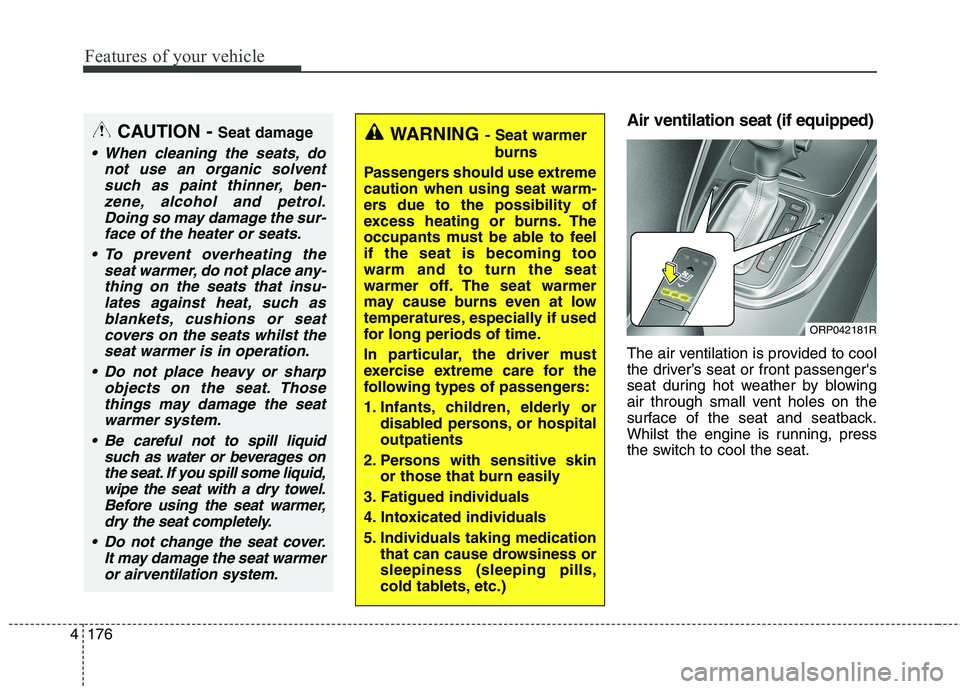
Air ventilation seat (if equipped)
The air ventilation is provided to cool
the driver’s seat or front passenger's
seat during hot weather by blowing
air through small vent holes on the
surface of the seat and seatback.
Whilst the engine is running, press
the switch to cool the seat.WARNING - Seat warmer
burns
Passengers should use extreme caution when using seat warm-
ers due to the possibility of
excess heating or burns. The
occupants must be able to feelif the seat is becoming toowarm and to turn the seat
warmer off. The seat warmer
may cause burns even at low
temperatures, especially if used
for long periods of time.
In particular, the driver must
exercise extreme care for the
following types of passengers:
1. Infants, children, elderly or disabled persons, or hospital outpatients
2. Persons with sensitive skin or those that burn easily
3. Fatigued individuals
4. Intoxicated individuals
5. Individuals taking medication that can cause drowsiness or sleepiness (sleeping pills,
cold tablets, etc.)CAUTION - Seat damage
When cleaning the seats, do
not use an organic solventsuch as paint thinner, ben-zene, alcohol and petrol.Doing so may damage the sur-face of the heater or seats.
To prevent overheating the seat warmer, do not place any-thing on the seats that insu-lates against heat, such asblankets, cushions or seat covers on the seats whilst theseat warmer is in operation.
Do not place heavy or sharp objects on the seat. Thosethings may damage the seat warmer system.
Be careful not to spill liquid such as water or beverages onthe seat. If you spill some liquid,wipe the seat with a dry towel. Before using the seat warmer,dry the seat completely.
Do not change the seat cover. It may damage the seat warmeror airventilation system.
ORP042181R
Page 273 of 723
4177
Features of your vehicle
When the operation of the air ventila-
tion is not needed, keep the switchesin the OFF position.
Each time you press the switch,the airflow will change as follows:
When pressing the switch for more than 1.5 seconds with the seat
cooler operating, the seat cooler
will turn OFF.
When the air ventilation seat is turned on, the seat may get cooler
after about 5 minutes.
Because the air ventilation uses the air in the vehicle, cooling effi-
ciency depends on the tempera-
ture of the air. In order to improve
cooling efficiency, use the air con-
ditioning system together.
The air ventilation seat defaults to the OFF position whenever the
ignition switch is turned to the ONposition. Sunvisor
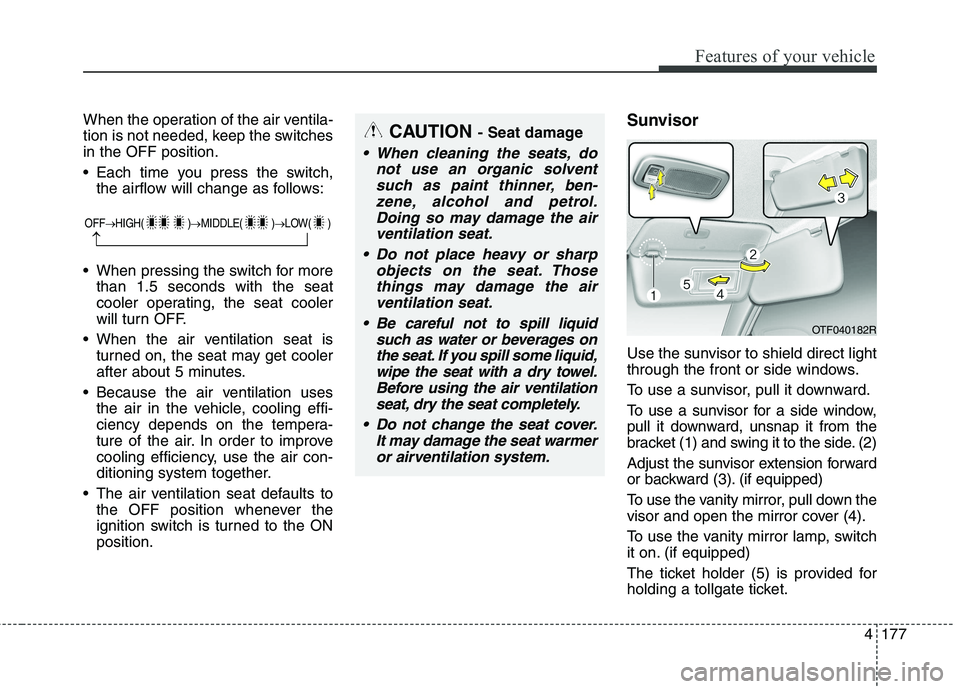
Use the sunvisor to shield direct light
through the front or side windows.
To use a sunvisor, pull it downward.
To use a sunvisor for a side window,
pull it downward, unsnap it from the
bracket (1) and swing it to the side. (2)
Adjust the sunvisor extension forward
or backward (3). (if equipped)
To use the vanity mirror, pull down the
visor and open the mirror cover (4).
To use the vanity mirror lamp, switch
it on. (if equipped)
The ticket holder (5) is provided for
holding a tollgate ticket.CAUTION
- Seat damage
When cleaning the seats, do
not use an organic solventsuch as paint thinner, ben-zene, alcohol and petrol.Doing so may damage the air ventilation seat.
Do not place heavy or sharp objects on the seat. Thosethings may damage the airventilation seat.
Be careful not to spill liquid such as water or beverages onthe seat. If you spill some liquid,wipe the seat with a dry towel.Before using the air ventilation seat, dry the seat completely.
Do not change the seat cover. It may damage the seat warmeror airventilation system.
OTF040182R
OFF HIGH( ) MIDDLE( ) LOW( )