Page 439 of 516

have these additives will help improve fuel economy,
reduce emissions, and maintain vehicle performance.Designated TOP TIER Detergent Gaso-
line contains a higher level of detergents
to further aide in minimizing engine
and fuel system deposits. When avail-
able, the usage of Top Tier Detergent
gasoline is recommended. Visit
www.toptiergas.com for a list of TOP
TIER Detergent Gasoline Retailers.
Indiscriminate use of fuel system cleaning agents should be
avoided. Many of these materials intended for gum and varnish
removal may contain active solvents or similar ingredients.
These can harm fuel system gasket and diaphragm materials.
Fuel System Cautions
CAUTION!
Follow these guidelines to maintain your vehicle’s
performance:
• The use of leaded gasoline is prohibited by Federal
law. Using leaded gasoline can impair engine perfor-
mance and damage the emissions control system.
(Continued)
CAUTION! (Continued)
•An out-of-tune engine or certain fuel or ignition
malfunctions can cause the catalytic converter to
overheat. If you notice a pungent burning odor or
some light smoke, your engine may be out of tune or
malfunctioning and may require immediate service.
Contact your authorized dealer for service assistance.
• The use of fuel additives, which are now being sold
as octane enhancers, is not recommended. Most of
these products contain high concentrations of metha-
nol. Fuel system damage or vehicle performance
problems resulting from the use of such fuels or
additives is not the responsibility of the manufac-
turer and may void or not be covered under the New
Vehicle Limited Warranty.
NOTE: Intentional tampering with the emissions control
system can result in civil penalties being assessed against
you.
9
TECHNICAL SPECIFICATIONS 437
Page 448 of 516

Lights, Doors & Locks, Engine Off Options, Compass
Settings, Audio, Phone/Bluetooth, Radio Setup, Restore
Settings and Clear Personal Data.
NOTE:Only one touchscreen area may be selected at a
time.
When making a selection, press the button on the touch-
screen to enter the desired mode. Once in the desired
mode, press and release the preferred setting and make
your selection. Once the setting is complete, either press
the Back Arrow button on the touchscreen or the Back
button on the faceplate to return to the previous menu or press the “X” button on the touchscreen to close out of the
settings screen. Pressing the Up or Down Arrow buttons on
the right side of the screen will allow you to toggle up or
down through the available settings.
NOTE:
All settings should be changed with the ignition in
the “RUN” position.
Display
After pressing the “Display” button on the touchscreen, the
following settings will be available:
Setting Name Selectable Options
Display Mode AutoManual
Brightness +–
Add Display Brightness With Head- lights ON
Add Display Brightness With Head- lights OFF
Language EnglishEspañolFrançais
Touchscreen Beep
446 MULTIMEDIA
Page 454 of 516

Setting NameSelectable Options
LaneSense Strength — If Equipped Low
Medium High
NOTE: When this feature is selected, it sets the strength of the steering wheel feedback for potential lane departures.
The amount of directional torque the steering system can apply to the steering wheel to correct for vehicle lane de-
parture can be set at “Low,” “Medium” or “High.”
Blind Spot Alert — If Equipped Off
LightsLights & Chime
NOTE:
•When this feature is selected, the Blind Spot Alert feature can be set to Off, Lights or Lights and Chime. The Blind
Spot Alert feature can be activated in Lights mode. When this mode is selected, the Blind Spot Monitor (BSM) sys-
tem is activated and will only show a visual alert in the outside mirrors. When Lights & Chime mode is activated,
the Blind Spot Monitor (BSM) will show a visual alert in the outside mirrors as well as an audible alert when the
turn signal is on. When Off is selected, the Blind Spot Monitor (BSM) system is deactivated.
•If your vehicle has experienced any damage in the area where the sensor is located, even if the fascia is not dam-
aged, the sensor may have become misaligned. Take your vehicle to an authorized dealer to verify sensor align-
ment. A sensor that is misaligned will result in the BSM not operating to specification.
Electric Park Brake Service Mode — If Equipped On Off
NOTE: This feature provides a means for a technician or vehicle owner to utilize a vehicle integrated, menu driven
system, to command the electric park brake retraction, to service the rear foundation brakes (brake pads, calipers, ro-
tors, etc.).
452 MULTIMEDIA
Page 456 of 516
Lights
After pressing the “Lights” button on the touchscreen, the
following settings will be available:
Setting NameSelectable Options
Headlight Sensitiv- ity — If Equipped Level 1
Level 2Level 3
NOTE:
•When this feature is selected, it allows the Headlight Sensitivity to be adjusted according to three levels.
•The greater the sensitivity set, the less the external light variation required to turn on the lights (e.g. with a setting
on level 3 at sunset the headlights turn on earlier than in levels 1 and 2). To change the Headlight Sensitivity set-
ting, press the “1,” “2” or “3” button on the touchscreen to select your desired Headlight Sensitivity level.
Headlight Off Delay 0 sec30 sec 60 sec 90 sec
Greeting Lights — If Equipped On
Off
Automatic High
Beam Headlamps — If Equipped On
Off
Daytime Running Lights — IfEquipped Ye s
N o
NOTE: When this feature is selected, the headlights will turn on while the engine is running.
454 MULTIMEDIA
Page 457 of 516
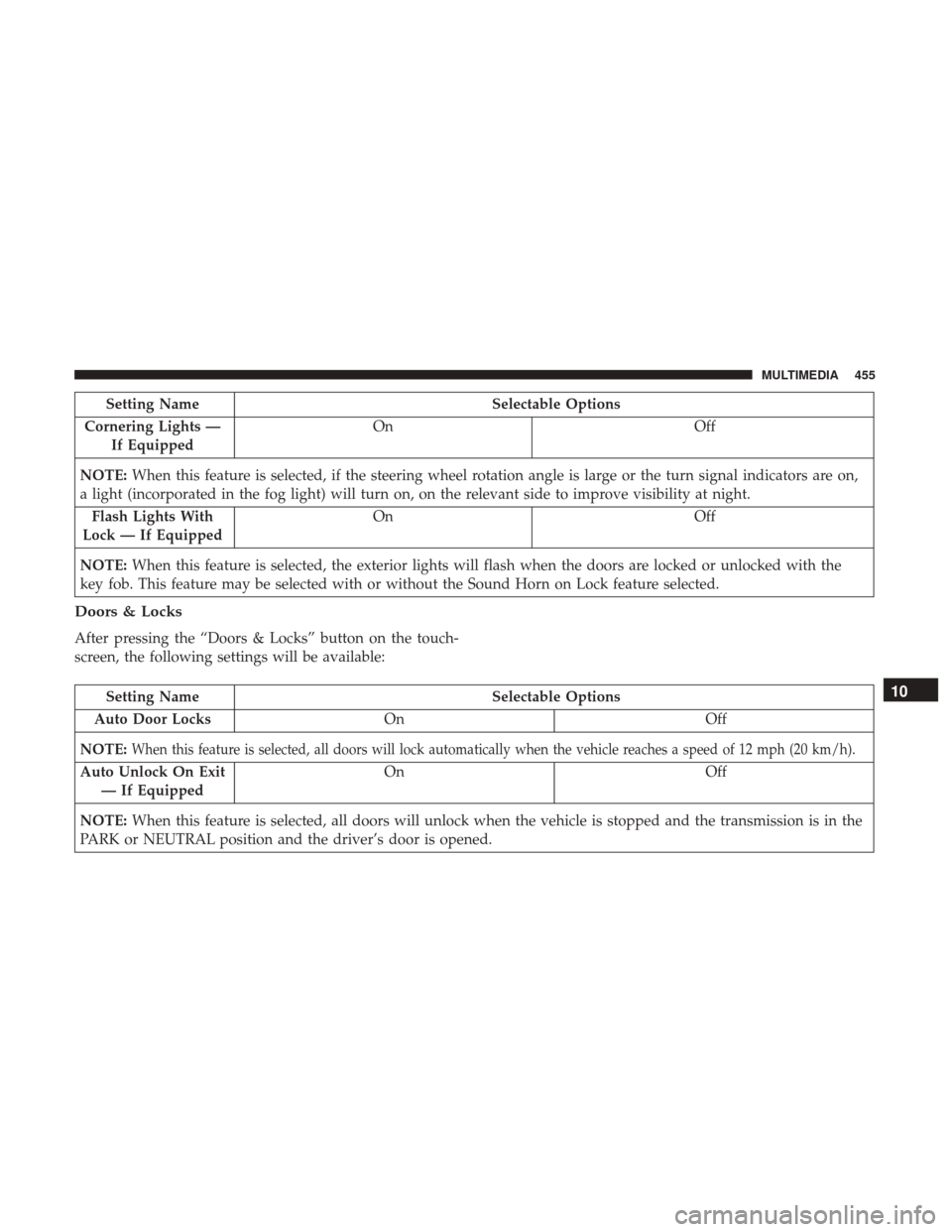
Setting NameSelectable Options
Cornering Lights — If Equipped On
Off
NOTE: When this feature is selected, if the steering wheel rotation angle is large or the turn signal indicators are on,
a light (incorporated in the fog light) will turn on, on the relevant side to improve visibility at night.
Flash Lights With
Lock — If Equipped On
Off
NOTE: When this feature is selected, the exterior lights will flash when the doors are locked or unlocked with the
key fob. This feature may be selected with or without the Sound Horn on Lock feature selected.
Doors & Locks
After pressing the “Doors & Locks” button on the touch-
screen, the following settings will be available:
Setting Name Selectable Options
Auto Door Locks On Off
NOTE:
When this feature is selected, all doors will lock automatically when the vehicle reaches a speed of 12 mph (20 km/h).
Auto Unlock On Exit — If Equipped On Off
NOTE: When this feature is selected, all doors will unlock when the vehicle is stopped and the transmission is in the
PARK or NEUTRAL position and the driver’s door is opened.
10
MULTIMEDIA 455
Page 458 of 516
Setting NameSelectable Options
Flash Lights With
Lock — If Equipped On
Off
NOTE: When this feature is selected, the exterior lights will flash when the doors are locked or unlocked with the
key fob or the Passive Entry Feature.
Horn With Lock — If Equipped Off
1st Press 2nd Press
Horn With Remote
Start — If Equipped On
Off
Passive Entry — If Equipped On
Off
NOTE: Passive Entry This feature allows you to lock and unlock the vehicle’s door(s) without having to press the key
fob lock or unlock buttons.
Remote Door
Unlock/Door Unlock — If Equipped Driver
All
NOTE:
•When “Driver” is selected, only the driver’s door will unlock on the first push of the key fob unlock button, you
must push the key fob unlock button twice to unlock the passenger’s doors. When “All” is selected, all of the
doors will unlock on the first press of the key fob unlock button.
456 MULTIMEDIA
Page 459 of 516

Setting NameSelectable Options
•If “All” is programmed, all doors will unlock no matter which Passive Entry equipped door handle is grasped. If
“Driver” is programmed, only the driver ’s door will unlock when the driver ’s door is grasped. Touching the
handle more than once will only result in the driver ’s door opening once. If the driver door is opened, the interior
door lock/unlock switch can be used to unlock all doors (or use key fob).
Engine Off Options
After pressing the “Engine Off Options” button on the
touchscreen, the following settings will be available:
Setting NameSelectable Options
Headlight Off Delay +–
NOTE: When this feature is selected, the driver can choose to have the headlights remain on for 0, 30, 60, or 90 sec-
onds when exiting the vehicle.
Radio Off Delay 0 MIN20 MIN
Phone/Bluetooth
After pressing the “Phone/Bluetooth” button on the touch-
screen, the following settings will be available:
Setting Name Selectable Options
Paired Phones This feature shows which phones are paired to the Phone/Bluetooth system.
For further information, refer to the Uconnect Owner ’s Manual Supplement
10
MULTIMEDIA 457
Page 462 of 516

Clear Personal Data
After pressing the “Clear Personal Data” button on the
touchscreen, the following settings will be available:
Setting NameSelectable Options
Clear Personal Data OKCancel X
NOTE: When this feature is selected, it will remove all personal data including Bluetooth devices and presets. To re-
move personal information, press the “Clear Personal Data” button and a pop-up will appear asking �Are you sure
you want to clear all personal data?”
Restore Apps — If Equipped OK
Cancel X
NOTE: When this feature is selected, it will reset Apps to their default settings. To remove restore apps, press the
“Restore Apps” button and a pop-up will appear.
Customer Programmable Features — Uconnect 6.5
NAV Settings
Press the Settings button to display the menu setting
screen. In this mode the Uconnect system allows you to
access programmable features that may be equipped such
as Display, Clock, Safety & Driving Assistance, Lights,
Doors & Locks, Engine Off Options, Audio, Phone/
Bluetooth, SiriusXM Setup, Restore Settings Defaults, Clear
Personal Data and System Information. NOTE:
•
Only one touchscreen area may be selected at a time.
• Depending on the vehicles options, feature settings may
vary.
460 MULTIMEDIA

