Page 380 of 516
Mileage or time passed
(whichever comes first)
10,000
20,000
30,000
40,000
50,000
60,000
70,000
80,000
90,000
100,000
110,000
120,000
130,000
140,000
150,000
Or Years: 1 2 3 4 5 6 7 8 9 10 11 12 13 14 15
Or Kilometers:
16,000
32,000
48,000
64,000
80,000
96,000
112,000
128,000
144,000
160,000
176,000
192,000
208,000
224,000
240,000
Check windshield/rear window
wiper blade position/wear. •• ••• • • •
Check operation of windshield
washer system and adjust jets if
necessary. •• ••• • • •
Check cleanliness of hood and
tailgate locks and cleanliness
and lubrication of linkages. •• ••• • • •
Visually check the condition and
wear of the front and rear
brakes. •••••••••••••••
Check the front suspension, tie
rods, CV joints and replace if
necessary. •••• • • •
Visual inspect the condition of
the accessory drive belt. •• •
Check the tension of the acces-
sory drive belt. •••• • • •
378 SERVICING AND MAINTENANCE
Page 392 of 516

CAUTION!
Do not use chemical flushes in your air conditioning
system as the chemicals can damage your air condition-
ing components. Such damage is not covered by the
New Vehicle Limited Warranty.
Refrigerant Recovery And Recycling — R–1234yf
R–1234yf Air Conditioning Refrigerant is a hydrofluo-
roolefin (HFO) that is endorsed by the Environmental
Protection Agency and is an ozone-friendly substance with
a low global-warming potential. The manufacturer recom-
mends that air conditioning service be performed by
authorized dealer using recovery and recycling equipment.
NOTE:Use only manufacturer approved A/C system
PAG compressor oil, and refrigerants.
A/C Air Filter
See your authorized dealer for service.
Body Lubrication
Locks and all body pivot points, including such items as
seat tracks, door hinge pivot points and rollers, liftgate,
tailgate, decklid, sliding doors and hood hinges, should be
lubricated periodically with a lithium based grease, such as Mopar Spray White Lube to assure quiet, easy operation
and to protect against rust and wear. Prior to the applica-
tion of any lubricant, the parts concerned should be wiped
clean to remove dust and grit; after lubricating excess oil
and grease should be removed. Particular attention should
also be given to hood latching components to ensure
proper function. When performing other underhood ser-
vices, the hood latch, release mechanism and safety catch
should be cleaned and lubricated.
The external lock cylinders should be lubricated twice a
year, preferably in the Fall and Spring. Apply a small
amount of a high quality lubricant, such as Mopar Lock
Cylinder Lubricant directly into the lock cylinder.
Windshield Wiper Blades
Clean the rubber edges of the wiper blades and the
windshield periodically with a sponge or soft cloth and a
mild nonabrasive cleaner. This will remove accumulations
of salt or road film.
Operation of the wipers on dry glass for long periods may
cause deterioration of the wiper blades. Always use washer
fluid when using the wipers to remove salt or dirt from a
dry windshield.
390 SERVICING AND MAINTENANCE
Page 447 of 516

Buttons On The Faceplate
Buttons on the faceplate are located below the Uconnect
system in the center of the instrument panel. In addition,
there is a Scroll/Enter control knob located on the right
side of the Climate Controls in the center of the instrument
panel. Turn the control knob to scroll through menus andchange settings (i.e., 30, 60, 90), push the center of the
control knob one or more times to select or change a setting
(i.e., ON, OFF).
Your Uconnect system may also have screen off and back
buttons located below the Uconnect system.
Push the screen off button to turn off the Uconnect touch-
screen. Push the screen off button a second time to turn the
touchscreen on.
Push the back button to exit out of a menu or certain option
on the Uconnect system.
Buttons On The Touchscreen
Buttons on the touchscreen are accessible on the Uconnect
display.
Customer Programmable Features — Uconnect 5.0
Settings
Push the MORE button on the faceplate, then press the
“Settings” button on the touchscreen to display the settings
menu screen. In this mode, the Uconnect system allows
you to access programmable features that may be
equipped such as Display, Clock, Safety/Assistance,
Uconnect 6.5 NAV Buttons On The Touchscreen And
Buttons On The Faceplate
1 — Uconnect Buttons On The Touchscreen
2 — Uconnect Buttons On The Faceplate
10
MULTIMEDIA 445
Page 448 of 516

Lights, Doors & Locks, Engine Off Options, Compass
Settings, Audio, Phone/Bluetooth, Radio Setup, Restore
Settings and Clear Personal Data.
NOTE:Only one touchscreen area may be selected at a
time.
When making a selection, press the button on the touch-
screen to enter the desired mode. Once in the desired
mode, press and release the preferred setting and make
your selection. Once the setting is complete, either press
the Back Arrow button on the touchscreen or the Back
button on the faceplate to return to the previous menu or press the “X” button on the touchscreen to close out of the
settings screen. Pressing the Up or Down Arrow buttons on
the right side of the screen will allow you to toggle up or
down through the available settings.
NOTE:
All settings should be changed with the ignition in
the “RUN” position.
Display
After pressing the “Display” button on the touchscreen, the
following settings will be available:
Setting Name Selectable Options
Display Mode AutoManual
Brightness +–
Add Display Brightness With Head- lights ON
Add Display Brightness With Head- lights OFF
Language EnglishEspañolFrançais
Touchscreen Beep
446 MULTIMEDIA
Page 450 of 516
Clock & Date
After pressing the “Clock & Date” button on the touch-
screen, the following settings will be available:
Setting NameSelectable Options
Set Time +-
Set Format 12 hour24 hour
NOTE: Press the corresponding arrow above and below the current time to adjust, then select “AM” or “PM.”
Show Time Status ONOFF
Set Date Up Arrow Button Down Arrow Button
Sync Time — If Equipped ONOFF
NOTE: When in this display, you may sync the time with GPS.
Safety/Assistance
After pressing the “Safety/Assistance” button on the
touchscreen, the following settings will be available:
Setting Name Selectable Options
ParkView Backup Camera — If Equipped On
Off
448 MULTIMEDIA
Page 457 of 516
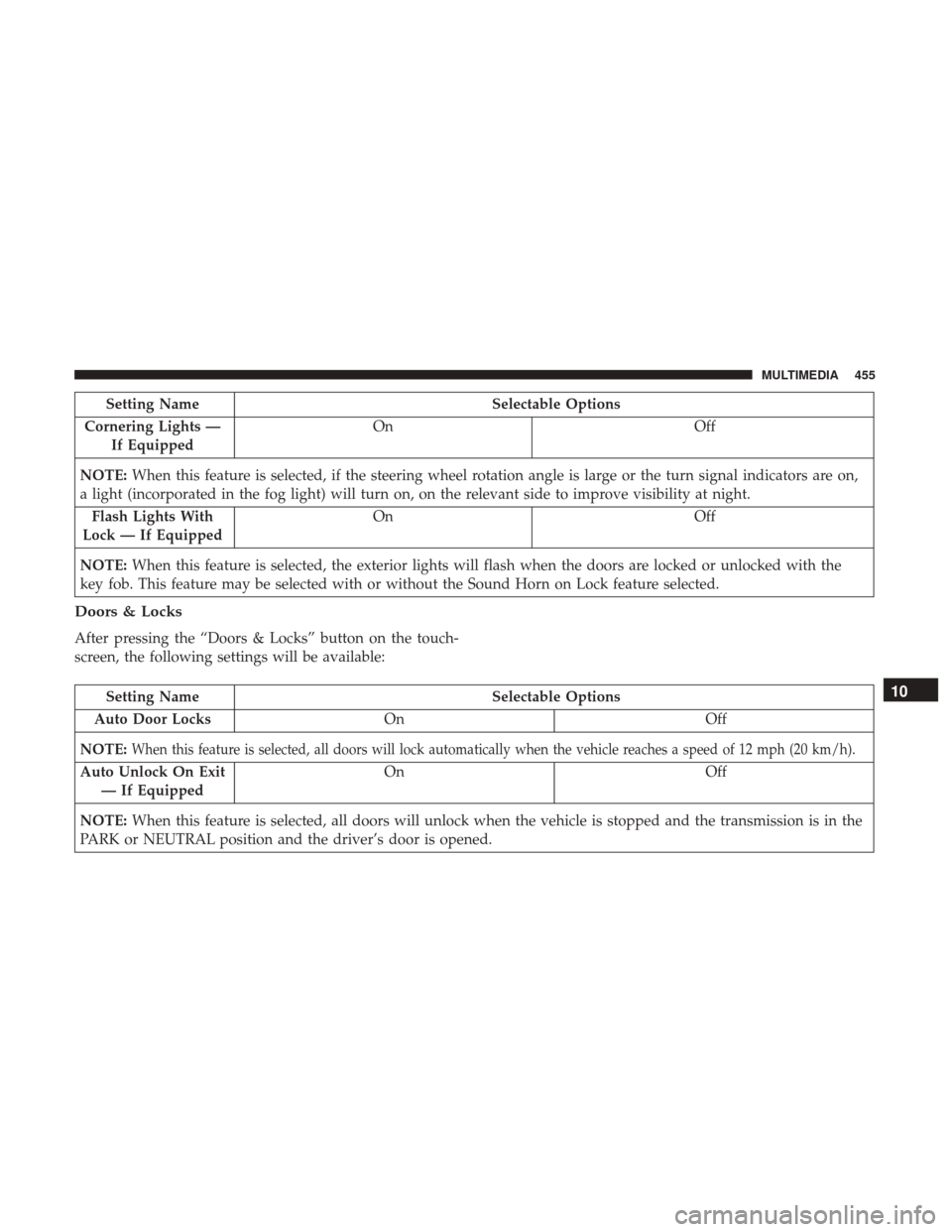
Setting NameSelectable Options
Cornering Lights — If Equipped On
Off
NOTE: When this feature is selected, if the steering wheel rotation angle is large or the turn signal indicators are on,
a light (incorporated in the fog light) will turn on, on the relevant side to improve visibility at night.
Flash Lights With
Lock — If Equipped On
Off
NOTE: When this feature is selected, the exterior lights will flash when the doors are locked or unlocked with the
key fob. This feature may be selected with or without the Sound Horn on Lock feature selected.
Doors & Locks
After pressing the “Doors & Locks” button on the touch-
screen, the following settings will be available:
Setting Name Selectable Options
Auto Door Locks On Off
NOTE:
When this feature is selected, all doors will lock automatically when the vehicle reaches a speed of 12 mph (20 km/h).
Auto Unlock On Exit — If Equipped On Off
NOTE: When this feature is selected, all doors will unlock when the vehicle is stopped and the transmission is in the
PARK or NEUTRAL position and the driver’s door is opened.
10
MULTIMEDIA 455
Page 458 of 516
Setting NameSelectable Options
Flash Lights With
Lock — If Equipped On
Off
NOTE: When this feature is selected, the exterior lights will flash when the doors are locked or unlocked with the
key fob or the Passive Entry Feature.
Horn With Lock — If Equipped Off
1st Press 2nd Press
Horn With Remote
Start — If Equipped On
Off
Passive Entry — If Equipped On
Off
NOTE: Passive Entry This feature allows you to lock and unlock the vehicle’s door(s) without having to press the key
fob lock or unlock buttons.
Remote Door
Unlock/Door Unlock — If Equipped Driver
All
NOTE:
•When “Driver” is selected, only the driver’s door will unlock on the first push of the key fob unlock button, you
must push the key fob unlock button twice to unlock the passenger’s doors. When “All” is selected, all of the
doors will unlock on the first press of the key fob unlock button.
456 MULTIMEDIA
Page 459 of 516

Setting NameSelectable Options
•If “All” is programmed, all doors will unlock no matter which Passive Entry equipped door handle is grasped. If
“Driver” is programmed, only the driver ’s door will unlock when the driver ’s door is grasped. Touching the
handle more than once will only result in the driver ’s door opening once. If the driver door is opened, the interior
door lock/unlock switch can be used to unlock all doors (or use key fob).
Engine Off Options
After pressing the “Engine Off Options” button on the
touchscreen, the following settings will be available:
Setting NameSelectable Options
Headlight Off Delay +–
NOTE: When this feature is selected, the driver can choose to have the headlights remain on for 0, 30, 60, or 90 sec-
onds when exiting the vehicle.
Radio Off Delay 0 MIN20 MIN
Phone/Bluetooth
After pressing the “Phone/Bluetooth” button on the touch-
screen, the following settings will be available:
Setting Name Selectable Options
Paired Phones This feature shows which phones are paired to the Phone/Bluetooth system.
For further information, refer to the Uconnect Owner ’s Manual Supplement
10
MULTIMEDIA 457


