2017 JEEP COMPASS light
[x] Cancel search: lightPage 108 of 429

Key Fob Unlock
When Driver’s Door 1st is selected, only the driver’s door
will unlock on the first push of the key fob unlock button
and require a second push to unlock the remaining locked
doors. When Remote Unlock All Doors is selected, all of the
doors will unlock at the first push of the key fob unlock
button. Push and hold theright
arrow button when in
this display until “Driver’s Door 1st” or “All Doors”
appears to make your selection.
Flash Lamps With Lock
When ON is selected, the front and rear turn signals will
flash when the doors are locked or unlocked using the key
fob. This feature may be selected with or without the sound
horn with lock feature selected. Push and hold the right
arrow button when in this display until “ON” or
“OFF” appears to make your selection.
Sound Horn With Lock
When ON is selected, a short horn sound will occur when
the key fob lock button is pushed. This feature may be
selected with or without the Flash Lights with Lock feature.
Push and hold the right
arrow button when in this
display until “ON” or “OFF” appears to make your
selection. Headlamp Off Delay
When this feature is selected the driver can choose to have
the headlights remain on for 0, 30, 60, or 90 seconds when
exiting the vehicle. Push and hold the
right
arrow
button when in this display until 0, 30, 60, or 90 appears
to make your selection.
Headlamps with Wipers (Available with Auto
Headlights Only)
When on is selected, and the headlight switch is in the
AUTO position, the headlights will turn on approximately
10 seconds after the wipers are turned on. If the headlights
were turned on by this feature, they will also turn off when
the wipers are turned off. To make your selection, push and
release the right
arrow button until “ON” or “OFF”
appears.
NOTE: Turning the headlights on during the daytime
causes the instrument panel lights to dim. To increase the
brightness, refer to “Lights” in “Getting To Know Your
Vehicle.”
Key Off Power Delay
When this feature is selected the power window switches,
radio, Uconnect phone, power sunroof, and power outlets
will remain active for up to 10 minutes after the ignition
106 GETTING TO KNOW YOUR INSTRUMENT PANEL
Page 109 of 429

switch has been turned OFF. Opening either front vehicle
door will cancel this feature. Push and hold theright
arrow button when in this display until “OFF,” “45
sec.”, “5 min.”, or “10 min.” appears to make your
selection.
Illuminated Approach
When this feature is selected, the headlights will activate
and remain on for up to 90 seconds when the doors are
unlocked using the key fob. Push and hold the right
arrow button when in this display until “OFF,” “30
sec,” “60 sec,” or “90 sec.” appears to make your
selection.
Hill Start Assist (HSA) — If Equipped
When “On” is selected, the HSA system is active. Refer to
“Electronic Brake Control System” in “Safety” for system
function and operating information. To make your selec-
tion, push and release the right
arrow button until
“On” or “Off” appears. Display Units In
The instrument cluster display, odometer, and Uconnect
GPS system units can be changed between US and Metric.
Push and hold the
right
arrow button when in this
display until “US” or “METRIC” appears to make your
selection.
Automatic Compass Calibration
This compass is self-calibrating, which eliminates the need
to set the compass manually. When the vehicle is new, the
compass may appear erratic, and the instrument cluster
display will display “CAL” until the compass is calibrated.
You may also calibrate the compass by completing one or
more 360 – degree turns (in an area free from large metal or
metallic objects) until the “CAL” message displayed in the
instrument cluster display turns off. The compass will now
function normally.
NOTE: A good calibration requires a level surface and an
environment free from large metallic objects such as build-
ings, bridges, underground cables, railroad tracks, etc.
4
GETTING TO KNOW YOUR INSTRUMENT PANEL 107
Page 112 of 429

The following displays can be reset or changed:
•Trip A
• Trip B
Trip Odometer (ODO)
This display shows the distance traveled since the last
reset. Push and release the STEPbutton on the instrument
cluster to switch from odometer, to Trip A or Trip B.
Trip A
Shows the total distance traveled for Trip A since the last
reset.
Trip B
Shows the total distance traveled for Trip B since the last
reset.
WARNING/INDICATOR LIGHTS AND MESSAGES
IMPORTANT: The warning/indicator light switches on in
the instrument panel together with a dedicated message
and/or acoustic signal when applicable. These indications
are indicative and precautionary and as such must not be
considered as exhaustive and/or alternative to the infor-
mation contained in the Owner Manual, which you are
advised to read carefully in all cases. Always refer to the
information in this chapter in the event of a failure indica-
tion.
All active telltales will display first, if applicable. The
system check menu may appear different based upon
equipment options and current vehicle status. Some tell-
tales are optional and may not appear.
110 GETTING TO KNOW YOUR INSTRUMENT PANEL
Page 113 of 429

Red Telltale Lights
Seat Belt Reminder Warning Light
Red TelltaleLight What It Means
Seat Belt Reminder Warning Light
When the ignition switch is first turned to ON/RUN, this light will turn on for four to eight sec-
onds as a bulb check. During the bulb check, if the driver’s seat belt is unbuckled, a chime will
sound. After the bulb check or when driving, if the driver ’s seat belt remains unbuckled, the Seat
Belt Reminder Light will flash or remain on continuously and a chime will sound. Refer to “Oc-
cupant Restraint Systems” in “Safety” for further information.
Air Bag Warning Light
Red Telltale
Light What It Means
Air Bag Warning Light
This light will turn on for four to eight seconds as a bulb check when the ignition switch is first
turned to ON/RUN. If the light is either not on during startup, stays on, or turns on while driv-
ing, have the system inspected at an authorized dealer as soon as possible. This light will illumi-
nate with a single chime when a fault with the Air Bag Warning Light has been detected, it will
stay on until the fault is cleared. If the light comes on intermittently or remains on while driving,
have an authorized dealer service the vehicle immediately. Refer to “Occupant Restraint Systems”
in “Safety” for further information.
4
GETTING TO KNOW YOUR INSTRUMENT PANEL 111
Page 114 of 429
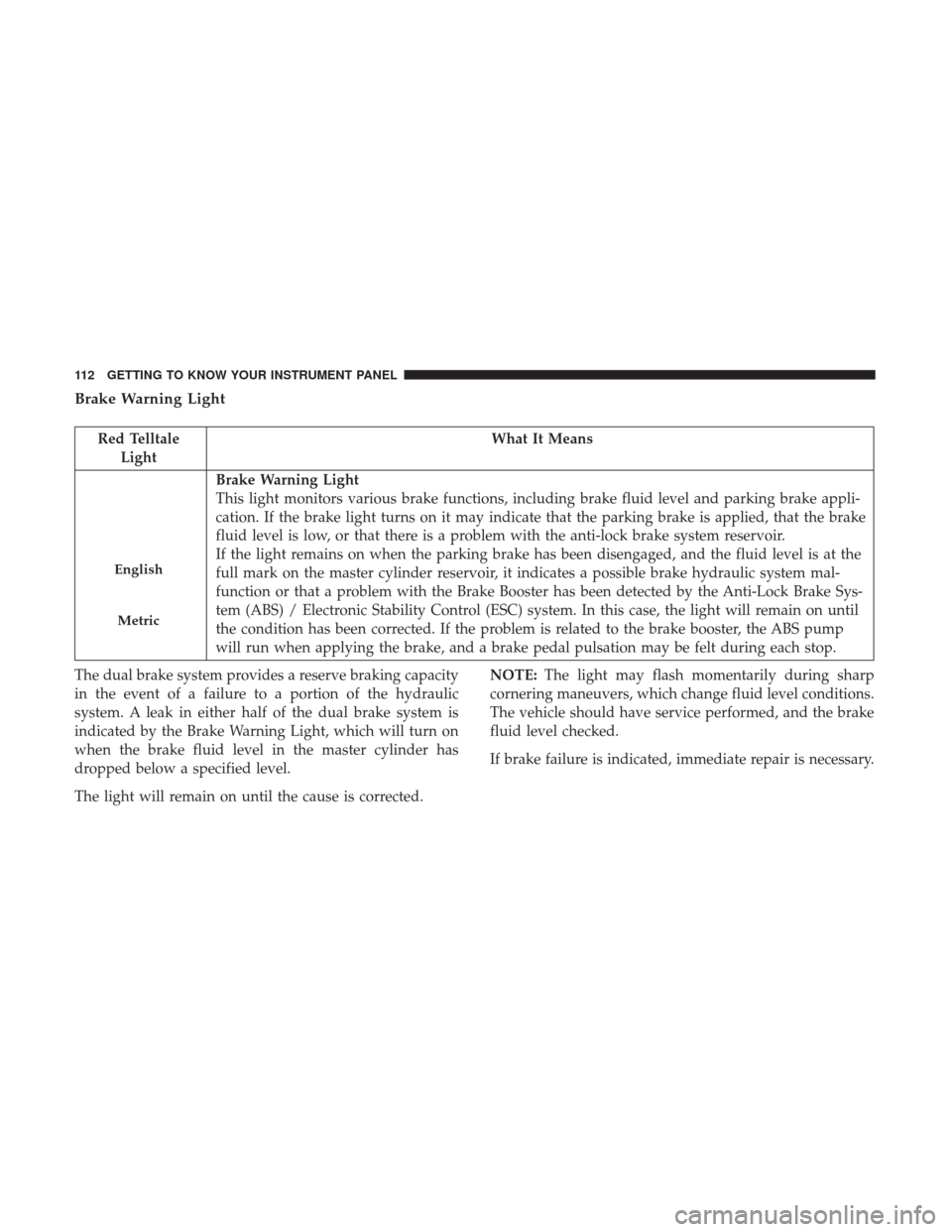
Brake Warning Light
Red TelltaleLight What It Means
English
Metric
Brake Warning Light
This light monitors various brake functions, including brake fluid level and parking brake appli-
cation. If the brake light turns on it may indicate that the parking brake is applied, that the brake
fluid level is low, or that there is a problem with the anti-lock brake system reservoir.
If the light remains on when the parking brake has been disengaged, and the fluid level is at the
full mark on the master cylinder reservoir, it indicates a possible brake hydraulic system mal-
function or that a problem with the Brake Booster has been detected by the Anti-Lock Brake Sys-
tem (ABS) / Electronic Stability Control (ESC) system. In this case, the light will remain on until
the condition has been corrected. If the problem is related to the brake booster, the ABS pump
will run when applying the brake, and a brake pedal pulsation may be felt during each stop.
The dual brake system provides a reserve braking capacity
in the event of a failure to a portion of the hydraulic
system. A leak in either half of the dual brake system is
indicated by the Brake Warning Light, which will turn on
when the brake fluid level in the master cylinder has
dropped below a specified level.
The light will remain on until the cause is corrected. NOTE:
The light may flash momentarily during sharp
cornering maneuvers, which change fluid level conditions.
The vehicle should have service performed, and the brake
fluid level checked.
If brake failure is indicated, immediate repair is necessary.
112 GETTING TO KNOW YOUR INSTRUMENT PANEL
Page 115 of 429

WARNING!
Driving a vehicle with the red brake light on is
dangerous. Part of the brake system may have failed. It
will take longer to stop the vehicle. You could have a
collision. Have the vehicle checked immediately.
Vehicles equipped with the Anti-Lock Brake System (ABS)
are also equipped with Electronic Brake Force Distribution
(EBD). In the event of an EBD failure, the Brake Warning
Light will turn on along with the ABS Light. Immediate
repair to the ABS system is required. Operation of the Brake Warning Light can be checked by
turning the ignition switch from the OFF position to the
ON/RUN position. The light should illuminate for ap-
proximately two seconds. The light should then turn off
unless the parking brake is applied or a brake fault is
detected. If the light does not illuminate, have the light
inspected by an authorized dealer.
The light also will turn on when the parking brake is
applied with the ignition switch in the ON/RUN position.
NOTE:
This light shows only that the parking brake is
applied. It does not show the degree of brake application.
Vehicle Security Warning Light
Red Telltale Light What It Means
Vehicle Security Warning Light
This light will flash at a fast rate for approximately 15 seconds when the vehicle security alarm is
arming, and then will flash slowly until the vehicle is disarmed.
4
GETTING TO KNOW YOUR INSTRUMENT PANEL 113
Page 116 of 429

Oil Pressure Warning Light
Red TelltaleLight What It Means
Oil Pressure Warning Light
This light indicates low engine oil pressure. If the light turns on while driving, stop the vehicle
and shut off the engine as soon as possible. A chime will sound when this light turns on.
Do not operate the vehicle until the cause is corrected. This light does not indicate how much oil
is in the engine. The engine oil level must be checked under the hood.
Battery Charge Warning Light
Red Telltale
Light What It Means
Battery Charge Warning Light
This light illuminates when the battery is not charging properly. If it stays on while the engine is
running, there may be a malfunction with the charging system. Contact your authorized dealer as
soon as possible. This indicates a possible problem with the electrical system or a related compo-
nent.
If jump starting is required, refer to “Jump-Starting” in “In Case Of Emergency.”
114 GETTING TO KNOW YOUR INSTRUMENT PANEL
Page 117 of 429

Electronic Throttle Control (ETC) Warning Light
Red TelltaleLight What It Means
Electronic Throttle Control (ETC) Warning Light
This light informs you of a problem with the Electronic Throttle Control (ETC) system. If a prob-
lem is detected while the engine is running, the light will either stay on or flash depending on
the nature of the problem. Cycle the ignition key when the vehicle is safely and completely
stopped and the transmission is placed in the PARK position. The light should turn off. If the
light remains on with the vehicle under power, your vehicle will usually be drivable; however,
see an authorized dealer for service as soon as possible.
If the light continues to flash when the engine vehicle under power, immediate service is re-
quired and you may experience reduced performance, and your vehicle may require towing. The
light will come on when the ignition is placed in the ON/RUN position and remain on briefly as
a bulb check. If the light does not come on during starting, have the system checked by an au-
thorized dealer.
4
GETTING TO KNOW YOUR INSTRUMENT PANEL 115