Page 344 of 563
5-36
Driving your vehicle
If the EPB Malfunction Indicator is still on, have the system
checked by an authorized
HYUNDAI dealer.
If the Parking Brake Warning Light does not illuminate or
blinks even though the EPB
switch was pulled up, the EPB
may not be applied.
If the Parking Brake Warning Light blinks when the EPB
Malfunction Indicator is on,
press the EPB switch, then pull
it up. Once more, press the
switch back to its original posi-
tion and pull it back up. If the
EPB Malfunction Indicator does
not go off, have your vehicle
checked by an authorized
HYUNDAI dealer.
Emergency braking
If there is a problem with the brake
pedal while driving, emergency brak-
ing is possible by pulling up and
holding the EPB switch. Braking is
possible only while you are holding
the EPB switch. However, braking
distance will be longer than normal. During emergency braking the
Parking Brake Warning Light will
illuminate to indicate that the sys-
tem is operating.
If there is a noise or burning smell
after using the emergency brake,
have your vehicle checked by an
authorized HYUNDAI dealer as
soon as possible.
NOTICE
NOTICENOTICE
Do not operate the parking
brake while the vehicle is mov-
ing except in an emergency sit-
uation. It could damage the
brake system and lead to a
severe accident.
WARNING
Page 354 of 563

5-46
Driving your vehicle
To prevent damage to the trans-
mission:
Do not allow wheel(s) of one axle to spin excessively while
the ESC, ABS, and brake warn-
ing lights are displayed. The
repairs would not be covered by
the vehicle warranty. Reduce
engine power and do not spin
the wheel(s) excessively while
these lights are displayed.
When operating the vehicle on a dynamometer, ensure the ESC is
turned off (ESC OFF light illumi-
nated).
Information
Turning the ESC off does not affect
ABS or standard brake system opera-
tion.
Hill-Start Assist Control (HAC)
The Hill-Start Assist Control (HAC)
prevents the vehicle from rolling
backwards when starting a vehicle
from a stop on a hill. The system
operates the brakes automatically for
approximately 2 seconds and releas-
es the brake when the accelerator
pedal is depressed or after 2 sec-
onds. The HAC does not operate when
the shift lever is in P (Park) or N
(Neutral)
The HAC activates even though the ESC (Electronic Stability
Control) is off but does not acti-
vate when the ESC has malfunc-
tioned.
NOTICE
i
NOTICE
Always be ready to depress the
accelerator pedal when starting
off on a incline. The HAC acti-
vates only for approximately 2
seconds.
WARNING
Page 375 of 563
5-67
Driving your vehicle
5
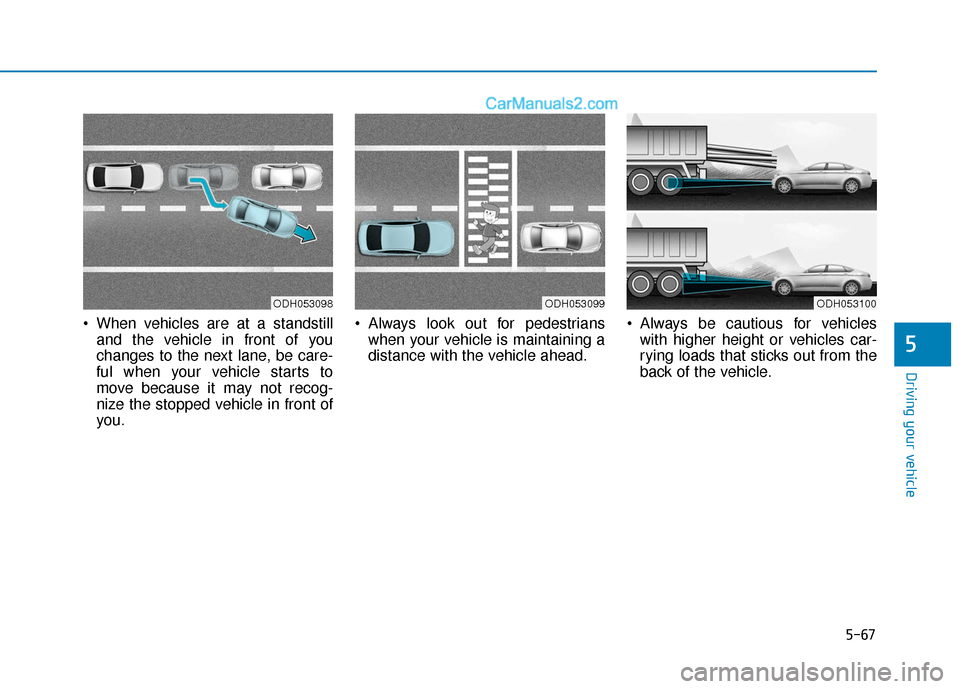
When vehicles are at a standstilland the vehicle in front of you
changes to the next lane, be care-
ful when your vehicle starts to
move because it may not recog-
nize the stopped vehicle in front of
you. Always look out for pedestrians
when your vehicle is maintaining a
distance with the vehicle ahead. Always be cautious for vehicles
with higher height or vehicles car-
rying loads that sticks out from the
back of the vehicle.
ODH053098ODH053099ODH053100
Page 381 of 563

5-73
Driving your vehicle
5
The Blind Spot Detection System
(BSD) uses a radar sensor to alert
the driver.
It senses the rear side territory of the
vehicle and provides an indication to
the driver if it detects an object
approaching from these areas.(1) BSD (Blind Spot Detection)
The warning range depends on
your vehicle speed. However, if
your vehicle is much faster than
the other vehicle, the system will
not warn you.
(2) LCA (Lane Change Assist) If the system detects a vehicle
approaching you at high speed,
the system will warn you.
(3) RCTA (Rear Cross Traffic Alert) If the radar detects an approach-
ing vehicle from the left and right
side as your vehicle moves rear-
ward, the system will warn you.
B BL
LI
IN
N D
D
S
S P
P O
O T
T
D
D E
ET
T E
EC
CT
T I
IO
O N
N
S
S Y
Y S
ST
T E
EM
M
(
( B
B S
SD
D )
)
(
( I
IF
F
E
E Q
Q U
UI
IP
P P
PE
ED
D )
)
OLF054067L
Blind spot area
Closing at high speed
Always check the road condi-
tion while driving for unex-
pected situations even
though the Blind Spot
Detection System (BSD) is
operating.
The Blind Spot Detection
System (BSD) is a supplemen-
tal system to assist you. Do
not solely rely on the system
and always pay attention and
drive safely.
The Blind Spot Detection
System (BSD) is not a substi-
tute for proper and safe driv-
ing. Always drive safely and
use caution when changing
lanes or backing the vehicle
up. The Blind Spot Detection
System (BSD) may not detect
every object alongside the
vehicle.
WARNING
Page 386 of 563
5-78
Driving your vehicle
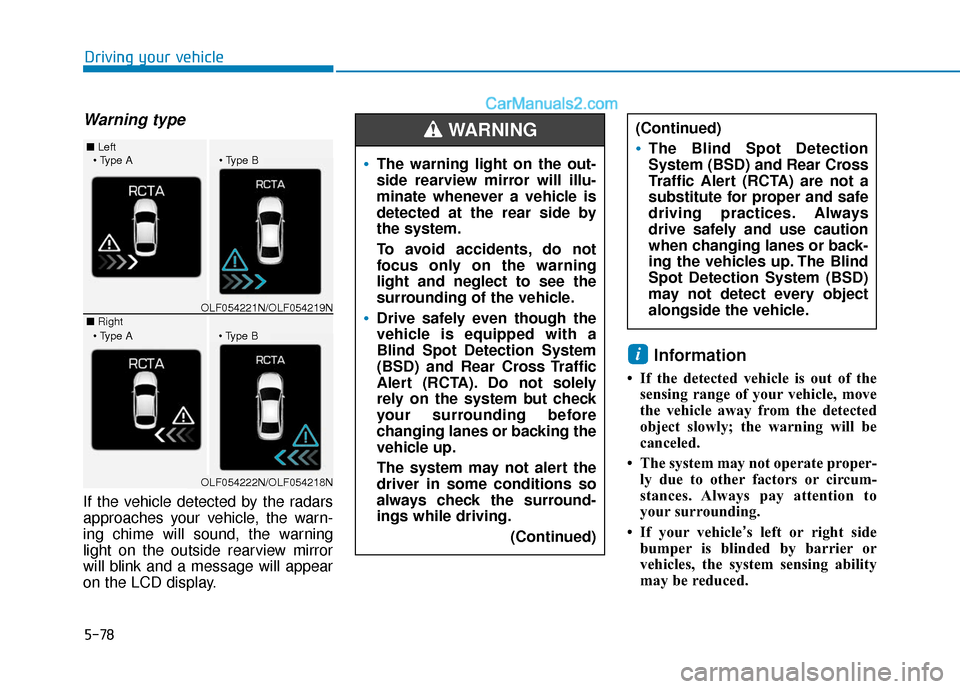
Warning type
If the vehicle detected by the radars
approaches your vehicle, the warn-
ing chime will sound, the warning
light on the outside rearview mirror
will blink and a message will appear
on the LCD display.
Information
• If the detected vehicle is out of thesensing range of your vehicle, move
the vehicle away from the detected
object slowly; the warning will be
canceled.
• The system may not operate proper- ly due to other factors or circum-
stances. Always pay attention to
your surrounding.
• If your vehicle’s left or right side bumper is blinded by barrier or
vehicles, the system sensing ability
may be reduced.
i
The warning light on the out-
side rearview mirror will illu-
minate whenever a vehicle is
detected at the rear side by
the system.
To avoid accidents, do not
focus only on the warning
light and neglect to see the
surrounding of the vehicle.
Drive safely even though the
vehicle is equipped with a
Blind Spot Detection System
(BSD) and Rear Cross Traffic
Alert (RCTA). Do not solely
rely on the system but check
your surrounding before
changing lanes or backing the
vehicle up.
The system may not alert the
driver in some conditions so
always check the surround-
ings while driving.
(Continued)
(Continued)
The Blind Spot Detection
System (BSD) and Rear Cross
Traffic Alert (RCTA) are not a
substitute for proper and safe
driving practices. Always
drive safely and use caution
when changing lanes or back-
ing the vehicles up. The Blind
Spot Detection System (BSD)
may not detect every object
alongside the vehicle.
WARNING ■ Left
■ RightOLF054221N/OLF054219N
OLF054222N/OLF054218N
Page 388 of 563
5-80
Driving your vehicle
(Continued)
- Metal substances are near the vehicles such as in a construc-
tion area.
- A big vehicle is near such as a bus or truck.
- A motorcycle or bicycle is near.
- A flat trailer is near.
- If the vehicle has started at the same time as the vehicle next to
you and has accelerated.
- When the other vehicle passes by at a higher rate of speed.
- When changing lanes.
- When going down or up a steep road where the height of the lane
is different.
- When the other vehicle drives very close.
- When a trailer or carrier is installed.
- When the temperature near the rear bumper area is high or low.
- When the radars are covered by a wall or a pillar of a parking lot.
(Continued)(Continued)
- When your vehicle is backing up,
if the detected vehicle also backs
up.
- Small objects like shopping carts and strollers.
- If there is a vehicle with decreased ride height (lowered).
- When the vehicle is close to another vehicle.
- When the vehicle in the next lane moves two lanes away from you
OR when the vehicle two lanes
away moves to the next lane
from you.
- When driving through a narrow road with many trees or bushes.
- When driving on wet surface.
Information
This device complies with Part 15 of
the FCC rules.
Operation is subject to the following
two conditions:
1. This device may not cause harmful interference, and
2. This device must accept any inter- ference received, including interfer-
ence that may cause undesired
operation.
i
Page 397 of 563

5-89
Driving your vehicle
5
Limitations of the system
The Automatic Emergency Braking
(AEB) system is designed to monitor
the vehicle ahead or a pedestrian in
the roadway through radar signals
and camera recognition to warn the
driver that a collision is imminent,
and if necessary, apply emergency
braking.
In certain situations, the radar sen-
sor or the camera may not be able to
detect the vehicle or pedestrian
ahead. In these cases, the AEB sys-
tem may not operate normally. The
driver must pay careful attention in
the following situations where the
AEB operation may be limited.
Detecting vehicles
The sensor may be limited when:
- The radar sensor or camera isblocked with a foreign object or
debris
- Inclement weather such as heavy rain or snow obscures the field of
view of the radar sensor or camera
- There is interference by electro- magnetic waves
- There is severe irregular reflection from the radar sensor
- The vehicle in front is too small to be detected by the camera recog-
nition system (for example a motor-
cycle or a bicycle, etc.)
- The vehicle in front is an oversize vehicle or trailer that is too big to
be detected by the camera recog-
nition system (for example a tractor
trailer, etc.)
- The driver's field of view is not well illuminated (either too dark or too
much reflection or too much back-
light that obscures the field of view) - The vehicle in front does not have
their rear lights properly turned ON
- The outside brightness changes suddenly, for example when enter-
ing or exiting a tunnel
- The vehicle in front is driving errat- ically
Page 400 of 563

5-92
Driving your vehicle
Detecting pedestrians
The sensor may be limited when:
- The pedestrian is not fully detectedby the camera recognition system,
for example, if the pedestrian is
leaning over or is not fully walking
upright
- The pedestrian is moving very quickly or appears abruptly in the
camera detection area
The pedestrian is wearing clothing
that easily blends into the back-
ground, making it difficult to be
detected by the camera recogni-
tion system
- The outside lighting is too bright (e.g. when driving in bright sunlight
or in sun glare) or too dark (e.g.
when driving on a dark rural road
at night)
- It is difficult to detect and distin- guish the pedestrian from other
objects in the surroundings, for
example, when there is a group of
pedestrians or a large crowdInformation
In some instances, the AEB system
may be cancelled when subjected to
electromagnetic interference.
Information
This device complies with Part 15 of
the FCC rules.
Operation is subject to the following
two conditions:
1. This device may not cause harmful interference, and
2. This device must accept any inter- ference received, including interfer-
ence that may cause undesired
operation.
i
i
Do not use the Automatic
Emergency Braking system
when towing a vehicle.
Application of the AEB system
while towing may adversely
affect the safety of your vehi-
cle or the towing vehicle
Use extreme caution when the
vehicle in front of you has
cargo that extends rearward
from the cab, or when the
vehicle in front of you has
higher ground clearance.
The AEB system is designed
to detect and monitor the vehi-
cle ahead or detect a pedestri-
an in the roadway through
radar signals and camera
recognition. It is not designed
to detect bicycles, motorcy-
cles, or smaller wheeled
objects such as luggage bags,
shopping carts, or strollers.
Never try to test the operation
of the AEB system. Doing so
may cause severe injury or
death.
WARNING