Page 74 of 563
2-57
Safety system of your vehicle
2
Always be sure that you and all vehi-
cle occupants are seated properly
and wearing the seat belt properly for
the most effective protection by the
air bag and the seat belt.
The OCS may not function properly if
the passenger takes actions which
can affect the classification system.
These include:
Failing to sit in an upright position.
Leaning against the door or centerconsole.
Sitting towards the sides of the front of the seat.
Putting their legs on the dashboard or resting them on other locations
which reduce the passenger
weight on the front seat.
Wearing the seat belt improperly.
Reclining the seatback.
Wearing a thick cloth like ski wear or hip protection wear.
Putting an additional thick cushion on the seat.
Putting electrical devices (e.g. notebook, satellite radio) on the
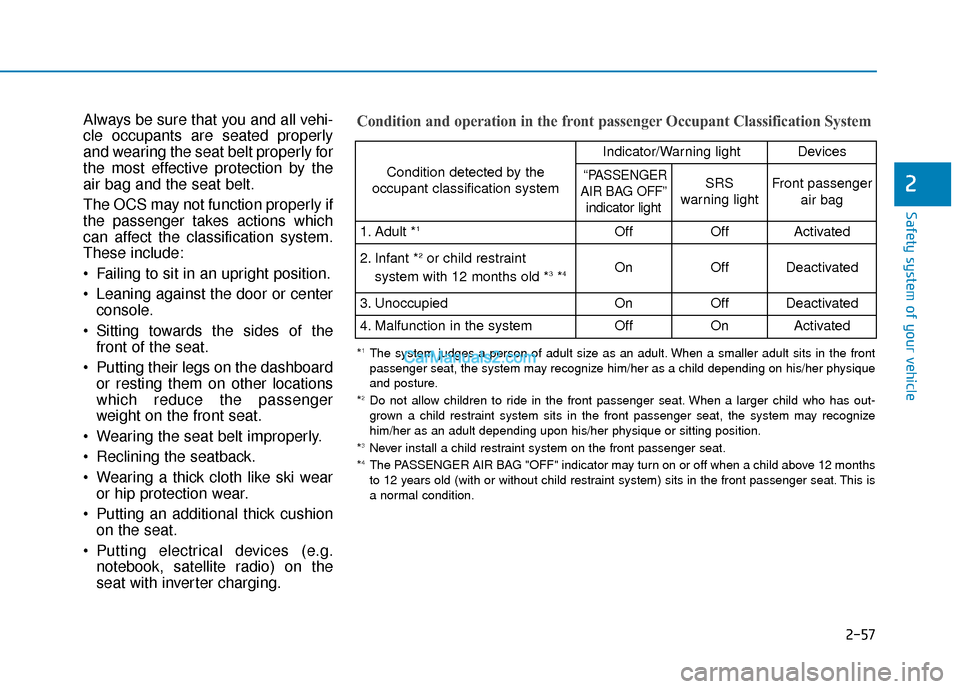
seat with inverter charging.Condition and operation in the front passenger Occupant Classification System
Condition detected by the
occupant classification system
Indicator/Warning lightDevices
“PASSENGER
AIR BAG OFF” indicator lightSRS
warning lightFront passenger
air bag
1. Adult *1OffOffActivated
2. Infant *2or child restraint
system with 12 months old *3*4 OnOffDeactivated
3. Unoccupied OnOffDeactivated
4. Malfunction in the systemOffOnActivated
*1The system judges a person of adult size as an adult. When a smaller adult sits in the front
passenger seat, the system may recognize him/her as a child depending on his/her physique
and posture.
*
2Do not allow children to ride in the front passenger seat. When a larger child who has out- grown a child restraint system sits in the front passenger seat, the system may recognize
him/her as an adult depending upon his/her physique or sitting position.
*
3Never install a child restraint system on the front passenger seat.
*4The PASSENGER AIR BAG "OFF" indicator may turn on or off when a child above 12 months
to 12 years old (with or without child restraint system) sits in the front passenger seat. This is
a normal condition.
Page 75 of 563
2-58
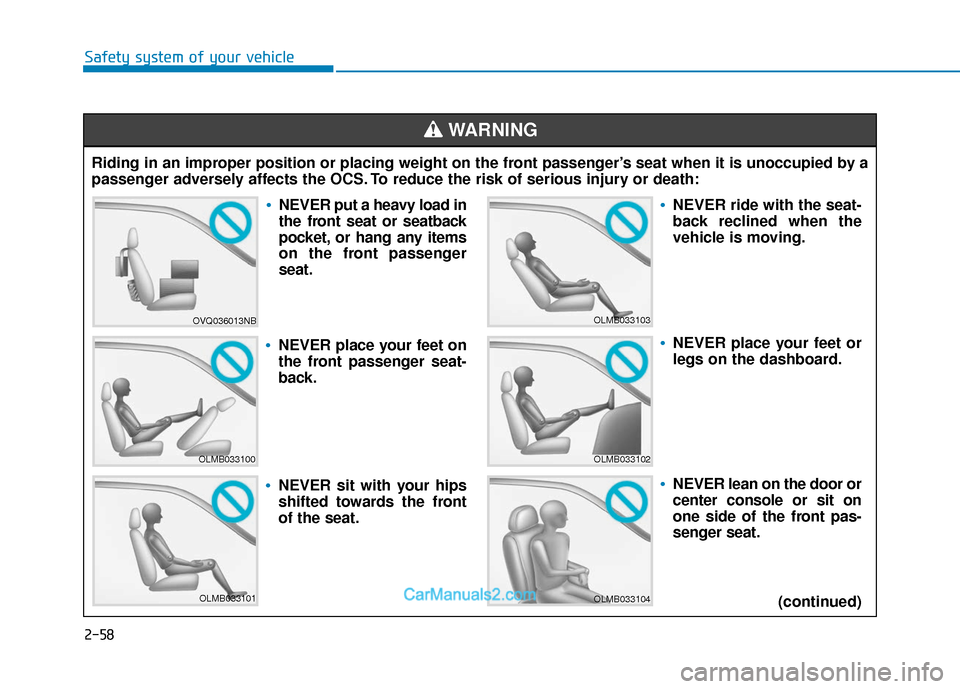
Safety system of your vehicleRiding in an improper position or placing weight on the front passenger’s seat when it is unoccupied by a
passenger adversely affects the OCS. To reduce the risk of serious injury or death:
WARNING
OVQ036013NB
OLMB033100
OLMB033101
OLMB033103
OLMB033102
OLMB033104
NEVER put a heavy load in
the front seat or seatback
pocket, or hang any items
on the front passenger
seat.
NEVER place your feet on
the front passenger seat-
back.
NEVER sit with your hips
shifted towards the front
of the seat.
NEVER ride with the seat-
back reclined when the
vehicle is moving.
NEVER place your feet or
legs on the dashboard.
NEVER lean on the door or
center console or sit on
one side of the front pas-
senger seat. (continued)
Page 76 of 563

2-59
Safety system of your vehicle
2
Proper seated position for OCS
If the “PASSENGER AIR BAG OFF”
indicator is on when an adult is seat-
ed in the front passenger seat, place
the ignition switch in the LOCK/OFF
position and ask the passenger to sit
properly (sitting upright with the seat
back in an upright position, centered
on the seat cushion with their seat
belt on, legs comfortably extended
and their feet on the floor). Restart
the engine and have the person
remain in that position. This will allow
the system to detect the person and
to enable the passenger air bag. If
the "PASSENGER AIR BAG OFF"
indicator is still on, ask the passen-
ger to move to the rear seat.
B990A01O
Never allow an adult passenger
to ride in the front passenger
seat when the "PASSENGER AIR
BAG OFF" indicator is illuminat-
ed. During a collision, the air bag
will not inflate if the indicator is
illuminated. Have your passen-
ger reposition himself in the
seat. If the "PASSENGER AIR
BAG OFF" indicator remains illu-
minated after the passenger
repositions himself properly and
the vehicle is restarted, have the
passenger move to the rear seat
because the air bag will not
inflate.
WARNING (continued)
Do not put an electronic
device (ex. Laptop computer,
after market DMB, navigation,
satellite audio, video game
machine, MP3, AC inverter,
etc.) in the front passenger
seatback pocket or on the
front passenger seat.
Do not place a sitting mat on
the front passenger seat.
Do not place any items under
the front passenger seat.
Do not place sharp objects on
the front passenger seat.
These may damage the occu-
pant detection system, if they
puncture the seat cushion.
Avoid spilling liquids on the
front seat; this may cause the
OCS not to work properly.
Keep the front seat dry at all
times.
Page 81 of 563
2-64
Safety system of your vehicle
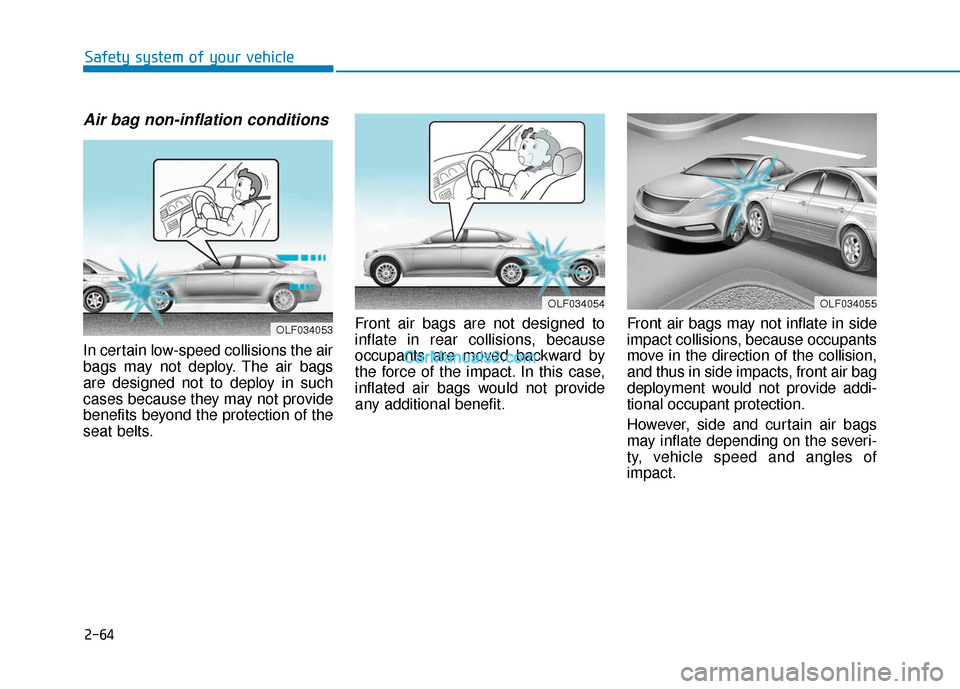
Air bag non-inflation conditions
In certain low-speed collisions the air
bags may not deploy. The air bags
are designed not to deploy in such
cases because they may not provide
benefits beyond the protection of the
seat belts.Front air bags are not designed to
inflate in rear collisions, because
occupants are moved backward by
the force of the impact. In this case,
inflated air bags would not provide
any additional benefit.
Front air bags may not inflate in side
impact collisions, because occupants
move in the direction of the collision,
and thus in side impacts, front air bag
deployment would not provide addi-
tional occupant protection.
However, side and curtain air bags
may inflate depending on the severi-
ty, vehicle speed and angles of
impact.
OLF034055OLF034054
OLF034053
Page 113 of 563
3-28
Convenient features of your vehicle
Compass function
The Compass can be turned ON and
OFF and will remember the last state
when the ignition is cycled. To turn
the display feature ON/OFF:
1. Press and release the buttonwithin 1 second to turn the display
feature OFF.
2. Press and release the button again within 1 second to turn the
display back ON.
Additional options can be set with
press and hold sequences of the
button and are detailed below.
There is a difference between mag-
netic north and true north. To com-
pensate for this difference you will
need to adjust the Zone setting based
on where you live.
B520C05NF
Page 120 of 563
3-35
Convenient features of your vehicle
3
Compass function
The Compass can be turned ON and
OFF and will remember the last state
when the ignition is cycled. To turn
the display feature ON/OFF:
1. Press and release the button toturn the display feature OFF.
2. Press and release the button again to turn the display back ON.
Additional options can be set with
press and hold sequences of the but-
ton and are detailed below.
There is a difference between mag-
netic north and true north. To com-
pensate for this difference you will
need to adjust the Zone setting
based on where you live.
B520C05NF
Page 133 of 563

3-48
If your vehicle is equipped with a
sunroof, you can slide or tilt your
sunroof with the sunroof control
switch located on the overhead con-
sole.
The sunroof can only be opened,
closed, or tilted when the ignition
switch is in the ON position.
The sunroof can be operated for
approximately 30 seconds after the
ignition key is removed or turned to
the ACC or LOCK (or OFF) position.
However, if the front door is opened,
the sunroof cannot be operated
even within 30 seconds.
Sunroof opening and closing
To open:
Press the sunroof control lever back-
ward to the first detent position.
Release the switch when you want
the sunroof to stop.
To close:
Press the sunroof control lever back-
ward to the first detent position.
Release the switch when you want
the sunroof to stop.
S SU
U N
NR
RO
O O
OF
F
(
( I
IF
F
E
E Q
Q U
UI
IP
P P
PE
ED
D )
)
Convenient features of your vehicle
OLFC044034CN
OLFC044036CN
A panorama sunroof is made of
glass, therefore it may break in
an accident. If you do not have
your seat belt on, you may go
through the broken glass and
get injured or killed. For all pas-
sengers safety, have an appro-
priate protection on (ex. Seat
belt, CRS, etc.).
WARNING
Page 134 of 563
3-49
Convenient features of your vehicle
Sliding the sunroof
Pressing the sunroof control lever
backward or forward momentarily to
the second detent position completely
opens or closes the sunroof even
when the switch is released. To stop
the sunroof at the desired position
while the sunroof is in operation, press
the sunroof control lever backward or
forward and release the switch.
Information
To minimize wind noise while driving,
it is recommended that you drive with
the sunroof slightly closed (stop the
sunroof about 2 inch (5 cm) before the
maximum slide open position).
To prevent damage to the sunroof
and the motor, do not continue to
press the sunroof control lever
after the sunroof is in the fully
open, closed or tilt position(s).
Automatic reversal
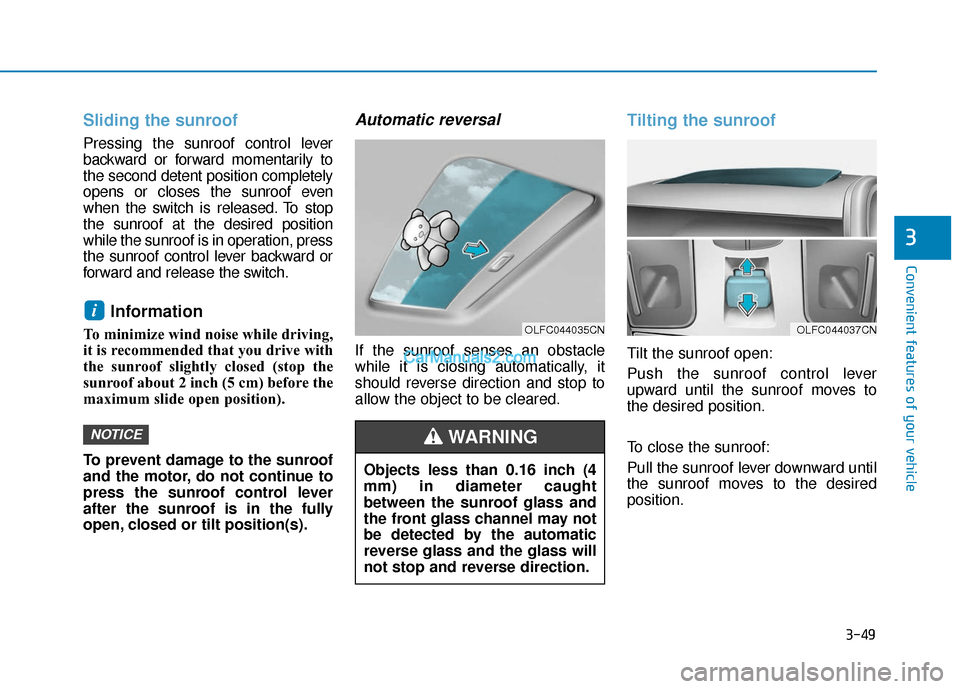
If the sunroof senses an obstacle
while it is closing automatically, it
should reverse direction and stop to
allow the object to be cleared.
Tilting the sunroof
Tilt the sunroof open:
Push the sunroof control lever
upward until the sunroof moves to
the desired position.
To close the sunroof:
Pull the sunroof lever downward until
the sunroof moves to the desired
position.
NOTICE
i
3
OLFC044037CNOLFC044035CN
Objects less than 0.16 inch (4
mm) in diameter caught
between the sunroof glass and
the front glass channel may not
be detected by the automatic
reverse glass and the glass will
not stop and reverse direction.
WARNING