2017 Hyundai Santa Fe Sport ad blue
[x] Cancel search: ad bluePage 20 of 614
Your vehicle at a glance
62
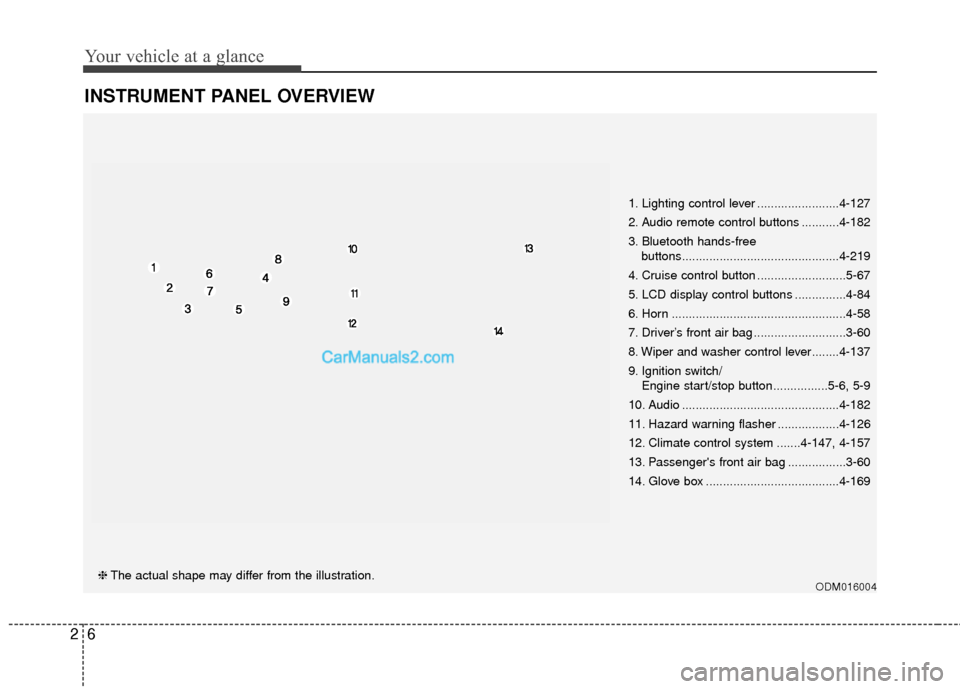
INSTRUMENT PANEL OVERVIEW
ODM016004❈The actual shape may differ from the illustration. 1. Lighting control lever ........................4-127
2. Audio remote control buttons ...........4-182
3. Bluetooth hands-free
buttons..............................................4-219
4. Cruise control button ..........................5-67
5. LCD display control buttons ...............4-84
6. Horn ...................................................4-58
7. Driver’s front air bag ...........................3-60
8. Wiper and washer control lever........4-137
9. Ignition switch/ Engine start/stop button ................5-6, 5-9
10. Audio ..............................................4-182
11. Hazard warning flasher ..................4-126
12. Climate control system .......4-147, 4-157
13. Passenger's front air bag .................3-60
14. Glove box .......................................4-169
Page 35 of 614
313
Safety features of your vehicle
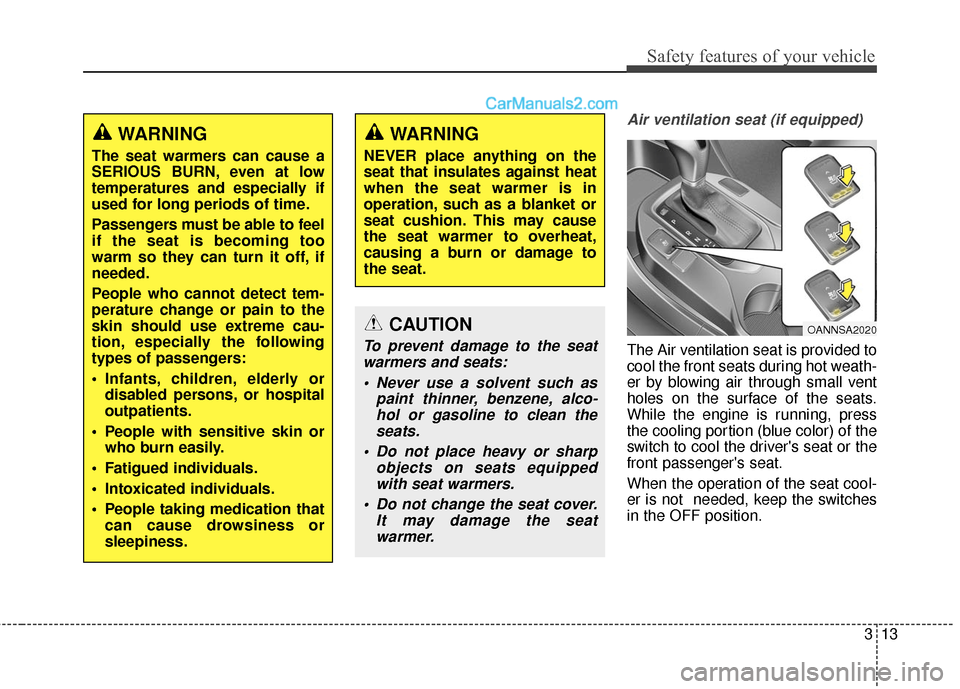
Air ventilation seat (if equipped)
The Air ventilation seat is provided to
cool the front seats during hot weath-
er by blowing air through small vent
holes on the surface of the seats.
While the engine is running, press
the cooling portion (blue color) of the
switch to cool the driver's seat or the
front passenger's seat.
When the operation of the seat cool-
er is not needed, keep the switches
in the OFF position.
OANNSA2020
WARNING
The seat warmers can cause a
SERIOUS BURN, even at low
temperatures and especially if
used for long periods of time.
Passengers must be able to feel
if the seat is becoming too
warm so they can turn it off, if
needed.
People who cannot detect tem-
perature change or pain to the
skin should use extreme cau-
tion, especially the following
types of passengers:
Infants, children, elderly ordisabled persons, or hospital
outpatients.
People with sensitive skin or who burn easily.
Fatigued individuals.
Intoxicated individuals.
People taking medication that can cause drowsiness or
sleepiness.
WARNING
NEVER place anything on the
seat that insulates against heat
when the seat warmer is in
operation, such as a blanket or
seat cushion. This may cause
the seat warmer to overheat,
causing a burn or damage to
the seat.
CAUTION
To prevent damage to the seatwarmers and seats:
Never use a solvent such as paint thinner, benzene, alco-hol or gasoline to clean theseats.
Do not place heavy or sharp objects on seats equippedwith seat warmers.
Do not change the seat cover. It may damage the seatwarmer.
Page 157 of 614
Features of your vehicle
60
4
MIRRORS
Inside rearview mirror
Adjust the rearview mirror so that the
center view through the rear window
is seen. Make this adjustment before
you start driving.
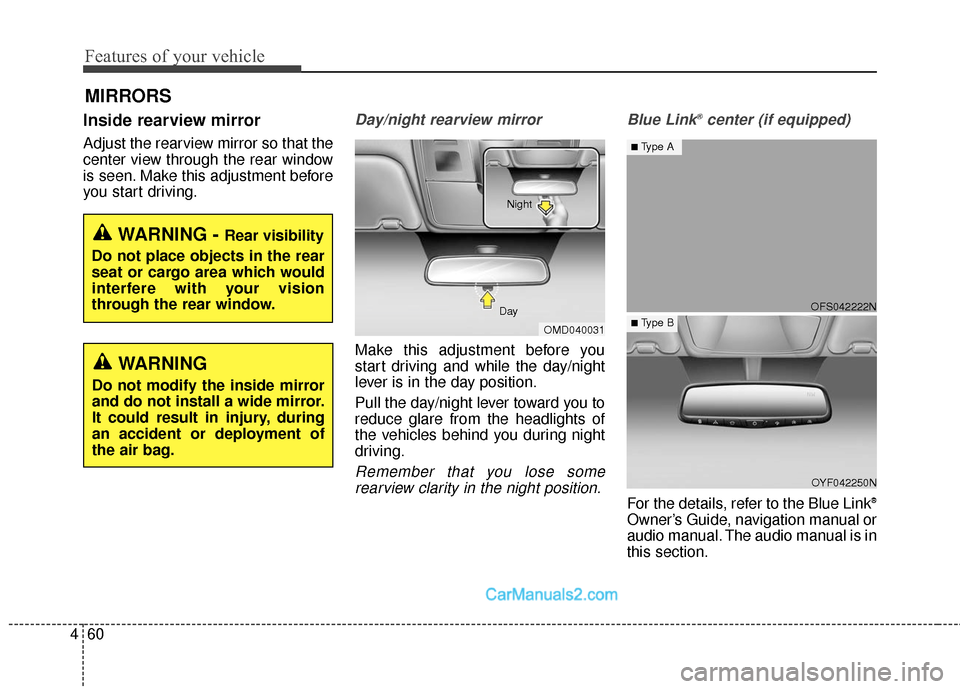
Day/night rearview mirror
Make this adjustment before you
start driving and while the day/night
lever is in the day position.
Pull the day/night lever toward you to
reduce glare from the headlights of
the vehicles behind you during night
driving.
Remember that you lose some
rearview clarity in the night position. Blue Link
®center (if equipped)
For the details, refer to the Blue Link®
Owner’s Guide, navigation manual or
audio manual. The audio manual is in
this section.
WARNING - Rear visibility
Do not place objects in the rear
seat or cargo area which would
interfere with your vision
through the rear window.
OMD040031
Day Night
WARNING
Do not modify the inside mirror
and do not install a wide mirror.
It could result in injury, during
an accident or deployment of
the air bag.
OFS042222N
OYF042250N
■Type A
■ Type B
Page 165 of 614
Features of your vehicle
68
4
This device complies with Part 15
of the FCC Rules.
Operation is subject to the following
two conditions:
1. This device may not cause harm-
ful interference, and
2. This device must accept any inter- ference received, including inter-
ference that may cause undesired
operation.
NVS
®is a registered trademark and
Z-Nav™ is a trademark of the Gentex
Corporation, Zeeland, Michigan.
HomeLink
®is a registered trademark
owned by Johnson Controls,
Incorporated, Milwaukee, Wisconsin.
Electric chromic mirror (ECM)
with HomeLink®system, compass
and Blue Link®(if equipped)
Your vehicle may be equipped with a
Gentex Automatic-Dimming Mirror
with a Z-Nav™ Electronic Compass
Display and an Integrated
HomeLink
®Wireless Control System.
During nighttime driving, this feature
will automatically detect and reduce
rearview mirror glare while the com-
pass indicates the direction the vehi-
cle is pointed. The HomeLink
®
Universal Transceiver allows you to
activate your garage door(s), electric
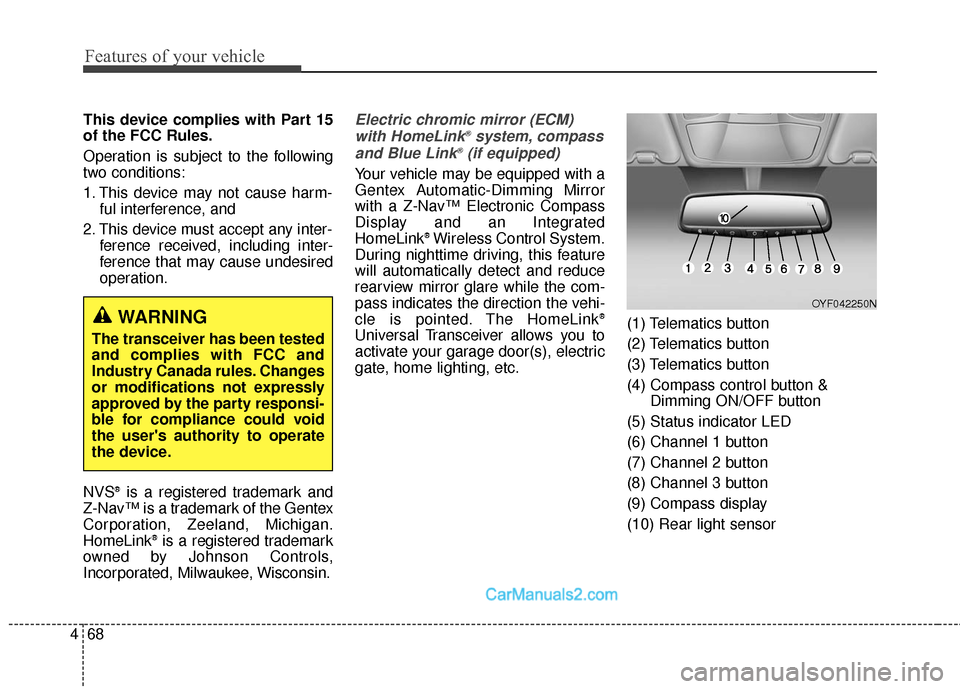
gate, home lighting, etc. (1) Telematics button
(2) Telematics button
(3) Telematics button
(4) Compass control button &
Dimming ON/OFF button
(5) Status indicator LED
(6) Channel 1 button
(7) Channel 2 button
(8) Channel 3 button
(9) Compass display
(10) Rear light sensor
WARNING
The transceiver has been tested
and complies with FCC and
Industry Canada rules. Changes
or modifications not expressly
approved by the party responsi-
ble for compliance could void
the user's authority to operate
the device.
OYF042250N
Page 247 of 614
Features of your vehicle
150
4
MAX A/C-Level (B, D)
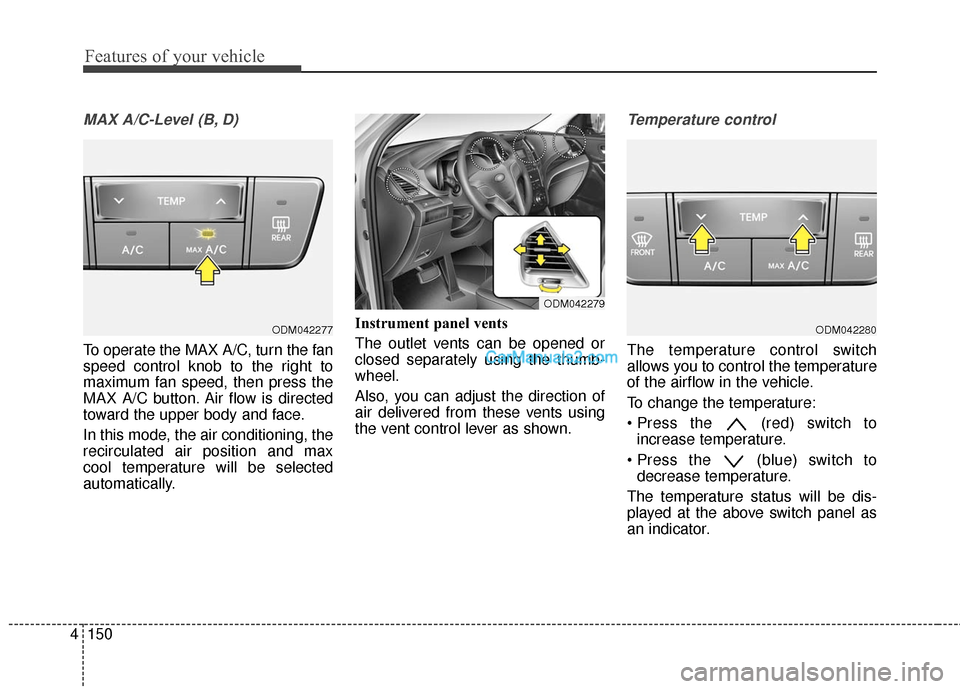
To operate the MAX A/C, turn the fan
speed control knob to the right to
maximum fan speed, then press the
MAX A/C button. Air flow is directed
toward the upper body and face.
In this mode, the air conditioning, the
recirculated air position and max
cool temperature will be selected
automatically. Instrument panel vents
The outlet vents can be opened or
closed separately using the thumb-
wheel.
Also, you can adjust the direction of
air delivered from these vents using
the vent control lever as shown.
Temperature control
The temperature control switch
allows you to control the temperature
of the airflow in the vehicle.
To change the temperature:
(red) switch to
increase temperature.
(blue) switch to decrease temperature.
The temperature status will be dis-
played at the above switch panel as
an indicator.
ODM042277ODM042280
ODM042279
Page 285 of 614
Features of your vehicle
188
4
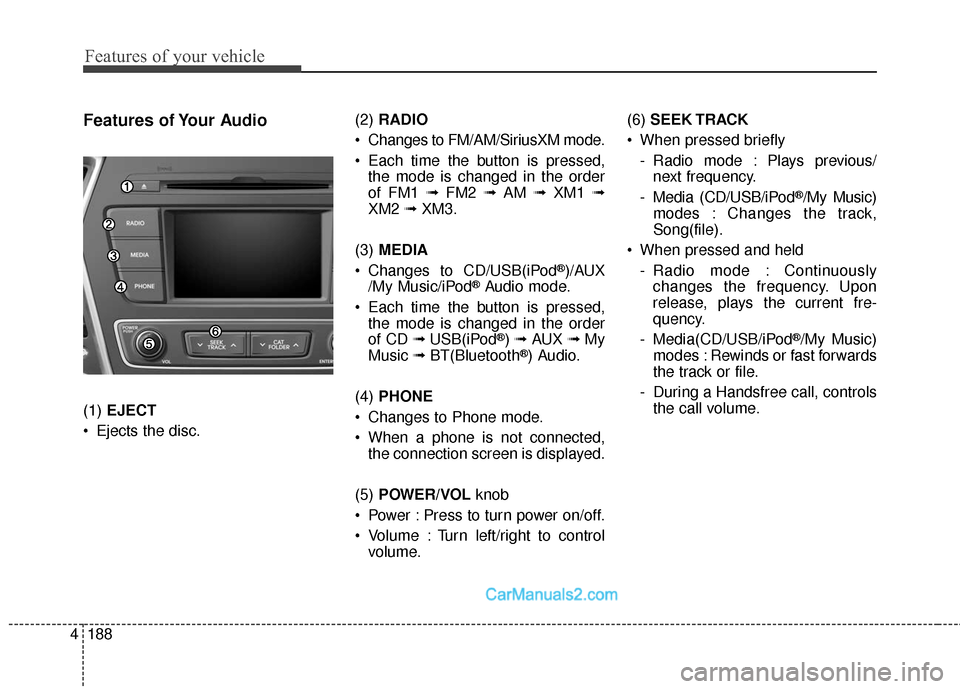
Features of Your Audio
(1) EJECT
Ejects the disc. (2)
RADIO
Changes to FM/AM/SiriusXM mode.
Each time the button is pressed, the mode is changed in the order
of FM1 ➟ FM2 ➟AM ➟XM1 ➟
XM2 ➟XM3.
(3) MEDIA
Changes to CD/USB(iPod
®)/AUX
/My Music/iPod®Audio mode.
Each time the button is pressed, the mode is changed in the order
of CD ➟ USB(iPod
®) ➟ AUX ➟My
Music ➟BT(Bluetooth®) Audio.
(4) PHONE
Changes to Phone mode.
When a phone is not connected, the connection screen is displayed.
(5) POWER/VOL knob
Power : Press to turn power on/off.
Volume : Turn left/right to control volume. (6)
SEEK TRACK
When pressed briefly - Radio mode : Plays previous/next frequency.
- Media (CD/USB/iPod
®/My Music)
modes : Changes the track,
Song(file).
When pressed and held - Radio mode : Continuouslychanges the frequency. Upon
release, plays the current fre-
quency.
- Media(CD/USB/iPod
®/My Music)
modes : Rewinds or fast forwards
the track or file.
- During a Handsfree call, controls the call volume.
Page 290 of 614
4193
Features of your vehicle
✽
✽NOTICE - Using an iPod®
• iPod®is a registered trademark of
Apple Inc.
• In order to use the iPod
®with
your vehicle's audio system, you
must use a dedicated iPod
®cable.
(the cable that is supplied when
purchasing iPod
®/iPhone®prod-
ucts)
• If the iPod
®is connected to the
vehicle while it is playing, a high
pitch sound could occur for
approximately 1-2 seconds imme-
diately after connecting. If possi-
ble, connect the iPod
®to the vehi-
cle with the iPod®stopped/paused.
• When the vehicle ignition is set to ACC or ON, connecting the iPod
®
through the iPod®cable will
charge the iPod®through the car
audio system.
• When connecting with the iPod
®
cable, make sure to fully insert the
jack to prevent communication
interference. (Continued)(Continued)
• When the EQ features of an exter-
nal device, such as the iPod
®, and
the audio system are both active,
EQ effects could overlap and
cause sound deterioration and dis-
tortion. Whenever possible, turn
off the EQ feature within the
external device when it is connect-
ed to the audio system.
• Noise may occur when an iPod
®or
AUX device is connected. When
such devices are not being used,
disconnect the device for storage.
• When the iPod
®or AUX device
power is connected to the power
jack, playing the external device
may result in noise. In such cases,
disconnect the power connection
before use.
• Skipping or improper operation may occur depending on the char-
acteristics of your iPod
®/iPhone®
device. (Continued)(Continued)
• If your iPhone
®is connected to
both the Bluetooth®Wireless
Technology and USB, the sound
may not be properly played. In
your iPhone
®, select the Dock con-
nector or Bluetooth®Wireless
Technology to change the sound
output (source).
• iPod
®mode cannot be operated
when the iPod®cannot be recog-
nized due to versions that do not
support communication protocols.
• For fifth generation iPod
®Nano
devices, the iPod®may not be rec-
ognized when the battery level is
low. Please charge the iPod
®for
use.
• The search/play orders shown within the iPod
®device may differ
from the orders shown within the
audio system.
• If the iPod
®malfunctions due to
an iPod®device defect, reset the
iPod®and try again. (To learn
more, refer to your iPod®manual)
(Continued)
Page 291 of 614
Features of your vehicle
194
4
(Continued)
• Some iPod®products may not
sync with the System depending
on the version. If the Media is
removed before the Media is rec-
ognized, then the system may not
properly restore the previously
operated mode. (iPad
®charging is
not supported.)
• Use an iPod
®cable shorter than 1
meter in length such as the one
originally supplied with a new
iPod
®, longer cables may lead to
the audio system not recognizing
the iPod
®.
✽ ✽ NOTICE - Using the
Bluetooth®Wireless
Technology Audio
Mode
• Bluetooth®Wireless Technology
Audio Mode can be used only
when a Bluetooth
®Wireless
Technology phone has been con-
nected.
• Bluetooth
®Wireless Technology
Audio Mode will not be available
when connecting mobile phones
that do not support this feature.
• If a Bluetooth
®Wireless
Technology Phone is being used to
play music and receives an incom-
ing or outgoing phone call, then
the music will stop.
• Moving the Track up/down while playing Bluetooth
®Wireless
Technology audio mode may
result in pop noises with some
mobile phones.
• Bluetooth
®Wireless Technology
streaming audio may not be sup-
ported in some mobile phones. (Continued)(Continued)
• When returning to Bluetooth
®
Wireless Technology Audio mode
after ending a call, the mode may
not automatically restart in some
mobile phones.
• Receiving an incoming call or making an outgoing call while
playing Bluetooth
®Wireless
Technology Audio may result in
audio interference.