2017 HONDA RIDGELINE lock
[x] Cancel search: lockPage 34 of 85
AUDIO AND CONNECTIVITY
60 || 61
A
UDIO AND CONNECTIVITY
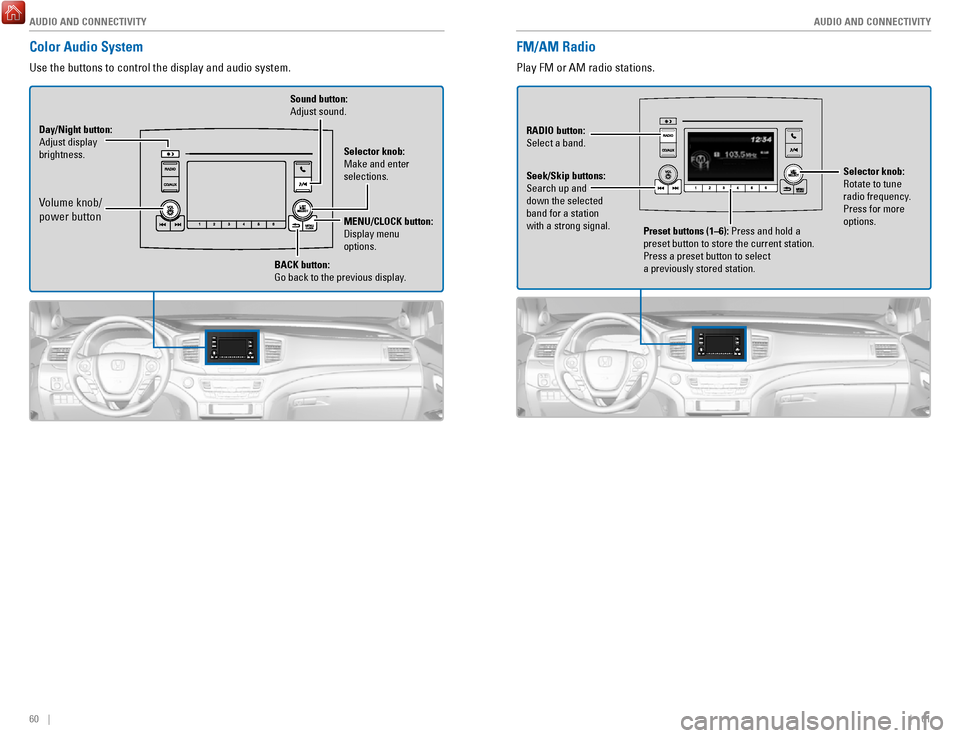
FM/AM Radio
Play FM or AM radio stations.
Preset buttons (1–6): Press and hold a
preset button to store the current station.
Press a preset button to select
a previously stored station.
RADIO
button:
Select a band.
Seek/Skip buttons:
Search up and
down the selected
band for a station
with a strong signal. Selector knob:
Rotate to tune
radio frequency
.
Press for more
options.
Color Audio System
Use the buttons to control the display and audio system.
Selector knob:
Make and enter
selections.
Volume knob/
power button
MENU/CLOCK button:
Display menu
options.
BACK
button:
Go back to the previous display.
Day/Night
button:
Adjust display
brightness. Sound button:
Adjust sound.
Page 52 of 85

NAVIGATION
96 || 97
D
RIVING
n Traffic
View traffic flow and incidents in major metro areas. Traffic alerts are accompanied
by an audible beep. Pop-up messages and traffic information can be vie\
wed when
you are on the map screen. You can also select traffic to avoid. Traffic coverage is
limited in Canada.
Viewing traffic
1.
From the map screen, select the traffic icon.
2.
Select Traffic Conditions.
3.
Traffic icons are shown on the map. Select the
magnifying glass icon to display a full list of
traffic delays.
To mute traffic alerts and voice guidance: From the map screen, press MENU.
Select Mute. To lower voice guidance volume, see page 90.
Avoiding traffic on your route
1.
From the map screen, select the traffic icon.
2.
Select Traffic on Route.
3.
Select an incident to avoid from the list.
4.
Select the menu icon.
5.
Select Avoid.
DRIVING
Learn about preparation for driving, as well as other features.
Before Driving
Check the following items before you begin driving.
n
Exterior Checks •
Make sure there are no obstructions on the windows, door mirrors, exteri\
or lights, or other parts of the vehicle.
•
Remove any frost, snow, or ice.
•
Make sure the hood is securely closed.
•
Make sure the trunk is closed and locked.
•
Make sure the tailgate is closed when not being used as an extended bed.\
•
Heat from the engine and exhaust can ignite flammable materials left u\
nder
the hood, causing a fire. If you’ve parked your vehicle for an exte\
nded period,
inspect and remove any debris that may have collected, such as dried gra\
ss
and leaves that have fallen or have been carried in for use as a nest by\
a small
animal. Also check under the hood for leftover flammable materials aft\
er you or
someone else has performed maintenance on your vehicle.
•
Make sure the tires are in good condition.
•
Make sure there are no people or objects behind or around the vehicle.
If the doors are frozen shut, use warm water around the door edges to me\
lt any ice.
Do not try to force them open, as this can damage the rubber trim around\
the doors.
When done, wipe dry to avoid further freezing.
NOTICE
n
Interior Checks •
Store or secure all items on board properly.
•
Do not pile items higher than the seat height.
•
Do not place anything in the front seat footwells.
Make sure to secure the floor mats.
•
If you have any animals on board, do not let them move freely around in \
the vehicle.
•
Securely close and lock all doors and the tailgate.
•
Adjust your seating position, mirrors, and steering wheel properly.
•
Make sure items placed on the floor behind the front seats cannot roll\
under the seats.
•
Everyone in the vehicle must fasten their seat belt.
•
Make sure that the indicators in the instrument panel come on when you s\
tart
the vehicle, and go off soon after.
Page 56 of 85

DRIVING
104 || 105
D
RIVING
Pre-tow checklist
When preparing to tow, and before driving away, ensure the following:
•
The vehicle has been properly serviced, and the suspension and the cooli\
ng
system are in good operating condition.
•
Avoid towing a trailer during your vehicle’s first 600 miles (1,000 km).
•
The trailer has been properly serviced and is in good condition.
•
All weights and loads are within limits. Never exceed the gross weight r\
atings.
•
Check if all loads are within limits at a public scale. If a public scal\
e is not
available, add the estimated weight of your cargo load to the weight of \
your
trailer (as quoted by the manufacturer) and the tongue load.
•
The hitch, safety chains, and any other attachments are secure.
•
All items in or on the trailer are properly secured and cannot shift whi\
le you drive.
Exceeding any load limit or improperly loading your vehicle and trailer \
can
cause a crash in which you can be seriously hurt or killed.
Check the loading of your vehicle and trailer carefully before starting \
to drive.
WARNING
Remote Engine Start*
Start your vehicle’s engine using the remote transmitter before you enter the vehicle.
Lock button
Engine button
Make sure the vehicle is in a safe location when using remote engine start (i.e., a well
ventilated area, away from any flammable materials).
n
Starting the Engine
Press the Lock button, then press and hold the Engine button within 5 se\
conds to
remotely start the engine.
The engine runs for up to 10 minutes. To extend the run time for another 10 minutes,
repeat the procedure during the initial 10 minutes.
While the engine is running, the climate control system adjusts the cabi\
n
temperature, the security system remains on, and lights and accessories remain off.
n
Stopping the Engine
Press and hold the Engine button.
The engine will also stop if it has been running for more than 10 minute\
s, or if any door is opened without using the remote or smart entry.
Engine exhaust contains toxic carbon monoxide gas.
Breathing carbon monoxide can kill you or cause unconsciousness.
Never use the remote engine starter when the vehicle is parked in a
garage or other area with limited ventilation.
WARNING
*if equipped
Page 58 of 85
DRIVING
108 || 109
D
RIVING
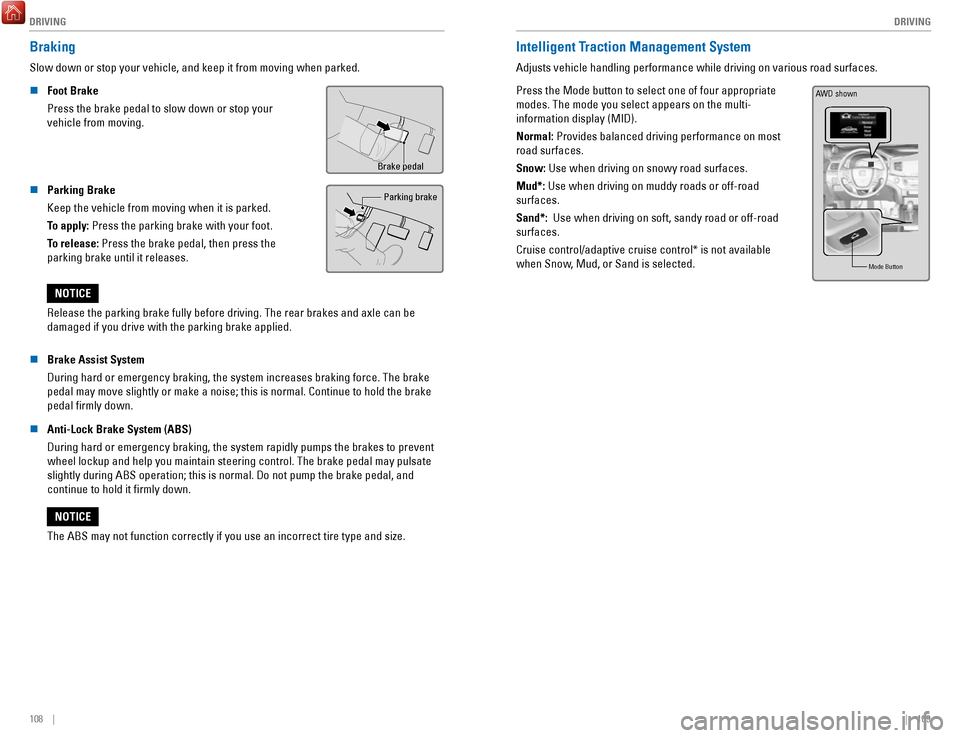
Braking
Slow down or stop your vehicle, and keep it from moving when parked.
n
Foot Brake
Press the brake pedal to slow down or stop your
vehicle from moving.
Brake pedal
n Parking Brake
Keep the vehicle from moving when it is parked.
To apply: Press the parking brake with your foot.
To release: Press the brake pedal, then press the
parking brake until it releases. Parking brake
Release the parking brake fully before driving. The rear brakes and axle\
can be
damaged if you drive with the parking brake applied.
NOTICE
n
Brake Assist System
During hard or emergency braking, the system increases braking force. The brake
pedal may move slightly or make a noise; this is normal. Continue to hol\
d the brake
pedal firmly down.
n
Anti-Lock Brake System (ABS)
During hard or emergency braking, the system rapidly pumps the brakes to\
prevent wheel lockup and help you maintain steering control. The brake pedal may\
pulsate
slightly during ABS operation; this is normal. Do not pump the brake ped\
al, and
continue to hold it firmly down.
The ABS may not function correctly if you use an incorrect tire type and\
size.
NOTICE
Intelligent Traction Management System
Adjusts vehicle handling performance while driving on various road surfa\
ces.
Press the Mode button to select one of four appropriate
modes. The mode you select appears on the multi-
information display (MID).
Normal: Provides balanced driving performance on most
road surfaces.
Snow: Use when driving on snowy road surfaces.
Mud*: Use when driving on muddy roads or off-road
surfaces.
Sand*: Use when driving on soft, sandy road or off-road
surfaces.
Cruise control/adaptive cruise control* is not available
when Snow, Mud, or Sand is selected.
Mode Butto n
AWD shown
Page 64 of 85
 at speeds of 3 mph (5 km")
DRIVING
120 || 121
D
RIVING
*if equipped
Cross Traffic Monitor*
Alerts you if a detected vehicle is approaching from a rear corner when \
your vehicle is
in Reverse (R) at speeds of 3 mph (5 km/h) or lower, which can be helpful when backing
out of parking spaces.
Off icon
An arrow icon appears
on the side of an
approaching vehicle.
The system does not provide alerts for a vehicle that is moving away fro\
m your vehicle,
and it may not detect pedestrians, bicycles, or stationary objects.
n
Turning the System On or Off
1.
From the HOME screen, select Settings.
2.
Select Camera.
3.
Select Cross Traffic Monitor.
4.
Select On or Off.
5.
Press BACK to exit the menu.
You can also select the icon on the lower right corner
of the screen when the monitor is on to
turn it off.
This system cannot detect all approaching vehicles and may not detect an\
approaching vehicle at all.
Failure to visually confirm that it is safe to back up the vehicle bef\
ore
doing so may result in a collision.
Do not solely rely on the system when reversing; always also use your
mirrors, and look behind and to the sides of your vehicle before reversi\
ng.
CAUTION
Multi-View Rear Camera
When you shift into Reverse (R), a real-time image of the area behind \
your vehicle is
shown in the display, along with helpful parking guidelines.
Wide view Normal view Top down view
Press the selector knob (color audio system) or touch icons on the scr\
een
(touchscreen) to toggle between views.
n
Changing Settings
Turn the guidelines on or off.
Models with color audio system 1.
Press the MENU/CLOCK button.
2.
Select Settings.
3.
Select Rear Camera.
4.
Select Camera Guidelines.
5.
Select On or Off.
6.
Press the Back button to exit the menus.
Page 66 of 85

DRIVING
124 || 125
H
ANDLING THE UNEXPECTED
n Refueling from a Portable Fuel Container
If you need to refuel your vehicle from a portable fuel container, use the funnel
provided with your vehicle.
1.
Turn off the engine.
2.
Press the fuel fill door release button. The fuel fill
door opens.
3.
Open the in-bed trunk and pull out the tire tray.
4.
Remove the funnel from the tool box.
5.
Place the end of the funnel on the lower part of
filler opening, then insert it slowly and fully. Make
sure that the end of the funnel goes down along
with the filler pipe.
6.
Fill the tank with fuel from the portable fuel
container. Pour fuel carefully so you do not spill
any.
7.
Remove the funnel from the filler neck. Wipe up
any fuel from the funnel before storing it.
8.
Shut the fuel fill door by hand.
Funnel
Funnel
Do not insert the nozzle of a portable fuel container or any funnel othe\
r than the one
provided with your vehicle. Doing so can damage the fuel system.
Do not try to pry open or push open the sealed fuel tank with foreign ob\
jects.
This can damage the fuel system and its seal.
NOTICE
HANDLING THE UNEXPECTED
Learn about what to do in critical or emergency situations.
Smart Entry Remote Battery Strength
If the battery life in your remote transmitter is weak, a message appear\
s in the MID with
information on how to start the engine.
1.
Touch the back of the remote transmitter to the
ENGINE START/STOP button while the indicator
is flashing.
2.
With the brake pedal pressed, press the ENGINE
START/STOP button within 10 seconds.
Shift Lever Does Not Move
Follow the procedure below if you cannot move the shift lever out of Par\
k (P).
1.
Set the parking brake.
2.
Remove the built-in key from the remote transmitter.
3.
Open the lid of the console compartment.
4.
Wrap a cloth around the tip of a small flat-tip
screwdriver. Put it into the shift lock release slot as
shown in the image, and remove the cover.
5.
Insert the key into the shift lock release slot.
6.
While pushing the key down, press the shift lever
release button and place the shift lever into Neutral
(N). The lock is now released. Have the shift lever
checked by a dealer as soon as possible.
Cover
Release
button
Shift lock
release slot
Page 68 of 85

HANDLING THE UNEXPECTED
128 || 129
H
ANDLING THE UNEXPECTED
Emergency Engine Stop
The ENGINE START/STOP button may be used to stop the engine due to an emergency
situation even while driving. If you must stop the engine, choose one of\
the following
operations:
•
Press and hold the ENGINE START/STOP button
for two seconds, or
•
Firmly press the ENGINE START/STOP button
three times.
If the vehicle is in Park (P), the power mode changes to VEHICLE OFF. Otherwise, the
power mode changes to ACCESSORY.
The steering wheel will not lock. Because turning off the engine also di\
sables the
power assist the engine provides to the steering and braking systems, it\
will require
significantly more physical effort and time to steer and slow the vehi\
cle. Use both feet
on the brake pedal, if necessary, to slow the vehicle and stop immediately in
a safe place.
Do not press the button while driving unless it is absolutely necessary \
for the engine to
be switched off.
Emergency Towing
Call a professional towing service if you need to tow your vehicle.
All models
Flat bed equipment: The operator loads your vehicle on the back of a tru\
ck.
This is the best way to transport your vehicle.
2WD models
Wheel lift equipment: The tow truck uses two pivoting arms that go under the front tires
and lift them off the ground. The rear tires remain on the ground.
This is an acceptable way to tow your vehicle.
Trying to lift or tow your vehicle by the bumpers will cause serious dama\
ge.
The bumpers are not designed to support the vehicle’s weight.
Improper towing such as towing behind a motorhome or other motor vehicle\
can
damage the transmission.
NOTICE
Tire Pressure Monitoring System (TPMS)
Monitors the tire pressure while you are driving.
If your vehicle’s tire pressure becomes significantly low,
the low tire pressure indicator comes on and a message
appears on the multi-information display. The specific tire
with low pressure is displayed.
n What to Do
Stop your vehicle in a safe place. Check the tire pressure and adjust th\
e pressure to
the specified level. The specified tire pressure is on a label on th\
e driver’s doorjamb.
n
Tire Fill Assist
Your vehicle gives you visual and audible alerts to help you adjust the t\
ire pressure to its appropriate level when the vehicle is on.
While inflating: The system beeps and the exterior lights flash once every 5 seconds.
When the correct pressure is reached:
The system beeps and the exterior lights
flash continuously for 5 seconds. Stop filling the tire.
If you overinflate: The system beeps and the exterior lights flash twice every
3 seconds.
Driving on an extremely underinflated tire can cause it to overheat. A\
n overheated
tire can fail. Always inflate your tires to the specified pressure.
NOTICE
Page 70 of 85

HANDLING THE UNEXPECTED
132 || 133
H
ANDLING THE UNEXPECTED
n Setting Up the Jack
1.
Place the jack under the jacking point closest to
the tire to be changed.
2. Turn the end bracket clockwise (as shown in the
image) until the top of the jack contacts the jacking
point. Make sure that the jacking point tab is
resting in the jack notch.
3. Raise the vehicle, using the jack handle bar and the
jack handle, until the tire is off the ground.
Jack handle bar
Wheel nut wrench as jack handle
The vehicle can easily roll off the jack, seriously injuring anyone
underneath.
Follow the directions for changing a tire exactly, and never get under the
vehicle when it is supported only by the jack.
WARNING
Do not use the jack if it doesn’t work properly. Call your dealer or a professional
towing service.
NOTICE
The following instructions must be followed to use the jack safely: •
Do not use the jack with people or luggage in the vehicle.
•
Use the jack provided in your vehicle. Other jacks may not support the w\
eight (load) or fit the jacking point.
•
Do not use while the engine is running.
•
Use only where the ground is firm and level.
•
Use only at the jacking points.
•
Do not get in the vehicle while using the jack.
•
Do not put anything on top of or underneath the jack. n
Replacing the Flat Tire
1.
Remove the wheel nuts and flat tire.
2.
Mount the compact spare tire. Replace the wheel
nuts, and lightly tighten them.
3.
Lower the vehicle and remove the jack. Tighten the
wheel nuts in the order indicated in the image. Go
around, tightening the nuts, two to three times in
this order. Do not overtighten the wheel nuts.
If you drive with the spare tire installed, the low tire
pressure/TPMS indicator appears. The indicator
stays on until a regular tire is installed.
n Storing the Flat Tire
1.
Remove the cap using a cloth-wrapped, flat-tipped
screwdriver.Cap
2. Place the spacer cone on the flat tire’s wheel
center, then mount the wheel using the wing bolt.
3.
Store the jack in the tire tray using the strap. Close
the tire tray and tighten the holding bolts.
4.
Store the center cap and tool kit in the in-bed trunkWing BoltSpacer Cone
Loose items can fly around the interior in a crash and can seriously i\
njure
the occupants.
Store the wheel, jack, and tools securely before driving.
WARNING