2017 HONDA RIDGELINE lock
[x] Cancel search: lockPage 20 of 85
 and it is
outside the vehicle and within range (about")
VEHICLE CONTROLS
32 || 33
V
EHICLE CONTROLS
Smart Entry System
When you carry the remote transmitter (for example, in a pocket or purs\
e) and it is
outside the vehicle and within range (about 32 inches or 80 cm), you c\
an lock or unlock the doors and trunk without handling the transmitter.
n
Unlocking / Locking the Doors and Trunk To unlock: Grab the driver’s door handle when the vehicle is off to unlock the driver’
s door. Grab the front
passenger’s door handle to unlock all the doors and the trunk. You can customize this feature’s behavior
(see page 54).
To lock: Press the door lock button on either front door handle. If the remote transmitter is inside the vehicle, neither the doors nor trunk will lock.Door Lock Button
n Walk Away Auto Lock
When you walk away from the vehicle while carrying the remote transmitter, the
doors and trunk can automatically lock if the following conditions are m\
et:
•
The remote transmitter is within a range of 6 feet (2 m).
•
All doors and the trunk are closed.
•
There is not an additional remote transmitter inside the vehicle.
When you are within the range, the system is activated and a beep sounds\
.
When you go outside the range, the lights flash and a beep sounds agai\
n.
The doors and trunk automatically lock.
To turn on this feature, follow the steps below:
1.
From the HOME screen, select Settings.
2.
Select Vehicle.
3.
Select Keyless Access Setup.
4.
Select Walk Away Auto Lock.
5.
Select Enable.
Tailgate and Trunk Operation
To drop open the tailgate, pull up in the upper handle. Support the tailgate until it is fully open.Upper handle
To swing open the tailgate, pull up on the lower handle.
Lower handl e
To open the trunk, unlock the doors, then pull up on the
trunk release button. Trunk Release Button
Or, insert the key into the trunk lock cylinder.
The main switch in the glove box disables the trunk release button.
ON
OF F
Main Switch
*if equipped
Page 21 of 85

VEHICLE CONTROLS
34 || 35
V
EHICLE CONTROLS
WARNING
Opening or closing a tailgate while anyone is in the path of the tailgat\
e can
cause serious injury.
Make sure everyone is clear before opening or closing the tailgate.
WARNING
Allowing passengers to ride in the pickup bed or on the tailgate can res\
ult in
death or serious injury. Make sure all passengers ride in a seat and wear a
seatbelt properly.
In-Bed Conveniences
n In-Bed Box
Turn the knobs to the left to open the lid
Knob
n AC Power Outlet* Open the in-bed box. Open the plug cover, insert a powercord slightly, rotate it 90° clockwise, then push
it in all the way.
Push the AC power button to turn the system on or off. The maximum power is 400 watts when the engine is running and the vehicle is in Park. Otherwise, the maximum power is 150 watts.
The battery charge may be affected by using AC power with truck bed audi\
o* or by heavy power outlet use while the vehicle is idling in Park (P). If thi\
s happens, engine-
idle speed will increase until the battery again has a normal charge.
Door Operation
Use several methods to lock or unlock the doors.
n
Using the Lock Tab To unlock: When you unlock either front door using the lock tab, the specific door (driver’s or passenger’
s)
unlocks.
To lock: When you lock the door using the lock tab on the driver’s door, all the other doors and the trunk lock
at the same time. When you lock the door using the lock tab on the front passenger’s door, only that
door locks.
Lo ck tab
To lock
To unlock
n Using the Front Door Inner Handle When you pull either front door inner handle, the door
unlocks and opens.
Unlocking and opening the driver’s door from the inner handle unlocks all the other doors and the trunk.
n Using the Master Door Lock Switch
To unlock: Press the unlock side of the switch to unlock all doors and the trunk.
To lock: Press the lock side of the switch to lock all doors and the trunk.Master door lock switch
To lock
To unlock
n Childproof Door Locks
The childproof door locks prevent the rear doors from being opened from the inside regardless of the
position of the lock tab.
Slide the lever in the rear door to the lock position,
and close the door.
Open the door using the outer door handle.
Lock Unlock
*if equipped
The AC-power system is not designed for devices needing precise power re\
gulation,
nor for devices requiring high initial peak wattage.
NOTICE
Page 22 of 85

VEHICLE CONTROLS
36 || 37
V
EHICLE CONTROLS
Power Window Operation
The power windows can be opened and closed when the vehicle is on by usi\
ng the
switches on the doors. The switches on the driver’s side can be used to open and close
all the windows.
n
Automatic OperationTo open: Push the switch down firmly.
To close:
Pull the switch up firmly.
The window opens or closes completely. To stop the window at any time, push or pull the switch again
briefly.
n
Manual Operation To open: Push the switch down lightly.
To close:
Pull the switch up lightly.
Release the switch when the windows reach the
desired position.
Off
Power window
lock button
Driver’s
window
switch Front passenger’s
window switch On
Rear window
switches
n Power Window Lock Push in the power window lock button so only the driver’s window can be operated. An indicator
appears in the button when window lock is on.
n
Back Window* To open: Push the switch back.
To close: Pull the switch forward.
Open
Close
WARNING
Closing a power window on someone’s hands or fingers can cause
serious injury.
Make sure your passengers are away from the windows before
closing them.
*if equipped
Power Moonroof Operation*
The moonroof can be opened and closed when the vehicle is on by using th\
e switch on the ceiling.
n
Automatic Operation To open: Push the switch back firmly to the second detent, then release.
To close: Push the switch forward firmly to the second detent, then release.
The moonroof opens or closes completely
. To stop the moonroof at any time, push
the switch briefly.
n
Manual Operation To open: Push and hold the switch back lightly to the first detent until the desired position is reached.
To close: Push and hold the switch forward lightly to the first detent until the desired position is reached.
Open
Close Tilt
n Moonroof Tilt
To tilt: Push the center of the switch.
To close:
Push the switch forward firmly, then release.
WARNING
Closing the moonroof on someone’s hands or fingers can cause
serious injury.
Make sure your passengers are away from the moonroof before closing it.
Opening the moonroof in below freezing temperatures or when it is covere\
d with
snow or ice can damage the moonroof panel or motor.
NOTICE
*if equipped
Page 23 of 85

VEHICLE CONTROLS
38 || 39
V
EHICLE CONTROLS
Interior and Exterior Lights
Operate interior and exterior lights when the vehicle is on or off.
n
Brightness Control
Adjust instrument panel brightness when the vehicle is on.
To brighten: Press the + button.
To dim: Press the - button.
A beep sounds when the brightness reaches minimum or maximum.+ button
-button
n Interior Lights Change the interior light settings using the switch on the ceiling.
ON position: Interior lights remain on. Door-activated position: Interior lights come on when
any of the doors are opened, the driver’s door is unlocked, or the vehicle is turned off.
OFF position:
Interior lights remain off.Models without moonroof
Door-activated position
Off
On
Models with
moonroof
Door-activated position
Off On
n Map Lights
Press the front map lights to turn on or off.
There are also map lights on the ceiling for the rear seats. Turn them on or off when the front interior light
switch is in the door-activated position.Models without
moonroof
Models with
moonroof
n Bed Lights
Press the button to turn the bed lights on or off. The vehicle must be in Park.
The lights come on automatically when the tailgate is swung open or the trunk is opened.
n Exterior Lights
Rotate the switches on the headlight lever to operate the exterior light\
s. Push the lever forward to turn on the high beams. Return the lever to its origina\
l position for low beams.
OFF: All exterior lights are off.
: Turn on exterior lights except headlights.
AUTO: Turn on the automatic lighting feature. Headlights turn on or off depending on ambient brightness when the vehicle is on. Headlights
automatically come on after the wipers are engaged for a certain time.
: Turn on all exterior lights including headlights.
: Turn fog lights* on or off.
High beams
Low beams Flash high
beams
Fog lights*
One-Touch Turn Signal
Use this quick and convenient method to signal a lane change.
Lightly push the turn signal lever up or down for
a three-blink sequence.
For a continuous signal, push the lever up or down until it locks into place.
Right turn
Left turn
*if equipped
Page 26 of 85
VEHICLE CONTROLS
44 || 45
V
EHICLE CONTROLS
*if equipped
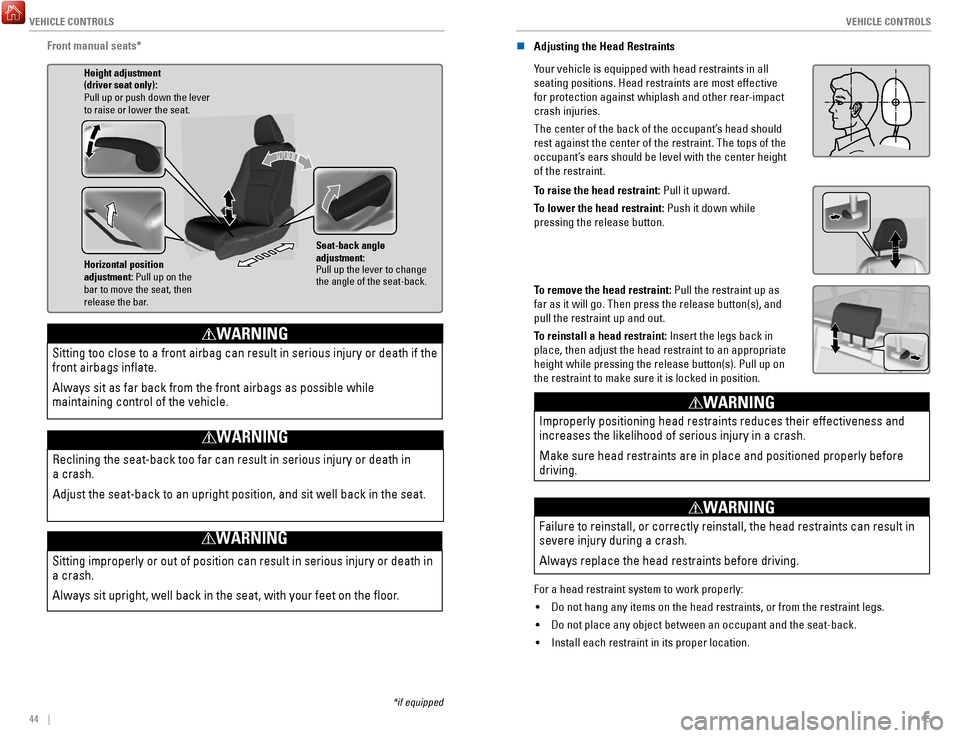
Front manual seats*
Horizontal position
adjustment: Pull up on the
bar to move the seat, then
release the bar. Height adjustment
(driver seat only):
Pull up or push down the lever
to raise or lower the seat.
Seat-back angle
adjustment:
Pull up the lever to change
the angle of the seat-back.
Sitting improperly or out of position can result in serious injury or de\
ath in
a crash.
Always sit upright, well back in the seat, with your feet on the floor\
.
WARNING
Sitting too close to a front airbag can result in serious injury or deat\
h if the
front airbags inflate.
Always sit as far back from the front airbags as possible while
maintaining control of the vehicle.
WARNING
Reclining the seat-back too far can result in serious injury or death in\
a crash.
Adjust the seat-back to an upright position, and sit well back in the se\
at.
WARNING
n Adjusting the Head Restraints
Your vehicle is equipped with head restraints in all
seating positions. Head restraints are most effective
for protection against whiplash and other rear-impact
crash injuries.
The center of the back of the occupant’s head should
rest against the center of the restraint. The tops of the
occupant’s ears should be level with the center height
of the restraint.
Position head in the
center of the head
restraint.
To raise the head restraint: Pull it upward.
To lower the head restraint: Push it down while
pressing the release button.
To remove the head restraint: Pull the restraint up as
far as it will go. Then press the release button(s), and
pull the restraint up and out.
To reinstall a head restraint: Insert the legs back in
place, then adjust the head restraint to an appropriate
height while pressing the release button(s). Pull up on
the restraint to make sure it is locked in position.
Improperly positioning head restraints reduces their effectiveness and
increases the likelihood of serious injury in a crash.
Make sure head restraints are in place and positioned properly before
driving.
WARNING
Failure to reinstall, or correctly reinstall, the head restraints can re\
sult in
severe injury during a crash.
Always replace the head restraints before driving.
WARNING
For a head restraint system to work properly: •
Do not hang any items on the head restraints, or from the restraint legs\
.
•
Do not place any object between an occupant and the seat-back.
•
Install each restraint in its proper location.
Page 27 of 85

VEHICLE CONTROLS
46 || 47
V
EHICLE CONTROLS
n Floor Mats
Position the front and rear seat floor mats properly,
and anchor them. If they are not properly positioned,
the floor mats can interfere with the front seat
functions.
Do not put additional floor mats on top of the
anchored mats.
Unlock
Lock
Rear Seats
Separately raise or lower the left and right rear-seat cushions to make room for luggage.n
Fold Up the Rear Seats
1.
To raise the driver’s side rear seat, store the armrest in the seatback.
2.
Pull and hold the release handle. If the handle is
difficult to move, release the handle, push on the
seat cushion until the seat leg is secure in the floor
guide, then try again.
3.
Lift the seat cushion until the legs disengage from the floor guide.
4.
Release the handle.
5.
Raise the cushion, pushing it firmly against the
seat back until it locks.
Handle
n Folding Down the Rear Seats
1.
Hold the folded seat cushion.
2.
Pull the release handle until the cushion unlocks.
3.
Hold the cushion as you slowly lower it.
4.
Set the seat leg in the floor guide.
5.
Push on the cushion to ensure the legs engage the
floor guide.
The seat leg is not designed to lock or latch in the floor guide. The seat lock is located in the seat hinge.
Handle
*if equipped
Driving Position Memory System*
You can store two driver’s seat and door mirror positions into memory when the vehicle
is on using the buttons on the driver’s door.
1.
Adjust the seat and mirrors to your preferred positions.
2.
Press SET.
3.
Press and hold memory button 1 or 2.
You will hear two beeps when the memory is set.
4.
Press one of the memory buttons to recall previously
stored positions.
Lumbar positions cannot be stored.
Memory button 1
Memory button 2
SET button
When you unlock and open the driver’s door, the driver’s seat slides rearward to allow
for easy entry. The seat slides forward to the stored position and the other items adj\
ust
when the vehicle is turned on.
Adjusting the Steering Wheel
The steering wheel height and distance from your body can be adjusted so\
that you can
comfortably grip the steering wheel in an appropriate driving posture.
1.
Push down the steering wheel adjustment lever.
2.
Move the steering wheel up or down, and in or out.
3.
Pull up the steering wheel adjustment lever to lock the
steering wheel in position.
Lever To lock
To adjust
Adjusting the steering wheel position while driving may cause you to los\
e
control of the vehicle and be seriously injured in a crash.
Adjust the steering wheel only when the vehicle is stopped.
WARNING
Page 29 of 85

VEHICLE CONTROLS
50 || 51
V
EHICLE CONTROLS
Air Conditioning System*
Manually control the front and rear heating and cooling in your vehicle’\
s interior using
the buttons on the dashboard.
n
Front Operation
Fan control
switch
A/C
buttonMAX A/C
button Windshield
defroster button
Temperature control switch
Recirculation button:
Recirculation mode (indicator
on): Recirculates air from the
vehicle’s interior.
Fresh air mode (indicator off):
Maintains outside ventilation. Rear defogger/
heated door
mirrors button*
ON/OFF
button
MODE button:
Change airflow
location.
Climate Control System*
The automatic climate control system can maintain your preferred interio\
r temperature
by selecting the proper mix of heated or cooled air and fan speed. Use t\
he buttons on
the dashboard to control both front and rear operation.
n
Front Operation
AUTO button: Press, then
use the temperature
control switch to set your
preferred temperature. SYNC button: Set the passenger’s
side and rear temperature to the
same as the driver’s side.
Driver’s side
temperature
control switch
A/C
buttonPassenger’s side
temperature
control switch
Recirculation button:
Recirculation mode (indicator on):
Recirculates air from the vehicle’s interior.
Fresh Air mode (indicator off):
Maintains outside ventilation.
Rear defogger/
heated door
mirrors button*
Windshield
defroster button
Fan
control
buttons
ON/OFF
button
MODE button:
Change
airflow
location.
n Rear Operation
RR SETTINGS button:
Adjust rear temperature.
REAR ON/OFF button
*if equipped
*if equipped
REAR LOCK button*:
Disable rear controls*.
Page 31 of 85

VEHICLE CONTROLS
54 || 55
V
EHICLE CONTROLS
Customized Features
Use the Settings menu to customize certain features when the vehicle is \
stopped.
Models with color audio system
Use the selector knob to make and enter selections.
MENU/CLOCK button
Selector knob
1. Press and hold the MENU/CLOCK button.
2.
Select Settings.
3.
Select a setting option, and make your preferred changes.
4.
Press the Back button to exit the menus.
Models with touchscreen
Select items on the touchscreen to make selections.
1. From the HOME screen, select Settings.
2.
Select a setting option, and make your preferred changes.
3.
Press BACK to exit the menus.
Setting the Clock.
Adjust the time using the steps described for your system type.
Models with color audio system
Use the selector knob to make and enter selections.
1.
Press and hold the MENU/CLOCK button.
2.
Select Adjust Clock.
3.
Select the hour and adjust as necessary.
4.
Select the minutes and adjust as necessary.
5.
Select Set when complete.
6.
Press the Back button to exit the menu.
Models with touchscreen
Select items on the touchscreen to make selections.
1.
From the HOME screen, select Settings.
2.
Select Clock/Info.
3.
Select Clock Adjustment.
4.
Adjust the hour and minute values.
5.
Select OK when complete.
On vehicles with navigation, the time is automatically set using GPS sig\
nals.