2017 HONDA RIDGELINE service
[x] Cancel search: servicePage 43 of 85

AUDIO AND CONNECTIVITY
78 || 79
A
UDIO AND CONNECTIVITY
Models with touchscreen
Pandora®*
Play and operate Pandora from your compatible phone through the vehicle’\
s audio
system. Visit handsfreelink.com to check phone compatibility. Standard data rates apply
with your phone service provider. Available in the U.S. only.
Connect your phone when the vehicle is stopped.
For iPhone:
•
Connect via Bluetooth HandsFreeLink (see page 85) or USB port
(see page 56).
•
A pop-up may appear on your phone requesting you to allow access for Pan\
dora
to be launched.
•
If you cannot operate Pandora through the audio system, it may be stream\
ing
through Bluetooth Audio. Make sure Pandora is selected on the audio system.
•
If Pandora still does not operate, try rebooting the phone and reconnect\
ing the
cable if necessary.
For other compatible smartphones: •
Connect via Bluetooth HandsFreeLink (see page 85).
Source: Select the Pandora icon.
Station: Change
the station. Skip: Go to the
next song.
MENU: Display
menu options,
including the
Station List.
Dislike/Like song
Play/Pause
*If equipped. Applicable laws may prohibit the operation of handheld ele\
ctronic devices while operating a vehicle. Launch streaming audio on your phone only when it i\
s safe to do so.
Models with touchscreen
Truck Bed Audio System*
Send audio system content to outside the vehicle by using the truck bed \
liner as a
speaker.
From the Home screen, select Truck Bed Audio.
Select On or Off.
n Using Truck Bed Audio
•
To start Truck Bed Audio:
à the vehicle must be in Park.
àthe ignition must be in Accessory or ON.
•
Once started, the system will work in any power mode.
•
The display screen will sleep to preserve power.
•
The system will cancel:
à if the vehicle moves at 10 mph (16 km/h) or faster.
àif the battery charge drops below the needs of the engine starter.
*if equipped
Page 48 of 85
88 || 89
Models with touchscreen
SMS Text Messaging and E-Mail*
Receive and send messages from your paired and connected phone.
Visit handsfreelink.com (U.S.) or handsfreelink.ca (Canada) to check phone compatibility.
Standard message rates apply with your phone service provider.
This feature is limited while the vehicle is moving.
n
Receiving and Responding to Messages
When you receive a new message, a pop-up appears on the touchscreen. You can
view the message when the vehicle is stopped. You can also reply to it using fixed
phrases or call the sender.
1.
When the prompt appears, select Read.
2.
The message is displayed, and the system
reads it aloud.
3.
To reply: With the message open, select Reply, and
choose one of the six available responses.
Select Send to send the message. You cannot
create a new text message.
4.
To call the sender: With the message open,
select Call.
n Selecting an Account
If your phone has both text message and e-mail accounts, you can select \
only one of
them at a time to be active and receive notifications.
1.
From the Home screen, select Settings.
2.
Select Phone.
3.
Select Select Account.
4.
Select Text Message or an e-mail account.
*if equipped Siri and iPhone are trademarks of Apple, Inc.
Models with touchscreen
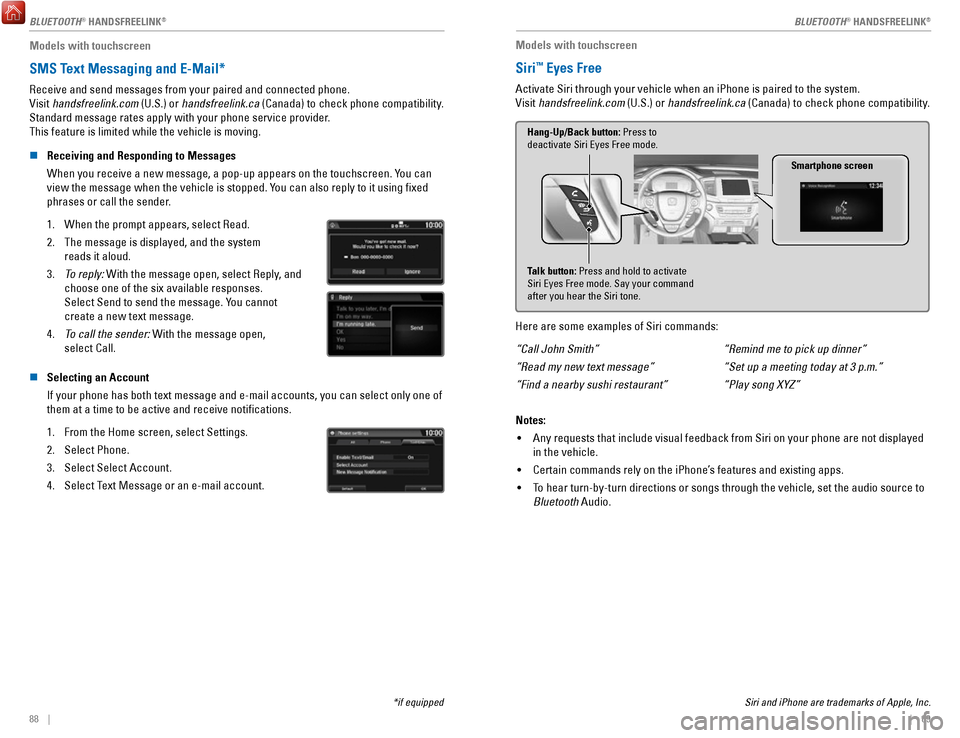
Siri™ Eyes Free
Activate Siri through your vehicle when an iPhone is paired to the syste\
m.
Visit handsfreelink.com (U.S.) or handsfreelink.ca (Canada) to check phone compatibility.
Smartphone screen
Talk button: Press and hold to activate
Siri Eyes Free mode. Say your command
after you hear the Siri tone. Hang-Up/Back button: Press to
deactivate Siri Eyes Free mode.
Here are some examples of Siri commands:
“Call John Smith”
“Read my new text message”
“Find a nearby sushi restaurant” “Remind me to pick up dinner”
“Set up a meeting today at 3 p.m.”
“Play song XYZ”
Notes: •
Any requests that include visual feedback from Siri on your phone are no\
t displayed
in the vehicle.
•
Certain commands rely on the iPhone’s features and existing apps.
•
To hear turn-by-turn directions or songs through the vehicle, set the aud\
io source to
Bluetooth Audio.
BLUETOOTH® HANDSFREELINK
Page 56 of 85

DRIVING
104 || 105
D
RIVING
Pre-tow checklist
When preparing to tow, and before driving away, ensure the following:
•
The vehicle has been properly serviced, and the suspension and the cooli\
ng
system are in good operating condition.
•
Avoid towing a trailer during your vehicle’s first 600 miles (1,000 km).
•
The trailer has been properly serviced and is in good condition.
•
All weights and loads are within limits. Never exceed the gross weight r\
atings.
•
Check if all loads are within limits at a public scale. If a public scal\
e is not
available, add the estimated weight of your cargo load to the weight of \
your
trailer (as quoted by the manufacturer) and the tongue load.
•
The hitch, safety chains, and any other attachments are secure.
•
All items in or on the trailer are properly secured and cannot shift whi\
le you drive.
Exceeding any load limit or improperly loading your vehicle and trailer \
can
cause a crash in which you can be seriously hurt or killed.
Check the loading of your vehicle and trailer carefully before starting \
to drive.
WARNING
Remote Engine Start*
Start your vehicle’s engine using the remote transmitter before you enter the vehicle.
Lock button
Engine button
Make sure the vehicle is in a safe location when using remote engine start (i.e., a well
ventilated area, away from any flammable materials).
n
Starting the Engine
Press the Lock button, then press and hold the Engine button within 5 se\
conds to
remotely start the engine.
The engine runs for up to 10 minutes. To extend the run time for another 10 minutes,
repeat the procedure during the initial 10 minutes.
While the engine is running, the climate control system adjusts the cabi\
n
temperature, the security system remains on, and lights and accessories remain off.
n
Stopping the Engine
Press and hold the Engine button.
The engine will also stop if it has been running for more than 10 minute\
s, or if any door is opened without using the remote or smart entry.
Engine exhaust contains toxic carbon monoxide gas.
Breathing carbon monoxide can kill you or cause unconsciousness.
Never use the remote engine starter when the vehicle is parked in a
garage or other area with limited ventilation.
WARNING
*if equipped
Page 65 of 85

DRIVING
122 || 123
D
RIVING
Models with touchscreen
1.
From the HOME screen, select Settings.
2.
Select Camera.
3.
Select one of the options.
Fixed Guidelines: Guidelines appear when you
change the gear to Reverse. Select On or Off.
Dynamic Guidelines: Guidelines move as you turn
the steering wheel. Select On or Off.
4.
Press BACK to exit the menu.
The rear camera view is restricted. You cannot see the corner ends of the bumper or what is
underneath the bumper. Its unique lens also makes objects appear closer or farther than they \
actually are.
Visually confirm that it is safe to drive before backing up. Certain c\
onditions (such as weather,
lighting, and high temperatures) may also restrict the rear view. Do not rely on the rearview display,
which does not give you all information about conditions at the rear of \
your vehicle.
Refueling
Use the proper fuel and refueling procedure to ensure the best performan\
ce and safety
of your vehicle.
n
Fuel Information
Use of unleaded gasoline of 87 octane or higher is recommended.
Honda recommends TOP TIER Detergent Gasoline where available.
Do NOT use gasoline containing more than 15% ethanol.
Do NOT use gasoline containing methanol.
Do NOT use gasoline containing MMT.
We recommend quality gasoline containing detergent additives that help pr\
event
fuel system and engine deposits. In addition, in order to maintain good \
performance,
fuel economy, and emissions control, we strongly recommend the use of
gasoline
that does NOT contain harmful manganese-based fuel additives such as MMT\
, if
such gasoline is available.
NOTICE n
How to Refuel
1.
The fuel fill door is located at the left rear of the
vehicle. Park next to the service pump that is most
accessible.
2.
Turn off the engine.
3.
Press the fuel fill door release button on the
driver’s door. The fuel fill door opens.
4.
Place the end of the filler nozzle on the lower part
of the filler opening, then insert it slowly and fully.
5.
After filling, wait about 5 seconds before removing
the filler nozzle. Close the fuel fill door by hand.
Gasoline is highly flammable and explosive. You can be burned or
seriously injured when handling fuel.
Stop the engine, and keep heat, sparks, and flame away.
Handle fuel only outdoors.
Wipe up spills immediately.
WARNING
NOTICE
The fuel filler opening is designed to accept only service station fi\
ller nozzles for
refueling. Use of smaller diameter tubes (e.g., to siphon fuel for othe\
r uses) or other
non-service station devices can damage the area in and around the fill\
er opening.
NOTICE
Page 67 of 85

HANDLING THE UNEXPECTED
126 || 127
H
ANDLING THE UNEXPECTED
Jump Starting
Turn off the power to electric devices, such as audio and lights. Turn off the engine, then
open the hood.
1.
Remove the engine compartment cover
(see page 141).
2.
Remove the holding clips and the air intake duct.
3.
Connect the first jumper cable to your vehicle’s battery
(+) terminal.
4.
Connect the other end of the first jumper cable to the
booster battery (+) terminal. Use a 12-volt booster
battery only.
5.
Connect the second jumper cable to the booster
battery (-) terminal.
6.
Connect the other end of the second jumper cable
to the engine hanger as shown. Do not connect this
jumper cable to any other part.
7.
If your vehicle is connected to another vehicle, start
the assisting vehicle’s engine and increase its rpm
slightly.
8.
Attempt to start your vehicle’s engine. If it turns over
slowly, make sure that the jumper cables have good
metal-to-metal contact.
Clip
Air intake duct
Engine cover
Pins
WARNING: Battery posts, terminals, and related accessories contain lead and lead\
compounds. Wash your hands after handling.
A battery can explode if you do not follow the correct procedure, seriou\
sly
injuring anyone nearby.
Keep all sparks, open flames, and smoking materials away from the batt\
ery.
WARNING
n After the Engine Starts
Once your vehicle’s engine has started, remove the jumper cables in the
following order:
1.
Disconnect the jumper cable from the engine hanger.
2.
Disconnect the other end of the jumper cable from the booster
battery’s (-) terminal.
3.
Disconnect the jumper cable from the booster battery’s (+) terminal.
4.
Disconnect the other end of the jumper cable from your vehicle’s (+) terminal.
5.
Have your vehicle inspected by a nearby service station or a dealer.
Overheating
If the temperature gauge needle is at the H mark, the engine suddenly lo\
ses power, or
steam or spray comes out from under the hood, your engine is overheating\
.
1.
Immediately park the vehicle in a safe place. Turn off
all accessories and turn on the hazard warning lights.
2.
If steam or spray is not present: Keep the engine
running and open the hood.
If steam or spray is present: Turn off the engine and
wait until it subsides. Then, open the hood.
Reserve tank
MIN MAX
3. Check that the cooling fan is operating and stop the engine once the tem\
perature
gauge needle comes down. If the cooling fan is not operating, immediatel\
y stop
the engine.
4.
Once the engine has cooled down, inspect the coolant level and check the\
cooling
system components for leaks. If the coolant level in the reserve tank is\
low, add
coolant until it reaches the MAX mark. If there is no coolant in the res\
erve tank,
make sure the radiator is cool, then cover the radiator cap with a heavy\
cloth and
open the cap. If necessary
, add coolant up to the base of the filler neck, and put the
cap back on.
Once the engine has cooled sufficiently, restart it and check the temperature gauge.
If the temperature needle has gone down, resume driving. If it has not g\
one down,
contact a dealer for repairs.
Steam and spray from an overheated engine can seriously scald you.
Do not open the hood if steam is coming out.
WARNING
Removing the radiator cap while the engine is hot can cause the coolant \
to
spray out, seriously scalding you.
Always let the engine and radiator cool down before removing the radiato\
r
cap.
WARNING
Continuing to drive with the temperature gauge needle at the H mark may \
damage
the engine.
NOTICE
Page 68 of 85

HANDLING THE UNEXPECTED
128 || 129
H
ANDLING THE UNEXPECTED
Emergency Engine Stop
The ENGINE START/STOP button may be used to stop the engine due to an emergency
situation even while driving. If you must stop the engine, choose one of\
the following
operations:
•
Press and hold the ENGINE START/STOP button
for two seconds, or
•
Firmly press the ENGINE START/STOP button
three times.
If the vehicle is in Park (P), the power mode changes to VEHICLE OFF. Otherwise, the
power mode changes to ACCESSORY.
The steering wheel will not lock. Because turning off the engine also di\
sables the
power assist the engine provides to the steering and braking systems, it\
will require
significantly more physical effort and time to steer and slow the vehi\
cle. Use both feet
on the brake pedal, if necessary, to slow the vehicle and stop immediately in
a safe place.
Do not press the button while driving unless it is absolutely necessary \
for the engine to
be switched off.
Emergency Towing
Call a professional towing service if you need to tow your vehicle.
All models
Flat bed equipment: The operator loads your vehicle on the back of a tru\
ck.
This is the best way to transport your vehicle.
2WD models
Wheel lift equipment: The tow truck uses two pivoting arms that go under the front tires
and lift them off the ground. The rear tires remain on the ground.
This is an acceptable way to tow your vehicle.
Trying to lift or tow your vehicle by the bumpers will cause serious dama\
ge.
The bumpers are not designed to support the vehicle’s weight.
Improper towing such as towing behind a motorhome or other motor vehicle\
can
damage the transmission.
NOTICE
Tire Pressure Monitoring System (TPMS)
Monitors the tire pressure while you are driving.
If your vehicle’s tire pressure becomes significantly low,
the low tire pressure indicator comes on and a message
appears on the multi-information display. The specific tire
with low pressure is displayed.
n What to Do
Stop your vehicle in a safe place. Check the tire pressure and adjust th\
e pressure to
the specified level. The specified tire pressure is on a label on th\
e driver’s doorjamb.
n
Tire Fill Assist
Your vehicle gives you visual and audible alerts to help you adjust the t\
ire pressure to its appropriate level when the vehicle is on.
While inflating: The system beeps and the exterior lights flash once every 5 seconds.
When the correct pressure is reached:
The system beeps and the exterior lights
flash continuously for 5 seconds. Stop filling the tire.
If you overinflate: The system beeps and the exterior lights flash twice every
3 seconds.
Driving on an extremely underinflated tire can cause it to overheat. A\
n overheated
tire can fail. Always inflate your tires to the specified pressure.
NOTICE
Page 70 of 85

HANDLING THE UNEXPECTED
132 || 133
H
ANDLING THE UNEXPECTED
n Setting Up the Jack
1.
Place the jack under the jacking point closest to
the tire to be changed.
2. Turn the end bracket clockwise (as shown in the
image) until the top of the jack contacts the jacking
point. Make sure that the jacking point tab is
resting in the jack notch.
3. Raise the vehicle, using the jack handle bar and the
jack handle, until the tire is off the ground.
Jack handle bar
Wheel nut wrench as jack handle
The vehicle can easily roll off the jack, seriously injuring anyone
underneath.
Follow the directions for changing a tire exactly, and never get under the
vehicle when it is supported only by the jack.
WARNING
Do not use the jack if it doesn’t work properly. Call your dealer or a professional
towing service.
NOTICE
The following instructions must be followed to use the jack safely: •
Do not use the jack with people or luggage in the vehicle.
•
Use the jack provided in your vehicle. Other jacks may not support the w\
eight (load) or fit the jacking point.
•
Do not use while the engine is running.
•
Use only where the ground is firm and level.
•
Use only at the jacking points.
•
Do not get in the vehicle while using the jack.
•
Do not put anything on top of or underneath the jack. n
Replacing the Flat Tire
1.
Remove the wheel nuts and flat tire.
2.
Mount the compact spare tire. Replace the wheel
nuts, and lightly tighten them.
3.
Lower the vehicle and remove the jack. Tighten the
wheel nuts in the order indicated in the image. Go
around, tightening the nuts, two to three times in
this order. Do not overtighten the wheel nuts.
If you drive with the spare tire installed, the low tire
pressure/TPMS indicator appears. The indicator
stays on until a regular tire is installed.
n Storing the Flat Tire
1.
Remove the cap using a cloth-wrapped, flat-tipped
screwdriver.Cap
2. Place the spacer cone on the flat tire’s wheel
center, then mount the wheel using the wing bolt.
3.
Store the jack in the tire tray using the strap. Close
the tire tray and tighten the holding bolts.
4.
Store the center cap and tool kit in the in-bed trunkWing BoltSpacer Cone
Loose items can fly around the interior in a crash and can seriously i\
njure
the occupants.
Store the wheel, jack, and tools securely before driving.
WARNING
Page 73 of 85

MAINTENANCE
138 || 139
M
AINTENANCE
Maintenance Minder™
When maintenance is due, the system message indicator comes on and a mes\
sage
appears on the display every time you turn the vehicle on. See page 139 to check what
maintenance is due indicated by the codes that appear.
Press the Info (
/) button on the steering wheel to change displays.
System message
indicator
Maintenance Minder message
Main
items Sub items
• Independent of the Maintenance Minder information, replace the brake fl\
uid every
3 years.
•
Inspect idle speed every 160,000 miles (256,000 km).
•
Adjust the valves during services A, B, 1, 2, or 3 if they are noisy.
U.S. models
Maintenance, replacement, or repair of emissions control devices and sys\
tems may
be done by any automotive repair establishment or individuals using part\
s that are
certified to EPA standards.
According to state and federal regulations, failure to perform maintenan\
ce on the
maintenance main items marked with # will not void your emissions warranties.
However
, all maintenance services should be performed in accordance with the
intervals indicated by the multi-information display. n
Maintenance Minder Service Codes
These codes indicate what services are due on your vehicle.
*1: If the message Maintenance Due Now does not appear more than 12 months after the display
is reset, change the engine oil every year.
#: See information on maintenance and emissions warranty.
*2: If you drive in dusty conditions, replace the air cleaner element every \
15,000 miles (24,000 km).
*3: If you drive primarily in urban areas that have high concentrations of s\
oot in the air from industry and diesel-powered vehicles, replace every 15,000 miles (24,000 km).
CODEMaintenance Main Items
A
Replace engine oi l*1
BReplace engine oil*1 and oil lter
Inspect front and rear brakes
Check parking brake adjustment
Inspect tie rod ends, steering gearbox, and boots
Inspect suspension components
Inspect driveshaft boots
Inspect brake hoses and lines (Including ABS/VSA)
Inspect all uid levels and condition of uids
Inspect exhaust system#
Inspect fuel lines and connection s#
*4: If you drive regularly in very high temperatures (over 110°F, 43°\
C), in very low temperatures
(under -20°F, -29°C), or towing a trailer, replace every 60,000 \
miles/100,000 km.
*5: Driving in mountainous areas at very low vehicle speeds or trailer towin\
g results in higher level
of mechanical (Shear) stress to uid. This requires differential \
uid changes more frequently
than recommended by the Maintenance Minder. If you regularly drive your \
vehicle under these
conditions, have the differential uid changed at 7,500 miles (12,00\
0 km), then every 15,000 miles
(24,000 km).
CODEMaintenance Sub Item s
1
Rotate tires
2Replace air cleaner element*2
Replace dust and pollen lte r*3
Inspect drive belt
3
Replace transfer-case uid and transmission ui d
4Replace spark plugs
Replace timing belt and inspect water pump*4
Inspect valve clearance
5
Replace engine coolant
6Replace rear differential ui d*, *5
*
*if equipped