2017 HONDA RIDGELINE transmission
[x] Cancel search: transmissionPage 17 of 85

INSTRUMENT PANEL
26 || 27
I
NSTRUMENT PANEL
INSTRUMENT PANEL
Learn about the indicators and displays related to driving the vehicle.
Indicators briefly appear with each engine start and then go out. Red \
and amber indicators are most critical. Blue and green indicators are used for gen\
eral information.
Malfunction Indicators
These are the most critical indicators. If they come on and stay lit whi\
le driving or at any other time, there may be a problem. See your dealer if necessary.
Ca nada
U.S.
Brake system
The brake fluid is low, or the brake system has a problem. Press the brake pedal lightly to check pedal pressure. If normal, check the brake flui\
d level when you stop. If abnormal, take immediate action. If necessary, downshift
the transmission to slow the vehicle using engine braking. Have your vehicle
repaired immediately.
Low oil pressure
Engine oil pressure is low. Stop in a safe place. Open the hood. Check the oil level, and add oil if necessary (see page 143). If the indicator does not turn off,
have your vehicle repaired immediately.
Charging system
The battery is not charging. Turn off all electrical items, but do not turn off the vehicle to prevent further battery discharge. Have your vehicle repa\
ired
immediately.
Supplemental Restraint System (SRS)
There is a problem with one of the airbag systems or seat belt tensioner\
s.
Smart Entry system*
There is a problem with the smart entry system.
*if equipped
Lane Keeping Assist System (LKAS)*
There is a problem with the system.
Malfunction indicator lamp (check engine light)
The emissions control system may have a problem. Avoid high speeds. Have your vehicle repaired immediately. If the indicator blinks, a misfire in the
engine’s cylinders is detected. Stop in a safe place, and wait for the engine to
cool down.
Anti-lock Brake System (ABS)
There is a problem with the anti-lock brake system. Your vehicle still has normal braking ability, but no anti-lock function.
Tire Pressure Monitoring System (TPMS)*
There is a problem with the tire pressure monitoring system, or the vehi\
cle is fitted with a spare tire.
Vehicle Stability Assist (VSA) system
There is a problem with the VSA or hill start assist system.
Canada U.S.
SYSTEMBrake system
There is a problem with one of the braking systems.
Collision Mitigation Braking System (CMBS)*
There is a problem with the system, the temperature is too high, or the \
camera or sensor is blocked.
Lane Departure Warning (LDW)*/Road Departure Mitigation (RDM)*
There is a problem with the system, the temperature is too high, or the \
camera is blocked.
Blind spot information (BSI)*
There is a problem with the system, or the radar is blocked.
Electric power steering
There is a problem with the system. Stop the vehicle in a safe place, an\
d restart the engine.
All-Wheel Drive (AWD)*
There is a problem with the system. If the indicator blinks, the differe\
ntial temperature is too high. Stop in a safe place, and let the engine idle u\
ntil the
indicator goes off.
Adaptive Cruise Control (ACC)*
There is a problem with the system.
*if equipped
Page 57 of 85
DRIVING
106 || 107
D
RIVING
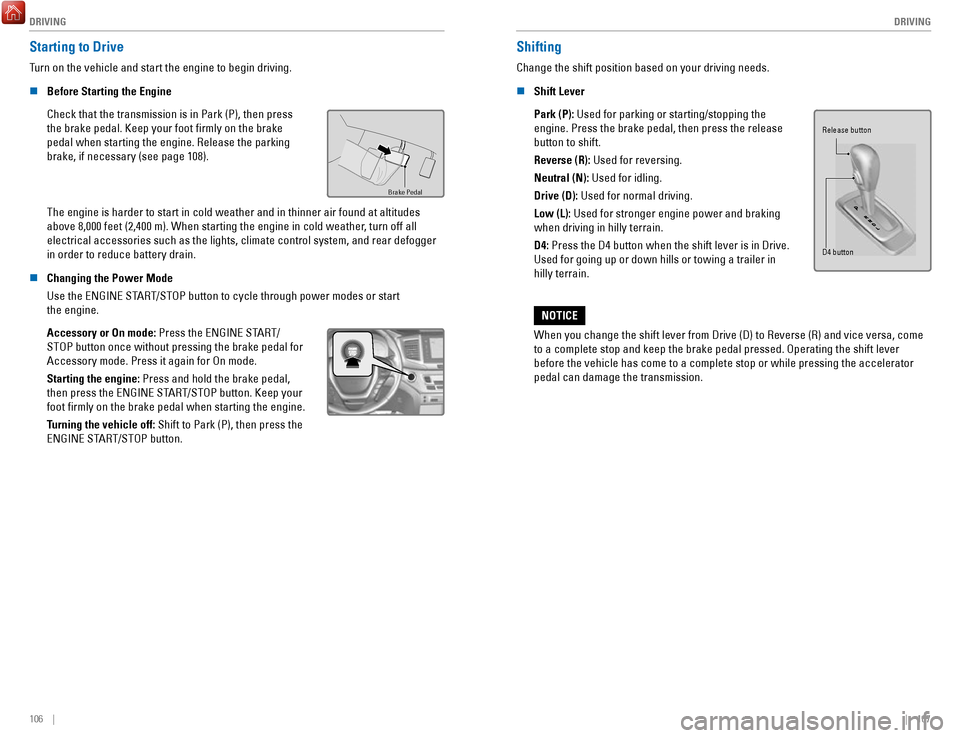
Starting to Drive
Turn on the vehicle and start the engine to begin driving.
n
Before Starting the Engine
Check that the transmission is in Park (P), then press
the brake pedal. Keep your foot firmly on the brake
pedal when starting the engine. Release the parking
brake, if necessary (see page 108).
Brake Pedal
The engine is harder to start in cold weather and in thinner air found a\
t altitudes
above 8,000 feet (2,400 m). When starting the engine in cold weather, turn off all
electrical accessories such as the lights, climate control system, and r\
ear defogger
in order to reduce battery drain.
n
Changing the Power Mode
Use the ENGINE START/STOP button to cycle through power modes or start
the engine.
Accessory or On mode: Press the ENGINE START/
STOP button once without pressing the brake pedal for
Accessory mode. Press it again for On mode.
Starting the engine:
Press and hold the brake pedal,
then press the ENGINE START/STOP button. Keep your
foot firmly on the brake pedal when starting the engine.
Turning the vehicle off: Shift to Park (P), then press the
ENGINE START/STOP button.
Shifting
Change the shift position based on your driving needs.
n
Shift Lever
Park (P): Used for parking or starting/stopping the
engine. Press the brake pedal, then press the release
button to shift.
Reverse (R): Used for reversing.
Neutral (N): Used for idling.
Drive (D): Used for normal driving.
Low (L):
Used for stronger engine power and braking
when driving in hilly terrain.
D4: Press the D4 button when the shift lever is in Drive.
Used for going up or down hills or towing a trailer in
hilly terrain.
Release button
D4 button
When you change the shift lever from Drive (D) to Reverse (R) and vi\
ce versa, come
to a complete stop and keep the brake pedal pressed. Operating the shift\
lever
before the vehicle has come to a complete stop or while pressing the acc\
elerator
pedal can damage the transmission.
NOTICE
Page 68 of 85

HANDLING THE UNEXPECTED
128 || 129
H
ANDLING THE UNEXPECTED
Emergency Engine Stop
The ENGINE START/STOP button may be used to stop the engine due to an emergency
situation even while driving. If you must stop the engine, choose one of\
the following
operations:
•
Press and hold the ENGINE START/STOP button
for two seconds, or
•
Firmly press the ENGINE START/STOP button
three times.
If the vehicle is in Park (P), the power mode changes to VEHICLE OFF. Otherwise, the
power mode changes to ACCESSORY.
The steering wheel will not lock. Because turning off the engine also di\
sables the
power assist the engine provides to the steering and braking systems, it\
will require
significantly more physical effort and time to steer and slow the vehi\
cle. Use both feet
on the brake pedal, if necessary, to slow the vehicle and stop immediately in
a safe place.
Do not press the button while driving unless it is absolutely necessary \
for the engine to
be switched off.
Emergency Towing
Call a professional towing service if you need to tow your vehicle.
All models
Flat bed equipment: The operator loads your vehicle on the back of a tru\
ck.
This is the best way to transport your vehicle.
2WD models
Wheel lift equipment: The tow truck uses two pivoting arms that go under the front tires
and lift them off the ground. The rear tires remain on the ground.
This is an acceptable way to tow your vehicle.
Trying to lift or tow your vehicle by the bumpers will cause serious dama\
ge.
The bumpers are not designed to support the vehicle’s weight.
Improper towing such as towing behind a motorhome or other motor vehicle\
can
damage the transmission.
NOTICE
Tire Pressure Monitoring System (TPMS)
Monitors the tire pressure while you are driving.
If your vehicle’s tire pressure becomes significantly low,
the low tire pressure indicator comes on and a message
appears on the multi-information display. The specific tire
with low pressure is displayed.
n What to Do
Stop your vehicle in a safe place. Check the tire pressure and adjust th\
e pressure to
the specified level. The specified tire pressure is on a label on th\
e driver’s doorjamb.
n
Tire Fill Assist
Your vehicle gives you visual and audible alerts to help you adjust the t\
ire pressure to its appropriate level when the vehicle is on.
While inflating: The system beeps and the exterior lights flash once every 5 seconds.
When the correct pressure is reached:
The system beeps and the exterior lights
flash continuously for 5 seconds. Stop filling the tire.
If you overinflate: The system beeps and the exterior lights flash twice every
3 seconds.
Driving on an extremely underinflated tire can cause it to overheat. A\
n overheated
tire can fail. Always inflate your tires to the specified pressure.
NOTICE
Page 73 of 85

MAINTENANCE
138 || 139
M
AINTENANCE
Maintenance Minder™
When maintenance is due, the system message indicator comes on and a mes\
sage
appears on the display every time you turn the vehicle on. See page 139 to check what
maintenance is due indicated by the codes that appear.
Press the Info (
/) button on the steering wheel to change displays.
System message
indicator
Maintenance Minder message
Main
items Sub items
• Independent of the Maintenance Minder information, replace the brake fl\
uid every
3 years.
•
Inspect idle speed every 160,000 miles (256,000 km).
•
Adjust the valves during services A, B, 1, 2, or 3 if they are noisy.
U.S. models
Maintenance, replacement, or repair of emissions control devices and sys\
tems may
be done by any automotive repair establishment or individuals using part\
s that are
certified to EPA standards.
According to state and federal regulations, failure to perform maintenan\
ce on the
maintenance main items marked with # will not void your emissions warranties.
However
, all maintenance services should be performed in accordance with the
intervals indicated by the multi-information display. n
Maintenance Minder Service Codes
These codes indicate what services are due on your vehicle.
*1: If the message Maintenance Due Now does not appear more than 12 months after the display
is reset, change the engine oil every year.
#: See information on maintenance and emissions warranty.
*2: If you drive in dusty conditions, replace the air cleaner element every \
15,000 miles (24,000 km).
*3: If you drive primarily in urban areas that have high concentrations of s\
oot in the air from industry and diesel-powered vehicles, replace every 15,000 miles (24,000 km).
CODEMaintenance Main Items
A
Replace engine oi l*1
BReplace engine oil*1 and oil lter
Inspect front and rear brakes
Check parking brake adjustment
Inspect tie rod ends, steering gearbox, and boots
Inspect suspension components
Inspect driveshaft boots
Inspect brake hoses and lines (Including ABS/VSA)
Inspect all uid levels and condition of uids
Inspect exhaust system#
Inspect fuel lines and connection s#
*4: If you drive regularly in very high temperatures (over 110°F, 43°\
C), in very low temperatures
(under -20°F, -29°C), or towing a trailer, replace every 60,000 \
miles/100,000 km.
*5: Driving in mountainous areas at very low vehicle speeds or trailer towin\
g results in higher level
of mechanical (Shear) stress to uid. This requires differential \
uid changes more frequently
than recommended by the Maintenance Minder. If you regularly drive your \
vehicle under these
conditions, have the differential uid changed at 7,500 miles (12,00\
0 km), then every 15,000 miles
(24,000 km).
CODEMaintenance Sub Item s
1
Rotate tires
2Replace air cleaner element*2
Replace dust and pollen lte r*3
Inspect drive belt
3
Replace transfer-case uid and transmission ui d
4Replace spark plugs
Replace timing belt and inspect water pump*4
Inspect valve clearance
5
Replace engine coolant
6Replace rear differential ui d*, *5
*
*if equipped
Page 74 of 85

MAINTENANCE
140 || 141
M
AINTENANCE
Under the Hood
Brake Fluid
(Black Cap)
Washer Fluid
Radiator Cap
Engine Coolant
Reserve Tan
k
Engine Oil Dipstick
(Orange)
Battery
Engine Oil Fill Ca p
Automatic Transmission Fluid Dipstick
n Opening the Hood
1.
Park the vehicle on a level surface, and set the
parking brake.
2.
Pull the hood release handle under the lower left
corner of the dashboard.
3.
Push up the hood latch lever in the center of the
hood to release the lock mechanism, and open the
hood.
4.
Remove the support rod from the clamp using the
grip. Mount the support rod in the hood.
When closing, remove the support rod, and stow it
in the clamp, then gently lower the hood. Remove
your hand at a height of approximately 12 inches
(30 cm) and let the hood close.
Pull
Lever
Support Ro d
Grip
Clamp
Do not open the hood when the wiper arms are raised. The hood will strik\
e the
wipers, and may damage either the hood or the wipers.
NOTICE
*if equipped
n Engine Compartment Cover
The component parts in the engine compartment are protected by a cover. You may
need to remove the cover when you perform certain maintenance work.
Starting at either side, lift the outermost edge of the
engine compartment cover. Pull up on the cover, and
remove it from the pins. Move towards the opposite
side while applying uniform upward pressure.
Engine Compartment Cove r
Page 81 of 85

SPECIFICATIONS
154 || 155
S
PECIFICATIONS
SPECIFICATIONS
*if equipped
* *
Vehicle
2: 2WD models
1: AWD models
ModelHonda Ridgeline
Front No. of Passengers: 2
Rear 3
6,019 lbs (2,730 kg)*25,710 lbs (2,590 kg)*1
3,131 lbs (1,420 kg)*13,042 lbs (1,380 kg)*2
3,219 lbs (1,460 kg)*13,042 lbs (1,380 kg)*2
9,987 lbs (4,530 kg)*18,201 lbs (3,720 kg)*2
Air Conditioning:
Weights:
Gross Vehicle
Weight Rating
Gross Axle Weight
Rating (Front)
Gross Axle Weight
Rating (Rear)
Gross Combined Weight
Rating
Refrigerant TypeCharge Quantit yLubricant TypeQuantity
HFO-1234yf (R-1234yf )
20.3 – 22.0 oz (575 – 625 g)
POE RL85HM
7.5 – 8.7 cu-in (123 – 143 cm
3)
Engine and Fuel
Fluids
Displacemen t211.8 cu-in (3,471 cm3)
Spark Plugs NGKDILZKR7B11GUnleaded gasoline, Pump octane
Fuel Type
Washer Tank Capacity
number of 87 or higher
Fuel Tank Capacity 19.5 US gal (73.8 )
U.S.: 1.0 US gal (3.8 )
Canada: 1.4 US gal (5.3 )
Light Bulbs
*
*1: Models with LED low beam headlights
* 2: Models without LED low beam headlights
* 3: Models with LED day time running lights
*
* 4: Models without LED day time running lights
5: Models with moonroof
6: Models without moonroof
Headlights (L
ow Beam) LE
D*155 W*2 (H11)
60W (HB3 )
35 W (H8)
28/8 W (Amber)
LE D
LE D
LE D
*3Daytime Running Lights
60 W (HB3)*4
Headlights (High Beam)
Fog Lights*
Front Turn Signal/Parking Light s*
Parking Lights*
Front Side Marker Lights
LED
LE D
LE D
21 W
21 W
LE D
5 W
Bed Lights LE
D
*13C P*2
Front Map Lights LE
D*55 W*6
In teri or Lights
5 W
1.4 W
LE D
Side Turn Signal Lights (on Door Mirrors)
*
Rear Side Marker Light
s
Brake/Taillights
Back-Up Lights
Rear Turn Signal Lights
High-M ount Brake Ligh t
Rear License Plate Ligh t
LED
3.8 W
LE D
1.4 W
1.4 W
Rear Map Lights
Vanity Mirror Lights
*
Door Pocket Lights*
Beverage Holder Light*
Door Courtesy Light
s*
Door Inner Handle Light s*
Console Compartment Light
Glove Box Light
Engine Oil
Recommende d·
Engine Coolan
t
·
Genuine Honda Motor Oil 0W-20
Change
Capacity API Premium-grade 0W-20 detergent oi
l
5.4 US qt (5.1 )
Change
lter including
5.7 US qt (5.4 )
Specie d
Ratio
Capacity
Honda Long Life Antifreeze/Coolant Type 2
50/50 with distilled wate r
1.88 US gal (7.13 )
(change including the remaining
0.19 US gal (0.72 ) in the reserve tank )
Brake Fluid
Automatic Transmission Fluid
Rear Differential Fluid*
Transfer Case Fluid*
SpeciedHonda Heavy Duty Brake Fluid DOT 3
Specied
CapacityHonda Automatic Transmission ATF DW- 1
Chang e3 .3 US qt (3.1 )
Specied Honda DPSF-II
Capacit yC hange
1.92 US qt (1.82 )
·
Specie d· Honda Hypoid Gear Oil HGO-1
SAE 90 (API grade GL4 or GL5)
Capacit y Hypoid gear oil SAE 75W-85 or
Change
0.45 US qt (0.43 )
Washer Flui d
Tires
RegularSize245/60R18 105 H
Pressure
35 (240 [2.4])
psi (kPa [kgf/cm2])
Spar e
Compact
Size
T165/90R17 105M
Pressure 60 (420 [4.2])
psi (kPa [kgf/cm2])
Wheel SizeRegular18 x 8J17 x 4TCompact Spare
Total5
LED
Footwell Lights*
*if equipped
* *
Vehicle
2: 2WD models
1: AWD models
Model Honda Ridgeline
Front No. of Passengers: 2
Rear 3
6,019 lbs (2,730 kg)
*25,710 lbs (2,590 kg)*1
3,131 lbs (1,420 kg)*1
3,042 lbs (1,380 kg)*2
3,219 lbs (1,460 kg)*1
3,042 lbs (1,380 kg)*2
9,987 lbs (4,530 kg)*1
8,201 lbs (3,720 kg)*2
Air Conditioning: Weights :
Gross Vehicle
Weight Rating
Gross Axle Weight
Rating (Front)
Gross Axle Weight
Rating (Rear)
Gross Combined Weight
Rating
Refrigerant Type
Charge Quantit y
Lubricant Type
Quantity
HFO-1234yf (R-1234yf )
20.3 – 22.0 oz (575 – 625 g)
POE RL85HM
7.5 – 8.7 cu-in (123 – 143 cm
3)
Engine and Fuel
Fluids
Displacemen t211.8 cu-in (3,471 cm3)
Spark Plugs NGK DILZKR7B11G
Unleaded gasoline, Pump octane
Fuel Type
Washer Tank Capacity number of 87
or higher
Fuel Tank Capacity 19.5 US gal (73.8 )
U.S.: 1.0 US gal (3.8 )
Canada: 1.4 US gal (5.3 )
Light Bulbs
*
*1: Models with LED low beam headlights
* 2: Models without LED low beam headlights
* 3: Models with LED day time running lights
*
*
4: Models without LED day time running lights
5: Models with moonroof
6: Models without moonroof
Headlights (L ow Beam) LE
D*1
55 W*2 (H11)60W (HB3 )35 W (H8)28/8 W (Amber)LEDLEDLE D*3Daytime Running Lights
60 W (HB3)*4
Headlights (High Beam)
Fog Lights*
Front Turn Signal/Parking Light s*
Parking Lights*
Front Side Marker Lights
LEDLED
LE D
21 W21 WLED5 W
Bed LightsLE D*1
3C P*2
Front Map Lights LE
D*5
5 W*6
In teri or Lights
5 W
1.4 W
LE D
Side Turn Signal Lights (on Door Mirrors)
*
Rear Side Marker Light
s
Brake/Taillights
Back-Up Lights
Rear Turn Signal Lights
High-M ount Brake Ligh t
Rear License Plate Ligh t
LED
3.8 W
LE D
1.4 W
1.4 W
Rear Map Lights
Vanity Mirror Lights*
Door Pocket Lights*
Beverage Holder Light*
Door Courtesy Light s*
Door Inner Handle Light s*
Console Compartment Light
Glove Box Light
Engine Oil
Recommende d·
Engine Coolan
t
·
Genuine Honda Motor Oil 0W-20
Change
Capacity API Premium-grade 0W-20 detergent oi
l
5.4 US qt (5.1 )
Change
lter including 5.7 US qt (5.4 )
Specie d
Ratio
Capacity Honda Long Life Antifreeze/Coolant Type
2
50/50 with distilled wate r
1.88 US gal (7.13 )
(change including the remaining
0.19 US gal (0.72 ) in the reserve tank )
Brake Fluid
Automatic Transmission Fluid
Rear Differential Fluid
*
Transfer Case Flui d*
SpeciedHonda Heavy Duty Brake Fluid DOT 3
Specied
Capacit yHonda Automatic Transmission ATF DW-
1
Chang e3 .3 US qt (3.1 )
Specied Honda DPSF-II
Capacit yC hange 1.92 US qt (1.82 )
·
Specie d· Honda Hypoid Gear Oil HGO-1
SAE 90 (API grade GL4 or GL5)
Capacit y Hypoid gear oil SAE 75W-85 or
Change 0.45 US qt (0.43 )
Washer Fluid
Tire s
Regular Size
245/60R18 105H
Pressure 35 (240 [2.4])
psi (kPa [kgf/cm2])
Spar e
Compact
Size
T165/90R17 105M
Pressure 60 (420 [4.2])
psi (kPa [kgf/cm
2])
Wheel Size Regular
18 x 8J
17 x 4T
Compact Spar e
Total5LED
Footwell Lights*
Page 85 of 85

INDEX
162 |
Opening the hood ............................................... 140
Service codes ..................................................... 139
Transmission fluid .............................................. 140
Under the hood ................................................... 140
Window washer fluid ......................................... 145
Wiper blades ....................................................... 146
Mirrors Door mirrors
.......................................................... 48
Rearview mirror .................................................... 48
Reverse tilt-down mirrors ................................... 48
Moonroof .................................................................. 37
Multi-Information Display (MID)........................... 30
Multi-View Rear Camera
..................................... 121
Navigation .......................................................... 90–96
Address .................................................................. 92
Destination ............................................................ 92
Home address ....................................................... 92
Legend .................................................................... 95
Place Category ..................................................... 93
Recent places ....................................................... 93
Routing ................................................................... 95
Saved places ......................................................... 94
Steering-wheel controls ..................................... 90
Traffic ..................................................................... 96
Turn-by-turn directions ....................................... 95
Overheating............................................................ 127 Parking sensor.......................................................
118
Power Mode
.......................................................... 106
Power outlets 12-volt
..................................................................... 57
Readiness codes ................................................... 153
Remote engine start ....................................... 31, 105
Road Departure Mitigation (RDM) ..................... 116
Safety Reporting safety defects
..................................... 25
Safety information .................................................. 7
Safety label locations .......................................... 25
Seat belts.............................................................. 9–11 Fastening
............................................................... 11
Lap/Shoulder belts ................................................. 9
Proper use ............................................................... 9
Seat belt inspection ............................................. 10
Shoulder anchor ................................................... 11
Seating ................................................................ 43–47Driver seat
.............................................................
43
Driving Position Memory System ...................... 47
Head restraints ..................................................... 45
Rear seats .............................................................. 46
Specifications ........................................................ 154
Steering wheel Adjusting
................................................................ 47
Tailgate ............................................................... 31, 33
Tires ................................................. 129–133, 147–152
Flat tire ......................................................... 131–133
Low tire pressure ............................................... 147
Tire and loading information label ................... 148
Tire and wheel replacement ............................. 148
Tire chains ........................................................... 149
Tire identification number ................................. 150
Tire information ................................................... 147
Tire labeling ......................................................... 150
Tire Pressure Monitor System (TPMS) ........... 129
Tire quality grading ............................................ 151
Tire service life ................................................... 149
Tire terminology .................................................. 150
Wear indicators .................................................. 147
Winter tires .......................................................... 149
Towing ............................................................. 101–104
Emergency towing ....................................... C6, 128
Load limits ............................................................ 101
Tongue load ......................................................... 102
Trailer weight ...................................................... 101
Truck Bed Audio ...................................................... 79
Turn signals .............................................................. 39
Vehicle Stability Assist (VSA) ............................. 110
Voice command index .......................................... 159
Warranty ................................................................. 158
Window Power windows
.................................................... 36
Wipers................................................................. 41–42 Intermittent wipers
............................................... 41
Rain-sensing wipers ............................................ 42