Page 317 of 565
316
uuCustomized Features u
Features
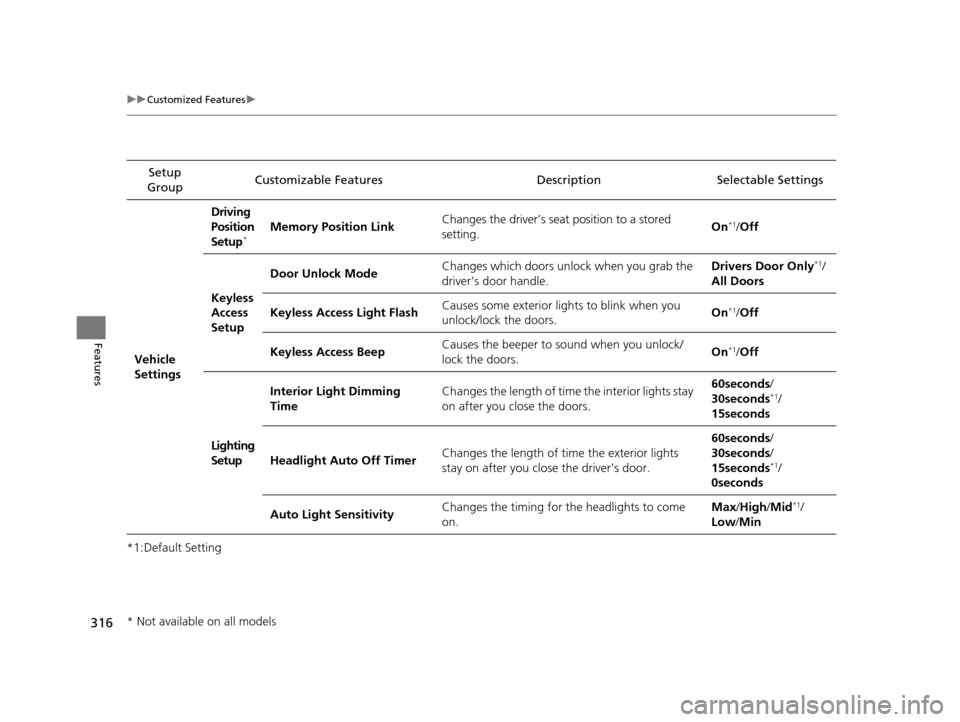
*1:Default SettingSetup
Group Customizable Features Descri
ption Selectable Settings
Vehicle
Settings Driving
Position
Setup
*Memory Position Link
Changes the driver’s seat position to a stored
setting. On*1/
Off
Keyless
Access
Setup Door Unlock Mode
Changes which doors unlock when you grab the
driver’s door handle. Drivers Door Only
*1/
All Doors
Keyless Access Light Flash Causes some exterior lig
hts to blink when you
unlock/lock the doors. On
*1/
Off
Keyless Access Beep Causes the beeper to sound when you unlock/
lock the doors.
On
*1/
Off
Lighting
Setup Interior Light Dimming
Time
Changes the length of time the interior lights stay
on after you close the doors. 60seconds/
30seconds
*1/
15seconds
Headlight Auto Off Timer Changes the length of time the exterior lights
stay on after you close the driver's door. 60seconds/
30seconds/
15seconds
*1/
0seconds
Auto Light Sensitivity Changes the timing for the headlights to come
on. Max
/High /Mid
*1/
Low /Min
* Not available on all models
17 US ODYSSEY (KA KC)-31TK86600.book 316 ページ 2016年10月24日 月曜日 午後4時2分
Page 318 of 565
317
uuCustomized Features u
Continued
Features
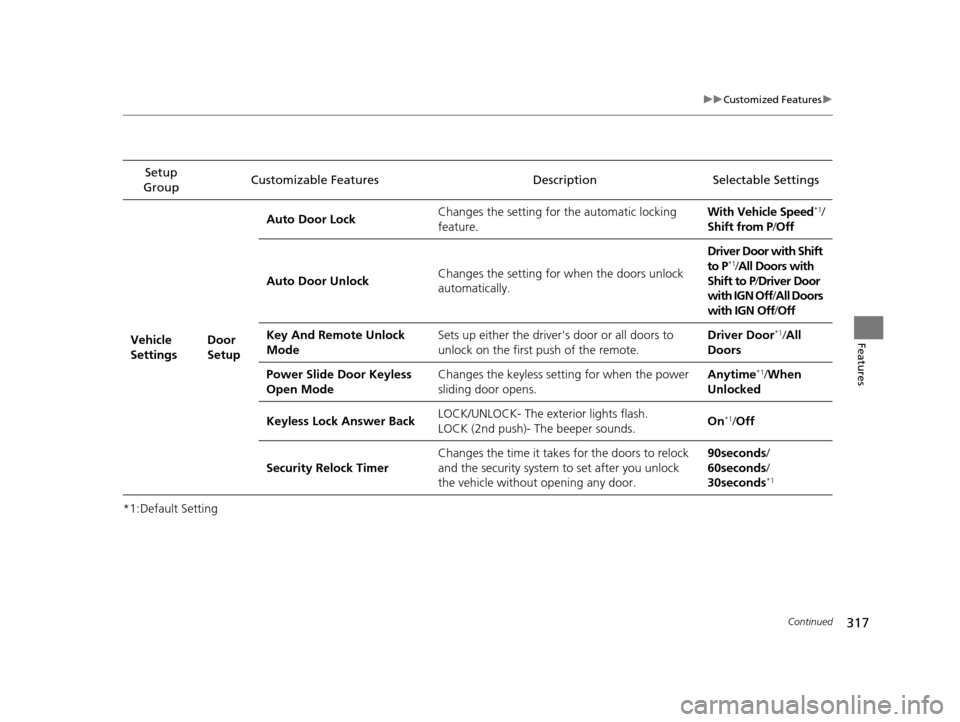
*1:Default SettingSetup
Group Customizable Features Description Selectable Settings
Vehicle
Settings Door
SetupAuto Door Lock
Changes the setting for the automatic locking
feature. With Vehicle Speed
*1/
Shift from P /Off
Auto Door Unlock Changes the setting for
when the doors unlock
automatically. Driver Door with Shift
to P
*1/
All Doors with
Shift to P /Driver Door
with IGN Off/ All Doors
with IGN Off /Off
Key And Remote Unlock
Mode Sets up either the driver's door or all doors to
unlock on the first push of the remote. Driver Door
*1/
All
Doors
Power Slide Door Keyless
Open Mode Changes the keyless setti
ng for when the power
sliding door opens. Anytime
*1/
When
Unlocked
Keyless Lock Answer Back LOCK/UNLOCK- The exterior lights flash.
LOCK (2nd push)- The beeper sounds.
On
*1/
Off
Security Relock Timer Changes the time it takes for the doors to relock
and the security system to set after you unlock
the vehicle without opening any door. 90seconds
/
60seconds /
30seconds
*1
17 US ODYSSEY (KA KC)-31TK86600.book 317 ページ 2016年10月24日 月曜日 午後4時2分
Page 319 of 565
318
uuCustomized Features u
Features
*1:Default SettingSetup
Group Customizable Features Descri
ption Selectable Settings
Vehicle
Settings Power
Tailgate
Setup
*
Power Tailgate Keyless
Open Mode
Changes the keyless setting for when the power
tailgate opens. Anytime*1/
When
Unlocked
Power Tailgate Open by
Outer Handle Selects whether to enable the power tailgate
open operation using the tailgate outer handle. Off (Manual Only)
/
On (Power/
Manual)
*1
Mainte-
nance
Info. Maintenance Reset
Resets the engine oil life display when you have
performed the maintenance service. —
Default Cancels/Resets all cust
omized items in the
Vehicle Settings group as default. Default
/OK
* Not available on all models
17 US ODYSSEY (KA KC)-31TK86600.book 318 ページ 2016年10月24日 月曜日 午後4時2分
Page 328 of 565
327Continued
Features
Bluetooth® HandsFreeLink ®
See the Navigation System Manual for how to operate the Bluetooth® HandsFreeLink® .
Bluetooth ® HandsFreeLink ® (HFL) allows you to place and receive phone calls using
your vehicle’s audio system, without handling your cell phone.
Using HFL
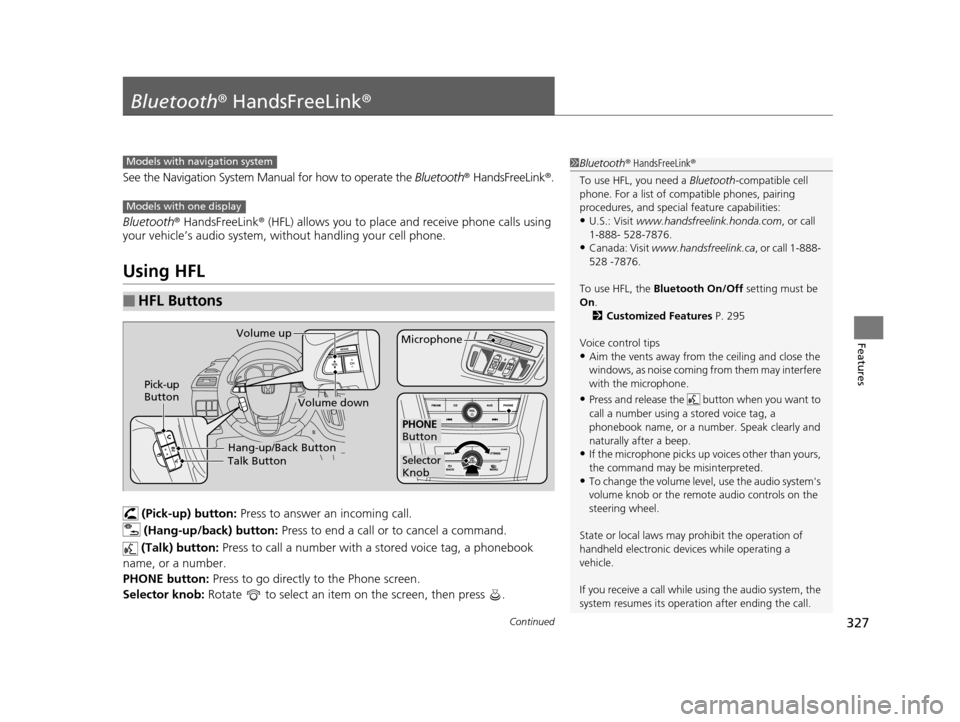
(Pick-up) button: Press to answer an incoming call.
(Hang-up/back) button: Press to end a call or to cancel a command.
(Talk) button: Press to call a number with a stored voice tag, a phonebook
name, or a number.
PHONE button: Press to go directly to the Phone screen.
Selector knob: Rotate to select an item on the screen, then press .
■HFL Buttons
1Bluetooth ® HandsFreeLink ®
To use HFL, you need a Bluetooth-compatible cell
phone. For a list of compatible phones, pairing
procedures, and special feature capabilities:
•U.S.: Visit www.handsfreelink.honda.com , or call
1-888- 528-7876.
•Canada: Visit www.handsfreelink.ca , or call 1-888-
528 -7876.
To use HFL, the Bluetooth On/Off setting must be
On .
2 Customized Features P. 295
Voice control tips
•Aim the vents away from the ceiling and close the
windows, as noise coming fr om them may interfere
with the microphone.
•Press and release the but ton when you want to
call a number using a stored voice tag, a
phonebook name, or a numbe r. Speak clearly and
naturally after a beep.
•If the microphone picks up vo ices other than yours,
the command may be misinterpreted.
•To change the volume level, use the audio system's
volume knob or the remote audio controls on the
steering wheel.
State or local laws may pr ohibit the operation of
handheld electronic devi ces while operating a
vehicle.
If you receive a call while using the audio system, the
system resumes its operati on after ending the call.
Models with navigation system
Models with one display
Talk ButtonVolume up
MicrophoneHang-up/Back Button
Pick-up
Button
Volume down
Selector
Knob
PHONE
Button
17 US ODYSSEY (KA KC)-31TK86600.book 327 ページ 2016年10月24日 月曜日 午後4時2分
Page 329 of 565
uuBluetooth ® HandsFreeLink ®u Using HFL
328
Features
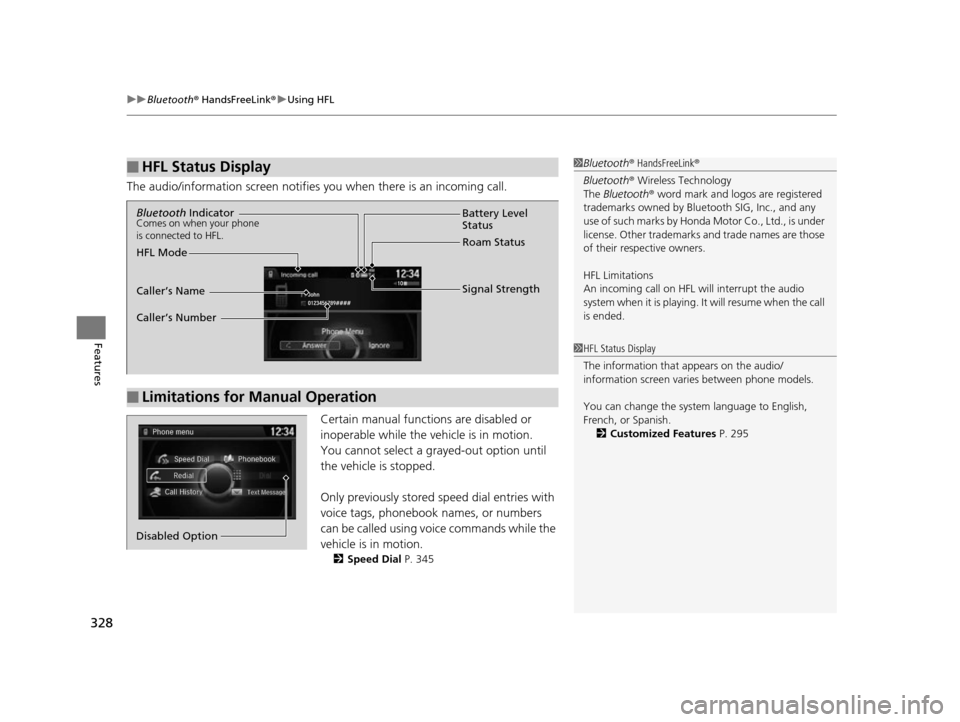
The audio/information screen notifies you when there is an incoming call.
Certain manual functions are disabled or
inoperable while the vehicle is in motion.
You cannot select a grayed-out option until
the vehicle is stopped.
Only previously stored speed dial entries with
voice tags, phonebook names, or numbers
can be called using voice commands while the
vehicle is in motion.
2 Speed Dial P. 345
■HFL Status Display1Bluetooth ® HandsFreeLink ®
Bluetooth ® Wireless Technology
The Bluetooth ® word mark and logos are registered
trademarks owned by Blue tooth SIG, Inc., and any
use of such marks by Honda Motor Co., Ltd., is under
license. Other trademarks and trade names are those
of their respective owners.
HFL Limitations
An incoming call on HFL will interrupt the audio
s y s te m wh e n it is p la y i n g . It wi ll re s u m e w h en t h e c a l l
is ended.
1 HFL Status Display
The information that appears on the audio/
information screen vari es between phone models.
You can change the system language to English,
French, or Spanish. 2 Customized Features P. 295
■Limitations for Manual Operation
Bluetooth IndicatorComes on when your phone
is connected to HFL.
Signal Strength
HFL Mode Battery Level
Status
Roam Status
Caller’s Name
Caller’s Number
Phone menu
Redial
Call History
Text Message
Dial
Phonebook
Speed Dial
Disabled Option
17 US ODYSSEY (KA KC)-31TK86600.book 328 ページ 2016年10月24日 月曜日 午後4時2分
Page 331 of 565
330
uuBluetooth ® HandsFreeLink ®u HFL Menus
Features
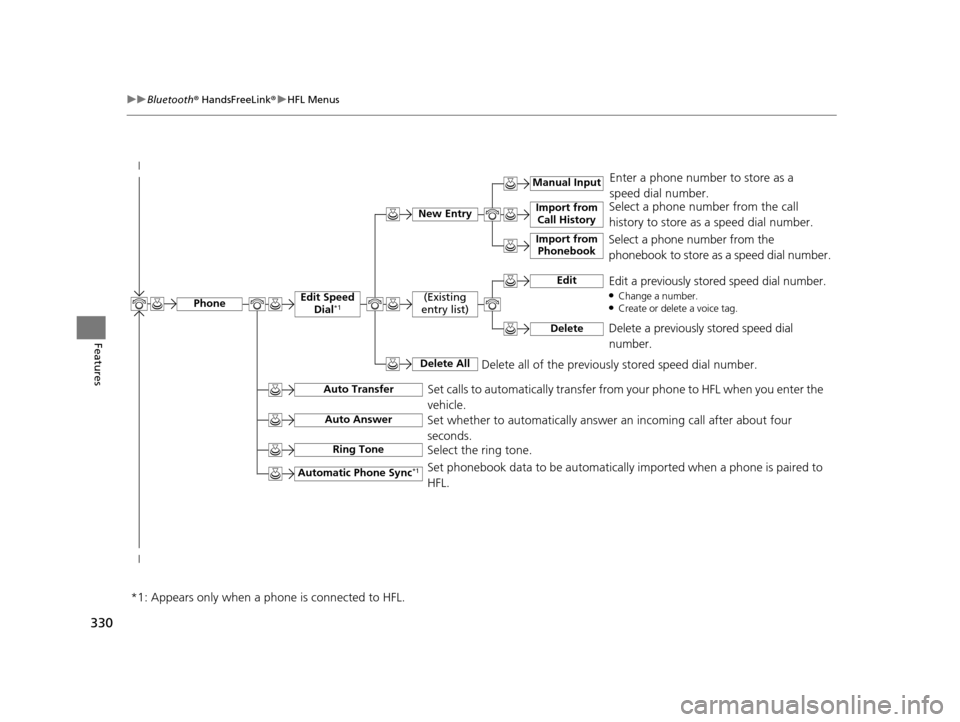
Select a phone number from the call
history to store as a speed dial number.
Manual Input
New Entry Import from
Call History
Import from Phonebook
Enter a phone number to store as a
speed dial number.
Delete all of the previously stored speed dial number.
Select a phone number from the
phonebook to store as a speed dial number.
EditEdit a previously stored speed dial number.●Change a number.●Create or delete a voice tag.
DeleteDelete a previously stored speed dial
number.
(Existing
entry list)
Delete All
Edit Speed Dial*1
Set calls to automatically transfer from your phone to HFL when you enter the
vehicle.Auto Transfer
Auto Answer
Ring Tone
Set whether to automatically answer an incoming call after about four
seconds.
Select the ring tone.
Automatic Phone Sync*1Set phonebook data to be automatically imported when a phone is paired to
HFL.
Phone
*1: Appears only when a phone is connected to HFL.
17 US ODYSSEY (KA KC)-31TK86600.book 330 ページ 2016年10月24日 月曜日 午後4時2分
Page 337 of 565
uuBluetooth ® HandsFreeLink ®u HFL Menus
336
Features
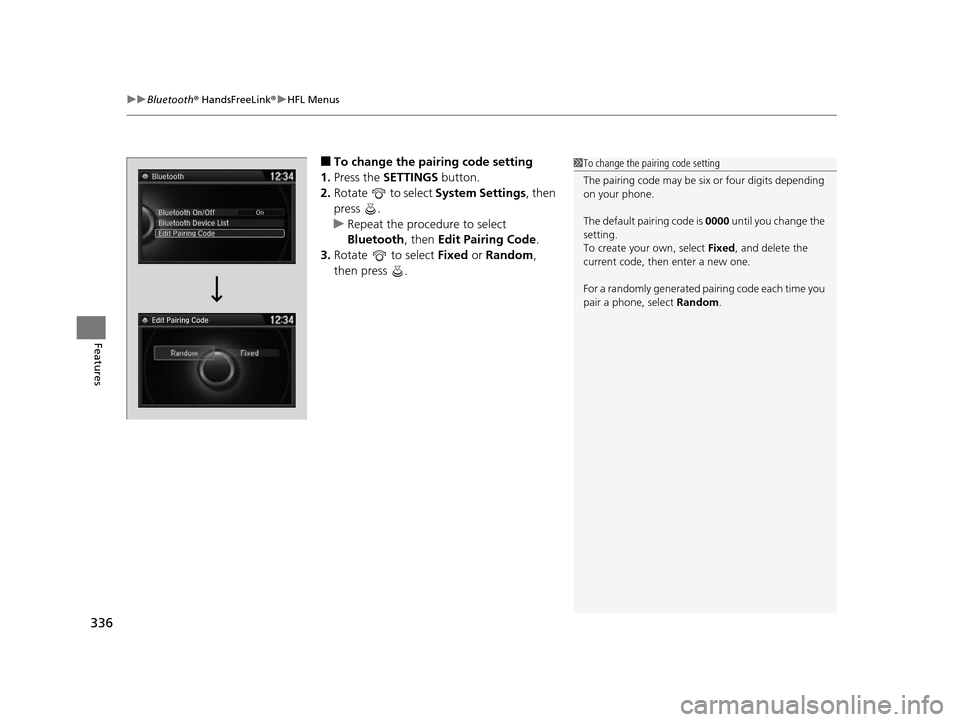
■To change the pairing code setting
1. Press the SETTINGS button.
2. Rotate to select System Settings, then
press .
u Repeat the procedure to select
Bluetooth , then Edit Pairing Code .
3. Rotate to select Fixed or Random ,
then press .1 To change the pairing code setting
The pairing code may be si x or four digits depending
on your phone.
The default pair ing code is 0000 until you change the
setting.
To create your own, select Fixed, and delete the
current code, then enter a new one.
For a randomly generated pa iring code each time you
pair a phone, select Random.
Edit Pairing Code
17 US ODYSSEY (KA KC)-31TK86600.book 336 ページ 2016年10月24日 月曜日 午後4時2分
Page 344 of 565
Continued343
uuBluetooth ® HandsFreeLink ®u HFL Menus
Features
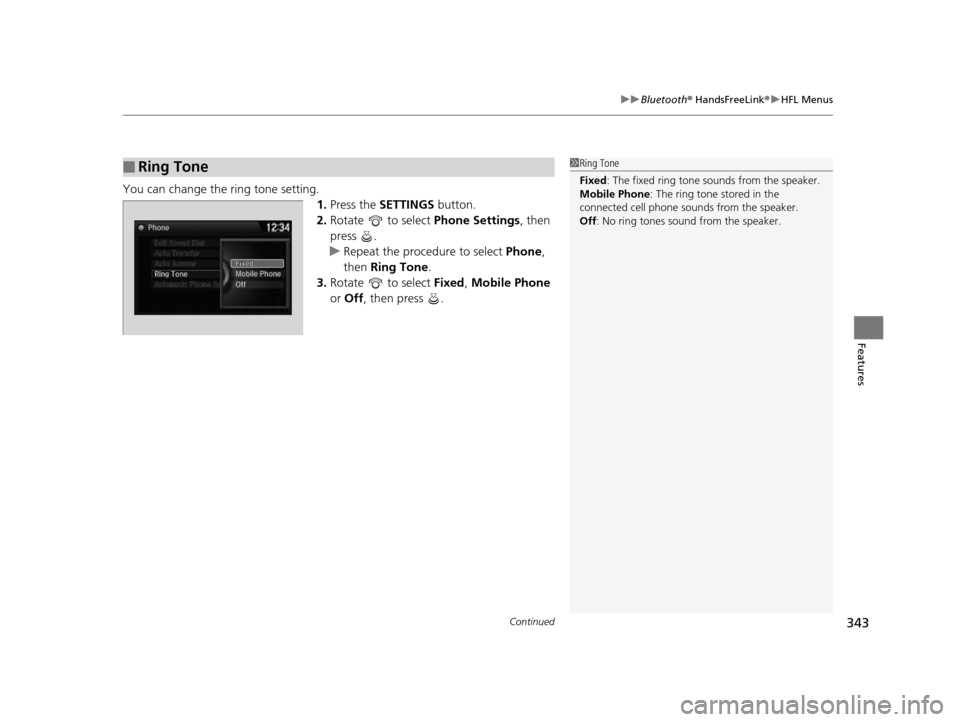
You can change the ring tone setting.
1.Press the SETTINGS button.
2. Rotate to select Phone Settings, then
press .
u Repeat the procedure to select Phone,
then Ring Tone .
3. Rotate to select Fixed, Mobile Phone
or Off , then press .
■Ring Tone1Ring Tone
Fixed: The fixed ring tone sounds from the speaker.
Mobile Phone: The ring tone stored in the
connected cell phone sounds from the speaker.
Off : No ring tones sound from the speaker.
17 US ODYSSEY (KA KC)-31TK86600.book 343 ページ 2016年10月24日 月曜日 午後4時2分