Page 301 of 565
300
uuCustomized Features u
Features
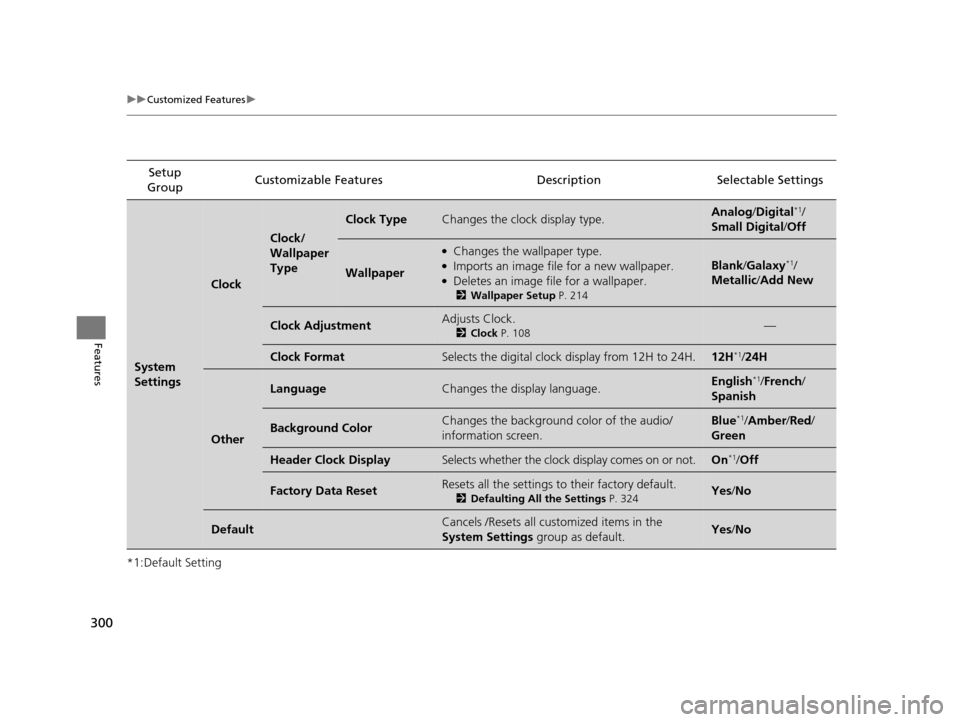
*1:Default SettingSetup
Group Customizable Features Descri
ption Selectable Settings
System
Settings
Clock
Clock/
Wallpaper
Type
Clock TypeChanges the clock display type.Analog/Digital*1/
Small Digital /Off
Wallpaper
●Changes the wallpaper type.●Imports an image file for a new wallpaper.●Deletes an image file for a wallpaper.
2 Wallpaper Setup P. 214
Blank/Galaxy*1/
Metallic /Add New
Clock AdjustmentAdjusts Clock.
2 Clock P. 108—
Clock FormatSelects the digital clock display from 12H to 24H.12H*1/24H
Other
LanguageChanges the display language.English*1/French /
Spanish
Background ColorChanges the background color of the audio/
information screen.Blue*1/ Amber /Red/
Green
Header Clock DisplaySelects whether the clock display comes on or not.On*1/ Off
Factory Data ResetResets all the settings to their factory default.
2 Defaulting All the Settings P. 324Yes/No
DefaultCancels /Resets all customized items in the
System Settings group as default.Yes/No
17 US ODYSSEY (KA KC)-31TK86600.book 300 ページ 2016年10月24日 月曜日 午後4時2分
Page 302 of 565
301
uuCustomized Features u
Continued
Features
*1:Default SettingSetup
Group Customizable Features Description Selectable Settings
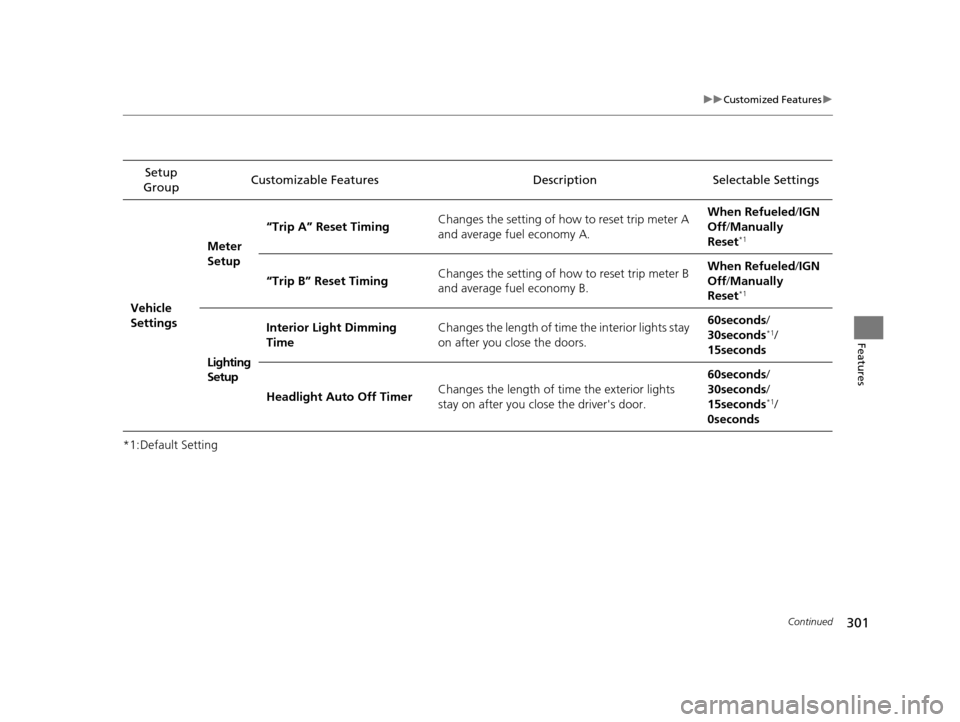
Vehicle
Settings Meter
Setup
“Trip A” Reset Timing
Changes the setting of how to reset trip meter A
and average fuel economy A. When Refueled
/IGN
Off /Manually
Reset
*1
“Trip B” Reset Timing Changes the setting of how to reset trip meter B
and average fuel economy B. When Refueled
/IGN
Off /Manually
Reset*1
Lighting
Setup Interior Light Dimming
Time
Changes the length of time the interior lights stay
on after you close the doors. 60seconds
/
30seconds
*1/
15seconds
Headlight Auto Off Timer Changes the length of time the exterior lights
stay on after you close the driver's door. 60seconds
/
30seconds /
15seconds
*1/
0seconds
17 US ODYSSEY (KA KC)-31TK86600.book 301 ページ 2016年10月24日 月曜日 午後4時2分
Page 303 of 565
302
uuCustomized Features u
Features
*1:Default SettingSetup
Group Customizable Features Descri
ption Selectable Settings
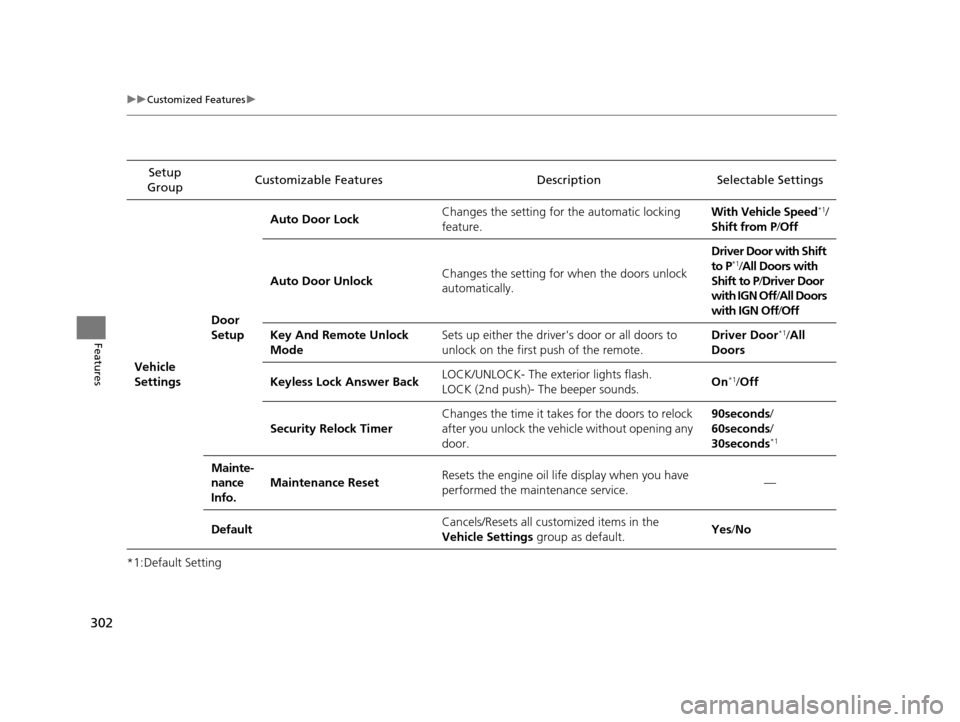
Vehicle
Settings Door
SetupAuto Door Lock
Changes the setting for the automatic locking
feature. With Vehicle Speed
*1/
Shift from P/ Off
Auto Door Unlock Changes the setting for when the doors unlock
automatically. Driver Door with Shift
to P
*1/
All Doors with
Shift to P /Driver Door
with IGN Off /All Doors
with IGN Off /Off
Key And Remote Unlock
Mode Sets up either the driver
's door or all doors to
unlock on the first push of the remote. Driver Door
*1/
All
Doors
Keyless Lock Answer Back LOCK/UNLOCK- The exterior lights flash.
LOCK (2nd push)- The beeper sounds. On
*1/
Off
Security Relock Timer Changes the time it takes for the doors to relock
after you unlock the vehicle without opening any
door. 90seconds/
60seconds/
30seconds
*1
Mainte-
nance
Info.
Maintenance Reset
Resets the engine oil life display when you have
performed the maintenance service. —
Default Cancels/Resets all cust
omized items in the
Vehicle Settings group as default. Yes
/No
17 US ODYSSEY (KA KC)-31TK86600.book 302 ページ 2016年10月24日 月曜日 午後4時2分
Page 311 of 565
310
uuCustomized Features u
Features
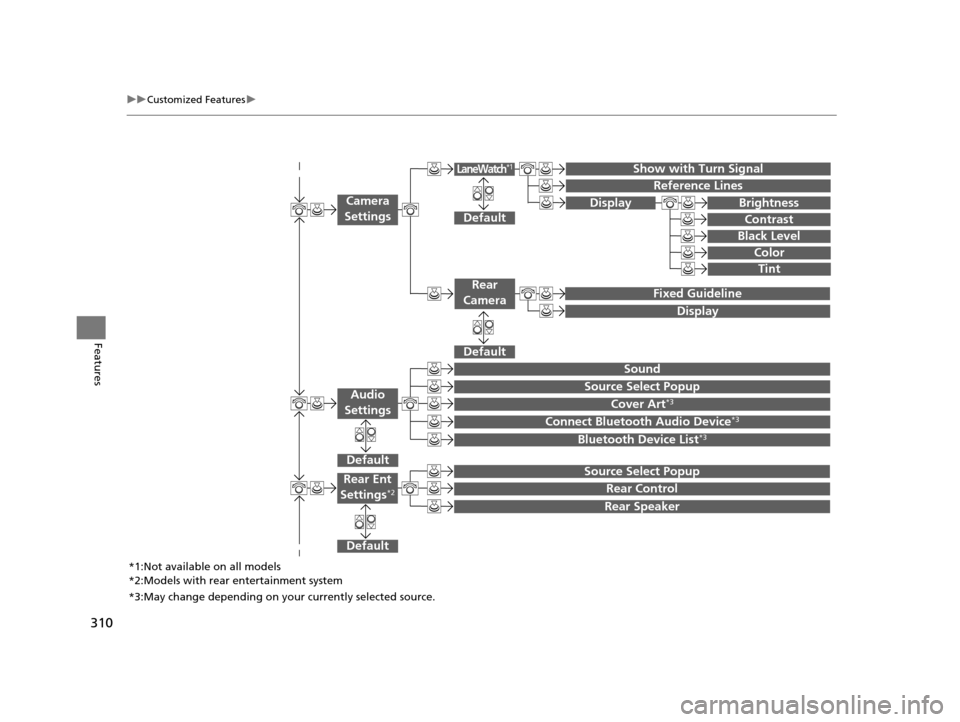
Show with Turn Signal
Reference Lines
Default
Fixed Guideline
Default
Default
Sound
Source Select Popup
Cover Art*3
Connect Bluetooth Audio Device*3
Bluetooth Device List*3
Camera
Settings
Rear
Camera
LaneWatch*1
Audio
Settings
Display Brightness
Contrast
Black Level
Color
Tint
Display
Default
Source Select Popup
Rear Control
Rear Speaker
Rear Ent
Settings*2
*1:Not available on all models
*2:Models with rear entertainment system
*3:May change depending on your currently selected source.
17 US ODYSSEY (KA KC)-31TK86600.book 310 ページ 2016年10月24日 月曜日 午後4時2分
Page 313 of 565
312
uuCustomized Features u
Features
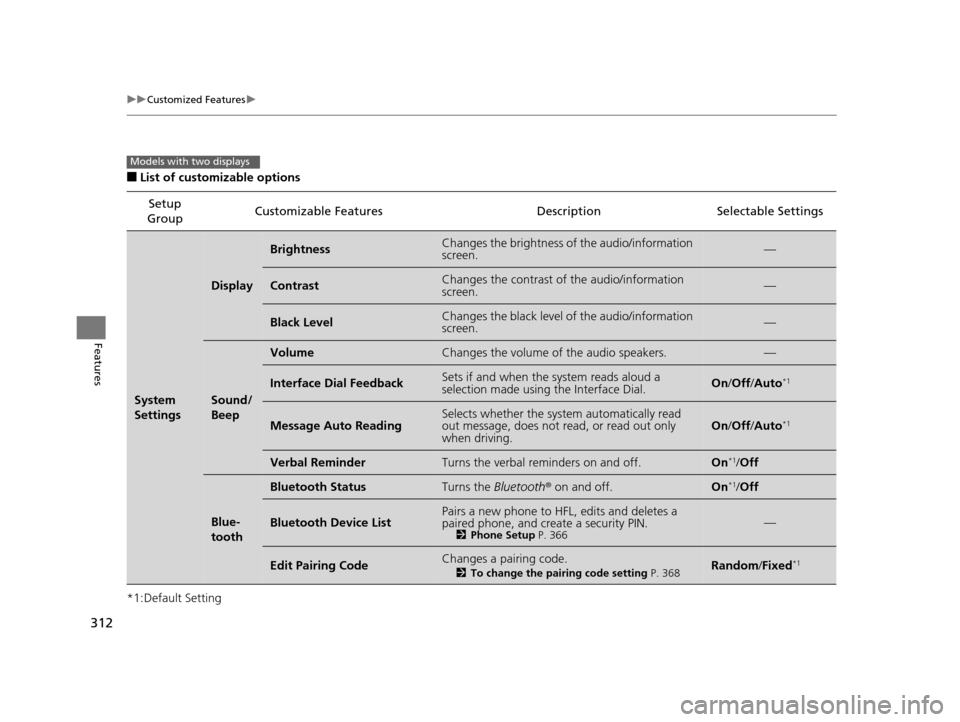
■List of customizable options
*1:Default Setting Setup
Group Customizable Features Descri
ption Selectable Settings
System
Settings
Display
BrightnessChanges the brightness of the audio/information
screen.—
ContrastChanges the contrast of the audio/information
screen.—
Black LevelChanges the black level of the audio/information
screen.—
Sound/
Beep
VolumeChanges the volume of the audio speakers.—
Interface Dial FeedbackSets if and when the system reads aloud a
selection made using the Interface Dial.On/Off /Auto*1
Message Auto ReadingSelects whether the system automatically read
out message, does not read, or read out only
when driving.On /Off /Auto*1
Verbal ReminderTurns the verbal reminders on and off.On*1/Off
Blue-
tooth
Bluetooth StatusTurns the Bluetooth ® on and off.On*1/Off
Bluetooth Device ListPairs a new phone to HFL, edits and deletes a
paired phone, and create a security PIN.
2 Phone Setup P. 366—
Edit Pairing CodeChanges a pairing code.
2To change the pairing code setting P. 368Random/Fixed*1
Models with two displays
17 US ODYSSEY (KA KC)-31TK86600.book 312 ページ 2016年10月24日 月曜日 午後4時2分
Page 314 of 565
313
uuCustomized Features u
Continued
Features
*1:Default SettingSetup
Group Customizable Features Description Selectable Settings
System
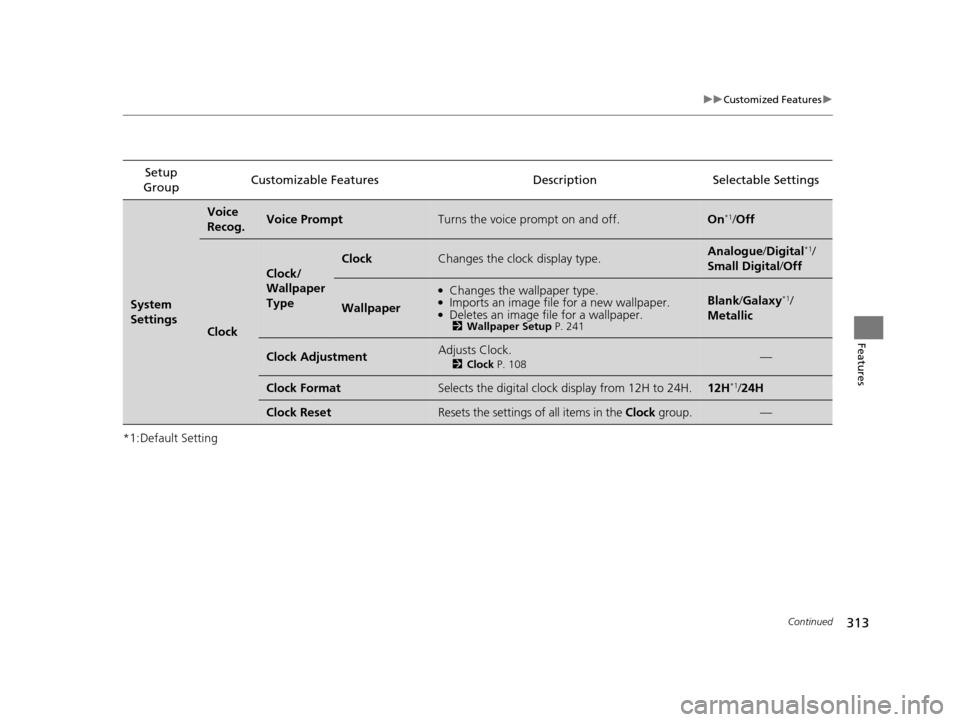
Settings
Voice
Recog.Voice PromptTurns the voice prompt on and off.On*1/
Off
Clock
Clock/
Wallpaper
Type
ClockChanges the clock display type.Analogue/ Digital*1/
Small Digital/ Off
Wallpaper
●Changes the wallpaper type.●Imports an image file for a new wallpaper.●Deletes an image file for a wallpaper.2Wallpaper Setup P. 241
Blank/Galaxy*1/
Metallic
Clock AdjustmentAdjusts Clock.
2 Clock P. 108—
Clock FormatSelects the digital clock display from 12H to 24H.12H*1/24H
Clock ResetResets the settings of all items in the Clock group.—
17 US ODYSSEY (KA KC)-31TK86600.book 313 ページ 2016年10月24日 月曜日 午後4時2分
Page 315 of 565
314
uuCustomized Features u
Features
*1:Default SettingSetup
Group Customizable Features Descri
ption Selectable Settings
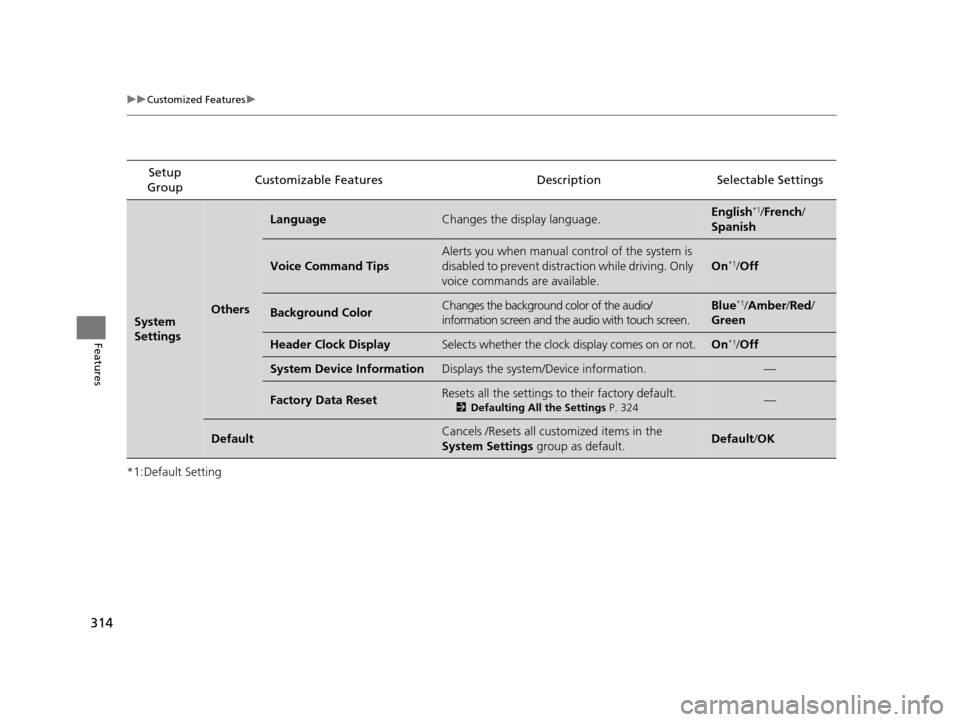
System
SettingsOthers
LanguageChanges the display language.English*1/French /
Spanish
Voice Command Tips
Alerts you when manual control of the system is
disabled to prevent distraction while driving. Only
voice commands are available.
On*1/ Off
Background ColorChanges the background color of the audio/
information screen and the audio with touch screen.Blue*1/Amber /Red/
Green
Header Clock DisplaySelects whether the clock display comes on or not.On*1/ Off
System Device InformationDisplays the system /Device information.—
Factory Data ResetResets all the settings to their factory default.
2Defaulting All the Settings P. 324—
DefaultCancels /Resets all customized items in the
System Settings group as default.Default/OK
17 US ODYSSEY (KA KC)-31TK86600.book 314 ページ 2016年10月24日 月曜日 午後4時2分
Page 316 of 565
315
uuCustomized Features u
Continued
Features
*1:Default SettingSetup
Group Customizable Features Description Selectable Settings
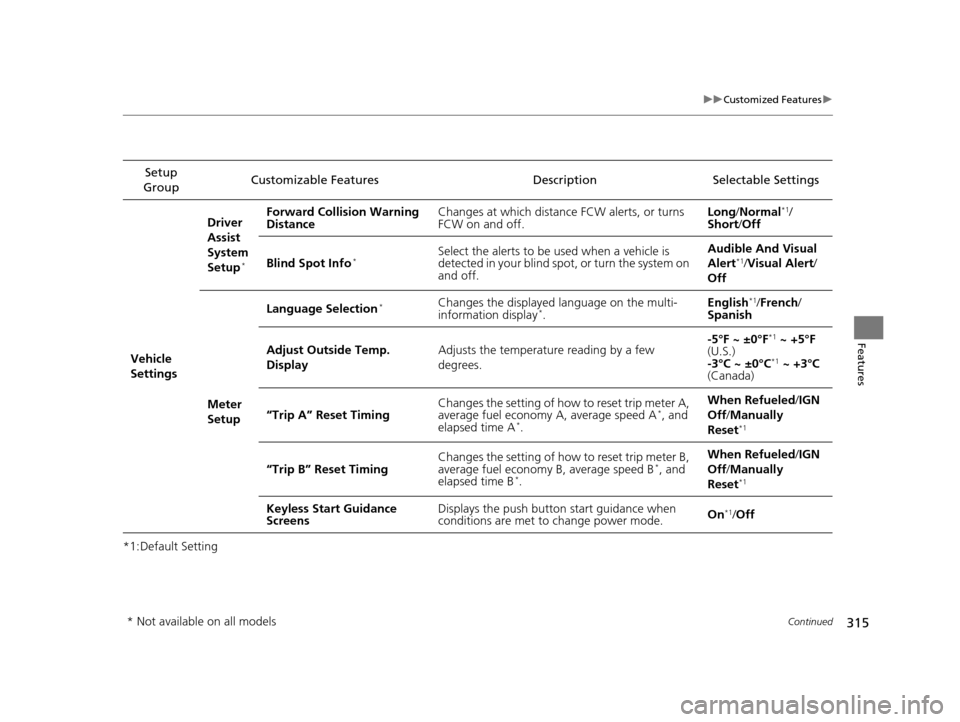
Vehicle
Settings Driver
Assist
System
Setup
*
Forward Collision Warning
Distance
Changes at which distance FCW alerts, or turns
FCW on and off. Long
/Normal*1/
Short/ Off
Blind Spot Info
*Select the alerts to be used when a vehicle is
detected in your blind spot, or turn the system on
and off. Audible And Visual
Alert*1/
Visual Alert /
Off
Meter
Setup Language Selection
*Changes the displayed language on the multi-
information display*.
English
*1/
French /
Spanish
Adjust Outside Temp.
Display Adjusts the temperature reading by a few
degrees. -5°F ~ ±0°F
*1
~ +5°F
(U.S.)
-3°C ~ ±0°C
*1 ~ +3°C
(Canada)
“Trip A” Reset Timing Changes the setting of how to reset trip meter A,
average fuel economy A, average speed A
*, and
elapsed time A*. When Refueled
/IGN
Off /Manually
Reset*1
“Trip B” Reset Timing Changes the setting of how to reset trip meter B,
average fuel economy B, average speed B*, and
elapsed time B*. When Refueled
/IGN
Off /Manually
Reset*1
Keyless Start Guidance
Screens Displays the push button
start guidance when
conditions are met to change power mode. On*1/
Off
* Not available on all models
17 US ODYSSEY (KA KC)-31TK86600.book 315 ページ 2016年10月24日 月曜日 午後4時2分